Please REGISTER or RENEW your account on RAPiDGATOR.net and support us by doing through all RAPiDGATOR working download links on main posts...
Apr 30

Ableton Live Suite 12.3.8

Description: Live is fast, fluid and flexible software for music creation and performance. It comes with effects, instruments, sounds and all kinds of creative features—everything you need to make any kind of music.
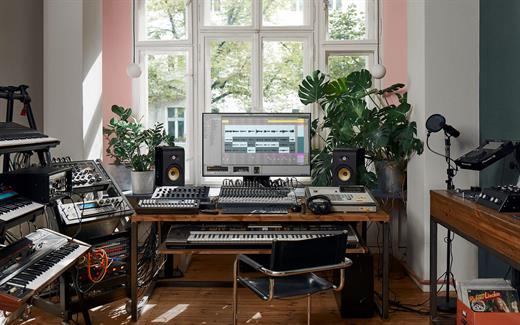
Create in a traditional linear arrangement, or improvise without the constraints of a timeline in Live’s Session View. Move freely between musical elements and play with ideas, without stopping the music and without breaking your flow.

New features and updates in Live 12
Play freely with ideas
MIDI Transformations
Create a variety of simple or complex variations to your MIDI clips: add ornaments and articulations, draw acceleration and deceleration curves, connect successive notes and chords, or simulate the strum of a guitar.

MIDI Generators
Conjure up melodies, chords and rhythms with new MIDI Generators. Give your chosen Generator custom constraints, watch it create playful and original patterns, and then turn the ideas it produces into your own.

Max for Live MIDI Tools
Max now facilitates even greater experimentation, letting you create new MIDI Transformations and Generators – either based on existing ones, or your own creations.

MIDI Editing Improvements
Arrange the order of a selection of notes by pitch, velocity or duration. Stretch, split, chop or join notes in new ways; shape the velocity of notes; transpose them into a scale; or add intervals chromatically or in key.

Keys and Scales
Set the selected clip’s scale in Live’s Control Bar to see its notes in any clip you create. Then edit the clip using scale highlighting as a guide, use the clip scale to transform and generate musical ideas, or sync the scale of MIDI devices and instruments to the clip being played. Any changes in Live will be reflected in Push, and vice versa.

Expanded probability
Assign a single probability rule to a group of notes so that the entire group of notes is played whenever the trigger is fired. Or select a chord and tell Live to randomly play one note from it whenever the probability trigger is fired.

Embrace and explore tunings
Follow your preferred tuning systems or try different ones more easily. Work outside the 12-tone equal temperament system, and access tunings with Live’s devices as well as any MPE-capable plugin.

Surprise yourself with the sounds you create
Meld
A bi-timbral, MPE-capable instrument designed for deep sound shaping that lets you create a wide array of textural and experimental tones with its two easy-to-use macro oscillators.

Granulator III
The latest iteration of Robert Henke’s granular instrument now has MPE capability, giving you expressive control over parameters like note bend, vibrato and glissando. Plus, you can now capture audio in real time and start manipulating it immediately.

Roar
Create everything from subtle and precise mastering-grade warmth to wild and unpredictable sound degradation with Live’s new coloring and saturation effect. Roar’s three saturation stages can be used in series, parallel, or even in mid/side and multiband configurations – and it comes equipped with a feedback generator and an extensive modulation matrix.

New Modulation Behavior
Modulation destinations are no longer taken over by the modulation source. This means you can still adjust the parameter being modulated, even after assigning an LFO or other modulation source to it, opening up faster workflows, more possibilities for performance and continuous real-time control of parameters.

New Packs
Lost and Found – A collection of sounds fashioned from unusual materials, percussive trinkets, unique foley recordings and expressive objects to infuse your productions with character and authenticity. Dig deep and create layers of decorative, expressive instruments, playful Drum Racks and rich sound effects.

Performance Pack – A set of innovative devices from Iftah that push the boundaries of performing with Live. Capture snapshots of your sets and deploy them later, control multiple parameters with layered macros and curves, extend performances with looping in Arrangement View and pre-arrange the structure of a performance before you have even recorded it.

Work more intuitively
Stacked Detail Views
View your devices and the Clip Editor, or automation and device parameters, at the same time – so you can work without the distraction of switching between views.

View styling
Live 12’s cleaner, more minimal look removes visual complexity and keeps the focus on your music.

Mixer in Arrangement
Live’s Mixer, previously available only in Session View, can now be used in Arrangement View. Toggle it on or off with Mixer View Control located in the bottom right corner or via the View menu, and configure it independently of the Arrangement Mixer.

Mixer improvements
Live’s Mixer also comes with visual improvements that make it more accurate for detailed mixing decisions, and easier to read and control.

Browser Tagging and Filtered Searches
Search for your sounds in the Browser without the constraints of Live's built-in categorization. That means when you search for bass sounds, you'll see all the bass sounds in your Ableton library, whether they're samples or instrument presets.

Live 12's sound content is also tagged using a new system that acts as a more flexible alternative or addition to Collections in the sidebar. Sounds now come with sensible labels to make them easier to find – but if you need more detail, or just want to use your own method of labeling, you can also add your own.

Aside from Live 12's built-in tags, you can create your own custom categories in the sidebar for easy access to all your favorite sounds and devices in the way that makes the most sense to your workflow.

Sound Similarity Search
Start with a sample and tell Live’s browser to find comparable sounds and instrument presets, with the help of a neural network.

Or swap all the samples in your Drum Rack for similar ones to quickly try out new percussive textures – like a drum machine with seemingly-infinite kits.

Browser History
Retrace your steps, and see and hear the sounds or categories you've previously searched for: Live's Browser now lets you backtrack through your search history as you would with a web browser.

Accessibility and navigation improvements
Control core workflows in Live 12 using assistive technologies like screen readers, and use new keyboard shortcuts to navigate to nearly every part of Live.

New Themes
Choose new themes and adjust them with cool, neutral or warm tones and even a high contrast mode.

Release Name: Ableton Live Suite 12.3.8
Size: 4 GB
Links: HOMEPAGE – NFO – Torrent Search

Download: RAPiDGATOR
2 Comments
Apr 30

Microsoft Office Professional Plus 2021-2024 VL v2604 Build 19929.20106

Description: Microsoft has officially announced the availability of the final version of its Office 2024 release for Windows and Mac users. Following the release of the preview version in the first half of this year, the product has been refined and is now available to users. Office 2024 includes updated versions of apps from the suite, Word, Excel, PowerPoint, Outlook, Access, and Publisher.

Office 2024 includes virtually every change that has been added to the suite of programs in Office 365 over the past 3 years, although some features remain exclusive to subscribers. In addition to the main programs Word, Excel, PowerPoint, and Outlook, which are available for both Windows and macOS, the Access and Publisher versions are only available for Windows and are included, as usual, only in premiums. Visio and Project for Windows are also available, although they are not part of the ongoing release of Office.

Microsoft Office 2021-2024 includes
Microsoft Office 2021-2024 Professional Plus
Microsoft Access 2021-2024
Microsoft Excel 2021-2024
Microsoft Lync 2021-2024
Microsoft OneNote 2021-2024
Microsoft Outlook 2021-2024
Microsoft PowerPoint 2021-2024
Microsoft Publisher 2021-2024
Microsoft Visio Viewer 2021-2024
Microsoft Word 2021-2024
Microsoft Visio pro 2021-2024
Microsoft Project 2021-2024
Skype for business 2021-2024
OneDrive for Business 2021-2024
Office Shared Features
Profing Tools Only 2021-2024
And many more

Release Name: Microsoft Office Professional Plus 2021-2024 VL v2604 Build 19929.20106
Size: 6.7 GB
Links: HOMEPAGE – NFO – Torrent Search

Download: RAPiDGATOR
8 Comments
Apr 30

MiniTool Power Data Recovery 12.9

Description: Best data recovery software for Windows PC, Server. Recover any lost files from laptop, HDD, SSD, USB drive, memory card and more. Quick data recovery from Desktop, Recycle Bin and specific folder. For various data loss situations due to deletions, formatting errors, OS crashes, virus attacks, etc.

For Windows Users
MiniTool Power Data Recovery is the professional data recovery software for Windows users. You can use it to recover any deleted/lost files under various data loss situations. Supported devices include Windows computer, external drive like HDD, SSD, USB, SD card, memory card, and more. You can choose free edition or paid edition based on your own needs.

Operating System: Windows 7/8/10/11 and Windows Server OS

Release Name: MiniTool Power Data Recovery 12.9
Size: 201.3 MB
Links: HOMEPAGE – NFO – Torrent Search

Download: RAPiDGATOR
7 Comments
Apr 30

Directory Opus 13.22.11 Beta

Description: Are you frustrated by the limitations of Windows Explorer? Directory Opus is a complete replacement for Explorer, with far more functionality than any other file manager available today.

You're in control.
Not just a simple file manager; Directory Opus lets you make your computer yours.
With a flexible user interface and unbelievable configurability, you can tailor Opus to streamline your workflow.
Dual panes, dual trees, multiple tabs.
Filter, sort, group your folders. Label and rate your files.
Queued file copies. Powerful batch renaming. Full archive support.
Find your files. Locate duplicates. Synchronize backups.
Assign tags and descriptions. Convert images. Edit metadata.
Fully multi-threaded, native 64 bit high performance code.
Whatever you want to do - Opus can probably do it. And if it's not built-in, you can take advantage of the unrivalled configurability to extend Opus using external tools.

What makes Opus unique?

Built for speed
Opus is written in native C++ multi-threaded code; compiled for the latest 64 bit CPUs, with high performance our number one design principle.

Fully configurable
Change the colors. Change the fonts. Change the toolbars and menus. Set up hotkeys. Opus adapts to how you want to use it.

Makes file management a breeze
Powerful searching, sorting, grouping, labelling and tagging features let you take control of your files like never before.

Endlessly extensible
Work with third-party tools as easily as with the built-in features. A full scripting interface, including scriptable dialogs, means your imagination is really the only limit.

Replace Windows Explorer and don't look back
Our unique Explorer Replacement mode provides a full replacement for Windows Explorer.
Single or dual pane file display and folder trees
Tabbed interface let you keep multiple folders open and switch quickly between them
Integrated viewer, metadata editor and utility panel
Built-in tools including synchronize and duplicate file finder
Leverage indexed search engines like Windows Search and Everything

High performance file management features
Copy, move, rename, duplicate, archive, view, backup and delete your files with ease
Queue multiple file copies for improved performance
Batch renaming including easy-to-use keyboard macros
Support for FTP and archive formats like Zip, 7Zip and RAR
Quickly filter, sort, group and search your folders
Color-code your files, assign status icons, star ratings, tags and descriptions
View images, documents and more. Image marking lets you sort your photos quickly and easily
Calculate folder sizes and print or export folder listings

Unrivalled configurability
Why let the programmers decide for you? You can tailor Opus to look how you want it to look, and to work how you want it to work.
Choose from light mode, dark mode, or design your own theme
Over 600 configurable colors and fonts
All toolbars and menus can be edited, plus you can add your own
Floating toolbars can act as program launchers
Configure your own hotkeys that work everywhere or just in Opus
Full scripting interface lets you design your own dialogs and add your own commands

Release Name: Directory Opus 13.22.11 Beta
Size: 29.4 MB
Links: HOMEPAGE – NFO – Torrent Search

Download: RAPiDGATOR
8 Comments
Apr 30

Bulk Image Downloader 6.63

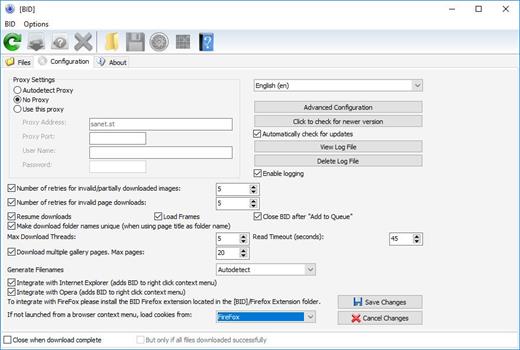
Description: Bulk Image Downloader is a specialized tool designed to automatically download and save images from thumbnailed image galleries, bypassing all annoying popups and adverts. It can also extract image information from regular text files (such as saved html pages or plain text files containing links) and web pages where image links are listed as plain text.

Release Name: Bulk Image Downloader 6.63
Size: 35.8 MB
Links: HOMEPAGE – NFO – Torrent Search

Download: RAPiDGATOR

6 Comments
Apr 30

WinRAR 7.21 Final

Description: WinRAR is a powerful archive manager. It can backup your data and reduce the size of email attachments, open and unpack RAR, ZIP and other files downloaded from Internet, create new archives in RAR and ZIP file format.

Features:
WinRAR provides complete support for RAR and ZIP archives and is able to unpack CAB, ARJ, LZH, TAR, GZ, UUE, BZ2, JAR, ISO, 7Z, XZ, Z archives.
WinRAR offers a graphic interactive interface utilizing mouse and menus as well as the command line interface.
When you purchase WinRAR license you are buying a license to the complete technology, no need to purchase add-ons to create self-extracting files, it's all included.
WinRAR is easier to use than many other archivers with the inclusion of a special "Wizard" mode which allows instant access to the basic archiving functions through a simple question and answer procedure. This avoids confusion in the early stages of use.
WinRAR offers you the benefit of industry strength archive encryption using AES (Advanced Encryption Standard) with a key of 256 bits.
WinRAR supports files and archives up to 8,589 billion gigabytes in size. The number of archived files is, for all practical purposes, unlimited.
WinRAR offers the ability to create self-extracting and multivolume archives.
Recovery record and recovery volumes allow to reconstruct even physically damaged archives.
WinRAR features are constantly being developed to keep WinRAR ahead of the pack.

Release Name: WinRAR 7.21 Final
Size: 3.8 MB
Links: HOMEPAGE – NFO – Torrent Search

Download: RAPiDGATOR

6 Comments
Apr 30

MediaMonkey Gold 2024.2.2.3221 RC4

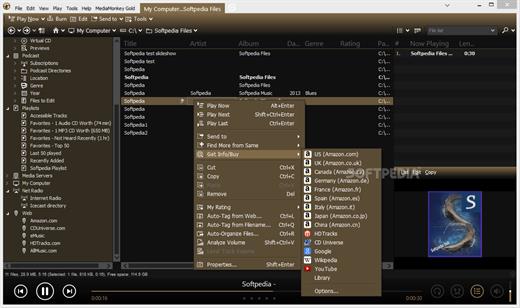
Description: The media manager for serious collectors. MediaMonkey is the award-winning media organizer and player for serious collectors. It cleans the mess in your music and video libraries, and lets you share and enjoy them across all your devices.

High Performance
Manage thousands of music tracks and videos without missing a beat.

Manage All Your Media
Create collections for Rock, Classical, Audiobooks, Podcasts, or Movies. Classify using standard tags, custom fields, and multiple attributes per field.

Quality Hi-Fi
Fine-tune audio via a 10-band equalizer, DSP effect addons, volume leveling, and use WASAPI drivers to interface with your high-end digital audio equipment.

Auto-tag
Automatically identify tracks and look up missing metadata, artwork, and lyrics. Or use the manual editor for fine-grained control.

Remove Duplicates
Quickly find and eliminate duplicate tracks to clean up your collection.

Organize
Reorganize and rename media files into logical folders and filenames based on artist, album, title, year, etc.

Record and Convert
Record CDs to your library** and convert audio/video files while preserving tag information***.

Online services
Listen to online radio, find related content on YouTube, or sync Spotify playlists.

Podcasts
Automatically download and manage your favorite podcasts.

Device Sync
Sync audio/video and playlists with iPhone, iPod, iPad, Android and other devices, including artwork, ratings, play history. Auto-convert formats to play on any device.

Wi-Fi Sync
Wirelessly sync with [MediaMonkey for Android] and manage your library from your phone or PC.

Cloud Storage
Sync, store or back up your library content to cloud services such as Dropbox, Google Drive, or OneDrive.

Share
Share your library with TVs and consoles via UPnP / DLNA; or access content from another DLNA server.

Cast
Stream audio/video to Google Cast or DLNA devices (includes Media Controller and Media Renderer functions).

Enjoy!
Listen to your media* with leveled volume (via ReplayGain and MP3Gain), as they’re shared over Last.fm, with beautiful visualizations.

Playlists
Drag and drop files to create the perfect audio/video playlist. Or create AutoPlaylists based on complex search criteria.

Party
Use jukebox mode to let users make requests while preventing your library from being modified.

Auto-DJ
When your chosen tracks run out, let the Auto-DJ automatically play tracks based on criteria that you define.

Extend
Use custom add-ons, skins, and Winamp plugins† to add new functionality. Download add-ons or write your own.

Create Reports
Generate statistics and other reports of your music collection.

Work With Other Apps
Save metadata using standardized tags readable by other apps. Update the library in response to changes by other apps to media folders.

Release Name: MediaMonkey Gold 2024.2.2.3221 RC4
Size: 121.5 MB
Links: HOMEPAGE – NFO – Torrent Search

Download: RAPiDGATOR

9 Comments
Apr 30

COAA PlanePlotter 6.7.4.5

Description: PlanePlotter receives and decodes live digital position reports from aircraft and plots them on a chart. Using PlanePlotter, you can see a radar-like display of all those aircraft around you that are transmitting the appropriate digital messages including ACARS, ADS-B and HFDL.

PlanePlotter - Features
The animated screen grab from PlanePlotter (left) was kindly provided by John Locker.

Message display
PlanePlotter shows a table display of messages received and decoded from live aircraft transmissions.

Data saving
PlanePlotter archives all the digital data that it receives and decodes to a log file.

Chart display
PlanePlotter plots aircraft positions, altitudes and times decoded from the message traffic that it receives. These include embedded position reports, AMDAR reports and ADS reports contained in ACARS messages, ADS-B position reports received by the Kinetic SBS1(tm) or AirNav System RadarBox(tm) Mode-S receivers, and position reports on HF using Charles Brain's PC-HFDL software. The plot can be superimposed on a suitable aeronatical chart that you have prepared, or PlanePlotter can download satellite imagery and plot the aircraft symbols on that. Where altitude information is available (eg Mode-S messages), you can select the data by altitude band to distinguish low level and high level traffic.

Google Earth server
If you are receiving Mode-S ADS-B position reports, PlanePlotter can interface to Google Earth to display aircraft positions over the Google Earth base map. It can even give you a dynamic real-time view from the flight deck of an aircraft that you designate.

Direction finding
PlanePlotter can determine and display the direction of any transmission using a simple passive antenna switch. This allows aircraft to be located even if they are not equipped with ACARS or Mode-S/ADS-B.

Input signals
PlanePlotter can decode ACARS messages, display the message content and plot any positions on a chart.
PlanePlotter can process and display Mode-S/ADS-B position reports captured by the Kinetic SBS1(tm), the AirNav Systems RadarBox(tm), the RxControl Mode-S receiver, the PlaneGadget Radar, the miniADSB, the microADBS and the FPGA Beast.
PlanePlotter can also work in conjunction with Charles Brain's PC-HFDL software (http://www.chbrain.dircon.co.uk/pchfdl.html) by automatically extracting position reports from the log file and plotting them in real time on the same chart display. PlanePlotter adds value by calculating course and heading from successive reports from the same aircraft and plotting the predicted position between reports (right).
PlanePlotter can drive a passive antenna switch and display the direction (QDM) of any aircraft voice transmission.

GPX overlays
PlanePlotter can display waypoints, tracks or routes over the current chart using data from a user-defined GPX format file.

Alerts
PlanePlotter can generate visible and audible alerts on detection of a specified registration, flight number or ADS identifier, on detection of any new aircraft, or on detection of an aircraft whose position is inside a user-defined Alert zone polygon.

Memory-Map Navigator support
PlanePlotter can direct the Memory-Map Navigator program (www.memory-map.com) to display dynamic aircraft position symbols over its proprietary maps using data from either ACARS or Mode-S ADS-B (in conjunction with the SBS1 receiver).

OLE/COM interface
You can access the position and other data for each aircraft known to PlanePlotter using a simple VB script or other OLE/COM capable program. You can use the same interface to update data held by PlanePlotter and to control the user interface.

Release Name: COAA PlanePlotter 6.7.4.5
Size: 7.7 MB
Links: HOMEPAGE – NFO – Torrent Search

Download: RAPiDGATOR
11 Comments
Apr 30

Total Commander 11.57 RC6

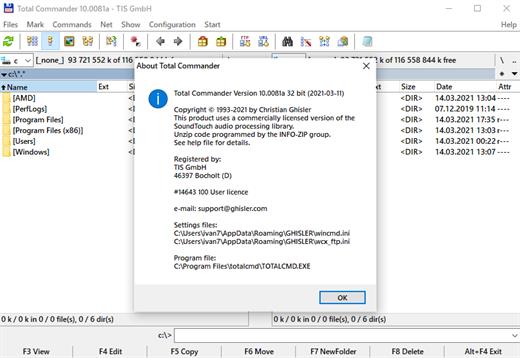
Description: Total Commander (former Wincmd) is a file manager for Windows similar to the Windows Explorer. But Total Commander uses a different approach: it has two fixed windows side by side like a well-known file manager for DOS.

Features
Two file windows side by side
Multiple language and Unicode support
Enhanced search function
Compare files (now with editor) / synchronize directories
Quick View panel with image and video display
ZIP, 7ZIP, ARJ, LZH, RAR, UC2, TAR, GZ, CAB, ACE archive handling + plugins
Built-in FTP client with FTPS (encrypted FTP) and HTTP proxy support
Multi-rename tool
Tabbed interface, regular expressions, history+favorites buttons
Thumbnails view, custom columns
Compare editor, cursor in lister, separate trees, logging, enhanced overwrite dialog etc.
Unicode names almost everywhere, long names (>259 characters), password manager for ftp and plugins, synchronize empty dirs, 64 bit context menu, quick file filter (Ctrl+S)
USB port connection via special direct transfer cable, partial branch view (Ctrl+Shift+B), and many improvements to ftp, synchronizing and other functions
And many more!

Release Name: Total Commander 11.57 RC6
Size: 11.2 MB
Links: HOMEPAGE – NFO – Torrent Search

Download: RAPiDGATOR

6 Comments
Apr 30

Tower 12.0.556

Description: The most powerful Git client for Windows. Over 100,000 developers and designers are more productive with Tower.

Git LFS. Git-Flow. Git Everything.
Use all of Git's powerful feature set - in a GUI that makes you more productive.

Productivity
Clone & create repos with a click
Manage your GitHub, Bitbucket, GitLab, Azure DevOps & Beanstalk accounts from within Tower

Automate the boring stuff
Fetching and stashing are automatically done for you, if you wish

Clone in the background
Downloading large projects happens in the background, while you work

Multiple windows
Have multiple projects open side-by-side

Ease-of-Use
Design & usability
Work with an app that was created to make things quicker & easier

Undo everything
Restore old revisions, revert commits, undo local changes, or recover deleted commits

Drag and drop
Many complex tasks can be performed easily via drag and drop, such as merging, cherry-picking, or squashing

Drag and drop
Many complex tasks can be performed easily via drag and drop, such as merging, cherry-picking, or squashing

Status / Working Copy
All files or only changed ones
View all files in a folder structure or only changed files as a flat list

Integrated diff viewer
See staged / unstaged changes in integrated diff views

Commit changes & amend commits
Staging Area
Precisely define what shall be committed - by staging selected files, parts of files or even individual lines

Discard changes
Discard unwanted local changes in a file, even on a single line basis

Revert files to previous states
Ignore files
Resolve merge conflicts
A dedicated conflict wizard helps you solve conflicts in an easy, visual way

Patches
Create and apply patches

Add, delete, rename, untrack, etc. files

Help & Learning Resources
Learn version control with Tower
A step-by-step guide for beginners (150 pages) helps you learn Git with Tower

Extensive documentation
An in-depth help book goes way beyond ordinary "documentation"

Great customer support
Friendly email support is here to help

Branches, Tags, and Remotes
Push, pull, and fetch from remote repositories
See unsynced commits
Quickly see which commits haven't been pushed or pulled, yet

Always up-to-date
New changes from remote servers are downloaded automatically for you in the background

Easily create, delete and rename branches, tags, and remotes
Extensive branching support
Push, pull, publish, track, checkout, or create new branches (from tags, commits, other branches)

Merge and rebase support
Drag and drop
Simply use drag and drop to merge, pull, create, and more
Learn more about Drag and Drop

Compare branches
Compare a branch against a base branch and see how they differ

Export files from a branch or tag

Release Name: Tower 12.0.556
Size: 80 MB
Links: HOMEPAGE – NFO – Torrent Search

Download: RAPiDGATOR

8 Comments