Please REGISTER or RENEW your account on RAPiDGATOR.net and support us by doing through all RAPiDGATOR working download links on main posts...
Apr 28

TablePlus 6.9.4

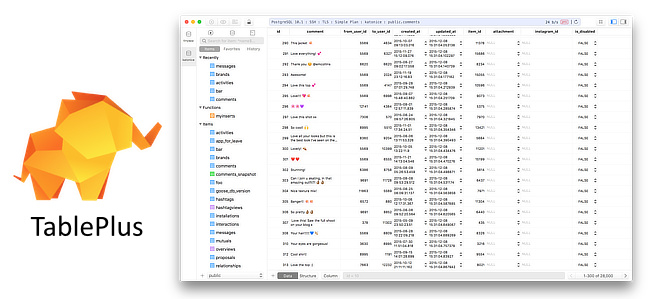
Description: Database management made easy. Modern, native, and friendly GUI tool for relational databases: MySQL, PostgreSQL, SQLite & more. Supports a whole set of relational databases and more. Modern native designs that match your beloved OS. With native build, simple design and powerful features, TablePlus makes database management easier, faster & more efficient for you.

Inline edit
Edit data rows, table structure, or query results directly with just a click.

Advanced filters
Quickly see the records you need using multiple advanced filters.

Code review
Always stay in control of what you have changed on your database.

Safe mode
Prevent any mistakes from being made on your production database.

Export & import database
Need to migrate a database to another server? Export and Import SQL Dump will get it done in no time.

Open anything
A quick jump to a table, schema, database, view, function, literally anything from your connection.

Multiple tabs & windows
Working with multiple databases or connections at the same time? Not a problem.

Metrics Board
With TablePlus, you can build internal dashboards fast and simply.

Customizable appearance
You can customize the appearance & configurations that best match your personal taste.

A smart query editor
We've built the best practices for SQL Editor into default to help you boost your productivity.

Release Name: TablePlus 6.9.4
Size: 90.3 MB
Links: HOMEPAGE – NFO – Torrent Search

Download: RAPiDGATOR

7 Comments
Apr 28

JP Software TCC 36.00.39

Description: TCC: Upgrading the Windows CMD Command Line Prompt. The command line is essential for developers, systems administrators and advanced users, offering many advantages to anyone wanting to save time, expand their control and/or to automate their tasks.

TCC is our console mode Windows command processor (formerly known as 4NT). TCC is a replacement for CMD.EXE, the default Windows command processor. TCC is compatible with your existing Windows console applications and batch files, but offers major improvements to the CMD prompt in command line editing, interactive file and system management, batch file programming and debugging.

TCC is a superset of CMD, with 275+ internal commands (CMD has about 42), 800+ internal variables and functions (CMD has 6), hundreds of additional options for existing CMD commands, and thousands of additional features.

Whether you're a seasoned CMD prompt user or just getting started, TCC is the tool that will take your command line prompt experience to the next level.

Why Switch From the CMD Shell to TCC?

Familiarity
TCC is a CMD replacement Windows command processor that is compatible with your existing CMD commands and batch files while adding hundreds of new commands, variables, and variable functions.

Productivity
TCC provides vastly improved line editing and tab file completion, and adds thousands of new features. You're immediately more productive, and you can learn TCC's new features at your own pace.

Batch Files
Create and debug your batch scripts in a fraction of the time with TCC's integrated editor and batch file debugger.

Comprehensive Help
The extensive help (including context-sensitive popup help for command and variable syntax) speeds your development time and reduces errors.

Syntax
TCC's internal commands share a consistent syntax, reducing your learning and development time.

Multilingual
The user interface is available in English, French, German, Italian, Russian, and Spanish. (Online help is available in English, French, German, and Spanish.)

Release Name: JP Software TCC 36.00.39
Size: 55 MB
Links: HOMEPAGE – NFO – Torrent Search

Download: RAPiDGATOR

6 Comments
Apr 28

JP Software Take Command 36.00.39

Description: Replace Your Windows Console and CMD Command Prompt Windows. The Windows Command Prompt shortcut is a Windows console (command line, or character mode) session that runs the default Windows command shell CMD.EXE.
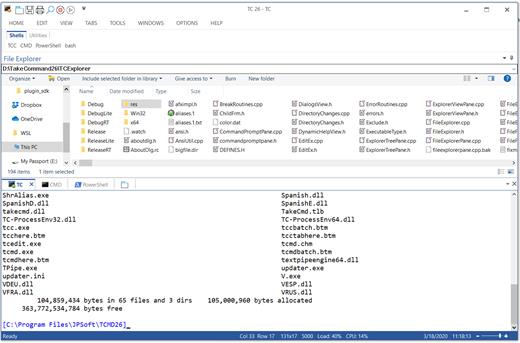
The command line is essential for developers, systems administrators and advanced users. Unfortunately, CMD Windows commands and the Windows console UI have always been woefully lacking in ability compared to what is available in most other operating systems. Because of the limitations in CMD and the Windows console, users have been forced to use the GUI for inappropriate tasks, or even to write custom programs to perform simple tasks that CMD should have been able to handle.

Take Command is a comprehensive interactive GUI and Windows command line toolkit that makes your command prompt windows easier to use and far more powerful. Take Command includes optional Windows Explorer integration, tabbed console windows, and major enhancements to standard Windows CMD commands such as COPY, DEL, DIR, FOR, MOVE, REN, SET, and START And it and adds more than 235 new commands, command dialogs, command line syntax coloring, vastly improved command line editing, programmable filename and directory tab completion, and thousands of other features.

Take Command is also a powerful batch file programming tool, including an integrated IDE with a sophisticated editor and batch debugger. Take Command offers extensions such as DO loops, SWITCH statements, error and exception handling, system monitoring and event triggers, and more than 780 built-in variables and functions. And you can extend that with 3rd-party plugins and user-defined functions.

12 Reasons Why You Should Replace Your Windows Console
The Windows console is responsible for running character-mode applications, including CMD, PowerShell, WSL bash, etc. It was introduced in Windows NT 3.1 in 1993, and some major internal architectural improvements were made in Windows 10 and 11.

Unfortunately, the improvements to the user interface were relatively minor, and though some efforts were made to improve the CMD console UI in Windows Terminal, they fall far short of what Take Command has been providing for years.

So why replace it with Take Command?

The Windows console is slow, and even slower when using Windows Terminal. Take Command's tab windows typically display output between 20% and 300% faster.
Take Command (like Windows Terminal) offers tabbed windows to run your character-mode applications. But Take Command takes it to another level by including vertical or horizontal tab groups and splitter windows.
Tabbed windows can be reordered, detached, or torn off, and existing console windows can be attached as new Take Command tab windows.
Take Command provides an optional embedded Windows File Explorer window that displays a tree view of the folders on your system and the contents of the selected folder (List View) on the right. You can drag folders and files from the Explorer window and drop them in a command prompt window.
Take Command can be easily configured for your preferences with its configuration dialogs.
Take Command has an optional tabbed tool bar that you can use to execute internal or external commands, aliases, or batch files with the click of a mouse (or an accelerator key). You can define up to 20 tabs, each with up to 50 toolbar buttons.
Take Command provides a configurable Status Bar that can display quick help for the current command, tooltips, and system information, including tab window size, CPU usage, memory usage, date & time, character values at the cursor location, and a slider control for window transparency.
Cut and Paste options are limited in the default CMD console or Windows Terminal. Take Command adds both line and column selection, double-click or triple-click selections, overwriting or appending to the Windows clipboard, and a variety of paste options.
Take Command windows can be styled with a choice of 18 themes.
Take Command and TCC offer a wide variety of colorization options, not just foreground and background colors.
Take Command includes invaluable tools, including a batch file debugging IDE, a regular expression creator / analyzer, search and replace in files, and a macro recorder / playback.
Extensive help (quick help, context sensitive help, and general help) is available in English, French, German, and Spanish at the touch of a button.

Release Name: JP Software Take Command 36.00.39
Size: 57.3 MB
Links: HOMEPAGE – NFO – Torrent Search

Download: RAPiDGATOR

7 Comments
Apr 28

JP Software CMDebug 36.00.39

Description: CMDebug is a stand-alone version of the Take Command IDE and batch debugger. CMDebug is intended to help developers create a batch file to run in CMD (the Windows default command processor) or TCC-RT (the free runtime version of TCC). It provides a comprehensive set of batch debugging features specifically designed for batch file development.

CMDebug allows you to write and debug your CMD batch files with the integrated graphical IDE. CMDebug includes tabbed edit windows and a sophisticated debugger with single stepping, conditional breakpoints, syntax coloring tooltips, bookmarks, and tabbed breakpoint, call stack, variable, alias, and watch windows. Windows batch file programming has never been easier or more powerful!

You can use CMDebug to develop either CMD-compatible batch files (*.BAT or *.CMD), or faster (and far more capable) TCC-RT-compatible batch scripts (.BTM). If you select the "TCC Syntax" option, CMDebug supports the full TCC-RT command set. If you select the "CMD Syntax" option, CMDebug will disable TCC-only internal commands, variables, and functions, and use the limited Windows CMD batch file commands syntax. Some internal CMD / TCC commands will also behave slightly differently or modify their display output in order to match CMD's behavior (and bugs!) more closely.

Using CMDebug with the TCC-RT syntax option allows you to create and debug (and optionally encrypt) batch files using the TCC command language, and then distribute them with the free TCC-RT runtime on an unlimited number of target machines.

Release Name: JP Software CMDebug 36.00.39
Size: 42.8 MB
Links: HOMEPAGE – NFO – Torrent Search

Download: RAPiDGATOR

6 Comments
Apr 28

IObit Driver Booster Pro 13.4.0.234

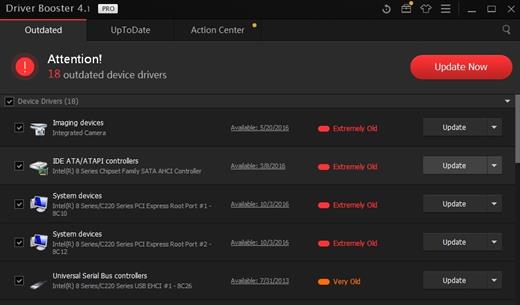
Description: Updating drivers is usually an initial step to avoid hardware failure, system instability and hidden security vulnerabilities. To update drivers regularly is also an effective way to enhance your overall PC performance, and maximize your gaming experience. While this process could be risky and frustrating if done manually.

Driver Booster PRO is introduced to download and update drivers for you automatically with just one click. Based on cloud library, Driver Booster PRO can always be the first to identify outdated drivers, and download and update driver at an unrivaled speed. With the backup feature, it is an easy, effective and risk free solution to keep your drivers up-to-date.

Update Outdated Drivers Safely and Rapidly
- Support More Hardware Devices & Improve PC Performance
- Update Drivers 300% Faster with Just One Click
- Specialized Driver Tweaking for Top Gaming Experience
- Backup Drivers for Safe Restore

Driver Booster Pro Features:
- Download and Update Outdated Drivers with One Click
- Enhance Hardware Functionality for Top Performance
- Specialized Driver Tweaking for Top Gaming Experience
- Automatically Identify Outdated Drivers
- Support More Comprehensive Hardware Devices
- Enjoy Priority to Update Outdated Drivers Promptly
- Backup Drivers for Safe Restore
- Download and Update Drivers up to 300% Faster
- Automatically Update to the Latest Version

Release Name: IObit Driver Booster Pro 13.4.0.234
Size: 37.2 MB
Links: HOMEPAGE – NFO – Torrent Search

Download: RAPiDGATOR

6 Comments
Apr 28

Acronis True Image Build 42980 Bootable ISO

Description: Backup, disk cloning, cyber protection and privacy tools that enable security for home users. Acronis True Image (formerly Acronis Cyber Protect Home Office). The most reliable cyber protection software on the market. Be protected from the unexpected. The complete cybersecurity protection you need with an easy-to-use and reliable solution against data loss, cyberattacks, and identity theft.

Backup
Flexible local or cloud backup of a complete machine or select files and folders on a flexible schedule that enables your cybersecurity.

Disk cloning
Create a complete replica of your data as a backup or a way to migrate to a new drive or computer.

Cybersecurity
Complete cyber protection, including antivirus and ransomware protection.

Acronis True Image is built on three key principles:

Reliable
•  Time-proven technology
•  Millions of satisfied users
•  Complete control of the backup process

Efficient
•  Fast backup and recovery
•  Fast upload and download of data
•  Pre-configured full-system backup plan

Easy to use
•  Intuitive user interface
•  One-click backup
•  Automatic protection

Devices and services protected

Operating systems
•  Windows
•  macOS

Mobile devices
•  iPhones and iPads
•  Android phones and
tablets

Cloud services
•  Outlook mailboxes
•  OneDrive

Release Name: Acronis True Image Build 42980 Bootable ISO
Size: 498 MB
Links: HOMEPAGE – NFO – Torrent Search

Download: RAPiDGATOR
6 Comments
Apr 28

Topaz Photo Pro 1.5.1

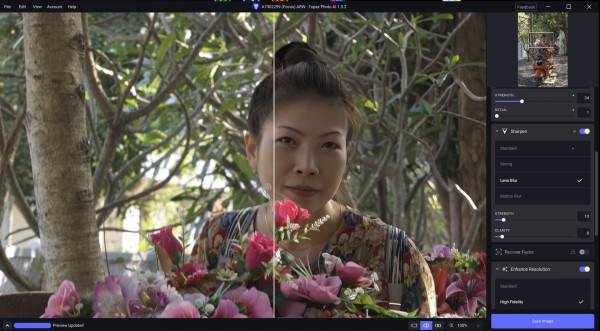
Description: Each tool gets it closer to perfect. The ultimate finishing step for every image. Fix issues. Restore focus. Remove noise. Enhance details. Crop in. Prepare for print. Topaz Photo is the magical last step before "done." All using AI trained on millions of images.

Wildlife & Astro Photography
Zoom in with lossless crop, sharpen details, and denoise high ISO shots captured in unpredictable conditions.

Sports Photography
Sharpen motion blur and denoise indoor shots with poor lighting.

Events & Weddings
Never miss the important moment to low lighting or soft focus. Topaz Photo lets you fix the details without reshooting.

Archival Images
Remove dust and scratches, adjust lighting and color, and restore images to their original sharpness.

System Requirements:
Windows Operating System: Windows 10 or 11
CPU: Intel OR AMD Processor2, with AVX instructions, released after 2016
System Memory (RAM): 16GB
Dedicated Graphics Card (NVIDIA): NVIDIA graphic card - 6GB VRAM4 | AMD graphic card - 6GB VRAM4 | Intel ARC graphic card - 6GB VRAM4
Dedicated Graphics Card (AMD): Intel UHD 600 Graphics5 | Intel Iris Xe5
Disk Space on C:/ 37GB of space6

Release Name: Topaz Photo Pro 1.5.1
Size: 959.3 MB
Links: HOMEPAGE – NFO – Torrent Search

Download: RAPiDGATOR
7 Comments
Apr 28

XnViewMP 1.11.1

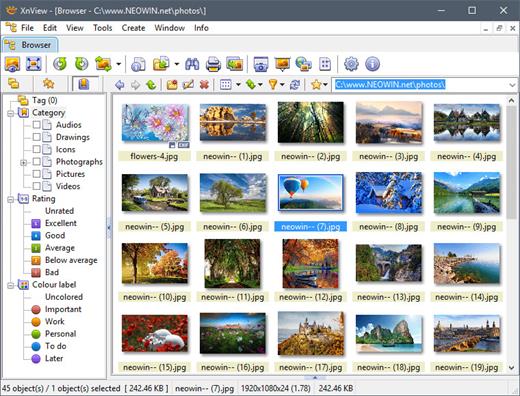
Description: XnView MP is a powerful, versatile and free image viewer, photo management, and image resizer software. XnView is one of the most stable, user-friendly, and comprehensive photo management tools available today, perfect for both beginners and professionals. All common picture and graphics formats are supported (JPEG, TIFF, PNG, GIF, WEBP, PSD, JPEG2000, JPEG-XL, OpenEXR, camera RAW, HEIF, HEIC, AVIF, PDF, DNG, CR2).

Photo Viewer
With XnView you can browse, organize, and view your images in numerous ways:
Thumbnail View
FullScreen View
FilmStrip View
SlideShow with Effects
Image Compare (up to 4 images)

Photo Editor
XnView allows you to process your images with an arsenal of editing tools:
Resize, Rotate, Crop
Lossless Rotate & Crop (jpeg)
Adjust Brightness, Contrast, Gamma, ...
Auto Levels, Auto Contrast
Modify Colors depth & palette
Apply Filters & Effects
And Much More...

Create
SlideShows
Contact Sheets
Video Thumbnails Gallery
File Listings
Strip of Images

Batch tools
XnView allows you to batch process your images:
Powerful Batch Convert (same module also powers XnConvert)
Batch Rename
Change Timestamp
Metadata Editing (IPTC, XMP)

Release Name: XnViewMP 1.11.1
Size: 56.7 MB
Links: HOMEPAGE – NFO – Torrent Search

Download: RAPiDGATOR
6 Comments
Apr 28

Capture One Enterprise – Professional 23 16.7.7.3470

Description: Phase One Capture One is one of the best professional digital photo converters in RAW format; it supports a wide range of modern cameras (Canon, Nikon, Epson, Fuji, Konica Minolta, Leica, Mamiya, Olympus, Pentax, Sony), including the most latest models, and provides conversion of original RAW images into readable formats JPEG, TIFF, PNG, DNG etc.

Capture One Pro and Enterprise Features


  • Import photos with previews.
  • Batch processing of images with pre-specified settings.
  • Simultaneously convert one RAW file into several formats.
  • Correct support for ICC color profiles.
  • Correction of chromatic aberrations, distortion, vignetting and other optical image defects.
  • Fine-tune color tones and white balance using the wheel.
  • A separate panel for setting skin tones, with the ability to save presets.
  • Possibility of separate toning globally or by control points directly on the photo through the color editor.
  • Supports the most popular DSLRs and digital backs from Phase One.
  • Directly capture images from cameras when connected via cable or Wi-Fi.
  • Overlay feature for composition and design.
  • Supports work on multiple monitors.

Installation


  1. After installation is complete, do not run the program.
  2. Place the dnlib.dll and MADARA.exe files in the folder with the installed program.
  3. Run MADARA.exe as administrator, select the edition (Pro or Enterprise) and click Patch

Note: If activation fails, you may need to add the following addresses to the hosts file.
Code:
0.0.0.0 activation.phaseone.com
127.0.0.1 industrial.phaseone.com
127.0.0.1 coweb.phaseone.com
127.0.0.1 help.phaseone.com

File Information

Year/Release Date : 2026
Version : 16.7.7.3470
Developer : Phase One
Developer’s Website : Phase One
Bit depth : 64bit
Interface language : Multilingual
Tablet : present

System Requirements


  • Windows 10 64-bit (builds from 21H2 to 23H2) or Windows 11
  • Intel® Core™ i3 (1st generation) / AMD Jaguar family
  • 8 GB of RAM
  • 10 GB of free hard disk space
  • Calibrated monitor with 1280×800, 24 -bit resolution at 96dpi
Release Name: Capture One Enterprise – Professional 23 16.7.7.3470
Size: 1.17 GB
Links: HOMEPAGE – NFO – Torrent Search

Download: RAPiDGATOR

8 Comments
Apr 28

CCleaner Professional Plus v6.40 + Fix


Description:
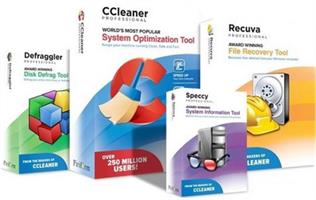
Piriform CCleaner Professional Plus– it is a selection of the newest versions of programs from Piriform Software, united in a common envelope, which will help you to make your computer faster, more secure and ensure its stable and confidential work.
We get many requests from our users wanting to buy all our products in one bundle. So we’ve listened and we’re very happy to announce that we’re launching CCleaner Professional Plus: a 4-in-1 product that includes all the Professional versions of CCleaner, Defraggler, Recuva and Speccy! With our patented technology products you can regain full control of your PC and keep it running like new.


Info :


  • CCleaner a utility for cleaning the debris in the operating system. In the course of their work CCleaner (Crap Cleaner) is looking for and removes unused files. These include: cookies, history, visiting sites in IE, temporary Internet files, search strings, files, Recycle Bin, etc.
  • Also search for temporary files of third-party applications: Firefox, Opera, Media Player, eMule, Kazaa, Google Toolbar, Netscape, Office XP, Nero, Alcohol 120, Adobe Acrobat, WinRAR, WinAce, WinZip, GetRight, Morpheus, Download Accelerator Plus, VirtualDub , ZoneAlarm and many others. Can be subjected to cleaning and registry Windows, ridding it of its unnecessary extensions of the old library dll and wrong ways, which accumulate in considerable quantities, especially after the installation and removal of a variety of programs.
How To Install?

  • Install the program from the given setup.
  • Don’t run the application yet and close from system tray or task manager if running.
  • Extract the “Patch-Keygen Fix.zip” to directory where you’ve installed the program.
  • Run the Patch and keygen as admin and apply it. (you may need to find the .exe to patch)
  • Boom! Now you can use the program without any interruptions.
  • That’s it, Enjoy now
Release Name: CCleaner Professional Plus v6.40 + Fix
Size: 92 MB
Links: HOMEPAGE – NFO – Torrent Search

Download: RAPiDGATOR
5 Comments