Please REGISTER or RENEW your account on RAPiDGATOR.net and support us by doing through all RAPiDGATOR working download links on main posts...
Apr 24

Mirillis Action! 4.48.1

Description: Mirillis Action! screen recorder allows streaming and real-time recording of Windows desktop in a superb HD video quality. With Action! you can record and stream your gameplay, web player videos, record music, capture screenshots, add webcams, microphone commentary... and more!
The most user friendly and stylish interface of all screen recorders!
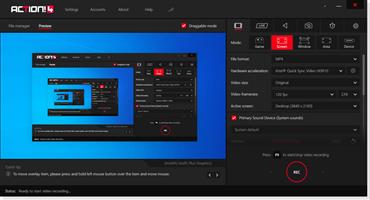
Action! is compact, stylish and user friendly. Built-in screen and gameplay recording manager allows to browse, delete selected items and export recordings to popular formats and devices. Action! screen recorder defines new standard of user experience for games benchmarking, gameplay and Windows desktop real-time recording software.

Greenscreen Mode
Action! gives you Greenscreen Mode. Now you can cut out the background, while recording with your webcam, from your video recording. You don't need to have special camera for that - all you need is Action! screen recorder and any solid color background, what is much cheaper solution and gives the same, if not better, results.

Record webcam or USB/HDMI Capture Devices
Select device recording mode to capture video from gaming consoles, other PC, TV broadcasts, webcams or camcorders. Add your own logo, webcam, microphone commentary and record video to your local disk or live stream to popular services.

Try screen recording with Selected Application recording option.
This brand new recording mode allows you to record your Windows desktop screen in complete privacy! Record only the application you want to show to others on your screen recording, while the rest of your desktop screen will be blackened-out and not recorded on your video.

Record gameplay in HD. Benchmark games performance.
Outstanding screen and gameplay recording performance and GPU utilization allows the smoothest real-time HD gameplay recording ever! Display current and average game framerate (FPS) during gameplay and save your benchmark results.

The outstanding screen recording performance!
Action! defines a new standard of performance for gameplay and desktop recording software. It uses Mirillis ultra-fast, multicore optimized, proprietary video codec (FICV - Fast Intra Compression Video standard) which together with highly optimized application engine provides the ultimate performance of real-time HD video recording. Action! screen recorder also captures video directly to MP4 format utilizing NVIDIA NVENC, AMD APP or Intel® Quick Sync Video hardware acceleration.

Live stream gameplay and desktop activity to popular services!
Action! LIVE Streaming service allows to stream all your gameplays, videos or desktop activity to popular streaming services like Twitch.tv, YouTube, Smashcast (hitbox), Ustream, Livestream, Facebook, Aliez and more! With Action! screen recorder live streaming is easy and fun!

Never miss a gaming moment with Time-Shift option
Save your best gameplay actions instantly to a file with just a single hotkey! With Time-Shift recording you will not lose any spectacular video game action!

Screen and gameplay recording in outstanding 4K!
Action! screen recorder supports a wide variety of high resolutions video recording, starting from 2K, 3K, 4K screen recording for single displays (supported for both AVI and MP4 file formats) up to more than 8K (supported for AVI file format) for AMD Eyefinity or NVIDIA 3D Vision setups.

Screen recording with automatic webcam background removal using Intel® RealSense™ technology!
Download and install Action! screen recorder with Intel® RealSense™ technology support and add webcams to your screen and gameplay recordings using automatic background removal option!

Upload Windows desktop and gameplay recordings to YouTube™ or Facebook.
Export and upload your screen recordings to popular services and social networks like YouTube™ and Facebook. Action! provides predefined exporting profiles for YouTube™ and Facebook, just push a button to export and automatically upload your screen or gameplay recordings to your favorite service fast and easy.

Smooth HD Windows desktop recording, screen recording and easy tutorial creation!
Action! defines a new standard of performance and user experience for real-time screen recording software. Record smooth high framerate HD videos of your Window desktop and applications activity, add microphone audio commentary and create great tutorials with ease!

Continuous Windows desktop screen and gameplay recording!
With Action! Active screen recording mode you can record your videos continuously, no matter how many times you switch from Windows desktop to fullscreen gameplay and back. All your Windows desktop actions and gameplay will be recorded to a single video file. This makes Action! perfect PC screen recorder!

Export screen and gameplay recordings to popular formats and devices!
Select one of many predefined profiles and push a button to export your screen recordings to popular formats, devices, Facebook or YouTube™. Use fast, hardware accelerated video exporting with NVIDIA® NVENC, AMD APP or Intel® Quick Sync Video technologies.

Add webcam to your screen or gameplay recordings
With Action! you can add picture from webcams to all your real-time gameplay and desktop recordings! Share more than only your gameplay or Windows screen video! With Action! webcam recording is easy, just select your webcam, set webcam video position and size and start recording!

Release Name: Mirillis Action! 4.48.1
Size: 108.2 MB
Links: HOMEPAGE – NFO – Torrent Search

Download: RAPiDGATOR
5 Comments
Apr 24

UsbToolbox Pro 1.2

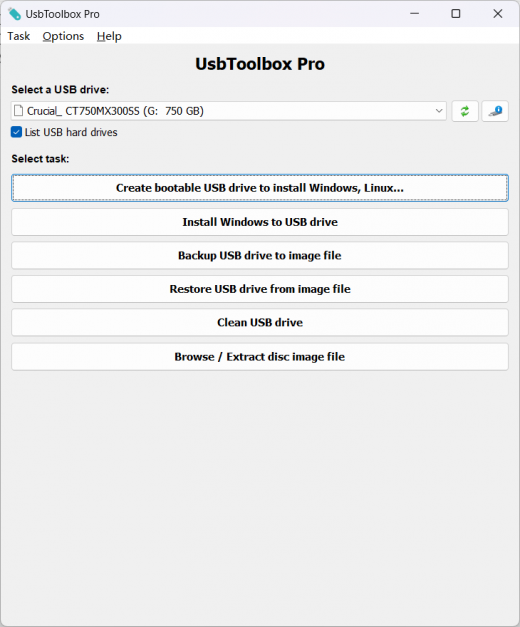
Description: UsbToolbox is a bootable USB drive creation tool, which supports ISO files of Windows, Linux, and other popular operating systems. It also includes some useful functions, such as installing Windows to USB drive, cleaning USB drive data, creating USB drive image file, and extracting disc image file.

Main features:
Create bootable USB drive from ISO file
Support ISO files of Windows, Linux, and other popular operating systems
Install Windows to USB drive (Windows to Go)
Clean USB drive data
Backup USB drive to image file
Restore image file to USB drive
Browse and extract image file

Create bootable USB drive
UsbToolbox can create bootable USB drive from ISO files. You can then install Windows, Linux, or other systems from the USB drive.

free software Install Windows to USB drive
UsbToolbox can install Windows to USB drive, which is also called Windows To Go. With this feature, you can run Windows from the USB drive.

free software Backup or restore USB drive
UsbToolbox can backup USB drive to image file or restore USB drive from the image file. On intelligent mode, only used sectors will be copied.

best software Clean USB drive data
UsbToolbox can securely erase all data in the USB drive, and if the USB drive become unusable or the capacity is not reported correctly, it can help you to recover the USB drive to regular status.

best software Browse and extract disc image file
You can browse or extract files within the image file without writing the image file to USB drive really. UsbToolbox supports most of all popular disc image file formats.

Release Name: UsbToolbox Pro 1.2
Size: 8.2 MB
Links: HOMEPAGE – NFO – Torrent Search

Download: RAPiDGATOR
5 Comments
Apr 24

AJC Sync Professional 4.21.0.1

Description: AJC Sync allows you to compare or synchronize large numbers of files and folders between multiple pairs of locations. These locations may be on the same computer, another computer or device over a network, an attached drive or memory stick, FTP server, cloud service etc. AJC Sync is an ideal backup solution for your PC, laptop or server.

Files can be synchronised by transferring in one direction or both directions according to a set of comparison rules. A user friendly sync plan shows you exactly what is going to happen to your files, giving you complete confidence and control. The built in diff can show you exactly what has changed in your files.

The sync process can be run with full visual control, via the command line or on a regular basis via the scheduler. Full logging, reporting and emailing is provided to notify you about what happened. An archiving facility is provided to store multiple versions of files allowing undo to recover from mistakes.

Home tab
Your synchronize or backup jobs are organised in sync projects. Each project can have one or more pairs of locations to keep in sync. Each location may be on any Windows accessible drive, network, USB stick etc or FTP server. The home tab gives you an overview of these pairs, showing a summary of the sync direction and last backup time. Different images can be selected to help you visuallise the sync locations. Throughout the application color coding is used so you can tell if files exist only on one side of the sync pair or both. Starting an interactive sync will then take you to the sync plan tab so you can see what will happen to your files

Explorer tab
The explorer allows you to browse and work with files and folders for the selected sync pair. It looks rather like Windows explorer with the folder tree down the left hand side and the items in the current folder on the right hand side. The two file structures from the sync pair are overlaid on top of each other into a combined view with color coding. You don’t use the explorer to synchronize or compare the file structures (you create a sync plan for this). The explorer is intended as a means of browsing all of your files and allowing you to work with them in a dual manner. E.g. Opening a file from both sides or one side, renaming a file on one or both sides etc.

Sync plan tab
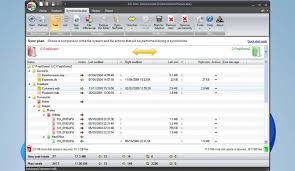
The sync plan shows a comparison between the two file system locations on each side of the specified sync pairs and decides the actions that will be taken to bring the two sides into sync. You can use this plan just to view the comparison of the file systems if you like but normally you check and modify and actions if required and then proceed to start the synchronize process which will carry out all listed actions. A one click sync button is also availble from the Home tab to use if you are happy with your sync plans and just want to do it.

History tab
The history tab shows what happened in previous sync runs. You can see when each sync run started and stopped, how long it took, what sync pairs were involved and what happened to each file/folder. An archiving system is provided to store old versions of files that were overwritten or deleted during the sync and if you are using this you can access file archives from here to retrieve or compare against older versions of the files and undo sync actions.

Report tab
The report shows what happened during a sync plan creation or a sync run. During a sync run the report is shown as the task progresses and you can see a progress bar at the bottom of the screen.

File compare diff
The built in diff file compare facility can show you what has changed inside a file.

Release Name: AJC Sync Professional 4.21.0.1
Size: 65 MB
Links: HOMEPAGE – NFO – Torrent Search

Download: RAPiDGATOR
6 Comments
Apr 24

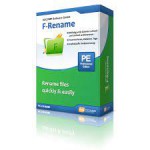
F-Rename Professional 3.000

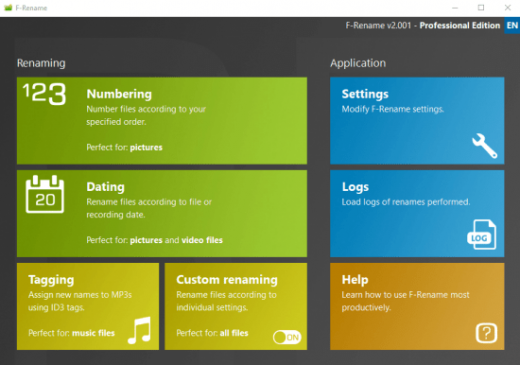
Description: With F-Rename, you can quickly and individually rename files, optimize your file structure and thus save a lot of time. Numbering and dating files. Renaming based on tags. Individual renaming incl. preview and log function.

Fast and precise renaming of files for more order and overview!
F-Rename: Rename files quickly, easily and flexibly
DSC813913091.JPG, 20110920.AVI, DL_MUSICFILE.MP3 – every computer user knows the issue: cryptic and uninformative file names, automatically generated by digital cameras, smartphones, or download managers. The chaos on the hard drive grows, and finding the right file becomes a time-consuming and frustrating task.

With F-Rename, you can bring order to your files and create structure by renaming any number of files at once based on customizable patterns. The software offers a variety of preconfigured renaming patterns that are easy to apply, and you can also define custom rules to suit your specific needs.

Intuitive renaming process
Whether you want to number entire collections of files, add dates, or rename MP3 files based on ID3 tags, F-Rename lets you complete these tasks quickly and effortlessly. The intuitive user interface guides you through the renaming process step by step, making it easy for even beginners to restructure their files. A standout feature is the individual renaming function. This offers maximum flexibility by allowing you to use numerous tags such as creation date, file type, or custom values. You can convert, shorten, or specifically replace parts of existing file names. This makes F-Rename an essential tool for managing large file collections.

Integrated protocol function
To ensure you always have full control over the renaming process, F-Rename includes a preview function that shows the planned changes before they are applied. Additionally, the log function lets you track all changes, ensuring no data is lost and your valuable files remain well-organized.

Perfect solution for file management
Discover how easy and efficient renaming files can be. With F-Rename, you create order, improve clarity, and save valuable time. Whether for personal use or professional applications, F-Rename is the ideal tool for structured file management.

Release Name: F-Rename Professional 3.000
Size: 13.5 MB
Links: HOMEPAGE – NFO – Torrent Search

Download: RAPiDGATOR
4 Comments
Apr 24

Secure Delete Professional 2026 v219

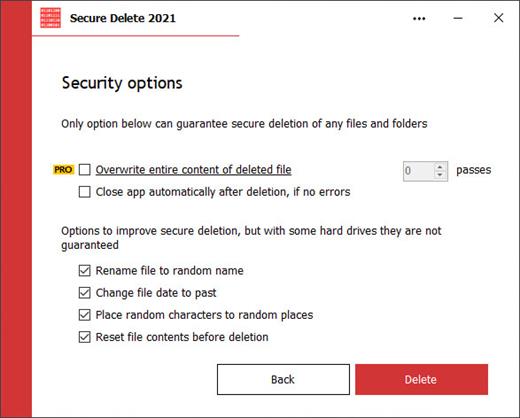
Description: Securely erases files, makes them unrecoverable. This software is an effective tool for securely erasing existing files and folders permanently, if they were not yet deleted. Once this software has been used, the selected files and folders do not go to the Recycle Bin and will be unrecoverable. Users have several security options to allow you to choose the level of security that you need, which will be reflective of the speed of processing.

This application can be used in three ways. (1) Drag and drop the files or folders which you want to be securely deleted to the main window. (2) Select the necessary files by clicking Add Files on the main screen. Or (3) select any file or folder on Windows Explorer and choose the Send To option, then click Secure Deleter.

Just because our interface is simple doesn't mean that it lacks quality. It's quite the opposite in our case. The simple interface was designed to be that way to make it easier for newer users. Within the software, there are many powerful algorithms in play for data destruction. So, even if you are a new user, you can be sure that you'll understand how to get the maximum security possible.

Release Name: Secure Delete Professional 2026 v219
Size: 4.2 MB
Links: HOMEPAGE – NFO – Torrent Search

Download: RAPiDGATOR
5 Comments
Apr 24

Digimizer 6.5.1

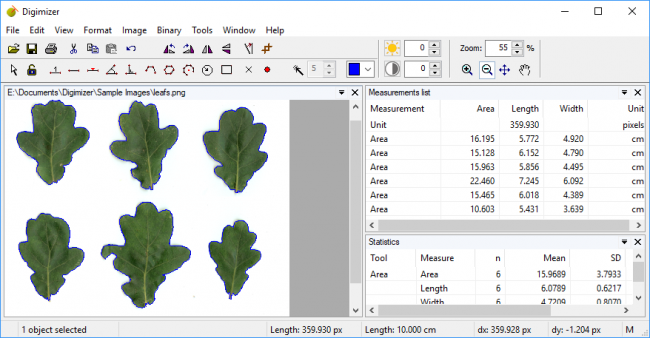
Description: Digimizer is an easy-to-use and flexible image analysis software package that allows precise manual measurements as well as automatic object detection with measurements of object characteristics.

Pictures may be X-rays, micrographs, etc. Supported file formats are JPG, GIF, TIFF, BMP, PNG, WMF, EMF and DICOM files.

Images can be rotated, flipped or straightened. Image brightness and contrast can be adjusted. Several filters for noise reduction, smoothing, or sharpening can be applied.

Image file operations
Open, save and print image files
Acquire image from scanner
Grab image from live video stream
Supported file formats: DGZ (native Digimizer file format), JPG, GIF, TIFF, BMP, PNG, WMF, EMF, and DICOM files.

Image manipulation
Resize
Crop
Rotate, flip
Zoom
Adjust contrast & brightness
Contrast auto fix
Stretch histogram
Background correction
Despeckle
Convert to grayscale
Convert to color
Invert
Negative
Selective Color Brightness
Sharpen
Filters: Canny Edge Detector, Emboss Filter, Arithmetic Mean Filter, Geometric Mean Filter, Harmonic Mean Filter, Contraharmonic Mean Filter, Median Filter, Maximum Filter, Minimum Filter, Midpoint Filter, Range Filter, Yp Mean Filter,

Manual measurements
Digimizer allows to:
define unit of measurement
measure distances and lengths of line segments or paths
measure perimeters and areas
measure angles
locate middle of line segment
find center and calculate characteristics of circular objects
measurements on perpendicular lines
measure circles, ellipses, and rectangles
measure average intensity of objects
mark and count objects
fit line
detect and decode bar codes and QR codes
Units of measurements: kilometer (km), hectometer (hm), decameter (dam), meter (m), centimeter (cm), millimeter (mm), micrometer (µm), nanometer (nm), picometer (pm), femtometer (fm), attometer (am), inch (in), foot (ft), yard (yd), mile (mi), degrees (°) or pixels.

Image analysis
Binarization
Options: Overlay binary image, Hide Binary Layer
Morphological operations: Dilate, Erode, Open, Close
Noise reduction
Analyze objects: object detection with measurement of perimeter and area

Measurements list
The measurements list displays the measurements in the current image, but can also include measurements of several images.
Open & save Measurements list
Print Measurements list
Export as Excel spreadsheet file, or MedCalc file for statistical analysis

Statistics
The integrated statistics table displays statistics (n, mean, median, SD, minimum and maximum) of the measurements in the Measurements list.
The program can generate a more detailed statistical report that includes summary statistics, percentiles, and a histogram with Box-and-Whisker plot.
Print statistics
Detailed statistics

Miscellaneous
User-defined scripts allow automation of repetitive tasks
System requirements
To use Digimizer, you need a PC with

Release Name: Digimizer 6.5.1
Size: 18.5 MB
Links: HOMEPAGE – NFO – Torrent Search

Download: RAPiDGATOR
3 Comments
Apr 24

SmartFTP Enterprise 10.0.3320

Description: SmartFTP is an FTP (File Transfer Protocol), FTPS, SFTP, WebDAV, Amazon S3, Backblaze B2, Google Drive, OneDrive, SSH, Terminal client. It allows you to transfer files between your local computer and a server on the Internet. With its many basic and advanced Features SmartFTP also offers secure, reliable and efficient transfers that make it a powerful tool.

SmartFTP can be used for:
Web site publishing and maintenance
Upload and download of images, documents, movie and music files
Managed file transfers. Automate file transfer processes.
Backup and synchronize local and remote files

Features
Protocols:
- FTP and FTPS (Secure FTP)
- SFTP over SSH
- WebDAV
- Amazon S3 (Enterprise Edition)
- Google Drive (Ultimate Edition)
- Microsoft OneDrive (Ultimate Edition)
- Google Cloud Storage (Enterprise Edition)
- Backblaze B2 Cloud Storage (Enterprise Edition)
- Box (Enterprise Edition)
- Terminal Emulator (Ultimate Edition)
Integrated Editor
HIPAA 5010 compliant
FIPS 140-3, 140-2, 186-4 compliant
Modern Graphical User Interface (GUI):
- High DPI support
File/Folder Synchronization
Multilingual (more than 20 languages)
Thumbnails View and Preview
Source File Preview
Visual Compare
Advanced Schedule
IPv6
On-the-fly Compression (MODE Z)
UTF-8 Support
Support for KeePass, LastPass, Bitwarden and 1Password password manager
Multiple Connections
Auto reconnect and resume of broken transfers
Transfer Integrity
Verified Transfers (XCRC, XMD5, XSHA)
FXP (Server-To-Server Transfer) support
Remote Edit of files
Search for files and folders on the server
Local Browser
Bulk Rename
Enhanced NAT/UPnP Support
UPnP (Universal Plug and Play), ICS, ICF
Transfer Queue:
- Scheduling (Enterprise Edition)
- Uploads/Downloads/FXP
- Unlimited simultaneous threads
International Domain Names (IDN)
Proxy / Firewall support:
- SOCKS5, SOCKS4, SOCKS4A, HTTP Proxy
URL Watcher
FTP command line
Custom Commands
CHMOD (Properties)
Section 508 compliant
and much more …

Release Name: SmartFTP Enterprise 10.0.3320
Size: 12.7 MB
Links: HOMEPAGE – NFO – Torrent Search

Download: RAPiDGATOR
5 Comments
Apr 24

PVsyst 8.1.1.48459

Description: PVsyst 8 brings major enhancements to our software features, demonstrating our ongoing commitment to the development and simulation of photovoltaic projects.

Define your project
System design: Rapidly design grid-connected, standalone, or pumping photovoltaic systems. The program guides you in selecting components for sizing your project.
System sizing: Visualize sizing constraints for modules and inverters, including I/V curves and power distribution, focusing on optimal inverter sizing and comprehensive loss analysis.
New orientations: Benefit from flexibility in project customization by defining unlimited orientations and explore the possibility of combining trackers and fixed plans in a single simulation.
Sub-hourly simulation: Import meteorological data at sub-hourly intervals from Meteonorm 9 or through PVsyst import tools, and then simulate your systems with greater accuracy.
Simulation and results: Calculate annual energy distribution, analyze key metrics such as total energy, yield, and specific energy, through detailed reports on gains and losses.

Setup shadings
Near shadings: Model your 3D scene directly or import it from another CAD tool. Fast design tools, orientation identification, scene validation, and advanced multithreading calculations will allow you to define your system as close to reality as possible.
Horizon: Simply define distant shadows by determining the sun positions to which your system will be directly exposed. The tool allows you to import horizon data directly via Meteonorm and PVGIS.
Layout: Precisely calculate electrical shading losses (mismatch) by calculating the I/V characteristics of the photovoltaic array, by adding the voltage of each module in a string, and aggregating the string currents.

Many different tools
Grid storage and self-consumption: Choose your storage and self-consumption strategy. Grid storage involves storing excess energy from the photovoltaic array for future use, improving energy management and reliability. Self-consumption involves the direct use of photovoltaic energy on the production site, minimising grid dependence and optimizing the use of solar energy.
Bifacial systems and trackers: Simulate bifacial installations and photovoltaic systems on single or dual-axis trackers, with safety and backtracking options.
Meteorological databases: Use on-board mapping (Bing or OpenStreetMaps) to locate your project and automatically import meteorological data from one of these databases: Meteonorm 8.2, NASA-SSE, PVGIS-TMY (5.1 & 5.2), NREL/NSRDB TMY, Solcast TMY, Solar Anywhere TGY, and Solargis. Many other formats can also be imported manually.
Ageing, optimization, and batch processing: Explore our suite of advanced tools providing detailed results for advanced design decisions. Combine multi-year batch simulation for serialised simulations, including row spacing and bifacial height adjustments, and photovoltaic module ageing.
Economic assessment: Evaluate the costs of your systems (CAPEX, OPEX, custom costs), establish detailed pricing strategies. The result of this assessment will calculate NPV, LCOE, ROI, and various profitability metrics.
Components: Access a verified and regularly updated database including photovoltaic panels, inverters, batteries, pumps, and optimizers (AMPT, Huawei, Maxim, Sungrow, SolarEdge, TIGO) for realistic simulations.

Off-grid systems
Pumping systems: Simulate your sun-tracking pumping systems by integrating hydraulic properties and characteristics, water storage, and water requirements through the selection of various components.
Standalone systems: Evaluate the efficiency of your off-grid installations with energy storage, focusing on defining user electrical needs for an accurate assessment of stand-alone systems.

Minimum required configuration:
At least 2 GB of RAM
At least 2 GB of free space on the hard drive
Minimum screen resolution of 1280 × 720 pixels
Graphics card supporting OpenGL 2.0 or higher
.NET 4.8 framework (for Meteonorm)
PVsyst workspace does not support shared or remotely-synced drives / folders (including OneDrive, Google Drive, Dropbox, etc.). Files and workspaces can be synced as a separate task, once PVsyst has been closed

Release Name: PVsyst 8.1.1.48459
Size: 813.1 MB
Links: HOMEPAGE – NFO – Torrent Search

Download: RAPiDGATOR
5 Comments
Apr 24

ButterScroll 1.5.0

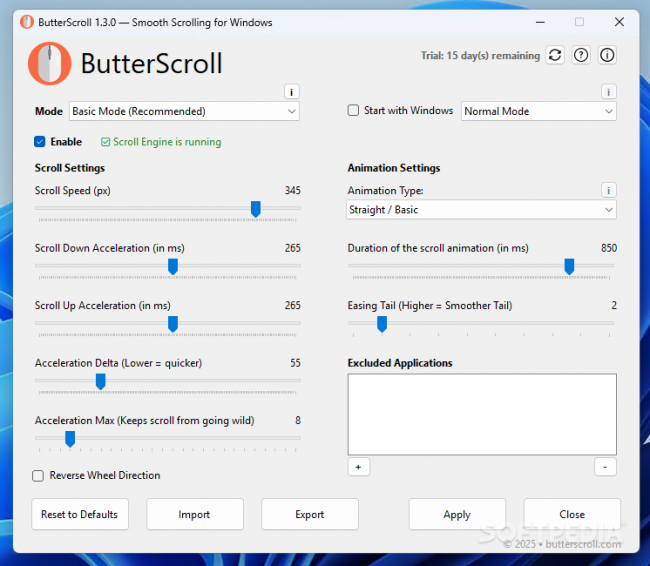
Description: Smooth scrolling on Windows just got better. Smooth scrolling for Windows is what ButterScroll is all about. It enhances how your mouse scrolls using custom speed and easing settings.

Looking for smooth scrolling windows experience? ButterScroll delivers exactly that.

Smooth scrolling functionality to all mice.
ButterScroll enhances your everyday scrolling experience with buttery-smooth scrolling precision, customizable control, and a satisfying feel across all your Windows apps — from browsers to spreadsheets.

Easy to setup and use
Smooth, fluid scroll animations for all apps.
Works with any mouse – no extra hardware needed.
Adjustable speed, acceleration, and easing.
Lightweight and optimized.
No tracking, no ads, full privacy control.

Release Name: ButterScroll 1.5.0
Size: 15.2 MB
Links: HOMEPAGE – NFO – Torrent Search

Download: RAPiDGATOR

4 Comments
Apr 24

Firetrust MailWasher Pro 8.0.109

Description: Receiving spam is like those telemarketers who call at dinner time, completely annoying and you didn't ask for it. Luckily you can stop this now! Now with free Android, iPhone and iPad version! Install MailWasher today to screen all your email accounts in one place and allow only the email you want in your inbox.

Install MailWasher today to screen all your email accounts in one place and allow only the email you want in your inbox. MailWasher lets you preview all your email before it gets to your computer or mobile device, enabling you to read all your email securely, and instantly delete any unwanted or suspicious email. Your remaining good email is downloaded to your PC or mobile device, so you avoid any spam or email viruses in your PC.

When you use mailwasher, the benefits become obvious.
Zero spam in your computer or mobile device.
Inspect any email before it gets to your computer or mobile device.
Never lose an email because you can’t afford to.
Intelligent spam tools ensure spam is caught and good email is not.

With over 8 million users, 22 languages and featured on both BBC World and CNN you can be confident that using MailWasher is one of the easiest ways to get rid of spam.

Receive only the email you want.
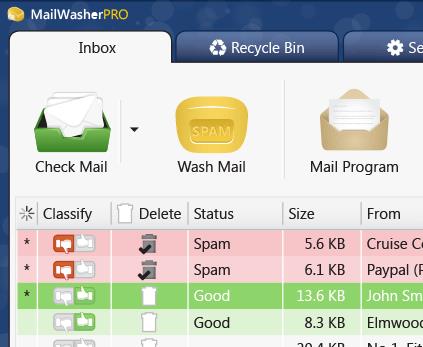
Check your email with MailWasher first. You’ll be safer knowing what’s waiting for you on the server, allowing you to quickly inspect and read your email and remove any unwanted messages quickly and easily.

Inspect all email before it gets to your computer.
View everything about your messages before they get to your computer so you can determine if they’re really spams, scams or good email. This means you can delete unwanted messages at the server so you only get the email you want.
MailWasher lets you view the email safely in plain text, but you can also inspect who it’s really from, who owns the company who sent it (WHOIS report) and all the hidden links.
Given that you can’t afford to lose any legitimate email, MailWasher lets you have the final say on it before letting you ‘Wash’ the spam away.

Intelligent spam tools.
Advanced spam detection technology and tools do all the hard work for you by automatically marking spam emails.
From simple friend's list, blacklists and learning filters to advanced custom filters, MailWasher has you covered.

Release Name: Firetrust MailWasher Pro 8.0.109
Size: 29.2 MB
Links: HOMEPAGE – NFO – Torrent Search

Download: RAPiDGATOR
3 Comments