Please REGISTER or RENEW your account on RAPiDGATOR.net and support us by doing through all RAPiDGATOR working download links on main posts...
Apr 23

O&O DiskImage Premium 22.6.1231 + WinPE

Incl. WinPE

Description: O&O DiskImage 22 lets you back up an entire computer or single files whenever you want – even while the computer is being used. In the event you should lose your personal data it can be quickly restored with just a few mouse clicks – even when Windows is no longer able to start.
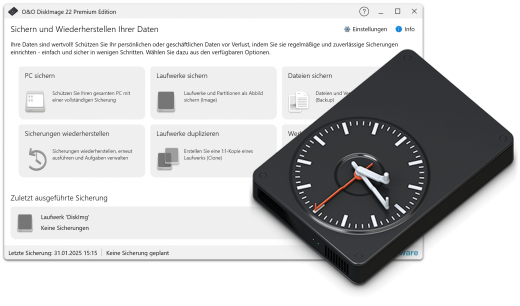
It also supports SSD drives and the latest UEFI System. O&O DiskImage lets you carry out a system restore and to duplicate or clone an entire PC or hard drive. You can even restore this backup onto a computer whose hardware is different from the original machine, for instance, where you have changed a motherboard on the target machine or have bought a brand new PC and want to restore an old backup onto it.

A regular backup is still something that many users prefer to avoid. At least that is until they suffer their first loss of important files as a result of software, hardware or user error: that’s when it becomes crystal clear just how valuable a reliable and up-to-date backup really is!

Comprehensive VHD / VHDX functionality
With the new version 21 it’s possible to convert image files made with O&O DiskImage into Microsoft Virtual Hard Disc (VHDX as well as VHD) image files. This can be especially useful if someone wants to first “rehearse” migrating from Windows 10 to Windows 11 because it can be done using a virtual machine created on the current system.

The new O&O DiskImage 21 can also create incremental and differential images of virtual drives. Combining or mounting these images is also possible. Whenever there’s a backup available, it only takes a few seconds to access any files that are needed. Work on the computer can then be continued without any loss of time or important data.

O&O DiskImage 21 with its own recovery partition
Normally with a backup or imaging program you need to create a boot medium (USB) to boot up your system if something goes awry. This you have to either carry around or store somewhere safe in case disaster strikes.

Thanks to the integration into the system, the O&O DiskImage RecoveryPartition can be accessed immediately so that the last system image can be restored directly. If the Windows operating system does not start or if faulty drivers have to be uninstalled – with the integrated recovery environment, all O&O tools are available to make the system operational again as easily as possible. Not only is this much more comfortable and quicker for the user, it also provides them with an extra level of security as this medium cannot get lost or damaged as easily as a “portable”, external one.

O&O DiskImage To Go
Previously, in addition to regularly backing up your machine, you also had to separately create an O&O DiskImage boot media to restore that backup. Everything is easier now! The new O&O DiskImage To Go function automatically turns an external hard drive (or USB flash drive with enough storage space) into an O&O DiskImage boot medium and marks this disk as the preferred storage medium for future system backups. As soon as you then connect this external USB hard disk to your computer, O&O DiskImage 21 automatically creates a backup. This makes it easy to create a recent backup. And if something really happens to your computer or you want to transfer your system and all your data to a new computer, then with the O&O DiskImage boot medium you can restore the backup stored on it with just one touch of a button. Without the hassle of searching for the boot medium and the external hard drive with the backup.

It has never been so easy to ensure the security of your data!

Further functions of O&O DiskImage

All default and advanced features are combined in one single product
This backup software is the safest and easiest way to avoid losing important personal files! Options are available for both auto backup and manual settings. Thanks to a unique recovery system that includes additional system recovery tools combined with O&O DiskImage you’ll quickly be able to restore all your important data – even if the backup you’re using was created with an older O&O DiskImage version.

Backup entire PCs, hard drives or files with the push of a button
When you back up a PC, O&O DiskImage saves all personal files as well as hard drive information and individual settings. This not only protects irreplaceable files but, in a worst case scenario, also saves you the trouble of having to carry out a time-consuming new setup of programs and the Windows operating system. O&O DiskImage lets you back up an entire computer, system and hard drives or just individual files and folders. To make sure your backups are always up to date, we recommend creating them at short intervals from one another.

Quick and easy system restore – even onto different hardware
Restoring a backup with O&O DiskImage is as easy as pie: all you have to do is start the program, select the backup you want to restore, and you’re off. Included with the software is our machine independent restoration which means your old backup can be transferred 1:1 onto a new machine. Hardware of a different make will be automatically recognized and Windows settings will be carried out by themselves.

Plug-and-play function
Anyone wanting to save data on an external hard disk has it even easier with the new O&O DiskImage 21. Thanks to the integrated plug-and -play option, selected files and folders can be backed up automatically as soon as, for example, an external hard disk is connected to the computer. This is ideal for users who forget to carry out regular backups or who don’t want to go through the trouble. Once configured, the auto backup function runs by itself.

Create a boot medium directly from within the program
O&O DiskImage can bring a system back to life immediately and with no installation required. It does so by way of a Boot Medium (USB Stick) which is based on the currently installed Windows system and which contains all the standard drivers required.

Made in Germany. Made in Berlin.
All O&O products are developed and serviced in Berlin. We at O&O are proud of our German heritage, and proud to represent the quality, security and satisfaction long associated with products “Made in Germany”. We take the concerns of our customers very seriously because we know just how important their data is for them.

Product features
- Backup an entire computer with the push of a button
- Backup system and hard drives, clone drives and entire disks
- Brand new file-based backup: now twice as fast as ever before – backup and restore individual files and/or folders
- Direct creation of VHD/VHDX
- Monitoring and warning of security risks
- Incremental/differential backup: back up only the changes
- Easily restore files, folders, drives and disks
- System restore onto different hardware (M.I.R.)
- Create a Windows Boot system directly from within the program with driver integration
- Plug-and-play: Selected files and folders are automatically backed up and synchronized
- Variable pixel density settings: adjusts to the selected DPI setting of the connected monitor
- New and enhanced functions Control via Command Lines
- Supports Windows 11 and Windows 10

* Backups that were created on older Windows versions 8.1, 8 and 7 with earlier versions of O&O DiskImage can still be restored.

System Requirements
The O&O DiskImage Premium is compatible with 11 and 10 (64-bit)

Release Name: O&O DiskImage Premium 22.6.1231 + WinPE
Size: 854.3 MB
Links: HOMEPAGE – NFO – Torrent Search

Download: RAPiDGATOR
6 Comments
Apr 23

Drive SnapShot 1.51.0.124

Description: Drive Snapshot creates an exact Disk Image of your system into a file, including the operating system, installed programs, your data and all security attributes - while windows is running and you continue to work.

Create Disk Image Backups, While Running Windows
The Backup process will back up all your data into a single file, containing all data, including system data and registry, for total security, should your computer ever crash. There is no restart (to DOS) necessary. Ever.

Continue your work, while the Backup is in progress
The new Snapshot technology ensures that all data are consistent, and reflect the PC's data at the start of backup.
There are no difficulties with opened files. Ever. This enables a very fast and easy way to back up servers and other computers, that must run 24 hours a day.

Easy Use and Restore of single Files or directories
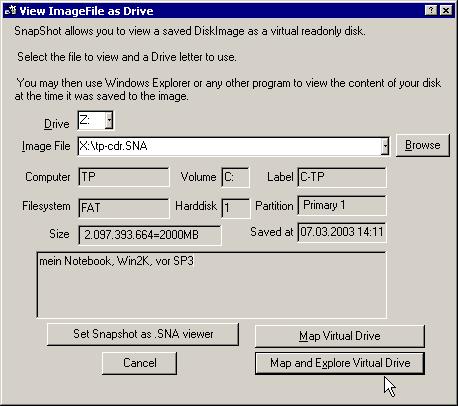
Drive Snapshot creates a virtual drive, containing all your drive's data.
You may use, compare, or restore these files directly from the Disk Image file.
This works with any program of your choice, including (of course) the Windows Explorer

Complete Restore of a disk in case of Disaster
If a disk is restored to its original state, it will be exactly the same as at the time of Backup - byte for byte.
Restoring a system partition will require DOS; other drives can be restored using Windows

Compatible with all Windows file systems (FAT16, FAT32, NTFS,ReFS)
Supports Linux EXT2/3/4/Reiser/XFS

Compatible with all Windows RAID Methods

Very easy and comprehensive command line interface
This makes automation of regular tasks a breeze.

System requirements:
Windows 2000,  XP,  Vista, 7, 8, 8.1, 10, 11, 2003 Server, 2008, 2008 R2, 2012, 2016, 2019,  2022, PE, Windows-X64
3 MB disk space + space to save the disk images.
32MB RAM if active, 0 MB if not active.
You need administrative rights to execute Drive Snapshot

Release Name: Drive SnapShot 1.51.0.124
Size: 11.6 MB
Links: HOMEPAGE – NFO – Torrent Search

Download: RAPiDGATOR
5 Comments
Apr 22

Windows 11 Education/Pro Education 25H2 Build 26200.8246 TPM Bypassed & Pre-Activated April 2026

Description: Windows 11, version 25H2 is an enablement update that builds on the features of 24H2 by enabling new, “continuous innovation” features, rather than introducing entirely new features itself. Key updates include a Braille Viewer for the Narrator, improvements to Click-to-Do (including a new “Convert to Table” feature), support for plug-in credential managers for passkeys, and enhancements to the mobile device companion experience. Microsoft is also implementing IT admin-focused features like the ability to remove pre-installed Store apps and a new Quick Machine Recovery system to reduce downtime.

Features


  1. Accessibility
    The Narrator now includes a Braille Viewer, allowing users to see the braille equivalent of on-screen text on a refreshable braille display.
  2. Passkeys
    Users can now utilize plug-in credential managers for setting up and using passkeys, offering improved security and management.
  3. Time & Language
    Ported settings from the Control Panel to the Settings app, including configuring additional clocks and changing the NTP time server.
  4. Mobile Experience
    The mobile device companion has a new, more accessible layout to view calls, messages, photos, and more from your phone.
  5. Click-to-Do
    New AI features for Click-to-Do are included, such as a new “Convert to Table” capability for converting text to an Excel table and more flexible selection methods.
  6. Quick Machine Recovery
    This new feature in the recovery system aims to reduce downtime and simplifies the process for recovering a system, according to PCMag.
  7. Removable Apps
    IT admins can now remove certain pre-installed Microsoft Store apps via Group Policy or MDM CSP on Enterprise/EDU devices.
  8. Feature Removals
    25H2 removes older components like PowerShell 2.0 and WMIC for greater security and efficiency.

Release Name: Windows 11 Education/Pro Education 25H2 Build 26200.8246 TPM Bypassed & Pre-Activated April 2026
Size: 6.7 GB
Links: HOMEPAGE – NFO – Torrent Search

Download: RAPiDGATOR
8 Comments
Apr 22

Microsoft Office Pro Plus 2021-2024 v2603 Build 19822.20182 (x64) Incl. Activator

Description: Microsoft has officially announced the availability of the final version of its Office 2024 release for Windows and Mac users. Following the release of the preview version in the first half of this year, the product has been refined and is now available to users. Office 2024 includes updated versions of apps from the suite, Word, Excel, PowerPoint, Outlook, Access, and Publisher.

Office 2024 includes virtually every change that has been added to the suite of programs in Office 365 over the past 3 years, although some features remain exclusive to subscribers. In addition to the main programs Word, Excel, PowerPoint, and Outlook, which are available for both Windows and macOS, the Access and Publisher versions are only available for Windows and are included, as usual, only in premiums. Visio and Project for Windows are also available, although they are not part of the ongoing release of Office.

Microsoft Office 2021-2024 includes
Microsoft Office 2021-2024 Professional Plus
Microsoft Access 2021-2024
Microsoft Excel 2021-2024
Microsoft Lync 2021-2024
Microsoft OneNote 2021-2024
Microsoft Outlook 2021-2024
Microsoft PowerPoint 2021-2024
Microsoft Publisher 2021-2024
Microsoft Visio Viewer 2021-2024
Microsoft Word 2021-2024
Microsoft Visio pro 2021-2024
Microsoft Project 2021-2024
Skype for business 2021-2024
OneDrive for Business 2021-2024
Office Shared Features
Profing Tools Only 2021-2024
And many more

Release Name: Microsoft Office Pro Plus 2021-2024 v2603 Build 19822.20182 (x64) Incl. Activator
Size: 5.9 GB
Links: HOMEPAGE – NFO – Torrent Search

Download: RAPiDGATOR

2 Comments
Apr 22

Pano2VR Pro 7.1.12

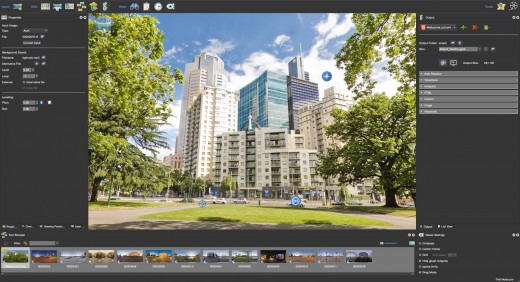
Description: Pano2VR is a powerful virtual tour software that converts your panoramic or 360° photos and videos into interactive experiences.

Whether you’re working on a single gigapixel panorama or a virtual tour with thousands of scenes, Pano2VR can help you create an immersive experience for any modern browser. Finished projects can be seamlessly integrated with existing websites and viewed on desktops and mobile or VR devices.

Build a Virtual Tour
From homes and real estate to museums and landmarks, virtual tours allow users to explore real places from around the world. In Pano2VR, link panoramic photo scenes, or nodes, using your choice of transitions and let the user navigate from scene to scene with just a click or tap. Provide greater location context to the scene by using our built-in Tour Map or by easily integrating floor plans or Google Maps.

Improve Your Images
Remove tripods and other image imperfections using Pano2VR’s Patch mode. With this invaluable tool, you can extract a defined patch area from the panorama without distortion, making it easier to retouch. Define and extract the image patch in Pano2VR. Then, edit it in your favorite editor. Once it’s saved, the modified patch will be automatically applied non-destructively to the panorama. Or never leave Pano2VR and instead use AI to correct the image for you.

Enhance the Experience
Add interactive elements like informational popups, photo hotspots, directional sound, and video to your panoramas. Use the included user interface overlays, called skins, or dive into the powerful Skin Editor to design custom buttons and controllers in your own unique interface design – all of which can be made responsive so that the design fits any screen. Create your skins or connect with the third-party designers here to help you achieve your goals.

Reveal the Highlights
Highlight significant scenes in your tours by creating animation paths that automatically navigate through each tour node. At any time, the viewer can choose to pause the animation to interact and explore further. You can even export this walk-through as a video file.

Zoom In
Pano2VR supports gigapixel images and multi-resolution so viewers can zoom deep in to the image to see amazing details. Load in the largest panorama you can find! Pano2VR can not only handle it but processing the panoramas is fast and the output is pixel perfect.

Show Your Work
Export panoramas in HTML5 format and upload to your web server. We even offer a handy plugin that lets you post your finished projects directly to your WordPress site.

Want to share your work in virtual reality? The program supports WebXR, which allows you to create a fully immersive VR experience directly from a web page so you can view projects on Apple Vision Pro and Meta Quest. Alternatively, use the  VRTourviewer  app integration for offline VR tours.

Google Street View
Pano2VR is a Street View ready application that gives you the ability to edit and publish tours to Google Street View.

Projections
Easily change projections during viewing or fly in from little planet view.

Directional Sound
Use Pano2VR's Sound Mode to add directional sound to your projects.

Droplets
If you need to create many projects on a regular basis, droplets let you do this with minimal effort.

Integrated Web Server
Pano2VR has a built-in web server so that once you create your tour, you can immediately see the results of an HTML5 output.

Video Panoramas
In addition to flat, cylindrical, and spherical panoramic images, Pano2VR also supports 360° videos.

Live Update
When Live Update is active, every change to the project is updated live in the browser after saving.

WordPress Plugin
Embed panoramas, VR tours, and object VRs in your WordPress site.

Release Name: Pano2VR Pro 7.1.12
Size: 186.5 MB
Links: HOMEPAGE – NFO – Torrent Search

Download: RAPiDGATOR
5 Comments
Apr 22

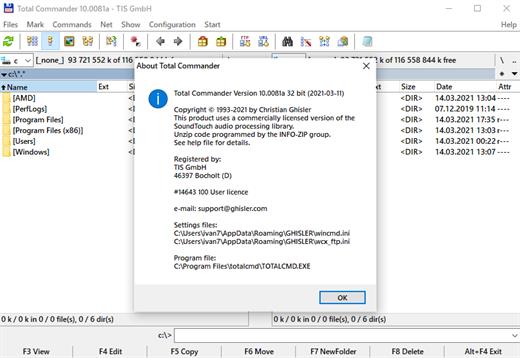
Total Commander 11.57 RC5

Description: Total Commander (former Wincmd) is a file manager for Windows similar to the Windows Explorer. But Total Commander uses a different approach: it has two fixed windows side by side like a well-known file manager for DOS.

Features
Two file windows side by side
Multiple language and Unicode support
Enhanced search function
Compare files (now with editor) / synchronize directories
Quick View panel with image and video display
ZIP, 7ZIP, ARJ, LZH, RAR, UC2, TAR, GZ, CAB, ACE archive handling + plugins
Built-in FTP client with FTPS (encrypted FTP) and HTTP proxy support
Multi-rename tool
Tabbed interface, regular expressions, history+favorites buttons
Thumbnails view, custom columns
Compare editor, cursor in lister, separate trees, logging, enhanced overwrite dialog etc.
Unicode names almost everywhere, long names (>259 characters), password manager for ftp and plugins, synchronize empty dirs, 64 bit context menu, quick file filter (Ctrl+S)
USB port connection via special direct transfer cable, partial branch view (Ctrl+Shift+B), and many improvements to ftp, synchronizing and other functions
And many more!

Release Name: Total Commander 11.57 RC5
Size: 11.2 MB
Links: HOMEPAGE – NFO – Torrent Search

Download: RAPiDGATOR
4 Comments
Apr 22

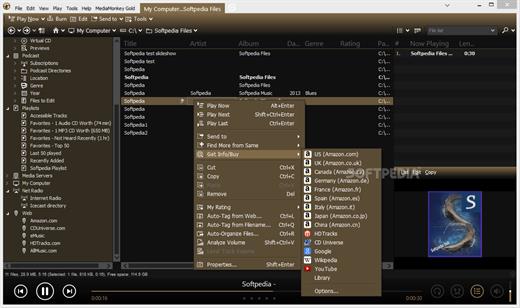
MediaMonkey Gold 2024.2.2.3220 RC3

Description: The media manager for serious collectors. MediaMonkey is the award-winning media organizer and player for serious collectors. It cleans the mess in your music and video libraries, and lets you share and enjoy them across all your devices.

High Performance
Manage thousands of music tracks and videos without missing a beat.

Manage All Your Media
Create collections for Rock, Classical, Audiobooks, Podcasts, or Movies. Classify using standard tags, custom fields, and multiple attributes per field.

Quality Hi-Fi
Fine-tune audio via a 10-band equalizer, DSP effect addons, volume leveling, and use WASAPI drivers to interface with your high-end digital audio equipment.

Auto-tag
Automatically identify tracks and look up missing metadata, artwork, and lyrics. Or use the manual editor for fine-grained control.

Remove Duplicates
Quickly find and eliminate duplicate tracks to clean up your collection.

Organize
Reorganize and rename media files into logical folders and filenames based on artist, album, title, year, etc.

Record and Convert
Record CDs to your library** and convert audio/video files while preserving tag information***.

Online services
Listen to online radio, find related content on YouTube, or sync Spotify playlists.

Podcasts
Automatically download and manage your favorite podcasts.

Device Sync
Sync audio/video and playlists with iPhone, iPod, iPad, Android and other devices, including artwork, ratings, play history. Auto-convert formats to play on any device.

Wi-Fi Sync
Wirelessly sync with [MediaMonkey for Android] and manage your library from your phone or PC.

Cloud Storage
Sync, store or back up your library content to cloud services such as Dropbox, Google Drive, or OneDrive.

Share
Share your library with TVs and consoles via UPnP / DLNA; or access content from another DLNA server.

Cast
Stream audio/video to Google Cast or DLNA devices (includes Media Controller and Media Renderer functions).

Enjoy!
Listen to your media* with leveled volume (via ReplayGain and MP3Gain), as they’re shared over Last.fm, with beautiful visualizations.

Playlists
Drag and drop files to create the perfect audio/video playlist. Or create AutoPlaylists based on complex search criteria.

Party
Use jukebox mode to let users make requests while preventing your library from being modified.

Auto-DJ
When your chosen tracks run out, let the Auto-DJ automatically play tracks based on criteria that you define.

Extend
Use custom add-ons, skins, and Winamp plugins† to add new functionality. Download add-ons or write your own.

Create Reports
Generate statistics and other reports of your music collection.

Work With Other Apps
Save metadata using standardized tags readable by other apps. Update the library in response to changes by other apps to media folders.

Release Name: MediaMonkey Gold 2024.2.2.3220 RC3
Size: 121.5 MB
Links: HOMEPAGE – NFO – Torrent Search

Download: RAPiDGATOR

7 Comments
Apr 22

AOMEI Backupper Technician Plus 8.3.0 + WinPE

Description: Complete Windows PC Data Protection and Clone Software. Automatically backup system, disk, files with different methods and schemes. Clone system and disk to another disk of different size without reinstalling. Keep files in two or more locations same via mirror, two-way or real-time sync.

Intelligent Backup
Backup system, disks, partitions, files, folders and all emails
Backup to internal/external storage, CD/DVD, NAS/network share, cloud as you want
Offer full, incremental and differential backup strategies to set customized backup plans
Backup to cloud storage with 3-2-1 backup strategy to save local space

Quick Restore
Restore system, disks, partitions, emails, files and folders to an earlier state
Restore the Windows system image to another computer and ensure it’s bootable
Create a bootable rescue media to restore the system easily when OS is unable to boot
Mount image files as virtual partitions to browse the contents and selectively restore certain contents as per your needs

Flexible Clone
Migrate an active OS from HDD to SSD without re-installation
Clone a hard drive to another disk, supporting conversion between MBR and GPT
Clone from a large disk to a small one, and vice versa

Diverse Sync
Sync files to local folders as well as other external storage devices
Provide different sync modes (“Basic Sync”, “Mirror Sync”, “Real-Time Sync”, “Two-Way Sync”) to personalize sync needs
Perform sync tasks automatically to keep a copy of frequently changed data

Cloud Backup is Ready
A local backup is the minimum requirement for data protection. However, adding online backup enables you to implement the 3-2-1 backup strategy. Cloud backup is an easy, secure, efficient method to add extra layer of protection for your data, reliably storing it off-site against hardware damage, ransomware, natural disaster, and other data loss risks. Meanwhile, economic cloud storage allows you to save expensive local drive costs.
1TB reliable and secure cloud storage
256-bit AES encryption
GDPR Compliance

Release Name: AOMEI Backupper Technician Plus 8.3.0 + WinPE
Size: 1.2 GB
Links: HOMEPAGE – NFO – Torrent Search

Download: RAPiDGATOR
5 Comments
Apr 22

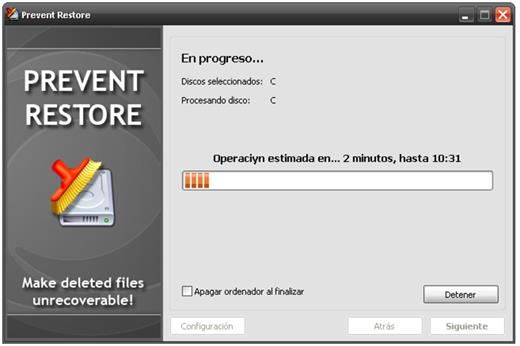
Prevent Restore Professional 2026 v120

Description: When you delete a file or folder (or empty the Recycle Bin) it's just marked as deleted and disappears from the list in Windows Explorer. But contents of deleted files still exist on the disk and can be easily restored for many years.

You may have thousands of already deleted files on your PC, whose contents still reside on your disk. Think of how many files that had been "deleted" were still on all those external hard drives that you gave to someone?

There is just one (and, luckily, simple) solution to prevent recovery of already deleted files - by overwriting all free disk space where the content of deleted files is located with random data. Thus, the content of old files will be replaced by new information and the old stuff will go away forever.

Release Name: Prevent Restore Professional 2026 v120
Size: 4.3 MB
Links: HOMEPAGE – NFO – Torrent Search

Download: RAPiDGATOR

6 Comments
Apr 22

Syncovery Premium 11.14.8.189

Description: The ultimate sync, backup, copy and migration tool. Syncovery will copy your data the way you need it - and fast!

Multiple Platforms
Syncovery will easily fulfill your requirements: on Windows, macOS, Linux, FreeBSD, and NAS systems. Copy between local drives, network shares, mobile devices via MTP, or using FTP, SFTP, or WebDAV and many others.

Cloud Support
Includes support for many different cloud storages, such as Google Drive, Box, Amazon S3, Azure, DropBox, OneDrive, Rackspace, Sharepoint, Backblaze B2, Citrix Sharefile, and many others.

Create multiple Jobs
Create as many different jobs as you need. Run them manually (with Sync Preview), or let the scheduler run them automatically.

Handle complex Tasks
Syncovery is rich in features, including real-time sync, compression, encryption, email notifications, and much more. It can be extended via PascalScript.

Wizard Mode makes it easy to create your first profile.
Create your first sync or backup job step by step, with explanations of the main settings you need to make. Each job (or profile) works with two paths – source and destination, or just the left and right path (since profiles can be 2-way copy tasks also).

Extremely Fast Scanning
Syncovery’s multi-threaded folder listing algorithm provides an unparalleled speed, and easily handles millions of files and huge numbers of folders. Even more speed can be gained with our Destination File List Cache and Remote Service features.

Block Level Copying
This will help you save bandwidth as well as backup space. Syncovery can detect changed blocks in large files, and copy only these. The detection works by keeping checksums in a database, or with the help of the Syncovery Remote Service, or by using our revolutionary File System Monitoring Service (the File Sytem Monitoring Service is Windows only).

Real-Time Synchronization
Real-Time Synchronization will make sure that changes are synced quickly. Syncovery listens to file system events and quickly performs the appropriate actions. For cloud servers, it can use polling to detect changes. These features are available on Windows and macOS only.

SmartTracking
The SmartTracking sync mode is frequently used in two-way sync jobs. It can detect moved files, deleted files, and conflicts (files changed on both sides).

Versioning
Syncovery allows you to keep multiple versions of modified files, allowing you to restore your files from an earlier date. The restore date can be chosen for individual files or multiple files, in our Restore Wizard.

File Server Migration
Syncovery’s advanced NTFS copying features, high speed, and scaleability enable you to perform large-scale migrations. Read our new, comprehensive Server Migration Guide.

Release Name: Syncovery Premium 11.14.8.189
Size: 69.8 MB
Links: HOMEPAGE – NFO – Torrent Search

Download: RAPiDGATOR
5 Comments