Please REGISTER or RENEW your account on RAPiDGATOR.net and support us by doing through all RAPiDGATOR working download links on main posts...
Apr 22

JP Software CMDebug 36.00.34

Description: CMDebug is a stand-alone version of the Take Command IDE and batch debugger. CMDebug is intended to help developers create a batch file to run in CMD (the Windows default command processor) or TCC-RT (the free runtime version of TCC). It provides a comprehensive set of batch debugging features specifically designed for batch file development.

CMDebug allows you to write and debug your CMD batch files with the integrated graphical IDE. CMDebug includes tabbed edit windows and a sophisticated debugger with single stepping, conditional breakpoints, syntax coloring tooltips, bookmarks, and tabbed breakpoint, call stack, variable, alias, and watch windows. Windows batch file programming has never been easier or more powerful!

You can use CMDebug to develop either CMD-compatible batch files (*.BAT or *.CMD), or faster (and far more capable) TCC-RT-compatible batch scripts (.BTM). If you select the "TCC Syntax" option, CMDebug supports the full TCC-RT command set. If you select the "CMD Syntax" option, CMDebug will disable TCC-only internal commands, variables, and functions, and use the limited Windows CMD batch file commands syntax. Some internal CMD / TCC commands will also behave slightly differently or modify their display output in order to match CMD's behavior (and bugs!) more closely.

Using CMDebug with the TCC-RT syntax option allows you to create and debug (and optionally encrypt) batch files using the TCC command language, and then distribute them with the free TCC-RT runtime on an unlimited number of target machines.

Release Name: JP Software CMDebug 36.00.34
Size: 42.8 MB
Links: HOMEPAGE – NFO – Torrent Search

Download: RAPiDGATOR

3 Comments
Apr 22

File Viewer Plus 6.2.2.120

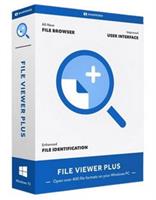
Description: Open hundreds of file types with one easy-to-use program. Edit Office documents, view and convert images, decompress archives, and much more.

The essential app for Windows
File Viewer Plus is a single app that opens over 400 file formats.
Open, edit, and save Office documents
View and convert PDFs
View and edit images, including camera raw files
Play audio and video files with the built-in media player
View and export CAD drawings
Decompress archives with the file decompression tool
Identify unknown files — even ones without file extensions

Open dozens of document formats, such as PDFs and Microsoft Office files, including Word, Excel, and PowerPoint documents. Edit text documents with the built-in word processor.
View over 100 different image formats, including JPG, PNG, and GIF. Edit images and save your changes using the built-in image editor.
Decompress several different archive formats, including ZIP, 7Z, RAR, and JAR.
Open and play dozens of audio formats, including MP3, M4A, AAC, and WAV. Convert audio files to different formats with the built-in converter.
Open and play dozens of video file formats, including MP4, MOV, AVI, and WEBM. Convert video files with the built-in converter.
Open many other file types, including Microsoft Visio files, Project files, and several different email file formats. View and edit source code files with the built-in source code editor.

More than a file viewer
Not only can you open hundreds of file formats with File Viewer Plus, you can also edit, save, and convert files.
Edit a Word document and save it as a PDF. Crop a raw image from a digital camera and export it as a JPEG. Convert thousands of files at once with the built-in batch converter.
NEW in version 5: Create new documents and spreadsheets.

Browse better
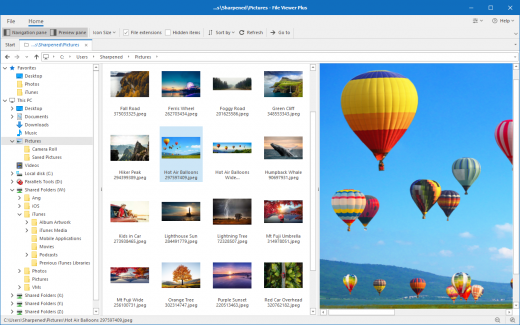
The built-in file browser provides an easy way to navigate folders and files on your PC. Open folders and browse directory contents within File Viewer Plus.
Quickly scan through hundreds of files and preview them directly in the file browser using the convenient split-view mode. Save your favorite locations for quick access.
NEW in version 5: Open an image file and scroll through all the images in the current folder, without leaving the image viewer.

Browse files and folders
View your PC's entire directory tree and select any folder to display its contents. Sort the contents of any folder.

Display file thumbnails
View thumbnail previews of your files, including many thumbnail formats not supported by Windows Explorer.

Preview before opening
Select a file and preview the file contents in the file browser's resizable preview pane.

Release Name: File Viewer Plus 6.2.2.120
Size: 168.8 MB
Links: HOMEPAGE – NFO – Torrent Search

Download: RAPiDGATOR

4 Comments
Apr 22

QR-Code Creator 7.6.1.4

Description: Create QR codes in no time on your PC. The best part is that the codes are generated without an internet connection. The software calculates the codes directly on your local computer, so you don't have to worry about your data being read by third parties.

You can easily paste the generated QR codes into almost any application using the clipboard.

The software is constantly being developed and now includes a built-in prompt generator in addition to numerous canvases for visual enhancement.

Release Name: QR-Code Creator 7.6.1.4
Size: 34.3 MB
Links: HOMEPAGE – NFO – Torrent Search

Download: RAPiDGATOR

4 Comments
Apr 22

Mountain Duck 5.2.1.28671

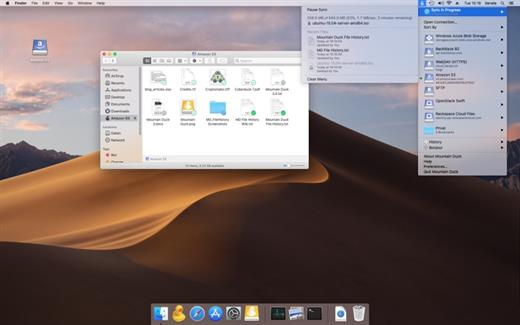
Description: Cyberduck for mounting volumes in the file explorer. Mountain Duck lets you mount server and cloud storage as a disk in Finder on macOS and the File Explorer on Windows. Open remote files with any application and work like on a local volume.

Smart Synchronization
View all files on your remote storage regardless if synced to your computer. Files are synchronized to your local disk when opened to allow offline usage.

Work Offline
Select files and folders to always keep offline on your computer. Other files are downloaded and cached on demand only and otherwise do not take space on your local disk.

Background Uploads
Changes are uploaded in the background as soon as a connection is available. Status icons indicate sync progress.

Fully integrated unobtrusive interface
Runs in the status bar on macOS or the system tray on Windows with sync progress, file history and connection management. Sync options at your fingertip with context menu in Finder and File Explorer.

Notifications
Notification badge when a file is added or updated on the server.

History
Detailed view of transfers in progress and history of recently edited files on your computer and on the server.

Share
Share files using the context directly in Finder on macOS and Windows Explorer. Create links for others that auto expire with Amazon S3, OpenStack Swift, Microsoft Azure, Backblaze B2 and others. Mountain Duck also supports creating shares in Dropbox, Google Drive, Backblaze B2, Microsoft OneDrive and NextCloud & ownCloud deployments

File Locking
Locking files to prevent conflicting edits from others when opening documents in Microsoft Office. Locks files on WebDAV servers when supported or alternatively using lock owner files.

Versions
Open and revert previous versions of files in versioned Amazon S3 buckets. Preview earlier versions with Quick Look or the default editor application.

Release Name: Mountain Duck 5.2.1.28671
Size: 119.9 MB
Links: HOMEPAGE – NFO – Torrent Search

Download: RAPiDGATOR

3 Comments
Apr 22

Xero Software TaxCycle Enterprise 15.1.61674

Description: Professional tax software for accountants and bookkeepers. From file carryforward to EFILE, get the Canadian tax software that simplifies tax compliance.

Exclusive Features

Reduced Data Entry
Carryforward conversions from other software. Auto-fill my return (AFR) data download. Carry back to prior years. Refresh carryforwards. Smart copy/paste. Corporate linking. Excel® import. SlipSync from slips to T1 returns.

Tools you can't live without
Electronic signatures, client portal, EFILE, Data Mining, DoxCycle, Client Manager and Template Editor help you serve clients better and faster. Customizable workflow. Review messages with quick fix solutions. Family Transmit all returns in a file at once.

Professional audit and review tools
Messages immediately alert you about potential issues. Quick Fix solutions help you resolve them in one click. Disable review messages you don’t need. Manage multiple reviewers with review marks and memos.

Intuitive form and field search
Form search that works like your favourite search engine. Search by keyword, line number, amount, account number, name, business, and more. On a form, search the words on the page to jump quickly to the field you need.

Familiar forms and shortcuts
Keyboard shortcuts and forms you've seen before. Forms-based screens for data entry. F4 Fast Find for natural-language search. Ctrl+F to find on a form. Get the full list of keyboard shortcuts.

Options for everyone
TaxCycle fits your office, whether large or small. Share only the options you want. Hide review messages you don't need. Configure status items, workflow tools and custom reports.

Release Name: Xero Software TaxCycle Enterprise 15.1.61674
Size: 693.6 MB
Links: HOMEPAGE – NFO – Torrent Search

Download: RAPiDGATOR

4 Comments
Apr 22

Perfectly Clear WorkBench 5.1.0.3198

Description: Perfectly Clear is the program's latest version, which also comes as a plugin for Photoshop & Lightroom. The essence of this development is simple; you have a picture, you do not like it, the skin is dull, pimples, in short, there are defects, now you can not bother with editing; a couple of clicks and here is a corrected photo, perfect, as it should be, not ashamed of social networks to pour. You can use the pens to adjust all correction parameters; many use automatic mode.

The program has 20 indicators for them that reconciliation and adjustment take place, and as a result, the picture is beautiful without any difficulties. The cameras have limitations; they can add noise to the picture, light a photo, make the skin tone terrible, etc. This plugin knows all these restrictions and will detect, eliminate, and provide; you only have to save the result.

The application will find and eliminate irregularities and other skin defects, work with dark circles under the eyes, remove excess shine in the picture, add shine, enlarge the eyes, whiten teeth, and tonify the skin. In short, now you can safely wake up and be immediately photographed; the program will process everything and be like candy, do not spend a couple of hours standing in front of a mirror.

What's New in Perfectly Clear WorkBench
Beautiful new interface
New image correction tools:
Preprocessing section for Input Looks and "Image Ambulance" for manual exposure corrections
"Face Aware" exposure for more accurate auto-exposure corrections in portraits and group photos
Black Point tool to deepen blacks
New Color Vibrancy tool to complement our previous "Vibrancy" control (now renamed to Color Restoration)
Sky and Foliage enhancements
Existing tools have been improved:
Added strength sliders to Light Diffusion and Vibrancy for better control
Better 'color pickers' for Skin Tone and Blush adjustments
Manually identify faces that are not detected automatically
One-click to zoom into individual faces
Modify facial regions to provide the best corrections
Histogram
Much improved preset management

Release Name: Perfectly Clear WorkBench 5.1.0.3198
Size: 276.7 MB
Links: HOMEPAGE – NFO – Torrent Search

Download: RAPiDGATOR

3 Comments
Apr 22

Anthemion Jutoh 3.30

Description: Jutoh - digital publishing for everyone. From brainwave to best-seller, Jutoh is your digital publishing assistant. Create top-quality fiction and non-fiction e-books - novels, self-help guides, poetry, children's books, autobiographies, and more. Convert your existing book or create it from scratch in Jutoh; edit and format; and output to Kindle, ePub, print, and even speech!
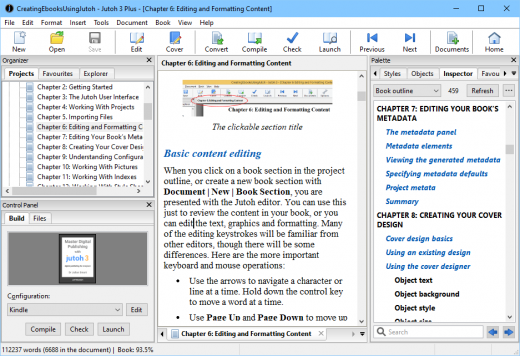
Import
Import your Word, ODT, ePub or text file into Jutoh and tweak the content and formatting. Jutoh will import pictures, tables and Word fields, and will split your book into chapters.

Export
Compile your book to Kindle, ePub 2/3, ODT (for PDF creation), HTML, text, Markdown, CBZ and MP3. Upload to Amazon, Apple, Kobo, B&N, and more. Fixed layout and reflowable Kindle and ePub books are supported.

Edit
Use the editor and styles to perfect your formatting. Jutoh provides many tools to help, including the Inspector tool, Find and Replace, Document Cleanup, support for footnotes, tables of contents, indexes and bibliographies, and much more.

Edit
Use the editor and styles to perfect your formatting. Jutoh provides many tools to help, including the Inspector tool, Find and Replace, Document Cleanup, support for footnotes, tables of contents, indexes and bibliographies, and much more.

Create
Jutoh comes with several creativity tools: the storyboard for planning, the writing prompt for exercising your writing muscle, writing goals for setting word count targets, and a character name generator. Plus, organise your thoughts and research in scraps.

Discover
Jutoh has hundreds of searchable 'knowledge base' articles for helping with using the software and solving problems. Jutoh also comes with a book Fiction: The Facts by novelist Harriet Smart, 40 further writing topics, and a selection of inspiring writing quotations.

Jutoh Benefits

Jutoh puts you in control
Instead of paying to outsource your manuscript formatting, you can do it yourself and put yourself in control of editing, formatting and publication. Or, ask your editing service to supply a Jutoh project that you can later edit if you need to. Many editing services and small publishers are already using Jutoh.

You also get far more scope to create a professional result compared with working with a word processor file; Jutoh's tools alert you of problems and allow refinement that a conventional word processor and simple file conversion can't give you. You've put in a lot of effort to get this far - don't compromise your book now!

Jutoh caters for all your format needs
With Jutoh, you don't need to edit your book multiple times for different ebook platforms.

Jutoh creates ebooks in Epub 2 and Epub 3, Kindle (Mobipocket), HTML, CBZ and plain text formats. Epub and Kindle cover most requirements - Epub is the standard with the most support from ebook reader manufacturers and publishers, including Apple, Google, Barnes & Noble and Kobo, while Mobipocket covers Amazon's Kindle platform.

Jutoh also creates OpenDocument (ODT) files, which you can open directly using OpenOffice or LibreOffice to create PDF or other linear formats. This is handy for targeting print-on-demand services - and Jutoh projects can be set up for print-on-demand through the use of page styles and other print-specific features. ODT files can be optimized for submission to the popular Smashwords platform.

Create as many books as you like
Unlike some solutions, Jutoh is a one-off purchase - no subscription, and no payments per book. Jutoh isn't 'cloud-based' so everything is local to your computer to put you in full control. If you want to come back to Jutoh in a year's time, you won't have to pay again - just download the latest version, and use your existing key.

Designed specifically for ebooks
Jutoh is designed for editing ebooks, so unlike a one-off file converter or conventional word processor, Jutoh gives you the tools to create the best possible ebook, generating clean code that will work on the greatest number of ebook platforms. Jutoh creates code to work around bugs and quirks in the ebook ereaders themselves.

Jutoh helps you import existing content
Jutoh helps you import existing content, whether from a word processor file, HTML files or even an existing ebook. You can decide how to split up a document into sections, using either styles in the document or a pattern that matches section headings. This makes creating your ebooks as quick and painless as possible.

Imported Epub/HTML content will be simplified as Jutoh does not retain all the original CSS - however import from DOCX and ODT, Jutoh's recommended import formats, preserves most styles.

Jutoh analyses your project and gives advice
Jutoh analyses your book during compilation, showing errors, warnings and tips. The advice Jutoh may give about your project includes: very large images, non-standard body text size, line spacing, blank paragraphs, accidental line breaks, direct formatting, problematic colour formatting, unused embedded fonts, large tables, unresolved links, and missing table of contents.

Along with each tip, Jutoh often gives quick links allowing you to locate the problem formatting or to find out more about it. This means that Jutoh goes far beyond just converting your book: it will give you the essential information and tools you need to improve your formatting, in order to produce the high quality ebook that your work deserves.

Jutoh helps your craft and creativity
You don't have to be a fiction author to use Jutoh, but if you are, Jutoh goes the extra mile to help your creativity.

Jutoh includes the fiction-writing how-to guide Fiction: The Facts, written by Harriet Smart, the author of sixteen novels including the Northminster Mysteries. In addition, there are 40 'Writing Recipes' containing valuable writing tips.

Motivate yourself with Writing Goals, and keep your writing muscle in peak form with the Writing Prompt feature.

Jutoh helps you store related material
Jutoh lets you store text, picture, and web notes together with the book content. So if you're writing or editing your ebook within Jutoh, you can easily refer to your notes or store text that doesn't yet have a place; or you can create scrapbooks of inspirational material.

Jutoh creates accessible documents
Jutoh can create MP3 audio files using a variety of text-to-speech systems, and has facilities for marking up text to improve pronunciation, pauses and other aspects of speech. Broaden your audience by providing your readers with a Speech Archive file which readers can turn into an audio book using the Jutoh demo.

Jutoh's Epub 3 support, adding semantic and structural information to a document, allows easier navigation of books by users with visual impairments.

Jutoh can also increase text size throughout an exported ebook or word processor file without changing the original document, making it easy to export large print documents by simply selecting a configuration and pressing Compile.

Jutoh is speedy
Jutoh is written in C++ so runs at top speed - no frustrating delays.
Fast to import your existing content, whether in text, HTML, Word DOCX, or OpenDocument.
Fast to create your Epub, Kindle or other format.
Fast to edit content and switch between variations of your ebooks.

Jutoh is multi-platform
Jutoh runs on Windows, Mac, and Linux, and you can easily copy your files between machines of different kinds. One licence can be used on multiple operating systems simultaneously; and rest assured that if you buy a different kind of desktop or laptop, you don't have to leave your way of working behind and buy new software.

Jutoh makes it easy to create ebook variations rapidly
Thanks to Jutoh's configurations, you can describe differences between versions of your book - for example, a different cover, title page, ISBN, links to other books, or formatting - all without needing separate projects. Just select a different configuration and click Compile. This is invaluable when you are distributing ebooks using different sites with slightly different requirements, and you can also use it to create samples for your own web site.

Built-in Epub checking gives you confidence
Jutoh installs the third-party EpubCheck checker program, so you can easily check your Epub book for internal errors or problems that might arise with specific readers. Jutoh will show the errors in context using its built-in Epub source viewer, with helpful tips to help you understand the errors.

Jutoh support is responsive and ready to help
We're a small company so when you ask for technical help, you're talking to the developer - and we're keen to make sure your experience is as smooth as possible. We improve Jutoh all the time in response to user feedback, and it's common for us to quickly make private releases to help with a user's specific problem. This way, we keep our users happy and we get to improve Jutoh for other users.

Release Name: Anthemion Jutoh 3.30
Size: 70.8 MB
Links: HOMEPAGE – NFO – Torrent Search

Download: RAPiDGATOR

5 Comments
Apr 22

All Video Downloader Pro 10.3.6

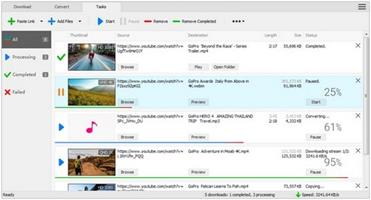
Description: All Video Downloader Pro is a professional Windows app for downloading and converting your favorite videos from video sharing sites. It accelerates your downloads by up to 5 times!

Features:

Download videos from hundreds of video sharing sites.
All Video Downloader Pro can download videos from YouTube, Facebook, Dailymotion, and hundreds of other video sharing sites. After downloaded, you'll be able to play them smoothly on your PC or mobile devices, even if you don't have internet access.

Accelerate downloads by up to 5 times.
All Video Downloader Pro features a multithreading download acceleration engine that can boost and increase your download speeds by up to 500% faster.

Download 4K, 2K, HD 1080p, HD 720p, and 3D videos.
All Video Downloader Pro allows you to download videos in different resolutions, including 4K/2160p, 2K/1440p, HD 1080p, HD 720p, 480p, 360p, and 240p. You can download 1080p HD videos to enjoy quality graphics on your TV, you can also download 240p videos in order to save space on your mobile devices.

YouTube to MP3 downloader.
All Video Downloader Pro allows you to download only audio stream directly from YouTube and save it as MP3, without downloading the entire video file.

Download entire playlist from YouTube at one time.
All Video Downloader Pro enables you to download an entire YouTube playlist with just a few clicks. All videos in the playlist can be downloaded automatically at one time.

Download multiple videos at a time.
All Video Downloader Pro supports simultaneous downloads that allows you to download more than one video at the same time.

Download subtitles in selected language and format.

Pause and resume downloads.
You may pause your downloads at any time. All Video Downloader Pro can resume broken download from where it was interrupted. You don't need to start from the beginning again.

Preview incomplete video while downloading.
While downloading, you can click the Preview button to play incomplete video and make sure that the content you are downloading is really the video of your choice.

Convert downloaded videos to any format.
All Video Downloader Pro can automatically convert downloaded videos to the format you choose. It supports MP4, FLV, WMV, MOV, ASF, AVI, DV, M4V, MKV, MPG, OGV, SWF, TS, VOB, WEBM, DVD, VCD, SVCD, and many others.

Optimize downloaded videos for any device.
All Video Downloader Pro can automatically optimize downloaded videos for your mobile devices, so you can watch them on your iPhone, iPad, Android phone, Android tablet, Xbox, Windows phone, PSP/PS4/PS3, Samsung Galaxy, etc.

Video to MP3 converter.
All Video Downloader Pro is capable of extracting audio streams from videos and save them as MP3, WAV, WMA, AC3, AAC, OGG, M4A, FLAC, MP2, or any other audio format.

Video and audio converter.
All Video Downloader Pro is a powerful video and audio converter too. It allows you to convert any video/audio files on your disk to the format you wish so that they are playable on your media player or mobile devices.

Ready-made video/audio format presets.
All Video Downloader Pro provides ready-made presets for all popular video and audio formats. You can also custom output video/audio format settings.

Schedule downloads.
All Video Downloader Pro can automatically start downloads at a set time, and shut down your computer when all done. You will no longer have to wait for your long list of videos to finish downloading.

Support drag-and-drop.
You may simply drag and drop a video link/URL from your web browser to All Video Downloader Pro's Drop Box to start a download. You don't even need to copy and paste video link/URL manually.

All Video Player.
All Video Downloader Pro includes a simple and easy-to-use media player - All Video Player, for playing MP4, WebM, FLV, MP3, AAC, and any other format video/audio files that Windows Media Player cannot play.

Release Name: All Video Downloader Pro 10.3.6
Size: 148.2 MB
Links: HOMEPAGE – NFO – Torrent Search

Download: RAPiDGATOR

5 Comments
Apr 22

Astute Graphics Plug-ins Elite Bundle 4.5.1

Description: Makers of award winning, time saving and creative tools such as Phantasm, VectorScribe, WidthScribe and many more. Get the complete set of plug-ins and transform your workflow in Illustrator. Add speed, ease and precision with all of our plug-ins and become an Astute Graphics Plug-ins Elite Bundle!?

AstuteBuddy
Keyboard shortcut panel

Autosaviour
Autosave, backups + reminders

DirectPrefs
Nudge distance, angles + guides

ColliderScribe
Precise alignment + selection

DynamicSketch
Intuitive vector sketching
FindReplace
Instantly locate + modify objects

InkFlow
Drawing + lettering in one tool

InkQuest
Pre-press controls and checks

InkScribe
Precise path creation

MirrorMe
Instant symmetry

Phantasm
Instant color control + halftone

Rasterino
Image crop + editing

Stipplism
Live stipple effect

Stylism
Live effects made easy

SubScribe
Create accurate artwork

Texturino
Textures + opacity brush

VectorFirstAid
Clean up vector documents

VectorScribe
Editing, shapes, corners + measure

WidthScribe
Variable stroke width effects

Reform
Shape + manipulate

Texturino Texture Packs – Pro
– High quality repeating and non-repeating textures
– Import your own textures
– Quickly and naturally brush an opacity mask
– Organize your textures in the texture manager

System Requirements:
– Adobe Illustrator 2022
– Windows 11/10/8/7 (64-bit)

Install Notes:
– Install pre-done setup.
– Setup located in default AI installation directory.
– Tested on AI 2022 latest update without problems.
– Plug-in can be found under Window menu in AI.

Release Name: Astute Graphics Plug-ins Elite Bundle 4.5.1
Size: 665.4 MB
Links: HOMEPAGE – NFO – Torrent Search

Download: RAPiDGATOR
6 Comments
Apr 22

JP Software TCC 36.00.34

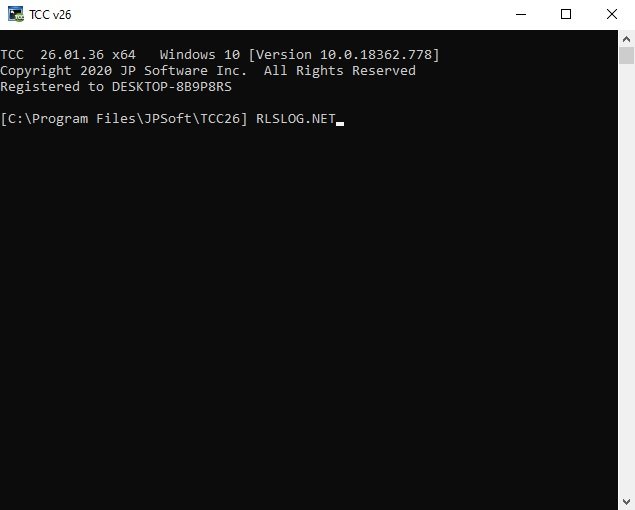
Description: TCC: Upgrading the Windows CMD Command Line Prompt. The command line is essential for developers, systems administrators and advanced users, offering many advantages to anyone wanting to save time, expand their control and/or to automate their tasks.

TCC is our console mode Windows command processor (formerly known as 4NT). TCC is a replacement for CMD.EXE, the default Windows command processor. TCC is compatible with your existing Windows console applications and batch files, but offers major improvements to the CMD prompt in command line editing, interactive file and system management, batch file programming and debugging.

TCC is a superset of CMD, with 275+ internal commands (CMD has about 42), 800+ internal variables and functions (CMD has 6), hundreds of additional options for existing CMD commands, and thousands of additional features.

Whether you're a seasoned CMD prompt user or just getting started, TCC is the tool that will take your command line prompt experience to the next level.

Why Switch From the CMD Shell to TCC?

Familiarity
TCC is a CMD replacement Windows command processor that is compatible with your existing CMD commands and batch files while adding hundreds of new commands, variables, and variable functions.

Productivity
TCC provides vastly improved line editing and tab file completion, and adds thousands of new features. You're immediately more productive, and you can learn TCC's new features at your own pace.

Batch Files
Create and debug your batch scripts in a fraction of the time with TCC's integrated editor and batch file debugger.

Comprehensive Help
The extensive help (including context-sensitive popup help for command and variable syntax) speeds your development time and reduces errors.

Syntax
TCC's internal commands share a consistent syntax, reducing your learning and development time.

Multilingual
The user interface is available in English, French, German, Italian, Russian, and Spanish. (Online help is available in English, French, German, and Spanish.)

Release Name: JP Software TCC 36.00.34
Size: 55 MB
Links: HOMEPAGE – NFO – Torrent Search

Download: RAPiDGATOR

5 Comments