Please REGISTER or RENEW your account on RAPiDGATOR.net and support us by doing through all RAPiDGATOR working download links on main posts...
Apr 20

Adobe Illustrator 2026 30.3

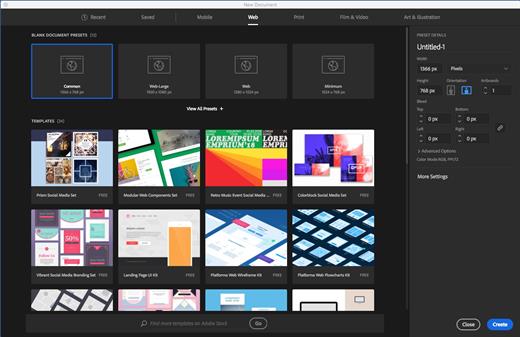
Description: The industry-standard vector graphics software is used by millions of designers and artists to create everything from gorgeous web and mobile graphics to logos, icons, book illustrations, product packaging, and billboards.
Iconic work at any size.
Get all the drawing tools you need to turn simple shapes and colors into sophisticated logos, icons, and graphics. Illustrator artwork is vector-based design software, so it can scale down for mobile screens and up to billboard size . and always look crisp and beautiful.

Gorgeous typography that says it all.
Incorporate a company name into a logo, create a flyer, or mock up a website design with the best type tools out there. Add effects, manage styles, and edit individual characters to create typographic designs that perfectly express your messages.

Draw attention everywhere.
Create freehand drawings, or trace and recolor graphics to turn them into works of art. Use your illustrations anywhere, including printed pieces, presentations, websites, blogs, and social media.

Pro power comes standard.
Illustrator launches, saves, and renders effects faster than ever before. Reuse your vector graphics and quickly access unlimited fonts. Work seamlessly with other Creative Cloud apps like Photoshop, InDesign, XD, and Premiere Pro. Your graphics, styles, and text are stored in the cloud, so they.re always up to date and at your fingertips.

Release Name: Adobe Illustrator 2026 30.3
Size: 3.43 GB
Links: HOMEPAGE – NFO – Torrent Search

Download: RAPiDGATOR

2 Comments
Apr 20

Adobe Bridge 2026 16.0.3

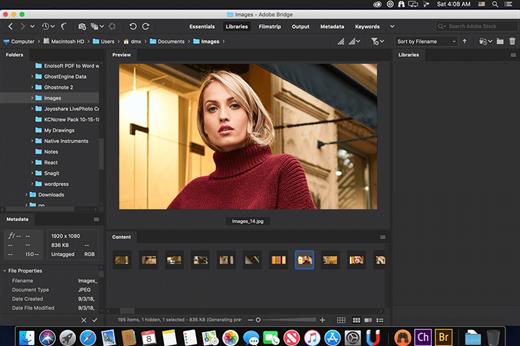
Description: Bridge gives you centralized access to all the files and assets you need for your creative projects. Organize personal and team assets, batch edit with ease, add watermarks, set centralized color preferences, and even upload your photos to Adobe Stock. Bridge simplifies your workflow and keeps you organized and now with CC Libraries.

Features
- Bulk import, export and preview CC Libraries assets
- Edit photo capture time
- Export/ Import network cache
- Native PDF Output Module
- Easy upload of images to Adobe Stock so you can get royalties for your work
- Support for Retina and HiDPI displays with the ability to scale
- Automated cache management
- Publishing to Adobe Portfolio to build your personalized website
- Quick organization and stacking of panoramic and HDR images
- On-demand thumbnail and metadata generation
- Option to import photos and videos from your mobile device or digital camera on macOS
- Support for CEP HTML5
- Flexible batch processing
- Drag-and-drop file flexibility
- Centralized color settings

Consistent user experience
Adobe Bridge now has an enhanced user interface to provide you a similar experience like other Creative Cloud applications. You can also change the default user interface appearance, text size, and scaling by setting the User Interface preferences in the Edit > Preferences > Interface dialog.

Enhanced Creative Cloud Libraries
The Libraries workspace in Bridge now displays a high-quality preview of library items. You can select multiple items to see their previews together.

Centralized cache management
You can now share a cache with other Bridge users and let them use the shared cache instead of creating a cache. Any Adobe Bridge user can export a cache to a shared folder, and other users can import a copy of the shared cache to their local systems. Given that the systems are in synchronization, managing the cache at a centralized location lets you reuse the exported cache, without the need to rebuild the cache on different user machines. You can create and manage the shared cache by using the Manage Cache dialog (Tools > Manage Cache), which has now been enhanced to provide options for building, importing, and purging cache. In addition, the cache preferences have been enhanced (Edit > Preferences > Cache and Edit > Preferences > Cache Management).

Edit capture time
Adobe Bridge now lets you change the capture time of the JPEG and RAW image files, just like the way it is done in Adobe Lightroom. This feature is helpful if you travel to a different time zone and do not change the date or time setting of your camera before you start photographing. With this feature, you can edit the capture time after capturing the image.

Support for XD file formats
Bridge now supports preview, thumbnail generation, metadata tagging, and keyword generation for Adobe XD files.

Media cache preferences
Bridge now processes and maintains a cache of all audio and video playback files. This capability improves the performance of playback files because the files are available for ready access whenever you want to view them later. It is recommended that you regularly clean the old and unused media cache files to optimize the performance. The preferences for media cache can be set by choosing Edit > Preferences > Media Cache.

Cut, copy, or move files and folders across Bridge and File Explorer or Finder

Bridge now lets you perform the following operations
- Cut, copy, or move files and folders from File Explorer (Windows) or Finder (macOS) and paste them in Bridge
- Cut, copy, or move files and folders from the Bridge workspace and paste them in File Explorer (Windows) or Finder (macOS)

Release Name: Adobe Bridge 2026 16.0.3
Size: 2.72 GB
Links: HOMEPAGE – NFO – Torrent Search

Download: RAPiDGATOR
2 Comments
Apr 20

4DDiG File Repair 4.3.11

Description: AI File Repair Expert. Effortlessly Repair any videos, photos and files that are blurry, overexposed and corrupted. AI enhance photo quality, sharpen detail, and colorize photos. Effectively improve video quality and boost resolution up to 8K. Expertly repair corrupted files, including XLSX, DOCX, PPTX, EPUB, PDF and more. Seamlessly repair corrupted audio files in M4A, MP3, AAC, WAV and FLAC formats.

Supported Formats

Photos:
Support all popular image file formats, including JPG, JPEG, PNG, RAW, SRW, CRW, RAF, SVG, TIFF, CR2, DNG, HEIC, etc.

Video:
Fix a variety of video formats, covering MP4, MKV, AVI, MOV, M4V, WMV, 3G2, 3GP, FLV, MPEG, MTS, MXF, RMVB and SWF files.

Audio:
Support the most common audio formats, including MP3, M4A, AAC, WAV, FLAC, etc.

Files:
Easily repair corrupted DOCX, DOCM, DOTM, XLSX, XLSM, PPTX, PPTM, POTM, PDF, ZIP, EPUB, AI, PSD and PSB files.

Supported Devices
The 4DDiG File Repair software supports all computer drives, USB flash drives, memory stick, SD card, and other storage media used in camera, drone, CCTV, etc.

Release Name: 4DDiG File Repair 4.3.11
Size: 217.6 MB
Links: HOMEPAGE – NFO – Torrent Search

Download: RAPiDGATOR

7 Comments
Apr 20

Quick Utilities Suite 4.6.0

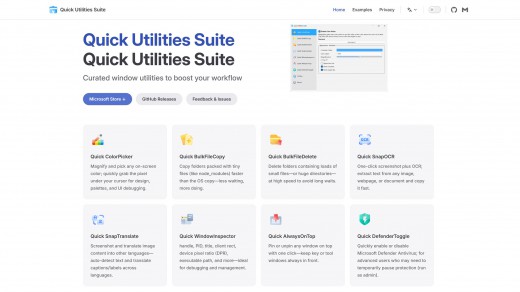
Description: Quick Utilities Suite - bring display control, window tools, file-heavy workflow utilities, capture, translation, and color tools into one product family. Curated desktop utilities to supercharge your workflow — all in one toolkit. (Quick ColorPicke, Quick BulkFileCopy, Quick BulkFileDelete, Quick SnapOCR, Quick SnapTranslate, Quick WindowInspector, Quick AlwaysOnTop, Quick DefenderToggle, Quick BrightnessSync and More ...)

Quick BrightnessSync
Real hardware brightness control for external monitors, designed for desks that run across two, three, or more displays.

Quick AlwaysOnTop
Keep reference windows, meeting panels, calculators, chats, and support tools visible while the rest of your workspace keeps moving.

Quick Utilities Suite
Bring display control, window tools, file-heavy workflow utilities, capture, translation, and color tools into one product family.

Window and troubleshooting tools
WindowInspector and related desktop utilities help technical users work faster without adding heavy, fragmented software.

File-heavy workflow support
Bulk copy and bulk delete help with project trees, mirrored assets, package folders, and repeated cleanup tasks.

Screen capture and language tools
SnapTranslate + ColorPicker extend the suite for cross-language work, visual QA, and fast content capture.

Two core experiences for serious Windows desktops
Quick BrightnessSync and Quick AlwaysOnTop represent two of the most practical improvements you can make to a Windows workstation. One makes multi-monitor control cleaner and more comfortable. The other keeps the right window visible at the right time without disrupting the rest of the desktop.

BrightnessSync for multi-monitor desks
If your setup depends on external displays, Quick BrightnessSync replaces monitor-button routines with a single, direct control surface. It is a practical tool for long work sessions across development, analysis, trading, operations, and content review.

AlwaysOnTop for focused multitasking
Quick AlwaysOnTop keeps reference material, live support windows, calculators, translators, and meeting panels within view while you continue working elsewhere. It fits naturally into office, technical, and support workflows because it improves the desktop you already have instead of asking you to work differently.

One product family for serious desktop workflows
Quick Utilities Suite brings these tools together with file, window, capture, translation, and color utilities for users who want a more complete professional Windows toolkit.

Release Name: Quick Utilities Suite 4.6.0
Size: 302.2 MB
Links: HOMEPAGE – NFO – Torrent Search

Download: RAPiDGATOR

7 Comments
Apr 20

Local Transcriber Pro 1.2.3

Description: Local Transcriber Pro processes voice entirely on your device. With no data sent to the cloud, it’s perfect for confidential meetings and areas with poor connectivity. Designed for efficiency: works smoothly on standard office laptops without high-end hardware.

Completely Local Processing
Not a single bit of voice data is sent externally. Ideal for meetings containing confidential company information.

No Time Limit
There is no limit on meeting time. It records long meetings lasting several hours to the very end.

Teleconference Support
It transcribes microphone audio simultaneously with online meeting audio, so you can transcribe your own remarks as well.

Transcription of Recordings
In addition to real-time transcription, it is possible to transcribe voice recorders or audio files saved by this app.

English Support
This version supports English transcription.

Ultra-High Precision AI Engine
- Adopting the latest neural network technology (Sherpa-Onnx), it recognizes speech with high precision.
- You can select the "High Precision Model" available in the[Pro] version.

Ghost Subtitle Mode
You can display real-time subtitles overlaid on other applications (web meeting tools, materials, etc.).

System Requirements
- OS: Windows 10 version 19041.0 or higher
- Memory: 8 GB (Minimum), 16 GB (Recommended)

Release Name: Local Transcriber Pro 1.2.3
Size: 1.9 GB
Links: HOMEPAGE – NFO – Torrent Search

Download: RAPiDGATOR

3 Comments
Apr 20

Altium Designer Agile 26.5.0 Build 17

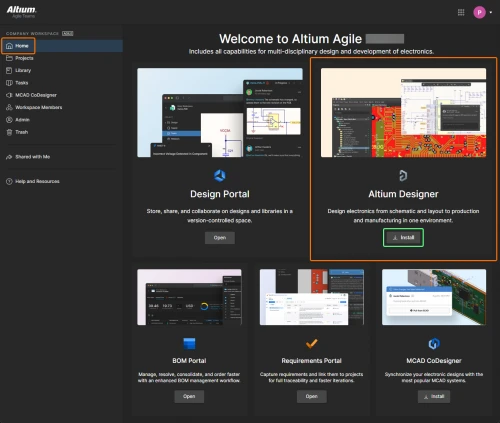
Description: Control Without Complexity. A platform-based solution for electronics product and systems development.

Fast Time-to-Impact
Scales with your needs for control, connectivity and compliance, without sacrificing speed and agility.

Enterprise Power, Without the Weight
Delivers the capabilities of traditional enterprise systems, without the complexity.

Adapts to Existing Environments
Integrates seamlessly with existing tools, systems and processes.

Users
Discover how Altium Agile empowers development organizations by seamlessly connecting users and engineering systems with integrations to Jira, PLM (Enterprise), and access to SiliconExpert and Z2Data components and supply chain data.
Supply chain intelligence improves decision making and reduces the risk of production disruptions
Seamless multidisciplinary engineering integration within a unified project environment, eliminates need for file exports/imports
Robust connectivity with enterprise systems, including but not limited to PLM, Jira, and requirements management

Data
Explore how Altium Agile manages and secures critical engineering data while streamlining access, traceability, and validation. From isolated environments to real-time supply chain checks, data is accurate, protected, and actionable.
Single-tenant and on-premise environment for enhanced data isolation and security
Track project and process data—including guest access, workflows, and milestones—for full visibility and auditability
Real-time supply chain intelligence helps verify component data against standards and requirements, reducing risk and improving design reliability

Processes
Explore how Altium Agile supports efficient and secure electronics development processes through configurable, structured workflows and external contributor management.
Maintain process integrity with separate production and pre-production environments, allowing teams to safely test updates without disrupting active workflows
Collaborate with external contractors while managing access through granular data sharing that align with defined process boundaries and security protocols
Design and manage workflows that reflect your organization’s best practices, enabling consistent, repeatable processes that drive quality and efficiency across projects

Release Name: Altium Designer Agile 26.5.0 Build 17
Size: 3.1 GB
Links: HOMEPAGE – NFO – Torrent Search

Download: RAPiDGATOR
3 Comments
Apr 20

IDimager Photo Supreme 2026.2.2.8972

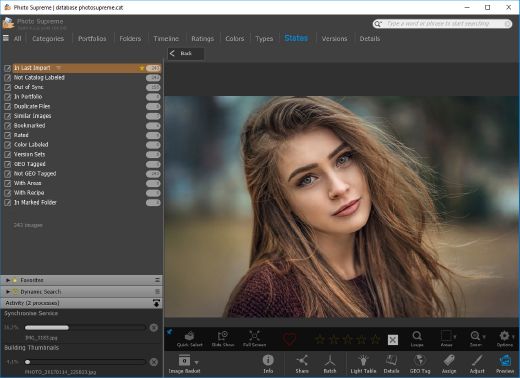
Description: Photo Supreme v2026 is a thoughtful and forward-looking release. This update has focused on smarter discovery, faster performance, and modern workflow expectations, especially around large catalogs, mobile integration, searches, and team environments.

Import and Select
One of the standout additions in Photo Supreme v2026 is the new multi-pass Import and Select workflow. This allows users to review and refine image selections in multiple stages instead of making all decisions in one pass. It’s especially useful for large shoots, letting photographers cull images more deliberately and with less pressure. In addition, the Import and Select feature now loads images faster than ever. Mac users will also appreciate direct iOS device importing, which makes it possible to bring photos straight from an iPhone or iPad into the catalog without relying on intermediary software. This significantly streamlines mobile-first workflows.

Powerful Searches
Photo Supreme now supports natural language searching, allowing users to find images using plain, conversational phrases rather than rigid metadata queries. This feature is powered by AI services such as OpenAI, Google Gemini, or local models with Ollama. This gives users flexibility in how advanced features are enabled. In addition, a new classification system enhances search accuracy by grouping images into meaningful categories upon import, making it easier to surface relevant results in large or complex catalogs.

Video & Media Handling
For users working with video, Photo Supreme v2026 introduces hover-based video previews. Simply hovering over a video thumbnail now reveals a short animated preview, making it much faster to identify clips without opening them individually. Support for modern formats has also been expanded, ensuring the software keeps pace with current media standards.

Sharing with ZIP
Exporting images is more flexible in v2026 thanks to ZIP output support in transfer profiles. This makes it easy to bundle images into a single archive for delivery, backup, or client sharing, all directly from within Photo Supreme. These enhancements simplify distribution workflows and reduce the need for external tools.

GEO Maps
GEOgraphic-Mapping features can now generate maps using not only Google Maps, but also OpenFreeMap with OpenStreetMaps. This removes the need for API keys while still delivering rich, interactive map displays. This update makes location-based browsing easier to configure and more accessible for all users.

Performance and Refinements
Photo Supreme v2026 delivers notable performance enhancements, resulting in faster browsing and a more responsive overall experience. Response times are improved by up to 10%, with especially noticeable gains for large libraries containing many catalog labels.
Catalogs with numerous stacks also see significant performance improvements, particularly when displayed in stacked views.
v2026 includes a wide range of refinements, such as: "Visually similar" stack detection, numerous stability fixes and workflow enhancements, polished UI behavior in collections, searches, and metadata handling

Wait, there's more, a lot more…
New "RAW Files" and "Video Files" catalog states
Added support for Google Gemini as an AI service
Added support for OpenAI GPT-5.2 as an AI Service
Added support for Ministral3 model with Ollama
Added file management support for ACR sidecar files
Update HTTP Server with Photo Supreme Online (Server Edition)
Faster face recognition
Added "AI-Estimated GEO Location" to the AI Panel
Faster result display in the Collection Viewer
"Cascade Metadata" from image to Stack or Version Set is now a background process
A highlighted stroke has been added to the active tabs, improving navigation
Now you can display metadata charts and graphs across multiple tabs
Added support for Ctrl/Cmd+Z functionality in text and memo fields
Defined the new Affinity v3 .AF and .AVIF file format as a supported "other file format"
Switching the collection viewer's view style is faster (eg from Basic to Grid to Clean to Custom Thumb Info)
Advanced Search now has an option to search by "File Size" and "File Size MB"
Finetuned the check for "need to compact" on PostgreSQL (Server Edition)
Bookmark keyboard shortcuts are now a "toggle", similar to ratings and color labels
Expanding nodes in the Catalog Tree is ~25% faster
When using the "Dump Full to Catalog File" feature, there's now the option to create either a "catalog dump" file, or a "catalog with thumbs" dump files
Added a XMP Storage Location for "original file AND non-standard sidecar file"
In "Stacked View", you can now select a specific item from the stack to show
Support for PostgreSQL 18.
And more…

Highlights for v2026
Multi-Pass "Import and Select": Seamlessly transition through passes with a fast-culling system that optimizes your workflow.
Direct iOS Image Import on macOS: Import images directly from your iOS devices with ease.
Video Thumbnail Preview: Hover over a video thumbnail or open the Quick View to view a live video preview.
Natural Language Search Powered by AI: Search your content using plain language, with smart integration through OpenAI, Google Gemini, or Ollama models.
Transfer Profiles can now create ZIP output files: Copy or send sets of images as a single ZIP file for easier sharing.
Maps with OpenFreeMap: Display images on interactive maps using OpenFreeMap/OpenStreetMaps with no API key needed.
Server Edition Thumbnail Caching: Enjoy faster performance with local thumbnail caching, automatic cleanup, and customizable settings for retention and cache size.
Classifications: Enhance search accuracy with an automatic image classification mechanism on import.

Release Name: IDimager Photo Supreme 2026.2.2.8972
Size: 163.1 MB
Links: HOMEPAGE – NFO – Torrent Search

Download: RAPiDGATOR

5 Comments
Apr 20

iBeesoft Data Recovery 5.0.0

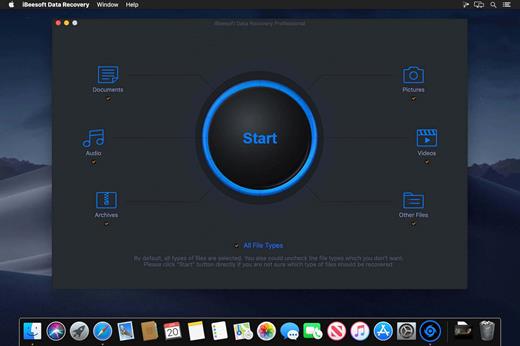
Description: Professional Recovery Data Software for PC to Find Your Lost Files Quickly. No matter what’s the reason for data loss, it can retrieve files from various storage devices in Windows 11/10/8/7 in the easiest way, even if the disk is damaged. Additionally, our tool can also repair corrupted files resulting from overwriting, file structure errors, or other causes.

Reasons Why You Can't Refuse iBeesoft Data Recovery
File loss is not terrible. There is a chance you can find it back as long as you apply the right data retrieval software and take quick action before residual information is overwritten. So, our program offers the following features that can help you yield the best recovery result.

Easy to Use
The File Explorer-like interface with detailed instructions of this program makes file recovery easier than ever.

99.5% Recovery Success Rate
Thanks to the built-in advanced intelligent search algorithms, which can perform sector-level scanning and display an entire list of items you lost/deleted in minutes so that you can restore them with one click.

One-to-one Expert Service
No matter what kind of data loss problem you have, our technical experts are available to assist you 24/7.

Intelligent Analysis
Multi-threaded scanning of storage devices can not only accurately find the metadata but also reconstruct the damaged part.

Other Capabilities
Record the last scan results automatically and support export/import, file filtering, quick search, and more.

Release Name: iBeesoft Data Recovery 5.0.0
Size: 54.2 MB
Links: HOMEPAGE – NFO – Torrent Search

Download: RAPiDGATOR

5 Comments
Apr 20

RoboTask 10.6.7

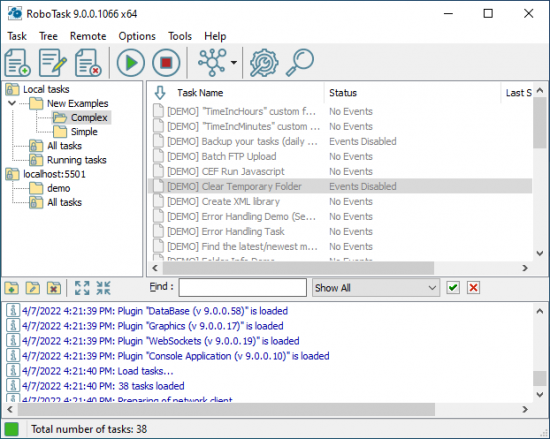
Description: RoboTask is a task automation software that can easily automate any series of tasks without writing code. The program allows to easily create simple macros, as well as highly complex automations, involving conditional logic, loops, custom variables and other advanced options.

Better Alternative to Windows Task Scheduler
You can schedule jobs to run at specified times or at regular intervals (every N seconds, minutes, hours, or days). However, RoboTask is more than just an efficient replacement for Windows Scheduler. Practically any event on your computer can trigger RoboTask to perform a specific action. For instance:
hotkey or keyboard shortcut;
file monitor (when a particular file is created, deleted, changed, or renamed);
window watcher (when a window is created, activated, closed, and so forth);
changing connected devices;
when a user logs on and off;
process watcher (when a specific process started or exited);
in case of high CPU load or RAM usage;
clipboard watcher;
http/websocket server;
and more.

Home computer, workstation or server
RoboTask can operate both as a user-launched application and as a Windows service, which allows it to perform the assigned tasks regardless of whether a user is logged in or not. Besides, using the built-in network capabilities, you can make RoboTask instances running on different computers and servers interact, both in the same local network and on the Internet.

Availability and Ease of use
After such a long list of possibilities, RoboTask may seem like something very complex and confusing to some people, like a cockpit of a jet plane. But that is not the case, we have carefully designed the user interface and paid special attention to every little detail. And we can say for sure that RoboTask is equally available both to ordinary users without programming skills and to advanced users and IT professionals.

A long and rich history
The first release of RoboTask appeared more than twenty years ago. And it has gone through an impressive development path during this time, it has turned from a simple assistant for PC users into a powerful system for automating a huge number of tasks. Various companies and institutions in different industries have found a way for RoboTask, and use it both on their employees’ workstations and install RoboTask on their servers to automate processes in 24/7 mode.

Stability and reliability
Our hard work on RoboTask over the years has turned it into a super reliable and stable solution for numerous users and companies. Their experience and feedbacks allowed us to improve and optimize literally every millimetre of the RoboTask internal structure. On many corporate servers, it works stably without restarting for literally months, ensuring the regular execution of tens and hundreds of tasks.

Release Name: RoboTask 10.6.7
Size: 196.8 MB
Links: HOMEPAGE – NFO – Torrent Search

Download: RAPiDGATOR

5 Comments
Apr 20

Charles Web Debugging Proxy 5.1.0

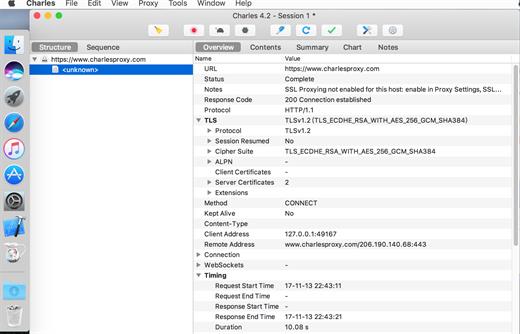
Description: Charles is a web proxy (HTTP Proxy / HTTP Monitor) that runs on your own computer. Your web browser (or any other Internet application) is then configured to access the Internet through Charles, and Charles is then able to record and display for you all of the data that is sent and received.

In Web and Internet development you are unable to see what is being sent and received between your web browser / client and the server. Without this visibility it is difficult and time-consuming to determine exactly where the fault is. Charles makes it easy to see what is happening, so you can quickly diagnose and fix problems.

Charles makes debugging quick, reliable and advanced; saving you time and frustration!

Key Features
SSL Proxying – view SSL requests and responses in plain text
Bandwidth Throttling to simulate slower Internet connections including latency
AJAX debugging – view XML and JSON requests and responses as a tree or as text
AMF – view the contents of Flash Remoting / Flex Remoting messages as a tree
Repeat requests to test back-end changes
Edit requests to test different inputs
Breakpoints to intercept and edit requests or responses
Validate recorded HTML, CSS and RSS/atom responses using the W3C validator

Release Name: Charles Web Debugging Proxy 5.1.0
Size: 78.8 MB
Links: HOMEPAGE – NFO – Torrent Search

Download: RAPiDGATOR
5 Comments