Please REGISTER or RENEW your account on RAPiDGATOR.net and support us by doing through all RAPiDGATOR working download links on main posts...
Apr 20

IsoBuster Pro 5.8 Beta (Build 5.7.9.0)

Description: The Ultimate data recovery software! IsoBuster for Windows. Supporting ALL types of media, including CD/DVD, BD/HD DVD, Hard Drives, SSD, USB flash drives, Zip drives, Jaz drives, floppies etc.
Rescue lost files from a bad or trashed CD, DVD or a Blu Ray disc. Recover deleted files from a Hard Drive, Memory card or of from flash media that Windows says needs to be formatted ! Save important documents, precious pictures or video from the family, your only system backup.

Features:
Data recovery from all possible CD, DVD and Blu Ray (BD & HD DVD) formats:
CD-i, VCD, SVCD, SACD, CD-ROM, CD-ROM XA, CD-R, CD-RW, CD-MRW, DVD-ROM, DVCD, DVD-RAM, DVD-R, DVD-RW, DVD+R, DVD+RW, DVD+MRW, DVD+R Dual Layer, DVD-R Dual Layer, DVD+RW Dual Layer, DVD+VR, DVD+VRW, DVD-VR, DVD-VRW, DVD-VM, DVD-VFR, BD-ROM, BD-R, BD-R DL, BD-RE, BD-RE DL, BD-R SRM, BD-R RRM, BD-R SRM+POW, BD-R SRM-POW, BD-XL, BDXL-R, BDXL-RE, BDXL-R TL, BDXL-R QL, BDXL-RE TL, UHD, M-Disc, BDAV, BDMV HD DVD-ROM, HD DVD-R, HD DVD-R DL, HD DVD-RW, HD DVD-RW DL, HD DVD-RAM, HD DVD-Video, GD-ROM, UDO, ARRI Codex, … And the list continues.
Data Recovery from Hard Drives, HDD, SSD, ODD, USB flash / thumb sticks, Memory stick, compact media cards, MMC media cards, SD, Micro SD, Mini SD, xD, GSM, CF, SDHC, SDSC, SDXC, SDIO, mobile phone memory card, memory cards that are used in digital cameras, camcorders, cell phones, MP3 players and any other type media cards, Floppy, Zip, Clik, Jaz, MiniDisc, Hi-MD drives etc.
Support for many Toshiba HDD Video recorders
Support for many Pioneer HDD Video recorders
Support for many Sony HDD Video recorders
Support for many Panasonic HDD Video recorders
Support for many Philips HDD Video recorders
Support for many Magnavox HDD Video recorders
Support for many ReplayTV HDD Video recorders
Support for many ShowStopper HDD Video recorders
Support for many Thomson HDD Video recorders
Support for RCA, LiteOn, Medion, Funai, .. HDD Video recorders
All device access, media access, data gathering and interpretation is done exclusively by the software. It does not rely on Windows to provide or interpret the data and so can work completely independent from Windows' limitations.
Better error handling and several retry-mechanisms to aid you in getting the data anyway.
The use of both generic and alternative ways to get to the data, get the best out of your CD/DVD-ROM drive.
The use of primary and secondary file systems to get to the data and/or make use of file system data that might be ignored or 'forgotten' by popular OS. Explore the alternatives.
CDs stay 'readable' after problems (such as Buffer Under-run,…).
Read / Extraction from open sessions.
All sessions, including older ones, are accessible and can be recovered.
Supports mounting several virtual sessions inside a single DVD+RW or DVD-RW track.
Read and Extraction of files, CD/DVD images, tracks and sessions from all optical media.
Scanning for lost UDF files and folders. More on UDF recovery.
Scanning for lost ISO9660 / Joliet sessions.
Scanning for files based on their file-signature.
Scanning for IFO / BUP / VOB file systems on VIDEO and AUDIO DVDs.
Scanning for lost, deleted and orphaned FAT files and folders.
Scanning for lost or deleted NTFS files and folders
and more…

Release Name: IsoBuster Pro 5.8 Beta (Build 5.7.9.0)
Size: 22.9 MB
Links: HOMEPAGE – NFO – Torrent Search

Download: RAPiDGATOR

5 Comments
Apr 20

Perfectly Clear WorkBench 5.1.0.3194

Description: Perfectly Clear is the program's latest version, which also comes as a plugin for Photoshop & Lightroom. The essence of this development is simple; you have a picture, you do not like it, the skin is dull, pimples, in short, there are defects, now you can not bother with editing; a couple of clicks and here is a corrected photo, perfect, as it should be, not ashamed of social networks to pour. You can use the pens to adjust all correction parameters; many use automatic mode.

The program has 20 indicators for them that reconciliation and adjustment take place, and as a result, the picture is beautiful without any difficulties. The cameras have limitations; they can add noise to the picture, light a photo, make the skin tone terrible, etc. This plugin knows all these restrictions and will detect, eliminate, and provide; you only have to save the result.

The application will find and eliminate irregularities and other skin defects, work with dark circles under the eyes, remove excess shine in the picture, add shine, enlarge the eyes, whiten teeth, and tonify the skin. In short, now you can safely wake up and be immediately photographed; the program will process everything and be like candy, do not spend a couple of hours standing in front of a mirror.

What's New in Perfectly Clear WorkBench
Beautiful new interface
New image correction tools:
Preprocessing section for Input Looks and "Image Ambulance" for manual exposure corrections
"Face Aware" exposure for more accurate auto-exposure corrections in portraits and group photos
Black Point tool to deepen blacks
New Color Vibrancy tool to complement our previous "Vibrancy" control (now renamed to Color Restoration)
Sky and Foliage enhancements
Existing tools have been improved:
Added strength sliders to Light Diffusion and Vibrancy for better control
Better 'color pickers' for Skin Tone and Blush adjustments
Manually identify faces that are not detected automatically
One-click to zoom into individual faces
Modify facial regions to provide the best corrections
Histogram
Much improved preset management

Release Name: Perfectly Clear WorkBench 5.1.0.3194
Size: 260.9 MB
Links: HOMEPAGE – NFO – Torrent Search

Download: RAPiDGATOR

6 Comments
Apr 20

Office Timeline 14.07.00.00

Description: Effortless project reviews. Happy executives. Quickly summarize your project plan into visuals that executives and clients actually understand. With Office Timeline, you can communicate effectively with clear, convincing timelines.

Build in PowerPoint. Present in PowerPoint.
Seamlessly import data from top project management platforms into your project review presentation. Easily produce accurate timelines, Gantt charts, program roadmaps, and portfolio slides that no other application can match.

Organize easily. Summarize well.
Take the complexity out of your project reviews with our PowerPoint add-in for Windows®. Make a timeline that clearly represents dependencies and highlights different workstreams or phases by grouping tasks into swimlanes.

Change dates with ease.
Be ready for project changes and shifts with an adaptable timeline creator. You can move your entire Gantt chart back when delays happen or update tasks and milestones in real time with our easy-to-use, drag-and-drop editor.

Keep your existing workflow. Integrate easily.
Office Timeline integrates with tools like Jira, Project®, Excel®, and Smartsheet to instantly generate beautiful visuals that you can update on the fly. A timeline maker intelligently designed to build from the plan you already have.

PowerPoint timeline generator
Use the feature-rich PowerPoint add-in to build striking timelines, Gantt charts and Swimlanes on your desktop PC. Easily customize every detail of your graphic to present your project in a crisp, distinctive way that impresses stakeholders.

Release Name: Office Timeline 14.07.00.00
Size: 128.8 MB
Links: HOMEPAGE – NFO – Torrent Search

Download: RAPiDGATOR

6 Comments
Apr 20

TweakNow WinSecret Plus 9.2.0

Description: A number-one all-in-one utility for optimizing and maintaining Windows 11 and 10. It includes more than 20 tools to make your everyday life easier.

Safely Unlock Windows 11 and 10 Hidden Settings
Effortlessly personalize hidden settings in Windows 11 and 10 to customize your taskbar, desktop, privacy preferences, and more.

Powerful and Comprehensive System Information at Your Fingertips
System Information module is designed to quickly and lightweightly provide all the detailed information you need about your PC's performance and components.

Looking to Supercharge Your Apps or Games Performance?
You can increase the priority level of apps or games to allocate more system resources, such as CPU time and RAM, to them.

Effortlessly Connect to Wi-Fi With QRr Codes
Using a QR code to share your Wi-Fi is super convenient and easy. Instead of typing out a long password, your friends can just scan the code with their phone and connect instantly.

View and Extract Icons From Windows Library (imageres.dll, shell32.dll, Etc.)
Windows 11 has a lot of attractive icons that make both the system look good and fun to use. Have you ever wondered where Windows may bury them in the system?

Keep Your PC Awake While You Are Leaving!
There are times when you might need to keep your PC running and prevent it from going into sleep mode or hibernation.

Effortlessly Convert PDF Into Images
At times, you may need to transform PDF documents into image files.

Quickly Convert HEIC to JPG on Windows
HEIC (High Efficiency Image Format) is a file format for images introduced by Apple with the release of iOS 11 in 2017.

Highlighted Modules
Create a shortcut to launch CPU-intensive app or game at above normal or high priority to improve performance
Running an application or game at high priority can give it more system resources, potentially improving its performance.
With the apps and games launcher module, you can easily create shortcuts to run your favorite apps and games at any priority level (low priority, below normal priority, normal priority, above normal priority, or high priority).

Combine multiple photos to create beautiful photo collages
Photo collages are a fun and creative way to display your photos and tell a story. You can use them for personal or professional purposes, such as making gifts, decorating your home, or promoting your brand.
With the Photo Collage Maker module, you can combine up to ten (10) photos many different layouts to choose to create a unique and beautiful photo collage.

Create and share beautiful QR Codes
A QR code is a type of barcode that can store information such as a URL, a Wi-Fi password, or a contact card. You can scan a QR code with your smartphone camera and access the information easily.

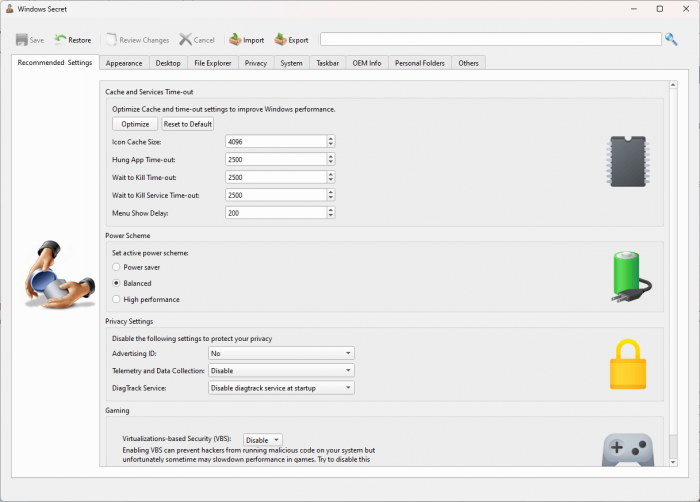
Safely change hidden Windows registry settings to improve your Windows experience
Windows registry is a database that stores settings and options for the Windows operating system. Unfortunately, most settings are not accessible from the Windows Settings or Control Panel. With the Windows Secret module, you can safely access more than one hundred (100) registry tweaks.

Quickly find out what’s taking up your disk space
The Folder Usage Analyzer module is useful for identifying which files and folders are taking up the most space on your hard drive. This can help you free up space by deleting unnecessary files or moving them to an external drive.

Remove duplicate images and freeing up valuable storage space
The Find Duplicate image module is useful for identifying and removing duplicate images from your computer, freeing up valuable storage space. These apps can help you find and delete multiple identical photos, saving you time, space, and money.

Release Name: TweakNow WinSecret Plus 9.2.0
Size: 34.6 MB
Links: HOMEPAGE – NFO – Torrent Search

Download: RAPiDGATOR
5 Comments
Apr 20

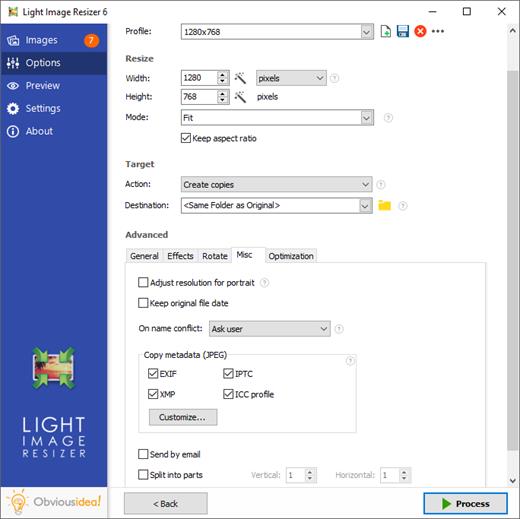
Light Image Resizer 7.6.2.170

Description: Easily convert images, photos and pictures with ObviousIdea’s Light Image Resizer and image converter software. Simple and easy, resize and convert images, one by one or in batch mode. Bulk Images convert with a prebuilt collection of presets.

Create your own profiles without programming. Include a free pic collage maker app. Capture screenshot with automatic OCR. Extract text from jpg.

Light Image Resizer – ObviousIdea’s all-time best seller, Millions of images have been resized with our software!
– previously called ‘VSO Image Resizer’

The program is available for all Windows computers. Just right click to resize images as copies or continue to work on the originals. Then simply share your resized images and collages online with friends.

Features
Resize images, resize pictures and resize photos – compress, convert, and easily create copies
All common image formats are supported, details see below (“Supported Formats“)
Create beautiful collage layouts for social media with just a few clicks
Resize and convert multiple images at a time
Create e-mail friendly images or use them for internet publishing (optionally with optimized compression)
Sort, rename or add a watermark to protect your pictures from being stolen
Choose from a wide range of pre-defined profiles (like 1K, 2K, Email) or create your own
Easily convert between image formats (for example JPEG to PNG, or vice versa)
Shell integration to add your favorite profiles directly to Windows context menu
Create JPG to PDF or PDF documents from your images, or vice versa
Create beautiful collage layouts for social media with just a few clicks (see video…)
Take screenshots or perform common editing tasks like adding text, highlight, blur, and more with the new included Light Image Editor

Resize and convert
Use the Light Image Resizer to resize photos. The batch image converter can easily convert your pictures into different formats. Select your output resolution, resize the original or create a copy, move and/or rename files or compress, choose a specific destination for your processed images. You can work on individual photos or edit large numbers of images by simply doing a batch resize in just one click.

Extra settings
Add your own watermark to protect your work or add a copyright to photos with html-like text formatting and transparency support. Customize pictures by converting them to sepia or add a border. Use the live preview to see what the final result will look like before actually processing the image. The ObviousIdea Photo Resizer/Picture Resizer works on files, subfolders and folders, and supports RAW formats. With multi-core support integrated, you can convert images even faster. Launch the application easily from Windows shell explorer with a right click on the image or folder.

Output and export
Photos can be added directly as attachments, individually or in a ZIP file, to email by using the publish function, without exceeding the maximum size permitted by email servers. Create PDF files from your images (convert JPG to PDF for example); do this for individual or multiple images. Edit, create, export, backup new profiles with your favorite settings. The most popular profiles are already pre-defined, such as 1K, 2K, Watermark, Web optimized, etc. Access to profiles in one click with the shell integration.

Collage layouts
Arrange beautiful collage layouts with several pictures, only with a few clicks. Just choose your images, select a layout template, check the order, and save your collage. Perfect for sharing on social media or your blog post. Free pic collage maker included.

What’s new in version 7
Context menu integration for Windows 11 is here!! Right-click your images from the file explorer
Now includes Light Image Editor with features like adding text, highlight, blur, shapes, and much more…
In this new app coming with LIR7, you can make screenshots easily with OCR applied
Profiles have been reset with new names, easier to use like 1k, 2k, 4k, or with a file size target (256Kb, 1Mb, 2Mb or your own file size requirement) (old profiles are renamed LIR6_xx)
Profiles are now stored as individual files in a sub-folder under user’s documents. It is synchronized with OneDrive cloud account so you can use your profiles between your desktop and laptop.
Incremental search in profile list by typing initial letters
Option to split long images to several pages for Create PDF action (see PDF tab)
PDF, JPEG or any photo can be a source for a OCR task (side file or in metadata). This makes your JPEG searchable by keywords in your local Windows search.
Output/convert images to HEIC format (a popular format supported by Apple for iPhone and MacOS)
Lossless compression option for WebP output
Watermark text tags for original file size, extension, and dimensions (use your files metadata for contact sheet, captioning, documentation)
Watermark panel has been improved, the setup package is coming with free sample of watermark with transparency.
“Append” option for text fields in metadata properties

Release Name: Light Image Resizer 7.6.2.170
Size: 54.7 MB
Links: HOMEPAGE – NFO – Torrent Search

Download: RAPiDGATOR

5 Comments
Apr 20

JP Software TCC 36.00.32

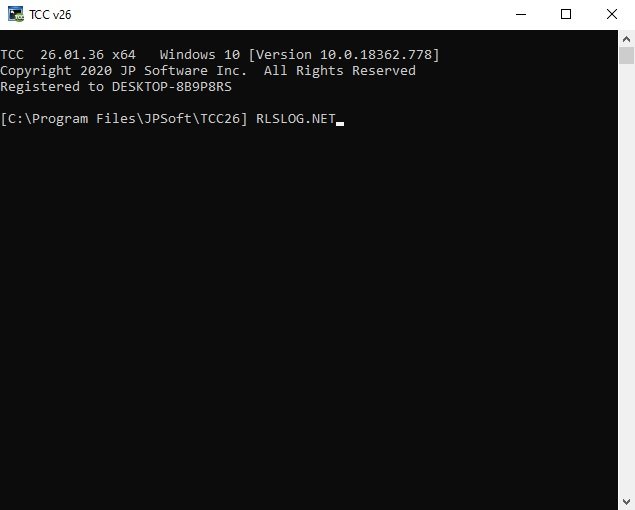
Description: TCC: Upgrading the Windows CMD Command Line Prompt. The command line is essential for developers, systems administrators and advanced users, offering many advantages to anyone wanting to save time, expand their control and/or to automate their tasks.

TCC is our console mode Windows command processor (formerly known as 4NT). TCC is a replacement for CMD.EXE, the default Windows command processor. TCC is compatible with your existing Windows console applications and batch files, but offers major improvements to the CMD prompt in command line editing, interactive file and system management, batch file programming and debugging.

TCC is a superset of CMD, with 275+ internal commands (CMD has about 42), 800+ internal variables and functions (CMD has 6), hundreds of additional options for existing CMD commands, and thousands of additional features.

Whether you're a seasoned CMD prompt user or just getting started, TCC is the tool that will take your command line prompt experience to the next level.

Why Switch From the CMD Shell to TCC?

Familiarity
TCC is a CMD replacement Windows command processor that is compatible with your existing CMD commands and batch files while adding hundreds of new commands, variables, and variable functions.

Productivity
TCC provides vastly improved line editing and tab file completion, and adds thousands of new features. You're immediately more productive, and you can learn TCC's new features at your own pace.

Batch Files
Create and debug your batch scripts in a fraction of the time with TCC's integrated editor and batch file debugger.

Comprehensive Help
The extensive help (including context-sensitive popup help for command and variable syntax) speeds your development time and reduces errors.

Syntax
TCC's internal commands share a consistent syntax, reducing your learning and development time.

Multilingual
The user interface is available in English, French, German, Italian, Russian, and Spanish. (Online help is available in English, French, German, and Spanish.)

Release Name: JP Software TCC 36.00.32
Size: 55 MB
Links: HOMEPAGE – NFO – Torrent Search

Download: RAPiDGATOR

4 Comments
Apr 20

MyLanViewer Enterprise 6.7.9

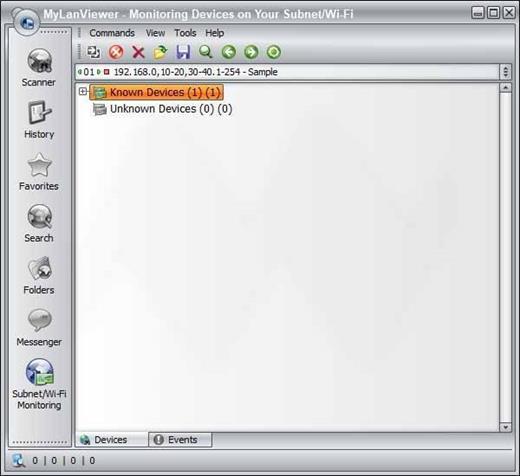
Description: MyLanViewer Network/IP Scanner is a powerful Netbios and LAN/Network IP address scanner for Windows, whois and traceroute tool, remote shutdown and Wake On LAN (WOL) manager, wireless network scanner and monitor. This application will help you find all IP addresses, MAC addresses and shared folders of computers on your wired or wireless (Wi-Fi) network.

The program scans network and displays your network computers in an easy to read, buddy-list style window that provides the computer name, IP address, MAC address, NIC vendor, OS version, logged users, shared folders and other technical details for each computer.

MyLanViewer Network/IP Scanner supports remote shutdown, wake-on-lan, lock workstation, log off, sleep, hibernate, reboot and power off. It is able to monitor IP address and show notifications when the states of some computers change. MyLanViewer Network/IP Scanner can also view and access shared folders, terminate user sessions, disable shared folders, show netstat information and detect rogue DHCP servers. The software can monitor all devices (even hidden) on your subnet, and show notifications when the new devices will be found (for example, to know who is connected to your WiFi router or wireless network). The program easy to install and use, and has a user-friendly and beautiful interface.

Enterprise License - A enterprise license grants an organization rights to install and use the software on an unlimited number of computers or servers at an unlimited number of locations used by the organization in many cities or countries.

Release Name: MyLanViewer Enterprise 6.7.9
Size: 9.9 MB
Links: HOMEPAGE – NFO – Torrent Search

Download: RAPiDGATOR

5 Comments
Apr 20

JP Software Take Command 36.00.32

Description: Replace Your Windows Console and CMD Command Prompt Windows. The Windows Command Prompt shortcut is a Windows console (command line, or character mode) session that runs the default Windows command shell CMD.EXE.

The command line is essential for developers, systems administrators and advanced users. Unfortunately, CMD Windows commands and the Windows console UI have always been woefully lacking in ability compared to what is available in most other operating systems. Because of the limitations in CMD and the Windows console, users have been forced to use the GUI for inappropriate tasks, or even to write custom programs to perform simple tasks that CMD should have been able to handle.

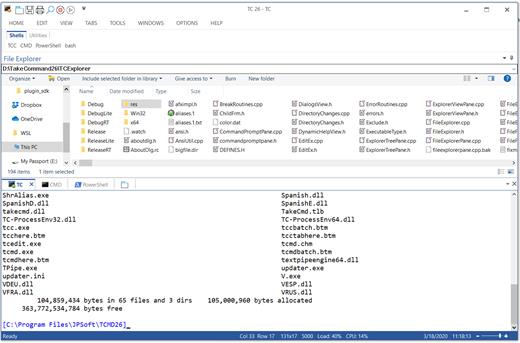
Take Command is a comprehensive interactive GUI and Windows command line toolkit that makes your command prompt windows easier to use and far more powerful. Take Command includes optional Windows Explorer integration, tabbed console windows, and major enhancements to standard Windows CMD commands such as COPY, DEL, DIR, FOR, MOVE, REN, SET, and START And it and adds more than 235 new commands, command dialogs, command line syntax coloring, vastly improved command line editing, programmable filename and directory tab completion, and thousands of other features.

Take Command is also a powerful batch file programming tool, including an integrated IDE with a sophisticated editor and batch debugger. Take Command offers extensions such as DO loops, SWITCH statements, error and exception handling, system monitoring and event triggers, and more than 780 built-in variables and functions. And you can extend that with 3rd-party plugins and user-defined functions.

12 Reasons Why You Should Replace Your Windows Console
The Windows console is responsible for running character-mode applications, including CMD, PowerShell, WSL bash, etc. It was introduced in Windows NT 3.1 in 1993, and some major internal architectural improvements were made in Windows 10 and 11.

Unfortunately, the improvements to the user interface were relatively minor, and though some efforts were made to improve the CMD console UI in Windows Terminal, they fall far short of what Take Command has been providing for years.

So why replace it with Take Command?

The Windows console is slow, and even slower when using Windows Terminal. Take Command's tab windows typically display output between 20% and 300% faster.
Take Command (like Windows Terminal) offers tabbed windows to run your character-mode applications. But Take Command takes it to another level by including vertical or horizontal tab groups and splitter windows.
Tabbed windows can be reordered, detached, or torn off, and existing console windows can be attached as new Take Command tab windows.
Take Command provides an optional embedded Windows File Explorer window that displays a tree view of the folders on your system and the contents of the selected folder (List View) on the right. You can drag folders and files from the Explorer window and drop them in a command prompt window.
Take Command can be easily configured for your preferences with its configuration dialogs.
Take Command has an optional tabbed tool bar that you can use to execute internal or external commands, aliases, or batch files with the click of a mouse (or an accelerator key). You can define up to 20 tabs, each with up to 50 toolbar buttons.
Take Command provides a configurable Status Bar that can display quick help for the current command, tooltips, and system information, including tab window size, CPU usage, memory usage, date & time, character values at the cursor location, and a slider control for window transparency.
Cut and Paste options are limited in the default CMD console or Windows Terminal. Take Command adds both line and column selection, double-click or triple-click selections, overwriting or appending to the Windows clipboard, and a variety of paste options.
Take Command windows can be styled with a choice of 18 themes.
Take Command and TCC offer a wide variety of colorization options, not just foreground and background colors.
Take Command includes invaluable tools, including a batch file debugging IDE, a regular expression creator / analyzer, search and replace in files, and a macro recorder / playback.
Extensive help (quick help, context sensitive help, and general help) is available in English, French, German, and Spanish at the touch of a button.

Release Name: JP Software Take Command 36.00.32
Size: 57.3 MB
Links: HOMEPAGE – NFO – Torrent Search

Download: RAPiDGATOR
5 Comments
Apr 20

CoolUtils Total Image Converter 8.2.0.297

Description: Total Image Converter converts images to other formats, crops, resizes and rotates them. Convert large TIFFs into small JPEGs, make photos suitable for the web or recover old photos in unsupported formats - Total Image Converter will do everything you need.

Supports TIFF, JPEG, RAW, PNG, BMP, PSD, TGA, and many other image formats;
Works incredibly fast with new multi-threading feature;
Converts CMYK to RGB;
Handy resize and crop options to make your photos smaller;
Watermarking: add your comment, logo or date.

Unique options of Total Image Converter
/image converterTotal Image Converter supports TIFF, JPEG, JPEG2000, RAW, PNG, BMP, ICO, PSD, TGA, PCX, PCD and many other rare image file types files complete list).
rotate imageAlong with conversions you can rotate your images! All is done in batch so you save a lot of your valuable time.
resize cadWith Total Image Converter it's very easy to resize your photos or images.
colorWith Total Image Converter you can specify the color space for your output images.
combine foldersWhat to combine images within folders? No problem! Our powerful batch image converter can do that too.
frame jpegTotal Image Converter will also add a frame to your images in batch.
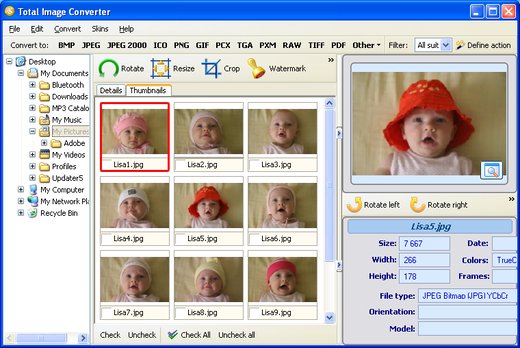
interfaceConvert TIFF, JPEG, PSD and many other files in seconds via our clear wizard-mode interface (thumbnails or file lists with details).
/image formatsThe widest list of output file types: PDF, TIFF, BMP, PNG, JPEG, JPEG2000, ICO, GIF, PCX, TGA, PXM, PS, PCL! Besides, it supports many rare formats like PALM, PICT, XPM, FIX, etc.
html converterTotal Image Converter supports almost all RAW camera photos (CRW, CR2, NEF, PEF, RAF, X3F, RAW, BAY, ORF, NRW, SRF, MRW).
previewThe built-in Preview panel helps you to view each file full-sized and learn the indo about it.
/image watermarkAdd text watermarks to the header or the footer of the output file to prevent unauthorized use.
dxf to pdfWhen you convert images to PDF you can set user permissions, password-protect your files or sign them with your digital signature.

Release Name: CoolUtils Total Image Converter 8.2.0.297
Size: 106.5 MB
Links: HOMEPAGE – NFO – Torrent Search

Download: RAPiDGATOR

4 Comments