Please REGISTER or RENEW your account on RAPiDGATOR.net and support us by doing through all RAPiDGATOR working download links on main posts...
Apr 16

Foxit PDF Editor Pro v14.0.4.33508

Description: Foxit PDF Editor (formerly) Foxit PhantomPDF is a business ready PDF toolkit to create professional looking PDF documents and forms. You can do that for tasks such as developing personal documents, implementing workgroup collaboration, designing company forms. Produce company collateral, finalizing agreements, applying digital signatures, or document archiving.
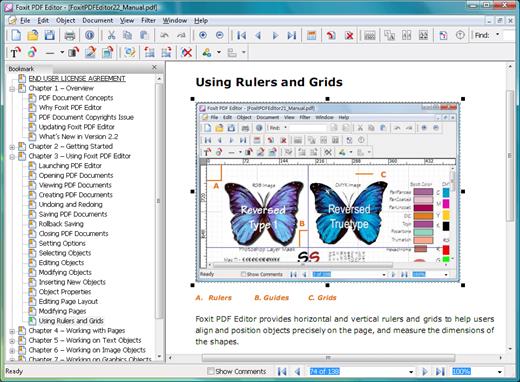
Award winning Foxit PDF creator allows you to produce great looking PDF document and forms quickly, affordably, and securely. This is the perfect solution for home/home offices, small and medium sized businesses, and large enterprises. Foxit PDF Editor comes in three versions to fit the diverse use cases that different users require.

This Foxit software can combine, split or repackage various PDF files. The documents can be merged or split based on page numbers, page outlines or bookmarks. Plus, this Suite can batch convert existing documents to a single or multiple PDF files.

Foxit PDF Editor Features:

Edit PDF like a pro
Quickly and easily update your own PDF documents. Works like a word processor – reflow text across paragraphs, columns, and pages; change document layout, modify text size, font, or line spacing, and add multimedia.

Share and collaborate live
Connect teammates together to increase flexibility and results. Integrate with leading Content Management Systems, utilize popular cloud storage services, and initiate shared reviews to provide and manage feedback

Export to popular file formats
Easily share PDF content by exporting PDF to Word, PowerPoint, Excel, RTF, HTML, text, and image formats. Export the whole document or just a selected area.

Create PDF docs and forms
Create PDF, PDF/A, PDF/X, and PDF/E from virtually any file format or web pages. Make PDF Portfolios to easily share multiple files together and use Form Field Recognition to quickly create interactive PDF Forms to collect data. Render PRC 3D PDF and create 3D PDF from .DWG files.

Organize PDF the simple way
Organize and manipulate PDF pages to support your workflows. Merge and split documents; drag and drop pages within a file or from one document to another; and add stamps, watermarks, headers, footers, and more.

Protect PDF properly
Protect the information in your confidential documents. Permanently redact and remove text and images, secure documents with password encryption or with Microsoft AIP, sanitize documents, and digitally sign PDFs.

Create accessible PDF
Enable PDF document accessibility for people with disabilities who use assistive technology to have access to information. Check accessibility of PDF files to verify if the document complies with Section 508 technology standards.

Scan and OCR paper docs
Scan and convert paper documents or images to PDF. Run text recognition (OCR) to create selectable and searchable text. Make text editable and update hardcopy just like digital documents.

System Requirements:
• Windows 8.x Full Version
• Windows 10
• Microsoft Office® 2010 or later version (required for some PDF creation features)
• Verified as Citrix Ready® with Citrix XenApp® 7.13

Release Name: Foxit PDF Editor Pro v14.0.4.33508
Size: 1.2 GB
Links: HOMEPAGE – NFO – Torrent Search

Download: RAPiDGATOR

3 Comments
Apr 16

The Foundry Nuke Studio 17.0v2

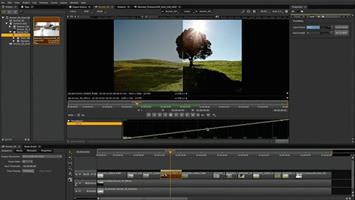
Description: Next-level workflows. Step into the future of compositing and review workflows with Nuke 16.0. Speed up your workflows, so you can focus on the final picture. Work across multiple shots at once, experience large-scale roto performance, faster shot review, approval and delivery, and more.

Variable-enabled multishot workflows
Create more, iterate less — by compositing multiple shots, or an entire sequence at once. Nuke now includes a native, variable-enabled workflow for efficient, reliable, and scalable multishot compositing. This makes applying the same changes to similar shots simple and intuitive, giving you more time for the creative comp work you enjoy.

Graph Scope Variables
As a core element of multishot workflows, Graph Scope Variables provide the option to create a ‘context’ that applies to multiple shots. Apply single scripts to multiple shots or entire sequences within a variable.

VariableSwitch node
With the VariableSwitch node you can create "split and join" workflows based on the variables set for your multishot workflow. Giving you the control you need when comping multiple shots at once.

Link nodes
Nuke 16.0’s Node Graph gives you more freedom to work your way. Now you can create Linked Nodes, for the option to change nodes simultaneously or make use of per-knob overrides, giving you the control you need without clones.

Group Node internal view
See and edit the contents of Groups and LiveGroups within the same Node Graph. This update supports smooth multishot workflows. providing a way to organize and manage multiple scopes.

Faster large-scale roto
We’ve refined the roto node to speed up scripts when working with large, or lots of shapes. Including improvements to caching, playback, interactivity when editing and moving shapes in the Viewer, and motion blur performance.

Contact Sheet in HieroPlayer
Keep your eye on the final sequence with the Contact Sheet in HieroPlayer — free with Nuke and NukeX licenses. View all of your shots at once, or compare with shots from other artists, to ensure full consistency.

BlinkScript updates
Want to create the kind of unique, stylized effects and brushes that define entire universes? Now you can make incredible custom effects more easily than ever, whether you’re already an experienced BlinkScript user, or just starting to experiment with writing your own BlinkScripts, with updates that make it easier to read, write, learn, and troubleshoot your code.

Improved editor
Create custom effects and innovative new looks with updates to the BlinkScript Editor that make it more intuitive. With formatting changes, error handling updates, new keyboard shortcuts, and more.

Library files
The BlinkScript Kernels are now more extensible. Now you can write your own functions for common operations and read them into multiple BlinkScripts. Reducing the code needed for each effect.

Safety Rails
New Safety Rails options catch and report operations that could cause problems when run directly on the underlying processor. So it’s easier to troubleshoot and fix the causes of these issues in your Kernel code.

Release Name: The Foundry Nuke Studio 17.0v2
Size: 3.5 GB
Links: HOMEPAGE – NFO – Torrent Search

Download: RAPiDGATOR
3 Comments
Apr 16

Iperius Backup Full 8.8

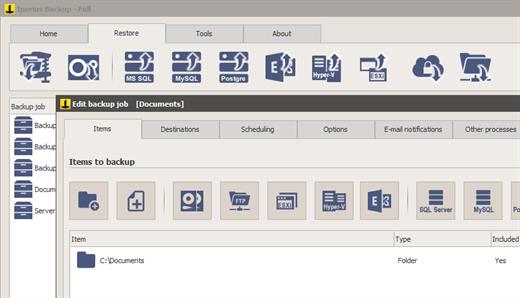
Description: The most comprehensive and versatile backup software. Backup for PCs, Servers, Virtual Machines, Databases, Mail Servers, and Microsoft 365. Any Destination: Cloud, S3, NAS, FTPS, Google Drive and many others.

Drive Image, Synchronization, FTP and Cloud backup
Hard disk cloning and P2V conversion (instant restore)
Complete restore of the system with the Iperius Recovery Environment recovery drive
Incremental backup to NAS and external USB drives
Automatic backup and Open file backup (VSS)
Backup to Google Drive, Amazon S3, Azure Storage, OneDrive, Dropbox
Lifetime license with free support and updates

Disk image
This powerful feature allows you to make exact copies of the entire disk (Drive Image), which can be used to restore the whole computer without having to reinstall the operating system and programs. The backup is done without interrupting any service neither the user's work (hot backup).

Hard Drive Cloning - P2V
Iperius drive image can be used to clone a hard disk and restore it to another disk. Cloning allows you to create an exact copy of Windows and start the cloned system on a Hyper-V virtual machine (instant restore) or restore it even on different hardware.

Automatic incremental backup
Iperius can perform automatic backups based on specific days and times, making a smart scanning of files that saves time and disk space. The incremental backup ensures that only new or changed files are copied after the first full backup.

Iperius Recovery Environment
Iperius allows you to restore a backup in different ways. You can recover individual files from an image backup, or create an Iperius Recovery Environment recovery drive for complete system restore (bare-metal), even on different hadrware.

Online backup Cloud/FTP
Iperius has several functions for online backup, for both upload and download. You can quickly create tasks to upload any file to Google Drive or to any FTP server, as well as perform website updates, or the automatic downloading of web sites.

Synchronization and VSS
Iperius can synchronize unlimited folders via FTP, deleting from the backup those files no longer existing in the local folders. It also allows you to copy any open or locked file (VSS), compress files in zip format, keep multiple copies of the backup and send e-mail notifications at the end of the backup.

Key features
Drive image backup (disaster recovery)
Backup to Google Drive, Amazon S3, Azure Storage, OneDrive, Dropbox
Remote backup FTP/SFTP
Compression and AES encryption
Scheduling of automatic backups
Installation as service
Lightweight and portable
Upload and Download of websites
Flexible backup retention policies
Incremental backup and synchronization
Open file backup (VSS)
Backup to NAS, USB drives, RDX, etc.
E-mail notifications
Support and updates included

Operating System: XP, 2003, Windows 7, Server 2008, SBS, Server 2012, Server 2016, Server 2019, Server 2022, Windows 8/8.1, Windows 10, Windows 11

Release Name: Iperius Backup Full 8.8
Size: 146.1 MB
Links: HOMEPAGE – NFO – Torrent Search

Download: RAPiDGATOR

6 Comments
Apr 16

WonderFox DVD Ripper Pro 24.3

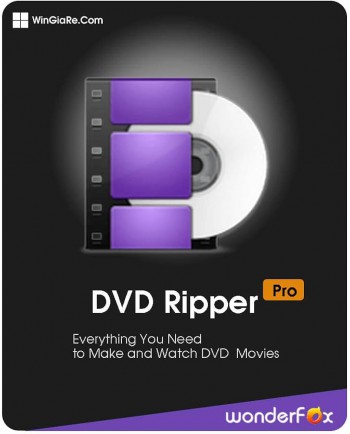
Description: Rip a DVD to Digital in 5 Minutes with Flawless 1:1 Quality. Hi Guys, So, please allow me to introduce myself. I'm WonderFox DVD Ripper Pro. The real No. 1 speed smart DVD ripping software that can fast digitize any DVD to hot video, audio, and device formats.

I’m a zero-difficulty DVD ripper tool for everyone!
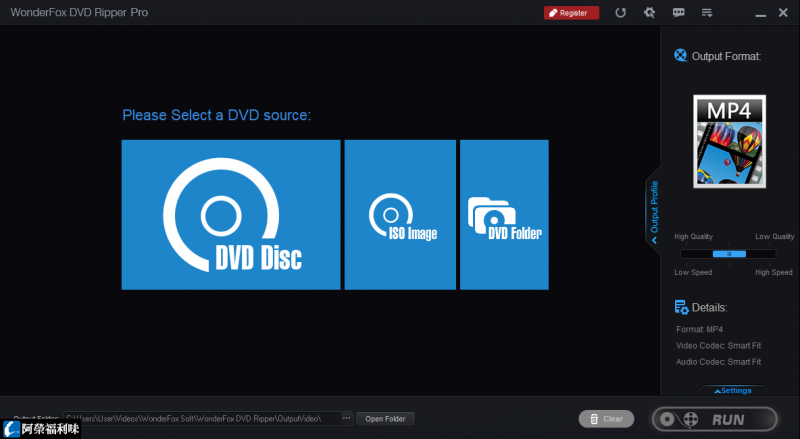
Only 3 steps: Load DVD > Select Output Format and Settings > Get Started
You can rip DVD to digital or copy DVD to ISO, Folder, or MPEG-2.
Fast ripping speed, lossless output, and 600+ export profiles.
DVD ripping and backup have never been so easy and fast.

For Legendary DVD Decryption Technology, I'm Just Being Myself 
Decrypt DVD CSSBypass and remove all sorts of DVD copy protections, such as DVD CSS, CPRM, Multi-angle, RCE, Sony ARccOS, UOP, Disney X-Project DRM and Cinavia Protection. Provide "Enhanced Decryption" mode for stronger decryption capabilities.
Support ripping DVD Movie, TVThe best DVD converter that supports ripping homemade DVDs, old & new DVD movies, TV shows, anime, music concert, Tutorial or Fitness/Workout (P90X/T25/...), etc.
DVD region freeRemove DVD region code effortlessly. No need to order a new DVD player for your DVD from another region.
DVD backupBackup DVDs for getting digital copies of movies you already own.

Compression with a Perfect Balance between File Size and Output Quality
Reduce DVD file size (7.5 GB) to digital video(1-2 GB) without losing quality.

Fastest DVD-to-Digital Conversion Speed
Only 20 minutes to rip a 150-minute DVD to MP4, AVI, MKV, MOV, etc. with 0-Quality-Loss and much less time to copy DVD to MPEG-2 (only 5 minutes).

Intelligently Detect Main Title of 99-title DVDs
Smart select the right title from 99 titles and remove ads, trailers, previews, and other unnecessary clips.

Release Name: WonderFox DVD Ripper Pro 24.3
Size: 98.4 MB
Links: HOMEPAGE – NFO – Torrent Search

Download: RAPiDGATOR
7 Comments
Apr 16

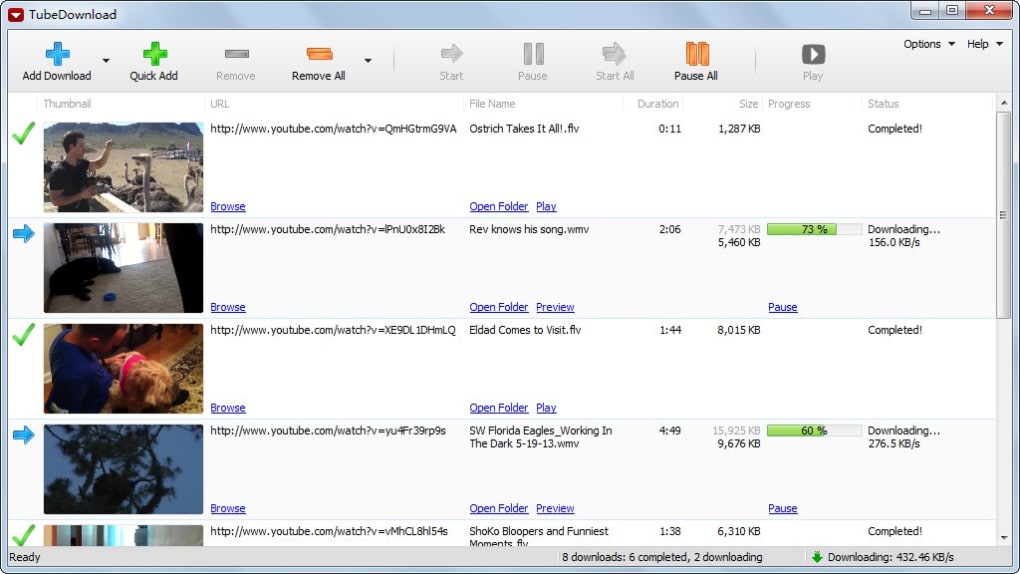
TubeDownload Pro 7.3.2

Description: TubeDownload Pro is a professional Windows application for downloading your favorite videos from YouTube and hundreds of other video sites. TubeDownload Pro can increase download speeds by up to 500%, or even more.

Features:
Download your favorite videos from YouTube and hundreds of other video sites.
Increase download speeds by up to 500%, or even more.
Download 720p, 1080p, 2K, 4K, and 8K HD videos from YouTube.
Download an entire playlist with just a few clicks.
Download multiple videos at the same time.
Pause and resume downloads at any time.
Convert video and audio files between MP4, FLV, WebM, WMV, MP3, AAC, OGG, and other video/audio formats.

Release Name: TubeDownload Pro 7.3.2
Size: 148 MB
Links: HOMEPAGE – NFO – Torrent Search

Download: RAPiDGATOR
5 Comments
Apr 16

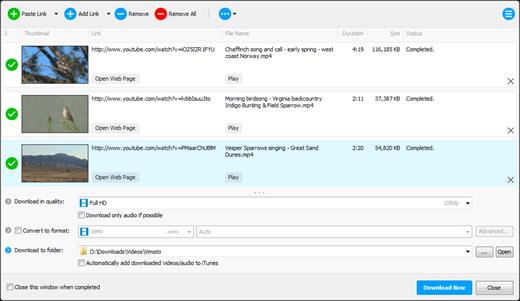
Any Video Downloader Pro 10.3.2

Description: Any Video Downloader Pro, formerly known as HD Video Downloader Pro, is a Windows app to help you download videos from YouTube, Facebook, Dailymotion, and thousands of other video sharing sites. It accelerates your downloads by up to 5 times.

Features
• Download videos from YouTube and thousands of other video sharing sites
Any Video Downloader Pro can download videos from YouTube, Facebook, Dailymotion, Vimeo, and thousands of other video sharing sites.
• Download HD videos from video sharing sites
You can download 720p, 1080p, 2K, 4K, 5K, 8K, and 3D videos from YouTube if they are available.
• Speed up your downloads
Any Video Downloader Pro features a multi-threaded acceleration engine that can boost your download speeds by up to 500% faster.
• Download multiple videos at a time
Any Video Downloader Pro supports simultaneous downloads. It allows you to download more than one video at a time.
• Pause and resume downloads
Any Video Downloader Pro allows you to pause and resume your downloads if you need more connection to perform other important tasks.
• Preview videos while downloading
While downloading, you can click the Preview button to play the incomplete file and make sure the content you are downloading is really the content of your choice.
• Download whole playlist from YouTube
Just enter a YouTube playlist link or ID, Any Video Downloader Pro will download all or part of videos in the playlist from YouTube for you.
• Download only audio stream from YouTube
Any Video Downloader Pro can download only audio stream from YouTube, without downloading the entire video file. The audio stream is small, so you can download it in just a few seconds.
• Convert and optimize downloaded videos
Any Video Downloader Pro can convert and optimize downloaded videos to any format for any device, so you can watch them on your PC, iPhone, iPad, Android phone, and other portable devices. It supports MP4, FLV, WMV, MOV, AVI, MPG, VOB, M4V, ASF, MKV, WEBM, 3GP, etc.
• Video to MP3
Any Video Downloader Pro allows you to extract audio stream from video file and save it as MP3, WAV, WMA, AC3, AAC, OGG, M4A, ringtone, or other audio format.
• Any Video Converter
Any Video Downloader Pro includes a powerful video and audio converter for converting your disk video/audio files to any format you wish so that they are playable on your mobile device.
• Ready-made presets
Any Video Downloader Pro provides ready-made presets for all popular video and audio formats. You can also custom output video/audio format settings.
• iTunes compatible
Optionally, Any Video Downloader Pro adds downloaded video/music to your iTunes library automatically, so you can easily synchronize your videos and music to your iPhone, iPad, iPod.
• Support drag-and-drop
You can directly drag and drop a video link from your web browser to the drop box or the main window of the program. You don't even need to copy and paste video link manually.
• Search for videos on the web
Any Video Downloader Pro has a built-in video search engine. You can easily search for videos on the web within the program and download any video with just one click.

Release Name: Any Video Downloader Pro 10.3.2
Size: 177.7 MB
Links: HOMEPAGE – NFO – Torrent Search

Download: RAPiDGATOR
5 Comments
Apr 16

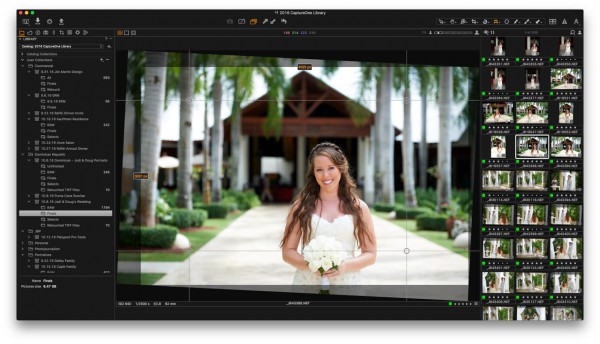
Capture One 16.7.7.3470

Description: Mind-blowing colors and quality. Get true-to-life colors and superb image quality right from the start of your photo process. Fine-tuned by our in-house experts, our RAW converter is customized for nearly 600 camera profiles and over 700 lenses. With true-to-life color processing, you can spend less time editing and reach your final look even faster.

Shoot tethered. Fast.
Connect your camera and shoot tethered into Capture One. Organize shots, make changes on the spot, auto-apply edits to incoming shots, and get the perfect image every time. See what your camera sees with Live View, and don’t miss out on some of our smart features like ReTether and Save to Card, which will make sure you stay flexible and never lose a shot.

Work together with anyone, anywhere
Collaborating with teams and clients – whether in the same room or on different continents – is made easy with Capture One Live. Share, view, comment, rate, tag, and get feedback. All in one place. No uploading, exporting, or downloading a single photo ever again.

Edit intelligently. Easily.
With assisted editing, you can start and finish your projects with just a few clicks.

With a single click, you can instantly match the style or edits of a reference image. Whether from a previous project, a film still, or a mood board, it automatically transfers the look to your current photo(s), giving you a strong starting point for editing and color grading.

Mask skin, hair, eyes, facial features, subjects, and backgrounds with extreme precision. Save time by creating complex masks quickly for multiple images. You can even combine them with other adjustments and save them as a Style.

You can now set your crop reference to a single image and apply it to a batch of photos or incoming shots. Capture One will detect whether to focus on a face or a subject and automatically make consistent crops for all your shots.

Finish most of your edits in seconds with Smart Adjustments by automatically adjusting Exposure and White Balance. Unlike copy and apply, Smart Adjustments makes our photos consistent, even under different lighting conditions.

Experience the speed as Capture One intelligently zooms and pans to the nearest eye in each shot, allowing you to quickly check for sharpness without manually zooming in.

A quick and easy way to take care of annoying dust spots in multiple photos and dramatically speed up your editing.

Release Name: Capture One 16.7.7.3470
Size: 1.2 GB
Links: HOMEPAGE – NFO – Torrent Search

Download: RAPiDGATOR

5 Comments
Apr 16

LicenseCrawler 2.17.2865

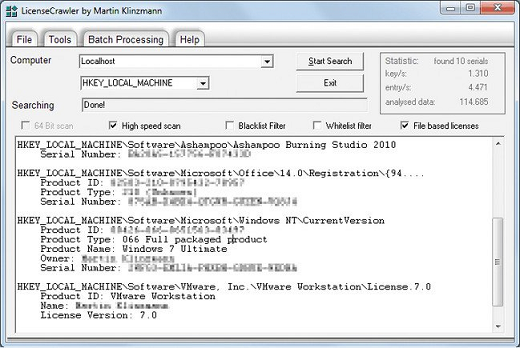
Description: The perfect partner for system backup, migration projects and system recovery. If you want to setup your computer system again you need to have the licenses and serial numbers at hand for all the software programs that you have purchased and registered. This does include the Windows product key but also other serial numbers for applications like Nero, Office, VMWare and pretty much every other application.

Instead of searching for the keys in your e-mails, manuals and recipes you could use another approach. LicenseCrawler is a sweet little application that scans the Windows Registry for Windows product keys and other serial numbers and licenses.

The LicenseCrawler can discover application product keys and other serial numbers or licenses very quickly and supports all versions of Windows operating system from Windows 95 over Windows 7 to Windows Server 2008 R2 (64Bit).

The portable-version can be run from any location and would be a perfect fit for a USB stick. The software is ideal to backup your system, help IT-Service members and for forensic services.

Asking clients to find serial and license keys is often very frustrating. Instead, tech support can simply run License Crawler without having to interact with the client at all.

Release Name: LicenseCrawler 2.17.2865
Size: 3.5 MB
Links: HOMEPAGE – NFO – Torrent Search

Download: RAPiDGATOR
6 Comments
Apr 16

Reclaim Time FocusMe 7.7.0.4

Description: Take Back Control of Your Time. Conquer digital distractions with the world’s most powerful focus software. FocusMe blocks distractions, reveals your online habits and helps you build the routines that make deep work possible.

How FocusMe Works
In a world of highly addictive websites and apps, FocusMe studies your digital patterns and reveals your online behavior. Where your attention drifts, when you work best and what needs stronger boundaries. Your AI Coach is an optional feature which then turns those insights into practical recommendations for blocking plans and focus routines, which you can immediately apply using the tools built directly into FocusMe.

The app runs in the background limiting exposure to distractions, setting screen time limits and scheduling focused work sessions. These are fully customizable to your daily schedule. If you want extra accountability, you can lock your set-up using Force Mode. With built-in Pomodoro timers, break reminders and real-time progress tracking, FocusMe becomes your digital productivity coach.

Release Name: Reclaim Time FocusMe 7.7.0.4
Size: 50.7 MB
Links: HOMEPAGE – NFO – Torrent Search

Download: RAPiDGATOR

5 Comments
Apr 16

WinCatalog 2026.1.0.415

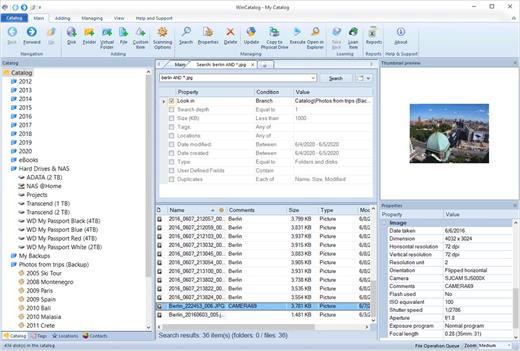
Description: Looking for a reliable and powerful disk catalog software to organize your huge collection of disks? WinCatalog 2024 disk cataloger is a perfect solution! On the market since 2001. Automatically create a catalog of all files, stored on your disks (HDDs, DVDs, CDs, network drives and other media storage devices): WinCatalog will automatically grab ID3 tags for music files, Exif tags and thumbnails for photos, thumbnails and basic information for video files, e-books, contents of archive files, thumbnails for images (pictures) and PDF files, ISO files, and much more.

Organize your file catalog, using virtual folders, tags (categories) and user defined fields, and find files in seconds, using powerful search, even when disks are not connected to the computer. Also easily use WinCatalog as a duplicate file finder. Your disk catalog can be automatically updated through Windows task scheduler.

And no matter how huge your collection of disks is - you will always have your file catalog on hand, perfectly organized.

Main features of WinCatalog Disk Catalog Software:

Ability to extract and store in a catalog thumbnails of graphic files (photos, pictures, RAW-images), as well as EXIF data of digital photos.
Thanks to WinCatalog 2024 disk catalog software you can automatically create and store thumbnails of graphic files (images, photos) saved in all popular formats (JPEG, PNG, BMP, ICO, GIF, Tiff, WMF, and EMF) or RAW image formats produced by most of modern digital photo cameras. You can also save EXIF data (comments, resolution, [photo camera model, focal distance, and other parameters) for photos. This means you can preview picture thumbnails in the catalog without the need to open the particular media. And it will allow you to quickly and easily locate a photo or an image in your image and photo catalog!

Fluently scan inside Zip, RAR, and 7z archives as well as ISO disk images, and add them as folders into the catalog
The program supports Zip, Zipx, RAR/RAR5, and 7z compressed files as well as ISO and NRG disk images. Files inside archives are displayed as files in folders.

Automatically extract supplemental information from music, video, Office Documents, PDF, HTML, TXT files during scanning a disk and creating a catalog
WinCatalog 2024 can display ID3 tags including artist name, song, album, disk cover and other information for music files in the following formats: MP3, WAV, WMA, OGG, OGA, ASF, M4A, M4B, M4P and MP4.
For video files WinCatalog extracts and adds to video catalog basic information including thumbnail, codec, video frame resolution, audio tracks information, etc. So you can successfully use WinCatalog as a video catalog software.
For E-books WinCatalog extracts a title, a description, authors' names, and a cover image. The supported formats of e-books are Epub, Mobi, and FB2.
For HTML files WinCatalog extracts and stores headings and tags.
For text files WinCatalog extracts a part of text and creates a preview that is displayed when you search for a particular document.
For PDF files WinCatalog creates a thumbnail for the first page and grabs text (if any) making them searchable by content.
For Office document files (Word, Excel, PowerPoint, OpenOffice, Markdown) WinCatalog creates a thumbnail for the first page and grabs text and document attributes making them searchable by content.

Release Name: WinCatalog 2026.1.0.415
Size: 120.6 MB
Links: HOMEPAGE – NFO – Torrent Search

Download: RAPiDGATOR
5 Comments