Please REGISTER or RENEW your account on RAPiDGATOR.net and support us by doing through all RAPiDGATOR working download links on main posts...
Apr 13

LuBan 3D 11.04.2026

Description: LuBan is generative design software that helps designers and makers in rapid production of their creations. LuBan automatically generates 3D models in various forms, such as lithophane, stack, hash, plate, relief, module, and wireframe. The generated model can be fabricated by 3D printing, laser cutting, and CNC milling.

LuBan is actively developed by a highly focused software team, led by Lujie Chen in Singapore and Larry Sass in USA.

Eyeglasses
Design eyeglasses frames based on a template image.

Lithophane
Turn any 2D photo into a 3D printed photo.

Photo Magic
Generate 3D models from a 2D photo.

Mesh Processing
Generate 3D models from a 3D model.

Release Name: LuBan 3D 11.04.2026
Size: 68.2 MB
Links: HOMEPAGE – NFO – Torrent Search

Download: RAPiDGATOR

8 Comments
Apr 13

EJ Technologies Install4j 12.0.4

Description: The Powerful Multi-Platform Java Installer Builder. install4j is a powerful multi-platform Java installer builder that generates native installers and application launchers for Java applications. install4j excels in its ease of use, its extensive platform support and its powerful screen and action system.

Visually create your installer UI
Compose your own installer screens with install4j's standard form components in an easy to use visual editor.

Compile installers on any platform
install4j supports Windows, Linux and macOS. You can compile installers for all platforms on any of these platforms. Signing and notarization included.

Rich set of installer actions
Need your installer to make some custom modifications? install4j has 80+ different configurable actions that will help you to do that with minimal effort.

Effortless JRE bundling
install4j will download JDKs from any of the well-known JDK providers, create optimized JRE bundles and ship them with your installers.

Easily create auto-updaters
Mastering successful auto-updates is demanding. install4j does the hard part for you while giving you full flexibility for your requirements.

Extensible by design
With its JavaBeans-based extension model and its well-documented API, you can develop your own actions, screens and form components.

Extensive i18n support
install4j offers a large number of installer languages. Localizing your own messages and auto-detecting the language at runtime are fully supported.

Native launcher generation
install4j generates launchers for your applications that are native on every supported platform and integrate with many other features in install4j.

Console installer mode
install4j supports a console mode that is auto-generated from the UI definition. On headless Linux systems, this is an automatic fallback.

Unattended installations
Automate your installations and supply user input with a user-editable response file that is generated by an interactive installation.

Update installations
install4j can optionally detect previous installation directories and apply previous user input from a response file.

RPM and Deb Packages
install4j can create packages for the most popular Linux package managers. Custom installer applications can bring in functionality from full installers.

Rollback on failure
All actions in install4j offer full rollback of their modifications. Rollback barriers for partial rollbacks can be defined flexibly.

Downloadable components
install4j supports user-selectable installation components. Selected installation components can be downloaded on demand to reduce the size of the installers.

Service launchers
In addition to GUI and console launchers, install4j can create service launchers that are installed as Windows services, Linux services, or macOS daemons.

Code snippets and variables
User input is bound to installer variables that can be easily used elswhere. Components can be customized with plain Java code snippets that are edited in install4j.

Support for build systems
install4j offers support for Gradle, Maven and ant as well as a command line compiler. With compiler variables you can customize projects from your build system.

Release Name: EJ Technologies Install4j 12.0.4
Size: 147.2 MB
Links: HOMEPAGE – NFO – Torrent Search

Download: RAPiDGATOR

9 Comments
Apr 13

EJ Technologies Perfino 4.3

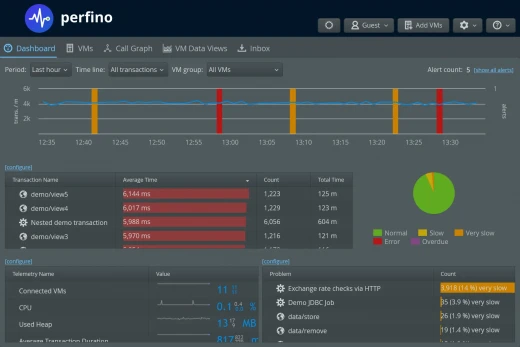
Description: perfino - JVM Monitoring for Production Servers. perfino is a powerful JVM monitoring solution that gives you maximum insight with minimum overhead.

Why perfino?

Micro-service friendly licensing
One license to monitor them all: With perfino you don't have a cap on the number of monitored JVMs or any other metric, such as recorded business transactions.
No matter how large your system gets or how many micro-services you want to monitor, your perfino license has you covered.

Immediately see what's wrong
When you log into perfino, the dashboard shows you if everything is OK - or if something is going wrong. perfino gives you fine-grained control over what level of performance is acceptable for your application.
The dashboard is where you start to drill down into the more detailed data views.

Show calls between VMs
perfino can monitor business transactions that span multiple VMs. A call in the web layer that goes on to an EJB server and further to a web service - in perfino these operations are connected, even when you do method-level sampling.
The call graph not only shows you the big picture of what is happening right now, but also what has happened in the past.

React to off-nominal conditions
When something is seriously wrong, you want to take action: Create alerts, send emails or gather more detailed data. In perfino, you use triggers and actions to configure your emergency response strategies.
Realizing a scenario like "When a business transaction hangs, take a thread dump and send it to my inbox" is very easy in the perfino UI.

Telemetries everywhere
Telemetries in perfino capture important scalar values in the monitored VMs, like the number of database operation per minute.
As sparklines in the dashboard and VMs view, they give you an instant appreciation of the current trends, in their full display they go back in time to the very beginning. Telemetry data is never discarded, only converted to higher resolutions.

Ultra-flexible business transactions
perfino automatically detects a wide range of business transactions from subsystems like servlet containers, EJBs or RMI calls. In addition, it offers you several ways to make any method call into a business transactions.
Whether you explicitly select POJO methods in the perfino UI, tell perfino about an important annotation or use the API to create transactions in your own code depends on what is most practical for you.

Call tree of business transactions
Transactions in perfino are organized into a cumulated call tree - just as you know it from your favorite profiler. The level of detail is up to you - it depends on what you configure as business transactions.
Policy violations like very slow transactions are shown separately in the call tree, so you can analyze them in isolation. perfino also correlates business transactions on the server with page load times in the browser.

Database performance and bottlenecks
Database operations like JDBC statements, or queries to mongoDB and other NoSQL databases are first class citizens in perfino.
When you ask the question "Which SQL query is the slowest in my application?", perfino delivers the answer together with cumulated backtraces pointing back to the business transactions that are responsible for the queries.

Method level sampling
To investigate the internal call structure and the method level hot spots of business transactions, perfino performs periodic method level sampling on a per-transaction basis.
For slow and very slow transactions you can configure automatic method level sampling. In many cases, these samples give you an immediate explanation for performance problems that are not related to databases.

Historical comparisons
Being able to compare performance between two points in time is important, especially for agile release managements.
With perfino, you can look back indefinitely to compare selected business transactions or entire call trees - your data is cumulated to larger time intervals as time goes by. And comparison functionality is built directly into the views that you use for viewing the data.

Cross-over to profiling
Defense in depth is a strategy that applies to many situations in life.
When your business is on the line, you sometimes need every tool there is and that is why perfino can bring in native JVMTI sampling and ultimately even prepare a VM for a JProfiler connection. So that when you need the full capabilities of a profiler, it's at your fingertips.

Release Name: EJ Technologies Perfino 4.3
Size: 138.9 MB
Links: HOMEPAGE – NFO – Torrent Search

Download: RAPiDGATOR

8 Comments
Apr 13

SysTools Outlook Recovery 10.0

Description: Repair Corrupted Outlook PST File & Restore Outlook file as PST, EML, MSG, HTML & Office 365. SysTools Outlook Recovery utility is an efficient solution that has excelled in recovering PST files' inaccessible data items & recovers Outlook folders like: emails, contacts, calendars, tasks etc.
SysTools Outlook Recovery Tool
- PST Repair Tool recovers Hard / Permanently Deleted Outlook Emails from PST file
- Repair damaged PST file of Outlook with both Minor as well as Major Corruption
- Recover Outlook PST data items: Emails, Contacts, Calendar Tasks, Notes, Journals
- Search PST Files option allow to Repair multiple PST Files in Batch Mode
- Recover Outlook PST data files and previews Deleted items in Red Color (NEW!)
- Recover Damaged Outlook File data from corrupted PST in UNICODE or ANSI Format
- Outlook PST Recovery Tool rebuilds Outlook PST file in PST, MSG, repair pst files and EML file
- Decrypt and Remove SMIME & OpenPGP encryption from Outlook messages (NEW!)
- Fix PST files with Outlook Email Recovery Tool & restore PST as Office 365 (NEW!)
- Recover Password Protected corrupted Outlook PST files using Outlook Recovery Tool
- Date & Email Filter Option allows to export selective Data from Outlook PST file
- Repair Outlook BAK File created by scanpst.exe & restores Archive File in PST format
- PST Recovery utility supports Windows 10 (32-bit & 64-bit) and MS Outlook (32/64 bit)

Deleted Outlook Email Recovery
Using Outlook PST Recovery tool, users can repair Outlook PST files & quickly recover damaged Outlook files. This PST Fix tool can easily recover permanently deleted emails in Outlook PST file items which includes contacts, calendars, tasks, notes, journals etc. One need to choose Advance Mode to recover deleted Outlook emails in bulk. The tool previews recovered deleted emails in Red Color in the preview panel.

Batch PST File Recovery
The Outlook Recovery Wizard supports to search multiple PST files from any drive on your local system. Once the entire searching is completed, you can repair multiple PST files at once. This provides advanced functionality to repair severely damaged PST File in Batch Mode quickly using Search All & Selected Drive.

Outlook PST Repair Modes
To repair Outlook archive PST or scanpst bak file; software quickly scans selected file automatically to repair damaged Outlook PST file. The application then loads the preview of emails with attachments, contacts, calendars, tasks in Personal Storage File (.pst). However, if the PST or BAK file has severe level of corruption then you are recommended to go for Advance Scan mode.

Save as PST / EML / MSG / file format
After performing Outlook PST recovery, you can restore Outlook PST file in .pst, .eml or .msg formats. Repair Outlook data file .pst and saving it as EML, HTML & MSG will allow you to open & read emails in Windows Live Mail & Outlook respectively.

Remove Encryption from Outlook Email
The Outlook PST Recovery Tool provides option to decrypt and remove SMIME and OpenPGP encryption from outlook email messages. The software decrypts protected emails with its respective certificates, keys and passwords. The tool also preview SMIME or OPENPGP encrypted emails and save them in PST, MSG, HTML, and feature formats without encryption.

Support All Type Preview (NEW!)
The SysTools PST repair Tool can generate instant preview of PST items like emails, contacts, calendars, tasks, notes, journals etc. and its properties in the in-built viewer. The application provide support to view PST file items in Normal, Hex, MIME, Message Header, HTML, RTF formats.

Preview Emails with Attachments
Outlook PST Repair software will generate an instant preview of all emails with corresponding attachments, and its properties in an in-built viewer. Along with emails, you can preview all other Outlook items that are recovered from a Outlook PST or BAK files.

Recover PST Items with Attributes
Outlook Recovery tool will maintain the original formatting of all items and will keep the meta data intact after Outlook file recovery process. The Repair PST file software also keeps the entire data after performing the Outlook .bak file recovery.

Export Selective Files or Data
You can check / uncheck the Outlook data files or folder to be saved locally. Outlook PST recovery tool not only allows to export repaired PST file items in bulk, but it also provides option to selectively export specific items. The application provides 'Export Selected' option to only save selected items in required format. You can also recover Outlook folders selectively from Inbox, Drafts, Sent Items etc.

Maintain Folder Hierarchy
The feature helps user to saves Outlook PST Data items like emails, contacts, calendars, tasks, notes, journals according to same folder hierarchy as they are saved in source file. The order and name of files and folders will not be changed even after saving PST files into PST, MSG, EML, HTML or in feature using this feature.

Don’t Export Empty Folders (NEW!)
The Outlook PST Recovery Tool provides "Don’t Export Empty Folders" option to users for excluding Empty Folders. For this, Uncheck the " Maintain Folder Hierarchy" option and check "Don’t Export Empty Folders" option for not saving folders which does not contain any data. Using this feature, the application will skip the folders that are empty.

Option to Divide Large PST
You can break the PST file size into smaller parts with split PST option, and recover Outlook PST file. Select any size from 1 to 45 GB & create PST's of same sizes that are easier to manage. This Microsoft Outlook PST Repair tool helps to rebuild Outlook PST files without corruptions and errors.

Outlook Style Interface
Graphic interface of the Outlook PST repair tool to fix Outlook PST files resembles MS Outlook UI. The appearance of Microsoft Outlook interface on software panel makes it user-friendly for all kind of users while they try to repair Outlook PST file.

Apply Mail Filters
Using Outlook Recovery utility, you can set a date range and filter all the emails to recover PST file and restore Outlook PST as PST / EML / HTML or MSG. This option within the Outlook Recovery Wizard will help you to save only selective amount of data in a date range specified after you have fixed damaged Outlook PST files.

Flexible & Useful Naming Options
Outlook PST recovery tool allows you to rebuild PST file as EML, HTML or MSG file formats then you can select one of the multiple naming options available to save emails for better manageability.Read More

Save Export Report
Once all the items get successfully exported, Outlook PST repair software will generate an Export report with location of selected mailbox and Exported file after completion of PST data recovery process. You can also save the export report regarding the details of recovered damaged Outlook PST files as .csv for future reference.

Change Screen View Mode
The screen view mode of Outlook Recovery Wizard can be switched between horizontal or vertical mode before a user repair corrupted PST files. By default the Outlook Email Recovery tool will appear in horizontal mode but you can switch it to vertical mode; if required.

System Specifications:
- Processor: Intel® Pentium 1 GHz processor (x86, x64) or equivalent
- Memory (RAM): Minimum 2 GB RAM is required
- Hard Disk Space: 100 MB of free hard disk space

Application Pre-Requisites:
- If you are using Windows 10/8.1/8/7 or Vista, then please launch the tool as "Run as Administrator".

Supported Editions:
- Microsoft Windows – 2000, 2003, 2008, XP, Vista, Windows 7/8/8.1, 2008/2012 (32-bit & 64-bit), Windows 10 (32-bit & 64-bit)
- MS Outlook – Outlook 2000, 2003, 2007, 2010(32/64 bit), 2013 (32/64 bit), 2016 (32/64 bit), 2019

Additional Requirements:
- Microsoft .NET framework 4.5 or above
- Certificates and respective passwords are needed to decrypt SMIME encrypted Emails
- Private Keys and respective passwords are needed to decrypt OPENPGP encrypted Emails

Release Name: SysTools Outlook Recovery 10.0
Size: 100.7 MB
Links: HOMEPAGE – NFO – Torrent Search

Download: RAPiDGATOR

8 Comments
Apr 13

My Music Collection 3.4.16.173

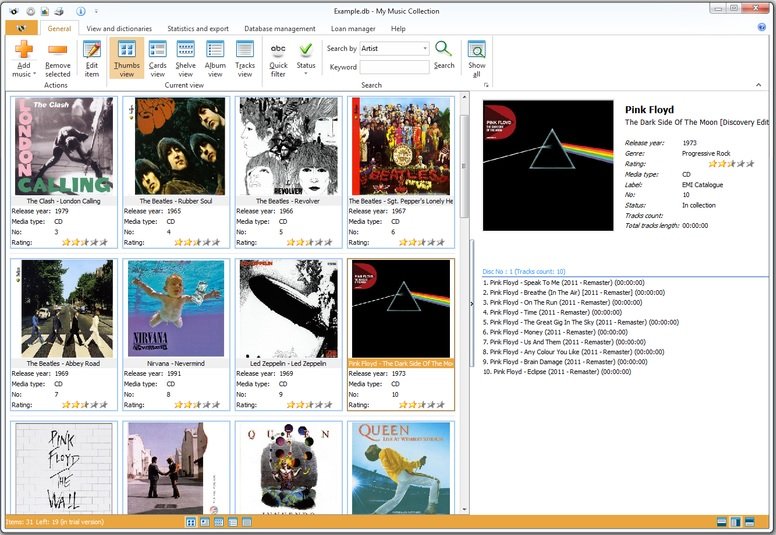
Description: My Music Collection is the most comprehensive music catalog software designed for organizing and managing music collections of any kind, including CD discs, MP3 files or vinyl records. This music organizer allows you to create an ordered CD database and view its contents, even if the disk is lying on a shelf or is being borrowed by a friend of yours. Now you can forget about creating music database on a paper, in Excel or text files.

Simply insert a disc, scan barcode or type the title and My Music Collection will fetch all album information from the Internet, including artist, title, release year, country, track titles and cover image, etc.

Furthermore, this music organizer does not only allow you to create comprehensive music collection with a great amount of options, but it is also a great loan manager allowing you to keep track of albums borrowed to your friends.

Familiar and intuitive interface allows you to easily and quickly search and browse your music collection. You can sort albums by artist, release year or even by media type. Checking statistics is also easy - My Music Collection allows you to view statistics in a table view or use a variety of diagrams. With music database software you can export your list into almost all popular file formats, including HTML, Excel, PDF, Text file or XML.

Release Name: My Music Collection 3.4.16.173
Size: 75.9 MB
Links: HOMEPAGE – NFO – Torrent Search

Download: RAPiDGATOR

8 Comments
Apr 13

SysTools OST Recovery 10.0

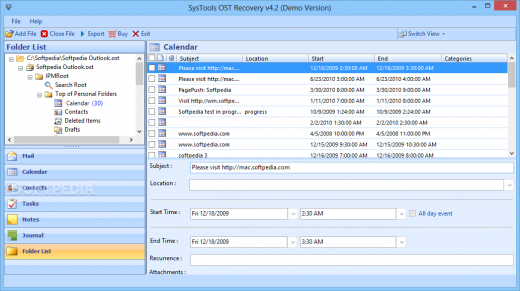
Description: SysTools OST Recovery Tool is best rated software to fix & recover OST emails from corruption or damage.SysTools OST recovery software is the ultimate solution to restore Offline OST mailbox data. This new version of OST offline recovery version has many update and new features which allow user to recover damaged OST file & save the data into a healthy state after successfully recovering emails from OST file corrupted state.

SysTools OST Recovery
- Extract & Recover deleted emails from OST files: Mail, Calendar, Contacts, Notes, Task & Journal
- Rebuild & Restore OST file into PST, EML, MSG, HTML, Office 365
- Supports to Fix Corrupt OST as well as Outlook NST File
- Decrypt OST File emails by Removing S/MIME & OpenPGP encryption (NEW!)
- Search within All or Selected Drive & Recover Multiple OST File (NEW!)
- Display Deleted OST items in Red Color after Recovery (NEW!)
- Apply Filters by Date Range & restore emails from OST with Selective Items / Folders
- Split exported File into Small size to avoid large-sized corruption issues
- Maintains Email Metadata like Read / Unread Status & Message Dates
- Supports MS Outlook 2019, 2016, 2013, 2010, 2007 & All below versions
- Supports to Recover OST file of both Compressible & High level Encryption
- No File Size Limitation for recovering orphaned OST File

Restore Deleted OST & NST Data
SysTools OST Recovery Tool can restore all permanently or hard deleted emails from OST file in Outlook 2019, 2013, 2016, 2010, 2007 like; deleted emails, contacts, tasks, calendars etc. After recovering NST & OST file, the OST Data Recovery tool save the restored file into & make data MS Outlook accessible. The OST Fix tool displays recovered emails to users in Red Color in the preview panel.

Fix OST File - Low & High Corruption
Two scanning modes are available to rebuild damaged OST file in Outlook 2007, 2010, 2013, 2016, 2019 i.e. Quick scan and advanced scan. Quick scan is to recover OST File data for less corrupt OST file and advance scan option is for severely corrupt OST file. Now, the OST & NST Recovery software performs Quick scanning by default to rebuild OST file in Outlook 2019, 2016, 2013, 2010, 2007, 2003.

Restore from Single or Multiple OST File (NEW!)
This OST Restore Tool Provides two option to browse & add OST File for recovery :

- Select File : Enables users select single OST file for recovery
- Search File : Enables users to Search OST Files within Selected or All Drive for Batch OST Recovery

Auto-Locate OST File for Recovery (NEW!)
This Utility provides "Search File" Option which enables user to search OST in following two ways & recover only selected OST File

- Search Selected Drive: This enables users to search with Selected Drive (eg- C:, D:, E: etc.)
- Search All Drive: This enables users to search OST from all the Drives.

Decrypt OST Emails from S/MIME or OpenPGP Encryption (NEW!)
The OST Fix Tool by SysTools is capable to Decrypt OST Emails & remove Encryption from OST emails which are encrypted with S/MIME or OpenPGP. Users simply need to check "Remove Encryption" checbox to decrypt SMIME / OpenPGP Encrypted emails in selected OST file.For this you need to provide associated Certificates (with passwords) to decrypt S/MIME encrypted emails or Private Keys(with passwords) to decrypt OPENPGP encrypted Emails.

Preview Data with Item Count
After recovery, the OST File Recovery software generate an instant preview of all OST file components like: Email, Calendar, Contacts, Notes, Task & Journal etc.; with its item count. After scanning, utility displays only those Folder name in Bold, which contains data for quick access. Also, orphaned OST recovery will display emails in normal mail view with associated attachment preview while you fix corrupt OST file.

7+ Views Before Recovery (NEW!)
OST Recovery Tool provides 7+ Preview Modes : Normal Mail View, Hex, Properties, Message Header, MIME, HTML, RTF and Attachmentsto preview Recovered OST File attributes. This enables users to inspect recovered OST File Properties in specified way for detailed analysis.

Maintains Meta Data
Office OST Fix tool ensures to keep Meta properties like To, Cc, Bcc, sent date, received date etc.; intact. Also, the original formatting of all items remains as original after the process to rebuild ost file of Outlook.

Extract Selected Items from OST File/ Folder
On saving selective emails or items from the recovered OST file; check or uncheck respective items and click export to extract emails, contacts & calendars from OST file as per your need. Also, with this you can Select and check the specific file or folder that you want to. The OST Fix tool will only rebuild corrupt OST & save files / folders that are being marked with a check.

Discard Empty Folders (NEW!)
OST Recovery Tool provides "Don’t Export Empty Folders" checkbox option which enables users to exclude Folders which are empty. To avail this option you need to first uncheck " Maintain Folder Hierarchy" option. This will recover only folders that have data & skip all empty folders.

Maintains Email Folder Structure
Outlook OST Restore Software maintain the internal folder structure of OST file as it is, while creating file. There will be no changes done in the internal hierarchy of files or folders after you fix corrupted OST file.

Apply OST Mail Filter
While restoring & extracting data from OST file; you can specify date range to apply mail filters. Thus; you can recover damaged OST file & save all email or items within these date range with the help of OST Fix tool.

Multiple Message Saving Options
After recovery of OST data, you can extract the OST file into multiple e-mail message formats like; or .eml or .msg. Each of these formats can further be used in various email archiving applications and email clients like; Outlook, Outlook Express, Windows Mail etc.

Divide File by Size
While extracting OST data into , you can apply the split option to break the resultant file into multiple parts. Specify the size in GB and the software will create several files of same size.

Save & Load Scanned OST (NEW!)
The OST file Recovery tool enables the user to save an OST file in Outlook 2019, 2016, 2013, 2010, 2007 once it has been scanned. The scanned file can be later on loaded when required, thus enabling the user to save time from re-scanning the same OST file while you fix corrupt OST file.

Fix OST File Without Outlook (NEW!)
The Outlook OST file Rebuild software gives the provision to extract data from OST & NST file into different file formats with MS Outlook as optional component in the user machine. The user can perform complete OST & NST Recovery and save OST File independent of Outlook.

Get Complete Recovery Report
After the complete OST file restoration; a Final report will get generated by the OST Recovery software. The report will contain the details of restored mailboxes and path of saved files. After you rebuild OST File, you can save this report in .csv file format for future reference when you restore data from OST File.

Different Naming Options
If you select .eml or .msg format to extract the OST file emails then Exchange OST Recovery software will provide you an option to choose the appropriate naming convention to save the emails.

Release Name: SysTools OST Recovery 10.0
Size: 100.7 MB
Links: HOMEPAGE – NFO – Torrent Search

Download: RAPiDGATOR

8 Comments
Apr 13

n-Track Studio Suite 10.3.0.10743

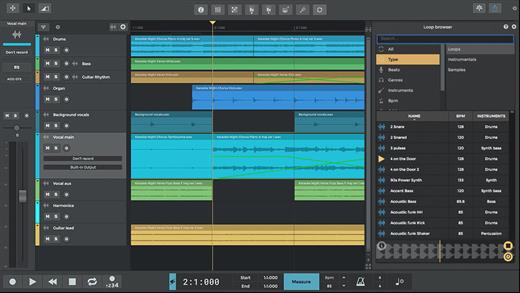
Description: n-Track Studio turns your PC into an easy to use multitrack audio recording studio. It is the perfect tool for professional quality audio recording, encoding, mixing and editing. Record, edit, overdub your audio tracks, apply effects, process audio live input, mix and then burn audio CDs or create mp3 files.


Piano Roll
Write and edit MIDI data for controlling virtual instruments using the intuitive built-in piano roll editor.

Step Sequencer
Create beats, sequences or arpeggios and import your own sounds easily with the Step Sequencer.

VocalTune
Using VocalTune you can do anything from simple pitch correction to completely transform your vocal.

Guitar Amp
Make your guitar sound huge by choosing among great amp head simulators, and different modern and vintage cabinets inspired by classic models.

Bass Amp
Ever felt your bass recordings needed that extra drive, lowend or grit to sit nicely in your mix and surprise your listeners?
Well, you're going to like this!

Screen Drumkit
The new screen Drumkit controller lets you play drum sounds with the look and feel of a real kit.

Songtree Community
Find your next collab and share your songs with the Songtree music community - directly inside n-Track Studio.

Pure Data Support
You can now load your Pure Data patches inside n-Track and use your favorite sounds and effects in your song.

Built-in effects
From Reverb, Compression, Parametric & Graphic EQ to DEnoiser, VocalTune, Shimmer, AutoFilter & Pitch Shift

Audio Part Widgets
Audio parts now have fade and volume widgets for quick and precise editing.

n-Vocal effects processor
The included n-Vocals plugin offers useful and creative ways of tweaking and manipulating your vocal recordings.

Surround mixing
Supports surround mixing for creating audio projects using 5.1, 6.1 and 7.1 channels surround formats

Effects and Instrument Chains
Craft your sonic signature with custom presets

Release Name: n-Track Studio Suite 10.3.0.10743
Size: 563.1 MB
Links: HOMEPAGE – NFO – Torrent Search

Download: RAPiDGATOR
9 Comments
Apr 13

Perfectly Clear WorkBench 5.1.0.3186

Description: Perfectly Clear is the program's latest version, which also comes as a plugin for Photoshop & Lightroom. The essence of this development is simple; you have a picture, you do not like it, the skin is dull, pimples, in short, there are defects, now you can not bother with editing; a couple of clicks and here is a corrected photo, perfect, as it should be, not ashamed of social networks to pour. You can use the pens to adjust all correction parameters; many use automatic mode.

The program has 20 indicators for them that reconciliation and adjustment take place, and as a result, the picture is beautiful without any difficulties. The cameras have limitations; they can add noise to the picture, light a photo, make the skin tone terrible, etc. This plugin knows all these restrictions and will detect, eliminate, and provide; you only have to save the result.

The application will find and eliminate irregularities and other skin defects, work with dark circles under the eyes, remove excess shine in the picture, add shine, enlarge the eyes, whiten teeth, and tonify the skin. In short, now you can safely wake up and be immediately photographed; the program will process everything and be like candy, do not spend a couple of hours standing in front of a mirror.

What's New in Perfectly Clear WorkBench
Beautiful new interface
New image correction tools:
Preprocessing section for Input Looks and "Image Ambulance" for manual exposure corrections
"Face Aware" exposure for more accurate auto-exposure corrections in portraits and group photos
Black Point tool to deepen blacks
New Color Vibrancy tool to complement our previous "Vibrancy" control (now renamed to Color Restoration)
Sky and Foliage enhancements
Existing tools have been improved:
Added strength sliders to Light Diffusion and Vibrancy for better control
Better 'color pickers' for Skin Tone and Blush adjustments
Manually identify faces that are not detected automatically
One-click to zoom into individual faces
Modify facial regions to provide the best corrections
Histogram
Much improved preset management

Release Name: Perfectly Clear WorkBench 5.1.0.3186
Size: 260.9 MB
Links: HOMEPAGE – NFO – Torrent Search

Download: RAPiDGATOR

9 Comments
Apr 13

QueueExplorer Professional 5.0.78

Description: Explorer-like management for queues. Works with multiple queuing systems. QueueExplorer supports multiple systems from the same installation, without need for additional licensing: MSMQ, Azure Service Bus, RabbitMQ, and ActiveMQ. With QueueExplorer you can do much more than with built-in management console - copy, move or delete messages, save and load, stress test, view and edit full message bodies (with support for XML, JSON, .Net objects...), and much more. QueueExplorer is a fast, native Windows application.

The indispensable tool for working with queues and messages:
understand and manage your system
figure out what went wrong
fix it

Find out all about your messages
With QueueExplorer you can dig into your queues and see which message went where, whether they were correctly formatted, with correct headers and settings, etc. Multiple viewers are at your disposal: JSON, XML, WCF, Hex, text with different encodings...

Develop and test producers and consumers separately
With QueueExplorer you can test individual pieces of your solution, or even simulate third party messages going in or out. You can create and edit test messages, send one by one or bunch of them together.

Test performance and load handling of your app
Send thousands of messages for performance testing to see how system handles that load.

Troubleshoot, fix, and resend problematic messages
If something is wrong, QueueExplorer is the fastest and easiest way to investigate and fix incorrect, poison, or failed/deadletter messages.

See status of your system at glance
Check if some of queues are growing too large, if there are messages in deadletter queues, etc. With autorefresh functionality see how entire system works in near real time.

Filter and sort messages to quickly find important data
QueueExplorer allows you to quickly find messages you're interested in. Professional edition allows you to even extract your business data from within messages using XPath, JSON, or Regex, and to immediately see e.g. invoice totals, etc.

Backup and restore messages
Backup messages to files, or move/copy them to another queue.

Copy, compare and sync queues, topics and other schema (metadata) objects
This can be used to migrate queues (and other objects) to another server, e.g. to propagate from development to production. Or just to compare and see which changes were made. Or to backup schema before changes are made. You can also duplicate queues with all their settings on the same server (Professional).

Release Name: QueueExplorer Professional 5.0.78
Size: 35.8 MB
Links: HOMEPAGE – NFO – Torrent Search

Download: RAPiDGATOR
9 Comments
Apr 13

Nero Burning ROM 27.5.0.11

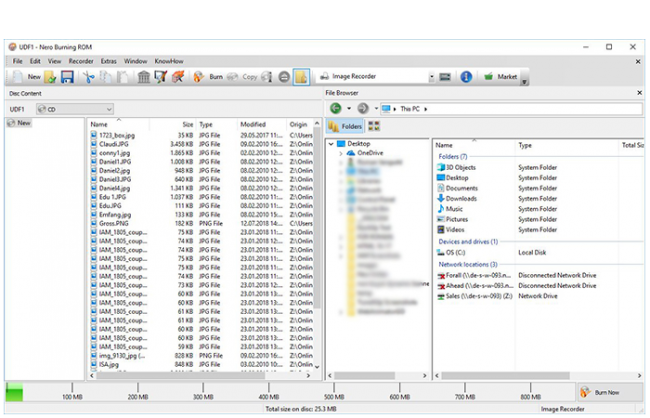
Description: Nero Burning Rom is a program designed for burning, erasing, rewriting and creating all types of disks, even bootable ones. The first product released by Nero AG. Using the utility, you can copy the disk and encrypt the data on it.

Nero Burning ROM Features
• Create and burn CDs, DVDs, and Blu-ray discs with precision
• Produce audio, data, video, and backup discs
• High-quality disc burning with verification to ensure error-free writing
• Support for popular image formats (ISO, NRQ, NRG, etc.)
• Disc copying with sector-by-sector accuracy
• Bootable disc creation for system backups
• Advanced buffer underrun protection for stable burns
• Secure disc writing with password and encryption options
• Burn playlists and audio CDs compatible with car and home players
• Create MP3, AAC, and other audio formats directly on disc
• Rip CDs and extract audio to common file formats
• Custom disc labels and cover design tools
• Multisession disc support to add files later
• Nero’s intuitive user interface with easy-to-use workflows
• Fast performance with minimal system resource usage
• Compatible with modern Windows versions and optical drives
• Create movie and video discs with menus and chapters
• Disc spanning for large backups across multiple discs
• Ideal for home media, archiving, and professional disc projects

Release Name: Nero Burning ROM 27.5.0.11
Size: 83.2 MB
Links: HOMEPAGE – NFO – Torrent Search

Download: RAPiDGATOR

9 Comments