Please REGISTER or RENEW your account on RAPiDGATOR.net and support us by doing through all RAPiDGATOR working download links on main posts...
Apr 13

4K Video Downloader Plus 26.1.0

Description: Download videos from all popular websites including YouTube, Vimeo, TikTok, SoundCloud, Facebook, Twitch, Bilibili and more in high-quality.

Meet the next generation of 4K Video Downloader
4K Video Downloader is a cross-platform app that lets you save high-quality videos from YouTube and other websites in seconds. It works faster than any free online video downloader — just a click, and you can enjoy content anytime, anywhere.

Download YouTube Playlists, Channels, and Search Results in One Click
Save playlists, channels, and search results from YouTube in high quality and various video or audio formats. Download YouTube Watch Later, Liked videos and private YouTube playlists.

Dubbed YouTube Audio Download
Effortlessly save both YouTube videos and accompanying audio tracks in multiple languages. Download dubbed audio in your preferred languages as separate files.

Extract YouTube Subtitles
Download annotations and subtitles along with YouTube videos. Save them in SRT format, select from over 50 languages. Get subtitles not just for one video, but for an entire YouTube playlist or even a channel.

Get Videos in 4K and 8K Quality for Free
Download videos in HD 720p, HD 1080p, 4K, and 8K resolution. Enjoy them in high definition on your HD TV, iPad, iPhone, Samsung and other devices.

Proxy Connection for Unrestricted Access
Bypass restrictions set by your Internet service provider and get around your school or workplace firewall. Connect through an in-app proxy to access and download from YouTube and other sites.

All Popular Sites Support
Save video and audio from YouTube, Vimeo, TikTok, SoundCloud, Bilibili, Niconico, Flickr, Facebook, DailyMotion, Naver TV, Likee and Tumblr. Download recorded streams from Twitch and YouTube Gaming.

New YouTube Video Auto-Download
Subscribe to the download of your favorite YouTube playlists and creators. Save whole channels and playlists in one go. Get new videos downloaded automatically as soon as they are uploaded to YouTube.

3D Video Download
Get a one of a kind experience by watching stereoscopic 3D videos on your computer or TV. Download 3D Youtube videos in MP4, MKV, FLV, 3GP and other formats

360° Video Download
Feel the action all around you with virtual reality videos. Download 360° videos to relive the mind-blowing VR experience as many times as you want.

Easy Downloads Management
Sort and filter downloads by type, name and date. Import and export all files as a single JSON file. Easily track and control the progress of both individual downloads and entire groups of downloading files.

Release Name: 4K Video Downloader Plus 26.1.0
Size: 184.6 MB
Links: HOMEPAGE – NFO – Torrent Search

Download: RAPiDGATOR

9 Comments
Apr 13

ManicTime Pro 2026.1.2.1

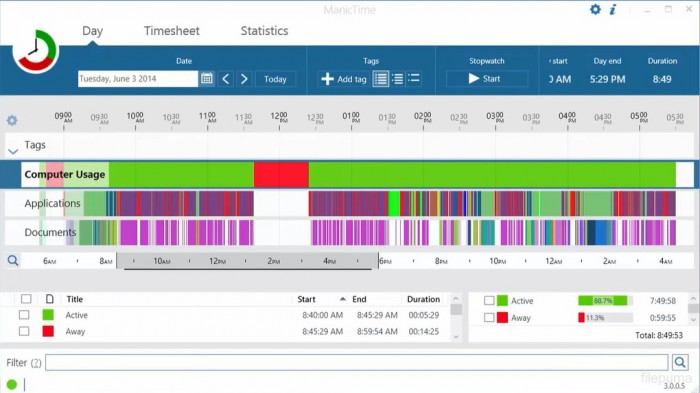
Description: ManicTime automatically records your computer usage. It remembers which apps you've used and for how long. It will also remember which web sites you've visited and which documents you've worked on.

Track project or client work accurately
All the data ManicTime collects will be presented in a easy to understand way. This will help you to quickly figure out when you have switched tasks or went to lunch. You can use this data to accurately assign time to tasks.

Clear and detailed reports
Reports like:
Applications and websites usage
Attendance
Annual leave
Start / end
and others

ManicTime automatically records device usage
Tired of the old, unreliable stopwatch? There is a better way...

Assign time to project or task
Use automatically recorded data to accurately assign time to your projects, clients or tasks.

Great reports
Comprehensive reports are designed to offer you invaluable insights into your business operations.

Attendance and vacation tracking
User-friendly tools for tracking attendance, managing leave quotas, and handling leave approvals

Integrate with other systems
ManicTime integrates with a host of other services as well as your in-house solutions.

Cloud or on premise
Offer a choice between easy to use cloud-based solution or on-premise installation for enhanced data control and security.

Privacy control
Offers highly customizable tracking for enhanced privacy.

Release Name: ManicTime Pro 2026.1.2.1
Size: 191.1 MB
Links: HOMEPAGE – NFO – Torrent Search

Download: RAPiDGATOR

8 Comments
Apr 13

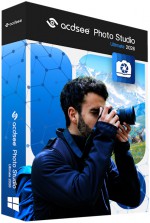
ACDSee Photo Studio Ultimate 2026 v19.1.0.4501

Description: Take your digital asset management and photo editing workflow from tedious to ta-da! With ACDSee Photo Studio Ultimate 2026 you’re not just editing and maintaining – you’re commanding your digital world with confidence and ease. Feel empowered as you use Artificial Intelligence (AI)-injected functions to effortlessly fine-tune the most intricate RAW images, quickly perform complex layered edits, and keep your entire file archive under intelligent, intuitive control.

Remove Noise, Not Detail
AI Denoise uses advanced machine learning to automatically detect where to reduce pixelated noise in your photos, so the important details stay sharp. Instantly clean up high-ISO shoots or grainy snaps to keep your images natural, sharp, and ready to shine. Run AI Denoise on an entire batch and cut down on editing time, while your photos emerge clean, detailed, and true to life.

Intricate Hair Selection in an Instant
Save even more time while editing your photos by letting ACDSee’s intuitive AI Hair Masking make one-click hair selections for you. This allows you to adjust the color and lighting of one of the trickiest elements in portrait photography – hair – without affecting the rest of the image.

Untapped Non-Destructive Editing Prowess
Intelligent, non-destructive style at your fingertips. AI Develop Presets are an absolute game-changer for hobby and commercial photographers alike. When applied to a batch of photos, the AI analyzes each individual photo and applies gorgeous adjustments, significantly reducing the time you spend editing. Make your subject pop, correct background lighting, or imprint your authentic style on an entire catalogue of images with just a few clicks.

New Portrait Possibilities
Effortlessly make retouching portraits feel intentional, not artificial. Enhance natural beauty or completely alter facial parameters using the tools in AI Face Edit that you already know and love – like skin smoothing, eye and eyebrow adjustments, nose contouring, teeth whitening, and more. Extend your capabilities with new additions for 2026:
AI Hair: Control individual hair color and clarity with adjustments for Temperature, Tint, Saturation, and more in the new Hair Group. Options for natural and unnatural hair colors give you full creative freedom to remain organic or push past societal norms. You do you!
Splotch Removal: Easily blend out blemishes, not texture, with the Splotch Removal tool added to the Skin Group.

Be Unstoppable
No more waiting for tasks to complete—thanks to the updated Activity Manager, background processing lets you continue working while operations run. With multi-threading, multiple activities run simultaneously, so you can import, export (one of the most requested enhancements), convert and resize batches of photos, apply Develop presets, and detect faces and keywords, all without ever slowing down. Track progress in real-time and experience a faster, more efficient workflow designed for high-volume demands.

FACE DETECTION & PEOPLE MODE
Narrower face labels in View Mode ensure no one is missed while using AI Face Detection on group photos. Find your people faster with new grouping options in People Mode, ACDSee Photo Studio’s AI-driven mode for identifying and managing people in your portfolio. Change modes without skipping a beat, your selection will remain right where you left it as you switch between modes.

ACDSEE TABS
Pick up right where you left off. ACDSee Tabs can now retain your open tabs between sessions, making it easy to resume previous searches and folder views without starting over.

VIDEO METADATA SUPPORT
Your video files are now a seamless part of your workflow. View GPS details and standard metadata fields in the Properties pane’s default view, or dive deeper into the video and audio streams with the new All Video Metadata view. With Advanced Search supporting video-specific fields, and many new Auto Categories to search your video files, you have everything you need to organize and manage your videos – on your terms.

IMPROVED FILE SUPPORT
Broaden your editing and metadata options with added IPTC metadata support for JPEG XL (JXL), and AVIF formats.

It’s Not Magic, it’s ACDSee
Artificial Intelligence (AI) in ACDSee Photo Studio Ultimate 2026 doesn’t take over – you remain in full control while the AI-driven tools amplify your impact. There is no limit to your potential thanks to zero-effort features like AI Denoise and AI Super-Resolution for instant smart photo enhancement, AI Keywords and AI Facial Recognition for easy organization and searching, AI Develop Presets for rapid RAW image adjustments, AI Actions and AI Filters to automatically make the most complicated and intricate selections for advanced editing, and many more AI-fueled features to boost your productivity. Unlike solutions that send your files to remote servers, ACDSee’s AI is locally powered, keeping your images and edits entirely on your device. That means complete privacy when using AI features. Create without limits and keep your head – not your files – in the clouds.

The Sky is Never the Limit
Transform dull skies into dramatic backdrops with the power of AI Sky Replacement. Whether you’re chasing the golden hour or adding atmosphere to a flat scene, this intelligent tool puts complete creative control in your hands. Instantly swap overcast skies for sunsets, vibrant fireworks, or clear blue horizons with no masking or manual edits required.

What’s New in ACDSee Photo Studio 2026?
Discover new and improved tools designed to simplify your editing and management workflow. AI Denoise removes unwanted noise while preserving detail, and AI Hair Masking makes selecting hair for adjustments quick and accurate. Apply intelligent adjustments across multiple images with AI Develop Presets, and take advantage of updates to AI Face Edit and People Mode for easier portrait work and organization. The new Home Page and enhanced tab system provide faster access to your projects, while the updated Activity Manager uses multi-threading to handle imports, batch exports, and other large operations in the background—so you can keep working without interruption. Additional improvements to video metadata and file format support give you greater flexibility throughout your workflow. ACDSee Photo Studio 2026 is packed with time-saving power to help you work smarter, complete tasks faster, and feel unstoppable.

Remove Noise, Not Detail
AI Denoise uses advanced machine learning to automatically detect where to reduce pixelated noise in your photos, so the important details stay sharp. Instantly clean up high-ISO shoots or grainy snaps to keep your images natural, sharp, and ready to shine. Run AI Denoise on an entire batch and cut down on editing time, while your photos emerge clean, detailed, and true to life.

Intricate Hair Selection in an Instant
Save even more time while editing your photos by letting ACDSee’s intuitive AI Hair Masking make one-click hair selections for you. This allows you to adjust the color and lighting of one of the trickiest elements in portrait photography – hair – without affecting the rest of the image.

Untapped Non-Destructive Editing Prowess
Intelligent, non-destructive style at your fingertips. AI Develop Presets are an absolute game-changer for hobby and commercial photographers alike. When applied to a batch of photos, the AI analyzes each individual photo and applies gorgeous adjustments, significantly reducing the time you spend editing. Make your subject pop, correct background lighting, or imprint your authentic style on an entire catalogue of images with just a few clicks.

New Portrait Possibilities
Effortlessly make retouching portraits feel intentional, not artificial. Enhance natural beauty or completely alter facial parameters using the tools in AI Face Edit that you already know and love – like skin smoothing, eye and eyebrow adjustments, nose contouring, teeth whitening, and more. Extend your capabilities with new additions for 2026:
AI Hair: Control individual hair color and clarity with adjustments for Temperature, Tint, Saturation, and more in the new Hair Group. Options for natural and unnatural hair colors give you full creative freedom to remain organic or push past societal norms. You do you!
Splotch Removal: Easily blend out blemishes, not texture, with the Splotch Removal tool added to the Skin Group.

Release Name: ACDSee Photo Studio Ultimate 2026 v19.1.0.4501
Size: 580 MB
Links: HOMEPAGE – NFO – Torrent Search

Download: RAPiDGATOR

10 Comments
Apr 13

DameWare Mini Remote Control 12.4.0.25

Description: DameWare Mini Remote Control (MRC) is one of the best values in remote control software available today. MRC is licensed by the number of help desk technicians your organization has and not by agent or end-point. It has been used for more than 10 years by thousands of IT admins to seamlessly connect to remote servers, desktops, and notebooks.

Remotely control Windows®, Mac OS® X, and Linux® computers
Remote control software for Windows, Mac OS X and Linux computers. Share screens, chat, transfer files and initiate MRC, RDP or VNC sessions.

Connect to out-of-band computers with Intel® AMT using KVM
Remotely connect to systems that are powered-off or in a crashed state.

Chat with end-users during remote support sessions
Chat with end-users to pinpoint and resolve issues, transfer files, and capture screenshots.

Manage remote access privileges
Create flexibile access permissions to remote computers based on roles in your organization.

Customize and automatically deploy remote control agents
Easily create and deploy custom MSI packages for the installation of the MRC Client Agent Service.

Securely connect with remote Smart Card authentication
Enforce two-factor authentication in security sensitive environments and government agencies.

System Requirements
- OS: Windows 7, 8, 8.1, 10, 11 (64-bit)
- Server: Windows Server 2008 R2*, 2012 R2, 2016, 2019
- Hard drive space: 150 MB
- CPU: 1 GHz
- RAM: 4 GB

Supported Languages
English, French, German

Release Name: DameWare Mini Remote Control 12.4.0.25
Size: 158.7 MB
Links: HOMEPAGE – NFO – Torrent Search

Download: RAPiDGATOR

9 Comments
Apr 13

FileLocator Pro 2022 Build 3562

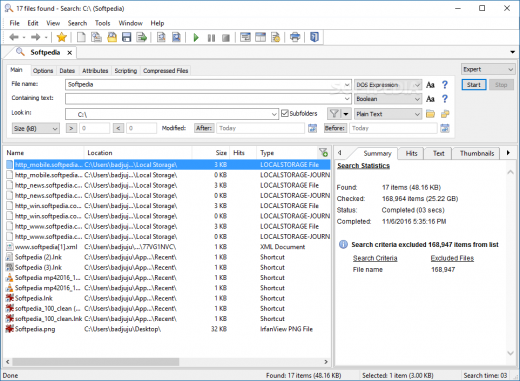
Description: Navigate and understand your data. Whether it’s a line of source code, an entry in a log file, a legal brief, or even just a Christmas letter to your family, FileLocator Pro helps you find things fast. Its unique features make it possible to dig out information in even the most obscure file formats.

Immediate results
Review highlighted keywords and surrounding text so you don’t need to waste time opening each file looking for the right information.

Document browsing
Different views allow you to see just the hits or the hits highlighted in the context of the whole file. Includes syntax highlighting for easier reading of source code, supports most programming languages

Hundreds of formats
Whether your information is stored in a PDF file, Office document, or archived in a ZIP file FileLocator Pro will dig it out.

Outlook searching
Search through emails, contacts, calendar items over multiple PST files in one go.

Indexing options available
Searches can be either non-indexed or indexed. Indexed searches allow almost instant searching through GB of data. Multiple user defined indexes can be created and shared across your network. No background indexing consuming valuable CPU cycles and no secret indexes stealing value disk space. You stay in control of your PC.

Reports and Exporting
Understand, summarize, and share results with FileLocator Pro’s Reporting and Exporting functionality.

Release Name: FileLocator Pro 2022 Build 3562
Size: 110.4 MB
Links: HOMEPAGE – NFO – Torrent Search

Download: RAPiDGATOR

8 Comments
Apr 13

ACDSee Photo Studio Professional 2026 v19.1.0.3560

Description: ACDSee Photo Studio Professional 2026 is equipped with a versatile toolkit that combines cutting-edge, locally powered Artificial Intelligence (AI) with renowned digital asset management and advanced RAW image editing. Stay firmly in command of your creative world as AI-driven tools handle the time-consuming tasks, leaving you free to focus on refining details, perfecting every shot, and keeping your growing image library effortlessly accessible.

Remove Noise, Not Detail
AI Denoise uses advanced machine learning to automatically detect where to reduce pixelated noise in your photos, so the important details stay sharp. Instantly clean up high-ISO shoots or grainy snaps to keep your images natural, sharp, and ready to shine. Run AI Denoise on an entire batch and cut down on editing time, while your photos emerge clean, detailed, and true to life.

Intricate Hair Selection in an Instant
Save even more time while editing your photos by letting ACDSee’s intuitive AI Hair Masking make one-click hair selections for you. This allows you to adjust the color and lighting of one of the trickiest elements in portrait photography – hair – without affecting the rest of the image.

Untapped Non-Destructive Editing Prowess
Intelligent, non-destructive style at your fingertips. AI Develop Presets are an absolute game-changer for hobby and commercial photographers alike. When applied to a batch of photos, the AI analyzes each individual photo and applies gorgeous adjustments, significantly reducing the time you spend editing. Make your subject pop, correct background lighting, or imprint your authentic style on an entire catalogue of images with just a few clicks.

Be Unstoppable
No more waiting for tasks to complete—thanks to the updated Activity Manager, background processing lets you continue working while operations run. With multi-threading, multiple activities run simultaneously, so you can import, export (one of the most requested enhancements), convert and resize batches of photos, apply Develop presets, and detect faces and keywords, all without ever slowing down. Track progress in real-time and experience a faster, more efficient workflow designed for high-volume demands.

FACE DETECTION & PEOPLE MODE
Narrower face labels in View Mode ensure no one is missed while using AI Face Detection on group photos. Find your people faster with new grouping options in People Mode, ACDSee Photo Studio’s AI-driven mode for identifying and managing people in your portfolio. Change modes without skipping a beat, your selection will remain right where you left it as you switch between modes.

ACDSEE TABS
Pick up right where you left off. ACDSee Tabs can now retain your open tabs between sessions, making it easy to resume previous searches and folder views without starting over.

VIDEO METADATA SUPPORT
Your video files are now a seamless part of your workflow. View GPS details and standard metadata fields in the Properties pane’s default view, or dive deeper into the video and audio streams with the new All Video Metadata view. With Advanced Search supporting video-specific fields, and many new Auto Categories to search your video files, you have everything you need to organize and manage your videos – on your terms.

IMPROVED FILE SUPPORT
Broaden your editing and metadata options with added IPTC metadata support for JPEG XL (JXL), and AVIF formats.

What’s New in ACDSee Photo Studio 2026?
Discover new and improved tools designed to simplify your editing and management workflow. AI Denoise removes unwanted noise while preserving detail, and AI Hair Masking makes selecting hair for adjustments quick and accurate. Apply intelligent adjustments across multiple images with AI Develop Presets, and take advantage of updates to AI Face Edit and People Mode for easier portrait work and organization. The new Home Page and enhanced tab system provide faster access to your projects, while the updated Activity Manager uses multi-threading to handle imports, batch exports, and other large operations in the background—so you can keep working without interruption. Additional improvements to video metadata and file format support give you greater flexibility throughout your workflow. ACDSee Photo Studio 2026 is packed with time-saving power to help you work smarter, complete tasks faster, and feel unstoppable.

Remove Noise, Not Detail
AI Denoise uses advanced machine learning to automatically detect where to reduce pixelated noise in your photos, so the important details stay sharp. Instantly clean up high-ISO shoots or grainy snaps to keep your images natural, sharp, and ready to shine. Run AI Denoise on an entire batch and cut down on editing time, while your photos emerge clean, detailed, and true to life.

Intricate Hair Selection in an Instant
Save even more time while editing your photos by letting ACDSee’s intuitive AI Hair Masking make one-click hair selections for you. This allows you to adjust the color and lighting of one of the trickiest elements in portrait photography – hair – without affecting the rest of the image.

Untapped Non-Destructive Editing Prowess
Intelligent, non-destructive style at your fingertips. AI Develop Presets are an absolute game-changer for hobby and commercial photographers alike. When applied to a batch of photos, the AI analyzes each individual photo and applies gorgeous adjustments, significantly reducing the time you spend editing. Make your subject pop, correct background lighting, or imprint your authentic style on an entire catalogue of images with just a few clicks.

New Portrait Possibilities
Effortlessly make retouching portraits feel intentional, not artificial. Enhance natural beauty or completely alter facial parameters using the tools in AI Face Edit that you already know and love – like skin smoothing, eye and eyebrow adjustments, nose contouring, teeth whitening, and more. Extend your capabilities with new additions for 2026:
AI Hair: Control individual hair color and clarity with adjustments for Temperature, Tint, Saturation, and more in the new Hair Group. Options for natural and unnatural hair colors give you full creative freedom to remain organic or push past societal norms. You do you!
Splotch Removal: Easily blend out blemishes, not texture, with the Splotch Removal tool added to the Skin Group.

Release Name: ACDSee Photo Studio Professional 2026 v19.1.0.3560
Size: 632 MB
Links: HOMEPAGE – NFO – Torrent Search

Download: RAPiDGATOR

7 Comments
Apr 13

PerfectIt Pro 6.6.5

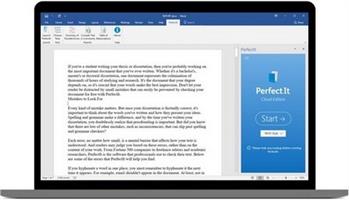
Description: Proofreading Software for Professionals. Edit faster. Submit better documents. Make the best impression. PerfectIt is the leading software among professional proofreaders and editors. Professional writers and editors in 72 countries have been using PerfectIt since 2009.

How PerfectIt improves your documents
- Check consistency
- Enforce style rules
- Locate undefined abbreviations
- Customizable for house style
- Works with all documents
- US, UK, CA and AU English

PerfectIt reduces time spent editing
If you're working on contracts, proposals, reports, technical documents, articles and books, PerfectIt saves time on copy-editing, so that authors can pay more attention to what matters most: the words and their meaning.

PerfectIt reduces errors
By helping to eliminate typos, it saves money on re-writes and changes, especially after documents have gone to press.

PerfectIt helps your words make the best impression
It increases the chance that proposals will be accepted and articles will be published.

PerfectIt helps build your brand
It can enforce the preferences of your house style and ensure that your business is presented the way you want it to be.
For the first time, you can control exactly what PerfectIt finds. Now you can turn PerfectIt into a custom checker designed (by you) to lift writing standards at your organization.

New features include
- The Chicago Manual of Style is available in PerfectIt
- Updates to built-in styles
- Search added to the Style Sheet Editor
- Faster checking, especially for long documents with tables
- Faster load times

System Requirements
PerfectIt requires Microsoft Office (also known as Microsoft 365 or Office 365).

More specifically
PerfectIt for Word (Windows) requires Windows 10 or above, with Office 2019 or above. It is compatible with every version of Microsoft 365. It will probably also work with older versions of Word and Windows, but we cannot guarantee nor support compatibility with Windows 8.1, Office 2016 or other earlier versions that are no longer supported by Microsoft. It requires the desktop version of Word, and does not support Word Online.

Release Name: PerfectIt Pro 6.6.5
Size: 444 MB
Links: HOMEPAGE – NFO – Torrent Search

Download: RAPiDGATOR

7 Comments
Apr 13

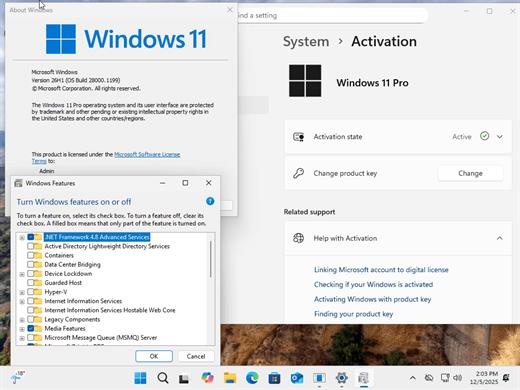
Windows 11 Pro 25H2 Build 26200.8117 TPM Bypassed & Pre-Activated April 2026

Description: On August 29, 2025, Microsoft released the first official preview of Windows 11 version 25H2 (2025 Update) in the Release Preview Channel of the Windows Insider Program. The update is rolling out as an enablement package for devices already running version 24H2.
Windows 11 versions 24H2 and 25H2 use the same underlying system files and architecture. That means there’s no need to reinstall or replace the core operating system to move between them. Instead of delivering a large, full-featured update, the software giant simply “flips the switch” with a small enablement package that activates the 25H2 features already present in 24H2. This makes the update faster, less risky, and easier to roll back.

What’s New


  • Some of the features that you can expect to find on Windows 11 25H2 include
  • Start menu redesign: Wider layout, more pinned apps, a new “All” apps section, and optional removal of “Recommended.”
  • File Explorer dark mode: More dialogs now match the theme, including copy and delete prompts.
  • Notification Center: Now shows full clock (with seconds) on secondary monitors.
  • Android app resume: Continue mobile app activity directly from the Taskbar.
  • Start menu sidebar: Expanded access to messages, calls, and photos from your phone with a new interface.
  • Click to Do: New “Describe Image” action, selection modes (Freeform, Rectangle, Ctrl + Click), and touch gestures.
  • Admin Protection: Prompts for elevation on untrusted apps—adds a visual warning layer.
  • Passkeys with 1Password: Native support for plugin-based passkey managers.
  • Text & image AI activity log: Track recent AI usage from third-party apps.
Release Name: Windows 11 Pro 25H2 Build 26200.8117 TPM Bypassed & Pre-Activated April 2026
Size: 6.5 GB
Links: HOMEPAGE – NFO – Torrent Search

Download: RAPiDGATOR
3 Comments
Apr 12

AnyLogic Pro 8.9.8

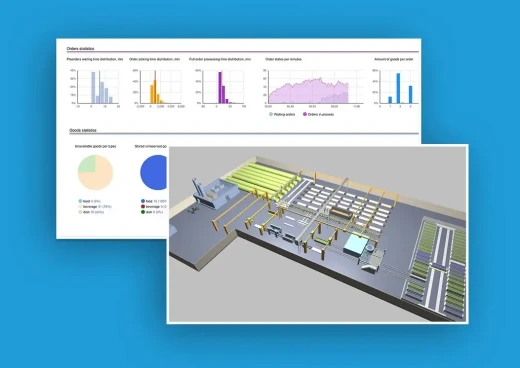
Description: AnyLogic is the only simulation tool that supports all the most common simulation methodologies in place today: System Dynamics, Process-centric and Agent Based modeling.

The unique flexibility of the modeling language enables the user to capture the complexity and heterogeneity of business, economic and social systems to any desired level of detail. AnyLogic’s graphical interface, tools, and library objects allow you to quickly model diverse areas such as manufacturing and logistics, business processes, human resources, consumer and patient behavior.

Why AnyLogic Simulation Software?
AnyLogic's visual development environment significantly speeds up the development process
The included object libraries provide the ability to quickly incorporate pre-built simulation elements
Reusability through fully object oriented structure
A visual integrated development environment makes it easy to convert from other widely used IDEs to AnyLogic
Pre-built object libraries show how the experts did it! Those objects can be easily reused

DEVELOP MORE MODELS WITH ONE TOOL
Develop agent-based, system dynamics, discrete-event, continuous and dynamic system models, in any combination, with one tool
AnyLogic supports the seamless integration of discrete and continuous simulations
The native Java environment supports limitless extensibility including custom Java code, external libraries, and external data sources
An extensive statistical distribution function set provides an excellent platform for simulating the uncertainty inherent in all systems
A powerful experimental framework, built-in support for Monte Carlo simulations and advanced forms of optimization support a wide variety of simulation approaches

IMPROVE THE VISUAL IMPACT OF YOUR MODELS
AnyLogic's simple yet sophisticated animation functions allow the development of visually rich, interactive simulation environments
You can create rich user interface for your model that would allow model users to easily configure experiments and change input data on the fly

RUN MODELS ANYWHERE
The native Java environment provides multi-platform support. Both the AnyLogic IDE and models work on Windows, Mac and Linux
You don’t need a runtime license — with one click you can generate a Java application that allows users to run a model anywhere
An AnyLogic model is completely separable from the development environment and can be exported as a standalone Java application

EXCELLENT SUPPORT AND CONSULTING SERVICES
Provide unlimited detailed support to hard modeling questions
Average question answering time is less than 24 hours, including comprehensive consultative questions
Provide a full range of consulting services from training to model development
Do our best to fully satisfy and exceed customers expectations

Release Name: AnyLogic Pro 8.9.8
Size: 1.1 GB
Links: HOMEPAGE – NFO – Torrent Search

Download: RAPiDGATOR

9 Comments
Apr 12

Directory Opus 13.22.3 Beta

Description: Are you frustrated by the limitations of Windows Explorer? Directory Opus is a complete replacement for Explorer, with far more functionality than any other file manager available today.

You're in control.
Not just a simple file manager; Directory Opus lets you make your computer yours.
With a flexible user interface and unbelievable configurability, you can tailor Opus to streamline your workflow.
Dual panes, dual trees, multiple tabs.
Filter, sort, group your folders. Label and rate your files.
Queued file copies. Powerful batch renaming. Full archive support.
Find your files. Locate duplicates. Synchronize backups.
Assign tags and descriptions. Convert images. Edit metadata.
Fully multi-threaded, native 64 bit high performance code.
Whatever you want to do - Opus can probably do it. And if it's not built-in, you can take advantage of the unrivalled configurability to extend Opus using external tools.

What makes Opus unique?

Built for speed
Opus is written in native C++ multi-threaded code; compiled for the latest 64 bit CPUs, with high performance our number one design principle.

Fully configurable
Change the colors. Change the fonts. Change the toolbars and menus. Set up hotkeys. Opus adapts to how you want to use it.

Makes file management a breeze
Powerful searching, sorting, grouping, labelling and tagging features let you take control of your files like never before.

Endlessly extensible
Work with third-party tools as easily as with the built-in features. A full scripting interface, including scriptable dialogs, means your imagination is really the only limit.

Replace Windows Explorer and don't look back
Our unique Explorer Replacement mode provides a full replacement for Windows Explorer.
Single or dual pane file display and folder trees
Tabbed interface let you keep multiple folders open and switch quickly between them
Integrated viewer, metadata editor and utility panel
Built-in tools including synchronize and duplicate file finder
Leverage indexed search engines like Windows Search and Everything

High performance file management features
Copy, move, rename, duplicate, archive, view, backup and delete your files with ease
Queue multiple file copies for improved performance
Batch renaming including easy-to-use keyboard macros
Support for FTP and archive formats like Zip, 7Zip and RAR
Quickly filter, sort, group and search your folders
Color-code your files, assign status icons, star ratings, tags and descriptions
View images, documents and more. Image marking lets you sort your photos quickly and easily
Calculate folder sizes and print or export folder listings

Unrivalled configurability
Why let the programmers decide for you? You can tailor Opus to look how you want it to look, and to work how you want it to work.
Choose from light mode, dark mode, or design your own theme
Over 600 configurable colors and fonts
All toolbars and menus can be edited, plus you can add your own
Floating toolbars can act as program launchers
Configure your own hotkeys that work everywhere or just in Opus
Full scripting interface lets you design your own dialogs and add your own commands

Release Name: Directory Opus 13.22.3 Beta
Size: 29.4 MB
Links: HOMEPAGE – NFO – Torrent Search

Download: RAPiDGATOR

10 Comments