Please REGISTER or RENEW your account on RAPiDGATOR.net and support us by doing through all RAPiDGATOR working download links on main posts...
Apr 8

Valentin Software TSOL 2026 R1 v2026.1.28

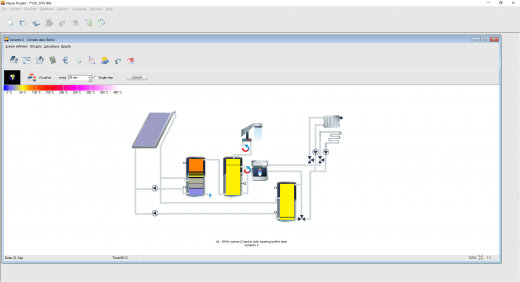
Description: The design and simulation software for solar thermal systems. T*SOL is a dynamic simulation program for the design, optimization and calculation of solar thermal systems.

T*SOL is the simulation program with which you can calculate the yield of a thermal solar system. No matter whether for domestic water heating, heating support, swimming pools or process heat, with T*SOL you can optimally design your planned solar thermal system, dimension storage and collector arrays (also east / west roofs) and determine the economic efficiency.

At the start of the design process, you have a large selection of all relevant systems for domestic hot water heating and heating support, as well as for swimming pools and process heat. During the design, you will be supported with dimensioning suggestions and can use a parameter variation to find the optimal combination, e.g. of storage size and collector area.

After the simulation you will receive a comprehensive and appealing project report with all system data as well as detailed simulation and profitability results. This report also contains all the data necessary to be recognized as evidence by BAFA.

Graphic representation of the simulation results
The parameters of the simulation results such as energies, temperatures or volumes can be displayed graphically. You can choose between different display formats such as bar charts and line graphs. The time axis can be varied between a day and up to a year. This offers many options for analyzing the system.

Simulation of the solar yield and the coverage of domestic hot water and heating
The dynamic annual simulation calculates temperatures and energies in time increments of one to six minutes. System parameters such as the efficiency and solar fraction are calculated from the simulation results.
Databases with solar collectors, boilers and storage tanks
T*SOL is delivered with an extensive database. This contains more than
4,000 collectors (flat plate collectors, tube collectors, air collectors)
5,000 heat generators (condensing boilers, wood boilers, pellet boilers, district heating, etc.)
600 storage tanks (combination and buffer storage, monovalent, bivalent, etc.)

Parameter variation
You can vary up to two parameters at the same time (e.g. collector area and storage volume) to find out the optimal values for the combination of target variables including "efficiency", "solar fraction", "additional energy" and "solar yield".

Energy label
Since September 26, 2015, it has been mandatory for all manufacturers, dealers and craftsmen in the EU to label heating devices for space heating and hot water systems in respect of their energy use. T*SOL simulates the energy efficiency of solar thermal supported heating systems and generates the composite system label for you.

Over 200 pre-configured solar thermal systems
All components can be parameterized in detail or selected from the database.
Domestic hot water
Heating
Swimming pool
Process heat
Large systems

Global climate data available
T*SOL provides you with high-quality TMY data sets for every km² in Germany (own procedure based on DWD data) and for any location worldwide with Meteonorm 8.2 (data period 2001-2020). You can use the interactive map to conveniently select the climate data. The import of your own measurement data takes place via files in DWD, Meteonorm or WBV format.

Release Name: Valentin Software TSOL 2026 R1 v2026.1.28
Size: 661.4 MB
Links: HOMEPAGE – NFO – Torrent Search

Download: RAPiDGATOR

9 Comments
Apr 8

Ashampoo Photo Optimizer Pro 26.0.2

Description: Photos constitute irreplaceable memories and capture special moments in our lives. But they do not always come out as expected, or leave room for improvement. Ashampoo Photo Optimizer Pro 26 helps you to make the most of your photos in a single click and achieve stunning results almost instantly and automatically–even with handy batch processing!

Efficient image compression with full control
With the new image compression feature, you can perfectly balance quality and file size. JPG, WebP, and PNG files can now be reduced quickly and precisely—including an interactive live before/after preview. As you adjust the settings, you’ll see the expected file size in real time and maintain full control over the final result. Save valuable storage space without visible quality loss—ideal for online use, archiving, or sharing Your images quickly.

Perfect image quality at optimal file size
New image compression with live preview and file size control
27 new LUTs for fresh one-click looks
New photo frames for additional image moods
Modernized user interface
Enhanced RAW support and optimized metadata handling
27 Brand-New LUTs Included!
LUTs (Look-Up Tables) adjust multiple image parameters such as hue, saturation, brightness, and contrast at once, giving photos a completely new look and atmosphere. In this new version, the LUT collection has been significantly expanded: Three new LUTs have been added to each of nine categories—Halloween, Christmas, Autumn, Summer, Vintage, Contrast, HighKey, LowKey, and FX. This means 27 new looks are now available for seasonal images, creative effects, or striking contrast styles.

New frames, new formats, new look
With targeted enhancements, Photo Optimizer has been further refined both visually and technically. New frames expand the existing design library and offer additional options for different image moods. At the same time, the redesigned interface provides a more modern, streamlined appearance without changing the familiar, easy-to-use workflow. In addition, RAW format support has been significantly enhanced and metadata handling optimized for clean and reliable processing.

Perfect results almost instantly
You can spend hours meticulously optimizing every aspect of your photos in search of the perfect look–or you can achieve the same in seconds using our lookup tables crafted by image editing experts. Dissatisfied with the lighting of a whole series of shots? Looking for that uniform exposure across your photo collection? LUTs will fix these issues and add the visual harmony and polish your shots deserve! From now on, visual excellence may always be just one click away!

Level up your vacation, wedding, and party shots!
Straighten misaligned shots, fix perspective errors, or apply a whole range of beautiful effects. Minor issues like red eyes, skin imperfections or stains are now easily fixable. Save time and nerves and achieve stunning results almost instantly with Photo Optimizer!

Important basics and creative freedom
Naturally, Ashampoo Photo Optimizer includes all the usual suspects like image cropping, rotating, watermarking, and softening. But it doesn't stop there. Feel free to get creative with artistic effects and elegant frame designs. Whether you're recovering failed shots, cranking up the image quality by another 5% or just having fun, this is the program for you!

The lifesaver for your vacation shots
Visual blemishes are detected and fixed through careful image analysis. Our carefully crafted algorithm fully automatically optimizes colors, contrasts, and exposure times for single shots or entire collections, turning underwhelming shots into brilliant photos!

A matter of perspective!
Taking shots of buildings often leads to unpleasant, and easily noticeable, perspective distortions, due to the position of the photographer. Buildings and other tall objects almost seem to fall over, putting an unintended comical spin on your photos. Other times, you forgot to bring your tripod and failed to keep your camera completely straight. Enter Photo Optimizer's new perspective correction! Fix horizontal or vertical distortions in just a few clicks and save shots that would have otherwise gone straight to the bin. Give your photos a second chance and get the right perspective, always!

More ease-of-use through favorites
We all have our favorite functions that we most frequently rely on. Now, you no longer have to navigate through various menus and categories to reach them. Ashampoo Photo Optimizer features a customizable "Favorites" menu so you can bundle all your favorite functions in a single instantly accessible location. Need to quickly straighten the horizon after auto-optimization, fix the perspective or do some cropping? Now you can. Genius, right?

Enhance white balance and intensify contrast spreads
White balance is pivotal to the color temperature of your images. Digital cameras are particularly prone to the dreaded bluish cast and dull colors. This leads to photos that seem lifeless and completely devoid of the magic of the moment. Low-contrast images, often due to poor lighting, are another common issue. With the help of custom white balance and contrast spread settings, Photo Optimizer can breathe new life into these otherwise ruined shots! Both features are part of auto-optimization and will auto-enable whenever appropriate!

Photo editing in just a few clicks
The user interface in Photo Optimizer is truly self-explanatory. Functions are arranged into intuitively named categories and never more than two clicks away. Where other photo editors have you wade through manuals, Photo Optimizer gives you results instantly! Everything is simple and logical, there's practically no learning curve. Whether you're a beginner or an advanced user, or maybe you just don't want to spend hours with image tweaking, Ashampoo Photo Optimizer is the program for you.

Versatile export features
Good photos deserve to be seen. That's why we're offering various ways in Photo Optimizer to share your photos with others. This includes email, the free Ashampoo Web and even just setting photos as your desktop background image. If you'd rather go the traditional route and print your photos, you'll love the feature-rich print dialog that not only creates high-quality but also space-efficient print outs, if needed.

Features for perfectionists and creatives
Many sophisticated features are available to those seeking to go beyond auto-optimization. Whether you need to sharpen or soften individual portions, Photo Optimizer offers well-designed tools for every use case. Reduce irritating image noise, adjust color temperatures or crop your images. And for the artist in you, we've also included multiple effects like waves, swirls, even implosion and explosion. There's ample room to experiment.

Naturally-looking portrait enhancements
Faces are the focus of many photos, yet they seldom come out perfect! Enhance your portraits automatically or manually with Photo Optimizer. Fix red eyes and whiten teeth for that dazzling smile. Fix minor glitches with the clone tool and remove stains and other impurities like a pro. Create perfect yet naturally looking portraits in just a few clicks!

Comfortable batch processing
Since Ashampoo Photo Optimizer does so much fully automatically, we've included batch processing to save you time and nerves while the program processes your entire photo library in one go. Select individual images from various sources or entire folders and have Photo Optimizer work its magic. Every image is meticulously analyzed and its quality optimized according to its specific characteristics. Batch-process an entire vacation in one go, polish your wedding or birthday shots and put the fun back into photography.

Release Name: Ashampoo Photo Optimizer Pro 26.0.2
Size: 265.7 MB
Links: HOMEPAGE – NFO – Torrent Search

Download: RAPiDGATOR

8 Comments
Apr 8

App Builder 2026.10

Description: Professional visual integrated development environment to create modern HTML5 apps, Web Apps, Progressive Web Apps, Web Extensions and Hybrid apps for both mobile and desktop browsers, Android, iOS, Windows and more.

Apache Cordova
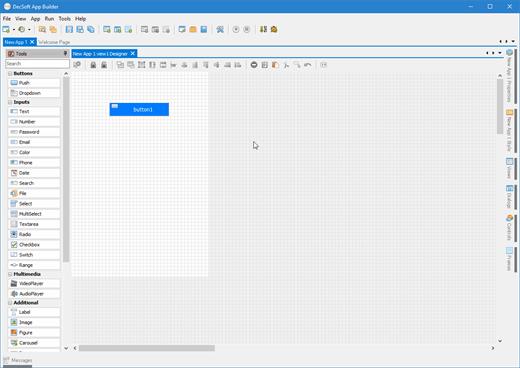
DecSoft App Builder is integrated with Apache Cordova and prepares for your app the right config file, platform icons, splash screens, batch files, shell files and JSON files. DecSoft App Builder integrates also the officials Apache Cordova plugins.

User Functions
In addition to the available app methods and the methods provided by the app views, app dialogs, app frames, the Apache Cordova plugins methods, and, all the possible controls that you can use, its also possible to setup your own User Functions in order to be available for your app at runtime.

App languages
Its easy to translate the apps into various languages by using the app languages manager. We can add any number of languages and then translate the app in runtime just by using the app.translateView() method.

Auto scale apps
There are many themes availables for your app, and, you can also set the fixed and scaled styles, even at runtime. The auto scale style made the app properly show in different screen sizes.

Release Name: App Builder 2026.10
Size: 264.3 MB
Links: HOMEPAGE – NFO – Torrent Search

Download: RAPiDGATOR

10 Comments
Apr 8

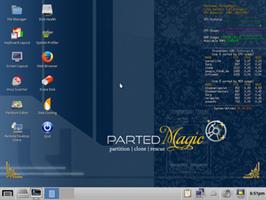
Parted Magic 2026.03.20

Description: Powerful Tools for Home or Office! Parted Magic is a complete hard disk management solution.

Disk Partitioning
PartedMagic has the tools to get the job done. With the Partition Editor you can re-size, copy, and move partitions. You can grow or shrink your C: drive. Create space for new operating systems. Attempt data rescue from lost partitions.

Disk Cloning
Clone a computer’s entire disk or a single partition. The cloned data could be saved as an image-file or as a duplicated copy of the data. The data could then be saved to a locally attached storage device, an SSH server, a Samba Server, or a Network File System share. The clone file can then be used to restore the original when needed.

Data Rescue
PartedMagic allows you to easily reset or change Windows passwords. Recover lost files. Rescue files from devices with disk read errors.

Disk Erasing
PartedMagic comes with easy to use solutions for conventional overwrite. Internal Secure Erase. Wiping of only Free Space.

Benchmarking
All the benchmarking tools you would ever need! Bonnie++, IOzone, Hard Info, System Stability Tester, mprime, and stress.

Release Name: Parted Magic 2026.03.20
Size: 2.3 GB
Links: HOMEPAGE – NFO – Torrent Search

Download: RAPiDGATOR

3 Comments
Apr 8

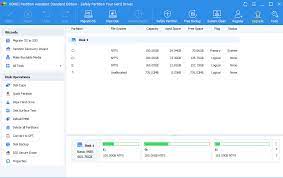
AOMEI Partition Assistant 10.10.1 WinPE

Editions: All Editions

Description: All-in-one partition management toolkit and disk performance optimizer for enterprises Trusted by world's biggest brands. AOMEI Partition Assistant is an all-inclusive hard disk partition software which is especially designed for enterprises. It provides comprehensive solutions for how to improve the disk performance to meet your business convenience.

One-Stop Disk Partition Toolkit for Enterprises
Easily and safely manage disk partitions on unlimited PCs & servers for enterprises.

Improve Disk Performance
Not satisfied with the status of computer’s hard drives? Re-partition the hard drive to maximize the disk space utilization and make it more reasonable for your business.

Re-Partition Hard Drive
Resize, move, extend, shrink, delete, merge partitions, create, split, format partition, and allocate free space to maximize disk space usage and make partitions more reasonable.

Manage Hard Disk Partition
Initialize disk, rebuild MBR, change label, change drive letter, change serials number, change partition ID, hide/unhide partition to manage hard disk better.

Disk Converter
Convert disk between MBR and GPT, convert disk between dynamic and basic, convert partition between primary and basic, convert file system between NTFS and FAT32 without data loss.

System and Data Migration
Need to migrate OS to SSD, upgrade HDD to SSD, or replace a small hard drive with a larger one? Or just want to move some applications to another partition or disk? This hard disk manager can help move OS or application to another location without reinstalling, and you can load the OS or app without any issues.

Migrate OS to SSD/HDD
Migrate only OS partition from HDD to SSD or HDD without reinstalling Windows operating system, fully bootable and exactly like the original.

Disk/Partition Clone
Transfer all data from one hard disk or one partition to another hard disk or partition without losing any important data.

App Mover
Move applications from one partition to another one, transfer Cache, Downloads or other big folder to another location to save the drive space.

Data Recovery & Anti-Recovery
Want to recover unexpected lost or deleted partition and data? This program will help you recover lost partition or deleted data from different data storage devices. If you need to permanently delete data, this tool will wipe data totally that no one can revert it back.

Files Recovery
Recover all types of files, including photos, videos, PDF, Excel, Word, and many more from various storage devices.

Partition Recovery
Fast search helps you quickly recover deleted or lost partition. Full search will scan each sector of the selected disk for recovery.

Shred Files
Shred files and folders that no one can revert it back. Keep the deleted files safe from data breach.

Wipe Data
Wipe data on the partition or hard drive completely. No one can recover the wiped partition by any recovery software.

Cater to Business Convenience
You may be away on business and do not want to bring a heavy laptop, but you want to use the OS you are familiar with. This partition manager software can bring Windows to USB so that you can boot any computer in any where with your own operating system.

Windows To Go Creator
Build a portable and fully functional Windows OS on USB drive. Bring your own device(BYOD) and keep your own work environment everywhere.

Create Bootable Media
Create a bootable media to troubleshoot problems or recover data when system fails to boot.

Portable USB Version
Install AOMEI Partition Assistant to a removable device so that directly run it on target computers without installing again.

Supported Operating Systems:
Windows 11/10/8.1/8/7
Windows Server 2012 and 2012 R2
Windows Server 2025
Windows Server 2022
Windows Server 2019
Windows Server 2016

Release Name: AOMEI Partition Assistant 10.10.1 WinPE
Size: 3.3 GB
Links: HOMEPAGE – NFO – Torrent Search

Download: RAPiDGATOR
5 Comments
Apr 8

SysGauge 12.7.14

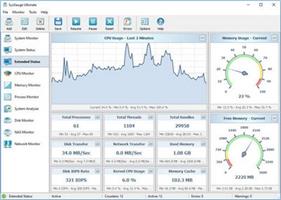
Description: SysGauge is a system and performance monitoring utility allowing one to monitor the CPU usage, memory usage, network transfer rate, operating system performance, the status and resource usage of running processes, file system performance, USB performance, disk space usage, disk read activity, disk write activity, disk read transfer rate, disk write transfer rate, disk read IOPS and disk write IOPS for individual logical disks or all physical disks installed in the computer.

SysGauge Main GUI Application
The main SysGauge GUI application allows one to configure a number of system and performance monitoring counters, display system monitoring charts, analyze the current system status, save various types of system monitoring reports and configure sound and E-Mail notifications.

SysGauge System Monitor
The 'System Monitor' GUI module allows one to perform various types of system monitoring operations using one or more pre-defined or user-custom system monitoring profiles. The system monitor provides the ability to add, edit or delete system monitoring counters, save various types of system monitoring reports, configure monitoring rules, actions and error E-Mail notifications.

Add Counter Dialog
The 'Add Counter' dialog provides the ability to add the CPU usage counters, memory usage counters, disk activity counters, network activity counters, USB activity counters, operating system status counters, file system counters and running processes counters.

SysGauge CPU Monitor
The 'CPU Monitor' GUI module is a dedicated CPU monitoring GUI module showing the total CPU usage, user CPU usage, kernel CPU usage, CPU interrupt time, CPU interrupt rate, the current CPU frequency, the C1 low-power state, C2 low-power state and C3 low-power state.

SysGauge Memory Monitor
The 'Memory Monitor' GUI module is a dedicated memory monitoring module showing the memory usage, the amount of free memory, the amount of used memory, the size of the memory cache, the cache peak size, the cache fault rate, the page file usage, the page file peak usage and the page fault rate.

SysGauge Process Monitor
The 'Process Monitor' GUI module is a dedicated process monitoring module showing the list of currently running processes and displaying for each process the process CPU usage, the memory usage, the number of threads, the number of handles, the number of process instances, the process data transfer rate, the process read transfer rate, the process write transfer rate, the process page fault rate and the amount of non-paged memory allocated by each running process.

Release Name: SysGauge 12.7.14
Size: 57.4 MB
Links: HOMEPAGE – NFO – Torrent Search

Download: RAPiDGATOR

8 Comments
Apr 8

Runtime GetDataBack Pro 5.78

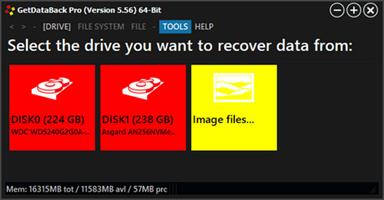
Description: Our flagship product GetDataBack Pro is the most powerful Data Recovery software. Lightning fast, for NTFS, FAT, exFAT, EXT, HFS+, and APFS. Recover your lost data now!

Highlights
Recover ALL your drive's data
Restore file names and directory structure
Safe, read-only design
Intuitive user interface
Lightning-fast operation
Supports all hard drives, SSD, flashcards, USB
Native 64-bit application under 64-bit Windows
Recovery of very large drives
Redesigned and rewritten, using the newest technologies
Supports Windows NTFS, FAT12, FAT16, FAT32, exFAT
Supports Linux EXT, EXT2, EXT3, EXT4
Supports Apple HFS+, APFS
Free to try
Free lifetime updates with purchase
Run GetDataBack from the Runtime Live CD or a WinPE Boot Medium

Redesigned and Rewritten
GetDataBack Pro is a completely redesigned and rewritten Data Recovery solution for Windows, Mac, and Linux file systems. Our developers have combined decades of data recovery experience with the newest technologies.

GetDataBack Pro runs as a native 64-bit application under 64-bit Windows. Thus is can take full advantage of the x64 CPU. GetDataBack Pro is now faster and can handle huge drives. Under 32-bit Windows, GetDataBack runs the 32-bit version.

GetDataBack Pro's clean interface guides you to your lost data and lets you recover it with just one click. GetDataBack Pro is the data recovery solution for professionals as well as inexperienced users. Start your data recovery now, no manual to read, no ostentatious options, no kidding.

GetDataBack Pro combines recovery capabilities for NTFS, FAT, exFAT, EXT, HFS+, and APFS. You do not need to find out beforehand which files system your drive uses. GetDataBack Pro's recovery engine internally utilizes four distinguished sophistication levels that automatically escalate until it achieves good results.

GetDataBack is more than an un-deleter or a system restore
GetDataBack Pro recovers your data if the hard drive's partition table, boot record, directories, or other system areas are lost or damaged, data was lost due to a virus attack, the drive was formatted or re-partitioned, a power failure has caused a system crash, files were lost due to a software failure, or files were accidentally deleted. GetDataBack Pro can recover your data if the operating system no longer recognized the drive. GetDataBack Pro works on hard drives, SSD, flashcards, USB sticks, etc.

Get everything back, the safe, secure, and fast way
Advanced algorithms put files and directories together as they were, restoring file names correctly. GetDataBack employs several approaches to your data, depending on the actual condition of the drive. Four different escalating sophistication levels ensure the recovery of your files.

GetDataBack is read-only, meaning the program will not attempt to "fix" or write to the drive you are about to recover.

GetDataBack Pro's user interface is intuitive. It enables even inexperienced users to conduct their data recovery with just one click.

Not only does GetDataBack Pro recover your data. It does it quickly. The first sophistication levels recover large drives in seconds or minutes. Copying the recovered data to another medium is similar to the speed of regular file copy operations.

Release Name: Runtime GetDataBack Pro 5.78
Size: 15.5 MB
Links: HOMEPAGE – NFO – Torrent Search

Download: RAPiDGATOR
9 Comments
Apr 8

AssistMyTeam PDF Studio 7.2.303

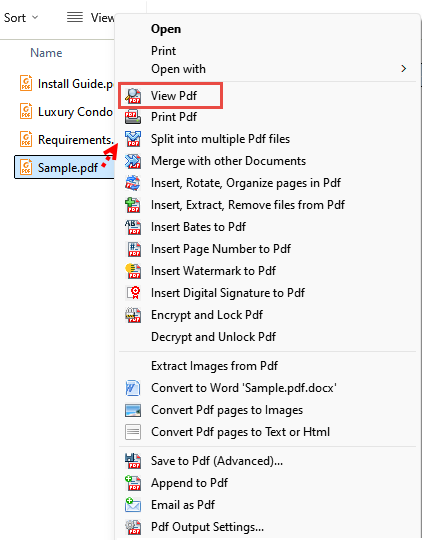
Description: AssistMyTeam PDF Studio plug-in integrates your Windows Explorer with a PDF reader, converter, editor, organizer, splitter, merger, files extractor and even an OCR with instant, one-click operation. What differentiates this app from most cluttered, heavy duty commercial PDF apps is the relative ease of use and efficiency with simple and minimal, yet intuitive and unobtrusive interface – just right-click the files in your window explorer and perform the action of your choice to your documents.

Features:
Convert different types of documents into PDF quickly from Windows Explorer.
Support conversion of 120 or more file types into PDF.
Convert compressed ZIP, Multi-page TIFF into PDF.
Save MSG, MBOX or EML email files with their attachments into PDF.
Embed files as attachments in their original format in PDF Portfolio or extract existing ones.
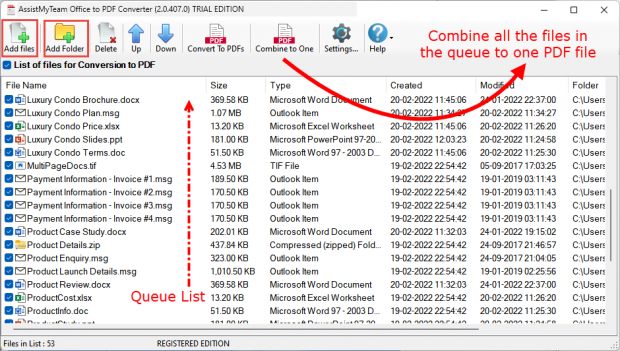
Combine Multiple documents and file types into One PDF file.
Append files of different types and formats to an existing PDF.
Set security restrictions to PDF files e.g., ability to edit or print.
Secure PDF documents by setting a user password for viewing.
Apply watermark image, text or stamp bates to PDF (i.e., logo or name).
Add table of contents or bookmarks in One PDF file for easy navigation.
Add page number, header and footer information in PDF such as copyright or disclaimer information.
Use Optical Character Recognition (OCR) to convert images with text into machine-encoded text and save to PDF, Word document (DOCX) or text files.
Support file formats for OCR – JPG, PNG, GIF, BMP, TIFF and PDF.
Split PDF document into multiple smaller files
Reorganize PDF pages – insert, extract, remove, rotate, replace pages.
Convert PDF to Microsoft Word Document
Convert PDF to text or html documents
Rasterize and convert PDF pages to images
Extract embedded and inline images from PDF
View your PDF documents in a quick and non-obstructive interface.
Convert multiple files or folders including nested subfolders into PDF in batch mode.
Seamless integration with Windows Explorer Shell Interface.
Works with Windows Vista, 7, 8, 8.1, 10, 11, Server 2012 and Higher (32-bit and 64-bit).
Convert documents to PDF/A standard for archiving and long-term preservation.
Watch folders and convert documents to PDF files automatically.
All conversions and processing performed locally. Ideal for closed systems.

Release Name: AssistMyTeam PDF Studio 7.2.303
Size: 100.7 MB
Links: HOMEPAGE – NFO – Torrent Search

Download: RAPiDGATOR

3 Comments
Apr 8

MassTube 2026 v21.6.0.203 Ultra

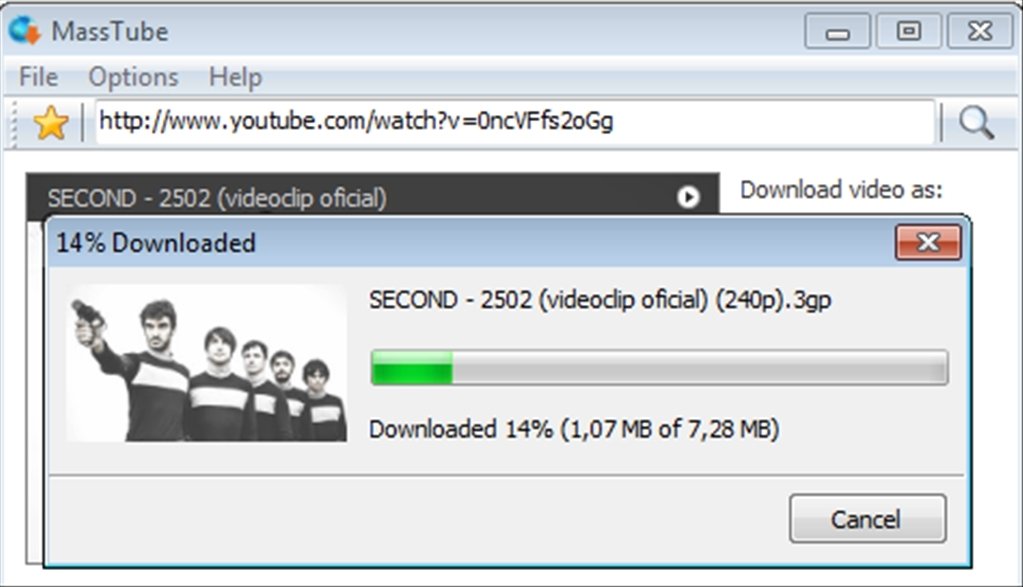
Description: MassTube is a simple, but powerful application to quicky download videos from YouTube.

Key features:
- download VEVO and others.
- download in Ultra HD 4K 2160p, Full HD 1080p, HD 720p and in other popular video resolutions.
- download in MP3, FLAC, OGG and in other popular audio formats.
- compatible with Windows 11, 10, 8.1, 8 and 7.
- much more! :)

Release Name: MassTube 2026 v21.6.0.203 Ultra
Size: 85.5 MB
Links: HOMEPAGE – NFO – Torrent Search

Download: RAPiDGATOR
5 Comments
Apr 8

AssistMyTeam PDF Converter 7.2.303

Description: Use AssistMyTeam PDF Converter to save all types of documents (Word, Excel, PowerPoint, webpages, images, email, ZIP archive) to PDF files. Not only are documents converted with perfect fidelity, it also goes the extra mile to make sure that files attached to MSG, MBOX, EML emails or inside compressed ZIP are processed to native PDF documents as well.

Features:
Convert different types of documents into PDF quickly from Windows Explorer.
Support conversion of 120 or more file types into PDF.
Save compressed ZIP file into PDF.
Convert Multi-page TIFF into PDF.
Save MSG or EML email files with their attachments into PDF.
Embed files as attachments in their original format in PDF Portfolio.
Combine Multiple documents and file types into One PDF file.
Append files of different types and formats to an existing PDF.
Set security restrictions to PDF files e.g., ability to edit or print.
Secure PDF documents by setting a user password for viewing.
Apply watermark image, text or stamp bates to PDF (i.e., logo or name).
Add table of contents or bookmarks in One PDF file for easy navigation.
Add page number, header and footer information in PDF such as copyright or disclaimer information.
Automatically fix photos to fit the page in the resultant PDF.
Convert multiple files or folders including nested subfolders into PDF in batch mode.
Seamless integration with Windows Explorer Shell Interface.
Works with Windows Vista, 7, 8, 8.1, 10, 11, Server 2012 and Higher.
Convert documents to PDF/A standard for archiving and long-term preservation.
Convert PDF files to Microsoft Word document (DOCX).
Watch folders and convert documents to PDF files automatically.

Release Name: AssistMyTeam PDF Converter 7.2.303
Size: 71.2 MB
Links: HOMEPAGE – NFO – Torrent Search

Download: RAPiDGATOR
5 Comments