Please REGISTER or RENEW your account on RAPiDGATOR.net and support us by doing through all RAPiDGATOR working download links on main posts...
Apr 8

Reclaim Time FocusMe 7.6.9.8

Description: Take Back Control of Your Time. Conquer digital distractions with the world’s most powerful focus software. FocusMe blocks distractions, reveals your online habits and helps you build the routines that make deep work possible.

How FocusMe Works
In a world of highly addictive websites and apps, FocusMe studies your digital patterns and reveals your online behavior. Where your attention drifts, when you work best and what needs stronger boundaries. Your AI Coach is an optional feature which then turns those insights into practical recommendations for blocking plans and focus routines, which you can immediately apply using the tools built directly into FocusMe.

The app runs in the background limiting exposure to distractions, setting screen time limits and scheduling focused work sessions. These are fully customizable to your daily schedule. If you want extra accountability, you can lock your set-up using Force Mode. With built-in Pomodoro timers, break reminders and real-time progress tracking, FocusMe becomes your digital productivity coach.

Release Name: Reclaim Time FocusMe 7.6.9.8
Size: 50.7 MB
Links: HOMEPAGE – NFO – Torrent Search

Download: RAPiDGATOR

8 Comments
Apr 7

StoryVox 1.0.13

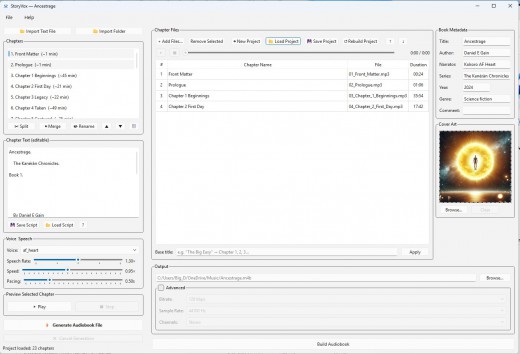
Description: Turn Any Book Into a Professional Audiobook. Import your manuscript, choose from 53 AI voices, and generate broadcast-quality audiobooks in minutes. Runs entirely on your PC — no cloud, no subscription, no limits.

Features


  • Everything You Need to Create Stunning Audiobooks
    Professional audiobook production used to require a recording studio, voice actors, and thousands of dollars. StoryVox puts it all on your desktop.
  • 53 Natural AI Voices
    Male and female voices across American, British, European, and Asian accents. Every voice powered by Kokoro — one of the most natural-sounding TTS engines available.
  • Fully Offline
    No internet connection required. No cloud processing. No monthly subscription. Your content never leaves your computer — complete privacy and no per-word fees.
  • Smart Chapter Detection
    Import a text file and StoryVox automatically detects chapters, front matter, and structure. Split, merge, and rename chapters with a click.
  • Fine-Tuned Controls
    Adjust speech rate, speed, and pacing to get exactly the sound you want. Preview any chapter in real-time and hear your pacing adjustments live.
  • WAV & MP3 Export
    Export your completed audiobook in high-quality WAV or compressed MP3. Each chapter is assembled automatically from sentence-level audio for a seamless final product.
  • Script Editing
    Edit your text directly in the app. Control pauses with punctuation, save and reload scripts between sessions, and preview changes instantly before generating.
  • 53 Voices. Zero Monthly Fees.
    Every voice runs locally through Kokoro TTS. Natural inflection, proper sentence pacing, and expressive delivery — all without an internet connection.

System Requirements for StoryVox

RAM: 8 GB

Processor: i5 (Minimum), i7 (Recommended)

Operating System: Windows 10 and 11

Space Required: 5 GB

Release Name: StoryVox 1.0.13
Size: 2.12 GB
Links: HOMEPAGE – NFO – Torrent Search

Download: RAPiDGATOR

6 Comments
Apr 7

Topaz Video 1.3.1

Description: Ultra smooth. Ultra sharp. Ultra steady. Topaz Video is a professional, AI-powered video enhancement software that lets you denoise low-light footage, recover and upscale old archival videos to 4K, restore focus, and adjust frame rate by creating new frames out of thin air. Available on Mac and Windows.

Trusted by major film studios and creative pros everywhere.
Denoise with cinema-level detail. Create new frames with frame interpolation. And stabilize the camera after the moment has already passed.

Filmmakers & Editors
Restore, upscale, and refine footage for professional post-production workflows.

Archivists & Historians
Preserve and modernize archival film, VHS, and historical footage with clarity.

Creators & Influencers
Enhance social media videos with sharper detail, higher resolution, and smoother motion.

Hobbyists & Enthusiasts
Improve old family videos and personal projects to look like they were shot today.

System Requirements:
Windows Operating System: 11 (most updated version recommended)
CPU: Intel OR AMD with AVX2 instructions
System Memory (RAM): 16 GB (32 GB or more recommended)
Graphics Card (NVIDIA): NVIDIA GTX 900 series or higher, 6GB VRAM
Graphics Card (AMD): AMD Radeon 500 series or higher, 6GB VRAM
Graphics Card (Intel): Intel ARC A750
CPU Release Year: 2016 or newer

Release Name: Topaz Video 1.3.1
Size: 300.1 MB
Links: HOMEPAGE – NFO – Torrent Search

Download: RAPiDGATOR

8 Comments
Apr 7

Atlantis Word Processor 5.0.2.3


Description:
 Atlantis is an innovative, no-nonsense word processor carefully designed with the end-user in mind. Compact, fast-loading, but still powerful and efficient, Atlantis will be the perfect companion for a wide range of your word processing tasks, – from simple to most complex. It does not matter if you are a novice or a power user, Atlantis has the tools you will ever need to compose highly professional documents. Using a most original and practical Control Board, you will create and manage all components of complex documents with unparalleled ease: sections, fields, headers & footers, newspaper columns, bulleted & numbered lists, styles, bookmarks, footnotes & endnotes, etc, all are a breeze with Atlantis.
Both the Safeguard and Backup Files features make sure that you work under extremely safe conditions. Private documents can also be encoded and secured: you can save them to a proprietary COD file format using powerful 256-bit encryption technology.

The Atlantis AutoCorrect and Spellcheck-As-You-Type features combine with a unique typing assist, the Atlantis Power Type, to dramatically simplify your word processing life. The Overused Words feature will help creative writers avoid repetitions and clichйs.

The Atlantis interface is entirely customizable: menus, toolbars, hot keys, colors and sounds can all be adjusted to suit your own requirements. What's more, Atlantis is a fully portable word processor. You can install Atlantis to a memory flash drive, and Atlantis will travel with you wherever you go.

THE WORD PROCESSING FUNCTIONS:
Document creation and formatting is easy, using a customizable and expandable collection of document templates and sample letters.

Comprehensive Style Sheet support is available for advanced users.
A customizable and expandable Clip Library is stocked with text and graphic items ready to be inserted in larger documents whenever suitable. The Atlantis original collections of clips include everyday phrases, letter writing elements, clip art, etc.
Of course, all the traditional font and paragraph formatting commands are present:

choice of typeface, font size, font color. A state of the art typeface preview.
bold, italic, underline, strikeout, double strikeout, superscript, subscript, small caps, all caps, shadow, outline, emboss, engrave.

choice of 17 underline styles; choice of underline color.
character spacing, scaling, kerning, vertical offset.
fully customizable tab stops.
left/right paragraph indent, first line indent and outdent.
spacing before/after paragraph, 6 types of interline spacing.
keep with next paragraph, keep intact, page break before, widow/orphan control.
and plenty more, only a key press or mouse click away...

More than 20 fields are supported. The corresponding items are quickly inserted and automatically updated by Atlantis. Fields make document and template creation very flexible. What's more, we have made sure that fields are not restricted to advanced users: using fields in Atlantis is child's play!

Words can be hyphenated across lines automatically or manually.
You can create newspaper-type columns, divide documents into sections, each section with its own page settings.
You have two graphic-type formatting modes to change font color and highlight text. You will use specific mouse pointers to format text in the same way as you would with a paint brush.

Atlantis introduces a revolutionary approach to document formatting with a Format Palette and Brush. Even the most complex formatting jobs can be done exclusively with a brush-like mouse cursor and a palette loaded with formatting templates. You can use the Atlantis default palette or customize your own format palettes in any way you like.

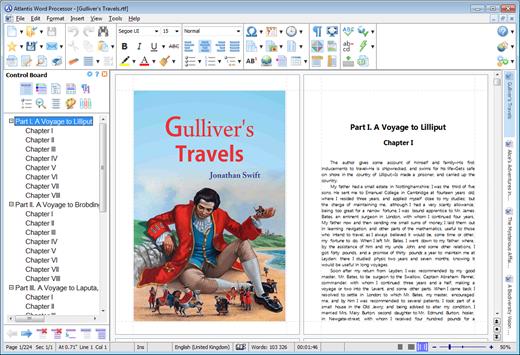
The Format Palette is only one of the instruments present on the Atlantis Control Board. The Atlantis Control Board brings together all the tools and commands that are required to create both simple and complex documents with the greatest of ease. Each panel of the Atlantis Control Board is dedicated to one specific characteristic of the active document. You have separate overviews of the document Headings, Bookmarks, Sections, Styles, or Lists, with all the related commands directly available from each specific panel of the Control Board. Tools and commands to manage Headings are on hand on the "Headings" panel, tools and commands to manage Bookmarks are on hand on the "Bookmarks" panel. Etc. This gives you unequaled power and flexibility.

The AutoCorrect feature of Atlantis has fully customizable multilingual options, and will dramatically simplify your word processing life. It combines flexibility with power for unparalleled control over the typing and formatting of documents. Some of the Atlantis AutoCorrect functions are still unheard-of in today's top-end word processors. Texts are proofread in the background "As-You-Type", or, optionally, when typing is complete.

A multilingual spellchecker will help you create documents with perfect language. Spelling is checked "As-You-Type", or, again, optionally, when typing is complete. Original Atlantis Spellcheckers are available for 16 languages or dialects. And of course, you can create and augment as many custom dictionaries as you wish.

Power Type is a typing assist adding unique functionality to Atlantis. Working in close cooperation with our proprietary spellchecker engine, Power Type collects statistical information about the texts that you type, creating a smart database of the words that you use most, and also of their usual environment. When you start typing the same words again, Atlantis gives a warning sound, pops a small window up, and displays a list of words beginning with the same characters. But this is not all. The Atlantis Power Type has learning abilities. As time goes by, the Power Type database gets smarter, and you will notice that the typing suggestions are more and more appropriate. Of course, the Atlantis Power Type is invaluable for people with disabilities. But also for slow "one-finger" typists.

The Overused Words feature will help creative writers avoid repetitions and clichйs if they want their texts to be read with any interest or pleasure. The Overused Words feature will show detailed statistics about repetitions and word frequency. This will tell you where words need to be replaced with synonyms, or whole paragraphs reworked.

To improve the reading and understanding of the documents you create in Atlantis, you can add bookmarks, hyperlinks, table of contents to them. Atlantis can build table of contents automatically at the press of a few keys.
All documents created in Atlantis can be "Saved As Web Page", i.e. saved as HTML. This will help owners of personal Web sites, and also e-book creators tremendously. Atlantis also has a command to convert any document to an eBook with just a few mouse clicks.

You will find comprehensive support for all types of lists, bulleted and numbered, whether simple (one level) or outline (multilevel). Where numbered lists are concerned, we have placed the highest emphasis on reliability. You will design foolproof numbering schemes from simplest to most complex with the greatest of ease. And, uniquely, you will be able to fix the wrong numbering of lists created in other not so smart word processors.

Headers and footers are fully supported. And so are footnotes and endnotes. You can insert footnotes and/or endnotes, choosing from a wide range of different reference marks. What's more, and quite uncommonly, you can configure footnotes and endnotes differently from one document section to the other.

DOCUMENT SUPPORT IS COMPREHENSIVE:

Document size is literally unlimited.
Multiple document formats are supported, insuring maximum portability on all systems: RTF, MS Word DOC 6.0/95/97/2000/XP/2003,Vista, Seven DOCX, etc.
Support for document projects.

Multiple graphic formats can be used to complement text: BMP, EMF, WMF, JPG, GIF, PNG, PCX, TGA, TIF, PCD, ICO, etc.
You have an option to save documents in a supercompact lightweight RTF format. Combined with the Atlantis internal Zip compression, this option is ideal for files traveling on the Internet.

Release Name: Atlantis Word Processor 5.0.2.3
Size: 1.9 MB
Links: HOMEPAGE – NFO – Torrent Search

Download: RAPiDGATOR

9 Comments
Apr 7

Moneyspire 2026 v26.0.12

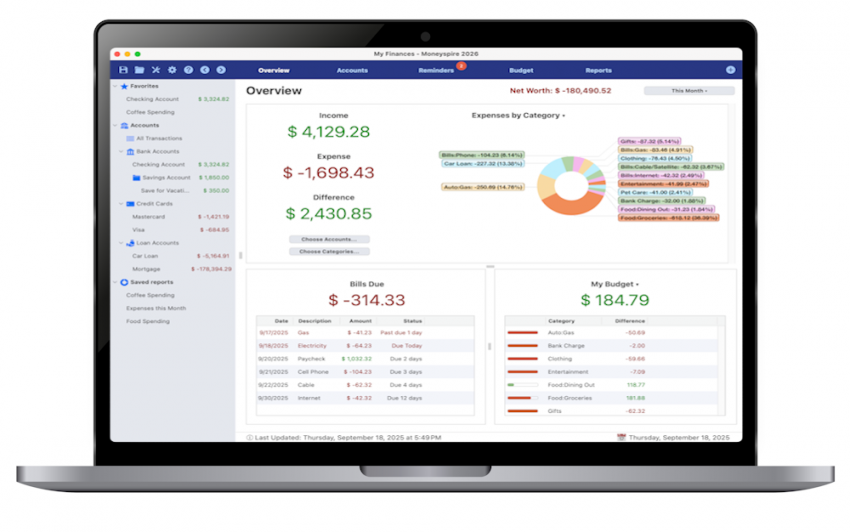
Description: Personal finance software, made personal. Keep track of your bank accounts, credit cards, loans, cash and investment accounts. Categorize your spending and income with customizable categories. Keep track of your bills so you never forget to make a payment again and avoid late fees.

Set a budget to keep track of your spending so you don't overspend on specified categories like Dining Out. Forecast your account balance to prevent overdrafts and insufficient funds. Balance your checkbook and reconcile with bank statements to catch errors and bank fraud.

Generate detailed reports to see exactly where your money is going and to make tax time easier. Optionally sync to your financial institutions (if you would like) via the Moneyspire Connect feature and automatically download your transactions. Optionally sync to the cloud (if you would like) via the Moneyspire Cloud feature so you can share your finances between multiple computers and mobile devices.

Moneyspire can also import data from Quicken, Microsoft Money (MS Money) and other personal finance software, so you can easily make the change to Moneyspire.

Release Name: Moneyspire 2026 v26.0.12
Size: 119 MB
Links: HOMEPAGE – NFO – Torrent Search

Download: RAPiDGATOR

8 Comments
Apr 7

FastNeuron BackupChain 4.1.5507

Description: BackupChain is an affordable, reliable, and customizable PC and Windows Server backup software for Windows Server 2025 - 2003, Windows 11 - XP, and Azure Stack HCI, made specifically for IT professionals. You can fine-tune backups and use open standard backup file formats to back up your physical and virtual servers exactly the way you want, at a significantly lower price than other backup solutions.

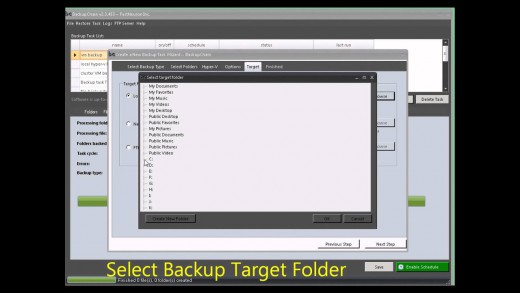
As a fully automatic and configurable backup solution, BackupChain offers Hyper-V backup, file backup, disk backup, version backup, deduplication, and delta compression. BackupChain Backup Software also includes database, live virtual machine backup, and a powerful multi-threaded engine for parallel processing. Files, databases, and virtual machines can be easily backed up to network servers, USB, SAN, iSCSI, local drives, and FTP. Access your data with ease: BackupChain can be configured to use open standard backup formats (ZIP, 7Z, virtual disks, etc.) or the file's native format, whether you are backing up a file server, a VMware, or Hyper-V server. Backup tasks can be configured to allow you to access files directly from the backup folder, and much more. Our notable customers include: Boeing, Siemens, Kyoto University, the State of Maryland, Lockheed Martin, the Canadian Federal Government, Mitsubishi, Supreme Court of Albania, BNP Paribas, Wyoming Community Bank, Oman Arab Bank, Scobag (Swiss Bank), HP (Hewlett-Packard) and the United States Bankruptcy Court.

Cost-Effective, Enterprise-Grade Backup Solution – All-in-One
A complete, yet lightweight, all-in-one backup software package, offered as a "buy-once-and-use-forever" license.
100% U.S. based, qualified, responsive, and reliable technical support is always available when needed
Own your backup software: Software licenses are perpetual "forever" licenses, not yearly subscriptions
Centralized management console: manage all your backups from a single screen, no matter how many computers and servers you have
Open standard file formats and the most advanced version backup system in the market
Image backup, full system disk backup, hard drive cloning and disk copy features, including bare-metal recovery, requiring no reboots or interruptions
V2V, V2P converter, and P2V converter: Convert physical server to virtual machines and vice versa, as well as between virtual machine platforms (V2V). Convert physical servers to Hyper-V to VMware or VirtualBox in all combinations.
Hyper-V Backup (See Step-by-Step Example), VMware Backup, VirtualBox Backup: Extensive, Reliable Virtual Machine Backup Features
Granular Backup & Granular Restore Features
File History Backup
Configurable data backup processing, filtering, file versioning (version backup, and parallelization options
Deduplication and a built-in FTPS Server (FTP encrypted over TLS/SSL), also available in all editions
Cloud Backup and Remote Backup (See our cloud backup plans);
Set Up Private DIY Cloud Server Storage and Access via Mapped Drive, using BackupChain and DriveMaker. Benefit from our unique incremental FTP backup technology, as it only uploads file content changes.
Azure Stack HCI backup: Back up virtual machines and other services running on Azure Stack HCI
Check out our notable customer list and reviews.
IT administrators and consultants: Get credit for your backup and recovery skills with our unique Backup Engineering Certification.

Release Name: FastNeuron BackupChain 4.1.5507
Size: 24.3 MB
Links: HOMEPAGE – NFO – Torrent Search

Download: RAPiDGATOR

8 Comments
Apr 7

Agisoft Metashape Professional 2.3.1 Build 22320

Description: Agisoft Metashape (formerly PhotoScan) is a stand-alone software product that performs photogrammetric processing of digital images and generates 3D spatial data to be used in GIS applications, cultural heritage documentation, and visual effects production as well as for indirect measurements of objects of various scales.

Wisely implemented digital photogrammetry technique enforced with computer vision methods results in smart automated processing system that, on the one hand, can be managed by a new-comer in the field of photogrammetry, yet, on the other hand, has a lot to offer to a specialist who can adjust the workflow to numerous specific tasks and different types of data. Throughout various case studies Metashape proves to produce quality and accurate results.

Features
Photogrammetric triangulation
Processing of various types of imagery: aerial (nadir, oblique) & close-range.
Auto calibration: frame (incl. fisheye), spherical & cylindrical cameras.
Multi camera projects support.

Dense point cloud: editing and classification
Elaborate model editing for accurate results.
Points classification to customize geometry reconstruction.
.LAS export to benefit from classical point data processing workflow.

Digital elevation model: DSM/DTM export
Digital Surface and/or Digital Terrain Model - depending on the project.
Georeferncing based on EXIF meta data/flight log: GPS/GCPs data.
EPSG registry coordinate systems support: WGS84, UTM, etc.

Georeferenced orthomosaic export
Georeferenced orthomosaic: most-GIS-compatible GeoTIFF format; .KML file to be located on Google Earth.
Export in blocks for huge projects.
Color correction for homogeneous texture.

Measurements: distances, areas, volumes
Inbuilt tools to measure distances, areas and volumes.
To perform more sophisticated metric analysis Metashape products can be smoothly transferred to external tools thanks to a variety of export formats.

Release Name: Agisoft Metashape Professional 2.3.1 Build 22320
Size: 205.1 MB
Links: HOMEPAGE – NFO – Torrent Search

Download: RAPiDGATOR

8 Comments
Apr 7

TominLab WonderPen 3.1.0.8383

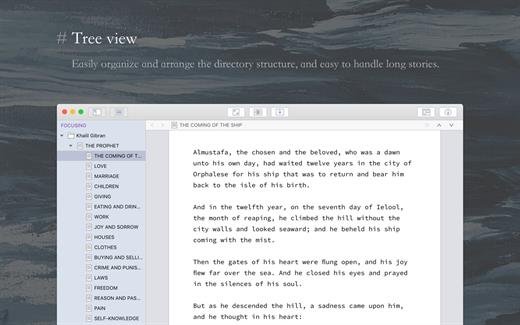
WonderPen is a professional writing app with a focused and fluid writing experience.

Statistics
Want to know how many words you wrote every day? Take a look at the typing statistics, and the progress of each day is clear at a glance.

Interface Lock
Need to leave the computer temporarily and don’t want others to see your work? Turn on the interface lock.

Split and Merge Chapters
Habitually write a large story first and then split the chapters? No problem, just click the right mouse button at the appropriate place in the document and click Chapter Split. Correspondingly, multiple chapters can also be easily merged into one.

Writing Targets
Set writing targets, monitor your writing progress in real time, and make writing more rhythmic and directional.

Share Typing Statistics
You can generate an image card of the daily typing number, which is convenient to share or show off your typing results.

Highlight Cards
Highlight the title of the card in the editor for quick reference.

Release Name: TominLab WonderPen 3.1.0.8383
Size: 226.7 MB
Links: HOMEPAGE – NFO – Torrent Search

Download: RAPiDGATOR

8 Comments
Apr 7

MusConv Lifetime 4.10.462

Description: More than 125+ music services supported. MusConv - the easiest way to transfer your music data! MusConv transfers playlists, albums, followed artists and liked songs across various services – Spotify, Apple Music, Amazon Music, YouTube, YouTube Music, iTunes, Deezer, Tidal, SoundCloud, Pandora and 125+ music services! Continuously working to bring you new updates and features.

MusConv Features
MusConv transfers playlists, albums, followed artists and liked songs across various services – Spotify, Apple Music, Amazon Music, YouTube, YouTube Music, iTunes, Deezer, Tidal, SoundCloud, Pandora and 125+ music services!
Manage playlists, albums, and artists across more than 125 popular music services
See your most-played songs, artists and albums on Spotify, Apple Music, YouTube Music and other
Browse the most popular songs, artists, and albums on your favorite services
Automatically synchronize playlists and albums between your platforms
Rematch incorrect and failed song matches
Syncing song order

Release Name: MusConv Lifetime 4.10.462
Size: 97.3 MB
Links: HOMEPAGE – NFO – Torrent Search

Download: RAPiDGATOR
9 Comments
Apr 7

Carifred Ultra Virus Killer Pro 11.10.23.0

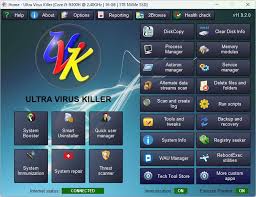
Description: UVK is a powerful virus removal and Windows repair tool. With simple and intuitive interface, UVK allows users to detect and delete all types of malware and spyware from infected systems. It also includes lots of tools to repair windows after the disinfection.

Process manager
Filter all the running processes by their executable path.
Select and manage several processes at once.
Kill processes.
Kill several processes with the same path at once.
Kill processes and delete the parent files simultaneously.
Kill all the listed processes.
Kill all the listed processes except the system processes.
Kill all non trusted processes.
Pause and resume processes.
Verify the processes files signatures.
Search information about a process over the internet.
Submit one or more processes MD5 to VirusTotal using the VT API.
Open the processes files locations.
View the processes executable files properties.

Startup entries and scheduled tasks
Delete startup entries, scheduled tasks and corresponding files simultaneously.
Select and manage several entries at once.
Verify the startup entries files signatures.
Hide Microsoft signed files from the list.
Search information about a startup entry file over the internet.
Submit one or more startup entries files MD5 to VirusTotal using the VT API.
Jump to the registry key where the startup entry is located.
Open the startup entries files locations.
View the startup entries files properties.
Maximizable window in this section for a more comfortable view.

Windows services and drivers
Delete services or drivers, and the corresponding files simultaneously.
Perform all common service management tasks: Stop, start, pause, resume services, and set their startup type.
Select and manage several services or drivers at once.
Stop all non Microsoft services.
Choose the services and drivers to be displayed: Show all services and drivers. Hide inactive services and drivers, Hide Microsoft services and drivers, Hide inactive and Microsoft services and drivers.
Verify the services/drivers files signatures.
Search information about a service/driver file over the internet.
Submit one or more services/drivers files MD5 to VirusTotal using the VT API.
Jump to the registry key where the service/driver is located.
Open the service/driver file location.
View the service file properties.
Maximizable window in this section for a more comfortable view.

Delete or replace file or folder
Delete files and folders even if they're being used by applications.
Delete running executable files.
Delete files and folders you can't normally delete using the Windows explorer.
Choose to whether delete the files definitely or move them to the recycle bin.
Replace or copy files.
Expand compressed files.
Replace files even if they are loaded in the memory.

Scan & create log
Perform a full analysis of your system and save it to a text file that you can send to a friend or professional, post in a forum, or analyze it yourself.
Choose the areas you want to scan and show in the log.
Choose whether to show Microsoft signed files in the log.
Choose where to save the log.
Choose whether to verify the scanned files digital signatures.
Search for recently created files, and write them to the log.
Perform other custom scans, live retrieving specific information on files, folders, registry entries, or automatically get the VirusTotal analysis result for a file.

Run UVK Scripts
Disinfect your computer by pasting lines from the UVK log to delete corresponding registry entries and files.
Use custom commands to download files, execute programs, delete or add registry entries, terminate processes, delete files and folders, run cmd batch scripts, register system files or run the UVK Fixes.
Create system restore points, empty the recycle bin and all users temporary folders.
Create and run scripts that perform complete system repair and maintenance.
Automatically run any of the UVK fixes or scans.

UVK tools
Retrieve al sorts of information on any file.
Generate VirusTotal MD5 reports, deny or grant access or perform an sfc scan for any file.
Search information on files and registry entries over the internet.
Grant access or prevent changes to registry keys.
Enumerate all the restore points.
Select and delete one or several restore points.
Create system restore points.
Enable or disable the system restore.

UVK System repair
Fix your computer with more than fifty exclusive fixes: Fix file extensions, register system dlls, enable and repair Windows update, clear dns cache and the hosts file, reset user default registry settings, fix installation problems, empty all browsers cache, reset security settings, defragment and optimize the hard drives, install Java, Flash, DirectX, .Net Framework, Fix the WMI and the system restore, delete all restore points, fix the windows shell, reset the user shell folders and much more.

System Info
Show information that can be very useful specially if you're going to reinstall windows or if you need to diagnose a performance or hardware problem. This includes the processor, memory and page file usage, OS and office product keys, and hardware and users info.
Export this info to a comprehensive html file.

UVK immunization
Prevent the most vulnerable registry and file system areas from being infected.
Prevent adding programs to the windows startup and logon.
Prevent creating/deleting browser helper objects, Internet explorer toolbars and search providers.
Prevent modifying the internet settings and the Internet explorer startup pages.
Backup and restore the Windows registry.

Release Name: Carifred Ultra Virus Killer Pro 11.10.23.0
Size: 27.7 MB
Links: HOMEPAGE – NFO – Torrent Search

Download: RAPiDGATOR

9 Comments