Please REGISTER or RENEW your account on RAPiDGATOR.net and support us by doing through all RAPiDGATOR working download links on main posts...
Apr 4

IDimager Photo Supreme 2026.2.0.8933

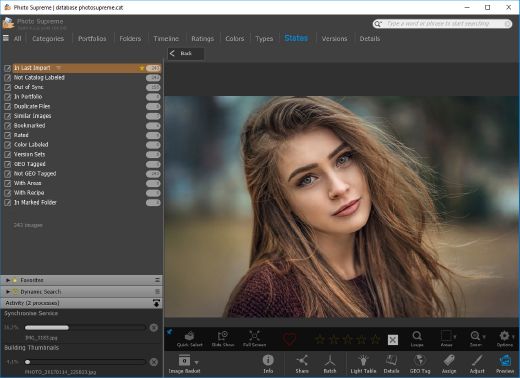
Description: Photo Supreme v2026 is a thoughtful and forward-looking release. This update has focused on smarter discovery, faster performance, and modern workflow expectations, especially around large catalogs, mobile integration, searches, and team environments.
Import and Select
One of the standout additions in Photo Supreme v2026 is the new multi-pass Import and Select workflow. This allows users to review and refine image selections in multiple stages instead of making all decisions in one pass. It’s especially useful for large shoots, letting photographers cull images more deliberately and with less pressure. In addition, the Import and Select feature now loads images faster than ever. Mac users will also appreciate direct iOS device importing, which makes it possible to bring photos straight from an iPhone or iPad into the catalog without relying on intermediary software. This significantly streamlines mobile-first workflows.

Powerful Searches
Photo Supreme now supports natural language searching, allowing users to find images using plain, conversational phrases rather than rigid metadata queries. This feature is powered by AI services such as OpenAI, Google Gemini, or local models with Ollama. This gives users flexibility in how advanced features are enabled. In addition, a new classification system enhances search accuracy by grouping images into meaningful categories upon import, making it easier to surface relevant results in large or complex catalogs.

Video & Media Handling
For users working with video, Photo Supreme v2026 introduces hover-based video previews. Simply hovering over a video thumbnail now reveals a short animated preview, making it much faster to identify clips without opening them individually. Support for modern formats has also been expanded, ensuring the software keeps pace with current media standards.

Sharing with ZIP
Exporting images is more flexible in v2026 thanks to ZIP output support in transfer profiles. This makes it easy to bundle images into a single archive for delivery, backup, or client sharing, all directly from within Photo Supreme. These enhancements simplify distribution workflows and reduce the need for external tools.

GEO Maps
GEOgraphic-Mapping features can now generate maps using not only Google Maps, but also OpenFreeMap with OpenStreetMaps. This removes the need for API keys while still delivering rich, interactive map displays. This update makes location-based browsing easier to configure and more accessible for all users.

Performance and Refinements
Photo Supreme v2026 delivers notable performance enhancements, resulting in faster browsing and a more responsive overall experience. Response times are improved by up to 10%, with especially noticeable gains for large libraries containing many catalog labels.
Catalogs with numerous stacks also see significant performance improvements, particularly when displayed in stacked views.
v2026 includes a wide range of refinements, such as: "Visually similar" stack detection, numerous stability fixes and workflow enhancements, polished UI behavior in collections, searches, and metadata handling

Wait, there's more, a lot more…
New "RAW Files" and "Video Files" catalog states
Added support for Google Gemini as an AI service
Added support for OpenAI GPT-5.2 as an AI Service
Added support for Ministral3 model with Ollama
Added file management support for ACR sidecar files
Update HTTP Server with Photo Supreme Online (Server Edition)
Faster face recognition
Added "AI-Estimated GEO Location" to the AI Panel
Faster result display in the Collection Viewer
"Cascade Metadata" from image to Stack or Version Set is now a background process
A highlighted stroke has been added to the active tabs, improving navigation
Now you can display metadata charts and graphs across multiple tabs
Added support for Ctrl/Cmd+Z functionality in text and memo fields
Defined the new Affinity v3 .AF and .AVIF file format as a supported "other file format"
Switching the collection viewer's view style is faster (eg from Basic to Grid to Clean to Custom Thumb Info)
Advanced Search now has an option to search by "File Size" and "File Size MB"
Finetuned the check for "need to compact" on PostgreSQL (Server Edition)
Bookmark keyboard shortcuts are now a "toggle", similar to ratings and color labels
Expanding nodes in the Catalog Tree is ~25% faster
When using the "Dump Full to Catalog File" feature, there's now the option to create either a "catalog dump" file, or a "catalog with thumbs" dump files
Added a XMP Storage Location for "original file AND non-standard sidecar file"
In "Stacked View", you can now select a specific item from the stack to show
Support for PostgreSQL 18.
And more…

Highlights for v2026
Multi-Pass "Import and Select": Seamlessly transition through passes with a fast-culling system that optimizes your workflow.
Direct iOS Image Import on macOS: Import images directly from your iOS devices with ease.
Video Thumbnail Preview: Hover over a video thumbnail or open the Quick View to view a live video preview.
Natural Language Search Powered by AI: Search your content using plain language, with smart integration through OpenAI, Google Gemini, or Ollama models.
Transfer Profiles can now create ZIP output files: Copy or send sets of images as a single ZIP file for easier sharing.
Maps with OpenFreeMap: Display images on interactive maps using OpenFreeMap/OpenStreetMaps with no API key needed.
Server Edition Thumbnail Caching: Enjoy faster performance with local thumbnail caching, automatic cleanup, and customizable settings for retention and cache size.
Classifications: Enhance search accuracy with an automatic image classification mechanism on import.

Release Name: IDimager Photo Supreme 2026.2.0.8933
Size: 163 MB
Links: HOMEPAGE – NFO – Torrent Search

Download: RAPiDGATOR

11 Comments
Apr 4

Typora 1.13.2

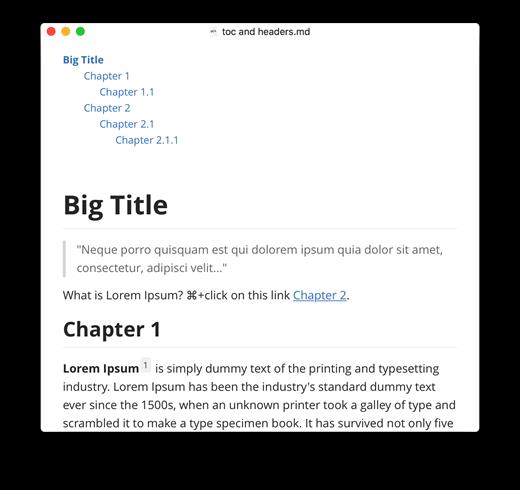
Description: Typora gives you a seamless experience as both a reader and a writer. It removes the preview window, mode switcher, syntax symbols of markdown source code, and all other unnecessary distractions, replacing them with a real-time preview to help you concentrate on the content itself.

Features
Markdown support including tables, code fences with syntax highlight, LaTeX, table of contents
Cross-platform
The real-time preview and WYSIWYG features
Beautiful interface and custom CSS theme support
Easy export

Release Name: Typora 1.13.2
Size: 94.1 MB
Links: HOMEPAGE – NFO – Torrent Search

Download: RAPiDGATOR

8 Comments
Apr 4

FinePrint 12.25

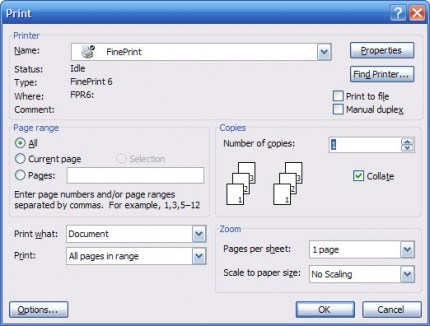
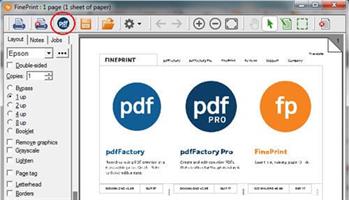
Description: FinePrint saves you money on paper and toner, weight in your briefcase, and time and hassle in managing your print jobs. With FinePrint working for you, annoying printing problems disappear. Below are just some examples of printing problems that FinePrint can fix. See also our Enterprise section for benefits of FinePrint in the Enterprise.

Features:
PDF Viewer
Universal print previewer
Microsoft signed drivers
Delete unwanted pages
Convert to grayscale
Lighten content to save ink
Remove blank pages
Crop pages
Edit text
Sign and mark up print jobs
Remove unwanted text and images
Print multiple pages on a single sheet
Print electronic letterhead
Archive print jobs

Release Name: FinePrint 12.25
Size: 26.2 MB
Links: HOMEPAGE – NFO – Torrent Search

Download: RAPiDGATOR
8 Comments
Apr 4

pdfFactory Pro 9.25

Description: pdfFactory offers award-winning PDF creation features at an affordable price. pdfFactory Pro has all the features of pdfFactory and adds bookmarks, job ordering, letterheads and automated email functions.

All of the features of pdfFactory plus:
PDF Viewer
PDF Creator
Microsoft signed drivers
Create PDFs on letterhead
Add page numbering, headers, footers, watermarks
Bookmark each job automatically
Create table of contents automatically
Convert to grayscale
PDF/A archiving
Fill in forms
Crop pages
Edit text
Save as single page PDF series
Add multiple signatures and initials with Notes function
Combine documents into a single PDF and rearrange them
Custom Drivers for specific tasks
Text highlight, copy and redact
Graphic copy, delete, save
Convert text to links
Append PDFs

Release Name: pdfFactory Pro 9.25
Size: 28.2 MB
Links: HOMEPAGE – NFO – Torrent Search

Download: RAPiDGATOR

8 Comments
Apr 4

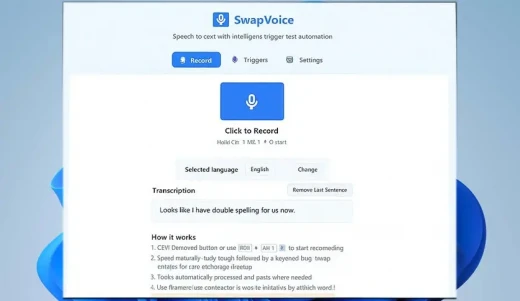
SwapVoice 2.0.0

Description: Transform your voice into instant, actionable text with SwapVoice's intelligent trigger recognition system for a onetime subscription fee instead of monthly license with other simialr tools. Perfect for professionals, content creators, and anyone who wants to work faster and smarter.

Offline voice recognition
No cloud dependency, complete privacy

Multi-language support
15 languages including English, Dutch, German, French, Spanish, Italian, Portuguese, Ukrainian, Polish, Turkish, Chinese, Japanese, Korean, Arabic, Hindi

Smart trigger system
Say "swap email" to instantly insert your email address

Global hotkey support
Quick access with Ctrl+Alt+V from any application

Voice training
Customize recognition for your specific triggers

Complete offline solution
Works without internet connection

Professional-grade accuracy
Uses advanced OpenAI Whisper technology

System Requirements
- OS: Windows 10 version 17763.0 or higher
- Keyboard: Integrated Keyboard
- Mouse: Integrated Mouse
- DirectX: Version 9
- Memory: 4 GB
- Video Memory: 1 GB

Microsoft Store - Full Version

Release Name: SwapVoice 2.0.0
Size: 1.1 GB
Links: HOMEPAGE – NFO – Torrent Search

Download: RAPiDGATOR
10 Comments
Apr 3

Statistical Discovery JMP Pro 19.0.5

Description: JMP is powerful statistical software designed with scientists and engineers in mind, but ideal for anyone solving problems with data. Packed with tools for data preparation, analysis, graphing, and so much more, JMP has everything you and your organization need to be truly unstoppable with data.

Features of JMP Pro


  • Statistics made visual, powerful, and approachable.
    JMP makes it easy to take on the most complex data challenges. Its simple, interactive interface lets you take your productivity further, and with no code required, there are no obstacles between you and any analysis or graph you want to create.
  • Get insights faster. Get home earlier.
    Your time matters. With JMP’s extensive suite of capabilities and code-free automation, you can quickly go from raw data to actionable insight—all within one streamlined, self-service platform.
  • Unlock efficiency gains to accelerate innovation.
    Industries with high product and process innovation have complex problems to solve and often require statistics to solve them. With JMP, scientists and engineers in these industries can seamlessly apply statistical techniques that support engineering efficiency and help propel their organizations to the forefront of the market.
  • Maximize your potential.
    Realizing potential requires the right support. With JMP, no matter where you are in your analytic journey, you have a partner in life-long learning. Our user community, support experts and learning resources are purpose-built to empower anyone looking to start, build, advance, or apply their skills with data.
System Requirements for JMP Pro

RAM: 4 GB

Processor: 64-bit; x64 processor only

Operating System: Windows 10 and 11

Space Required: 2 GB

Release Name: Statistical Discovery JMP Pro 19.0.5
Size: 600 MB
Links: HOMEPAGE – NFO – Torrent Search

Download: RAPiDGATOR

5 Comments
Apr 3

InfoTouch Professional 2.5.9

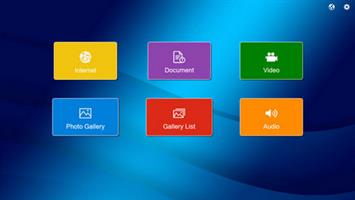
Description: InfoTouch Professional is an advanced and reliable solution for self-service public kiosks and displays. The software protects public computers against any kind of unwanted manipulation by end users, monitors the kiosk, generates usage statistics and allows for an easy and secure display of different kinds of information in public spaces such as libraries, schools, universities, museums, etc.

InfoTouch Professional allows you to:
Display websites in a secure Web browser
Create personalized start pages and navigation screens
Show photo galleries
Play movies
Play sounds
Send emails
Read incoming messages
Send multimedia postcards
View documents (e.g. PDF)
Create personalized multi-level menus
Run external programs

With InfoTouch Professional you can easily create interactive multimedia presentations. No programming skills are required. Convenient and intuitive configuration tool allows you to fully customize the user interface to suit your needs, e.g. change the background, edit buttons, define modules available for users. Presented content can be updated not only locally at the terminal, but also remotely via a local area network and over the Internet.

Release Name: InfoTouch Professional 2.5.9
Size: 240.8 MB
Links: HOMEPAGE – NFO – Torrent Search

Download: RAPiDGATOR
8 Comments
Apr 3

Sublime Merge 2 Build 2124 Dev

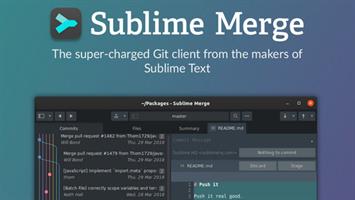
Description: Git Client, done Sublime. Meet a new Git Client, from the makers of Sublime Text. A snappy UI, three-way merge tool, side-by-side diffs, syntax highlighting, and more. Stage Files, Hunks and Lines with no waiting - Sublime Merge is really, really fast.

Why choose Sublime Merge as your Git Client?

A faster way to work
With a zippy cross-platform GUI toolkit, an unmatched syntax highlighting engine, and a custom high-performance Git reading library, Sublime Merge sets the bar for performance.

Precise and Flexible
Commit exactly what you want with line-by-line and hunk staging. Select one or more lines to split hunks into multiple changes.

Sublime Highlighting
With the power of Sublime Text syntax highlighting, you can understand exactly what's been changed in a commit. With over 40 supported languages out of the box, and automatic loading of installed third-party syntaxes, we've got you covered.

Real Git
When you're using Sublime Merge, you're using Git. View the exact Git commands you're using, and seamlessly transition between the command line and Sublime Merge.

Powerful Search
Looking for a commit? Use find-as-you-type search to find the exact commit you're looking for.

Your Git Client
Make it yours with an adaptable layout and powerful theming system.

Release Name: Sublime Merge 2 Build 2124 Dev
Size: 33.1 MB
Links: HOMEPAGE – NFO – Torrent Search

Download: RAPiDGATOR
7 Comments
Apr 3

Filou NC Gorilla 2026.03.31

Description: Experts estimate that 80-90% of all CNC parts are 2.5D parts. So no complex 3D models have to be created, but the 2.5D CNC code can be derived quickly and easily with the CAM module from easy-to-create 2D geometry.

With FILOU-NC you create all work in one software, from simple and fast 2D design to transfer to the machine / CNC control, in order to mill your workpiece.

Features:
No complex 3D models
Many CAM functions
Easy NC code creation
Editor with 3D backplot
3D simulation
tool library
Peel milling (trochoidal)
Lots of post processors
Own postprocessors possible
RS-232 transfer possible

Release Name: Filou NC Gorilla 2026.03.31
Size: 22.5 MB
Links: HOMEPAGE – NFO – Torrent Search

Download: RAPiDGATOR
9 Comments
Apr 3

IK Multimedia TONEX MAX 1.11.0

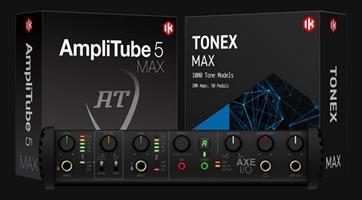
Description: Experience hyper-realistic Tone Models. A revolutionary concept in rig modeling, and the core of the TONEX ecosystem, TONEX software uses breakthrough AI Machine Modeling™ technology to let you model the sound of any amp, cabinet, combo or pedal, and turn it into a plug-in, all with a sonic accuracy that’s virtually indistinguishable from the real thing.

You can instantly play up to 1,100+ Premium Tone Models already available plus browse, demo and download over 20 K Tone Models available on ToneNET in TONEX. Easily add more Premium tones to your library with Tone Partner and signature collections.

From rare one-of-a-kind vintage amps to modern rigs, TONEX makes it possible and affordable to own the most sought-after gear in the world.

TONEX Tone Modeling features
Model amps, cabinets, combos and pedals (like distortion, overdrive, fuzz, EQ or boost) in any combination, from single element to complex rig
Built-in assistant guides you through each step from hardware connection to complete modeling
Assign custom skins to your modeled gear and open them as a plug-in or standalone inside the TONEX software and app, or AmpliTube 5 for Mac/PC
Create Tone Models in minutes (as fast as 5 minutes on modern computers*) using AI Machine Modeling technology with selectable levels of accuracy
Ultra-precise reproduction of high-frequency content
Works also as an IR creator or you can use the built-in VIR™ cabinets with multiple IRs per cabinet

Player
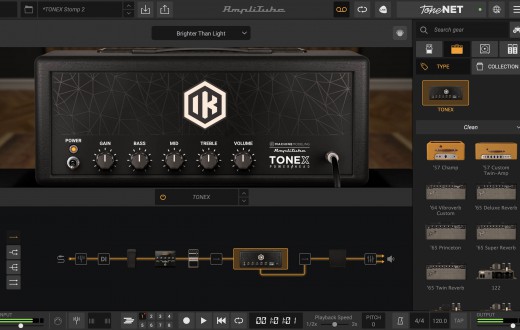
TONEX offers an intuitive, easy-to-use workflow to keep you in the creative zone. Play, practice and record the best guitar and bass tones using TONEX as a standalone application or plug-in inside your favorite DAW. Edit and organize your entire library of tones, and always have the right tone at your fingertips.
With powerful editing tools, it’s easy to take control. Add and adjust every parameter, including effects like modulation, delay, reverb, compression, noise gate and EQ, all from the home screen.
Customize your cab block with Tone Models, VIR™ and Custom IRs for unmatched flexibility. Easily create and manage custom presets, keeping your favorite sounds organized and ready to play within a single user-friendly interface.

Modeler
Harness the power of IK’s advanced AI Machine Modeling technology to turn your rig into virtual models of amps, cabs and pedals (distortion, overdrive, fuzz, EQ and boost) or entire rigs, in any combination.
TONEX uses a specially prepared audio file of actual guitar and bass signals, not just test tones, to capture your rig in true-to-life detail. Then TONEX’s neural network computes the machine modeled tone in minutes. The result is a virtual model that sounds indistinguishable from the real rig, to be used in TONEX software and app.
Add your custom skin and keywords to your Tone Models, then upload and share them with other TONEX users in ToneNET with just one click.

TONEX Editor
TONEX Editor is a FREE standalone application that lets you make real-time adjustments with a connected TONEX Pedal or TONEX ONE. It allows you to access and edit any onboard Tone Model or preset and hear your changes instantly through the pedal. You can also access your entire TONEX library within the Librarian tab, including Tone Models, presets and ToneNET, and quickly load favorites to audition and save to a designated hardware slot on your pedal.

Release Name: IK Multimedia TONEX MAX 1.11.0
Size: 2.9 GB
Links: HOMEPAGE – NFO – Torrent Search

Download: RAPiDGATOR

8 Comments