Please REGISTER or RENEW your account on RAPiDGATOR.net and support us by doing through all RAPiDGATOR working download links on main posts...
Apr 2

Dragonrise Games YoloX 1.9

Description: Use YoloX to change your game crosshair. Includes inverted colors, audio sensor, motion sensor, anticheat safety, and other features never seen before. Evolve your aim with the next revolution in crosshair technology!

Effects: Inverted color and other effects.
Animations: Separate animations for main fire, alt fire, and jump.
Audio Sensor: Animated reactions to game audio. Now you can listen to your own music without missing key sounds.
Motion Sensor: Animated reactions to motion such as mouse movement.
Fullscreen: Just works in dedicated fullscreen and other modes.
Easy: No other apps or plugins, like gamebar, required.
Fast: Highly optimized using latest tech. No lag. No FPS drops.
Profiles: Crosshair, size, and offset assigned per game.
Crosshairs: Includes many crosshairs and more by community users, pros, and streamers.
Create: Create and publish your crosshairs to the community.
Autohide: Crosshairs show only when needed.
Scaling: Lossless scaling (sizing) between 200% and 25%.
Hotkeys: Hotkeys to change crosshair, scale, offset, and toggle.
Settings: Settings to autostart, autohide, limit FPS, Steam desync, and more.
Anticheat Compliant: Overlay Only. No dangerous hooks. Code Signed. Whitelisted.

Release Name: Dragonrise Games YoloX 1.9
Size: 6.1 MB
Links: HOMEPAGE – NFO – Torrent Search

Download: RAPiDGATOR

9 Comments
Apr 2

Total Commander 11.57 RC2

Description: Total Commander (former Wincmd) is a file manager for Windows similar to the Windows Explorer. But Total Commander uses a different approach: it has two fixed windows side by side like a well-known file manager for DOS.

Features
Two file windows side by side
Multiple language and Unicode support
Enhanced search function
Compare files (now with editor) / synchronize directories
Quick View panel with image and video display
ZIP, 7ZIP, ARJ, LZH, RAR, UC2, TAR, GZ, CAB, ACE archive handling + plugins
Built-in FTP client with FTPS (encrypted FTP) and HTTP proxy support
Multi-rename tool
Tabbed interface, regular expressions, history+favorites buttons
Thumbnails view, custom columns
Compare editor, cursor in lister, separate trees, logging, enhanced overwrite dialog etc.
Unicode names almost everywhere, long names (>259 characters), password manager for ftp and plugins, synchronize empty dirs, 64 bit context menu, quick file filter (Ctrl+S)
USB port connection via special direct transfer cable, partial branch view (Ctrl+Shift+B), and many improvements to ftp, synchronizing and other functions
And many more!

Release Name: Total Commander 11.57 RC2
Size: 11.2 MB
Links: HOMEPAGE – NFO – Torrent Search

Download: RAPiDGATOR

8 Comments
Apr 2

Perfectly Clear WorkBench 5.0.4.3169

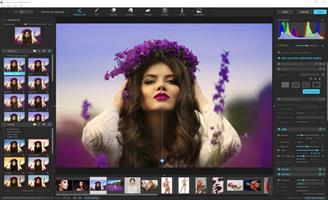
Description: Perfectly Clear is the program's latest version, which also comes as a plugin for Photoshop & Lightroom. The essence of this development is simple; you have a picture, you do not like it, the skin is dull, pimples, in short, there are defects, now you can not bother with editing; a couple of clicks and here is a corrected photo, perfect, as it should be, not ashamed of social networks to pour. You can use the pens to adjust all correction parameters; many use automatic mode.

The program has 20 indicators for them that reconciliation and adjustment take place, and as a result, the picture is beautiful without any difficulties. The cameras have limitations; they can add noise to the picture, light a photo, make the skin tone terrible, etc. This plugin knows all these restrictions and will detect, eliminate, and provide; you only have to save the result.

The application will find and eliminate irregularities and other skin defects, work with dark circles under the eyes, remove excess shine in the picture, add shine, enlarge the eyes, whiten teeth, and tonify the skin. In short, now you can safely wake up and be immediately photographed; the program will process everything and be like candy, do not spend a couple of hours standing in front of a mirror.

What's New in Perfectly Clear WorkBench
Beautiful new interface
New image correction tools:
Preprocessing section for Input Looks and "Image Ambulance" for manual exposure corrections
"Face Aware" exposure for more accurate auto-exposure corrections in portraits and group photos
Black Point tool to deepen blacks
New Color Vibrancy tool to complement our previous "Vibrancy" control (now renamed to Color Restoration)
Sky and Foliage enhancements
Existing tools have been improved:
Added strength sliders to Light Diffusion and Vibrancy for better control
Better 'color pickers' for Skin Tone and Blush adjustments
Manually identify faces that are not detected automatically
One-click to zoom into individual faces
Modify facial regions to provide the best corrections
Histogram
Much improved preset management

Release Name: Perfectly Clear WorkBench 5.0.4.3169
Size: 260.9 MB
Links: HOMEPAGE – NFO – Torrent Search

Download: RAPiDGATOR

10 Comments
Apr 2

RizomUV 2025.0.117

Description: RizomUV’s strength is that it is built for speed of workflow. It can unwrap in seconds, pack in seconds, optimise in seconds, thereby reducing the hours you spend UV mapping in other applications into minutes. This frees you up to spend time where it matters: Your art. RizomUV VS is a full-featured UV Mapping application, with features surpassing most offerings currently on the market. Whereas its sibling, RizomUV RS ((Real Spaces), is for CAD space RizomUV VS (Virtual Spaces) is our UV Mapping application for the CG industry, from indie stills to games you’ve played or movies you’ve seen.

Instant Unwraps
Got a little enthusiastic with your SubD? Made it a little complicated? Need to unfold it? RizomUV doesn't really care about size. It can flatten + 100K poly models into perfectly flat, non-overlapping maps (almost) in the blink of an eye

Tight Packing
Our native packer is designed to ensure your islands are packed with minimal waste of space and efficient orientation and scale. And of course, it can pack groups, fill gaps and put shells anywhere else you can think of.

Autoseams
Don't like cutting seams? Neither do we! That's why we have several specific algorithms and settings to create the seams for you, so you can cut up anything from a terrain to a mech in seconds, based on the parameters you define. You can even choose only to display proposed cuts, make the cuts, or cut, wrap and pack in one go.

UDIMS and Multichannels
If you need to spread your wings or anything else over multiple tiles or channels, we have you covered – RizomUV offers super easy UDIM and MultiChannel functionality. Define your tiles, and/or define your channels, any which way you like, and save. Boom! Done!

Brushes
In addition to just hitting the Unwrap button, we also give you brush options for fine-tuning your UV maps, complete with radius, pressure and a choice of algorithm options. These come in particularly handy when working with photogrammetry models or heads – and again, save you time by letting you paint, rather than spending ages on finding that perfect cut that will solve all

Supersharp Optimisation
If you're looking for stretch or pinch management, there are Optimisers, and then there's our Optimiser. Ours is so good; it's used in the CAD industry to design objects that need micrometre precision.

Adaptable
We support Obj and FBX formats, as well as poly/object, material and smoothing groups. Easy to import and export. We offer also offer Lua-scripting – you can see prime examples of these by checking out our community-created Bridges.

Release Name: RizomUV 2025.0.117
Size: 104.8 MB
Links: HOMEPAGE – NFO – Torrent Search

Download: RAPiDGATOR

9 Comments
Apr 2

ViewCompanion Premium 17.00.0.1200

Description: ViewCompanion Premium is the most powerful member of the ViewCompanion family. ViewCompanion Premium can view, print and convert Adobe PDF, PDF/A, Autodesk DWF, PLT, CGM, TIFF, CALS, EDMICS and several other file formats.
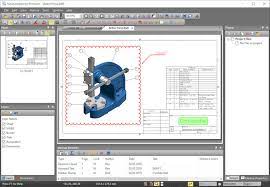
With ViewCompanion Premium you can convert your files to many different output formats, please check the complete list of supported output formats below. Your PLT, CGM, Gerber and DWF files can be converted into Autodesk DXF format, which can be read by all popular CAD applications, for example Autodesk AutoCAD™.

With the built-in PDF to CAD tools, you can convert your PDF files into editable DXF, Gerber, CGM or SVG files. Both batch convert and batch print is included. The software can be configured to monitor a user defined folder, and all files copied to that folder will be automatically printed using your settings.

You can merge multiple files of different formats to a single multi-page PDF, DWF or TIFF file. ViewCompanion can split a multipage PDF, TIFF or DWF file into multiple files. You may split a PDF file either based on a maximum number of pages per file or based on the maximum file size for each output file. With ViewCompanion you can measure dimension lengths and areas. All measurements can be done using snap to drawing geometry to give the highest accuracy. Calibration of the measurement tools is available to make sure you get correct results even if your drawings are not scaled 1:1. The measurement results may be exported to either a Excel Workbook (XLSX) or to a CSV file which can be opened by any spreadsheet application.

Use ViewCompanion to compare files of different revisions and visualize the differences. You can compare all supported file formats, including PDF. Two multipage files can be compared page by page.
Annotate your files using markup elements like text, highlight, dimension line, area measurement, stamp, freehand, arrow, barcode, symbol, image and more.
ViewCompanion support symbol libraries that make it easy to add frequently used symbols as markups. You can create your own symbol libraries from any image file. You will also find a few libraries available for you to use after installation.
All markup elements will be stored in a separate file and the original file will be left unmodified. The markup elements can be included when the viewed file is printed or converted.

Key Features
View, markup, convert and print files of many different formats.
Convert to a large number of output formats, please see the complete list of formats below.
Use the PDF to CAD tool to convert your PDF files into editable DXF, DWF, PLT, SVG and CGM files.
Batch printing and conversion is included.
Color, Black & White or Grayscale printing and conversion.
Scaled print or fit to paper.
Poster mode for printing big format drawings on multiple sheets, e.g., print an A0 drawing in full size using multiple A4 sheets.
N-up printing mode, also known as multiple pages per paper sheet printing.
Hot folder printing. Monitor a folder and print all files that are copied to this folder.
Add footer and header containing date, scale, time, filename or custom text to the printed file.
Annotate your files by adding text, symbols, stamps, barcodes, images, measurements and more.
Include annotation during printing and conversion.
Precise measurement with snap to drawing geometry.
Use the measurement and annotation functionality to perform digital takeoffs.
Send the viewed file by e-Mail, either as a PDF, as a JPEG or in the original format.
Conform, or convert, any PDF file into PDF/A standard for archiving. Batch and single file supported.
Compare two files and visualize the differences.
Compare multi-page PDF files, page by page.
Merge multiple PDF files into a single multipage PDF file.
Split a multipage PDF file into individual files.
Digitally sign PDF files.
Optimize PDF files.
Scan documents and create a new file or append as a page to the active file.
Includes advanced raster processing tools to deskew, cleanup, remove foxing and more.
Create searchable PDF files from scanned documents using Optical Character Recognition (OCR).
Split a multipage TIFF file into individual files.
Overlay up to 10 files and print as one drawing.
Apply watermark using text or image to the printed file.
Use pen table for full control of colors, styles and widths.
Copy a selected region, or whole drawing, to clipboard, and paste into other applications.
Text search and extract.
Store commonly used files in projects.
Shell Extension for easy access to functions inside the Explorer Window and a full preview of the selected file.
Extensive set of command line parameters for conversion and printing.
Delete pages from multipage files (e.g., TIFF and PDF).

Release Name: ViewCompanion Premium 17.00.0.1200
Size: 118.3 MB
Links: HOMEPAGE – NFO – Torrent Search

Download: RAPiDGATOR

9 Comments
Apr 2

R-Wipe & Clean 20.0.2554

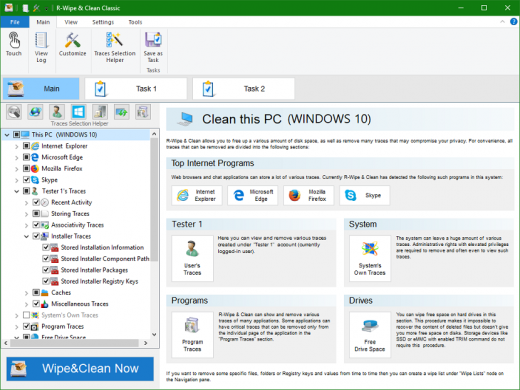
Description: R-Wipe & Clean is a complete R-Tools solution to remove useless files, free up your disk space, and clean various privacy-compromising information on your online and offline activity. This includes internet history and cookies, lists of downloaded files and opened documents, various data caches, temporary files, and many more items, created by the operating system, most contemporary internet browsers and communication programs, and by hundreds of third-party applications.

It is also possible to create specific lists of traces to be cleaned for unsupported applications. All small computer cleaning and file erasing jobs can be combined into large computer cleaning tasks that can be started immediately, or at scheduled time/events.

In addition to new traces to clean, the latest version offers its users several brand new features:
Touch interface: A new graphical interface designed for devices with touch screens: tablets, laptops with touch screens, etc.. Users with non-touch screen devices may use it too, to enjoy its original stylish appearance.
Traces Selection helper: a tool to quickly select some of the most common traces to clean.
Support for SSD devices: the program correctly recognizes SSD devices and treats them accordingly to avoid their additional wear and tear.
R-Wipe & Clean Smart: an advanced tool to create and manage very complex wipe lists.
R-Wipe & Clean Lite: a free version that cleans most essential computer traces.

Computer Cleaning
Traces Selection helper: a tool to quickly select some of the most common traces to clean.
Cleaning Internet activity: removing traces from most contemporary browsers and communication programs.
Cleaning personal traces: removing various lists, logs, caches, temporary files, and other traces of your activity.
Cleaning system traces: removing registry traces, temp files, system history, and various log files.
Cleaning traces from various third-party programs: removing various caches, logs, temporary files, recent file lists, and other traces left by applications.
Cleaning can be performed as a background task and computer can be turn off upon its completion.

Wiping
Support for SSD devices: R-Wipe & Clean correctly recognizes SSD devices and by default wipes only necessary data on the disk preventing them from additional wear.
Strong or fast erase algorithms, including DoD-approved, for wiping files and free disk space.
Support for FAT/exFAT and NTFS file systems.
Wiping files' alternate data streams and cluster "tips", or free parts of file clusters.
Wiping files directly from File Explorer.
Wiping free space on a single disk directly from its shortcut menu.
Wiping unused space of several disks through one single wipe task.
Wipe records of small files stored directly in the NTFS Master File Table.
Predefined wipe lists of files, folders, and Registry keys to be wiped through a single task. Files or folders can be added to a current wipe list directly from File Explorer.

Touch Interface
A new graphical interface designed for devices with touch screens with various resolutions: tablets, laptops with touch screens, etc.. In addition to its modern look and animation, Touch Interface is adapted to the way the users control their touch screen devices: by swiping and tapping. It provides access to all controls and settings of R-Wipe & Clean, so users with non-touch screen devices may use it too, to enjoy its original stylish appearance.

Advanced Features
All separate cleaning and wiping actions can be combined into large wipe and clean tasks to launch them manually or at scheduled times or events (user log-on/log-off, system start-up/shutdown, closing any or all browsers, etc.)
Detailed representation of all trace items on your computer.
Detailed logging of all wipe and clean operations.
Customization: R-Wipe & Clean can hide those items you will never want to clean.
Full system integration: Most wipe and clean operations can be performed directly from Windows.
Password protection.
R-Wipe & Clean Smart: an advanced tool to create and manage very complex wipe lists.
Cleaning and wiping task can be started from a command line.
Boss Key to close a web-browser in emergency.
Stealth mode to hide computer cleaning.
Standby/hibernate control: Your computer will not hibernate until R-Wipe & Clean finishes its long job.
Startup Renaming for files/folders locked by Windows and other programs. They will be renamed and cleaned during the next start-up.

Release Name: R-Wipe & Clean 20.0.2554
Size: 36.2 MB
Links: HOMEPAGE – NFO – Torrent Search

Download: RAPiDGATOR

8 Comments
Apr 2

IDimager Photo Supreme 2026.2.0.8925

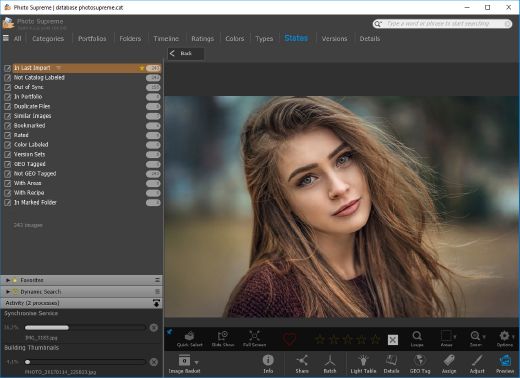
Description: Photo Supreme v2026 is a thoughtful and forward-looking release. This update has focused on smarter discovery, faster performance, and modern workflow expectations, especially around large catalogs, mobile integration, searches, and team environments.

Import and Select
One of the standout additions in Photo Supreme v2026 is the new multi-pass Import and Select workflow. This allows users to review and refine image selections in multiple stages instead of making all decisions in one pass. It’s especially useful for large shoots, letting photographers cull images more deliberately and with less pressure. In addition, the Import and Select feature now loads images faster than ever. Mac users will also appreciate direct iOS device importing, which makes it possible to bring photos straight from an iPhone or iPad into the catalog without relying on intermediary software. This significantly streamlines mobile-first workflows.

Powerful Searches
Photo Supreme now supports natural language searching, allowing users to find images using plain, conversational phrases rather than rigid metadata queries. This feature is powered by AI services such as OpenAI, Google Gemini, or local models with Ollama. This gives users flexibility in how advanced features are enabled. In addition, a new classification system enhances search accuracy by grouping images into meaningful categories upon import, making it easier to surface relevant results in large or complex catalogs.

Video & Media Handling
For users working with video, Photo Supreme v2026 introduces hover-based video previews. Simply hovering over a video thumbnail now reveals a short animated preview, making it much faster to identify clips without opening them individually. Support for modern formats has also been expanded, ensuring the software keeps pace with current media standards.

Sharing with ZIP
Exporting images is more flexible in v2026 thanks to ZIP output support in transfer profiles. This makes it easy to bundle images into a single archive for delivery, backup, or client sharing, all directly from within Photo Supreme. These enhancements simplify distribution workflows and reduce the need for external tools.

GEO Maps
GEOgraphic-Mapping features can now generate maps using not only Google Maps, but also OpenFreeMap with OpenStreetMaps. This removes the need for API keys while still delivering rich, interactive map displays. This update makes location-based browsing easier to configure and more accessible for all users.

Performance and Refinements
Photo Supreme v2026 delivers notable performance enhancements, resulting in faster browsing and a more responsive overall experience. Response times are improved by up to 10%, with especially noticeable gains for large libraries containing many catalog labels.
Catalogs with numerous stacks also see significant performance improvements, particularly when displayed in stacked views.
v2026 includes a wide range of refinements, such as: "Visually similar" stack detection, numerous stability fixes and workflow enhancements, polished UI behavior in collections, searches, and metadata handling

Wait, there's more, a lot more…
New "RAW Files" and "Video Files" catalog states
Added support for Google Gemini as an AI service
Added support for OpenAI GPT-5.2 as an AI Service
Added support for Ministral3 model with Ollama
Added file management support for ACR sidecar files
Update HTTP Server with Photo Supreme Online (Server Edition)
Faster face recognition
Added "AI-Estimated GEO Location" to the AI Panel
Faster result display in the Collection Viewer
"Cascade Metadata" from image to Stack or Version Set is now a background process
A highlighted stroke has been added to the active tabs, improving navigation
Now you can display metadata charts and graphs across multiple tabs
Added support for Ctrl/Cmd+Z functionality in text and memo fields
Defined the new Affinity v3 .AF and .AVIF file format as a supported "other file format"
Switching the collection viewer's view style is faster (eg from Basic to Grid to Clean to Custom Thumb Info)
Advanced Search now has an option to search by "File Size" and "File Size MB"
Finetuned the check for "need to compact" on PostgreSQL (Server Edition)
Bookmark keyboard shortcuts are now a "toggle", similar to ratings and color labels
Expanding nodes in the Catalog Tree is ~25% faster
When using the "Dump Full to Catalog File" feature, there's now the option to create either a "catalog dump" file, or a "catalog with thumbs" dump files
Added a XMP Storage Location for "original file AND non-standard sidecar file"
In "Stacked View", you can now select a specific item from the stack to show
Support for PostgreSQL 18.
And more…

Highlights for v2026
Multi-Pass "Import and Select": Seamlessly transition through passes with a fast-culling system that optimizes your workflow.
Direct iOS Image Import on macOS: Import images directly from your iOS devices with ease.
Video Thumbnail Preview: Hover over a video thumbnail or open the Quick View to view a live video preview.
Natural Language Search Powered by AI: Search your content using plain language, with smart integration through OpenAI, Google Gemini, or Ollama models.
Transfer Profiles can now create ZIP output files: Copy or send sets of images as a single ZIP file for easier sharing.
Maps with OpenFreeMap: Display images on interactive maps using OpenFreeMap/OpenStreetMaps with no API key needed.
Server Edition Thumbnail Caching: Enjoy faster performance with local thumbnail caching, automatic cleanup, and customizable settings for retention and cache size.
Classifications: Enhance search accuracy with an automatic image classification mechanism on import.

Release Name: IDimager Photo Supreme 2026.2.0.8925
Size: 163.1 MB
Links: HOMEPAGE – NFO – Torrent Search

Download: RAPiDGATOR

7 Comments
Apr 2

EaseUS Partition Master 20.0.0 Build 202604010340 + WinPE

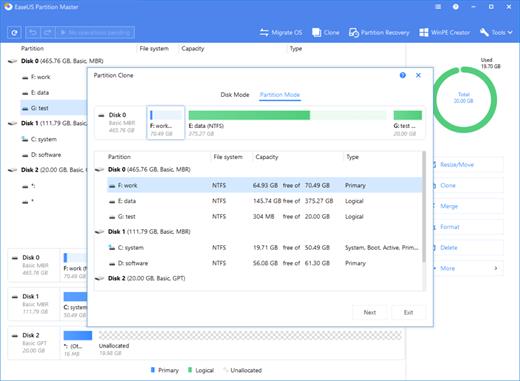
Description: Best Tool to Simplify Your PC Disk Management. Resize/Extend partition to maximize disk space usage. Clone system or hard drive to upgrade disks without reinstalling Windows. Convert MBR System Disk to GPT for Windows 11 Upgrade. Support one-click AI smart space adjustment.

Upgrade to New HDD/SSD
Easily move to a new hard drive or SSD without reinstalling Window system and applications.

Maximize Disk Performance
Efficiently fix low disk space and other disk partition problems for better performance.

Easy Windows 11 Upgrade
Completely prepare your computer for easy & safe Windows 11 upgrade.

Install a new hard drive or SSD with the existing OS by migrating OS to SSD/HDD
Upgrade OS disk to an SSD for better computer performance or a larger hard drive to save more files without reinstalling Windows by cloning disk.
Transfer or backup data from a specific partition on a hard disk to another disk or partition by cloning partition.
Wipe data from the old disk or partition for data and privacy security after clone.

Troubleshoot Low Disk Space Issues
When C drive or other disk partition gets full and warns low disk space, you can efficiently extend it with unallocated & free space on a local drive by resizing, extending or merging partitions without rebooting.

A Powerful PC System Recovery Tool to Fix All Windows Boot Issues
EaseUS Partition Master with Win PE technology allows you to create a bootable CD/DVD/USB disk on any workable computer to boot up the crashed.
Windows computer to fix all your Windows boot problems, reset Windows password and recover data from unbootable hard disks.

Reset Windows local and domain password
If you forgot or lost your password for Windows system like Windows 10, Windows 8.1, or Windows 7, you may be able to reset it with EaseUS Partition Master. The tool allows you to boot up the PC with the bootable disk or flash drive and reset your Windows local and domain password.

Boot Up Any Computer That Won't Start Properly
There are various ways in which your PC can crash and make you panic. From the popular Blue Screen of Death to screen freezes, it can be mightily frustrating to try and revive your system when you can’t even launch any commands on it. EaseUS Partition Master allows you to create a bootable media to fix Windows boot issues like blue/black screen, Windows won't boot, system crash, etc.

Recover data from unbootable Windows system
The worst part about computers not booting up is when your data can’t be retrieved or has been corrupted in some way. This is usually the worst-case scenario, especially if you don’t habitually back up your files and happen to have some important work or files on your PC. However, EaseUS Partition Master on your bootable CD/DVD/USB disk can come to the rescue again. With it, you can easily export documents, archives, photos, videos, and other files with important information when the system fails to boot.

Supported Operating Systems:
Windows 11, Windows 10, Windows 8.1, Windows 8, Windows 7, Windows Vista, Windows XP

Release Name: EaseUS Partition Master 20.0.0 Build 202604010340 + WinPE
Size: 1.4 GB
Links: HOMEPAGE – NFO – Torrent Search

Download: RAPiDGATOR

9 Comments
Apr 2

Coder Technologies Coder 2.30.6

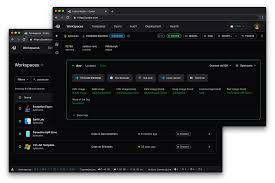
Description: Deploy development environments on your infrastructure. Onboard developers to fully configured cloud development environments with Coder, the only open-source platform you can self-host and manage for complete security and control.

The #1 Self-Hosted Cloud Development Environment
Coder is an open-source cloud development environment (CDE) that you host in your cloud or on-premises. With Coder, you can deploy environments that provide the infrastructure, IDEs, and tools your developers need. Upgrade to Coder Premium to gain enhanced security, governance, and observability for your platform teams.

Build and Test Faster
Cloud computers can build and test large codebases at breakneck speeds, saving hours of developer time per week. Coder workspaces can run on existing VM, Kubernetes, and other computing infrastructure, putting unused resources to work.

Unlock AI / ML Development
With cloud workspaces, data science teams benefit from the latest advancement in hardware as soon as they become available. Upgrade Jupyter workspace specs with a few lines of code. Share GPU access from the cloud. Eliminate time-consuming replication of large data sets to local machines.

Reduce Cloud Costs
Coder reduces cloud costs by automatically shutting down unused resources and starting them back up right before developers begin their day. Augment or replace expensive, always-on VMs or VDI solutions that your developers hated anyway.

Bring Code Closer to Resources
Clone, download, upload, and query faster by moving your development environments closer to your data. With Coder, developers experience consistent, high-performance networking even when coding from log cabins and coffee shops.

Secure Third-Party and Contractor Developers
Third-party developers and contractors need the same access to development environments as your own employees. Unfortunately, giving them full remote access or administrative privileges to their local machines is risky. Coder decouples the developer workspace from third-party devices, restoring productivity in restricted environments.

Visual Studio Code is connected in a single click from the dashboard using the Coder extension.
JetBrains Gateway is supported with our extension—use any of your favorite JetBrains IDEs.
SSH connections can be created using `coder ssh`. All you need is a terminal!
Automatic Shutdown specifies a duration to stop resources when no connections are active.
Single Sign-On lets users sign up with OpenID Connect (Okta, Google, etc).
Automatic Git Auth integrates with GitHub, GitLab, BitBucket and Azure DevOps to auto-auth users when performing Git operations.

Release Name: Coder Technologies Coder 2.30.6
Size: 145.2 MB
Links: HOMEPAGE – NFO – Torrent Search

Download: RAPiDGATOR

8 Comments
Apr 2

Exportizer Enterprise 10.3.1.1339

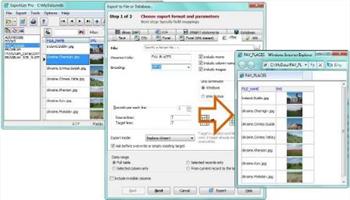
Description: Exportizer Enterprise opens local databases, ODBC data sources, and all major relational databases like Access, SQLite, Oracle, SQL Server, Firebird etc; it exports data to large list of file formats and types of databases, and adds extra powerful features like ability to drastically accelerate data migration between databases, converting group of tables at a time, exporting very big tables etc.

Do you need a SQLite converter? Or, maybe, DB2 or Firebird exporter? DBF to SQL Server or MDB to Excel conversion tool? It's all about Exportizer Enterprise.

And, like Exportizer Pro, it provides the database query tool which extends your capabilities of the source data extraction.

Supported source data types:
File databases like Paradox (.db), dBase (.dbf), FoxPro (.dbf), text, CSV, or XML (with some limitations)
ODBC data sources [Pro, Enterprise]
Multi-table files like MS Excel (.xls, .xlsx, .xlsmb, .xlsm), HTML (.html, .htm)
Multi-table file databases like Visual FoxPro (.dbc), MS Access (.mdb, .accdb), Interbase (.gdb, .ib), Firebird (.fdb), SQLite [Enterprise]
Databases specified by ADO connection strings [Enterprise]
Relational server databases like PostgreSQL, DB2, Oracle, SQL Server, MySQL, SQL Anywhere, Informix, Advantage Database Server [Enterprise]

Supported destination data types:
File formats like text, CSV, JSON, XLS, XLSX, RTF, XML, HTML, PDF, DBF, SLK, SQL script (with INSERT, UPDATE, MERGE, or DELETE statements)
User defined file format based on user's formula
ODBC data sources [Pro, Enterprise]
Relational databases of any supported source type (see the list above) [Enterprise]
Files of any types from database BLOB and CLOB columns (see below) [Pro, Enterprise]

For example, in Exportizer, you can export
- dbf to SQL script,
- csv to dbf,
- text to JSON,
- Paradox to Excel,
and make several other data conversions.

Release Name: Exportizer Enterprise 10.3.1.1339
Size: 24.8 MB
Links: HOMEPAGE – NFO – Torrent Search

Download: RAPiDGATOR
8 Comments