Please REGISTER or RENEW your account on RAPiDGATOR.net and support us by doing through all RAPiDGATOR working download links on main posts...
Apr 1

CoolUtils Total Movie Converter 4.1.0.78

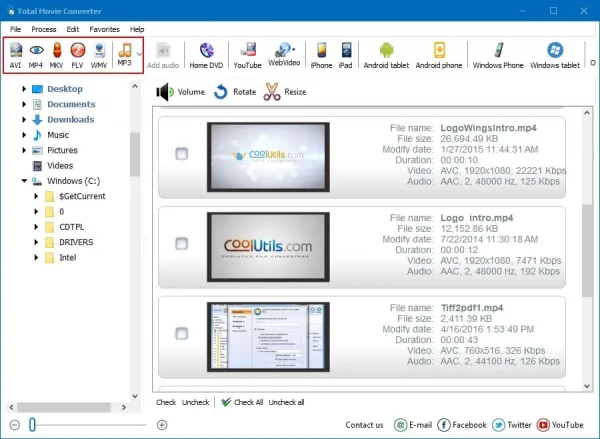
Description: Total Movie Converter is a handy solution to convert video files of almost all popular video codecs to AVI, MPG, WMV, MPEG, FLV. In addition, Total Movie Converter is great for converting video for iPad, iPhone, Apple TV, Archos, XBox and others thanks to the new Video To Device feature.

If you make home videos with a HD camera Total Movie Converter will make your videos suitable for the web in two clicks.
Use this powerful video converter to rotate your videos or resize them.
Total Movie Converter converts video from YouTube, Vimeo, and Sevenload. All you have to do is enter the url.
The video converter can also change the codec or system type between all popular video formats. You can also adjust Audio\Video bitrate, Frame Rate, cut any piece of your movie or combine video.

Release Name: CoolUtils Total Movie Converter 4.1.0.78
Size: 144.6 MB
Links: HOMEPAGE – NFO – Torrent Search

Download: RAPiDGATOR

10 Comments
Apr 1

CoolUtils Total Image Converter 8.2.0.293

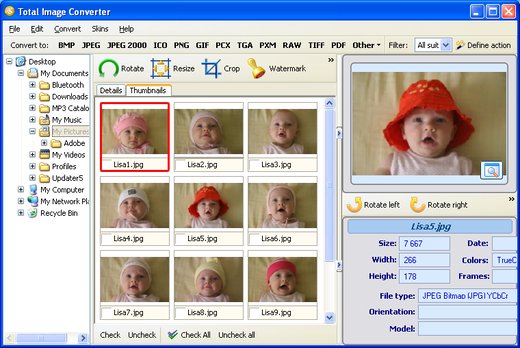
Description: Total Image Converter converts images to other formats, crops, resizes and rotates them. Convert large TIFFs into small JPEGs, make photos suitable for the web or recover old photos in unsupported formats - Total Image Converter will do everything you need.
Supports TIFF, JPEG, RAW, PNG, BMP, PSD, TGA, and many other image formats;
Works incredibly fast with new multi-threading feature;
Converts CMYK to RGB;
Handy resize and crop options to make your photos smaller;
Watermarking: add your comment, logo or date.

Unique options of Total Image Converter
/image converterTotal Image Converter supports TIFF, JPEG, JPEG2000, RAW, PNG, BMP, ICO, PSD, TGA, PCX, PCD and many other rare image file types files complete list).
rotate imageAlong with conversions you can rotate your images! All is done in batch so you save a lot of your valuable time.
resize cadWith Total Image Converter it's very easy to resize your photos or images.
colorWith Total Image Converter you can specify the color space for your output images.
combine foldersWhat to combine images within folders? No problem! Our powerful batch image converter can do that too.
frame jpegTotal Image Converter will also add a frame to your images in batch.
interfaceConvert TIFF, JPEG, PSD and many other files in seconds via our clear wizard-mode interface (thumbnails or file lists with details).
/image formatsThe widest list of output file types: PDF, TIFF, BMP, PNG, JPEG, JPEG2000, ICO, GIF, PCX, TGA, PXM, PS, PCL! Besides, it supports many rare formats like PALM, PICT, XPM, FIX, etc.
html converterTotal Image Converter supports almost all RAW camera photos (CRW, CR2, NEF, PEF, RAF, X3F, RAW, BAY, ORF, NRW, SRF, MRW).
previewThe built-in Preview panel helps you to view each file full-sized and learn the indo about it.
/image watermarkAdd text watermarks to the header or the footer of the output file to prevent unauthorized use.
dxf to pdfWhen you convert images to PDF you can set user permissions, password-protect your files or sign them with your digital signature.

Release Name: CoolUtils Total Image Converter 8.2.0.293
Size: 112.5 MB
Links: HOMEPAGE – NFO – Torrent Search

Download: RAPiDGATOR

9 Comments
Apr 1

Clip Studio Paint EX 5.0.2

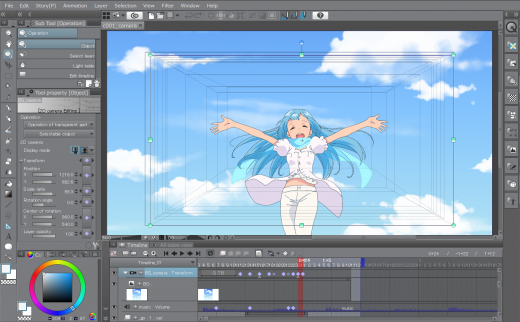
Description: CLIP STUDIO PAINT is the world’s leading comic and manga creation software and delivers powerful art tools for every manga and comic artist. It is designed both for artists wishing to enhance and perfect their pen-and-paper illustrations and for artists wishing to complete the entire process of creating manga and comics digitally. Sketching, inking and coloring your Comics and Manga has never been easier.

Features


  • Cel animation support (frame-by-frame animation)
    Also known as frame-by-frame or traditional animation, this technique makes an object or character appear to move on its own. The artist can draw individual cels (frames), which act as transparent sheets that can be layered, and create the illusion of movement when the series of cels is played as a continuous sequence.
  • Animation timeline
    The timeline provides granular control over timing and display adjustments to create fluid movement of the animations.
  • Light table function
    The light table illuminates pages, rendering them semi-transparent and making it easier to use multiple layers for reference, which is ideal for creating in-betweens (transitions between cels), and clean-line art for cels and illustrations.
  • Onion skin display
    Onion skinning is a technique used in creating animated cartoons and editing movies to see several cels at once, allowing the animator or editor to determine how to create or adjust an image based on the previous image in the sequence.
  • Multiple export options
    Drawings and animations can be exported as sequential images, GIFs, and movie formats.
  • CLIP STUDIO PAINT EX Features
    Formerly Manga Studio. CLIP STUDIO PAINT EX has all of the features of CLIP STUDIO PAINT PRO, professional story creation tools, as well as other special features, that make it the ultimate illustration tool for serious comic, manga and graphic artists.
  • Coloring
    Powerful coloring tool make CLIP STUDIO PAINT your all-in-one manga and comic creation solution. Choose from an abundance of preset colors, create custom color sets or blend colors naturally as if you were mixing them with your own fingers using the color blend options.
  • Pens, Pencils, Brushes & Tools
    Create original sketches using your mouse or draw naturally with a pen tablet. Draw using a suite of familiar tools including pens, pencils, brushes and selection tools. With vector mapping technology and smart pen pressure sensing, CLIP STUDIO PAINT gives you incredible sensation of drawing on paper.
  • Panels
    Save time by easily adding and customizing panels for your pages or create panels of all shapes and sizes using Bezier curves.
  • Advanced Brush Effects
    Simulate real work brushes with the new dedicated air brush which allows multiple air brush effects. Use the tone brush to create and share a wider array of visual effect.
  • Vector Tools
    Vector Toolkit allows maximum flexibility, speeds up production and gives you the ability to view the centerline of vectors makes spotting trouble areas in need of smoothing a breeze. Coupled with the vector snapping tools, artists are now able to achieve exactly the lines they want.
  • New Advancements
    Speed up your workflow with amazing advancements that include new layer effects like screen, overlay and multiply, even brushes can now have effects of their own.
  • Templates
    Design with attention to detail and save time on tedious projects with tons of ready-to-use page template options.
  • Importing & Exporting
    CLIP STUDIO PAINT imports and exports to common file formats including layered PSD files. Resize with no loss in quality.
  • 3D Options
    CLIP STUDIO PAINT EX now offers support for 3D objects and figures allows for reference and background materials. Manipulate 3D objects directly on the screen or use preset poses. Drag and Drop other 3D objects on the canvas.
  • Compatibility
    Backwards compatibility allows you to import all of your Manga Studio 4 EX and 4 Debut files including your .CPG page files and your .CST story (project) files into CLIP STUDIO PAINT PRO or CLIP STUDIO PAINT EX.
  • Text
    Advanced text allows adjustments to letter and word spacing, mixing of fonts, anti-aliasing, italics and underline options, line spacing and many more.
  • Faster Than Ever
    64-Bit Architecture & Multi-Core CPU Support makes Manga Studio faster than ever with the capability to handle high definition and multiple layer art projects even more smoothly.
  • CLIP STUDIO PAINT Is Perfect for Comic Illustration
    Adobe Photoshop has become the standard drawing and illustration tool, used in many industries, but it will not only cost you more, it’s primarily a photo editing tool. Photoshop just doesn’t have the tools and features that are ideal for comic illustration, CLIP STUDIO PAINT does.
  • Multiple-Page Story Layout
    Create your whole story with the Multiple-Page Story Layout. This allows manga and comic artists to streamline their creative process and easily access their story files in one convenient area (EX only).
Release Name: Clip Studio Paint EX 5.0.2
Size: 476 MB
Links: HOMEPAGE – NFO – Torrent Search

Download: RAPiDGATOR

10 Comments
Apr 1

HEU KMS Activator v63.3.3 (Windows and MS Office Activator)

Description: HEU KMS Activator is an easy to use Windows and Office activation program that can activate Windows 10, 11 and MS Office 2021 within 1 click.
The program will choose the best method for you to locally activate all Microsoft products. You can choose your own activation channel, with 4 modes to choose from: Digital License, KMS38, OEM and KMS, plus many useful tools like Change Windows 10 version, Backup and restore Windows, Change MS Office Edition, Key Settings manually in case you purchased the original Key and more.


  • Easy to use
  • Smart activation with the best method.
  • Activate Windows XP / Vista / 7 / 8.1 / 10/11
  • Activate MS Office 2010, 2013, 2016, 2019, 2021 and Office 365
  • Automatically identify and bypass permanently activated Windows/Office.
  • Install/uninstall auto-renew function.
  • Work schedule mode.
  • Delete KMS customer information.
  • Set up a KMS server.
  • Digital activation.
  • OEM activation.
  • Change Windows 10 version.
  • Windows/Office key management.
  • Smart activation.
  • Windows Backup/Restore.
  • And more.
Release Name: HEU KMS Activator v63.3.3 (Windows and MS Office Activator)
Size: 4.00 MB
Links: HOMEPAGE – NFO – Torrent Search

Download: RAPiDGATOR
7 Comments
Apr 1

MadMapper 6.0.10

MadMapper is a collaborative software project between the french installation studio 1024 architecture and the swiss software makers GarageCube. With more than 10 years experience in the field, we are devoted to bringing you the best tool for your artistic needs.

The ultimate video mapping software
MadMapper can support up to 16K high resolution for video.
Simultaneously playback content to multiple outputs and displays, each with unique parts of your composition.
Use powerful graphic tools such as bezier masking and animated line drawing.

The perfect light mapping application
Control LED arrays or any number of DMX fixtures in realtime.
A powerful cueing system to trigger your shows with ease.

User-Friendly but Advanced Depth!
MadMapper is plug-and-play, easy for newbies, but also includes features for power users who want advanced functionality like 3D calibration, space scanning, LED scanning, live shader editing, and much more.

Unleash your creativity and power up your toolchain armada.
MadMapper is ready to handle the most demanding projects at any scale.
From cathedrals to temples, from object-sized to land-art, engage with your audience without sacrificing usability. A crystal clear workflow will help you to deliver your show on time, allowing realtime parameter tinkering and last-minute modifications.

CAD software for artists
Freedraw like a mad man and turn live drawing into a surgical performance with MadMapper’s precise tool set.

World heritage landmarks
History at your fingers tips, thanks to a friendly user interface. Tackle your next big project with confidence.

Embrace improvisation
Play MadMapper like an instrument or like a video game, with realtime controls. Stop thinking, start performing!

Release Name: MadMapper 6.0.10
Size: 250.9 MB
Links: HOMEPAGE – NFO – Torrent Search

Download: RAPiDGATOR
8 Comments
Apr 1

Icecream PDF Candy Desktop Pro 3.18

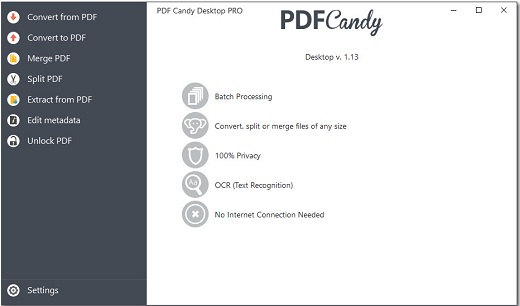
Description: PDF Candy Desktop is a versatile tool that enables you to convert files from PDF to various supported formats (PDF to DOC, PDF to JPG, etc), convert documents, ebooks and images to PDF, merge PDF, split PDF, extract images and text from PDF, edit PDF metadata, protect PDF and unlock password-protected PDF files. Most modes support processing files in a bulk. All these features are available through modern and user-friendly interface.

100% Privacy
Process sensitive data locally on your PC to keep maximum privacy

Batch Processing
Convert, merge multiple files at a time

No Limits
Convert, split or merge files of any size

OCR (Text Recognition)
Recognize text in scanned PDFs to create editable documents

No Internet Connection Needed
Process your files whenever and wherever you need

PDF to editable Word files
High quality conversion of PDF documents to editable DOC format

Release Name: Icecream PDF Candy Desktop Pro 3.18
Size: 156.7 MB
Links: HOMEPAGE – NFO – Torrent Search

Download: RAPiDGATOR
9 Comments
Apr 1

Gillmeister Automatic PDF Processor 2.0.43

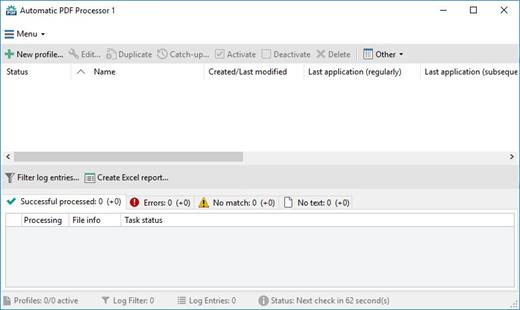
Description: With Automatic PDF Processor, PDF files can be processed automatically. Any number of folders can be monitored in order to automatically print, rename or move incoming PDF files to dynamically named folders.

Numerous metadata of the PDF document can be used in addition to the content, for example to include invoice information in the file path. The PDF files to be processed can be narrowed down with various profile-specific filters - the document text, PDF metadata and general file information are available as filters.

Extraction of data from the text of PDF files is optional. An unlimited number of extraction rules can be created within a profile. The extracted data can be used (after optional validation and formatting) for naming folders or the file name, and can be saved as an extract in a CSV file. Another task that can be automated with the Automatic PDF Processor is the extraction of attachments from PDF files, for example to save ZUGFeRD XML files, XRechnung attachments or similar as part of a PDF invoice in the same folder.

Features:
Print, rename, move, or copy PDF files automatically
Store embedded PDF attachments in any folder for archiving
Extract textual data from PDF documents automatically and save them as CSV file
Monitor any number of folders (hot folder monitoring)
Create individual rules for different tasks
Filter by document text, file date, attachment name or count, title …
Create the storage location (storage folder) dynamically from PDF document properties or based on content
Get informed about different processing statuses by email
Limit the automatic processing of PDF files to certain days and times, for example to print only during office hours
Combine a scan and OCR process with subsequent automatic naming by the Automatic Email Processor in order to be able to file older PDF documents in a structured way as well
Perform subsequent actions e.g., start a program with the path of the saved PDF file or PDF attachment as parameter
Process all already existing PDF files of a folder (with user-defined criteria)
Sort PDF — files automatically or have them moved to another folder and subfolder created dynamically from file properties
Send an Excel report with overview and detailed information on a regular basis

System requirements:
Microsoft Windows 11, 10, 8, 7 or Server (32-bit or 64-bit version)

Release Name: Gillmeister Automatic PDF Processor 2.0.43
Size: 226.3 MB
Links: HOMEPAGE – NFO – Torrent Search

Download: RAPiDGATOR
10 Comments
Apr 1

Acronis True Image Build 42902 Bootable ISO

Description: Backup, disk cloning, cyber protection and privacy tools that enable security for home users. Acronis True Image (formerly Acronis Cyber Protect Home Office). The most reliable cyber protection software on the market. Be protected from the unexpected. The complete cybersecurity protection you need with an easy-to-use and reliable solution against data loss, cyberattacks, and identity theft.

Backup
Flexible local or cloud backup of a complete machine or select files and folders on a flexible schedule that enables your cybersecurity.

Disk cloning
Create a complete replica of your data as a backup or a way to migrate to a new drive or computer.

Cybersecurity
Complete cyber protection, including antivirus and ransomware protection.

Acronis True Image is built on three key principles:

Reliable
•  Time-proven technology
•  Millions of satisfied users
•  Complete control of the backup process

Efficient
•  Fast backup and recovery
•  Fast upload and download of data
•  Pre-configured full-system backup plan

Easy to use
•  Intuitive user interface
•  One-click backup
•  Automatic protection

Devices and services protected

Operating systems
•  Windows
•  macOS

Mobile devices
•  iPhones and iPads
•  Android phones and
tablets

Cloud services
•  Outlook mailboxes
•  OneDrive

Release Name: Acronis True Image Build 42902 Bootable ISO
Size: 497.3 MB
Links: HOMEPAGE – NFO – Torrent Search

Download: RAPiDGATOR

10 Comments
Apr 1

DBF Viewer 2000 v9.1

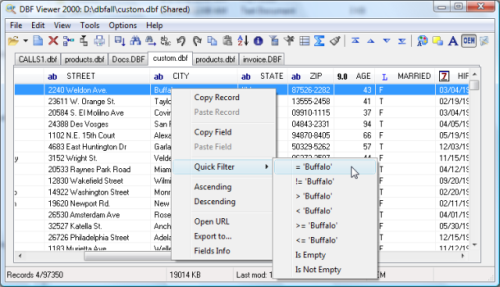
Description: If you're seeking a fast, effective solution for viewing and editing all sorts of DBF files, DBF Viewer 2000® is the answer. This feature-rich program can handle files from dBase, Visual dBase, Foxpro, Visual FoxPro and Clipper, to name just a few, with a performance that easily rivals costly professional database utilities.

Its optimised proprietary engine means that no matter what your file size, DBF Viewer 2000 is incredibly fast, performing any task you set it - from a simple query and duplicate clean-up to data export - at lightning speed.

With DBF Editor's simple, dynamically generated visual dialogues, you can easily see the structure of your DBF files and edit them exactly as you would with native database management tools. In addition to being able to view the contents and structure of DBF files, you can also view and edit dBase III, dBase IV, dBase Level 7, FoxPro and Visual FoxPro format memo fields.

Command line automation is fully supported, making it simple to repeat activities including data import, replacement and export and clean-up of duplicate records. Because DBF Viewer 2000 is completely independent of database engines, drivers and database management systems, you can simply install the program and start viewing and editing DBF files immediately.

Operating System: Windows from 2000 through XP, Windows 11, 10, 8, 7 and Server Editions

Release Name: DBF Viewer 2000 v9.1
Size: 4.8 MB
Links: HOMEPAGE – NFO – Torrent Search

Download: RAPiDGATOR

11 Comments
Apr 1

TechSmith SnagIt 26.1.1.10472

Description: Screen capture loved by over 40 million people. Snagit is the ultimate screen capture and recording software for anyone who wants to look good, work smarter, and communicate clearly.

Easy to use, but full of advanced features
Don't let clumsy built-in tools hold you back. Snagit's comprehensive feature set makes it the top screen capture software for professionals.

Scrolling capture
Quickly capture images of anything and everything on your computer screen, even scrolling areas.

Simplify UI
Transform screenshots into simplified user interface (SUI) graphics in a single click.

Library
Say goodbye to the chaos and let Snagit keep your content effortlessly organized and synced across devices.
Filter and sort by date, file type, and application
Sync to Google Drive, OneDrive, and more
Tag images and videos

Smart move
Snagit automatically recognizes elements in your screenshot, granting you the magical ability to rearrange or remove UI elements.

Text recognition
Magically edit the text within an image, screenshot, or scanned document. You can even adjust the font, text size, and color.

Capture anything, exactly how you want it
This is the capture window where you can effortlessly customize and save your capture settings.

Image capture
Capture your full screen, a specific region, fixed image size, or scrolling area.

Video recording
Record video of all or part of your screen, plus your camera.

Audio recording
Record microphone and system audio.

Custom presets
Create custom presets and keyboard shortcuts for your go-to captures.

Unleash your creativity with the ultimate built-in editor
Effortlessly transform your captures into polished, professional-quality images with easy-to-use templates and mark-up tools.

Release Name: TechSmith SnagIt 26.1.1.10472
Size: 413 MB
Links: HOMEPAGE – NFO – Torrent Search

Download: RAPiDGATOR

10 Comments