Please REGISTER or RENEW your account on RAPiDGATOR.net and support us by doing through all RAPiDGATOR working download links on main posts...
Mar 31

MusConv Lifetime 4.10.460

Description: More than 125+ music services supported. MusConv - the easiest way to transfer your music data! MusConv transfers playlists, albums, followed artists and liked songs across various services – Spotify, Apple Music, Amazon Music, YouTube, YouTube Music, iTunes, Deezer, Tidal, SoundCloud, Pandora and 125+ music services! Continuously working to bring you new updates and features.

MusConv Features
MusConv transfers playlists, albums, followed artists and liked songs across various services – Spotify, Apple Music, Amazon Music, YouTube, YouTube Music, iTunes, Deezer, Tidal, SoundCloud, Pandora and 125+ music services!
Manage playlists, albums, and artists across more than 125 popular music services
See your most-played songs, artists and albums on Spotify, Apple Music, YouTube Music and other
Browse the most popular songs, artists, and albums on your favorite services
Automatically synchronize playlists and albums between your platforms
Rematch incorrect and failed song matches
Syncing song order

Release Name: MusConv Lifetime 4.10.460
Size: 97.3 MB
Links: HOMEPAGE – NFO – Torrent Search

Download: RAPiDGATOR

13 Comments
Mar 31

Claris FileMaker Pro 22.0.6.601

Description: Claris FileMaker - the power of custom with the efficiency of low code. The ultimate tool for building the custom operational apps teams rely on. You have some ideas around how to optimize the way your team works. With Claris FileMaker, you can build the perfect tech stack to make it happen.

FileMaker Pro
Build robust custom apps that run your operations with a professional, powerhouse platform. Solve the hard problems that matter with fast, flexible software that can continuously adapt to changing business needs.

Maximize speed-to-value.
Quickly build apps that create efficiencies, grow your competitive edge, and help you win.

Limitless app creation possibilities.
Always say "yes" to the newest tech — including AI — to build apps like never before.

Integrate with everything.
FileMaker integrates with your systems to create the ultimate workplace operating system.

Power and speed come together.
The flexibility of FileMaker frees developers to leverage the speed of pre-built tools and the power of code, when and how they want.

Generate robust custom reports in minutes.
Equip users with the data they need to tackle decisions with confidence.

Control access, automate schedules, and keep apps running smoothly.
Increased administrator visibility and control of schedules and users means you can deploy apps quickly to the teams who need them.

Meet users wherever they are.
Bring the power of desktop applications to mobile devices so your users can get the most out of your apps.

System Requirements
- Windows 11 Enterprise and Pro Editions (23H2, 64-bit only)
- Windows 10 Enterprise and Pro Editions (22H2, 64-bit only)

Release Name: Claris FileMaker Pro 22.0.6.601
Size: 388.7 MB
Links: HOMEPAGE – NFO – Torrent Search

Download: RAPiDGATOR

12 Comments
Mar 31

PDQ Inventory 19.7.6

Description: PDQ Inventory: Streamline your systems management. Scan, collect, and organize your on-prem Windows machines so deployments go exactly where you need them to with PDQ Inventory.
The Swiss Army knife of sysadmin tools
Free yourself and your team from pesky, repetitive tasks by unlocking powerful automations so everyone can focus on the important things, like a spirited debate over what to order for lunch.

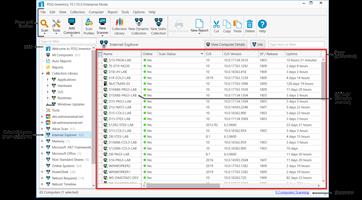
Efficiently organize your network inventory
Gain immediate, deep visibility into your environment so you can quickly spot and address machines that need attention. 20/20 vision into your environment, and no optometrist appointment necessary.

Collection Library
Save time with our prebuilt device groups, which provide a real-time display of which machines have old software versions installed or are low on disk space.

Custom collections
Create collections of devices to meet your specific needs. These groupings can either be static or set to dynamically include new computers that meet your defined criteria.

Auto sync with AD
Enable PDQ Inventory to automatically import computer records from your Active Directory domain for accurate, centralized visibility of your inventory data.

Get centralized, tailored inventory insights
Get specific on what matters most to you and save time in the long run by pulling in additional data and automating repeat tasks. Please let us do more of your work for you, we insist.

Custom scanners
Bring additional scanned data, like specific registry data or custom script results, into PDQ Inventory for more thorough monitoring and investigation of your environment.

Custom tools
Utilize prebuilt tools for reboots, remote assistance, and Wake-on-LAN, or create and save your own tool for any command that can be run with Windows.

Custom variables
Create and store custom values for repeated use, like the version number of a custom software application, or static fields like a computer’s department.

Integrate inventory workflows
Automate your workflow by leveraging both PDQ Inventory and Deploy together, and efficiently collaborate with teammates to ensure everyone sees what they need, in a pretty damn quick fashion.

Targeted deployments
Automate your patch management by targeting PDQ Inventory collections for recurring deployments on a set schedule with PDQ Deploy.

Central server
Multiple admins at a single company can centrally maintain packages, deployment histories, and schedules across multiple administrators with high visibility.

Reporting
Gather insights and metrics with our prebuilt and custom reports. Schedule them to automatically run on a chosen cadence and email results to colleagues.

Securely manage your Windows devices
PDQ Deploy & Inventory data is locally stored on your network, allowing you full control, offline operations, and more. We encrypt the password data we store for you as well as in-transit data.

Release Name: PDQ Inventory 19.7.6
Size: 106.2 MB
Links: HOMEPAGE – NFO – Torrent Search

Download: RAPiDGATOR

10 Comments
Mar 31

PDQ Deploy 19.7.6

Description: Let automation handle the heavy lifting with PDQ Deploy. Update third-party software, deploy custom scripts, and make impactful configuration changes to your on-prem Windows devices in minutes with PDQ Deploy.

Set it and forget it. No, really.
Free yourself and your team from pesky, repetitive tasks by unlocking powerful automations so everyone can focus on more important things, like covering up the evidence of who ate the rest of the breakroom snacks.

Deploy just about anything
Rapidly deploy precisely what you need, from the latest Windows cumulative update to a specific custom software install, and see details on how every deployment went. Inconceivable power is at your fingertips!

Package library
More than 200 common apps are ready for you to deploy in our Package Library. We keep these packages updated and we test each one to ensure silent installations.

Custom packages
Create multistep packages, like installing an MSI or running a PowerShell script. Start from scratch or modify a prebuilt package from our Package Library to your liking.

Deployment history
See current and completed deployments, their status, the package deployed, target details, and more. You can also schedule post-deployment confirmation emails.

Automate patch management
Streamline your device management workload by automating recurring maintenance tasks to reduce the need for manual interventions. Say farewell to repetitive processes and hello to more efficient patch management!

Schedule updates
Automate deployments to run at specific times or recurring intervals. For example, deploy the latest version of Zoom or a weekly reboot to targeted PDQ Inventory collections.

Heartbeat trigger
Deploy software or updates based on the availability of the machine and ensure deployments reach devices that are offline at the time of your scheduled run.

Central server
Centrally maintain packages, deployment histories, and schedules across multiple administrators at a single company with high visibility.

Securely manage your Windows devices
PDQ Deploy & Inventory data is locally stored on your network, allowing you full control, offline operations, and more. We encrypt the password data we store for you as well as in-transit data.

Release Name: PDQ Deploy 19.7.6
Size: 102.8 MB
Links: HOMEPAGE – NFO – Torrent Search

Download: RAPiDGATOR

10 Comments
Mar 31

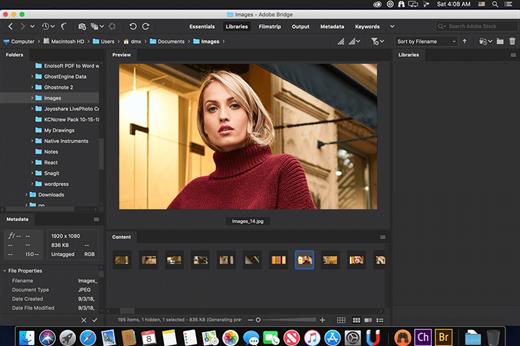
Adobe Bridge 2026 v16.0.3

Description: Bridge gives you centralized access to all the files and assets you need for your creative projects. Organize personal and team assets, batch edit with ease, add watermarks, set centralized color preferences, and even upload your photos to Adobe Stock. Bridge simplifies your workflow and keeps you organized and now with CC Libraries.

Features
- Bulk import, export and preview CC Libraries assets
- Edit photo capture time
- Export/ Import network cache
- Native PDF Output Module
- Easy upload of images to Adobe Stock so you can get royalties for your work
- Support for Retina and HiDPI displays with the ability to scale
- Automated cache management
- Publishing to Adobe Portfolio to build your personalized website
- Quick organization and stacking of panoramic and HDR images
- On-demand thumbnail and metadata generation
- Option to import photos and videos from your mobile device or digital camera on macOS
- Support for CEP HTML5
- Flexible batch processing
- Drag-and-drop file flexibility
- Centralized color settings

Consistent user experience
Adobe Bridge now has an enhanced user interface to provide you a similar experience like other Creative Cloud applications. You can also change the default user interface appearance, text size, and scaling by setting the User Interface preferences in the Edit > Preferences > Interface dialog.

Enhanced Creative Cloud Libraries
The Libraries workspace in Bridge now displays a high-quality preview of library items. You can select multiple items to see their previews together.

Centralized cache management
You can now share a cache with other Bridge users and let them use the shared cache instead of creating a cache. Any Adobe Bridge user can export a cache to a shared folder, and other users can import a copy of the shared cache to their local systems. Given that the systems are in synchronization, managing the cache at a centralized location lets you reuse the exported cache, without the need to rebuild the cache on different user machines. You can create and manage the shared cache by using the Manage Cache dialog (Tools > Manage Cache), which has now been enhanced to provide options for building, importing, and purging cache. In addition, the cache preferences have been enhanced (Edit > Preferences > Cache and Edit > Preferences > Cache Management).

Edit capture time
Adobe Bridge now lets you change the capture time of the JPEG and RAW image files, just like the way it is done in Adobe Lightroom. This feature is helpful if you travel to a different time zone and do not change the date or time setting of your camera before you start photographing. With this feature, you can edit the capture time after capturing the image.

Support for XD file formats
Bridge now supports preview, thumbnail generation, metadata tagging, and keyword generation for Adobe XD files.

Media cache preferences
Bridge now processes and maintains a cache of all audio and video playback files. This capability improves the performance of playback files because the files are available for ready access whenever you want to view them later. It is recommended that you regularly clean the old and unused media cache files to optimize the performance. The preferences for media cache can be set by choosing Edit > Preferences > Media Cache.

Cut, copy, or move files and folders across Bridge and File Explorer or Finder

Bridge now lets you perform the following operations
- Cut, copy, or move files and folders from File Explorer (Windows) or Finder (macOS) and paste them in Bridge
- Cut, copy, or move files and folders from the Bridge workspace and paste them in File Explorer (Windows) or Finder (macOS)

Release Name: Adobe Bridge 2026 v16.0.3
Size: 2.5 GB
Links: HOMEPAGE – NFO – Torrent Search

Download: RAPiDGATOR

10 Comments
Mar 31

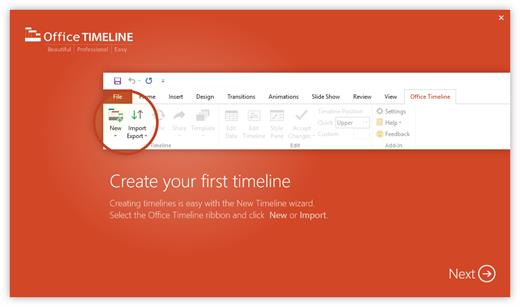
Office Timeline 14.02.00.00

Description: Effortless project reviews. Happy executives. Quickly summarize your project plan into visuals that executives and clients actually understand. With Office Timeline, you can communicate effectively with clear, convincing timelines.

Build in PowerPoint. Present in PowerPoint.
Seamlessly import data from top project management platforms into your project review presentation. Easily produce accurate timelines, Gantt charts, program roadmaps, and portfolio slides that no other application can match.

Organize easily. Summarize well.
Take the complexity out of your project reviews with our PowerPoint add-in for Windows®. Make a timeline that clearly represents dependencies and highlights different workstreams or phases by grouping tasks into swimlanes.

Change dates with ease.
Be ready for project changes and shifts with an adaptable timeline creator. You can move your entire Gantt chart back when delays happen or update tasks and milestones in real time with our easy-to-use, drag-and-drop editor.

Keep your existing workflow. Integrate easily.
Office Timeline integrates with tools like Jira, Project®, Excel®, and Smartsheet to instantly generate beautiful visuals that you can update on the fly. A timeline maker intelligently designed to build from the plan you already have.

PowerPoint timeline generator
Use the feature-rich PowerPoint add-in to build striking timelines, Gantt charts and Swimlanes on your desktop PC. Easily customize every detail of your graphic to present your project in a crisp, distinctive way that impresses stakeholders.

Release Name: Office Timeline 14.02.00.00
Size: 128.8 MB
Links: HOMEPAGE – NFO – Torrent Search

Download: RAPiDGATOR

13 Comments
Mar 31

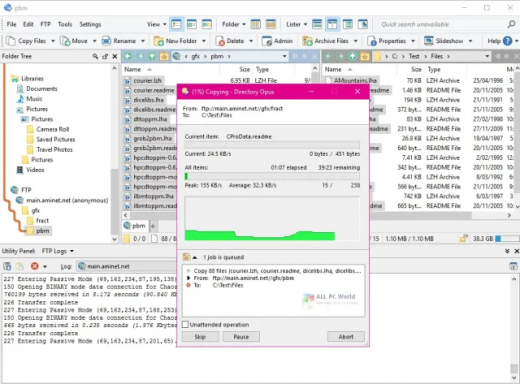
Directory Opus 13.22.1 Beta

Description: Are you frustrated by the limitations of Windows Explorer? Directory Opus is a complete replacement for Explorer, with far more functionality than any other file manager available today.

You're in control.
Not just a simple file manager; Directory Opus lets you make your computer yours.
With a flexible user interface and unbelievable configurability, you can tailor Opus to streamline your workflow.
Dual panes, dual trees, multiple tabs.
Filter, sort, group your folders. Label and rate your files.
Queued file copies. Powerful batch renaming. Full archive support.
Find your files. Locate duplicates. Synchronize backups.
Assign tags and descriptions. Convert images. Edit metadata.
Fully multi-threaded, native 64 bit high performance code.
Whatever you want to do - Opus can probably do it. And if it's not built-in, you can take advantage of the unrivalled configurability to extend Opus using external tools.

What makes Opus unique?

Built for speed
Opus is written in native C++ multi-threaded code; compiled for the latest 64 bit CPUs, with high performance our number one design principle.

Fully configurable
Change the colors. Change the fonts. Change the toolbars and menus. Set up hotkeys. Opus adapts to how you want to use it.

Makes file management a breeze
Powerful searching, sorting, grouping, labelling and tagging features let you take control of your files like never before.

Endlessly extensible
Work with third-party tools as easily as with the built-in features. A full scripting interface, including scriptable dialogs, means your imagination is really the only limit.

Replace Windows Explorer and don't look back
Our unique Explorer Replacement mode provides a full replacement for Windows Explorer.
Single or dual pane file display and folder trees
Tabbed interface let you keep multiple folders open and switch quickly between them
Integrated viewer, metadata editor and utility panel
Built-in tools including synchronize and duplicate file finder
Leverage indexed search engines like Windows Search and Everything

High performance file management features
Copy, move, rename, duplicate, archive, view, backup and delete your files with ease
Queue multiple file copies for improved performance
Batch renaming including easy-to-use keyboard macros
Support for FTP and archive formats like Zip, 7Zip and RAR
Quickly filter, sort, group and search your folders
Color-code your files, assign status icons, star ratings, tags and descriptions
View images, documents and more. Image marking lets you sort your photos quickly and easily
Calculate folder sizes and print or export folder listings

Unrivalled configurability
Why let the programmers decide for you? You can tailor Opus to look how you want it to look, and to work how you want it to work.
Choose from light mode, dark mode, or design your own theme
Over 600 configurable colors and fonts
All toolbars and menus can be edited, plus you can add your own
Floating toolbars can act as program launchers
Configure your own hotkeys that work everywhere or just in Opus
Full scripting interface lets you design your own dialogs and add your own commands

Release Name: Directory Opus 13.22.1 Beta
Size: 29.3 MB
Links: HOMEPAGE – NFO – Torrent Search

Download: RAPiDGATOR
12 Comments
Mar 31

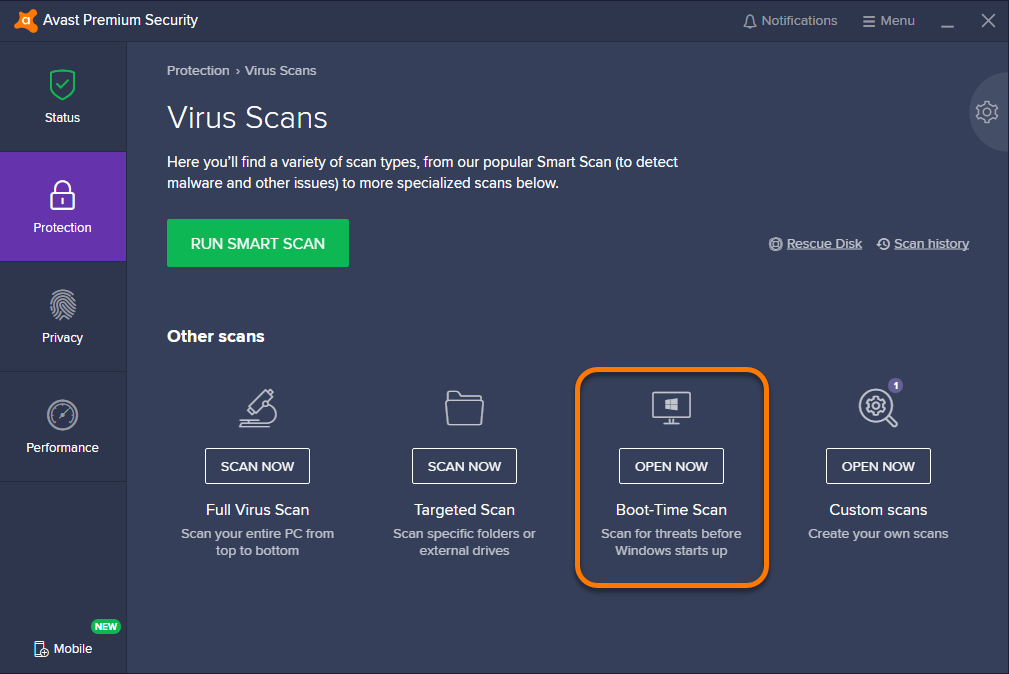
Avast Premium Security 26.3.10886

Description: Avast Premium Security is an Avast product that offers antivirus protection and advanced security for your PC against online threats. It allows users to safely shop and bank online, avoid fake websites and phishing scams, block web spies, and more. Avast Premium Security also includes key features from Avast Internet Security and Avast Premier products, both of which no longer exist.

Avast Premium Security protects against all online threats, including spoofed websites and ransomware. Complemented by SafeZone technology, it creates an isolated virtual desktop, invisible to any possible attacker, where you can do your online shopping and banking securely.

The Avast award-winning and certified antivirus engine and shields stop even previously unknown threats – for peace of mind when you chat or spend time on Facebook, Twitter, or other websites.

The silent firewall stops hackers and other unauthorized entry attempts to your PC, to keep your data where it belongs – safe and sound. The antispam feature blocks both spam and sophisticated “phishing” attempts, to keep you from clicking “harmless” links that really can cause damage.

Safely shop and bank online
Spoofed (fake) websites are one of the oldest hacking tricks in the book. Avast Premium Security scans websites for security risks on both your computer and mobile phone, so you can finally shop and bank online safely on any device.

Avoid becoming the victim of digital extortion
Ransomware is quickly becoming one of the most common – and dangerous – types of malware out there. Avast Premium Security protects your devices against havoc-wreaking ransomware so you don’t become the victim of digital extortion.

Features
- Blocks viruses, spyware, and other threats in real-time
- Enjoy peace of mind with advanced ransomware protection
- Avoid fake websites for safer online shopping and banking
- Keep hackers off your computer with our advanced firewall
- Prevent strangers from watching you via your webcam

With Avast Premium Security for Windows, you also get
- Advanced antivirus. Blocks viruses, spyware, and other malware in real-time.
- Web Shield. Blocks dangerous downloads and websites.
- Wi-Fi Inspector. Detects weaknesses in both your home Wi-Fi network and public networks.
- Real Site. Prevents you from visiting fake sites designed to steal passwords and money.
- Sandbox. Lets you open suspicious files in a safe environment to protect your PC.
- Advanced Firewall. Monitors and controls what goes in and out of your computer.
- Ransomware Shield. Prevents ransomware from harming any files in your protected folders.
- Sensitive Data Shield. Stops spyware from accessing sensitive documents on your computer.
- Webcam Shield. Blocks untrusted apps from accessing your webcam.
- Data Shredder. Helps you permanently delete sensitive files so they can’t be recovered.
- Automatic Software Updater. Updates the most popular apps on your PC to help plug security holes.
- Passive Mode. Lets you safely use another antivirus on your PC alongside Avast Premium Security.
- Do Not Disturb Mode. Silences notifications from Windows, other apps, and even our own Avast apps.
- Real-time updates. Pushes security updates to you so you always have our best protection.

Release Name: Avast Premium Security 26.3.10886
Size: 797.5 MB
Links: HOMEPAGE – NFO – Torrent Search

Download: RAPiDGATOR

13 Comments
Mar 31

Glary Utilities Pro 6.40.0.44

Description: Glary Utilities is the number-one all-in-one utility for cleaning and maintaining your PC. It includes more than 20 tools to maximize your computer's performance.

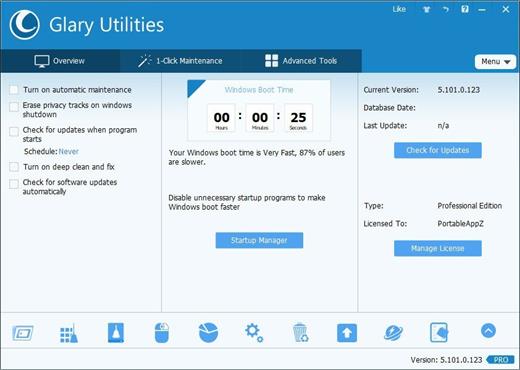
One-click Maintenance
One-click maintenance Integrates frequently used functions together. One-click to clean up junk files, fix system errors, clear privacy records, and optimize computer performance.

Free Up Drive Space
Disk Cleanup searches for old temporary files, obsolete installation files, log files, internet history and cache, error reports, save offline content and error logs etc. that you can safely delete on your computer.

Prevent errors or crashes
Based on years of experience, Glary Utilities can more safely clean up the errors in your registry to prevent some inexplicable program errors or system crashes. Also it can detect and fix disk corruption.

Make your computer run faster
Is your computer getting slower? Glary Utilities can help you identify and disable unnecessary startup programs that take up resources, or uninstall infrequently used software to free up more hard disk space.

Protect Your Privacy
Your browser will record the URL you have visited, and some software will also save the name of the file you opened last time. Glary Utilities can help you find and delete them. Glary Utilities can also help you completely delete files so that they cannot be recovered.

Keep Your Software Update To Date
The newer version of the software usually has better functions, higher performance, fixes bugs and vulnerabilities, and has better security, Glary Utilities can help you discover and update new versions in time.

Recover Lost or Deleted Files
Did you accidentally delete an important file? Did you also empty the Recycle Bin? Don't worry. Glary Utilities can help you find and restore them quickly.

Analyze Disk Space Usage
Are you running out of hard drive space? And you want to know which files or folders take up the most space? Disk Space Analyzer can quickly scan your hard disk and show you them sorted by size.

Find and Remove Duplicate Files
You may have downloaded the same file twice or backed up the same file twice. Duplicate Files Are Big Disk Space Hogs. Dupliate Finder can help you find and delete them.

Operating System: Windows 11, 10, 8.1, 8, 7, XP and Vista

Release Name: Glary Utilities Pro 6.40.0.44
Size: 29.3 MB
Links: HOMEPAGE – NFO – Torrent Search

Download: RAPiDGATOR
7 Comments
Mar 31

Glary Malware Hunter Pro 1.214.0.848

Description: Detects and removes stubborn malware that can cause potential danger. Constantly updated malware database. Cleans disk and speeds up your PC.

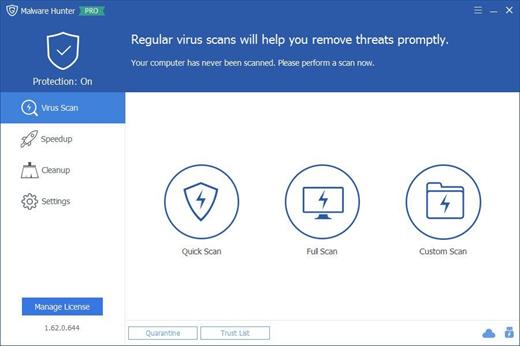
Malware Scan
Scan your computer quickly and thoroughly. Detect and remove stubborn malware to prevent potential danger. Support scheduled scan to save your time.

Speed Up
Help you optimize your system to speed up and boost your computer performance.

Disk Cleaner
Clean up temporary & unnecessary files. Remove unneeded documents to save computer storage space.

Process Protection
Protect your PC from malware, such as Trojan, worms, spyware, and other online threats.

Release Name: Glary Malware Hunter Pro 1.214.0.848
Size: 56.3 MB
Links: HOMEPAGE – NFO – Torrent Search

Download: RAPiDGATOR
8 Comments