Please REGISTER or RENEW your account on RAPiDGATOR.net and support us by doing through all RAPiDGATOR working download links on main posts...
Mar 27

QueueExplorer Professional 5.0.75

Description: Explorer-like management for queues. Works with multiple queuing systems. QueueExplorer supports multiple systems from the same installation, without need for additional licensing: MSMQ, Azure Service Bus, RabbitMQ, and ActiveMQ. With QueueExplorer you can do much more than with built-in management console - copy, move or delete messages, save and load, stress test, view and edit full message bodies (with support for XML, JSON, .Net objects...), and much more. QueueExplorer is a fast, native Windows application.

The indispensable tool for working with queues and messages:
understand and manage your system
figure out what went wrong
fix it

Find out all about your messages
With QueueExplorer you can dig into your queues and see which message went where, whether they were correctly formatted, with correct headers and settings, etc. Multiple viewers are at your disposal: JSON, XML, WCF, Hex, text with different encodings...

Develop and test producers and consumers separately
With QueueExplorer you can test individual pieces of your solution, or even simulate third party messages going in or out. You can create and edit test messages, send one by one or bunch of them together.

Test performance and load handling of your app
Send thousands of messages for performance testing to see how system handles that load.

Troubleshoot, fix, and resend problematic messages
If something is wrong, QueueExplorer is the fastest and easiest way to investigate and fix incorrect, poison, or failed/deadletter messages.

See status of your system at glance
Check if some of queues are growing too large, if there are messages in deadletter queues, etc. With autorefresh functionality see how entire system works in near real time.

Filter and sort messages to quickly find important data
QueueExplorer allows you to quickly find messages you're interested in. Professional edition allows you to even extract your business data from within messages using XPath, JSON, or Regex, and to immediately see e.g. invoice totals, etc.

Backup and restore messages
Backup messages to files, or move/copy them to another queue.

Copy, compare and sync queues, topics and other schema (metadata) objects
This can be used to migrate queues (and other objects) to another server, e.g. to propagate from development to production. Or just to compare and see which changes were made. Or to backup schema before changes are made. You can also duplicate queues with all their settings on the same server (Professional).

Release Name: QueueExplorer Professional 5.0.75
Size: 35.8 MB
Links: HOMEPAGE – NFO – Torrent Search

Download: RAPiDGATOR

10 Comments
Mar 27

NanoCAD 26.0.7355.4942 Build 259

Description: nanoCad Plus is a smart tool able to produce professional designs and drafts in valid formats and of high quality. It has a wide price range and affordable for both beginners and professionals. Its functionality allows creating simple to complex designs and drafts for modeling, projecting, construction. Solve bigger problems and save time and money.

Architecture
2D Drawing
3D Modeling
Bills of material
Building Information Modeling
Contact Management
Contract Management
Document Management
Drafting
Presentation Tools
Project Management

Engineering CAD
2D Drawing
3D Modeling
Chemical
Civil
Collaboration
Design Analysis
Design Export
Document Management
Electrical
Mechanical
Mechatronics
Presentation Tools

Release Name: NanoCAD 26.0.7355.4942 Build 259
Size: 1.7 GB
Links: HOMEPAGE – NFO – Torrent Search

Download: RAPiDGATOR

9 Comments
Mar 27

Boris FX Optics 2026.0.2

Description: Bring your creative vision to life with Boris FX Optics, the ultimate photo editing toolkit. Designed for photographers, digital artists, and creators of all skill levels, Optics transforms your images with professional-grade effects inspired by the film and television industry. Whether you're enhancing photos, creating dynamic cinemagraphs, or crafting one-of-a-kind visuals, Optics is your go-to solution.

Why Choose Optics?

Hollywood-Grade Effects:
Access over 160 stunning filters and thousands of presets, including cinematic lens flares, glows, light leaks, and particle effects.

Seamless Integration:
Works directly inside Adobe Photoshop and Lightroom or as a standalone application, blending into your workflow without interruptions.

AI-Powered Masking:
Save time with intelligent masking tools that isolate subjects and apply effects with precision.

Customizable Controls:
Fine-tune every detail of your effects to match your vision perfectly.

Authentic Film Stock Emulation:
Recreate the magic of vintage and modern film looks for timeless, cinematic results.

Transform Photos With Dynamic Particles:
Transform photos with a fast and easy-to-use particle engine that creates unique effects with organic elements.

Photographers
Add cinematic flair and enhance the story behind your shots

Hobbyists
Create stunning visuals with easy-to-use effects and tools inspired by Hollywood

Social Media Creators
Engaging content that grabs attention in feeds

Designers
Craft eye-catching visuals that captivate audiences

Release Name: Boris FX Optics 2026.0.2
Size: 3.3 GB
Links: HOMEPAGE – NFO – Torrent Search

Download: RAPiDGATOR

8 Comments
Mar 27

Bitty Engine 1.7.1

Description: Bitty Engine is a cross-platform itty bitty Game Engine and open-source Framework. The full featured engine is programmable in Lua and integrated with built-in editors. It keeps the nature of both engine's productivity, and fantasy computer/console's ease to iterate. It boosts your commercial/non-commercial projects, prototypes, game jams, or just thought experiments.

Why Bitty Engine?
Bitty Engine has everything built-in for coding, graphics composing, etc; it has a full featured debugger for breakpoint, variable inspecting, stepping, and call-stack traversing; it offers a set of well-designed API with full documentation; it builds fast binaries with code and asset obfuscating, moreover its package size is small (around 10MB with an empty project, the other engines output more than 10 times bigger).
It is supposed to be your ultimate 2D game creating software.

Features
Bitty Engine offers a set of orthogonal features that makes game development comfortable and enjoyable.
Programmable in Lua, an easy to learn and widely used programming language
Debugger with scope inspector, breakpoint support and stepping
Easy to use API for resources, graphics, input, audio, and more other facilities
Built-in libraries for File, File System, Archive, JSON, Network, Physics, etc.
Various example projects
Handy tools for editing sprite, map, image, text, JSON, etc.
Project can be exported into standalone binary

Technical specifications
Display: configurable resolution
Code: Lua, supports multiple source files
Image: either true-color (PNG, JPG, BMP, TGA) or paletted, up to 1024x1024 pixels per file
Palette: 256 colors with transparency support
Sprite: up to 1024x1024 pixels per frame, up to 1024 frames per sprite
Map: up to 4096x4096 tiles per page
Font: supports Bitmap and TrueType
Audio: 1 BGM channel, 4 SFX channels; supports MP3, OGG, WAV, etc.
Gamepad: 6 buttons for each pad (D-Pad + A/B), up to 2 players
Keyboard and mouse: supported

Release Name: Bitty Engine 1.7.1
Size: 414.4 MB
Links: HOMEPAGE – NFO – Torrent Search

Download: RAPiDGATOR

10 Comments
Mar 27

Red Gate SmartAssembly 8.4.4.6815

Description: Redgate's .NET obfuscator. SmartAssembly is an obfuscator that helps protect your application against reverse-engineering or modification, by making it difficult for a third-party to access your source code.

If your entire business rests on the IP embodied in your software or you don't want your C# or VB.NET code exposed internationally, then obfuscating your code becomes a necessity, not a luxury.

With SmartAssembly, you get a comprehensive set of obfuscation features, including name mangling, control flow obfuscation, strings encoding, reference dynamic proxy, and declarative obfuscation.

Protect your .NET code and IP with SmartAssembly
Protect intellectual property through obfuscation and encryption
Secure .NET Framework, .NET Core, and .NET Standard assemblies
Automatically report usage and exceptions

Key features

Name mangling
Changes the names of methods and fields to make it hard to understand their purpose.

Control flow obfuscation
Converts the code inside methods to 'spaghetti code' to make it difficult to see how the application works.

References dynamic proxy
Creates a proxy for calls to methods outside of your assembly to make it hard to find external calls.

Strings encoding
Encodes the strings used in your software to hide such information as passwords and SQL queries.

Resources compression and encryption
Compresses and encrypts managed resources to make them hard to understand, and to reduce the size of the assembly.

Pruning
Removes non-useful metadata to make the code harder to reverse-engineer, reduce the size of the assembly, and improve loading time.

Dependencies merging
Takes all the DLLs and merges dependencies into the main assembly, so you don't have to load lots of DLL files, and so that they can also be obfuscated.

Dependencies compression and embedding
Compresses and embeds your dependencies into your main assembly, simplifying the deployment of your software and reducing the size of your program.

Method parent obfuscation
Moves methods in your code by changing the class they are in, making it harder to understand how methods and classes relate to each other.

Strong name signing with tamper protection
Signs your assembly and helps to protect it against modification (the additional tamper protection is not available in the Standard edition).

Declarative obfuscation
Excludes a member from obfuscation using custom attributes directly in your code.

Release Name: Red Gate SmartAssembly 8.4.4.6815
Size: 15 MB
Links: HOMEPAGE – NFO – Torrent Search

Download: RAPiDGATOR

9 Comments
Mar 27

YT Downloader 10.3.1

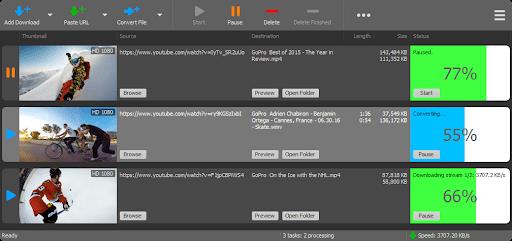
Description: YT Downloader (ex YTD Youtube Downloader) is a simple and easy-to-use video download application. It helps you to download and convert videos from YouTube and hundreds of other video sites. YT Downloader increases your download speeds by up to 500%.

Features
YT Downloader is the easiest and the fastest way to download and convert videos from YouTube and other video sites.

Download videos from YouTube and hundreds of video sites
YT Downloader can download videos from YouTube, Facebook, Dailymotion, Vimeo, Metacafe, and hundreds of other video sites. After downloading your video files, you'll be able to watch them smoothly using any media player, even if you don't have internet access.

Accelerate your downloads
YT Downloader features an advanced download acceleration engine that lets you download videos 500% faster than normal speed.

Download 4K, 2K, HD 1080p and 720p videos from YouTube
You can also download 3D videos from YouTube if they are available.

YouTube to MP3
YT Downloader allows you to download only audio stream from YouTube, and save it as MP3. You don't need to download the entire video file. The audio stream is small, you can download it within seconds.

Download whole playlist from YouTube
Just enter a YouTube playlist ID, YT Downloader will download all or selected videos in the playlist from YouTube for you.

Support drag-and-drop
You can directly drag and drop video link from your browser to the drop box or program window to start a download. You don't even need to copy and paste video URL.

Download multiple videos at a time
YT Downloader supports simultaneous downloads. It allows you to download more than one video at same time and safe time.

Pause and resume downloads
You can pause, resume, or cancel your downloads if you need more connection to perform other important tasks.

Preview videos while downloading
While downloading, you can click the Preview button to play incomplete video and make sure the content you are downloading is really the content of your choice.

Video and audio converter
YT Downloader is also a powerful video/audio converter. It can convert local video/audio files to any format you wish so that they are playable everywhere.

Video to MP3
YT Downloader allows you to extract audio streams from videos and save them as mp3, wav, wma, ac3, ringtone, or other audio format.

Support all popular video and audio formats
YT Downloader allows you to save downloaded videos in any format for any device, so you can watch them smoothly on your PC, iPhone, iPad, Android phone, and other device.

Ready-made presets
YT Downloader provides ready-made presets for all video and audio formats. You can also custom output video/audio format settings.

iTunes compatible
Optionally, YT Downloader can add downloaded video/music to your iTunes library automatically, so you can easily synchronize your videos and music to your iPhone, iPad, iPod.

Media Player
YT Downloader includes a simple and easy-to-use media player. If your Windows Media Player cannot play your video/audio files, you may try our Media Player.

Release Name: YT Downloader 10.3.1
Size: 147.6 MB
Links: HOMEPAGE – NFO – Torrent Search

Download: RAPiDGATOR

11 Comments
Mar 27

Zortam Mp3 Media Studio Pro 33.84

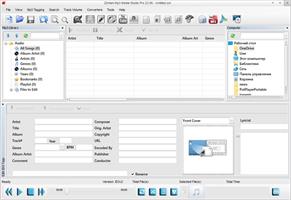
Description: Zortam Mp3 Media Studio is an all-in-one music application suite that is designed to edit the tags of music files. It has several modules such us AutoTagger, Music Organizer, Music Tag Editor, Integrated Music Player, Mp3 Volume Normalizer,BPM (Beats Per Minute) Analyzer, CD Ripper, YouTube To MP3 converter, MP3 to Wav converter, Auto rename file editor.

The application supports MP3, FLAC, WMA, MP4, WAV tags and music formats.

With Zortam Mp3 Media Studio you can batch auto-tag your music files, rename files, search for duplicate files using the tag information or filename checksum, write tags using information from the filename, and much more.

The batch auto tagger process identifies your music and automatically downloads album art, lyrics, and other metadata such as artist, title, year, genre, and track info to your music files.

The software recognizes over 35 million music tracks. Album covers, lyrics, and other metadata are saved to tags and can be viewed in iTunes, iPhone, iPod, and Android mobile or tablet devices.

The program is designed to run on the Microsoft Windows operating system and supports Windows 2000,Windows XP, Windows 7, Windows Vista, Windows 8 and Windows 10, Windows 11.

The program is translated into English, German, Italian, French, Spanish and Portuguese. There is also an Android version of the program which you can download from Google Play.

Program features:
Automatically identify and organize your digital music collection
Auto Tag MP3, FLAC, WMA, M4A and WAV music files
Free Tag Editor
Integrated music player
Mp3 Volume Normalizer
Automatically add cover art
Automatically add lyrics
Rename Mp3 files automatically using tag information
Auto-tag files and clean-up tags automatically
Write tags from filenames using custom formats
Tag and rename music files automatically
Automatically import songs from the iTunes library
Fix broken tags
YouTube Mp3 Converter
Organize a huge music library with ease
BPM song analyzer
Find duplicate MP3 files using MP3 tags or file information
CD Ripper automatically adds cover art, lyrics, and other tags
Export whole or part of the Mp3 library to CSV, Excel, HTML
Identify music tracks using an advanced fingerprint algorithm

Release Name: Zortam Mp3 Media Studio Pro 33.84
Size: 75.3 MB
Links: HOMEPAGE – NFO – Torrent Search

Download: RAPiDGATOR

10 Comments
Mar 27

Autodesk CFD 2027 Ultimate

Description: CFD Computational Fluid Dynamics or simply means Computational Fluid Dynamics, a branch of fluid mechanics that uses numerical methods, fluid flow analysis does. Autodesk Simulation CFD CFD software or earlier program called CFdesign known Autodesk's role fluid flow simulation software suite Autodesk Simulation is responsible. Simulation and analysis, and computational fluid dynamics to simulate the flow of heat transfer product using this program possible.

Facilities and software features of Autodesk CFD:
has advanced computational fluid dynamics tools
has the complete set of capabilities for the CFD simulation and analysis of heat transfer
Ability to communicate and tones generated designs using CAD software program
automate the form of smart meshing technology
Fully flexible simulation according to user requirements

Release Name: Autodesk CFD 2027 Ultimate
Size: 3.5 GB
Links: HOMEPAGE – NFO – Torrent Search

Download: RAPiDGATOR

8 Comments
Mar 27

IDimager Photo Supreme 2026.2.0.8898

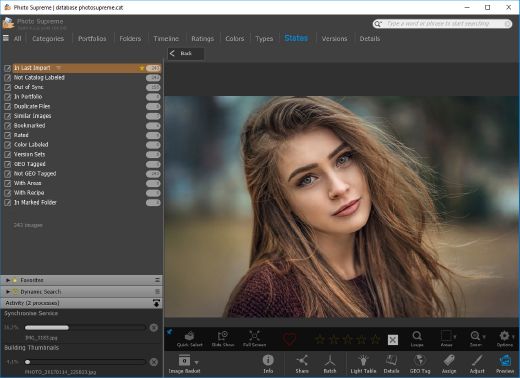
Description: Photo Supreme v2026 is a thoughtful and forward-looking release. This update has focused on smarter discovery, faster performance, and modern workflow expectations, especially around large catalogs, mobile integration, searches, and team environments.

Import and Select
One of the standout additions in Photo Supreme v2026 is the new multi-pass Import and Select workflow. This allows users to review and refine image selections in multiple stages instead of making all decisions in one pass. It’s especially useful for large shoots, letting photographers cull images more deliberately and with less pressure. In addition, the Import and Select feature now loads images faster than ever. Mac users will also appreciate direct iOS device importing, which makes it possible to bring photos straight from an iPhone or iPad into the catalog without relying on intermediary software. This significantly streamlines mobile-first workflows.

Powerful Searches
Photo Supreme now supports natural language searching, allowing users to find images using plain, conversational phrases rather than rigid metadata queries. This feature is powered by AI services such as OpenAI, Google Gemini, or local models with Ollama. This gives users flexibility in how advanced features are enabled. In addition, a new classification system enhances search accuracy by grouping images into meaningful categories upon import, making it easier to surface relevant results in large or complex catalogs.

Video & Media Handling
For users working with video, Photo Supreme v2026 introduces hover-based video previews. Simply hovering over a video thumbnail now reveals a short animated preview, making it much faster to identify clips without opening them individually. Support for modern formats has also been expanded, ensuring the software keeps pace with current media standards.

Sharing with ZIP
Exporting images is more flexible in v2026 thanks to ZIP output support in transfer profiles. This makes it easy to bundle images into a single archive for delivery, backup, or client sharing, all directly from within Photo Supreme. These enhancements simplify distribution workflows and reduce the need for external tools.

GEO Maps
GEOgraphic-Mapping features can now generate maps using not only Google Maps, but also OpenFreeMap with OpenStreetMaps. This removes the need for API keys while still delivering rich, interactive map displays. This update makes location-based browsing easier to configure and more accessible for all users.

Performance and Refinements
Photo Supreme v2026 delivers notable performance enhancements, resulting in faster browsing and a more responsive overall experience. Response times are improved by up to 10%, with especially noticeable gains for large libraries containing many catalog labels.
Catalogs with numerous stacks also see significant performance improvements, particularly when displayed in stacked views.
v2026 includes a wide range of refinements, such as: "Visually similar" stack detection, numerous stability fixes and workflow enhancements, polished UI behavior in collections, searches, and metadata handling

Wait, there's more, a lot more…
New "RAW Files" and "Video Files" catalog states
Added support for Google Gemini as an AI service
Added support for OpenAI GPT-5.2 as an AI Service
Added support for Ministral3 model with Ollama
Added file management support for ACR sidecar files
Update HTTP Server with Photo Supreme Online (Server Edition)
Faster face recognition
Added "AI-Estimated GEO Location" to the AI Panel
Faster result display in the Collection Viewer
"Cascade Metadata" from image to Stack or Version Set is now a background process
A highlighted stroke has been added to the active tabs, improving navigation
Now you can display metadata charts and graphs across multiple tabs
Added support for Ctrl/Cmd+Z functionality in text and memo fields
Defined the new Affinity v3 .AF and .AVIF file format as a supported "other file format"
Switching the collection viewer's view style is faster (eg from Basic to Grid to Clean to Custom Thumb Info)
Advanced Search now has an option to search by "File Size" and "File Size MB"
Finetuned the check for "need to compact" on PostgreSQL (Server Edition)
Bookmark keyboard shortcuts are now a "toggle", similar to ratings and color labels
Expanding nodes in the Catalog Tree is ~25% faster
When using the "Dump Full to Catalog File" feature, there's now the option to create either a "catalog dump" file, or a "catalog with thumbs" dump files
Added a XMP Storage Location for "original file AND non-standard sidecar file"
In "Stacked View", you can now select a specific item from the stack to show
Support for PostgreSQL 18.
And more…

Highlights for v2026
Multi-Pass "Import and Select": Seamlessly transition through passes with a fast-culling system that optimizes your workflow.
Direct iOS Image Import on macOS: Import images directly from your iOS devices with ease.
Video Thumbnail Preview: Hover over a video thumbnail or open the Quick View to view a live video preview.
Natural Language Search Powered by AI: Search your content using plain language, with smart integration through OpenAI, Google Gemini, or Ollama models.
Transfer Profiles can now create ZIP output files: Copy or send sets of images as a single ZIP file for easier sharing.
Maps with OpenFreeMap: Display images on interactive maps using OpenFreeMap/OpenStreetMaps with no API key needed.
Server Edition Thumbnail Caching: Enjoy faster performance with local thumbnail caching, automatic cleanup, and customizable settings for retention and cache size.
Classifications: Enhance search accuracy with an automatic image classification mechanism on import.

Release Name: IDimager Photo Supreme 2026.2.0.8898
Size: 163.1 MB
Links: HOMEPAGE – NFO – Torrent Search

Download: RAPiDGATOR

10 Comments
Mar 27

Diffraction Limited MaxIm DL 7.3.2

Description: Cyanogen Imaging® MaxIm DL™ includes an extensive suite of image acquisition, processing, and analysis tools. Starting with complete observatory integration, MaxIm DL takes you from gathering raw data through to the final high-quality result with the minimum of effort.
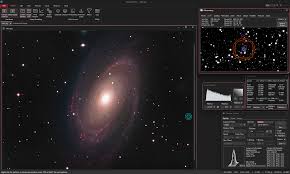
A typical imaging sequence will include hours of autoguided images with dither, automatic filter changes, and pier flipping – all the while slewing your dome and monitoring the weather. Every image is tagged with extensive data in its FITS header. When your weather sensor reports unsafe conditions MaxIm DL will automatically shut down your equipment, park the telescope, and safe the dome.

Once your images are collected, MaxIm DL can automatically assemble your calibration images into groups, select the correct groups for each individual image, calibrate, and stack your images. You can process hundreds of images from different targets with just a few mouse clicks.

MaxIm DL also includes advanced photometry and astrometry capabilities. Photometric measurements are made using best practice median-mean and partial-pixel algorithms vetted by professional astronomers. Astrometric measurements are performed using PinPoint LE, widely recognized as the most powerful and accurate package available today.

New! MaxIm DL Version 7
MaxIm DL Version 7 features 64-bit operation with enhanced speed and memory handling – perfect for modern high-resolution cameras. It also has an all-new modern user interface. Ribbon Bars provide a more convenient, faster access to all functions of the software. The new Dark Mode display is easier on the eyes and helps preserve night vision.

Version 6 remains available for those running 32-bit cameras. Both versions can be installed and run simultaneously.

Features:
Complete observatory integration. Controls all of your astronomical equipment.
Integrates your camera, autoguider, filter wheels, focusers, camera rotator, telescope mount, observatory webcam, remote switches, weather station, and dome.
Fully ASCOM compliant.
Built-in mini-planetarium helps you maintain “situational awareness”.
Designed for efficiency. Create your own presets for finding, centering, focusing, and imaging sequences.
Multithreaded hardware interfaces for smooth and responsive operation.
Automated shutdown with user-definable triggers (including weather) and sequencing.
PinPoint V7 with online all-sky solving – easily recover if your telescope gets lost.
Automatic pier flipping with guide star reaquisition.
Multistar and differential autoguiding.
Monitor and control your observatory with dome webcam, remote switches, and weather monitoring.
Stack hundreds of images of different targets in one operation – with automatic alignment and bad data rejection.
Blend in narrowband data to create fully realistic images or false color representations of your data.
Includes a complete image processing toolkit, including a large variety of filters, deblooming, curves, deconvolution, color tools, and much more.
Analyze multispectral photometry data for huge numbers of images including multiple targets; export light curves and AAVSO reports.
Instant Raw image color preview – see Raw images in full color without Bayer conversion.

Imaging
Complete integration of all your observatory hardware in a single package.
Supports your equipment – compatible with more equipment than any competing package. Supports ASCOM equipment plus a huge variety of cameras and filter wheels.
Multi-threaded equipment control for smoother operation.
Instant presets for quick changing between find, focus, complex imaging sequences, etc.
Save and load all program settings – instantly reconfigure for different hardware setups.
Built-in mini-planetarium provides full “situational awareness” with advanced features such as instant image overlays, FOV indicator with rotator control, extensive catalog search capabilities, and much more.
Instantly recover from a “lost” telescope with PinPoint V7 online all-sky blind solving.
Monitor and control your observatory with ASCOM switch controls, observatory webcam, and integrated weather sensors.
Automatically execute a script for each image to optimize preview or process on the fly.
Advanced imaging techniques such as dither, automatic per-filter focus offsets, AO control, graphical track logs, audible alarms.
Highly flexible sequence capability including up to 32 filter/exposure slots and auto-mosaic.
Improved autoguider support with enhanced reliability and new guiding modes.
AO and TDI (drift scanning) support.
Bookmark locations on sky – perfect for session planning and marking unexpected discoveries.
Automated pier flipping.
Automated observatory shutdown sequences, including multiple triggers and user-defined sequence.
Full ASCOM compatibility.
Compatible with DC-3 Dreams’ ACP browser-based automation tool.

Processing
Intelligent Calibration™ automatically selects the best bias, dark, and flat-field frames for each individual image. Calibrate both your main camera and autoguider without changing settings.
Powerful image stacking tool automatically identifies and groups image by target object and filter, automatically rejects poor quality images, and includes multiple automatic and manual alignment modes. Automatically stack and LRGB combine multiple images at once!
Narrowband image blending tool takes your stacked and aligned image sets and merges them with intesity and wavelenth controls. Use realistic or exaggerated wavelength values for optimum discrimination of object features.
Includes a host of image enhancement filters including:
Kernel Filters including sharpen, smooth, Guassian blur, median, dilation, erosion, custom.
FFT filters
Unsharp Mask
Wavelet filters
Digital Development Processing
Rank filter
Local Adaptive filter
Rotational Gradient filter
Deconvolution filters
Background and Gradient Removal
Easy-to-use Batch processing and advanced scripting capability.
Color tools include stacking, balance, saturation adjustment, pseudo color, color filter, remove background, realign planes.
FFT analysis.
Generate, save, and reuse background flattening profiles for multiple images and targets.
Complete photometry and astrometry capabilties. New photometry capaibilities include unlimited image sets, multispectral analysis, and enhanced target recognition and image quality assessment.
Other functions include:
Align
Stack
Remove Bad Pixels
Add Noise
Remove Bloom
Remove Pedestal
Resize
Histogram Specification
Curves
Levels
Threshold
Pixel Math
Mosaic
Rotation
Clone, Edit, and Annotation tools

Release Name: Diffraction Limited MaxIm DL 7.3.2
Size: 193.8 MB
Links: HOMEPAGE – NFO – Torrent Search

Download: RAPiDGATOR

11 Comments