Please REGISTER or RENEW your account on RAPiDGATOR.net and support us by doing through all RAPiDGATOR working download links on main posts...
June 2

Directory Opus 13.23.5 Beta

Description: Are you frustrated by the limitations of Windows Explorer? Directory Opus is a complete replacement for Explorer, with far more functionality than any other file manager available today.

You're in control.
Not just a simple file manager; Directory Opus lets you make your computer yours.
With a flexible user interface and unbelievable configurability, you can tailor Opus to streamline your workflow.
Dual panes, dual trees, multiple tabs.
Filter, sort, group your folders. Label and rate your files.
Queued file copies. Powerful batch renaming. Full archive support.
Find your files. Locate duplicates. Synchronize backups.
Assign tags and descriptions. Convert images. Edit metadata.
Fully multi-threaded, native 64 bit high performance code.
Whatever you want to do - Opus can probably do it. And if it's not built-in, you can take advantage of the unrivalled configurability to extend Opus using external tools.

What makes Opus unique?

Built for speed
Opus is written in native C++ multi-threaded code; compiled for the latest 64 bit CPUs, with high performance our number one design principle.

Fully configurable
Change the colors. Change the fonts. Change the toolbars and menus. Set up hotkeys. Opus adapts to how you want to use it.

Makes file management a breeze
Powerful searching, sorting, grouping, labelling and tagging features let you take control of your files like never before.

Endlessly extensible
Work with third-party tools as easily as with the built-in features. A full scripting interface, including scriptable dialogs, means your imagination is really the only limit.

Replace Windows Explorer and don't look back
Our unique Explorer Replacement mode provides a full replacement for Windows Explorer.
Single or dual pane file display and folder trees
Tabbed interface let you keep multiple folders open and switch quickly between them
Integrated viewer, metadata editor and utility panel
Built-in tools including synchronize and duplicate file finder
Leverage indexed search engines like Windows Search and Everything

High performance file management features
Copy, move, rename, duplicate, archive, view, backup and delete your files with ease
Queue multiple file copies for improved performance
Batch renaming including easy-to-use keyboard macros
Support for FTP and archive formats like Zip, 7Zip and RAR
Quickly filter, sort, group and search your folders
Color-code your files, assign status icons, star ratings, tags and descriptions
View images, documents and more. Image marking lets you sort your photos quickly and easily
Calculate folder sizes and print or export folder listings

Unrivalled configurability
Why let the programmers decide for you? You can tailor Opus to look how you want it to look, and to work how you want it to work.
Choose from light mode, dark mode, or design your own theme
Over 600 configurable colors and fonts
All toolbars and menus can be edited, plus you can add your own
Floating toolbars can act as program launchers
Configure your own hotkeys that work everywhere or just in Opus
Full scripting interface lets you design your own dialogs and add your own commands

Release Name: Directory Opus 13.23.5 Beta
Size: 29.6 MB
Links: HOMEPAGE – NFO – Torrent Search

Download: RAPiDGATOR

7 Comments
June 2

QR-Code Creator 7.6.2.1

Description: Create QR codes in no time on your PC. The best part is that the codes are generated without an internet connection. The software calculates the codes directly on your local computer, so you don't have to worry about your data being read by third parties.

You can easily paste the generated QR codes into almost any application using the clipboard.

The software is constantly being developed and now includes a built-in prompt generator in addition to numerous canvases for visual enhancement.

Release Name: QR-Code Creator 7.6.2.1
Size: 34.3 MB
Links: HOMEPAGE – NFO – Torrent Search

Download: RAPiDGATOR

6 Comments
June 2

Duplicate Finder Professional 2026 v417

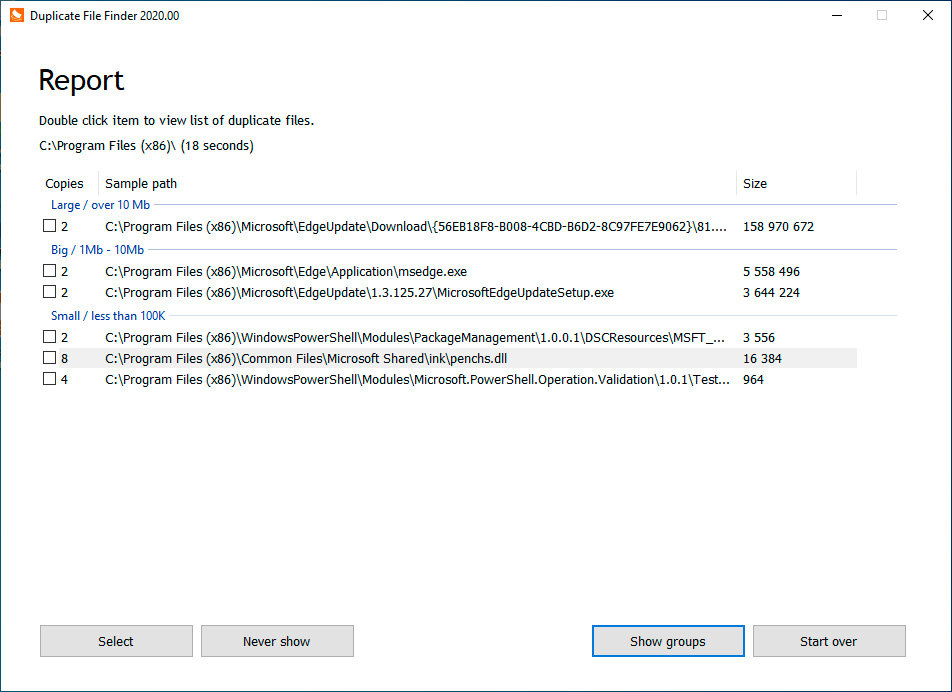
Description: Finds duplicate pictures and videos. You can choose any folder on your hard drive (or use standard user folders) and our app will deeply analyze contents of selected folders for searching for any duplicates. The most amazing things is that it will take just a few seconds. Files will be compared by the MD5 hashing algorithm, which means that they will be compared by content, not by name. Then, using our convenient user interface you can view duplicates and delete those which you don't need.

Convenient user interface. Duplicated files can often be quite large, which is why we pay a lot of attention to the user interface. The process starts with splitting the files into groups: large, medium, and small - this feature can be turned off. Then, you can review each duplicate to ensure that you're only deleting the necessary files. You even have the option of viewing selected duplicates through the default viewer or Notepad, or you can open the location on Windows Explorer for other options. If you accidentally delete files into the Recycle Bin, you can recover them with the standard process. Our app can also remember scan results between sessions, so you won't need to rescan repeatedly, saving you time.

Clean your Windows OS. There are a lot of duplicates files created every single day. For instance, on a test computer running Windows 10, we found 23% of duplicated files in the system folder. That 23% was wasting over 1 GB of precious disk space. Just think, every fourth file has a duplicate. Most of these are related to Windows OS update service, which works daily. Some of those files can be safely removed while others cannot; therefore take care when checking the system folders.

Release Name: Duplicate Finder Professional 2026 v417
Size: 3 MB
Links: HOMEPAGE – NFO – Torrent Search

Download: RAPiDGATOR

6 Comments
June 2

Wise Care 365 Pro 8.0.2.731

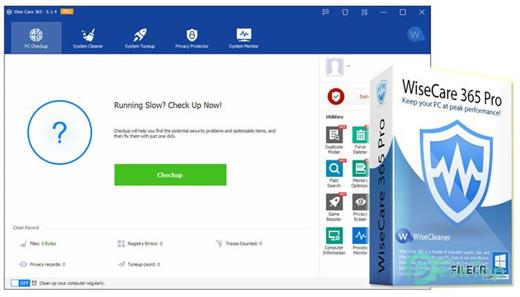
Description: Free to clean up disk and fix registry problems on your PC. Protect your privacy and make your PC more secure. Provide a better solution for optimizing and accelerating your computer!

Protect Your Windows System in Real-Time

Take prompt action once some applications attempt to make modification without your permission. This protector will identify and stop any processes that try to secretly change Windows registry.


  • Prevent programs from changing your Internet Explorer homepage.
  • Prevent any unwanted new application from adding into the Windows startup.
  • Prevent new applications adding to the Windows context menu.
  • Prevent changes to the default browser.
A Comprehensive Windows PC Cleaner

Wise Care 365 is definitely the preferred option for billions of Windows users who want to keep their Windows PC at peak performance. Speed up a slow computer and free up more valuable hard disk space in seconds.


  • Remove invalid Windows registry entries, easily back up and restore Windows registry.
  • Cleans Windows temporary files, browsers (IE, Edge - including legacy version and the chromium-based version, Google Chrome, Mozilla Firefox, Opera, Safari, etc.) caches, download history, browsing history, Cookies, saved passwords. Wise Care 365 can also clean invalid shortcuts, recent use traces, Windows Delivery Optimization Files, useless files created by other applications.
  • Scan all local drives to clean files with specific extensions.
World's Fastest System Optimization Tool

Wise Care 365 adopts world's top technology. It optimizes PC's performance, defrags disks and the Windows registry, and manages the startup process as well as services.


  • Over time, your computer's hard disk drive and registry will become cluttered. Wise Care 365 can defrag the drive and registry to make them organized, thus making your computer run faster and more stable. You are going to be amazed by its blazing defrag speed.
  • Many programs run silently in the background when you start up your computer. Wise Care 365 helps you disable unneeded programs that consume your precious system resources and improves PC startup speed.
Your Ultimate Computer Privacy Protector

Wise Care 365 protects your computer privacy from prying eyes.


  • Privacy Eraser erases all traces of any computer operation like browsing history and accessed files, so any computer operation you do stays confidential.
  • Disk Eraser prevents deleted files from being restored by a data recovery tool, e.g, Wise Data Recovery.
  • File Shredder can delete files thoroughly so that they can never be recovered.
  • Manage websites that send you notifications when you surf the Internet. Allow or disallow.
A Powerful System & Hardware Monitoring Utility

System Monitor displays all the essential information of your computer.


  • Process Monitor gives users a clear and neat list of all the processes run by user and system, users can shut down any process they don't need to make the PC run more smoothly.
  • Hardware Overview offers users both brief and detailed information of all the crucial hardware components, letting users know about their computers at a glance.
  • Operating system is a newly added tab that displays a summary of Windows system, such as Windows product key, specifications (edition, version, installation date, build), date format, etc.
Say Goodbye to Blurry

Thanks to the brand new Wise XUI, it solves the scaling problem of the previous version. Wise Care 365 supports 100%, 125%, 150%, 175%, and 200% scales, and automatically adapts to Windows system scale settings without manual adjustments.

Wise Care 365 is perfectly compatible with 4K UHD monitors. Not blurry!

Release Name: Wise Care 365 Pro 8.0.2.731
Size: 37.1 MB
Links: HOMEPAGE – NFO – Torrent Search

Download: RAPiDGATOR

8 Comments
June 2

CoolUtils PDF Combine 8.1.0.75/12

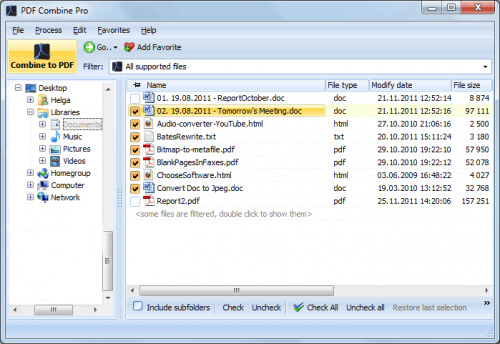
Description: To combine PDF, or PDF merging, is the process of joining multiple PDF files into one. This can be useful for organizing, sharing, or printing documents. CoolUtils PDF Combiner is software that allows you to merge PDFs offline without uploading your files to any third-party servers.

Our PDF merger tool allows you to:
Combine PDF files into one document
Append PDF files
Add a clickable Table of Contents
Use the PDF merger software to add a cover page
Delete blank pages from scanned files
Insert blank pages for double-sided printing.

Release Name: CoolUtils PDF Combine 8.1.0.75/12
Size: 314.5 MB
Links: HOMEPAGE – NFO – Torrent Search

Download: RAPiDGATOR
5 Comments
June 2

EaseUS Fixo Pro 4.3.1 Build 20260528

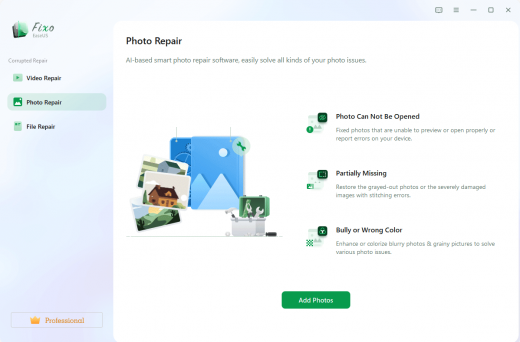
Description: Repair Corrupted or Unopenable Videos, Photos and Files. Videos, photos or files get corrupted or fail to open? EaseUS one-stop solution will help you repair corrupted videos, photos and files regardless of the level of damage.

Repair Any Corrupted or Unplayable Video
Videos become corrupted or inaccessible after sudden power surges and failures, complete system crashes, updating errors, file mishandling or some other reasons? The video repair software - EaseUS Fixo enables you to repair a wide variety of video file formats including MOV, MP4, M2TS, MKV, MTS, 3GP, and more easily, no matter how it is damaged.

Repair Corrupted Photos from Any Device
Photos with precious memories or essential information become corrupted and unopenable? The photo repair software - EaseUS Fixo can intelligently and smartly repair your corrupted and damaged photos from your computer or other external storage devices like USB flash drives, memory sticks, SD cards, digital camera and phones regardless of their level of damage.

Repair Corrupted Word, Excel, PPT, and PDF Files
Office files and pdf files become corrupted, inaccessible or unreadable unexpectedly for unknown reasons? EaseUS Fixo which has an intuitive interface is the best file repair software for novices to fix the corrupted office documents, including PDF, Word, Excel, and PowerPoint files.

Release Name: EaseUS Fixo Pro 4.3.1 Build 20260528
Size: 194.2 MB
Links: HOMEPAGE – NFO – Torrent Search

Download: RAPiDGATOR
6 Comments
June 2

Drive SnapShot 1.51.0.1759 WinPE

Description: Drive Snapshot creates an exact Disk Image of your system into a file, including the operating system, installed programs, your data and all security attributes - while windows is running and you continue to work.

Create Disk Image Backups, While Running Windows
The Backup process will back up all your data into a single file, containing all data, including system data and registry, for total security, should your computer ever crash. There is no restart (to DOS) necessary. Ever.

Continue your work, while the Backup is in progress
The new Snapshot technology ensures that all data are consistent, and reflect the PC's data at the start of backup.
There are no difficulties with opened files. Ever. This enables a very fast and easy way to back up servers and other computers, that must run 24 hours a day.

Easy Use and Restore of single Files or directories
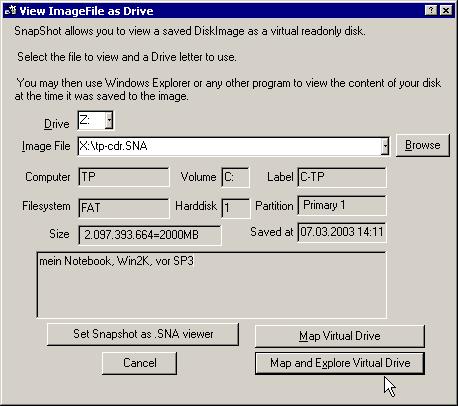
Drive Snapshot creates a virtual drive, containing all your drive's data.
You may use, compare, or restore these files directly from the Disk Image file.
This works with any program of your choice, including (of course) the Windows Explorer

Complete Restore of a disk in case of Disaster
If a disk is restored to its original state, it will be exactly the same as at the time of Backup - byte for byte.
Restoring a system partition will require DOS; other drives can be restored using Windows

Compatible with all Windows file systems (FAT16, FAT32, NTFS,ReFS)
Supports Linux EXT2/3/4/Reiser/XFS

Compatible with all Windows RAID Methods

Very easy and comprehensive command line interface
This makes automation of regular tasks a breeze.

System requirements:
Windows 2000,  XP,  Vista, 7, 8, 8.1, 10, 11, 2003 Server, 2008, 2008 R2, 2012, 2016, 2019,  2022, PE, Windows-X64
3 MB disk space + space to save the disk images.
32MB RAM if active, 0 MB if not active.
You need administrative rights to execute Drive Snapshot

Release Name: Drive SnapShot 1.51.0.1759 WinPE
Size: 366.9 MB
Links: HOMEPAGE – NFO – Torrent Search

Download: RAPiDGATOR
7 Comments
June 2

Drive SnapShot 1.51.0.1758

Description: Drive Snapshot creates an exact Disk Image of your system into a file, including the operating system, installed programs, your data and all security attributes - while windows is running and you continue to work.

Create Disk Image Backups, While Running Windows
The Backup process will back up all your data into a single file, containing all data, including system data and registry, for total security, should your computer ever crash. There is no restart (to DOS) necessary. Ever.

Continue your work, while the Backup is in progress
The new Snapshot technology ensures that all data are consistent, and reflect the PC's data at the start of backup.
There are no difficulties with opened files. Ever. This enables a very fast and easy way to back up servers and other computers, that must run 24 hours a day.

Easy Use and Restore of single Files or directories
Drive Snapshot creates a virtual drive, containing all your drive's data.
You may use, compare, or restore these files directly from the Disk Image file.
This works with any program of your choice, including (of course) the Windows Explorer

Complete Restore of a disk in case of Disaster
If a disk is restored to its original state, it will be exactly the same as at the time of Backup - byte for byte.
Restoring a system partition will require DOS; other drives can be restored using Windows

Compatible with all Windows file systems (FAT16, FAT32, NTFS,ReFS)
Supports Linux EXT2/3/4/Reiser/XFS

Compatible with all Windows RAID Methods

Very easy and comprehensive command line interface
This makes automation of regular tasks a breeze.

System requirements:
Windows 2000,  XP,  Vista, 7, 8, 8.1, 10, 11, 2003 Server, 2008, 2008 R2, 2012, 2016, 2019,  2022, PE, Windows-X64
3 MB disk space + space to save the disk images.
32MB RAM if active, 0 MB if not active.
You need administrative rights to execute Drive Snapshot

Release Name: Drive SnapShot 1.51.0.1758
Size: 9.9 MB
Links: HOMEPAGE – NFO – Torrent Search

Download: RAPiDGATOR
5 Comments
June 2

nTopology 5.48.3

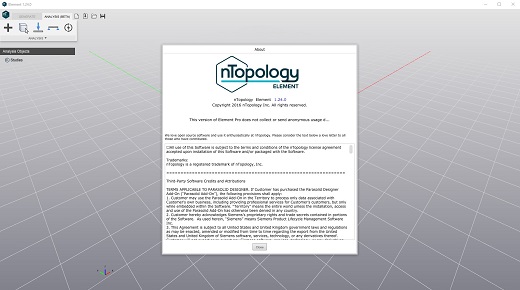
Description: Innovate. Iterate. Create. Unlock faster innovation and better performance with advanced computational design software.

Lightweighting
Decrease weight while meeting your structural requirements to improve performance.

Thermal management
Improve heat transfer efficiency with more compact and reliable designs.

Fluid management
Generate designs with improved fluid or aerodynamic performance.

Architected materials
Develop highly engineered structures with a targeted response to enhance product performance.

Mass customization
Automate design to reduce cost and time to market for personalized products.

Release Name: nTopology 5.48.3
Size: 1.5 GB
Links: HOMEPAGE – NFO – Torrent Search

Download: RAPiDGATOR
5 Comments
June 2

CHROMiX ColorThink 4.2.0

Description: ColorThink 4 - the Best now Better. Version 4 adds tons of features and thoroughly modernizes the industry's best color graphing and analytics tool while retaining its familiar interface.

Gamut Comparison
Also highly anticipated is the ability to analyze and compare two gamuts. ColorThink 4 uses gamut subtraction and/or addition to create an entirely new kind of graph. For example: When sRGB and a press profile are compared, ColorThink 4 subtracts the portion of the press profile that is left outside of sRGB. This is a very clear illustration of the colors on press that are unavailable if sRGB is your working space. The compare function can reverse the subtraction, so the press profile is subtracted from the sRGB gamut. You can also select the shared gamut to be shown in addition to the fully combined gamut. The Plot Item inspector shows the gamut volumes of each of the two original gamuts as well as the comparison volume. The gamut comparison index or GCI is also an easy number to relate to and is calculated in accordance to the ISO standard.

Image Animation
ColorThink 4 has an exciting new way of displaying images in the grapher. Images load in their normal form and smoothly animate between the normal display form and the Lab values of the image colors in the grapher. The embedded profile is easily selected to show in wireframe form, illustrating how the image colors all fit within the gamut of its embedded profile. This feature alone will wow your audience and help get their head into color faster than any previous visualization!

Color Assets
This is a huge benefit for many color folks that have a zillion profiles and related files in various places. ColorThink 4 organizes all Color Assets, including profiles that are installed in your system plus other assets that are located wherever you store them. Filter them by the kind of asset, the color space of the asset or even arbitrary text. ColorThink harvests tons of meta-data about each asset type, including primary colors, asset type, color space, gamut volume and various size parameters and even the max density value Dmax. Then you can sort by these values to find the largest gamut profile or the paper with the lowest Dmax. There is so much power in the organizational benefits of the new Color Assets that you'll just have to see for yourself. This feature will save literally hours of search time.

White Point Editor
One new tool in ColorThink 4 is the White Point Editor. Modifying the white point in an ICC profile is a handy way to alter the appearance of proofs as well as other functions. The new White Point Editor is very flexible, where you can enter XYZ, Lab or correlated color temperature values. You can also drag and drop a list of colors or another ICC profile into the editor and the white point of those will be used to modify the original profile's white point. It's a simple click and direct measurement from your color instrument to sample a real world paper color and change your profile's white point to that color. Very powerful.

LCH Mode
Another effective coordinate space which unfolds profiles and other data sets is LCH. Color hue, which normally goes around the color wheel like hands of a clock is stretched out into a straight line. ColorThink 4 graphs in LCH allowing you to evaluate your color from a very different perspective. With this view the relative saturation or chroma of each of the colors is now easily compared because they're viewed across a straight line. Alternate color spaces like Jab and OKLab can also be used in this mode so you can see how they affect the saturation to become a lot more regular.

Delta-E blobs
The color difference calculations we know as delta E can be difficult to explain. ColorThink 4 can illustrate the idea of Delta E as a blobs or spheres around colors. The Delta E 76 and Delta E 2000 have very different perspectives and shapes relating to closeness distance of color aims. ColorThink 4 will help with this understanding. You can change the plotting coordinates from Lab to Jab or other modes to see how it affects these color differencing shapes.

Release Name: CHROMiX ColorThink 4.2.0
Size: 249.7 MB
Links: HOMEPAGE – NFO – Torrent Search

Download: RAPiDGATOR
6 Comments