Please REGISTER or RENEW your account on RAPiDGATOR.net and support us by doing through all RAPiDGATOR working download links on main posts...
Mar 19

BandiView Pro 7.26

Description: BandiView is the succeeding image viewer to Honeyview, that inherits everything cool of its predecessor and also gets improved even further. Fast and easy to view images in a variety of formats, from the most common ones to the most professional ones.

For the most graphic details - HDR support
BandiView supports an image output using HDR (High Dynamic Range) to express a widened range of brightness and color.
Do not miss the full experience of what HDR can really do with BandiView.

Webtoon view mode
BandiView can show multiple images as one vertical flow. Useful when working on a webtoon; arrange images to grasp the overall story.

Multiple format support
Not to mention images in many popular formats, BandiView provides support for RAW files taken by your camera, professional graphics like Clip Studio Paint, and even HEIC files from your iPhone.

Convert images faster and easier
BandiView can convert the format or size of multiple images simultaneously, at 10x faster processing speed than other converters do. Only thing it needs is a few click of your mouse.

Release Name: BandiView Pro 7.26
Size: 23.2 MB
Links: HOMEPAGE – NFO – Torrent Search

Download: RAPiDGATOR

9 Comments
Mar 19

Directory Opus 13.22

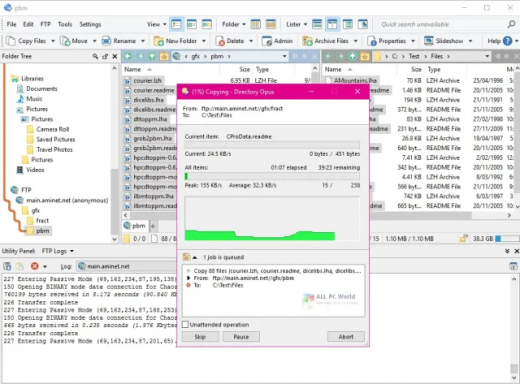
Description: Are you frustrated by the limitations of Windows Explorer? Directory Opus is a complete replacement for Explorer, with far more functionality than any other file manager available today.

You're in control.
Not just a simple file manager; Directory Opus lets you make your computer yours.
With a flexible user interface and unbelievable configurability, you can tailor Opus to streamline your workflow.
Dual panes, dual trees, multiple tabs.
Filter, sort, group your folders. Label and rate your files.
Queued file copies. Powerful batch renaming. Full archive support.
Find your files. Locate duplicates. Synchronize backups.
Assign tags and descriptions. Convert images. Edit metadata.
Fully multi-threaded, native 64 bit high performance code.
Whatever you want to do - Opus can probably do it. And if it's not built-in, you can take advantage of the unrivalled configurability to extend Opus using external tools.

What makes Opus unique?

Built for speed
Opus is written in native C++ multi-threaded code; compiled for the latest 64 bit CPUs, with high performance our number one design principle.

Fully configurable
Change the colors. Change the fonts. Change the toolbars and menus. Set up hotkeys. Opus adapts to how you want to use it.

Makes file management a breeze
Powerful searching, sorting, grouping, labelling and tagging features let you take control of your files like never before.

Endlessly extensible
Work with third-party tools as easily as with the built-in features. A full scripting interface, including scriptable dialogs, means your imagination is really the only limit.

Replace Windows Explorer and don't look back
Our unique Explorer Replacement mode provides a full replacement for Windows Explorer.
Single or dual pane file display and folder trees
Tabbed interface let you keep multiple folders open and switch quickly between them
Integrated viewer, metadata editor and utility panel
Built-in tools including synchronize and duplicate file finder
Leverage indexed search engines like Windows Search and Everything

High performance file management features
Copy, move, rename, duplicate, archive, view, backup and delete your files with ease
Queue multiple file copies for improved performance
Batch renaming including easy-to-use keyboard macros
Support for FTP and archive formats like Zip, 7Zip and RAR
Quickly filter, sort, group and search your folders
Color-code your files, assign status icons, star ratings, tags and descriptions
View images, documents and more. Image marking lets you sort your photos quickly and easily
Calculate folder sizes and print or export folder listings

Unrivalled configurability
Why let the programmers decide for you? You can tailor Opus to look how you want it to look, and to work how you want it to work.
Choose from light mode, dark mode, or design your own theme
Over 600 configurable colors and fonts
All toolbars and menus can be edited, plus you can add your own
Floating toolbars can act as program launchers
Configure your own hotkeys that work everywhere or just in Opus
Full scripting interface lets you design your own dialogs and add your own commands

Release Name: Directory Opus 13.22
Size: 28 MB
Links: HOMEPAGE – NFO – Torrent Search

Download: RAPiDGATOR

10 Comments
Mar 19

DA-HelpCreator 2.8.4

Description: DA-HelpCreator – Easily create online help. What is DA-HelpCreator? DA-HelpCreator is a user-friendly, powerful help authoring tool for creating online help in Windows CHM format, web pages, documentation, FAQ pages and knowledge management.

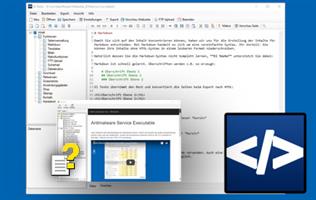
DA-HelpCreator allows easy and fast creation of content, which can then be converted into different export formats: HTML website, Windows-CHM help files or as a stand-alone Windows program.

Editors and design
Two editors are available for entering the content. The WYSIWYG HTML editor, here you work like with a word processor, and the Markdown editor for the fast input of contents.

Exports
Create documentation and online help in no time at all. Export the project as HTML Web pages, Windows Help (CHM) file, or as a .exe Runtime Web page.

Macros
Macro functions automatically create tables of contents and navigation elements, which automatically take care of linking and updating.

Customizeable templates
Select the design of the project from various responsive HTML templates. All templates can be customized. The CSS and HTML templates can be edited for each project.

FTP upload for HTML export
Download the export as a website with one click on your webspace, with the integrated FTP upload and synchronization function. Only changed files are transferred on request.

Open project structure
Each project is stored in an open data structure on the hard disk. The contents are managed in text files. This allows a problem-free administration with external programs, like a text editor, Subversion or GIT.

Security with static content
The export as web page creates static web pages. This means no security holes in your project.

PDF export of articles
Export individual articles directly into PDF format. The PDF export is configurable with its own headers and footers. Ideal for passing on information.

Release Name: DA-HelpCreator 2.8.4
Size: 26.8 MB
Links: HOMEPAGE – NFO – Torrent Search

Download: RAPiDGATOR

8 Comments
Mar 19

QILING Disk Master 8.7.6 Build 20260311 + WinPE

Description: The biggest nightmare for a computer user is data loss and system crash, once happened, reliable and up-to-date backups are extremely necessary and important. QILING Disk Master covers all the needs to recover your lost data and restore crashed systems in minutes. It's advanced and reliable data backup & system disaster recovery software for home office and business desktops and laptops. It enables users to perform self-service backup operation with comprehensive full/differential/incremental backup.

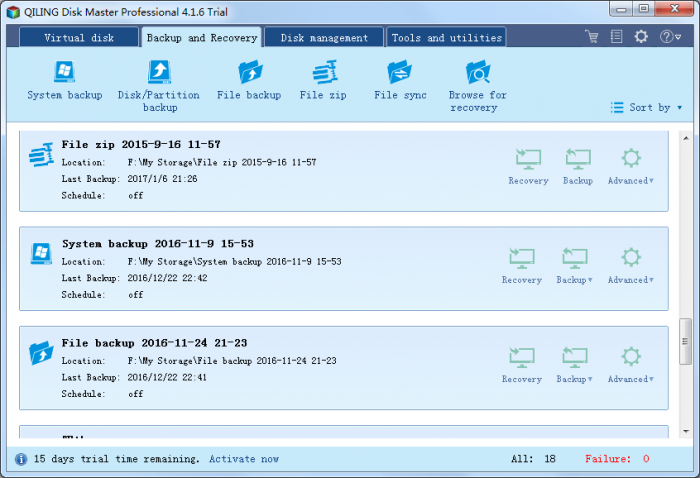
System backup
Easy system drive backup of all contents, including Windows operating system and system settings without interrupting your work.

Disk/partition backup Disk/partition backup
Block-level disk imaging quickly and efficiently backs up the entire disk or volumes.

File backup File backup
File-level backup allows you to selectively back up specific files, folders or file types, including network shared files.

File zip File zip
Compress selectively files, folders or file types, including network shared files to a zip file.

Schedule backup Schedule backup
Flexible backup scheduler allows backups to run based on daily, weekly, monthly or event.

Backup management Backup management
Easily manage backup job and automatically delete the out-of-date backup images, saving storage space.

Unattended backup Unattended backup
Runs as a Windows service - ideal for unattended Servers. Backs up even when system logged out, slept or hibernated.

Incremental & Differential Incremental & Differential
Based on a full backup, the software enables only backup changed or new data in order to save time and disk space for you.

Incremental & Differential Hot backup
Back up specific files and volumes without interrupting any current operations, especially for open files backup.

Release Name: QILING Disk Master 8.7.6 Build 20260311 + WinPE
Size: 589.7 MB
Links: HOMEPAGE – NFO – Torrent Search

Download: RAPiDGATOR

10 Comments
Mar 18

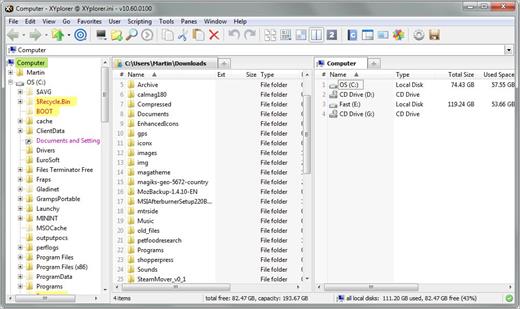
XYplorer 28.20.0600

Description: XYplorer is a file manager for Windows. It features tabbed browsing, a powerful file search, a versatile preview, a highly customizable interface, optional dual pane, and a large array of unique ways to efficiently automate frequently recurring tasks.

It's Tabbed
Tabs let you switch between folders most easily. Drag them around, hide them, lock them, name them, or drop files onto them. The tabs remember their configuration individually and across sessions. On top of this you get tabsets and dual pane.

t's Functional
XYplorer has been designed to make you faster. Numerous usability enhancements in an attractive interface help to streamline your workflow and increase your efficiency. You will definitely save a lot of time.

It's Scriptable
Yes, you can program this app. Individual solutions for individual tasks. No plugins needed, scripts run out-of-the-box. Even beginners can benefit from this feature since many ready-to-use scripts are available in the forum.

It's Fast
Speed has always been a major design goal with XYplorer. The code is constantly optimized for performance, zero tolerance for slowness. On top of that the app uses very little RAM, the executable is light (7 MB), and it loads almost instantly.

It's Reliable and Robust
You can trust XYplorer. It works as intended and expected, and is very hard to destroy. Any issues are immediately attended and usually fixed within hours. A large community is closely watching the development and permanently testing the frequent beta versions.

It's Customizable
You can fine-tune the app to look and behave exactly as you want it. This ranges from fonts and colors to custom toolbar buttons and even file icons and program associations. And every bit of it is fully portable. Even the dark mode.

It's Responsive
Your customer voice is listened to and taken seriously, most of the time you get instant feedback, and your wish might actually get implemented sooner than you'd think.

Operating System:
Windows 11, Windows 10, Server 2019, Server 2016, 8.1, 8, Server 2012, 7, Server 2008, Vista, XP, Server 2003; 32-bit and 64-bit versions.

Release Name: XYplorer 28.20.0600
Size: 11.4 MB
Links: HOMEPAGE – NFO – Torrent Search

Download: RAPiDGATOR

10 Comments
Mar 18

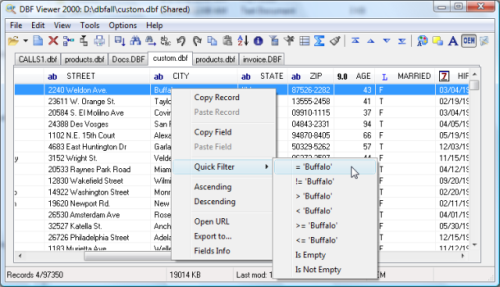
DBF Viewer 2000 v9.0

Description: If you're seeking a fast, effective solution for viewing and editing all sorts of DBF files, DBF Viewer 2000® is the answer. This feature-rich program can handle files from dBase, Visual dBase, Foxpro, Visual FoxPro and Clipper, to name just a few, with a performance that easily rivals costly professional database utilities.

Its optimised proprietary engine means that no matter what your file size, DBF Viewer 2000 is incredibly fast, performing any task you set it - from a simple query and duplicate clean-up to data export - at lightning speed.

With DBF Editor's simple, dynamically generated visual dialogues, you can easily see the structure of your DBF files and edit them exactly as you would with native database management tools. In addition to being able to view the contents and structure of DBF files, you can also view and edit dBase III, dBase IV, dBase Level 7, FoxPro and Visual FoxPro format memo fields.

Command line automation is fully supported, making it simple to repeat activities including data import, replacement and export and clean-up of duplicate records. Because DBF Viewer 2000 is completely independent of database engines, drivers and database management systems, you can simply install the program and start viewing and editing DBF files immediately.

Operating System: Windows from 2000 through XP, Windows 11, 10, 8, 7 and Server Editions

Release Name: DBF Viewer 2000 v9.0
Size: 4.8 MB
Links: HOMEPAGE – NFO – Torrent Search

Download: RAPiDGATOR

8 Comments
Mar 18

Imaginando VS v2.1.1

Description: Easily create visuals that react to MIDI and audio. Creating audio-reactive visuals has traditionally been a complex and intimidating process, often requiring deep technical knowledge and navigating software designed with steep learning curves. For many musicians and creators, this complexity becomes a barrier to exploring the visual side of performance.

VS - Visual Synthesizer offers a refreshing solution by making the creation of music-driven visuals accessible, intuitive, and creatively inspiring. Its compact yet powerful feature set is purposefully designed with a musician’s mindset, adopting familiar concepts from audio workflows to ease the transition into the visual realm. By streamlining how MIDI and audio triggers are assigned to control visual parameters and movement, VS removes the technical friction, empowering users to focus on creativity and expression rather than setup and configuration.

Features
8 Polyphonic visual layers with blend modes
4 voices per layer
Multiple layer sources: shaders, audio visualizers, image, video, and text
Real-time input sources: camera, Syphon / Spout, and render output feedback
1 background layer with a solid color or image / video
Factory content amounting to 57 shaders, 63 presets and over 100 images and videos
Multiple expansions with new shaders, videos, images and presets in a variety of styles
Built-in shader editor for creating your own materials
4 multi-shape LFOs with sync and MIDI trigger options
2 MIDI-triggered envelope generators
4 audio-triggered modulators with peak and frequency band modes
Modulation Matrix per layer
Built-in video recorder
Preset Playlist with duration and transition time settings
Audio & MIDI player for loading your music
Midi Mapping Manager
Media Manager
Up to 60 FPS, 4k output with horizontal and vertical portrait rendering
Syphon / Spout and NDI output

Release Name: Imaginando VS v2.1.1
Size: 1.1 GB
Links: HOMEPAGE – NFO – Torrent Search

Download: RAPiDGATOR

7 Comments
Mar 18

Nitro PDF Pro 14.43.5

Editions: Enterprise / Retail

Description: The PDF & eSign solution designed for on-the-go professionals. Effortlessly create, edit, share and sign your essential documents on any device, wherever you are - all with your Nitro Pro.
Keep your work moving with rapid support
Whether you run a small business or support a large enterprise, Nitro’s 24/7 global support team is here to answer questions and resolve issues. Get prompt, personalized agent support with 2 or more licenses.

Sign and share with unlimited eSignatures
Experience the convenience of unlimited eSignatures for access and signing from any device — no downloads or sign-ups needed. Share PDFs for signature across multiple people and devices with ease.

Safeguard confidential documents with confidence
Keep your critical data and documents safe with Nitro Pro's robust security features. Add password protection, customize permissions, and securely share files — all while streamlining your workflows.

Easily convert your documents into editable PDFs
With Nitro Pro, you can effortlessly convert Excel spreadsheets, PowerPoint presentations and Word documents into searchable, editable PDFs. Our intuitive platform recognizes text in multiple languages, ensuring seamless conversion. Need extra guidance? Just chat with Nitro Assistant, our chat tool, to get started.

Make your work stand out with simplified PDF editing
Whether you’re redacting personal customer information or annotating your document with highlights or notes, perform all your essential PDF edits with ease. You can also insert hyperlinks, logos, bookmarks, watermarks, page numbers and much more for a professional touch.

Sign and share documents with integrated eSign
Complete forms and send documents for signatures in seconds with Nitro's integrated eSign solution. Enhance credibility with customizable ‘sign here’ stamps and send for signing directly from Outlook and Word. Need more signature, security and integration options?

Track performance in one place
Use Nitro’s analytics dashboard to gain valuable insights into user adoption, product usage and areas for optimizing workflows. Customize the dashboard to track your organization's most important KPI and start driving success like never before.

Now do it all on the go with Nitro Workspace
Seamlessly access installers, web-based PDF tools, quick eSigning, and more in one place. From inviting collaborators to extracting data and requesting signatures, the Workspace hub empowers you to save time and effort with one-click tools.

Discover User-Friendly Features

Redact and Protect
Protect sensitive personal and customer data with batch redaction.

Form Creation
Design forms for quick autofill to minimize repetitive tasks.

Sign Documents
Get unlimited documents signed by multiple people, on any device.

Batch Editing
OCR and combine multiple documents at once for quick searchability.

Integrations
Use Nitro seamlessly with Microsoft 365, Sharepoint, iManage and AIP.

Compress and Share
Optimize PDF files for easy sharing and minimal storage space usage.

Release Name: Nitro PDF Pro 14.43.5
Size: 824.9 MB
Links: HOMEPAGE – NFO – Torrent Search

Download: RAPiDGATOR

8 Comments
Mar 18

Lansweeper 12.6.3.5

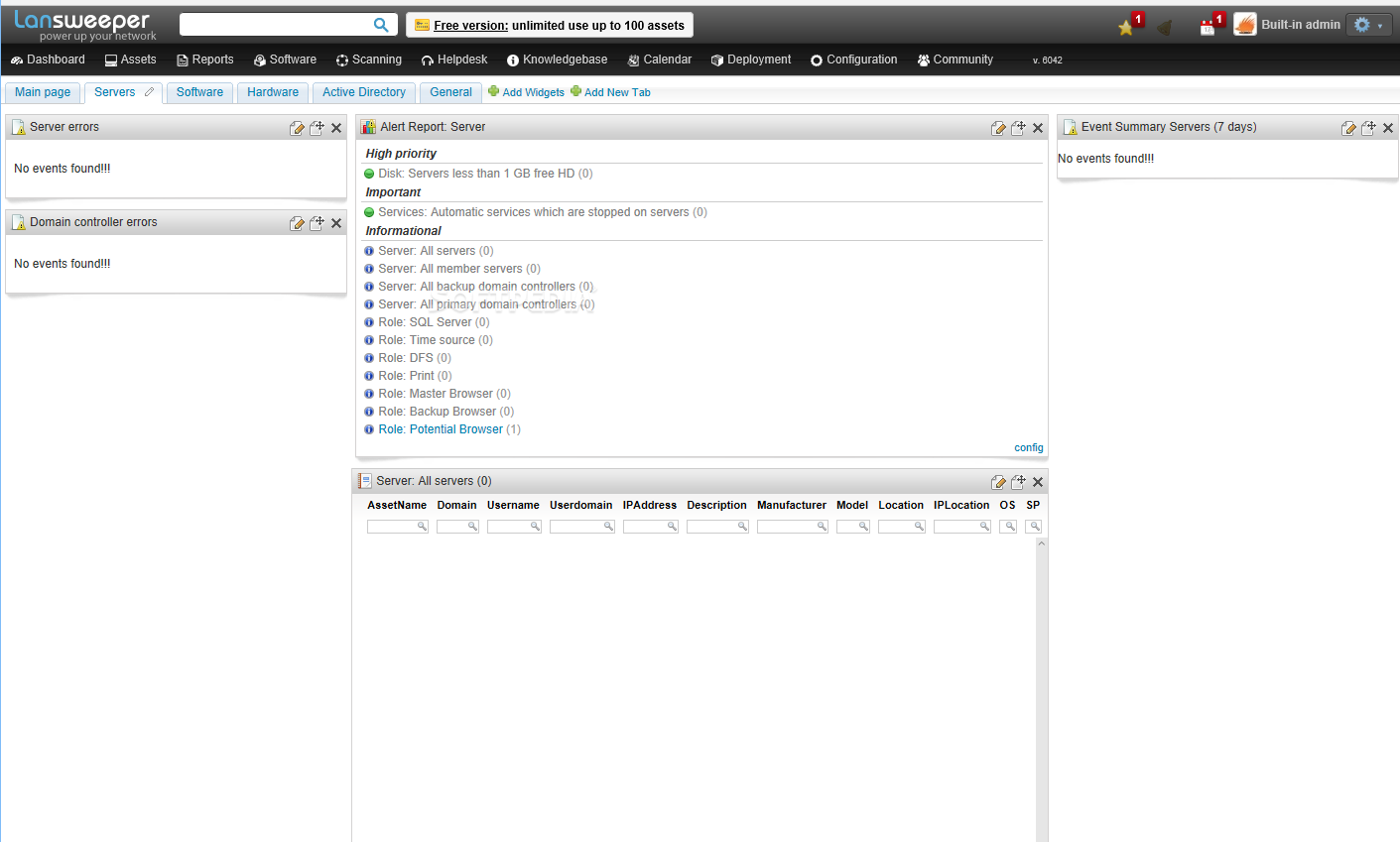
Description: Lansweeper is an automated network discovery and asset management tool which scans all your computers and devices and displays them in an easy accessible web interface. There is no need to install any agents on the computers, all scanning is done by standard build-in functionality.

Software inventory
With Lansweeper it’s easy to track and audit all your installed software, you can create powerful software inventory reports to find out which application is installed on which computer. Google unknown software and publishers right from the web interface and find out who is running software that’s not up to date.

Hardware inventory
Lansweeper cannot only detect all hardware devices in your computers but with it’s change tracking it can find out when a device was changed or removed. Not only does Lansweeper scans windows devices, it also gathers details about all other IP enabled devices on your network from the network discovery scan. (Linux, Printers, Routers, …)

License compliance
If you want to keep all software and operating systems licenses up to date it can be a time consuming work. With Lansweeper computer inventory it doesn’t need to be…
The webinterface will tell you how many software versions are installed and how much licenses you are missing.

Compliance reporting
Every company needs policies to get a smooth running network. Compliance reporting and the dashboard can help you to make all kinds of asset management reports. Who doesn’t have the latest version of our virus scanner, Who is missing the latest patch for our ERP solution. The only limit is your imagination…

Active directory integration
Lansweeper gathers all active directory user and computer details for your scanned machines. Create reports based on OU, integrate user pictures, Clean up your Active directory…

Eventlog integration
Every windows computer logs errors into the Eventlog. Thanks to Lansweeper you can now consolidate all these errors and get an alert e-mail as soon as an important error occurs.

Release Name: Lansweeper 12.6.3.5
Size: 375.8 MB
Links: HOMEPAGE – NFO – Torrent Search

Download: RAPiDGATOR

7 Comments
Mar 18

ManicTime Pro 2025.3.9.1

Description: ManicTime automatically records your computer usage. It remembers which apps you've used and for how long. It will also remember which web sites you've visited and which documents you've worked on.

Track project or client work accurately
All the data ManicTime collects will be presented in a easy to understand way. This will help you to quickly figure out when you have switched tasks or went to lunch. You can use this data to accurately assign time to tasks.

Clear and detailed reports
Reports like:
Applications and websites usage
Attendance
Annual leave
Start / end
and others

ManicTime automatically records device usage
Tired of the old, unreliable stopwatch? There is a better way...

Assign time to project or task
Use automatically recorded data to accurately assign time to your projects, clients or tasks.

Great reports
Comprehensive reports are designed to offer you invaluable insights into your business operations.

Attendance and vacation tracking
User-friendly tools for tracking attendance, managing leave quotas, and handling leave approvals

Integrate with other systems
ManicTime integrates with a host of other services as well as your in-house solutions.

Cloud or on premise
Offer a choice between easy to use cloud-based solution or on-premise installation for enhanced data control and security.

Privacy control
Offers highly customizable tracking for enhanced privacy.

Release Name: ManicTime Pro 2025.3.9.1
Size: 166.3 MB
Links: HOMEPAGE – NFO – Torrent Search

Download: RAPiDGATOR

9 Comments