Please REGISTER or RENEW your account on RAPiDGATOR.net and support us by doing through all RAPiDGATOR working download links on main posts...
June 1

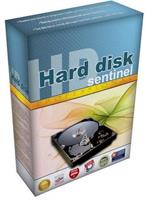
Hard Disk Sentinel Pro 6.40.2 Beta

Description: Hard Disk Sentinel Professional (HDSentinel) is a hard disk monitoring software with highest possible support of HDD/SSD/SSHD (hybrid) drives. Its goal is to find, test, diagnose and repair hard disk drive problems, report and display SSD and HDD health, performance degradations and failures.
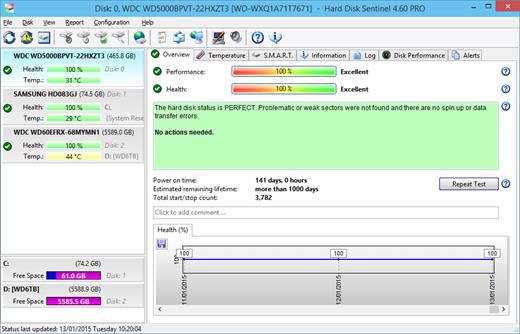
Hard Disk Sentinel gives complete textual description, tips and displays/reports the most comprehensive information about the hard disks and solid state disks inside the computer or in external enclosures (USB / e-SATA). Many different alerts and report options are available to ensure maximum safety of your valuable data.

The software monitors hard disk drive / HDD status, including health, temperature and all S.M.A.R.T. (Self-Monitoring, Analysis and Reporting Technology, built in most hard disks, solid state disks and hybrid drives (SSHD) today) values for each disks. Also it measures the disk transfer speed in real time which can be used as a benchmark or to detect possible hard disk failures, performance degradations,

HDSentinel is the perfect data protection solution: it can be effectively used to prevent HDD failure and SSD / HDD data loss because it has the most sensitive hard disk health rating system which is extremely sensitive to hard disk problems. This way even a small HDD problem can't be missed. The Professional version has scheduled and automatic (on-problem) hard disk backup options to prevent data loss caused by not only failure but by malware or accidental delete also.

Features of Hard Disk Sentinel Professional

Easy to use interface
All information are displayed in the main window of the application. Quick controls allow easy navigation to access all hard disks, partitions and different information. Intuitive user interface elements display information by using green/yellow/red color to indicate the level of problem. Detailed text description and context sensitive help guides the user thru the features and options.

1. Install > 2. Configure > 3. Stay protected
Just install, configure alerts and backup functions and your system is now safe. You'll be notified about the problems - but if everything is correct, Hard Disk Sentinel just sits on tray and displays current status. The data is protected 24 hours daily, 7 days a week.

Hard Disk Management
Control Advanced Power Management level and adjust Free Fall Control sensitivity of hard disks to maximise hard disk performance and data safety.

Backup
Wide range of automatic backup methods are available: to backup data to local computer, to a LAN server or to a remote server by transferring files via FTP (or even by e-mail). It is possible to use 3rd party tools to create archives or burn CD/DVD media. Hard Disk Sentinel Professional can manage power status of remote computers in the network, so it is possible to automatically power on and shut down remote computers, for example a backup server.

API Interface For Developers
With the API it is possible to query detected hard disk information from the software. This way 3rd party software can log, display or otherwise process detected hard disk drive information including temperature, health and so.

Remote Monitoring
Hard Disk Sentinel Professional offers extensive remote monitoring capabilities. Hard disk status can be checked remotely by a web browser, even by a mobile phone or a PDA.

Instant S.M.A.R.T. analysing
Hard Disk Sentinel can communicate with all IDE, Serial ATA, NVMe, SCSI, SAS and most USB hard disk drives, SSD and hybrid drives (SSHD) to detect their status and temperature. Hard disk status are displayed immediately as you launch the application, there is no need to analyse hard disks for a long period. It displays the current and maximum temperature for the hard disk. It reads all general and vendor-specific attributes and monitor their values. For advanced users, all raw data are displayed also including power-on time and number of read/write errors. Hard Disk Sentinel interprets the performance and fitness related S.M.A.R.T. values and displays the calculated Performance and Health percentage, total power on time and estimated lifetime remaining.

Hard Disk Hardware and Software Tests
By using Hard Disk Sentinel, it is possible to start hardware hard disk self tests. These tests can be used to effectively find all hard disk problems because built-in hardware methods are used to verify hard disk components (for example heads, servo, internal buffer in the Short self test). The Extended self test also verifies the complete hard disk surface, finds and repairs all weak areas and re-allocates the possible bad sectors. This is not possible with the software-based hard disk surface scan methods (for example, by using scandisk).

Seek Noise Test
Seek Test - to verify hard disk noise, seek time performance and temperature. Longer tests can be used as very deep and intensive stress-tests for the hard disk and verify if additional cooling is required.

Enhanced Hard Disk Tests
Surface Test - to verify hard disk surface with intensive hard disk testing methods to reveal and fix hard disk problems. Surface reinitialisation resets all sectors to factory default states. Different destructive and non-destructive tests are available to re-fresh the condition of any hard disk drives, solid state disks or even your pendrives or memory cards.

Logging
Hard Disk Sentinel logs all degradations in all SMART parameters and issues alerts in such cases to maximise data protection. For example, if a new bad sector is found on your hard disk, you will be notified.

Alerts
Hard Disk Sentinel has wide range of alerts upon different problems. It can send e-mail (with e-mail->SMS gateway it can be SMS warning to your mobile), network message, can play sound alerts and so.It can execute various tasks (automatic panic backup or any configured external applications) in case of a problem.There is an option to send daily emails about current status.

Shutdown
Offers option to shut down the computer on hard disk failure, HDD overheat or health degradation. This option can be used in combination of the alerts to prevent further data loss.

Hard Disk Details
Detects and displays every information about the hard disk, from the revision number and buffer size to all features it has. The maximum available and current transfer modes are also displayed.

HDD status in Windows Explorer
View the current health status and used space in Windows Explorer or in any other application, so you'll always know the amount of used space for each partitions and the hard disk drive condition.

Hard disk health and used space displayed on hard disk icons
Information on demand
Current hard disk temperatures and health are displyed on the system tray and can be displayed in a small status window, the desktop itself or in a sidebar gadget (under Windows Vista or newer operating system). Average and maximum temperatures are logged for all hard disks and these informations are displayed in graphs for statistical purposes.

Hard Disk Performance
Logs how much data were read from or written to the hard disk. Displays current transfer rates for both reading and writing and estimates the maximum available (theoretical) transfer rate for a particular hard disk.

Hard Disk Partitions
Displays partitions for each physical hard disks and type and usage informations about them so you cannot run out of space. Hard Disk Sentinel sends this information automatically in alert/status messages.

Acoustic Management
Offers option to control the acoustic level of IDE/S-ATA hard disk. It is possible to increase performance or make the hard disk drives more silent. Unique feature: control the acoustic level of your external USB hard disk (if your USB enclosure is equipped with one of the proper USB-ATA bridge chips which supports this feature).

Clock Synchronization
It offers option to synchronize the PC clock with an atomic clock via NTP (Network Time Protocol).

Release Name: Hard Disk Sentinel Pro 6.40.2 Beta
Size: 40.9 MB
Links: HOMEPAGE – NFO – Torrent Search

Download: RAPiDGATOR

5 Comments
June 1

Markdown Monster 4.4

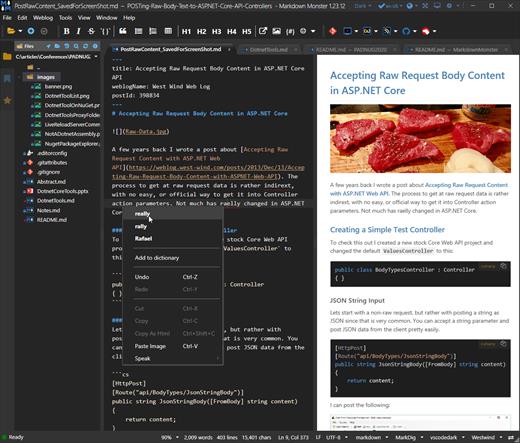
Description: Markdown Monster is a powerful, yet easy to use, dedicated Markdown editor with syntax highlighting and sophisticated and fast edit features. A collapsible, synced, live preview lets you see your output as you type and scroll. Easily embed or paste images, links, tables and code using raw markup or our smart UI helpers to simplify many operations with a few keystrokes or a click or two. Paste images from the clipboard or drag and drop from Explorer or our built-in file browser. Inline spell-checking and word counts keep your content streamlined.

You can export Markdown to PDF or HTML on disk or copy Markdown selections as HTML to the clipboard. The HTML preview can display syntax colored code snippets for most coding languages.

Choose from light or dark app themes and individually selectable and customizable preview and editor themes. Use the built-in folder browser to open, manage and drag files into content, the document outline to quickly jump through your open document, or the shell integration to shell out to Explorer, Terminal, Image Editor, Diff tool or your favorite Git client. Git support is also built-in to see local Git status and to commit to and update your repositories.

Everything is at your finger tips, but out of your way until you need it. .

Weblog Publishing
Markdown Monster can also publish your Markdown directly to your Weblog Service. If your blog supports WordPress, MetaWeblog, Jekyll or Medium, you can publish your documents with one click. You can also edit and republish, or download existing posts and even convert existing posts from HTML to Markdown.

Extensible via .NET
We also wanted to make sure the editor is highly extensible, so you can add custom features of your own. Markdown Monster includes an addin model that makes it easy to build extensions that let you hook into the UI, the editor behavior, markdown rendering and the publishing process. We also provide useful Scripting and Text Templating addins that let you automate many tasks without creating an addin. Find out more about creating an addin with .NET.

Features:
Easy and fast Markdown editing
Syntax colored Markdown text
Live Preview while you type
Inline spell checking
Easy image and link embedding
Paste images from Clipboard
Gentle toolbar support
File and Folder Browser
Favorites Manager
Document Outline
Git Integration
Built in screen capture
Two-way Table Editor
Import Html to Markdown
Export Markdown to Html
Dark and Light UI Themes
Customizable Preview Themes
High DPI Support
Weblog Publishing and Editing
Yaml Meta Data Support
Snippet Expansion Templates
Swappable Markdown Parsers
Extensible with .NET Add-ins

System Requirements:
Microsoft Windows 10 or later
.NET 7.0 (pre-installed)
WebView2 Runtime (pre-installed)

Release Name: Markdown Monster 4.4
Size: 19.9 MB
Links: HOMEPAGE – NFO – Torrent Search

Download: RAPiDGATOR

5 Comments
June 1

Any Video Downloader Pro 10.4

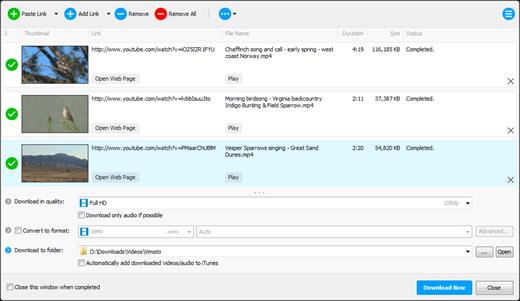
Description: Any Video Downloader Pro, formerly known as HD Video Downloader Pro, is a Windows app to help you download videos from YouTube, Facebook, Dailymotion, and thousands of other video sharing sites. It accelerates your downloads by up to 5 times.

Features
• Download videos from YouTube and thousands of other video sharing sites
Any Video Downloader Pro can download videos from YouTube, Facebook, Dailymotion, Vimeo, and thousands of other video sharing sites.
• Download HD videos from video sharing sites
You can download 720p, 1080p, 2K, 4K, 5K, 8K, and 3D videos from YouTube if they are available.
• Speed up your downloads
Any Video Downloader Pro features a multi-threaded acceleration engine that can boost your download speeds by up to 500% faster.
• Download multiple videos at a time
Any Video Downloader Pro supports simultaneous downloads. It allows you to download more than one video at a time.
• Pause and resume downloads
Any Video Downloader Pro allows you to pause and resume your downloads if you need more connection to perform other important tasks.
• Preview videos while downloading
While downloading, you can click the Preview button to play the incomplete file and make sure the content you are downloading is really the content of your choice.
• Download whole playlist from YouTube
Just enter a YouTube playlist link or ID, Any Video Downloader Pro will download all or part of videos in the playlist from YouTube for you.
• Download only audio stream from YouTube
Any Video Downloader Pro can download only audio stream from YouTube, without downloading the entire video file. The audio stream is small, so you can download it in just a few seconds.
• Convert and optimize downloaded videos
Any Video Downloader Pro can convert and optimize downloaded videos to any format for any device, so you can watch them on your PC, iPhone, iPad, Android phone, and other portable devices. It supports MP4, FLV, WMV, MOV, AVI, MPG, VOB, M4V, ASF, MKV, WEBM, 3GP, etc.
• Video to MP3
Any Video Downloader Pro allows you to extract audio stream from video file and save it as MP3, WAV, WMA, AC3, AAC, OGG, M4A, ringtone, or other audio format.
• Any Video Converter
Any Video Downloader Pro includes a powerful video and audio converter for converting your disk video/audio files to any format you wish so that they are playable on your mobile device.
• Ready-made presets
Any Video Downloader Pro provides ready-made presets for all popular video and audio formats. You can also custom output video/audio format settings.
• iTunes compatible
Optionally, Any Video Downloader Pro adds downloaded video/music to your iTunes library automatically, so you can easily synchronize your videos and music to your iPhone, iPad, iPod.
• Support drag-and-drop
You can directly drag and drop a video link from your web browser to the drop box or the main window of the program. You don't even need to copy and paste video link manually.
• Search for videos on the web
Any Video Downloader Pro has a built-in video search engine. You can easily search for videos on the web within the program and download any video with just one click.

Release Name: Any Video Downloader Pro 10.4
Size: 177.7 MB
Links: HOMEPAGE – NFO – Torrent Search

Download: RAPiDGATOR
5 Comments
June 1

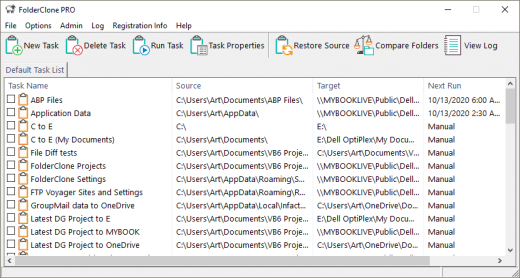
FolderClone Professional 4.0.1

Description: FolderClone is beneficial to individual users, small businesses (SOHO), and large corporations. Individual users will find it essential for backing up their data files and/or synchronizing their laptops to their desktops, to external drives, or to cloud storage providers.

For large enterprises and small businesses alike, FolderClone is part of the network infrastructure needed to maintain high file availability, protect your files, and share files throughout your organization.

FolderClone arranges your backup jobs in sets of “tasks”. A task is a set of specifications which tells FolderClone what files/folders you want to copy, where you want them copied, and how often you want this done. Once configured, the software compares the “source” folder against the “target” folder at the user-defined time intervals. Changes or additions to the source folder are copied to the target folder. Items which exist on the target folder but not on the source folder are deleted. (Optionally, you can turn off file deletions). This process runs automatically in the background with no further user interaction required.
FolderClone is not intended to back up complete systems, including operating system files and installed applications. Its primary use is to back up data files that would be irreplaceable should a disaster occur.

Key Features - standard
- Easy to use, Interface for simple creation and maintenance of synchronization tasks.
- Four file comparison methods: Date/Time, Size, Contents, and CRC32
- Uni-directional synchronization, replication, mirroring of data from Source folder to Target Folder
- One-to-many synchronization is supported. One Source folder may be synchronized with multiple Target folders.
- Uses native operating system APIs for scanning directories and copying files for optimum performance.
- Assembly Language routines are also utilized for blazingly fast execution.
- File copy only occurs if target files are actually different than the matching source file, reducing file transfer requirements.
- Multiple Copy Options: Including the ability to maintain the source file's create time stamp, and a Safe Copy option which ensures that the target file is not deleted unless the copy operation is successful.
- Four Delete Options: Delete Permanently, Send To Recycle Bin, Do Not Delete, and Secure Delete. The Secure Delete option wipes the data from the disk so that the file can not be restored by an undelete utility.
- Option to Include/Exclude Sub Folders
- Option to include "All Files and Folders" or "Only Selected Files and Folders"
- Loads at Windows Startup and resides in the System Tray
- Runs unattended in the background and checks folders at user defined intervals
- Interval options include: Manual, Every Few Minutes, Every Few Hours, Every Few Days, Only On Selected Days, First Day of Month, and Last Day of Month.
- Process Priority rules can be defined to allow control of CPU utilization during certain hours of the day.
- Can Ignore the FAT/NTFS time stamp issues of "2 second difference" and "daylight savings time difference"
- All synchronization activity and errors are logged. Or optionally, only errors are logged.
- Log size limit can be determined by user
- Scheduled synchronizations can be paused
- In-Progress synchronizations can be canceled
- Folders can be compared and an HTML-formatted report generated
- Lists of synchronization "Tasks" can be Created/Loaded/Saved
- Batch execution of multiple synchronization tasks in a user specified order
- UNC file path names supported
- International date format support
- Password protection is available for Administrators
- Very easy to use
- Extremely cost effective

Key Features - Professional Edition
FolderClone Professional Edition - includes all of the capabilities of FolderClone Standard Edition as well as these additional features

E-mail Notifications
Administrators can be notified when a task begin, ends, or is canceled. E-mail notifications can also be sent when errors occur.
No Email client is required. Requires the use of an SMTP (outgoing mail) server, everything else is built in.

Run a task when first connecting to network
Laptop users can come into the office, dock their computers, and automatically backup their laptop data to another machine on the network. FolderClone Pro will determine when a valid connection exists between the source and target computers and will initiate a task at that time. No user involvement is required.

Copy Open/Locked/In-Use Files
With FolderClone Professional's Open File Manager, there is no need to close applications during a backup. Most open, locked, and in-use files can be copied. SQL Server database files, Access databases, MS Word documents, Excel spreadsheets, and most system files can be copied with ease. (Outlook PST files are not currently supported) Files must be on local computer and user must have administrator privileges. Requires: Windows XP/2000/2003/Vista/Win7.

Define Custom Log File Size
Rather than being required to choose from a list of preset maximum Log sizes, a custom size may be defined.

Copy NTFS Security Attributes
When copying files between NTFS drives, security information such as file ownership and access privileges can be copied along with the file to the destination folder.

Application option settings can be overridden for each individual task
Options are ordinarily set at the application level and are global to all tasks. So, for example, if you choose the 'Do Not Delete' option, this rule is applied when running all tasks. FolderClone Professional gives you the ability to customize most options on an individual task level.

Scheduling option allows for FolderClone Pro to "Run On Windows Startup"
Tasks can be scheduled to run when Windows is started up. FolderClone must be set up to startup with Windows for this to work properly.

Release Name: FolderClone Professional 4.0.1
Size: 11.9 MB
Links: HOMEPAGE – NFO – Torrent Search

Download: RAPiDGATOR

5 Comments
June 1

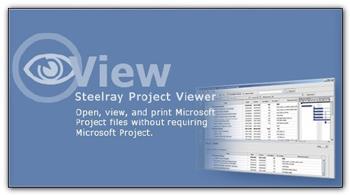
Steelray Project Viewer 6.28.2

Description: Viewers for Microsoft and Primavera Schedules. For team members who only need to view Microsoft Project or P6 schedules. Steelray invented the viewer for Microsoft Project in 2000 and has continuously added innovations and improvements since then. There is no need to import or upload anything – simply open the file as you would with Microsoft Project or Primavera, and you’ll see the same core views and data in the schedule.

Enterprise Ready
Steelray Viewer is used by customers in the industries with the largest project schedules (e.g. Aerospace/Defense, Construction).

Enhanced Printing
Preview all pages, one page or actual size before printing. Scale and see the effects on the output, control page size and orientation and header data. Easier than printing in Project!

Schedule Search
Find what you need rapidly with the first search engine integrated into a project viewer. Search through task information, resource names and dates.

Platform Ready
Opens Microsoft Project files from Microsoft Project 98 through Project 2019. Opens Primavera P6 .XER files.

1-Click Navigation
Click on a task and see the detailed information. Select a resource name and you’ll see the assignments for that resource. Click on a date and see what is starting, finishing and in-progress.

Easy to Use
An improvement on the original, not a clone of Microsoft Project or Primavera. Simplify project data for all who need it.

Release Name: Steelray Project Viewer 6.28.2
Size: 173.5 MB
Links: HOMEPAGE – NFO – Torrent Search

Download: RAPiDGATOR
6 Comments
June 1

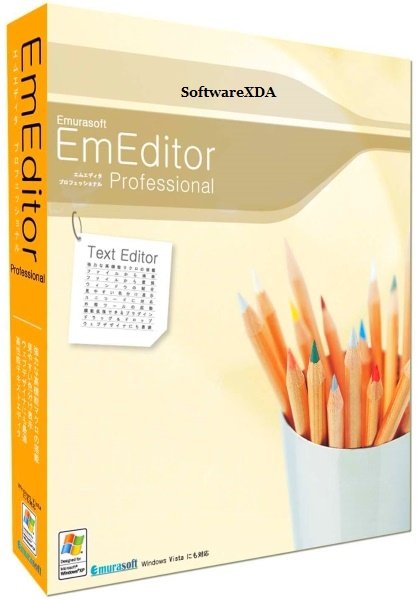
Emurasoft EmEditor Professional 26.1.1

Description: EmEditor is a fast, lightweight, yet extensible, easy-to-use text editor, code editor, CSV editor, and large file viewer for Windows. Both native 64-bit and 32-bit builds are available, and moreover, the 64-bit includes separate builds for SSE2 (128-bit), AVX-2 (256-bit), and AVX-512 (512-bit) instruction sets.

The text editor supports powerful macros, Unicode, CSV, and very large files. Emurasoft’s timeless mission is to achieve our clients’ needs and wants by listening to them with empathy and expertise. We value timely customer support, and are honored to have distinguished users, including major corporations, educational institutions, institutions of the European Union, ministries of Japan, and governments from all over the world.

Release Name: Emurasoft EmEditor Professional 26.1.1
Size: 109.1 MB
Links: HOMEPAGE – NFO – Torrent Search

Download: RAPiDGATOR
5 Comments
June 1

Agisoft Metashape Professional 2.3.1 Build 22580

Description: Agisoft Metashape (formerly PhotoScan) is a stand-alone software product that performs photogrammetric processing of digital images and generates 3D spatial data to be used in GIS applications, cultural heritage documentation, and visual effects production as well as for indirect measurements of objects of various scales.

Wisely implemented digital photogrammetry technique enforced with computer vision methods results in smart automated processing system that, on the one hand, can be managed by a new-comer in the field of photogrammetry, yet, on the other hand, has a lot to offer to a specialist who can adjust the workflow to numerous specific tasks and different types of data. Throughout various case studies Metashape proves to produce quality and accurate results.

Features
Photogrammetric triangulation
Processing of various types of imagery: aerial (nadir, oblique) & close-range.
Auto calibration: frame (incl. fisheye), spherical & cylindrical cameras.
Multi camera projects support.

Dense point cloud: editing and classification
Elaborate model editing for accurate results.
Points classification to customize geometry reconstruction.
.LAS export to benefit from classical point data processing workflow.

Digital elevation model: DSM/DTM export
Digital Surface and/or Digital Terrain Model - depending on the project.
Georeferncing based on EXIF meta data/flight log: GPS/GCPs data.
EPSG registry coordinate systems support: WGS84, UTM, etc.

Georeferenced orthomosaic export
Georeferenced orthomosaic: most-GIS-compatible GeoTIFF format; .KML file to be located on Google Earth.
Export in blocks for huge projects.
Color correction for homogeneous texture.

Measurements: distances, areas, volumes
Inbuilt tools to measure distances, areas and volumes.
To perform more sophisticated metric analysis Metashape products can be smoothly transferred to external tools thanks to a variety of export formats.

Release Name: Agisoft Metashape Professional 2.3.1 Build 22580
Size: 205.1 MB
Links: HOMEPAGE – NFO – Torrent Search

Download: RAPiDGATOR
6 Comments
June 1

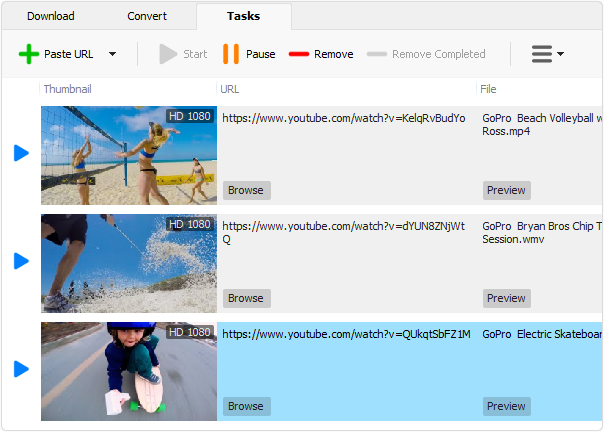
Robin YouTube Video Downloader Pro 7.5

Description: The fastest way to download and convert videos from YouTube. YouTube Video Downloader Pro is a professional Windows app for downloading and converting videos from YouTube, Facebook, TikTok, and thousands of other video sharing sites. It accelerates your downloads by up to 5 times. YouTube Video Downloader Pro allows you to download multiple videos at a time. It also allows you to pause, resume, and cancel downloads at anytime.

Speed up your downloads 
YouTube Video Downloader Pro features an advanced download acceleration engine that lets you download videos up to 5 times faster than normal speed.
YouTube Video Downloader Pro allows you to download multiple videos at a time. It also allows you to pause, resume, and cancel downloads at anytime.
While downloading, you can click "Preview" button to play incomplete video and make sure it is really the video of your choice.

Convert to any format for any device
YouTube Video Downloader Pro can automatically convert downloaded file to any format for any device. It supports MP4, FLV, WMV, MOV, AVI, MPG, VOB, WEBM, DVD, VCD, and many other formats.
YouTube Video Downloader Pro can also extract audio stream from video file, and save it in WAV, WMA, AC3, AAC, OGG, FLAC, MP2, or any other audio format.

iTunes compatible
Optionally, YouTube Video Downloader Pro can automatically add downloaded video files to your iTunes library, so you can easily synchronize your videos to your iPhone, iPad, iPod, etc.

Release Name: Robin YouTube Video Downloader Pro 7.5
Size: 73.8 MB
Links: HOMEPAGE – NFO – Torrent Search

Download: RAPiDGATOR

4 Comments
June 1

MedCalc 23.5.9

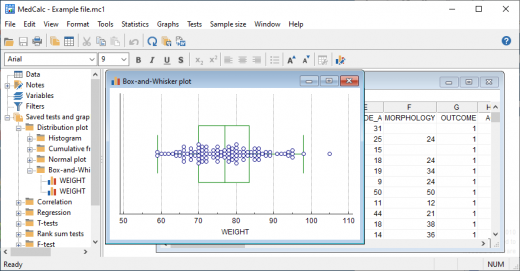
Description: MedCalc is a statistical software package for biomedical research. Includes more than 220 statistical tests, procedures and graphs. ROC curve analysis, method comparison and quality control tools. Minimal learning curve. Developed since 1993.

Easy to learn, fast and reliable
MedCalc includes more than 220 statistical tests, procedures and graphs
save graphs in SVG, PNG, JPG, high resolution TIF, or other file formats, or as PowerPoint slides (*.pptx).
free updates
available with an English, Chinese (simplified and traditional), French, German, Italian, Japanese, Korean, Polish, Portuguese (Brazilian), Russian and Spanish user-interface (help file and documentation in English)
one edition includes all features (do not pay extra for the functions you really need).
compatible with all contemporary Windows desktop editions

Data management
Integrated spreadsheet with 1 048 576 rows and 16 384 columns.
Correct handling of missing data.
Outliers can easily be excluded.
Built-in WYSIWYG text editor.
Imports Excel, Excel 2007, SPSS, DBase and Lotus files, and files in SYLK, DIF or plain text format.
Easy selection of subgroups for statistical analysis.

MedCalc Documentation
Complete HTML manual on MedCalc web site.
Comprehensive context-sensitive help.
Context help in dialog boxes.

ROC curve analysis
MedCalc is the reference software for ROC curve analysis. Our ROC curve analysis module includes:
Area Under the Curve (AUC) with standard error, 95% confidence interval, P-value. Offers choice between methodology of DeLong et al. (1988) and Hanley & McNeil (1982, 1983).
List of sensitivity, specificity, likelihood ratios, and positive and negative predictive values for all possible threshold values.
ROC curve graph with 95% Confidence Bounds.
Threshold values can be selected in an interactive dot diagram with automatic calculation of corresponding sensitivity and specificity.
Plot of sensitivity and specificity, or cost, versus criterion values.
Plot of predictive values versus prevalence.
Interval likelihood ratios.
Comparison of up to 6 ROC curves: difference between the areas under the ROC curves, with standard error, 95% confidence interval and P-value.
Sample size calculation for area under ROC curve and comparison of ROC curves.
Go to the ROC curve analysis section of the MedCalc manual for more information on ROC curve analysis in MedCalc.

Graphs
Lots of graphs, see Graph gallery.
Data point identification in graphs.
Draw text boxes, lines, arrows and connectors.
Name, save and recall graphs and statistics.
Statistical info in graph windows.
Save graphs as SVG, PNG, JPG, GIF, BMP, PCX, or high resolution TIF files, or as PowerPoint slides (*.pptx).

Release Name: MedCalc 23.5.9
Size: 173.1 MB
Links: HOMEPAGE – NFO – Torrent Search

Download: RAPiDGATOR
6 Comments
June 1

Coolmuster Android Backup Manager 3.5.33

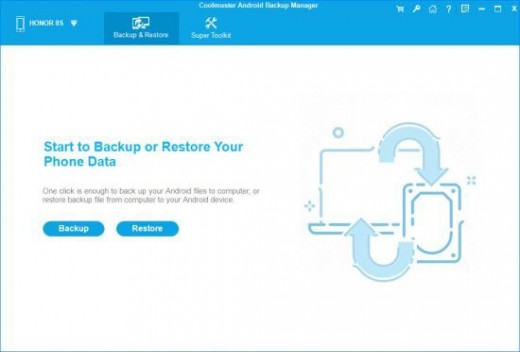
Description: Back Up and Restore Android Data with 1 Click. Back up everything on Android phone to PC with 1 click. Restore Android from backup file on PC with 1 click. Support contacts, text messages, call logs, music, videos, photos, books and apps. READ-ONLY, fast transfer, multiple device management, ad-free, green, easy-to-use, etc. Fully compatible with almost all Android phones and tablets.

Why Should You Choose Coolmuster Android Backup Manager?

Back Up Android Phone in 1 Click
Wondering how to back up everything on Android phone effortlessly? This Android backup software allows you to back up Android phone to PC in one click and endows you with the full right to back up Android phone data with ease. User-friendly Backup Process: With no special technical skills required, you can freely choose to back up either all or any target data types on Android device without quality loss, customize the storage location of backup files, and also track the backup progress.

Multiple File Types Supported: Various file types are supported for Android backup management, such as contacts, messages, call logs, photos, music, videos, documents and user apps.

Restore Android from Backup in 1 Click
Want to make an Android backup and restore to a new phone? Whenever you need to switch to a new Android phone or share data with the other Android device, this Android data backup & restore app is always at your services, helping with Android restore from backup with one click.

Customized Restore Process: It can quickly scan out and list all the backup files you've made on your computer, you can freely choose to restore any listed backup file and any target file types into any connected Android device.

Other Restore Utilities: Can't find the backup file you've made from the list? No worries, you can add the previous backup file with the "Add Backup Folder" feature. Also, the exiting data on your Android phone won't be deleted unless you've chosen to clear data before restoring as it supports.

2 Device Connection Methods: USB and Wi-Fi
Coolmuster Android Backup Manager provides two ways to connect Android device to this software for successful Android data backup and restore: USB connection and Wi-Fi connection. You can freely choose either way you want.

Connect via USB Cable: Usually, you can connect your Android device to computer with a USB cable for a more stable connection, which is easy and also ensure fast Android data backup and restore.

Connect via Wi-Fi: With no USB cable around? Don't worry, you can also connect the Android phone to computer with stable Wi-Fi by scanning the QR code of this program, and wirelessly back up and restore Android data.

High Compatibility, Fast Transfer, Read Only, etc.
After rigorous testing, Coolmuster Android Backup Manager works well with almost all Android devices, and also stands out with various attractive features.

Supported Android Devices: Almost all Android phones and tablets in different phone brands and models are supported, such as Samsung, Xiaomi, OPPO, Oneplus, TECNO, Infinix, Itel, vivo, Motorola, Honor, and so forth.

Highlighted Features: It's easy and fast to back up and restore Android data, READ-ONLY for Android data without damaging or leaking out users' personal data, able to manage multiple Android devices simultaneously, green, ad-free and light in size.

Release Name: Coolmuster Android Backup Manager 3.5.33
Size: 21.7 MB
Links: HOMEPAGE – NFO – Torrent Search

Download: RAPiDGATOR
4 Comments