Please REGISTER or RENEW your account on RAPiDGATOR.net and support us by doing through all RAPiDGATOR working download links on main posts...
June 9

IDM UltraEdit 33.0.0.21

If you need a text editor, you need UltraEdit. UltraEdit is the most flexible, powerful, and secure text editor.

What can UltraEdit do for a system administrator?
Exact search (including multi-line and binary character search)
Pattern or wildcard search
Replace text can even preserve the case of the original!
Disk based text editing
Supports files in excess of 4 gigabytes
Minimum RAM used even for multi-megabyte files
Insert string at every increment
Ideal for formatting database records
Column/block mode text editing
Allows insertion/removal of columns of data
Insert/fill columns
Insert line numbers
Sum columns/selection
Convert to fixed column
Convert to character delimited

An editor that makes programming and development easier.
Color coded editor, syntax highlighting, and bookmarks!
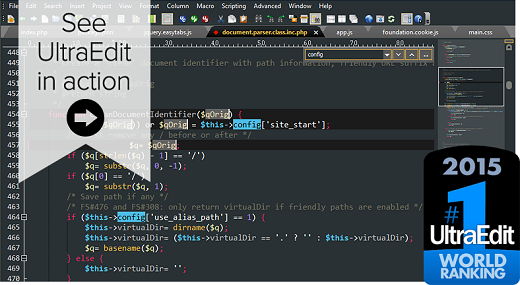
UltraEdit delivers easy viewing and editing of code and variables. In addition to the standard editing functions such as undo, copy and paste, and searching, UltraEdit’s color-coded editor allows programmers to decipher different code types and variables, and you are going to love the powerful code-folding too. Additional productivity enhancing features include delimiter matching that shows you the location of the opening and closing of parentheses, and bookmarking which helps you remember and find significant sections of code such as subroutines and constant declarations.

Dynamic code auto-completion with IntelliTips
Intellitips provides code and context-aware auto-complete suggestions. This offers class members, functional tips, and intuitive prompts for most modern programming languages. The level of automation can be configured.

Multi-caret/multi-select
One of the most powerful and intuitive multi-caret editing and multi-selection capabilities in the business. Once your cursors or selections are where you want them to be, you can copy, cut, paste, select and delete just the same as you normally would.

HTML / Markdown live preview
Watch your HTML or Markdown pages rendered in real time with live preview—even as you edit them. Also comes with Github Flavored Markdown (GFM) code highlighting and compatibility.
Double-click an element in the preview to jump to its definition in source.

Search
UltraEdit’s omniscient search can find files across folders and directories even on files as large as 4GB. Use various filters such as regular expressions to fine tune search

Integrated FTP, SSH & Telnet
Whether you need to make quick edits to a file on a server or upload a massive codebase, UltraEdit’s integrated FTP capabilities and SSH/Telnet make it easy to work with remote files and interact with servers from a single, powerful application.

Column mode
When editing horizontally just isn’t quite good enough, Column Mode is there for you. Use Column Mode to intuitively edit along the Y axis anywhere in your document. It’s just one of the many powerful ways UltraEdit helps you edit tabular data or code files.

Customizable UI
The user interface has been built with customizability in mind.
Our menu system has been rebuilt from the ground up to make it even more customizable than ever. Our deeply customizable new menu can be laid out however you’d like. Set yourself up with Ribbon mode for a familiar look and feel. Or maybe you prefer the simple toolbar with only your most commonly needed features. The possibilities are endless.

Themes
Themes allow users to configure UI systems, menu layouts, and colors.
Choose from our core themes or from our user-contributed submissions to get UltraEdit exactly how you like it. Feel free to modify it too.

Release Name: IDM UltraEdit 33.0.0.21
Size: 438.8 MB
Links: HOMEPAGE – NFO – Torrent Search

Download: RAPiDGATOR

6 Comments
June 9

Key Metric FolderSizes 10.1.56 Enterprise

Description: Fast, powerful, pro disk space analysis software for Windows. Desktop PCs, laptops and servers can quickly end up accumulating large quantities of unused, temporary, and duplicate files. Before you know it, you're out of disk space, backups are taking far too long to run, users can’t find what they need, and you're struggling to plan for the future.

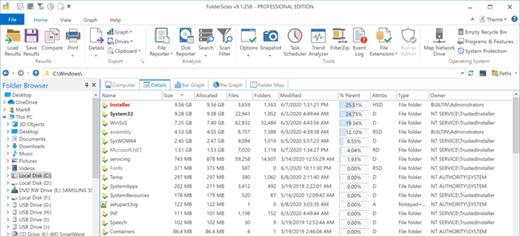
You need a visual, interactive software tool to help you manage disk space. You need FolderSizes - the award-winning, network-enabled disk space analyzer for Windows. It can quickly isolate large, old, temporary, and duplicate files, or even show file distribution by type, size, attributes, age, depth, or owner. All with multiple export formats, command-line support, report scheduling, and much more.

Scheduling and email integration
Robust, built-in report scheduling with email delivery support

Folder and disk trends
Trend analysis features show disk usage and folder sizes over time

File system snapshots
Unique and powerful file system snapshot capability

Disk space bar, pie, and treemap
Stunning disk space visualizations – bar, pie, and treemap views

Fast disk space reporting
Performance & scalability – analyze any file system with confidence

Analyze network disk space
Network share discovery for servers, storage devices, and domains

FolderSizes goes far beyond the capabilities of existing disk space analysis tools with superior features and performance. Try it and see why so many customers depend on FolderSizes.

File system search
Search for files and folders by age, name, attributes, size, owner, & more

Largest, oldest, newest, duplicate, and temp files
Quickly isolate largest files, oldest files, duplicate files, and temp files

Report files by type, age, owner, depth, attributes
Reports for file types, attributes, owners, sizes, names, ages, & depths

Export file system analysis data
Export reports to MS Excel, PDF, HTML, CSV, and TXT file formats

Re-load and compare file system analysis reports
Save, re-load, and compare folder size report data

Windows software
Built by trusted leaders in secure Windows software

Release Name: Key Metric FolderSizes 10.1.56 Enterprise
Size: 23.8 MB
Links: HOMEPAGE – NFO – Torrent Search

Download: RAPiDGATOR

6 Comments
June 9

Database Tour Pro 11.6.9.2211

Description: Database Tour Pro is a comprehensive software application that enables you to organize all your connected databases. It offers support for Borland Database Engine (BDE) and Microsoft ActiveX Data Objects (ADO), SQL scripts, reports, along with data conversion and exporting, among others.

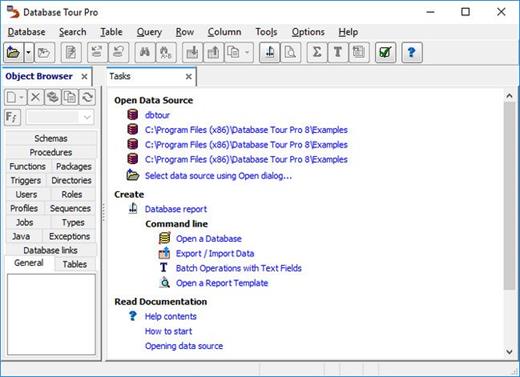
Wrapped up in a large window with a well-structured layout, the interface seems outdated. It contains an object browser for functions, packages, triggers, directories, users, roles, profiles, sequences, jobs, types, Java, exceptions, database links, general properties, tables, schemas, and procedures.

Manage tables and queries
Tables can be created, deleted, emptied, duplicated, renamed or packed. You can allow table editing, view deleted records, set a table password, change the language driver, add, remove, rename and resize fields, add, delete or regenerate indexes, check out the table family, as well as verify referential integrity.
When it comes to queries, Database Tour Pro lets you save, load and print SQL scripts or history, and explore a wide range of predefined query templates which can be seamlessly inserted into the project, like select, update, insert and delete, add or drop field, and create view or create table.

Encrypt databases and build reports
It's possible to isolate, start, commit and roll back transactions, review the database history, clear the password list, resort to a search-and-replace function, as well as locate objects and fields.
The software utility puts a bunch of useful tools at your disposal, including arithmetic functions, batch operations with text fields, a report builder and previewer, printer for table data, data importer and exporter, file encryption and decryption, in addition to a command-line generator.

Features
- Accessing different types of databases.
- Creating tables.
- Viewing data.
- Editing data.
- Several ways to print data.
- Built-in report engine, which allows to produce the reports automatically or by using a visual report designer with templates, expressions, preview etc.
- Expression builder for report expressions.
- Building and executing SQL queries.
- Support for execution of multi statement SQL scripts.
- Syntax highlighting in SQL editor.
- Support for parameterized SQL queries.
- Enhanced database grids, which allow to view and manipulate the data in the most convenient way, including sorting by clicking column header, changing row heights, resizing columns etc.
- Creating, deleting, modifying BDE aliases.
- Command line support for executing queries, opening tables, export-import operations, loading reports etc. with logging the performed operations.
- Searching and replacing text in database with ability to choose fields, record range etc.
- Importing data to table from another table or a query.
- Exporting data from open table or query to large number of file formats like text, CSV, HTML, XLS, XML, RTF, DBF or to any of supported database formats.
- Copying data to clipboard.
- Calculating numeric fields (sum, avg, min, max, count).
- Viewing and editing Blob data, such as MEMO, graphic, RTF.
- Tools for editing text fields (trimming, changing case of symbols, replacing text).
- Sorting (logical and physical) data.
- Filtering data according to user's criteria.
- Viewing table and database structure with ability to print, copy, sort it.
- Reindexing tables.
- Customized data view (font, background).
- Conditional formatting data in database grids and reports.
- Ability to control transactions manually.
- Storing database and SQL history.

Release Name: Database Tour Pro 11.6.9.2211
Size: 28.7 MB
Links: HOMEPAGE – NFO – Torrent Search

Download: RAPiDGATOR

6 Comments
June 9

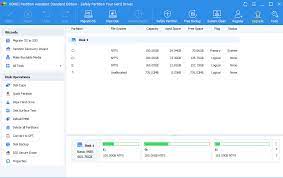
AOMEI Partition Assistant 10.11

Editions: All Editions

Description: All-in-one partition management toolkit and disk performance optimizer for enterprises Trusted by world's biggest brands. AOMEI Partition Assistant is an all-inclusive hard disk partition software which is especially designed for enterprises. It provides comprehensive solutions for how to improve the disk performance to meet your business convenience.

One-Stop Disk Partition Toolkit for Enterprises
Easily and safely manage disk partitions on unlimited PCs & servers for enterprises.

Improve Disk Performance
Not satisfied with the status of computer’s hard drives? Re-partition the hard drive to maximize the disk space utilization and make it more reasonable for your business.

Re-Partition Hard Drive
Resize, move, extend, shrink, delete, merge partitions, create, split, format partition, and allocate free space to maximize disk space usage and make partitions more reasonable.

Manage Hard Disk Partition
Initialize disk, rebuild MBR, change label, change drive letter, change serials number, change partition ID, hide/unhide partition to manage hard disk better.

Disk Converter
Convert disk between MBR and GPT, convert disk between dynamic and basic, convert partition between primary and basic, convert file system between NTFS and FAT32 without data loss.

System and Data Migration
Need to migrate OS to SSD, upgrade HDD to SSD, or replace a small hard drive with a larger one? Or just want to move some applications to another partition or disk? This hard disk manager can help move OS or application to another location without reinstalling, and you can load the OS or app without any issues.

Migrate OS to SSD/HDD
Migrate only OS partition from HDD to SSD or HDD without reinstalling Windows operating system, fully bootable and exactly like the original.

Disk/Partition Clone
Transfer all data from one hard disk or one partition to another hard disk or partition without losing any important data.

App Mover
Move applications from one partition to another one, transfer Cache, Downloads or other big folder to another location to save the drive space.

Data Recovery & Anti-Recovery
Want to recover unexpected lost or deleted partition and data? This program will help you recover lost partition or deleted data from different data storage devices. If you need to permanently delete data, this tool will wipe data totally that no one can revert it back.

Files Recovery
Recover all types of files, including photos, videos, PDF, Excel, Word, and many more from various storage devices.

Partition Recovery
Fast search helps you quickly recover deleted or lost partition. Full search will scan each sector of the selected disk for recovery.

Shred Files
Shred files and folders that no one can revert it back. Keep the deleted files safe from data breach.

Wipe Data
Wipe data on the partition or hard drive completely. No one can recover the wiped partition by any recovery software.

Cater to Business Convenience
You may be away on business and do not want to bring a heavy laptop, but you want to use the OS you are familiar with. This partition manager software can bring Windows to USB so that you can boot any computer in any where with your own operating system.

Windows To Go Creator
Build a portable and fully functional Windows OS on USB drive. Bring your own device(BYOD) and keep your own work environment everywhere.

Create Bootable Media
Create a bootable media to troubleshoot problems or recover data when system fails to boot.

Portable USB Version
Install AOMEI Partition Assistant to a removable device so that directly run it on target computers without installing again.

Supported Operating Systems:
Windows 11/10/8.1/8/7
Windows Server 2012 and 2012 R2
Windows Server 2025
Windows Server 2022
Windows Server 2019
Windows Server 2016

Release Name: AOMEI Partition Assistant 10.11
Size: 85.2 MB
Links: HOMEPAGE – NFO – Torrent Search

Download: RAPiDGATOR

5 Comments
June 9

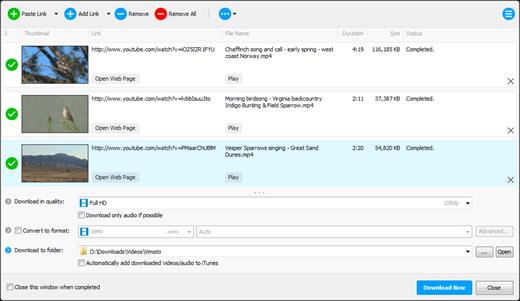
Any Video Downloader Pro 10.4.1

Description: Any Video Downloader Pro, formerly known as HD Video Downloader Pro, is a Windows app to help you download videos from YouTube, Facebook, Dailymotion, and thousands of other video sharing sites. It accelerates your downloads by up to 5 times.

Features
• Download videos from YouTube and thousands of other video sharing sites
Any Video Downloader Pro can download videos from YouTube, Facebook, Dailymotion, Vimeo, and thousands of other video sharing sites.
• Download HD videos from video sharing sites
You can download 720p, 1080p, 2K, 4K, 5K, 8K, and 3D videos from YouTube if they are available.
• Speed up your downloads
Any Video Downloader Pro features a multi-threaded acceleration engine that can boost your download speeds by up to 500% faster.
• Download multiple videos at a time
Any Video Downloader Pro supports simultaneous downloads. It allows you to download more than one video at a time.
• Pause and resume downloads
Any Video Downloader Pro allows you to pause and resume your downloads if you need more connection to perform other important tasks.
• Preview videos while downloading
While downloading, you can click the Preview button to play the incomplete file and make sure the content you are downloading is really the content of your choice.
• Download whole playlist from YouTube
Just enter a YouTube playlist link or ID, Any Video Downloader Pro will download all or part of videos in the playlist from YouTube for you.
• Download only audio stream from YouTube
Any Video Downloader Pro can download only audio stream from YouTube, without downloading the entire video file. The audio stream is small, so you can download it in just a few seconds.
• Convert and optimize downloaded videos
Any Video Downloader Pro can convert and optimize downloaded videos to any format for any device, so you can watch them on your PC, iPhone, iPad, Android phone, and other portable devices. It supports MP4, FLV, WMV, MOV, AVI, MPG, VOB, M4V, ASF, MKV, WEBM, 3GP, etc.
• Video to MP3
Any Video Downloader Pro allows you to extract audio stream from video file and save it as MP3, WAV, WMA, AC3, AAC, OGG, M4A, ringtone, or other audio format.
• Any Video Converter
Any Video Downloader Pro includes a powerful video and audio converter for converting your disk video/audio files to any format you wish so that they are playable on your mobile device.
• Ready-made presets
Any Video Downloader Pro provides ready-made presets for all popular video and audio formats. You can also custom output video/audio format settings.
• iTunes compatible
Optionally, Any Video Downloader Pro adds downloaded video/music to your iTunes library automatically, so you can easily synchronize your videos and music to your iPhone, iPad, iPod.
• Support drag-and-drop
You can directly drag and drop a video link from your web browser to the drop box or the main window of the program. You don't even need to copy and paste video link manually.
• Search for videos on the web
Any Video Downloader Pro has a built-in video search engine. You can easily search for videos on the web within the program and download any video with just one click.

Release Name: Any Video Downloader Pro 10.4.1
Size: 194.4 MB
Links: HOMEPAGE – NFO – Torrent Search

Download: RAPiDGATOR

6 Comments
June 9

ExtraMAME 26.5

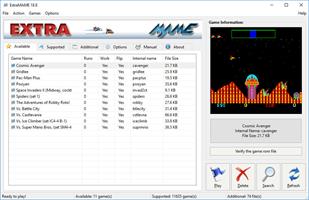
Description: Introducing ExtraMAME, a compact and user-friendly MS Windows GUI wrapper for MAME, the Multiple Arcade Machine Emulator authored by Nicola Salmoria and the MAME team. ExtraMAME allows you to play thousands of classic arcade games on your PC without the need for complex configurations. It’s compatible with all MAME games and supports well-known gaming platforms such as 3DO, Atari, MSX, Namco, Naomi, Neo-Geo, Nintendo, Sega, Taito, and more.

Q. What is ExtraMAME?
A. ExtraMAME is a compact MS Windows compatible GUI wrapper for M.A.M.E., the Multiple Arcade Machine Emulator. It allows you to play thousands of classic arcade games on your computer.

Q. What makes ExtraMAME better than other GUI wrappers for M.A.M.E.?
A. ExtraMAME is compact, easy to use, and doesn’t require you to deal with complex configurations. It’s compatible with all M.A.M.E games.

Release Name: ExtraMAME 26.5
Size: 152.6 MB
Links: HOMEPAGE – NFO – Torrent Search

Download: RAPiDGATOR

6 Comments
June 9

CoolUtils PDF Combine Pro 4.2.0.170/123

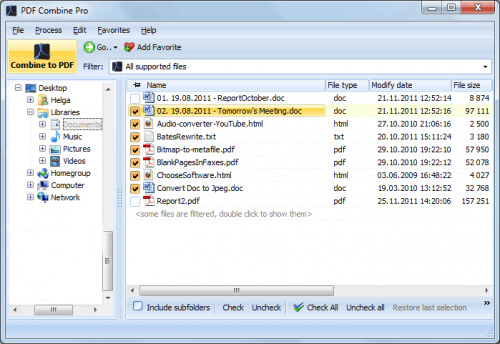
Description: PDF Combine Pro is a life saver for those who need to combine PDF, DOC, TXT, DOCX, HTML, XLS files, images (TIFF, JPEG, PNG) and emails into one PDF. Now you do not have to use several programs and converters to get one PDF. PDF Combine Pro does it in one go. Supported input formats include DOC, DOCX, RTF, TXT, XLS, XLSX, HTML, HTM, MHT, PS, EPS, PRN, PDF, TIFF, JPEG, PNG, PST, EML, MSG.

PDF Combine Pro can combine files within folders. For example, you have 3 folders with different file types inside each. The app can produce three combined PDF files.
It can easily create bookmarks that can be used as table of contents.
Users can add custom Cover pages to the combined PDF.
Legal users will appreciate the flexible bates stamping option.
Transparent user interface and full command line support.

Unique options of PDF Combine Pro
With PDF Combine Pro you can combine PDF files as well as DOC, TXT, XLS, HTML, TIFF, JPEG, PNG into one PDF. A unique all-in-one tool!
Combine PDF, Doc, TXT, TIFF files within folders. If you have 10 folders with multiple files in each, you can get 10 PDF files in one process.
Combine PDF files by common name part. The app can analyze the whole file name or any range of characters you set (i.e. analyzing the first 2 characters PEdouglas.pdf, PEmike.pdf, PEhelen.pdf will be combined into one file).
Want more order? Add pagination. Just tick the box, no additional steps are required.
It's easy to change the order of the docs you want to combine; just drag and drop them up or down.
PDF Combine Pro will also offer you to add your digital signature to the combined PDF file.
The interface is very clear. The wizard helps you to make all the settings.
You can also add bookmarks. Use file names, document titles or external file to create your table of contents.
When you combine files of different formatting, some files may not fit. Use fit-to-page option to properly locate all the files in the output PDF.
Use a duplex printer? PDF Combine solves the problem of printing PDF files double sided with an odd number of pages. It adds a blank page if the file has an odd number of pages, so the next file is not printed on the back side of the previous one.
The built-in Preview panel helps you to view each file either scaled or in actual size.
Our app can also function as PDF encrypter, setting user permissions or password protection.
We also offer a special server PDF Combine Pro (SDK). It has no GUI, no interrupting messages.
PDF Combine Pro can be run via command line (get the ready-to-use command line from GUI settings).

Release Name: CoolUtils PDF Combine Pro 4.2.0.170/123
Size: 411.7 MB
Links: HOMEPAGE – NFO – Torrent Search

Download: RAPiDGATOR

6 Comments
June 9

Ashampoo Photo Optimizer Pro 26.0.4

Description: Photos constitute irreplaceable memories and capture special moments in our lives. But they do not always come out as expected, or leave room for improvement. Ashampoo Photo Optimizer Pro 26 helps you to make the most of your photos in a single click and achieve stunning results almost instantly and automatically–even with handy batch processing!

Efficient image compression with full control
With the new image compression feature, you can perfectly balance quality and file size. JPG, WebP, and PNG files can now be reduced quickly and precisely—including an interactive live before/after preview. As you adjust the settings, you’ll see the expected file size in real time and maintain full control over the final result. Save valuable storage space without visible quality loss—ideal for online use, archiving, or sharing Your images quickly.

Perfect image quality at optimal file size
New image compression with live preview and file size control
27 new LUTs for fresh one-click looks
New photo frames for additional image moods
Modernized user interface
Enhanced RAW support and optimized metadata handling
27 Brand-New LUTs Included!
LUTs (Look-Up Tables) adjust multiple image parameters such as hue, saturation, brightness, and contrast at once, giving photos a completely new look and atmosphere. In this new version, the LUT collection has been significantly expanded: Three new LUTs have been added to each of nine categories—Halloween, Christmas, Autumn, Summer, Vintage, Contrast, HighKey, LowKey, and FX. This means 27 new looks are now available for seasonal images, creative effects, or striking contrast styles.

New frames, new formats, new look
With targeted enhancements, Photo Optimizer has been further refined both visually and technically. New frames expand the existing design library and offer additional options for different image moods. At the same time, the redesigned interface provides a more modern, streamlined appearance without changing the familiar, easy-to-use workflow. In addition, RAW format support has been significantly enhanced and metadata handling optimized for clean and reliable processing.

Perfect results almost instantly
You can spend hours meticulously optimizing every aspect of your photos in search of the perfect look–or you can achieve the same in seconds using our lookup tables crafted by image editing experts. Dissatisfied with the lighting of a whole series of shots? Looking for that uniform exposure across your photo collection? LUTs will fix these issues and add the visual harmony and polish your shots deserve! From now on, visual excellence may always be just one click away!

Level up your vacation, wedding, and party shots!
Straighten misaligned shots, fix perspective errors, or apply a whole range of beautiful effects. Minor issues like red eyes, skin imperfections or stains are now easily fixable. Save time and nerves and achieve stunning results almost instantly with Photo Optimizer!

Important basics and creative freedom
Naturally, Ashampoo Photo Optimizer includes all the usual suspects like image cropping, rotating, watermarking, and softening. But it doesn't stop there. Feel free to get creative with artistic effects and elegant frame designs. Whether you're recovering failed shots, cranking up the image quality by another 5% or just having fun, this is the program for you!

The lifesaver for your vacation shots
Visual blemishes are detected and fixed through careful image analysis. Our carefully crafted algorithm fully automatically optimizes colors, contrasts, and exposure times for single shots or entire collections, turning underwhelming shots into brilliant photos!

A matter of perspective!
Taking shots of buildings often leads to unpleasant, and easily noticeable, perspective distortions, due to the position of the photographer. Buildings and other tall objects almost seem to fall over, putting an unintended comical spin on your photos. Other times, you forgot to bring your tripod and failed to keep your camera completely straight. Enter Photo Optimizer's new perspective correction! Fix horizontal or vertical distortions in just a few clicks and save shots that would have otherwise gone straight to the bin. Give your photos a second chance and get the right perspective, always!

More ease-of-use through favorites
We all have our favorite functions that we most frequently rely on. Now, you no longer have to navigate through various menus and categories to reach them. Ashampoo Photo Optimizer features a customizable "Favorites" menu so you can bundle all your favorite functions in a single instantly accessible location. Need to quickly straighten the horizon after auto-optimization, fix the perspective or do some cropping? Now you can. Genius, right?

Enhance white balance and intensify contrast spreads
White balance is pivotal to the color temperature of your images. Digital cameras are particularly prone to the dreaded bluish cast and dull colors. This leads to photos that seem lifeless and completely devoid of the magic of the moment. Low-contrast images, often due to poor lighting, are another common issue. With the help of custom white balance and contrast spread settings, Photo Optimizer can breathe new life into these otherwise ruined shots! Both features are part of auto-optimization and will auto-enable whenever appropriate!

Photo editing in just a few clicks
The user interface in Photo Optimizer is truly self-explanatory. Functions are arranged into intuitively named categories and never more than two clicks away. Where other photo editors have you wade through manuals, Photo Optimizer gives you results instantly! Everything is simple and logical, there's practically no learning curve. Whether you're a beginner or an advanced user, or maybe you just don't want to spend hours with image tweaking, Ashampoo Photo Optimizer is the program for you.

Versatile export features
Good photos deserve to be seen. That's why we're offering various ways in Photo Optimizer to share your photos with others. This includes email, the free Ashampoo Web and even just setting photos as your desktop background image. If you'd rather go the traditional route and print your photos, you'll love the feature-rich print dialog that not only creates high-quality but also space-efficient print outs, if needed.

Features for perfectionists and creatives
Many sophisticated features are available to those seeking to go beyond auto-optimization. Whether you need to sharpen or soften individual portions, Photo Optimizer offers well-designed tools for every use case. Reduce irritating image noise, adjust color temperatures or crop your images. And for the artist in you, we've also included multiple effects like waves, swirls, even implosion and explosion. There's ample room to experiment.

Naturally-looking portrait enhancements
Faces are the focus of many photos, yet they seldom come out perfect! Enhance your portraits automatically or manually with Photo Optimizer. Fix red eyes and whiten teeth for that dazzling smile. Fix minor glitches with the clone tool and remove stains and other impurities like a pro. Create perfect yet naturally looking portraits in just a few clicks!

Comfortable batch processing
Since Ashampoo Photo Optimizer does so much fully automatically, we've included batch processing to save you time and nerves while the program processes your entire photo library in one go. Select individual images from various sources or entire folders and have Photo Optimizer work its magic. Every image is meticulously analyzed and its quality optimized according to its specific characteristics. Batch-process an entire vacation in one go, polish your wedding or birthday shots and put the fun back into photography.

Release Name: Ashampoo Photo Optimizer Pro 26.0.4
Size: 265.7 MB
Links: HOMEPAGE – NFO – Torrent Search

Download: RAPiDGATOR

6 Comments
June 9

ChrisPC VideoTube Downloader Pro 15.26.0608

Description: A powerful software that allows you to download videos from BBC iPlayer, YouTube, Vimeo, Dailymotion, Metacafe, Viaplay & convert them to video formats compatible with iPad, iPhone, MPEG-4, MP3.

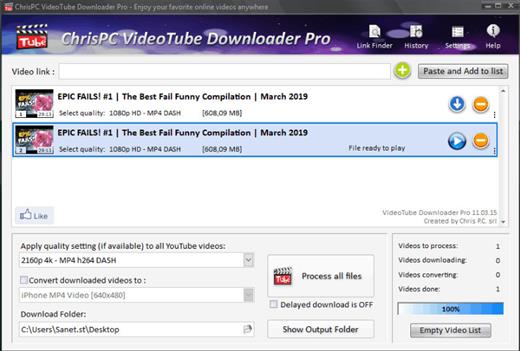
ChrisPC VideoTube Downloader is a powerful software with a friendly user interface that allows you to download videos and playlists from YouTube, videos from Dailymotion, BBC iPlayer, ITV Player, Viaplay, ABC, FOX, CBS.com, Vimeo, Prosieben, Metacafe, CBC.ca many more video websites. Once the videos are downloaded, you can convert them to formats compatible with iPad, iPhone, iPod, MPEG-4 H.264, MP3, AC3.

Version 14 comes with new features and improvements:
Added new advanced features Playlist Preview and Playlist History for YouTube videos, that lets you easily find the videos you want to download from a playlist.
The Playlist Preview loads all available videos from a playlist and lets you filter/search the list by name. You can also sort the list alphabetically, by duration or author.
Video selection can be made individually by clicking the checkboxes from 1st column or by batch using the SHIFT key and UP/DOWN arrow keys (or mouse) and pressing the SPACE key.
With Playlist History you can monitor new videos added to a playlist from previous versions or compare it with another list.
Added the option Set live recording end time (available for YouTube live streams and M3U8 streams, by pressing on the 3 dots menu of the video). It can be adjusted at any time during live recording.
Added the option Disable sleep mode while software is running, it will prevent your PC from entering in sleep mode (Settings->Advanced settings).
Link Finder Expert is a new powerful feature to be used when you can`t detect and download your video using copy/paste mode or with Link Finder engine.
Improved detection using Link Finder for videos from My5, Channel4, TVNow, TVNZ, threenow, UKTV Play, RTEPlayer, TG4, Atresplayer, NPOStart, 9Now, 7Plus, GlobalTV, CityTV, CTV, VirginPlayer, TF1, Prosieben, 6play, TVAPlus, VRai, MediasetPlay, Kijk, Zee5 and many more.
Added the Advanced Mode to Link Finder engine, which lets you choose the browser type from a list of 25+ browser configurations, like Safari on iPhone, Edge on iPad, Chrome on Android and many more. This way, you can find different video streams (like M3U8, MPD, MP4 or MP3) for the same video content depending on the platform it is played on.
Added advanced settings where you can choose how many parts to be downloaded at same time for M3U8 and MPD DASH streams. If your Internet connection is fast you can download up to 10 parts simultaneous.
Improved download speed by up to 15x times for M3U8, MPD and F4M streams.
Added segmented download option to improve YouTube video download by up to 12x times.
Improved Link Finder engine detection of HTML 5 videos, M3U8, F4M, MPD, MP4, M4A, M4V, MP3 video and audio streams.
Video Download History keeps a log of all your downloads, helps you find downloaded videos by title, author, day of download.
Added the option to automatically select subtitle language to download for YouTube, ITV, BBC, CBS, ABC, NBC, FOX and others.
You can download videos up to 3 GB with the free version from the popular video websites: YouTube, Vimeo, DailyMotion, Metacafe.
Record live streams from YouTube, Livestream, Ustream, M3U8 HLS and F4M HDS streams.

Release Name: ChrisPC VideoTube Downloader Pro 15.26.0608
Size: 51 MB
Links: HOMEPAGE – NFO – Torrent Search

Download: RAPiDGATOR

5 Comments
June 9

Syncovery Premium 12.0.2.26

Description: The ultimate sync, backup, copy and migration tool. Syncovery will copy your data the way you need it - and fast!

Multiple Platforms
Syncovery will easily fulfill your requirements: on Windows, macOS, Linux, FreeBSD, and NAS systems. Copy between local drives, network shares, mobile devices via MTP, or using FTP, SFTP, or WebDAV and many others.

Cloud Support
Includes support for many different cloud storages, such as Google Drive, Box, Amazon S3, Azure, DropBox, OneDrive, Rackspace, Sharepoint, Backblaze B2, Citrix Sharefile, and many others.

Create multiple Jobs
Create as many different jobs as you need. Run them manually (with Sync Preview), or let the scheduler run them automatically.

Handle complex Tasks
Syncovery is rich in features, including real-time sync, compression, encryption, email notifications, and much more. It can be extended via PascalScript.

Wizard Mode makes it easy to create your first profile.
Create your first sync or backup job step by step, with explanations of the main settings you need to make. Each job (or profile) works with two paths – source and destination, or just the left and right path (since profiles can be 2-way copy tasks also).

Extremely Fast Scanning
Syncovery’s multi-threaded folder listing algorithm provides an unparalleled speed, and easily handles millions of files and huge numbers of folders. Even more speed can be gained with our Destination File List Cache and Remote Service features.

Block Level Copying
This will help you save bandwidth as well as backup space. Syncovery can detect changed blocks in large files, and copy only these. The detection works by keeping checksums in a database, or with the help of the Syncovery Remote Service, or by using our revolutionary File System Monitoring Service (the File Sytem Monitoring Service is Windows only).

Real-Time Synchronization
Real-Time Synchronization will make sure that changes are synced quickly. Syncovery listens to file system events and quickly performs the appropriate actions. For cloud servers, it can use polling to detect changes. These features are available on Windows and macOS only.

SmartTracking
The SmartTracking sync mode is frequently used in two-way sync jobs. It can detect moved files, deleted files, and conflicts (files changed on both sides).

Versioning
Syncovery allows you to keep multiple versions of modified files, allowing you to restore your files from an earlier date. The restore date can be chosen for individual files or multiple files, in our Restore Wizard.

File Server Migration
Syncovery’s advanced NTFS copying features, high speed, and scaleability enable you to perform large-scale migrations. Read our new, comprehensive Server Migration Guide.

Release Name: Syncovery Premium 12.0.2.26
Size: 100.2 MB
Links: HOMEPAGE – NFO – Torrent Search

Download: RAPiDGATOR
6 Comments