Please REGISTER or RENEW your account on RAPiDGATOR.net and support us by doing through all RAPiDGATOR working download links on main posts...
May 25

Directory Opus 13.23.3 Beta

Description: Are you frustrated by the limitations of Windows Explorer? Directory Opus is a complete replacement for Explorer, with far more functionality than any other file manager available today.

You're in control.
Not just a simple file manager; Directory Opus lets you make your computer yours.
With a flexible user interface and unbelievable configurability, you can tailor Opus to streamline your workflow.
Dual panes, dual trees, multiple tabs.
Filter, sort, group your folders. Label and rate your files.
Queued file copies. Powerful batch renaming. Full archive support.
Find your files. Locate duplicates. Synchronize backups.
Assign tags and descriptions. Convert images. Edit metadata.
Fully multi-threaded, native 64 bit high performance code.
Whatever you want to do - Opus can probably do it. And if it's not built-in, you can take advantage of the unrivalled configurability to extend Opus using external tools.

What makes Opus unique?

Built for speed
Opus is written in native C++ multi-threaded code; compiled for the latest 64 bit CPUs, with high performance our number one design principle.

Fully configurable
Change the colors. Change the fonts. Change the toolbars and menus. Set up hotkeys. Opus adapts to how you want to use it.

Makes file management a breeze
Powerful searching, sorting, grouping, labelling and tagging features let you take control of your files like never before.

Endlessly extensible
Work with third-party tools as easily as with the built-in features. A full scripting interface, including scriptable dialogs, means your imagination is really the only limit.

Replace Windows Explorer and don't look back
Our unique Explorer Replacement mode provides a full replacement for Windows Explorer.
Single or dual pane file display and folder trees
Tabbed interface let you keep multiple folders open and switch quickly between them
Integrated viewer, metadata editor and utility panel
Built-in tools including synchronize and duplicate file finder
Leverage indexed search engines like Windows Search and Everything

High performance file management features
Copy, move, rename, duplicate, archive, view, backup and delete your files with ease
Queue multiple file copies for improved performance
Batch renaming including easy-to-use keyboard macros
Support for FTP and archive formats like Zip, 7Zip and RAR
Quickly filter, sort, group and search your folders
Color-code your files, assign status icons, star ratings, tags and descriptions
View images, documents and more. Image marking lets you sort your photos quickly and easily
Calculate folder sizes and print or export folder listings

Unrivalled configurability
Why let the programmers decide for you? You can tailor Opus to look how you want it to look, and to work how you want it to work.
Choose from light mode, dark mode, or design your own theme
Over 600 configurable colors and fonts
All toolbars and menus can be edited, plus you can add your own
Floating toolbars can act as program launchers
Configure your own hotkeys that work everywhere or just in Opus
Full scripting interface lets you design your own dialogs and add your own commands

Release Name: Directory Opus 13.23.3 Beta
Size: 29.6 MB
Links: HOMEPAGE – NFO – Torrent Search

Download: RAPiDGATOR

5 Comments
May 25

LuBan 3D 11.05.2026

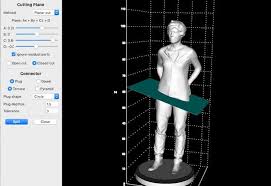
Description: LuBan is generative design software that helps designers and makers in rapid production of their creations. LuBan automatically generates 3D models in various forms, such as lithophane, stack, hash, plate, relief, module, and wireframe. The generated model can be fabricated by 3D printing, laser cutting, and CNC milling.

LuBan is actively developed by a highly focused software team, led by Lujie Chen in Singapore and Larry Sass in USA.

Eyeglasses
Design eyeglasses frames based on a template image.

Lithophane
Turn any 2D photo into a 3D printed photo.

Photo Magic
Generate 3D models from a 2D photo.

Mesh Processing
Generate 3D models from a 3D model.

Release Name: LuBan 3D 11.05.2026
Size: 68 MB
Links: HOMEPAGE – NFO – Torrent Search

Download: RAPiDGATOR
7 Comments
May 25

Wondershare Recoverit 14.0.27.8

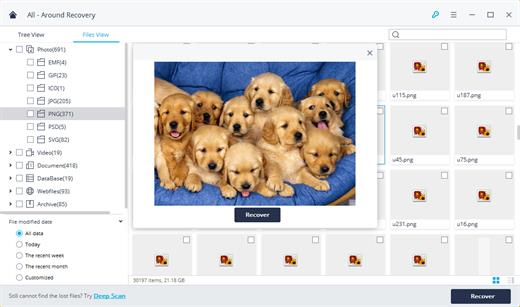
Description: Recover Files in Minutes, No Tech Skills Needed. 2000+ storage devices supported. Recover 1000+ file types. Success recovery rate of 99.5%. 3 simple steps to recover unlimited data.

2000+ Storage Devices Supported
The high-tech data recovery tool can easily recover lost data from almost any devices or storage media.

Laptops, PCs & NAS
Recyle bin, internal drives, partitions; NAS (Network Attached Storage)

Memory Cards
SD/CF card, microSD, miniSD, Sandisk, memory card/stick, TF memory card…

Internal Hard Drive
Hard Drive (Basic & Dynamic), SSD (Solid State Drive)

External Hard Drive
We Support Nearly All External Hard Drive That You Use

Flash Drives
USB Drives, Jump Drives, Pen Drives, Thumb Drives…

Other Storage Media
Camera (Canon, Sony, Nikon, Fuji), Music/Video Player, Camera Drones (GoPro, DJI)

Recoverit Support 1000+ File Types and Formats
We support recovery of all types of files and file systems, e.g. NTFS, FAT, HFS+, APF.

Document
DOC, DOCX, RTF, XLS, XLSX, XLSB, PPT, PPTX, PPS, PDF, DOT, DOTX, XLSB, XLT, XLTX, POT, PPSX, etc.

Photo
CRW, JPEG, JPG, PNG, PSD, RAW, RGB, 3DM, 3DMF, 3FR, ABM, AFX, ANI, ART, ARW, BIZ, BLD, etc.

Video
AVI, FLA, FLV, M4V, MOV, MP4, WMV, 3G2, 3GP, 3GP2, 3GPP, AMV, ANM, ASF, ASX, etc.

Audio
AAC, AIFF, ALAC, FLAC, MP3, OGG, PCM, WAV, WMA, A52, AA, AA3, AAC, AC3, ACC,AFC, AIF, etc.

Archive
7Z, WAR, ZIP, exe, 7zip, etc.

Other Files
MSG, PST, OST, EML, EMLX, MBOX, EPUB, JIS, KEY, LOG, MPS, 3DA, 3DS, 3TF, 3WS, ABD, etc.

Release Name: Wondershare Recoverit 14.0.27.8
Size: 214.9 MB
Links: HOMEPAGE – NFO – Torrent Search

Download: RAPiDGATOR

5 Comments
May 25

Scan2CAD 10.6.13

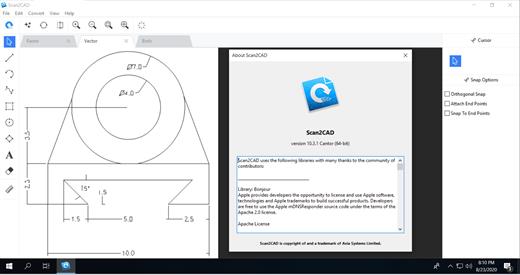
Description: Professional-Grade Conversion Software. Convert your files for CAD & CNC. Convert images and PDFs to DXF or DWG. Supported in all common CAD software. With layers, text and objects converted.

Cut-friendly conversions
Convert your images and PDFs to DXF and G-code for all common CNC machines.
Logos
CNC Artwork
Gaskets & Tools
Outlines
Pocketing
All CNC imagery

Batch conversion
With Scan2CAD’s simple Batch conversion feature you can intuitively convert multiple files within a defined folder in a single click. Or Batch Convert multiple pages of a PDF in a single run. Batch conversion saves countless man hours of repetitive conversion tasks.

Automation API
Scan2CAD Automate offers a powerful Python API which can be used to automate any feature of Scan2CAD, enabling you to integrate powerful conversion features with your processes.

Release Name: Scan2CAD 10.6.13
Size: 128.5 MB
Links: HOMEPAGE – NFO – Torrent Search

Download: RAPiDGATOR
6 Comments
May 25

MediaHuman YouTube To MP3 Converter 3.9.20 (2405)

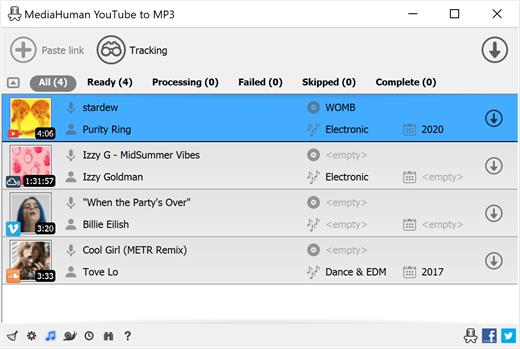
Description: You like to listen to music on YouTube, SoundCloud or Bandcamp and want to save it for offline playing. Or you want to download the soundtrack of a new movie. Then we recommend you to try out this software developed specifically for this purpose.

Downloads all music from a playlist or channel
Tracks playlist/channel updates and downloads only new videos
Downloads highest available quality up to 320 kbps
Supports YouTube, Vimeo, SoundCloud, Mixcloud, etc.
Downloads simultaneously several tracks
Includes simple tag editor with cover art image support
Works on all modern platforms (macOS, Windows, Ubuntu)
Exports downloaded files to iTunes/Music.app

Main Features:
Playlists and channels
The software supports downloading all videos in a playlist or channel. There is also an option to subscribe and download only newly uploaded tracks.

iTunes/Music.app support
In the app preferences, you can select the option to automatically add the downloaded tracks to your iTunes/Music.app library. You can also specify the playlist to which the converted tracks will be added.

Saves your time & traffic
The app detects audio track in YouTube video clip and downloads it, skipping the video part. As a result download speed increases dramatically, especially on HD-quality content and higher.

Simple tag editor
Application automatically detects artist name and track title of the video and saves it in the downloaded file. But at the same time, you can easily change tags to whatever you want. You can even change a cover art image.

Original format, no conversions
You can save audio tracks in original quality without any conversion. It means that there will be no loss of quality and it greatly reduces the downloading time.

Free music
There is a great amount of music on YouTube. And our app will help you to convert YouTube videos to MP3 or save it on your computer in original M4A/AAC format. Just find the track you like and download it in the quality you need.

Not only YouTube
Vevo.com, Vimeo, DailyMotion, Soundcloud, Bandcamp, HypeMachine, MixCloud, MixUpload, Audiomack, UOL, Hearthis.at, Play.fm, Naver, BitChute, Brandnewtube, Brighteon, Rumble and many other sites are also supported. So you can download music just as easily as you can from YouTube.

Clipboard tracking
The program tracks the content of the system clipboard. It means that you can easily add a video clip to the download list without switching from your favorite browser. Just copy an URL into the clipboard and it will be added to the download queue.

Multilingual interface
Localized to: Arabic, Armenian, Azerbaijani, Bulgarian, Catalan, Chinese (Hong Kong SAR China), Chinese (Simplified), Chinese (Taiwan), Croatian, Czech, Danish, Dutch, English, Esperanto, French, German, Greek, Hebrew (Israel), Hungarian, Indonesian, Italian, Japanese, Korean, Latvian, Lithuanian, Malay, Norwegian Bokmål, Polish, Portuguese, Portuguese (Brazil), Romanian, Russian, Serbian, Slovenian, Spanish, Swedish, Turkish, Vietnamese

Release Name: MediaHuman YouTube To MP3 Converter 3.9.20 (2405)
Size: 81 MB
Links: HOMEPAGE – NFO – Torrent Search

Download: RAPiDGATOR

4 Comments
May 25

Hasleo BitLocker Anywhere 9.9.0.2

Description: BitLocker Drive Encryption is a full disk encryption feature released by Microsoft as a native application in some versions of Windows. Unfortunately, this feature is not available in Windows 11/10/8.1/8/7 Home, Windows 8.1/8 Core and Windows 7 Professional. Hasleo BitLocker Anywhere For Windows is the world's first BitLocker solution for Windows Home and Windows 7 Professional, with it you can enjoy almost all the features of BitLocker in these editions of Windows.

Backing up your data is just as important as encrypting it, so we recommend that you use our free Windows backup software Hasleo Backup Suite to back up your data to prevent data loss.

Features:
Encrypt Windows C: drive & data partitions with BitLocker.
Decrypt BitLocker-encrypted Windows C: drive & data partitions.
Change password, Export BitLocker recovery key & startup key.
Easily lock and unlock BitLocker encrypted drives.
Turn on or off auto-unlock for BitLocker encrypted drives.
Encrypt and start Windows 11/10/8/7 with password or startup key USB drive
Command line interface (CLI) support.
Compatible with Windows 7/2008 R2 or later.

Release Name: Hasleo BitLocker Anywhere 9.9.0.2
Size: 44.5 MB
Links: HOMEPAGE – NFO – Torrent Search

Download: RAPiDGATOR
6 Comments
May 25

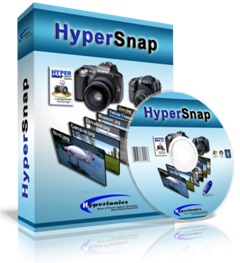
HyperSnap 9.8.1

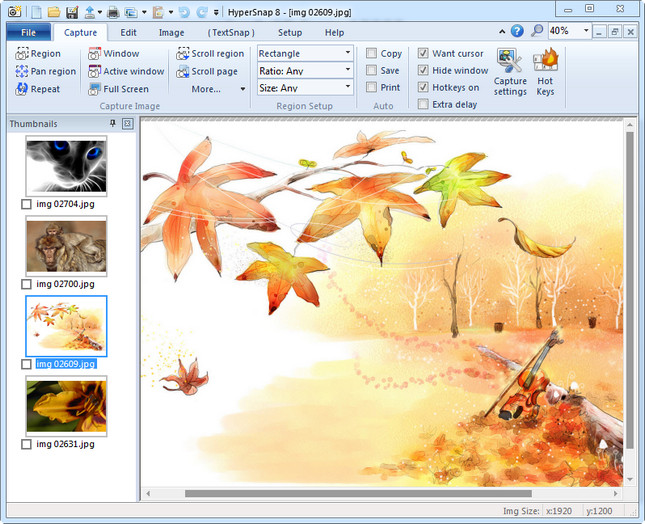
Description: HyperSnap 9 is the fastest and easiest way to take screenshots from Windows. HyperSnap combines the power of a first-class screen capture application with an advanced image editing utility, and editable text capture through OCR - wrapped into one easy-to-use tool. Windows 10 and 11 only.

HyperSnap is perfect for capturing images and texts that you want to include in your Help system, online tutorials, manuals, training handouts, presentations, marketing materials, Web pages, emails and more. Use HyperSnap to quickly share a picture-perfect representation of anything on your screen.

HyperSnap is versatile and extremely easy-to-use. You can switch between modern "ribbon" interface shown on the image above, or tranditional menu and toolbars.

Top Features
Image captures from any where on the screen or multiple monitors, in any shape or size.
New & powerful image capture, editing, annotation and  manipulation tools. Objects drawn over images can now be selected, edited, shown and hidden, moved, deleted any time. A new native file format saves the objects drawn for further editing later, or save a standard image and have the object "imprinted" permanently on them.
Unlimited undo/redo.
Capture dropdown menus and lists with hotkey feature or delayed capture.
Image stamps, frames, drop shadow, free-hand capture, FTP server uploads, more.
Automatic color substitution.
Non-rectangular window capture.
Button Capture  - perfect for professional technical writers who need to snap and document dozens of buttons!
Auto-scrolls and concurrently captures long web pages and other. documents, enabling it to grab more than is visible on the screen.
Tightly integrates with the MS Windows clipboard to automate repetitive tasks - will even automatically PASTE capture images where needed!
Automatically saves your captures to graphics files.
Doubles as effective image viewer, format converter (over 20 image formats supported).
Fully customizable user interface. Rearrange menus and toolbars any way you want, assign any keyboard shortcuts you like, tear off menus to create instant toolbars, even control HyperSnap with voice commands!

Release Name: HyperSnap 9.8.1
Size: 33 MB
Links: HOMEPAGE – NFO – Torrent Search

Download: RAPiDGATOR
6 Comments
May 25

Windows Server 2025 LTSC v24H2 (x64) Build 26100.32860 May 2026 Incl. Activator

Description: For many years, Windows Server has been a vital component of the IT ecosystem, offering companies dependable, safe, and expandable server solutions. Microsoft is expected to significantly alter and improve the enterprise IT landscape with the release of Windows Server 2025. We’ll examine the anticipated additions and enhancements for Windows Server 2025 in this article, as well as the possible effects they may have on companies and IT specialists.

Features :


  • Hotpatching support to install updates without rebooting (Preview feature)

  • Credential Guard enabled by default

  • Virtualization-Based Security (VBS) enclaves for isolating app secrets

  • Windows LAPS (Local Administrator Password Solution) built-in

  • Improved Kerberos security (disabling RC4 for Ticket Granting Tickets)

  • Active Directory improvements (32K page size, stricter password defaults)

  • NVMe storage performance boost (up to 60% more IOPS vs Server 2022)

  • ReFS deduplication support

  • Block cloning support for faster file operations

  • SMB over QUIC for secure VPN-less file access

  • GPU partitioning (GPU-P) for sharing GPU across VMs

  • Dynamic processor compatibility for easier live VM migration

  • Higher VM capacity (up to 1,792 virtual CPUs and 29.7 TB RAM per VM)

  • Azure Arc integration for hybrid and multi-cloud management

  • New web-based Server Manager 2.0

  • PowerShell 8.0 support

  • Dev Drive (ReFS-based) optimized for developer workloads

  • Integrated file compression options (ZIP, 7z, TAR) via right-click

  • Updated Task Manager with dark mode and modern UI

  • OpenSSH and Winget pre-installed

  • Built-in support for Bluetooth and Wi-Fi

Release Name: Windows Server 2025 LTSC v24H2 (x64) Build 26100.32860 May 2026 Incl. Activator
Size: 7.8 GB
Links: HOMEPAGE – NFO – Torrent Search

Download: RAPiDGATOR
2 Comments
May 25

StoryVox v1.0.16 Pre-Cracked

Description: Turn Any Book Into a Professional Audiobook. Import your manuscript, choose from 53 AI voices, and generate broadcast-quality audiobooks in minutes. Runs entirely on your PC — no cloud, no subscription, no limits.

Everything You Need to Create Stunning Audiobooks
Professional audiobook production used to require a recording studio, voice actors, and thousands of dollars. StoryVox puts it all on your desktop.

53 Natural AI Voices
Male and female voices across American, British, European, and Asian accents. Every voice powered by Kokoro — one of the most natural-sounding TTS engines available.

Fully Offline
No internet connection required. No cloud processing. No monthly subscription. Your content never leaves your computer — complete privacy and no per-word fees.

Smart Chapter Detection
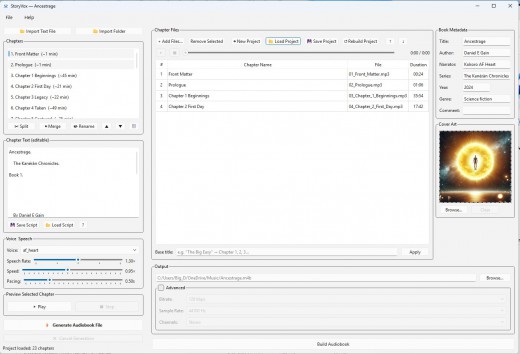
Import a text file and StoryVox automatically detects chapters, front matter, and structure. Split, merge, and rename chapters with a click.

Fine-Tuned Controls
Adjust speech rate, speed, and pacing to get exactly the sound you want. Preview any chapter in real-time and hear your pacing adjustments live.

WAV & MP3 Export
Export your completed audiobook in high-quality WAV or compressed MP3. Each chapter is assembled automatically from sentence-level audio for a seamless final product.

Script Editing
Edit your text directly in the app. Control pauses with punctuation, save and reload scripts between sessions, and preview changes instantly before generating.

53 Voices. Zero Monthly Fees.
Every voice runs locally through Kokoro TTS. Natural inflection, proper sentence pacing, and expressive delivery — all without an internet connection.

From Text to Audiobook in Four Simple Steps

Import Your Text
Drop in a .txt file or import an entire folder. StoryVox detects chapters automatically and organizes them for you.

Choose Your Voice
Pick from 53 voices and dial in your speech rate, speed, and pacing. Preview any chapter live to hear exactly how it will sound.

Generate
Hit generate and StoryVox builds each chapter — sentence by sentence — into professional audio with natural pacing between sentences.

Export & Publish
Assemble your chapters into a complete audiobook. Export as WAV or MP3. Upload to ACX, Audible, or distribute however you choose.

System Requirements
- OS: Windows 10 version 17763.0 or higher
- Memory: 8 GB (Minimum), 16 GB (Recommended)
- Processor: i5 (Minimum), i7 (Recommended)

Release Name: StoryVox v1.0.16 Pre-Cracked
Size: 1.4 GB
Links: HOMEPAGE – NFO – Torrent Search

Download: RAPiDGATOR
5 Comments
May 25

Readra Pro AI eBook Reader v1.10.0 Pre-Cracked

Description: Readra — Your Premium Reading Companion. Transform your reading experience with Readra, a beautifully crafted eBook reader designed for Windows users who value elegance, focus, and depth. Whether you’re diving into a novel, studying a textbook, or exploring free online libraries, Readra makes every page feel effortless.

Features:


  • MULTI-FORMAT SUPPORT
    – EPUB, PDF, FB2, MOBI, CBZ, AZW3, CBR, TXT, and RTF
    – Smart cover extraction and typographic fallback covers
    -Import books from your PC, cloud storage, or online catalogs
  • SMART READING EXPERIENCE
    – Customizable fonts, themes, and text size
    – Day, night, and sepia reading modes
    – Adjustable margins, line spacing, and paragraph settings
    – Automatically remembers where you left off
  • HIGHLIGHTS & NOTES
    – Highlight text in multiple colors
    – Add personal notes to any passage
    – Browse all highlights and notes in one place
    – Jump directly to highlighted sections
  • AI READING ASSISTANT (Pro)
    – Ask questions about what you’re reading
    – Get instant explanations and summaries
    – Translate selected text into any language
    – Uses your own OpenAI API key — configure in Settings
  • FOCUS MODE
    – Ambient soundscapes: Rain, Ocean, Forest, Piano, Fireplace & more
    – Import your own MP3 music
    • Minimize distractions and enter deep reading sessions
  • ONLINE LIBRARIES
    – Access thousands of free eBooks via OPDS catalogs
    – Project Gutenberg, Standard Ebooks, Open Library & more
    – Search, browse, and download directly into your library
Release Name: Readra Pro AI eBook Reader v1.10.0 Pre-Cracked
Size: 190 MB
Links: HOMEPAGE – NFO – Torrent Search

Download: RAPiDGATOR
5 Comments