Please REGISTER or RENEW your account on RAPiDGATOR.net and support us by doing through all RAPiDGATOR working download links on main posts...
May 20

ProfiCAD 13.5.5

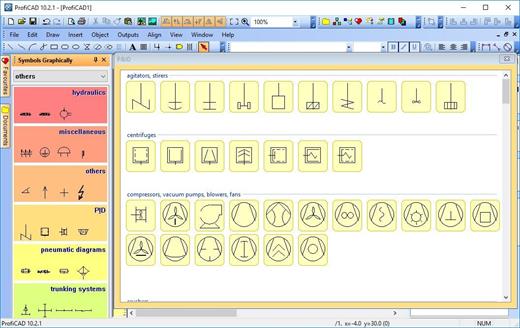
Description: ProfiCAD is designed for drawing electrical and electronic diagrams, schematics, and control circuit diagrams. It can also be used for pneumatics, hydraulics, and other types of technical diagrams.

Print Reports
ProfiCAD generates essential project documentation, including bill of material, list of wires, a list of terminals, a list of cables, as well as other critical parts of an electrical project.

Symbols
The program includes over two thousand symbols. You can easily create your own symbols using the symbol editor.

Title block
The title block designed in accordance with ISO 7200 can be easily adapted, for example by inserting the logo of your company. Alternatively, you can create your own title block in the title block editor.

Cross references
The program supports cross-references between wires and between symbols belonging to one component (e.g., relay coil + contacts). You can access a linked symbol on a different page by clicking on the cross-reference.

Floor plans
The page scale allows you to enter the actual dimensions of objects. Dimensioning facilitates the drawing of floor plans and mechanical drawings.

Cables and terminals
The program supports drawing cable symbols. A cable listing is available, providing an overview of their cores, cable properties, and connected devices. Thanks to the terminal list, you have an overview of all project terminals and the cables and devices connected to them.

Advanced features
Some advanced features include automatic numbering of symbols, drawing of striped wires, instant symbol search, automatic insertion of symbols into a circuit, and others

Release Name: ProfiCAD 13.5.5
Size: 19.6 MB
Links: HOMEPAGE – NFO – Torrent Search

Download: RAPiDGATOR

7 Comments
May 20

ezAccounting 3.16.14

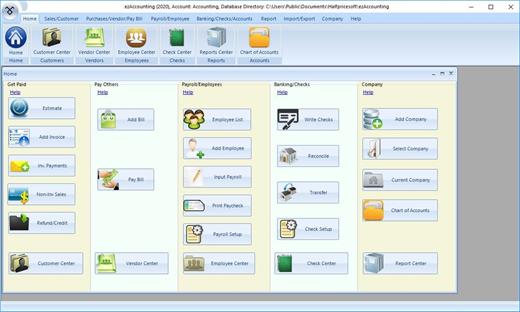
Description: ezAccounting Software is designed with small businesses in mind: simple, reliable, and affordable. ezAccounting is the right in-house accounting solution for small businesses needing to document and report on incoming and outgoing cash flow, including sales, receipts, payments, and purchases. It also supports payroll processing and tax form reporting.

Get Paid
Generate Estimate, Invoice, Receipt and Packing Slip
Receive Payments
Track Sales
Refund and Credit

Pay Others
Add Bills
Pay Bills
Write Checks
Track Expense

Payroll Center
Calculate Payroll taxes
Print Paychecks with Stubs
Print Tax Forms W2, W3, 940, 941 and 943

See how your company is doing
Report Center
Balance Sheet
Profit and Loss

Release Name: ezAccounting 3.16.14
Size: 12.8 MB
Links: HOMEPAGE – NFO – Torrent Search

Download: RAPiDGATOR

6 Comments
May 20

Typora 1.13.6

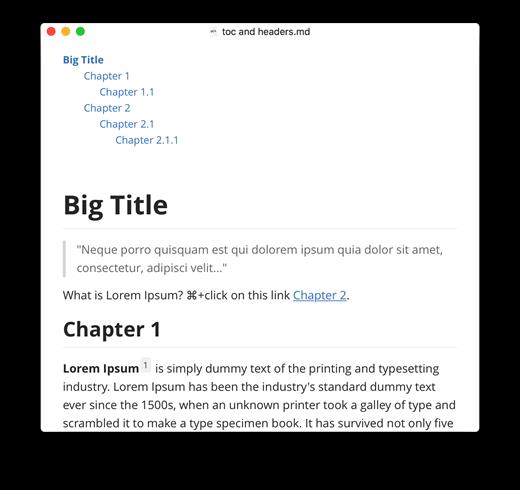
Description: Typora gives you a seamless experience as both a reader and a writer. It removes the preview window, mode switcher, syntax symbols of markdown source code, and all other unnecessary distractions, replacing them with a real-time preview to help you concentrate on the content itself.

Features
Markdown support including tables, code fences with syntax highlight, LaTeX, table of contents
Cross-platform
The real-time preview and WYSIWYG features
Beautiful interface and custom CSS theme support
Easy export

Release Name: Typora 1.13.6
Size: 94.1 MB
Links: HOMEPAGE – NFO – Torrent Search

Download: RAPiDGATOR

5 Comments
May 20

Screenpresso Pro 2.2.12

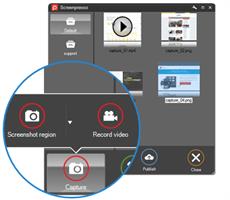
Description: Screenpresso captures your desktop (screenshots and HD videos) for your training documents, collaborative design work, IT bug reports, and more… Screenpresso is a NEW Light-weight screen grab tool with built-in image editor, user guide generator and sharing options.

Capture in Videos or Images
Capture what you see on your screen with just a few clicks. Manage your capture history by workspaces.

Create great looking images and documents
Edit and highlight what matter in your screenshots with our built-in image editor. Create PDF documents with our document generator.

Share your screen captures
Drag & drop your captures to your emails to create attachments in 1 second. Share videos and images with Screenpresso Cloud without registration. Publish to Google Drive, Twitter, OneDrive, Dropbox and more…

Capture screenshots including scrolling parts
Press the Print Screen button, and you will see how Screenpresso magically assists you in screen capture:
The mouse cursor will turn into a crosshair, and moving it around the screen will automatically highlight the area that can be captured in red. It does some pretty cool edge snapping to the screen, so you can choose to grab part of a window, or the entire window, or even the whole screen.
Capture full screen, part of the screen or a specific window with the same shortcut/hotkey
Make sure to capture what you need. Click and drag anywhere on your screen to select a region with pixel-perfect accuracy thanks to the zoom lens at the right bottom of the screen
Capture scrolling windows: Can’t fit it on the screen? Make a unique image of scrolling windows thanks to the stitching mechanism
Capture your mouse cursor and the context of the capture
Delay capture for capturing context menu

Capture your screen in HD videos
A small video is a key to reduce misunderstanding in documentation.
Screenpresso records your screen in a video and produces lightweight MP4 video files for easy sharing.
Capture in MP4 format for lightweight files
Capture sounds and webcam
Export frames/images
Crop the video
Mute, change video speed, or change the format

Smooth workflow It has a 3-step process:
Press [PrintScreen] key to start a Capture. You don’t need to bother on filename
Edit your capture with built-in editor
Publish your capture (PDF, email attachment, drag anywhere or post online)

Powerful built-in image editor
Screenpresso provides a built-in vector image editor to mark up your screen captures.
Double-click on an image in the Screenpresso’s workspace to open the editor or click on the Edit button
Add arrows, spotlight an area, colorful speech bubbles, rectangles, ellipses, text boxes, callouts and more
Crop, add drop-shadow, rounded corners, reflection, torn edges and more fancy border effects
Step Tool: quickly highlight a series of steps: each click gets the next number in the series

Release Name: Screenpresso Pro 2.2.12
Size: 46.3 MB
Links: HOMEPAGE – NFO – Torrent Search

Download: RAPiDGATOR

6 Comments
May 20

Altium Designer 26.5.1 Build 12

Description: Precision and speed are essential for meeting challenging electronics design requirements and tight timelines. Altium Designer provides an integrated, user-friendly platform incorporating everything from schematics and layout to simulation and analysis so you can meet design requirements and tight timelines effortlessly.

Unified Design Environment and Data Model
Create electronic designs from schematic capture to final design documentation and manufacturing files – all in one intuitive interface and unified data model.

Integrated Analysis
Perform SPICE simulations, resolve power issues without relying on expensive prototypes, and analyze signal integrity, all within Altium Designer.

3D-MID Design
Explore a new world of design possibilities with the latest manufacturing technology that can be accessed within an existing PCB project in Altium Designer.

Collaborate and Connect Seamlessly
Effective collaboration, seamless connectivity, and resource optimization are keys to success in electronic product development.

Altium Designer, paired with 365 Applications, streamlines co-design and collaboration across locations. This approach optimizes resource allocation, shortens design timelines, and minimizes the risk of errors or delays.

365 Applications Suite
Experience the Altium 365 suite of applications for secure, seamless and streamlined collaboration.

Digital Domain Connections
Connect your ECAD solution with the most popular MCAD tools, Ansys simulation experts, and PLM systems to seamlessly exchange data and reduce costly and time-consuming rework.

PCB CoDesign
Speed up layout design by involving more than one Engineer to design different parts of the same PCB simultaneously.

Workflow Processes
Elevate your design process to unparalleled levels of efficiency, transparency and innovation using digitally managed workflows configurable to how your organization wants to work.

Tackle Any Design Complexity
Electronic designs vary in complexity, posing challenges such as flexible designs and multi-board setups.

Release Name: Altium Designer 26.5.1 Build 12
Size: 6 GB
Links: HOMEPAGE – NFO – Torrent Search

Download: RAPiDGATOR

1 Comments
May 20

RecordFab 1.0.1.6

Description: Record streaming videos, live, and online courses in 720p/1080p quality. One-click record, and save them on device permanently.

Streaming Videos
Easily record your favorite films and shows from any streaming service.

Social Media Content
Preserve unforgettable moments on social media and share them with friends.

Online Courses
Keep pace with your learning progress. Record online courses from educational platforms study at your own rhythm.

Live Streams
Never miss a single captivating moment of the live streams. Record and replay it at any time.

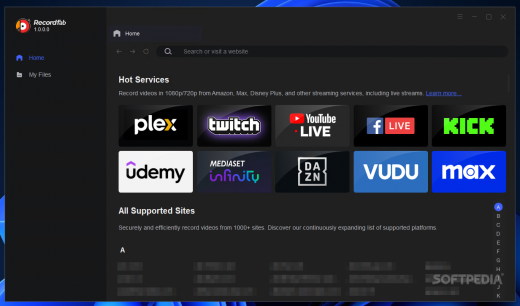
Massive Streaming Services are Supported by RecordFab
Stands apart from conventional desktop screen recorders, RecordFab is tailored specifically for streaming services. Almost all streaming platforms are supported to be recorded.
RecordFab will automatically detect the video stream, eliminating the need for you to set a recording frame, which alleviates the frustration of inadvertently capturing superfluous pop-up windows during recording.

2x Lightening Speed to Facilitate Your Recording Procedures
Equipped with advanced recording technology, RecordFab supports 1x, 1.25x, 1.75x, and 2x recording speed, rendering it more efficient than traditional stream recorders.
RecordFab values your time, making the recording procedures as fast as possible to enhance your operaiton experience, and continuously upgrades technology to offer faster high-speed recording in the future.
*This feature is not supported on some particular websites, which will be recorded at 1x speed.

Impressive 720p/1080p Resolution for Your Recordings
You can set the recorded videos as 720p or 1080p resolution based on your preference. RecordFab allows you to effortlessly capture every intricate detail and vibrant hue in streaming videos.
What's more amazing is that the recorded videos with RecordFab maintain perfect audio-visual synchronization.

Record Streams with Integrated Browser
Seamlessly utilize RecordFab to search and capture streaming videos within an integrated browser, thereby preserving the operational space of your preferred browser and significantly minimizing CPU usage.
This technological principle also ensures that the recorded content consists solely of the desired video, without any distracting pop-ups or borders.

System Requirements"
Windows 11/10/8.1/8/7
Intel i3 or above
4GB of RAM or above
40GB of free hard disk space or above

Release Name: RecordFab 1.0.1.6
Size: 339.4 MB
Links: HOMEPAGE – NFO – Torrent Search

Download: RAPiDGATOR

7 Comments
May 20

QueueMonitor Professional 1.6.37

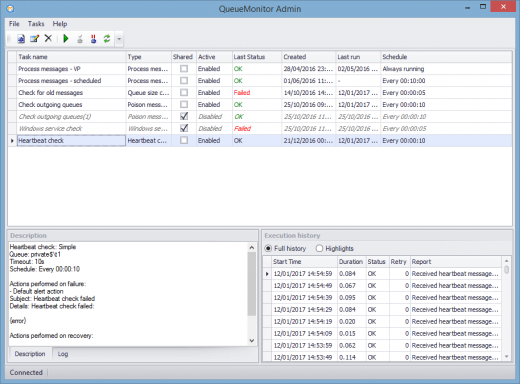
Description: QueueMonitor keeps a constant watch on your MSMQ and its queues, and sends alerts or performs automatic fixes whenever something is wrong.

Key benefits of MSMQ monitoring
Find out as soon as something is wrong with your MSMQ.
Automatic actions can fix some problems without admin intervention.
Heartbeat checks can also include your application to monitoring.
QueueMonitor is not a generic monitoring tool with few simple MSMQ checks added afterward, it was made specifically for MSMQ monitoring, and can detect and handle queueing specific problems like poison messages, dead letter messages, etc.
Monitoring multiple machines from single admin interface.

Professional edition
QueueMonitor Professional allows you to automatically process messages and integrate various external systems using files, HTTP, SQL database, FTP, without any coding on your part.

Key benefits of MSMQ automation
Process messages without writing any code.
Conditional processing based on message content.
Periodic backups.
Parse JSON and XML messages to extract important business data.
Modify messages.
Macro based operations.
Route messages to other queues.

Integration with external services
Built-in integrations without any programming on your part.
Integrate SQL Server and MSMQ in both directions.
Folder watching for file-based integrations.
Sending to FTP server or invoking HTTP requests.
Integration with command line applications.

Release Name: QueueMonitor Professional 1.6.37
Size: 11.8 MB
Links: HOMEPAGE – NFO – Torrent Search

Download: RAPiDGATOR

5 Comments
May 20

COAA PlanePlotter 6.7.5.1

Description: PlanePlotter receives and decodes live digital position reports from aircraft and plots them on a chart. Using PlanePlotter, you can see a radar-like display of all those aircraft around you that are transmitting the appropriate digital messages including ACARS, ADS-B and HFDL.

PlanePlotter - Features
The animated screen grab from PlanePlotter (left) was kindly provided by John Locker.

Message display
PlanePlotter shows a table display of messages received and decoded from live aircraft transmissions.

Data saving
PlanePlotter archives all the digital data that it receives and decodes to a log file.

Chart display
PlanePlotter plots aircraft positions, altitudes and times decoded from the message traffic that it receives. These include embedded position reports, AMDAR reports and ADS reports contained in ACARS messages, ADS-B position reports received by the Kinetic SBS1(tm) or AirNav System RadarBox(tm) Mode-S receivers, and position reports on HF using Charles Brain's PC-HFDL software. The plot can be superimposed on a suitable aeronatical chart that you have prepared, or PlanePlotter can download satellite imagery and plot the aircraft symbols on that. Where altitude information is available (eg Mode-S messages), you can select the data by altitude band to distinguish low level and high level traffic.

Google Earth server
If you are receiving Mode-S ADS-B position reports, PlanePlotter can interface to Google Earth to display aircraft positions over the Google Earth base map. It can even give you a dynamic real-time view from the flight deck of an aircraft that you designate.

Direction finding
PlanePlotter can determine and display the direction of any transmission using a simple passive antenna switch. This allows aircraft to be located even if they are not equipped with ACARS or Mode-S/ADS-B.

Input signals
PlanePlotter can decode ACARS messages, display the message content and plot any positions on a chart.
PlanePlotter can process and display Mode-S/ADS-B position reports captured by the Kinetic SBS1(tm), the AirNav Systems RadarBox(tm), the RxControl Mode-S receiver, the PlaneGadget Radar, the miniADSB, the microADBS and the FPGA Beast.
PlanePlotter can also work in conjunction with Charles Brain's PC-HFDL software (http://www.chbrain.dircon.co.uk/pchfdl.html) by automatically extracting position reports from the log file and plotting them in real time on the same chart display. PlanePlotter adds value by calculating course and heading from successive reports from the same aircraft and plotting the predicted position between reports (right).
PlanePlotter can drive a passive antenna switch and display the direction (QDM) of any aircraft voice transmission.

GPX overlays
PlanePlotter can display waypoints, tracks or routes over the current chart using data from a user-defined GPX format file.

Alerts
PlanePlotter can generate visible and audible alerts on detection of a specified registration, flight number or ADS identifier, on detection of any new aircraft, or on detection of an aircraft whose position is inside a user-defined Alert zone polygon.

Memory-Map Navigator support
PlanePlotter can direct the Memory-Map Navigator program (www.memory-map.com) to display dynamic aircraft position symbols over its proprietary maps using data from either ACARS or Mode-S ADS-B (in conjunction with the SBS1 receiver).

OLE/COM interface
You can access the position and other data for each aircraft known to PlanePlotter using a simple VB script or other OLE/COM capable program. You can use the same interface to update data held by PlanePlotter and to control the user interface.

Release Name: COAA PlanePlotter 6.7.5.1
Size: 7.7 MB
Links: HOMEPAGE – NFO – Torrent Search

Download: RAPiDGATOR

9 Comments
May 20

JP Software Take Command 36.01.53

Description: Replace Your Windows Console and CMD Command Prompt Windows. The Windows Command Prompt shortcut is a Windows console (command line, or character mode) session that runs the default Windows command shell CMD.EXE.
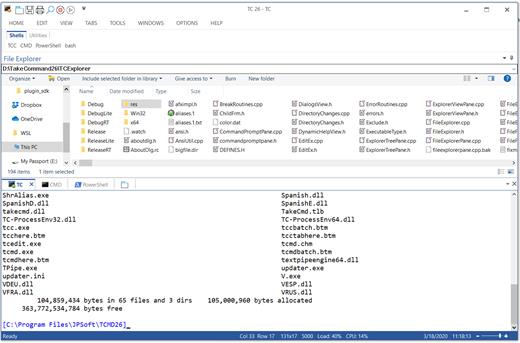
The command line is essential for developers, systems administrators and advanced users. Unfortunately, CMD Windows commands and the Windows console UI have always been woefully lacking in ability compared to what is available in most other operating systems. Because of the limitations in CMD and the Windows console, users have been forced to use the GUI for inappropriate tasks, or even to write custom programs to perform simple tasks that CMD should have been able to handle.

Take Command is a comprehensive interactive GUI and Windows command line toolkit that makes your command prompt windows easier to use and far more powerful. Take Command includes optional Windows Explorer integration, tabbed console windows, and major enhancements to standard Windows CMD commands such as COPY, DEL, DIR, FOR, MOVE, REN, SET, and START And it and adds more than 235 new commands, command dialogs, command line syntax coloring, vastly improved command line editing, programmable filename and directory tab completion, and thousands of other features.

Take Command is also a powerful batch file programming tool, including an integrated IDE with a sophisticated editor and batch debugger. Take Command offers extensions such as DO loops, SWITCH statements, error and exception handling, system monitoring and event triggers, and more than 780 built-in variables and functions. And you can extend that with 3rd-party plugins and user-defined functions.

12 Reasons Why You Should Replace Your Windows Console
The Windows console is responsible for running character-mode applications, including CMD, PowerShell, WSL bash, etc. It was introduced in Windows NT 3.1 in 1993, and some major internal architectural improvements were made in Windows 10 and 11.

Unfortunately, the improvements to the user interface were relatively minor, and though some efforts were made to improve the CMD console UI in Windows Terminal, they fall far short of what Take Command has been providing for years.

So why replace it with Take Command?

The Windows console is slow, and even slower when using Windows Terminal. Take Command's tab windows typically display output between 20% and 300% faster.
Take Command (like Windows Terminal) offers tabbed windows to run your character-mode applications. But Take Command takes it to another level by including vertical or horizontal tab groups and splitter windows.
Tabbed windows can be reordered, detached, or torn off, and existing console windows can be attached as new Take Command tab windows.
Take Command provides an optional embedded Windows File Explorer window that displays a tree view of the folders on your system and the contents of the selected folder (List View) on the right. You can drag folders and files from the Explorer window and drop them in a command prompt window.
Take Command can be easily configured for your preferences with its configuration dialogs.
Take Command has an optional tabbed tool bar that you can use to execute internal or external commands, aliases, or batch files with the click of a mouse (or an accelerator key). You can define up to 20 tabs, each with up to 50 toolbar buttons.
Take Command provides a configurable Status Bar that can display quick help for the current command, tooltips, and system information, including tab window size, CPU usage, memory usage, date & time, character values at the cursor location, and a slider control for window transparency.
Cut and Paste options are limited in the default CMD console or Windows Terminal. Take Command adds both line and column selection, double-click or triple-click selections, overwriting or appending to the Windows clipboard, and a variety of paste options.
Take Command windows can be styled with a choice of 18 themes.
Take Command and TCC offer a wide variety of colorization options, not just foreground and background colors.
Take Command includes invaluable tools, including a batch file debugging IDE, a regular expression creator / analyzer, search and replace in files, and a macro recorder / playback.
Extensive help (quick help, context sensitive help, and general help) is available in English, French, German, and Spanish at the touch of a button.

Release Name: JP Software Take Command 36.01.53
Size: 57.2 MB
Links: HOMEPAGE – NFO – Torrent Search

Download: RAPiDGATOR

5 Comments
May 20

JP Software TCC 36.01.53

Description: TCC: Upgrading the Windows CMD Command Line Prompt. The command line is essential for developers, systems administrators and advanced users, offering many advantages to anyone wanting to save time, expand their control and/or to automate their tasks.

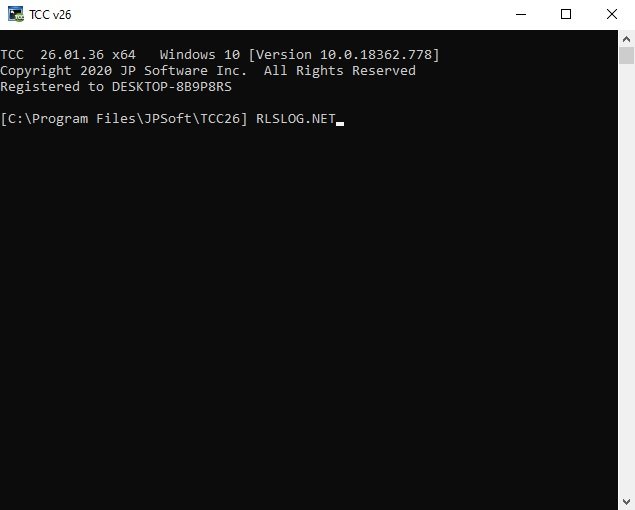
TCC is our console mode Windows command processor (formerly known as 4NT). TCC is a replacement for CMD.EXE, the default Windows command processor. TCC is compatible with your existing Windows console applications and batch files, but offers major improvements to the CMD prompt in command line editing, interactive file and system management, batch file programming and debugging.

TCC is a superset of CMD, with 275+ internal commands (CMD has about 42), 800+ internal variables and functions (CMD has 6), hundreds of additional options for existing CMD commands, and thousands of additional features.

Whether you're a seasoned CMD prompt user or just getting started, TCC is the tool that will take your command line prompt experience to the next level.

Why Switch From the CMD Shell to TCC?

Familiarity
TCC is a CMD replacement Windows command processor that is compatible with your existing CMD commands and batch files while adding hundreds of new commands, variables, and variable functions.

Productivity
TCC provides vastly improved line editing and tab file completion, and adds thousands of new features. You're immediately more productive, and you can learn TCC's new features at your own pace.

Batch Files
Create and debug your batch scripts in a fraction of the time with TCC's integrated editor and batch file debugger.

Comprehensive Help
The extensive help (including context-sensitive popup help for command and variable syntax) speeds your development time and reduces errors.

Syntax
TCC's internal commands share a consistent syntax, reducing your learning and development time.

Multilingual
The user interface is available in English, French, German, Italian, Russian, and Spanish. (Online help is available in English, French, German, and Spanish.)

Release Name: JP Software TCC 36.01.53
Size: 55 MB
Links: HOMEPAGE – NFO – Torrent Search

Download: RAPiDGATOR

6 Comments