Please REGISTER or RENEW your account on RAPiDGATOR.net and support us by doing through all RAPiDGATOR working download links on main posts...
May 19

Advanced Renamer 4.21

Description: Advanced Renamer is a program for renaming multiple files and folders at once. By configuring renaming methods the names can be manipulated in various ways. It is easy to set up a batch job using multiple methods on a large amount of files. The 14 different methods enables you to change the names, attributes, and timestamps of files in one go. The files can also be copied or moved to new locations based on information in the files.
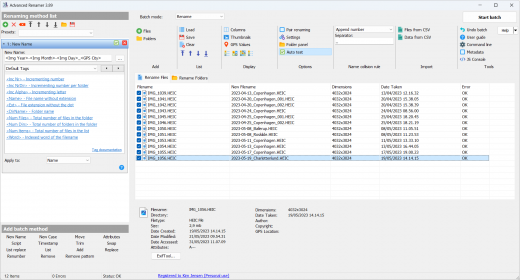
With Advanced Renamer you can construct new file names by adding, removing, replacing, changing case, or giving the file a brand new name based on known information about the file.

Before performing the operations on the files you can verify that the output will be correct and if you perform the rename and regret it, you can undo the complete batch.

Image files
This mass file renamer is a great utility for organising digital pictures for both professionals and beginners. The thumbnail mode lets you display thumbnails directly in the file list giving you maximum control of the renaming process. With this program you can rename all your photos in a snap.

GPS data
If your image files contain GPS data you can add the name of the city and the country where the picture was taken. Coordinates are used to lookup city, country, and state names from a database containing more than 100,000 cities around the globe.

Music files
MP3 and other music files often have messed up names and contain weird characters. With Advanced Renamer you can change the names of your favourite music files to more suitable names using the built-in ID3 functions.

Video files
Ever wanted to add the codec or the resolution of a video to the filename? With the video tags you can add various information about video and audio content to the names.

Release Name: Advanced Renamer 4.21
Size: 12.7 MB
Links: HOMEPAGE – NFO – Torrent Search

Download: RAPiDGATOR

5 Comments
May 19

Wondershare Recoverit 14.0.26.6

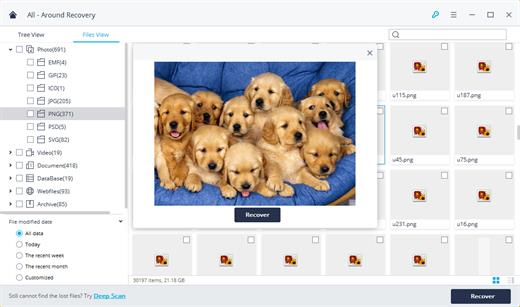
Description: Recover Files in Minutes, No Tech Skills Needed. 2000+ storage devices supported. Recover 1000+ file types. Success recovery rate of 99.5%. 3 simple steps to recover unlimited data.

2000+ Storage Devices Supported
The high-tech data recovery tool can easily recover lost data from almost any devices or storage media.

Laptops, PCs & NAS
Recyle bin, internal drives, partitions; NAS (Network Attached Storage)

Memory Cards
SD/CF card, microSD, miniSD, Sandisk, memory card/stick, TF memory card…

Internal Hard Drive
Hard Drive (Basic & Dynamic), SSD (Solid State Drive)

External Hard Drive
We Support Nearly All External Hard Drive That You Use

Flash Drives
USB Drives, Jump Drives, Pen Drives, Thumb Drives…

Other Storage Media
Camera (Canon, Sony, Nikon, Fuji), Music/Video Player, Camera Drones (GoPro, DJI)

Recoverit Support 1000+ File Types and Formats
We support recovery of all types of files and file systems, e.g. NTFS, FAT, HFS+, APF.

Document
DOC, DOCX, RTF, XLS, XLSX, XLSB, PPT, PPTX, PPS, PDF, DOT, DOTX, XLSB, XLT, XLTX, POT, PPSX, etc.

Photo
CRW, JPEG, JPG, PNG, PSD, RAW, RGB, 3DM, 3DMF, 3FR, ABM, AFX, ANI, ART, ARW, BIZ, BLD, etc.

Video
AVI, FLA, FLV, M4V, MOV, MP4, WMV, 3G2, 3GP, 3GP2, 3GPP, AMV, ANM, ASF, ASX, etc.

Audio
AAC, AIFF, ALAC, FLAC, MP3, OGG, PCM, WAV, WMA, A52, AA, AA3, AAC, AC3, ACC,AFC, AIF, etc.

Archive
7Z, WAR, ZIP, exe, 7zip, etc.

Other Files
MSG, PST, OST, EML, EMLX, MBOX, EPUB, JIS, KEY, LOG, MPS, 3DA, 3DS, 3TF, 3WS, ABD, etc.

Release Name: Wondershare Recoverit 14.0.26.6
Size: 211.4 MB
Links: HOMEPAGE – NFO – Torrent Search

Download: RAPiDGATOR
4 Comments
May 19

Room Arranger 11.0.1.779

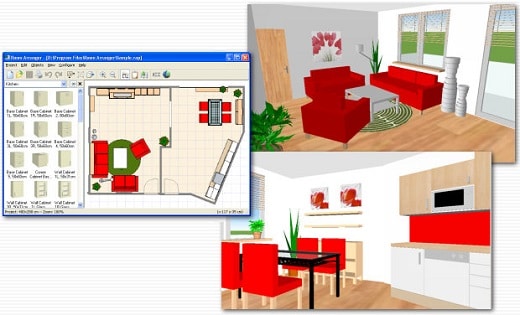
Description: Room Arranger is 3D room / apartment / floor planner with simple user interface. Once you get the basics, you can draw whatever you imagine.

Easy to Use
Room Arranger is small and compact piece of software. Still it lets you design nearly anything you imagine. Once you understand the basics it's easy to bring it to next level.

3D Visualization
3D can give you a better impression of your design. Room Arranger will not only let you fly around the scene, but you can also walk through it like in reality. You can also have multiple floors in the single project.

Wide Object Library
There are nearly 300 objects in the standard object library. Furniture, and other equipment. For each of them, you can modify their dimensions exactly as you need - you are not limited to what we think is the most common.

Everybody needs something different. Every piece of equipment is special.
We are not able to put everything into Room Arranger. But you can quickly and easily design all your special objects on your own in it. Some contributed to our On-line object library and shared their work. The program can also be used in the variety of other areas - garden architecture, housing development (houses as objects), webdesign...

3D Visualization
Room Arranger can show your project in 3D. It uses VRML standard for it. So you can put interactive 3D scene on your web. And you can make movies here too.

Build on Floor Plan Image
Drawing walls can be quite time consuming for apartment or house design. So there is a way to make it easier in case you have an image or photo of the floor plan. Load the image of the floor plan into the Wall Editor, calibrate it, and draw walls on top of it.

Measure
There is a measurement tool in Room Arranger that helps you to check if there is enough space left for other objects, or just visualize the dimensions in the project. The software also measures the room areas, wall areas and other useful values. It will let you copy - paste them to Excel for further processing.

Print in Scale
print over more pages
Printing is the integral part of designer's work. We try to make this output precisely and in high quality. Professional architects usually require printouts in exact 1:50 or 1:100 scale, which is possible in Room Arranger. In case you have only small A4 printer, the software manages to print the project over more pages. You will just glue all sheets of paper together.

Features:
Each wall and floor can have separate color / material
Annotations
Snap objects to near walls while moving them with mouse
Baseboards and crown moldings
Doorframe has editable thickness and color
Picture can have frame with editable thickness and color
Groups within groups of objects, option to forbid ungrouping (with password)

The software is translated into many languages, but we are still searching for new ones.

Release Name: Room Arranger 11.0.1.779
Size: 43 MB
Links: HOMEPAGE – NFO – Torrent Search

Download: RAPiDGATOR

4 Comments
May 19

Nero AI Video Upscaler Pro 1.3.16

Description: Bigger, better, sharper! With state-of-the-art AI technology, Nero AI Video Upscaler PRO takes your videos to the next level. Enlarge films, clips and recordings up to 4K or 8K - razor-sharp, rich in detail and colourful. This makes old videos fresh again and new projects even more impressive.

Super Resolution
- Enhance videos to 2x or 4x their original quality.
- Remove noise and grain, ensuring your videos are crystal clear.

6 AI models for every need
- Fast: Upscale quickly, perfect for time-sensitive projects.
- Animation: Recommended for animation and AI-generated content.
- Realistic: Enhance actual video footage for true-to-life quality.
- Versatile: Enhance the video quality with less artifacts and keep more details.
- Face Enhancement: Face detection, recognition, and video enhancement can be used to recover faces from old videos and increase overall quality.
- Restoration (New) - Designed to recover fine textures and revive old or low-quality footage.

Clip selection
Enhance any clip within a video without the need for pre-cutting.

AI Frame Interpolation
Nero AI Video Upscaler intelligently analyzes your video frames and fills in the gaps to increase the frame rate, providing a truly smooth and fluid viewing experience. Boost your videos up to 120 FPS for the ultimate in seamless playback.

- Slow-Motion - Generate high-quality slow-motion effects without needing high-speed cameras.
- Low FPS Videos - Convert low FPS videos into 60 FPS or even up to 120 FPS for ultra-smooth, fluid motion.
- AI-Generated Videos - Ensure your AI-created videos play at up to 120 FPS for professional-grade output.

Minimum Requirements
- Windows Operating System: Windows 10 64-bit or Windows 11 64-bit
- CPU: AMD Ryzen or Intel Core, released after 2017
- System Memory (RAM): 8 GB RAM
- Graphics Card (GPU): AMD Radeon 500 series / NVIDIA GeForce GTX 900 series or higher, 4 GB VRAM for Full HD upscaling to 4K
- At least 20 GB of free space on the system hard disk

Recommendations
- Windows Operating System: Windows 10 64-bit or Windows 11 64-bit
- CPU: AMD Ryzen or Intel Core, released after 2017
- System Memory (RAM): 32 GB RAM
- Graphics Card (GPU): AMD Radeon RX 6700 XT / NVIDIA GeForce RTX 3060 or higher, 12 GB VRAM for 4K upscaling to 8K
- At least 20 GB of free space on the system hard disk

Release Name: Nero AI Video Upscaler Pro 1.3.16
Size: 476.4 MB
Links: HOMEPAGE – NFO – Torrent Search

Download: RAPiDGATOR
6 Comments
May 19

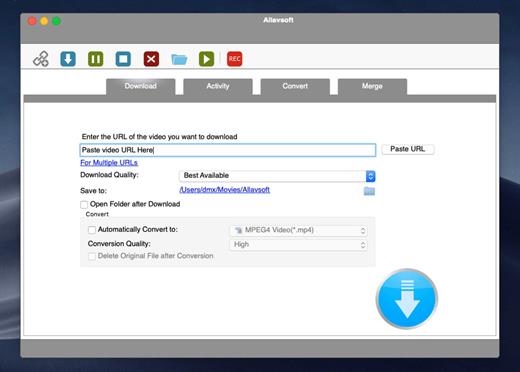
Allavsoft 3.29.1.9632

Description: Allavsoft - Video and Music downloader. Batch Download Video, Music and Subtitles from 1000+ websites. Download Music from Spotify,YouTube, Deezer, Qobuz, Soundcloud, Napster etc to MP3, FLAC.

Two steps to download movies, video, music files and subtitles from 1000+ media sharing sites like YouTube, Spotify, Facebook, Vimeo, Twitter, eHow, Dailymotion, Viki, Break, Metacafe, BlipTV, Crunchyroll, Deezer, Soundcloud, SBS, Tenplay, Plus 7, ABC iView, Medici.tv, Lynda, Udemy, PBS, BBC, cbc.ca, Livestream, Kissasian, MegaVideo, Veoh, VideoBash, LiveLeak, MyVideo, FunnyOrDie, Nico Video, TV.com, Veevr, Adobe TV etc

Besides downloading video in its original format, Allavsoft also features one-click to download as well as convert the downloaded video to popular video format like MP4, AVI, WMV, MOV, MPEG-1, MPEG-2, VOB, ASF, RMVB, DV, TS, Apple ProRes, WebM, FLV, OGV and etc.

This professional Video Downloading and Converting tool also helps to extract and download audio from online music video or movies as well as convert to popular audio format like MP3, WMA, WAV, AAC, AAC, Apple Lossless M4A, AIFF, RA, FLAC, OGG, AU and etc.

Powerful download features and functions
Batch download and convert
Allavsoft supports adding multiple video URLs and batch downloading and converting multiple videos at a time.
When download web video files, this wonderful Video Downloader will automatically detects advertisements and does not download them.
Preview and playback downloaded video files
There is a built-in video player in Allavsoft for us to preview and playback the downloaded video files.
Breakpoint Resume
You can pause and resume downloading at any time. It is very convenient to use.
Action after download done
You can set automatically shut down computer after all the download tasks are finished, if you have lots of videos to download and want to leave your Windows on to download them.
Download YouTube VR 360 Videos
Copy and paste the YouTube VR video link to Allavsoft and click Download button, then it will download the VR videos to your computer.
You may download and install PotPlayer to watch the VR 360 videos: Video > 3D Video Mode > Enable 3D Video Mode, SBS (Side by Side); Video > 360 Video Mode > Enable 360 Video Mode, Equi-Angular Cubemap 2x3 (Google Stereo)
High Download Speed
Download videos at the highest speed possible without any limitations
Schedule download times
Allavsoft allows to schedule a download to run during offpeak hours if your internet connection has 'Peak' and 'Off Peak' download limits.
Enable chapter preservation in the downloaded video.
It would certainly be helpful for all users to be able to skip to the proper chapter without fast forwarding or doing post-processing to do that.For example, when you play the downloaded video with VLC, you may click Playback -> Chapter to choose which chapter you want to play.

Release Name: Allavsoft 3.29.1.9632
Size: 71.3 MB
Links: HOMEPAGE – NFO – Torrent Search

Download: RAPiDGATOR

5 Comments
May 19

nTopology 5.47.3

Description: Innovate. Iterate. Create. Unlock faster innovation and better performance with advanced computational design software.

Lightweighting
Decrease weight while meeting your structural requirements to improve performance.

Thermal management
Improve heat transfer efficiency with more compact and reliable designs.

Fluid management
Generate designs with improved fluid or aerodynamic performance.

Architected materials
Develop highly engineered structures with a targeted response to enhance product performance.

Mass customization
Automate design to reduce cost and time to market for personalized products.

Release Name: nTopology 5.47.3
Size: 1.5 GB
Links: HOMEPAGE – NFO – Torrent Search

Download: RAPiDGATOR
5 Comments
May 19

digitalbigmo Skinworks 2026.1.1

Description: Make All Skin, Beautiful. Hollywood-Class Retouch Plug-in for the Ultimate Skin Quality. Concealer, Foundation, and Gloss. The Ultimate of Plug-ins for Skin Retouching. Skinworks currently offers three types of plug-ins: [Concealer] Removes acne and moles. [Foundation] Eliminates spots and unevenness of color to smoothen the skin. [Gloss] Emphasizes the gloss of skin and lips.

Skinworks currently offers three types of plug-ins
- Concealer - Removes acne and moles.
- Foundation - Eliminates spots and unevenness of color to smoothen the skin.
- Gloss - Emphasizes the gloss of skin and lips.

The “concealer”
- Naturally removes acne and moles while leaving the texture, beautifully restoring the original skin.
- The edge detection function preserves the contours of the eyes, mouth, and face while retouching the skin.
- Furthermore, the chroma keyer function detects skin color and applies the effects, only to your selected parts.

The “foundation”
- Removes uneven color of skin while leaving the original texture, making the skin ideally smooth.
- The edge detection function preserves the contours of the eyes, mouth, and face while retouching the skin.
- Furthermore, the chroma keyer function detects skin color and applies the effects, only to your selected parts.

The “gloss”
- Emphasizes the highlights of dark and bright areas on the skin at once. For a glossier, attractive skin.
- It is also ideal for restoring the three-dimensional appearance of the skin that tends to be lost during the retouching process.
- In addition, the gloss can also be used to emphasize the illumination of night views and to polish cars.

Simple and Easy Controls
Skinworks emphasises its simple and easy controls, allowing you to retouch with ease. A simple 2 to 3 steps to retouch the skin. Simply adjust the parameters and produce masks to where you wish to apply the effects, done.

The Skinworks plug-in supports
- Adobe After Effects and Premier CC
- The Foundry Nuke
- Autodesk flame 2020 later.
- Davinci Resolve
- Other OpenFX support software

System Requirements
Windows 10 (64-bit) and higher, AE and OFX.

Release Name: digitalbigmo Skinworks 2026.1.1
Size: 1.2 GB
Links: HOMEPAGE – NFO – Torrent Search

Download: RAPiDGATOR

6 Comments
May 19

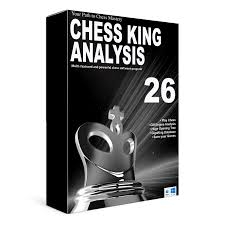
Chess King 2026 v26.0.0.2614

Description: The new Chess King Analysis 26 is considerably improved from the original Chess King or from any of the previous versions of Chess King. Note we used to call the previous versions simply "Chess King", now we call it "Chess King Analysis" to stress its computer software as opposed to "Chess King Learn" Interactive courses.

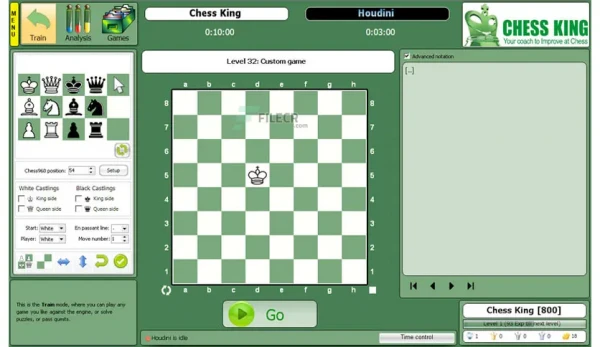
Chess King will help you improve at chess. It’s complete with all the best tools, and it’s easy to use for all levels. Play, learn, analyze, prepare for your opponent, store your own games and share them to the world.

Main features of Chess King Analysis 26
• Grandmaster engine Rybka
• Automatic installer for Stockfish engine
• Huge opening tree with evaluations and success for each move
• GigaKing 2025 games database of over 8 million games
• Classical (any level), Random, Puzzle (1500 puzzles) and Quest modes (100 games)
• Prepare for your opponent, opening and custom trees

Chess King Analysis 26 is a new and versatile tool for chess players and is an ideal introduction for the beginner, a challenging opponent for the practiced amateur, and an invaluable coach for the aspiring master. Chess King Analysis 26 emphasizes simplicity of use in training players. However, it is more than just a traditional training program as it includes an extremely strong chess engine and a huge professional database. It is also a convenient tool for analyzing and studying one's opponent before facing them at a tournament. Buying Chess King Analysis 26 is like getting several products and paying only for one, a professional chess software playing and analysis system, the largest game database available GigaKing, the grandmaster chess engines Rybka and Stockfish, 1500 chess puzzles for all chess levels, a unique random playing mode, and much, much more. Included: Rybka, GigaKing Database of over 8 million games, Full opening tree, Chess puzzles, over one hundred opening positions, Photos of over 1600 chess players. Rybka - a chess engine rated well above 2900 Elo is a good choice for analysis. Considering such a strong engine can be frustrating to play against, Rybka includes various kinds of handicaps that can be set up using the Chess King interface. The GigaKing database is updated up to the end of 2025 and includes a full opening tree. Full Chess960 support. The program is very easy to use, with several video tutorials available on the publisher's site and a possibility to send questions and feedback to the manufacturers.

Play in Classical Mode
You can play at any level you choose, from a rating of 800 to 3200, either with white or black, and either for fun (not counting for rating, you can take back moves), or in rated mode. Your games will automatically be saved in your games database and you will be able to analyze them in detail with the Grandmaster engine to see what mistakes have been made.

Have fun in the Random Mode
The Random Mode is exclusive to Chess King, in which you can choose what advantage you want to start the game with and the number of pieces you want to have on the board. For example suppose you want to start with an advantage of +6 (the equivalent of 6 pawns advantage), Chess King will randomly select a starting position with the characteristics you decide and then you will play that position against Rybka for Chess King or Stockfish if you installed it, at the highest level. Anybody should win with such a crushing starting advantage, but you’ll see it’s not that easy!

Setup any position
You can set up any position you like and then analyze it or even play it.

Search in the GigaKing Database
Look out for games of your favorite players in the GigaKing database. For example a search for Magnus Carlsen will give more than 2,000 games including all the games he played in official tournaments and many of his published exhibition matches and simultaneous exhibitions.

Learn with the Puzzle Mode
You will learn with the puzzle mode, with hundreds of exercises from beginner level until Grandmaster level. Chess King Analysis 26 will congratulate you for your success and tell you where you went wrong.

Huge Opening Tree
In the Analysis pane at the beginning of the game, either while analyzing some master game or when entering your own games in your own games database, you can follow the opening tree move by move to see what moves have been played in the whole history of chess and how much success they have had. It’s now easy to study a whole opening just by browsing opening moves, selecting lines, watching games of interest, and learning the ideas behind the opening moves.

Whole Game Evaluation graph and Engine Analysis
In the Analysis Pane after the opening stage one sees the game notation and comments, the whole game evaluation graph and below the best lines calculated by the engine. In this position below black could have taken the advantage by taking the pawn on e5, giving an evaluation of -0.86 (Black would have an advantage of close to 1 pawn equivalent), and instead played a bad move a4, which gave an evaluation of +0.49, which means white is up the equivalent of 1/2 pawn. With Chess King Analysis 26 you will know the best moves in each position.

System Requirements
The PC version is compatible with all windows versions from XP, Vista, 7, 8, 10 to the most recent Windows 11.

It can be installed and use in 5 languages
English, French, German, Spanish, and Russian.

Release Name: Chess King 2026 v26.0.0.2614
Size: 2 GB
Links: HOMEPAGE – NFO – Torrent Search

Download: RAPiDGATOR
3 Comments
May 19

JRiver Media Center 35.0.78

Description: Supports more cell phones, MP3 players, DLNA, and other devices. Powers an HTPC to entertain your family. Even different playback in multiple zones. And it can record high definition TV, and provide a replacement for cable TV. It has a Theater View interface, controllable by a Media Center Remote, an iPad, iPhone, Android, a Windows netbook or Touchscreen. MC is a DirectShow player. Obsessive taggers will be delighted with cover art and metadata options. And MC backs up your work so you can sleep at night.

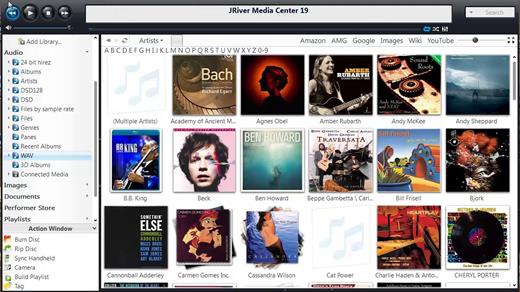
JRiver Media Center has a streamlined user interface designed to make it even easier to organize, find and play your digital files, and to connect to hardware devices. Make a CD of music for your car. Record your favorite shows and watch them on your TV. More than one soundcard? Play different music simultaneously in different rooms. MC’s Media Server can even stream your music to your PC at work!

Audio:
* Native support of DirectShow DSP filters
* Audiophile – WASAPI exclusive output using high-end USB DACs
* Audiophile – Added ability to play files from memory instead of disk
* Audiophile – Support for high end USB DAC’s with WASAPI
* Headphone DSP makes listening more natural and comfortable.
* /SoundcardSwitch command for the launcher (MC14.exe), allows soundcard selection on Vista and W7
* 3D album view adjusts text size to display more tracks when necessary
* 3D album view allows playing, adding, shuffling, and adding as next to play

Images:
* Image Preview allows zoom from a thumbnail to rotate, delete, compare, edit, and more
* Image thumbnail frames (optional)
* Photoshop PSD file support
* Single command copy / send to an editor like Photoshop, and stack new image with original

Video:
* Video tagging using sidecar files
* Chapter Support for MKV and MP4
* Chapters added to On Screen Display
* Info Panel displays metadata

Television:
* Added new “watched” column to metadata
* EPG can automatically retrieve XMLTV data
* Automatic correlation of XML channel names and MC channel names
* Info Panel displays metadata, including TV program art
* TV program art from YADB

Theater View:
* Watch Hulu and YouTube from Theater View
* Customizable nested views in Theater View
* Customizable File Info panel to display metadata
* Speed and quality enhancements
* Custom backgrounds
* Touch screen support
* On screen clock

Remotes and Servers:
* Wiki articles: Remotes and Servers
* Remote Relay using IR transceivers for controlling a set top box or receiver
* Remote Setup Wizard
* Media Center Remote learning and blasting
* Media Center can connect to another Media Center to act as a remote (TRemote)
* New HID remote control plug-in — supports shortcuts with keyboard, mouse, & gamepad
* Remote control with REST based Web Service Interface in Library Server
* Library Server supports read and write to allow for shared, multi-user database access
* DLNA added to the UPnP Server
* Library Server clients can write changes back to server
* Library Server connections allow playback on server as Playing Now zones

Release Name: JRiver Media Center 35.0.78
Size: 47.6 MB
Links: HOMEPAGE – NFO – Torrent Search

Download: RAPiDGATOR

5 Comments
May 19

Chess Assistant 26 v12.00 Build 2

Description: Chess Assistant 26 is a unique tool for managing chess games and databases, playing chess through the Internet, analyzing games, or playing chess against the computer. Chess Assistant 26 includes grandmaster level playing programs, Chess Opening Encyclopedia mode, a powerful search system, the unique Tree mode, databases of about 9.79 million games in total (Dec. 1, 2025) that can be automaticaly updated 3000 new games.

In addition to the grandmaster level engine Rybka 4 coming with the package, Stockfish 17.1, the confirmed leader among chess playing programs, will be automatically downloaded and plugged in upon installation. Stockfish and Rybka can perform any type of analysis: multi-pass game analysis, Interactive analysis, Background analysis. You can easily connect Chess Assistant 26 to any other UCI playing programs like Komodo. The programs can perform various analysis tasks for any needs.

Automatic opening annotation
Searches for novelty, adds expert annotations from the Opening Encyclopedia, CAP evaluations, inserts reference games etc.

Search for blunders
Reveals bad moves.

Multi-pass game analysis
An advanced analysis method to fine-tune each step of the search. You can even choose different engines for each phase of the game.

Analysis markers
Allow you to mark selected positions for automatic analysis at a later time.

Interactive analysis
Allows you guide the engine in its analysis and pick lines, remembering the results.

Chess Opening Encyclopedia
Includes rich theoretical material on all openings, more than 8000 annotations by GM Kalinin and 40 million evaluations by strongest engines key positions. Customizable key system.

When it comes to searching
You will not find a more powerful system. Chess Assistant 26 offers search by position, header, maneuvers, material, comments, novelty search, advanced search by material in 12 regions of the board and more!

System Requirements
256 RAM, 4 Gb, Windows XP/Vista/7/8/10/11

Languages
English, German, French, Spanish, Italian.

Release Name: Chess Assistant 26 v12.00 Build 2
Size: 2.7 GB
Links: HOMEPAGE – NFO – Torrent Search

Download: RAPiDGATOR
3 Comments