Please REGISTER or RENEW your account on RAPiDGATOR.net and support us by doing through all RAPiDGATOR working download links on main posts...
May 14

MOBILedit Forensic Ultra 9.8.0.34378

Description: MOBILedit Forensic is an all-in-one solution for data extraction from phones, smartwatches, and cloud services. With the introduction of the new Ultra edition, MOBILedit Forensic has become an exceptionally powerful tool for security bypassing. It combines physical and logical data acquisition with advanced features such as application analysis, deleted data recovery, support for a wide range of devices, detailed reporting, concurrent processing, and a user-friendly interface.

All-in-one tool used to gather evidence from phones
With MOBILedit Forensic, you can extract all the data from a phone with only a few clicks. This includes deleted data, call history, contacts, text messages, multimedia messages, photos, videos, recordings, calendar items, reminders, notes, data files, passwords, and data from apps such as Skype, Dropbox, Evernote, Facebook, WhatsApp, Viber, Signal, WeChat and many others.

MOBILedit Forensic automatically uses multiple communication protocols and advanced techniques to get maximum data from each phone and operating system. Then it combines all data found, removes any duplicates and presents it all in a complete, easily readable report.

Security bypassing
MOBILedit Forensic Ultra has built-in security bypassing for many phone models, allowing you to acquire a physical image even when the phone is protected by a password or pattern. Bypass the lock screen on a wide range of Android phones, so you can keep the investigation moving forward. We are introducing a new approach to security bypassing with Live updates technology - new phone models can be added even without a MOBILedit reinstallation, just like updating antivirus software!

Physical data acquisition and analysis
In addition to advanced logical extraction we also provide Android physical data acquisition, allowing you to extract physical images of investigated phones and have exact binary clones. Physical analysis allows you to open image files created by this process, or those obtained through JTAG, chip-off or other tools to recover deleted files plus all other deleted data where our product is known to be excellent.

Advanced application analysis
The use of apps to communicate and share has grown rapidly. Many apps are released or updated everyday. It is obvious that the analysis of apps is vital to retrieving as much evidence as possible. This is the strongest point of MOBILedit Forensic, we dedicate a large part of our team specifically for application analysis. We employ adaptive and in-depth methods to ensure you retrieve the most data available for each app- especially recovering deleted data. Data is analyzed for its meaning so you see it on a timeline as a note, a photo, a video or a flow of messages no matter what app was used to send them.

Smart Screenshots
The Smart Screenshots feature provides a solution for obtaining evidence from applications that cannot be accessed through logical extraction. This advanced feature enables the extraction of conversations and other information from popular messaging apps like Instagram, Signal, Skype, Telegram, Viber, and WhatsApp. The screenshotting is automatic without requiring any user interaction on the device.

Smartwatch forensics
With the rise in popularity of wearable devices, smartwatch forensics plays an essential role and is vital if a smartwatch is the only digital evidence available. MOBILedit Forensic supports smartwatches made by manufacturers such as Apple, Garmin, Samsung, TCL and others, via special readers which are available in our Smartwatch Kit.

Deleted data recovery
Deleted data is almost always the most valuable information in a device. It often hides in applications; and because this is our strongest expertise, we deliver great results in finding deleted data. Our special algorithms look deeply through databases, their invalidated pages and within caches to find any data that still resides in a phone. MOBILedit Forensic retrieves the deleted data and presents it clearly in a special section of the report.

Fine-tuned reports
A tremendous amount of effort has been dedicated to refining reports so they are customizable, easy to read, concise and professional. An enhanced report configurator allows you to define exactly which data will be extracted from the phone and how the report will look. Each report is divided into sections, labeled with icons, pictures, and highlighted relevant data so you can find evidence quickly. A complete, configurable and comprehensive list of all events with a time-stamp is shown on a timeline and messages can be filtered by conversation or by contact names.

Reports are available in PDF, XLS, or HTML formats, and you can generate data exports compatible with the other data analysis tools you use in your lab, such as UFED.

Concurrent extractions and new 64-bit engine
The new 64-bit engine provides stability and the ability to analyze huge amounts of data, apps with hundreds of thousands of messages, photos and other items, plus several phones at once. Speed up your investigation process by extracting multiple phones at the same time, and generating multiple outputs for each one. All you need is a USB hub, cables and a computer powerful enough to perform concurrent jobs. You can finish a week's worth of work overnight!

Malware detection
The new Malware detection is based on the Yara project. Yara works on the basis of rules that describe any pattern of data, in our case patterns that may indicate malware. MOBILedit Forensic applies these rules and searches the file to see if it accomplish any of these rules, and returns a list of results. This means that it contains the data patterns described.

Easy to use UI
Having the right tool is not enough, you need the right staff to work with it. The shorter the learning curve the better. Because we have designed software for millions of consumers, it was a welcome challenge for us to make MOBILedit Forensic the most user-friendly forensic tool available. With a straightforward interface, each step is simple and guided with clear instruction. It is also optimized for touch screens allowing for easy use in the field.

Camera Ballistics - scientific image analysis
When combined with Camera Ballistics you are able to identify which images present on the analyzed phone were actually taken by the phone's camera using a sensor fingerprint. This process delivers new insight into the images such as make, model, GPS, camera settings, mean square error, fingerprint presence result, probability, and correlation will be organized into a well designed and comprehensive PDF report suitable for submission as evidence.

Reports in any language
Reports are now under the user’s control. You can customize reports to your own style or translate them to your language, so you can meet the criteria defined by the law.

Photo Recognizer
This module automatically locates and recognizes suspicious content in both photos and videos, such as weapons, drugs, nudity, currency, and documents. Photo Recognizer utilizes artificial intelligence and deep machine learning to quickly analyze an unlimited number of photos and videos, and is designed to eliminate countless hours that would be spent manually searching for key evidence in huge databases of visual media. Each piece of media is placed in its own specific category so that investigators can keep their cases well-organized and easily present the suspicious content in a fine-tuned report.

Face Matcher
This important feature easily finds photos and videos of people you are looking for. Based on the newest deep learning techniques, Face Matcher rapidly analyzes even large quantities of visual media that users often have in their phones or PCs. Eliminate countless hours spent manually looking through photo and video albums. Simply supply photos of faces you want to find, and let Face Matcher find the right photos and videos.

System Requirements
To enjoy the best possible user experience, please ensure your computer meets the minimum system requirements as shown below. We have also included additional specifications for a more powerful system

- OS: Windows 64-bit OS is required, Windows 10 as minimal configuration.
- CPU: Intel Core i5 or Ryzen 5 as a minimum, i7 or Ryzen 7 is recommended for concurrent extractions, and a CPU with AVX is required for Face Matcher and Photo Recognizer.
- RAM: 16 GB as minimal configuration, 32 GB is recommended, 64 GB or more is better.
- Please note that meeting the minimum RAM requirements may impact concurrent extractions and performance on phones with a larger amount of data.
- HDD: free space of 1 GB on the system drive for MOBILedit Forensic, plus suitable storage space for the reports. SSDs are recommended as read/write speeds are quicker. HDDs, removable drives, and network storage are suitable for longer-term storage of data.
- Minimum screen resolution: 1250x800, recommended 1920x1080.
- High-quality cables for connecting phones are essential.
- GPU: The GPU can be of any type and either integrated, a dedicated graphics card or, fully external. There are no processes in MOBOILedit Forensic PRO that utilise the GPU.

Release Name: MOBILedit Forensic Ultra 9.8.0.34378
Size: 3.6 GB
Links: HOMEPAGE – NFO – Torrent Search

Download: RAPiDGATOR
4 Comments
May 14

Nuclear Coffee Recover Keys 12.0.6.316 Enterprise

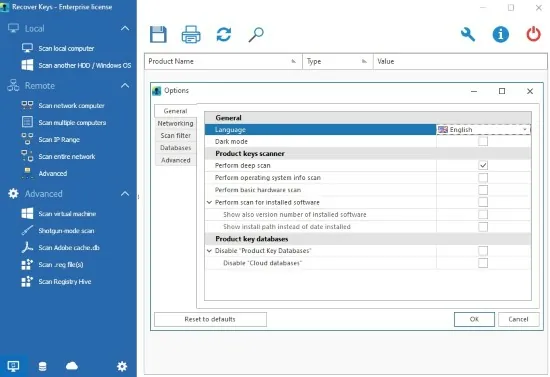
Description: Recover Keys is a simple yet comprehensive Windows application designed to safeguard activation keys for software products installed on your local or remote network computers in the event of a system or hard disk crash.

Losing activation keys is a time consuming and expensive experience. In such case you would have to contact the developers of each program or even purchase entirely new versions of all software.

Now you can protect yourself and backup your keys! Recover Keys quickly analyzes your system for over 11,000+ software programs and produces a list of software activation keys. Then you can save, backup, print, or export (Word, Excel, PDF, HTML, CSV, XML) the license information. Due to friendly interface and solid amounts of options, Recover Keys can used both by professionals and inexperienced users.

Product Key Finder
Recover product keys for Windows, Office, Adobe products, Acronis products, Electronic Arts games, WinZip, Nero and more than 11,000+ other programs.

Backup activation keys
Losing product keys can be very expensive for your both time and money. You can save your product keys into Text file, Word, Excel, PDF, HTML, CSV, XML or simply send it to printer.

Scan another Windows or HDD
Recover Keys can also scan another Windows operating system or another hard disc drive (HDD) for product keys, bootable or not

Scan remote network computers
Besides scanning your local PC for product keys, Recover Keys can scan for product keys on remote network computers.

Cloud and local databases
Store and access your product keys securely from anywhere. Upload your product keys with Recover Keys software and access it from anywhere via browser or mobile.

System requirements
Works on Windows NT / 2000 / XP / Vista / 7 / 8 / 8.1 / 10 / 11. 32 bit or 64 bit system. No specific requirements.

Release Name: Nuclear Coffee Recover Keys 12.0.6.316 Enterprise
Size: 65.3 MB
Links: HOMEPAGE – NFO – Torrent Search

Download: RAPiDGATOR
6 Comments
May 14

Native Instruments Kontakt 8.10.2

Description: KONTAKT 8 is everything from instant inspiration for music makers to the industry’s leading instrument-building tool. For the eight generation of KONTAKT, we’re bringing its 20-year legacy into the future. Explore new musical ideas and find fresh inspiration with an overhauled Factory Library 2, newly added effects, and under-the-hood audio improvements.

KONTAKT is the Definitive Sampling Platform and Industry-Standard. KONTAKT powers the biggest selection of sampled instruments available. Included Factory Library 2 puts 55+ GB of detailed, creative, and expressive instruments at your fingertips. Drag and drop your own samples into an instrument’s interface to use your own sounds. Build your own instruments with powerful sample-editing and instrument-building.

The virtual instrument platform reinvented
Imagine any sound – Kontakt lets you find it, create it, and transform it. The latest edition of our revolutionary sampling platform combines a brand-new set of intelligent tools with countless sound design options, redefining how you generate ideas and make music.

A huge choice of sound
Kontakt hosts the world’s largest range of virtual instruments. With thousands of libraries, it's the gateway to quality sound from Native Instruments, our official partners, and scores of indie developers. Plus, everything is completely tweakable, so you can make any sound your own.

What's new in Kontakt 8?
The most feature-packed release yet is here to transform the way you generate, modulate, and playback sound. Plus, it's packed with performance updates so you can work faster than ever

Smash writer's block - Tools add a completely new layer of creative features to get the ideas flowing. And they work with any Kontakt instrument, old and new. For our first drop, we're launching MIDI content and randomization features with Chords and Phrases, designed to spark new ideas and get you in the zone fast.

Fast and fun loop control - Leap is an ultra-fast and playful way to play and manipulate loops. Spark fresh ideas, sprinkle in expressive performance effects, or just jam. Breathe new life into your sample collection or try something totally fresh with our new Leap Expansions series, starting with 12 curated packs for specific genres and styles.

Sound like nothing else - Conflux is the first in a new breed of Kontakt instruments for experimental sound design. Layer organic and synthetic samples and add dynamic movement to static sounds in real time, with original PPG wavetables and techniques like FM, Phase Modulation, and Ring Modulation.

Get going with hundreds of included instruments
Kontakt's Factory Library comes packed with over hundreds of meticulously sampled instruments. Get started with a huge playable and tweakable selection of acoustic and electronic options, including the renowned collection from Orchestral Tools, plus Hybrid Keys.

Dream it, build it
All your favorite Kontakt instruments are built right here. The powerful feature set makes Kontakt the first choice for instrument developers worldwide, and it just got even bigger with enhanced synth capabilities, including real-time wavetable, frequency modulation, and ring modulation oscillators.

What's the difference between Kontakt and Kontakt Player?
Just looking to use Kontakt instruments? Kontakt Player is the free version that runs all NI Kontakt instruments and many more officially licensed options from third-party developers (make sure to check the compatibility before you buy).

The go-to for pros
You've heard Kontakt at the top of the charts, in Oscar-winning scores, and on the soundtracks of major TV shows. It's the favorite of so many composers, producers, and sound designers for its unmatched sound quality, deep manipulation feature set, and incredible attention to detail.

→ Features:

• Tools - Chords and Phrases Tools deliver MIDI content and randomization features for creating melodies and sequences, sparking new ideas fast. Works with any Kontakt instrument.
• Leap - An ultra-fast way to play and manipulate loops and samples. Includes 12 Leap Expansions – curated packs for specific genres and styles, including Afrobeats, Latin Trap, Platinum Pop, Progressive Trance, Soul Gold, and more.
• Conflux - A true hybrid instrument combining samples with wavetable, FM, and ring modulation oscillators for real-time sound manipulation.
• Kontakt 8 Factory Library 2 includes over 900 instruments.
• A platform for thousands of third-party sample-based instruments.
• Seamless hardware integration with Kontrol keyboards and Maschine.
• Deep NKS integration with hundreds of instruments to allow quick browsing, preview, and hands-on control for your virtual instruments.
• Improved tools for building your own instruments.

As well as our own KONTAKT instruments, there are currently around 900 licensed instruments from other manufacturers that run in KONTAKT, plus thousands more so-called ‘indie’ instruments. This diverse ecosystem means that KONTAKT 8 is your access point to the industry’s biggest collection of playable sampled sound.

Release Name: Native Instruments Kontakt 8.10.2
Size: 1.2 GB
Links: HOMEPAGE – NFO – Torrent Search

Download: RAPiDGATOR

4 Comments
May 14

Microsoft Office 365 ProPlus - Online Installer 3.3.13

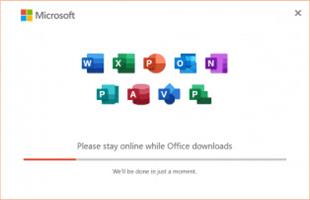
Description: This small Script will download and install the Microsoft Office 365 Professional Plus including all the updates directly from the Microsoft CDN Server.

Includes
Word, Excel, PowerPoint, Outlook, OneNote, Publisher, Access, Visio, Project, ProofingTools, OneDrive Desktop.

How to use ?
Extract the downloaded RAR Archive file.
Start the file "Office 2021 Setup.cmd".
Run the KMS_VL_ALL - Smart Activation Script tool.
Done.

System Requirements
Windows 10/11 x86 (32-bit)
Windows 10/11 x64 (64-bit)

Release Name: Microsoft Office 365 ProPlus - Online Installer 3.3.13
Size: 8.6 MB
Links: HOMEPAGE – NFO – Torrent Search

Download: RAPiDGATOR
8 Comments
May 14

Sony Catalyst Production Suite 2026.1

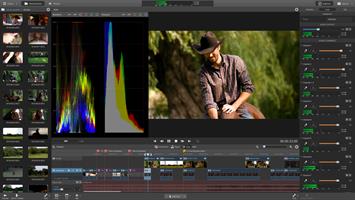
Description: Catalyst Production Suite fuses powerful media preparation and fast, focused video editing to provide the backbone for your video productions. Catalyst Prepare paves your path from camera to post with robust organizational tools, precise first-pass color correction and monitoring, extensive metadata support, and more.

Catalyst Edit provides a lean, focused video editing environment that makes your cutting process fast and fluent.

With support for 4K, Sony RAW, and HD media, Catalyst Production Suite gives you the power to make the most of your camera's high dynamic range and wide color gamut as well as the stunning resolution of 4K from beginning to end.

The Catalyst Production Suite workflow
With strong family support, you can accomplish amazing things. The Catalyst family provides powerful media prep and focused, fast editing that you can rely on to translate the vision in your head to an experience that moves your viewers.

Catalyst Prepare takes care of all of your media prep needs
- View your media directly from a camera, deck, or card reader
- Make a full-volume backup with checksum verification
- Organize clips into bins
- Batch copy clips
- Batch transcode clips
- Make color adjustments and apply looks
- Set in/out points
- Establish multichannel audio assignments
- Batch upload clips Ci, the Sony video cloud service
- Assemble a rough cut with the Storyboard feature

Catalyst Edit
In Catalyst Edit, turn your beautiful footage into a polished, finished product. To save time, access your Catalyst Prepare libraries directly and import existing storyboards to cut your project together quickly and creatively. The focused toolset gives you quick access to all the essential cutting tools as well as effects, titling, and other tools to bring your production from imagination to screen.

What's new
Notable fixes/changes in version 2025.3
- HLG mild was added.
- Fixed a bug where PDF export would not complete when multiple clips were selected.
- Fixed a bug where color adjustments might not be properly applied when using proxy clips.
- Fixed a bug where the app could fail to start when launched by a user other than the one who installed it.
- Added support for displaying Shooting Information.
- Improved cropping when performing stabilization on clips with significant camera shake.

System Requirements
- A 64-bit operating system: Microsoft® Windows 10, Windows 11
- 2 GHz processor (multicore or multiprocessor CPU recommended for HD; 8 cores recommended for 4K)
- 500 MB hard-disk space for program installation
- Solid-state disk (SSD) or high-speed RAID for 4K media
- 4 GB RAM (8 GB recommended; 16 GB recommended for 4K)
- NVIDIA, AMD/ATI, or Intel GPU with support for OpenCL 1.1 or later with at least 512 MB of memory (2 GB recommended for 4K) or a CPU with SSE 4.2 or higher. OpenGL 2.1 is recommended for optimum performance.

Release Name: Sony Catalyst Production Suite 2026.1
Size: 673.8 MB
Links: HOMEPAGE – NFO – Torrent Search

Download: RAPiDGATOR
4 Comments
May 14

Gillmeister Automatic PDF Processor 2.1.8

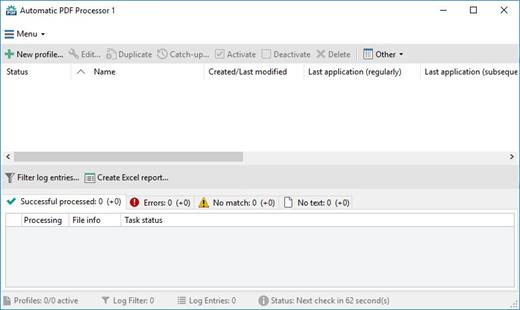
Description: With Automatic PDF Processor, PDF files can be processed automatically. Any number of folders can be monitored in order to automatically print, rename or move incoming PDF files to dynamically named folders.

Numerous metadata of the PDF document can be used in addition to the content, for example to include invoice information in the file path. The PDF files to be processed can be narrowed down with various profile-specific filters - the document text, PDF metadata and general file information are available as filters.

Extraction of data from the text of PDF files is optional. An unlimited number of extraction rules can be created within a profile. The extracted data can be used (after optional validation and formatting) for naming folders or the file name, and can be saved as an extract in a CSV file. Another task that can be automated with the Automatic PDF Processor is the extraction of attachments from PDF files, for example to save ZUGFeRD XML files, XRechnung attachments or similar as part of a PDF invoice in the same folder.

Features:
Print, rename, move, or copy PDF files automatically
Store embedded PDF attachments in any folder for archiving
Extract textual data from PDF documents automatically and save them as CSV file
Monitor any number of folders (hot folder monitoring)
Create individual rules for different tasks
Filter by document text, file date, attachment name or count, title …
Create the storage location (storage folder) dynamically from PDF document properties or based on content
Get informed about different processing statuses by email
Limit the automatic processing of PDF files to certain days and times, for example to print only during office hours
Combine a scan and OCR process with subsequent automatic naming by the Automatic Email Processor in order to be able to file older PDF documents in a structured way as well
Perform subsequent actions e.g., start a program with the path of the saved PDF file or PDF attachment as parameter
Process all already existing PDF files of a folder (with user-defined criteria)
Sort PDF — files automatically or have them moved to another folder and subfolder created dynamically from file properties
Send an Excel report with overview and detailed information on a regular basis

System requirements:
Microsoft Windows 11, 10, 8, 7 or Server (32-bit or 64-bit version)

Release Name: Gillmeister Automatic PDF Processor 2.1.8
Size: 226.5 MB
Links: HOMEPAGE – NFO – Torrent Search

Download: RAPiDGATOR
4 Comments
May 14

VueScan Pro 9.8.54

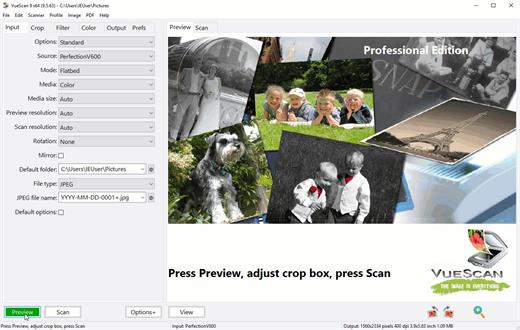
Description: Can't Find a Driver for Your Scanner? VueScan is here to help. We reverse engineered over 7400 scanners and included built in drivers in VueScan so you can keep using the scanner you already have.

VueScan supports over 7400 scanners from 42 manufacturers
The easiest way to see if VueScan works with your scanner is to download and try it. But you can also view the lists of all of the scanners VueScan supports.

The Tool For All Your Scanning Needs
VueScan has the features you need no matter what you need to scan

Scan Documents
Whether you need to scan a single page or a hundred page book, VueScan has the tools to help you.
Scan with Flatbed and Automatic Document Feeders (ADF)
Scan to PDF (Single and Multipage)
Optical Character Recognition (OCR)
Automatic Color Detection
Small document file sizes
Automatic document deskewing

Scan Photos
Do you have boxes full of photos in a drawer? Use VueScan to get them on your computer, and off your to-do list.
Scan with Flatbed and Automatic Document Feeders (ADF)
Scan to JPEG or TIFF
Preset photo sizes
Scan multiple photos on the flatbed
Automatic file naming

Scan Film and Slides
VueScan is the ultimate tool for all your film and slide scanning needs.
Works with almost all film/slide scanners
Scan to JPEG/TIFF/RAW
Infrared Dust Removal
Color correction
IT8 Calibration
Photoshop Integration

Operating Systems: Windows 11, 10 x64, 8 x64, 7 x64, Vista x64

Release Name: VueScan Pro 9.8.54
Size: 59.8 MB
Links: HOMEPAGE – NFO – Torrent Search

Download: RAPiDGATOR
4 Comments
May 14

VectorStyler 1.3.018

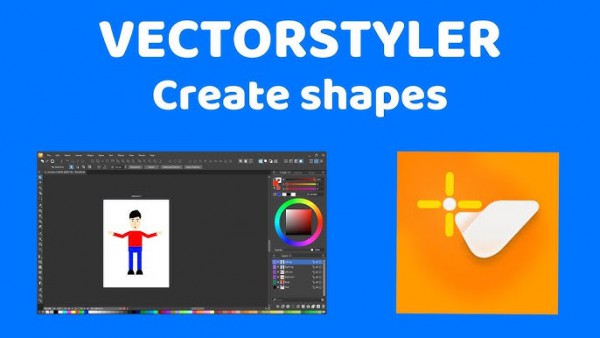
Description: VectorStyler brings every advanced vector and illustration tool together — in one complete, independent package, with no subscriptions and no compromises. Packed with powerful, unique tools you won’t find anywhere else — VectorStyler redefines what’s possible in vector illustration.

Customizable User Experience
Customize all aspects of the user interface and workflow, including shortcuts, menus, toolboxes and toolbars. Create and save your own workspace profiles.

Native Illustrator Import
Open, import or paste artwork from Adobe Illustrator using the native Illustrator file format support, retaining all high-level editable attributes.

Extended Compatibility
Import artwork and export to various common file formats like AI, PDF, SVG, DWG, DXF, PSD, PNG and TIFF. Import and export PSD files while retaining layer hierarchy and keeping editable vectors.

Powerful Snapping Options
Use advanced snapping options for precision, including rotated grids and guidelines, collision and tangent to shape snapping. Turn any object shape into a guideline.

Real Vector Brushes
Paint with and use real vector brushes on any shape or outline. Brushes can be of artistic, pattern, scatter or bristle type. Create new brush styles or presets from any group or layer.

Select Objects by Attribute
Select objects by style or other attributes. Select objects with a similar style or attribute as the selected objects.

Magic Wand Tool
Use the magic wand selection mode and the Magic Wand panel to select objects similar to the pointed object. Select similar shapes by area or length.

Color Palettes
Work with document and global color palettes easily. Open multiple color palettes from external formats. Manage palettes seamlessly.

Advanced Halftones
Create complex vector halftones on layers or images. Work multiple halftones on one object using the Appearance panel

Align Object on Path
Create non-destructive object alignment on path. Align and distribute multiple objects on a path

Vector Drop Shadow
Create vector drop shadow effects on objects or groups. Adjust the drop shadow options using the Drop Shadow panel.

Parametric Shapes
Draw with a large collection of parametric shapes. Adjust shape properties using the Shape panel. Use the Node tool to edit parametric shapes.

System Requirements
- VectorStyler is (also) a native Windows (Intel) application, and requires a PC with Windows 10 installed to run. A minimum of 8GB of system memory is recommended. More memory helps when creating complex designs or illustrations.
- Only Windows 10 or newer versions are supported. An Intel Core i5 or i7 processor with 4 cores and hyper-threading is recommended as VectorStyler makes extensive use of multiple threads. GPU acceleration can be enabled in the Settings / Performance by selecting OpenCL (any GPU supported by Windows), or the NVIDIA mode for Nvidia GPUs.

Release Name: VectorStyler 1.3.018
Size: 79.7 MB
Links: HOMEPAGE – NFO – Torrent Search

Download: RAPiDGATOR

5 Comments
May 14

Topaz Gigapixel Pro 1.3.0

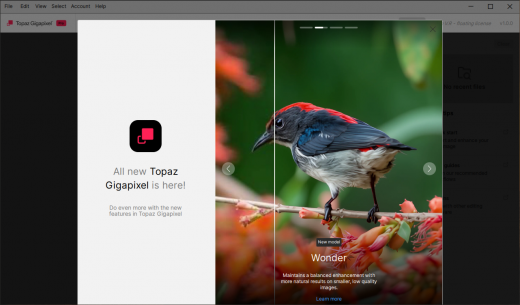
Description: Creative vision doesn't come in standard definition. The nine AI-powered tools in Topaz Gigapixel not only make your images larger, but more detailed, more real, and even more valuable.

The industry standard for upscaling.
Used by professional photographers, fine artists, designers, illustrators, and creative teams worldwide. Gigapixel AI was the first commercially available AI image upscaler, since 2019. Now as Topaz Gigapixel, the models are better than ever.

6x Lossless Zoom
Crop in on your subject without losing quality and while enhancing detail.

True-to-Input Details
Explore nine different AI models inside Topaz Gigapixel to make every image larger.

Use Before Every Print
From poster to billboard. Ensure every detail is crisp, defined, and bold.

Photogs, Artists & Designers
Every type of creative professional can benefit from running their images through Topaz Gigapixel.

System Requirements:
Windows Operating System: 10 or 11 (most updated version recommended)
System Memory (RAM): 16GB
CPU: Intel or AMD, with AVX instructions, released after 2013
GPU: NVIDIA GTX 980 Ti | 6GB VRAM | AMD Radeon 570 | 6GB VRAM | Intel UHD 600 Graphics | 16GB RAM

Release Name: Topaz Gigapixel Pro 1.3.0
Size: 469.3 MB
Links: HOMEPAGE – NFO – Torrent Search

Download: RAPiDGATOR
3 Comments
May 14

Disk Savvy 18.1.24

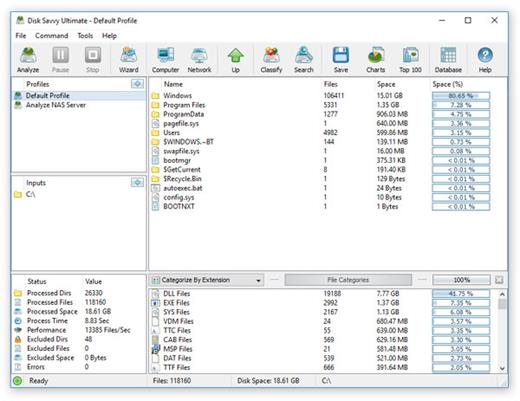
Description: Disk Savvy is a disk space usage analyzer capable of analyzing disks, network shares, NAS devices and enterprise storage systems. Users are provided with multiple disk usage analysis and file classification capabilities allowing one to gain an in-depth visibility into how the disk space is used, save reports and perform file management operations.

DiskSavvy is a powerful disk space usage analyzer allowing one to analyze disks, network shares, NAS storage devices and enterprise storage systems. The user is provided with the ability to analyze one or more disks, directories or network shares, detect directories and files using significant amounts of the disk space, generate various types of pie charts, save disk space usage reports and perform disk space usage history trend analysis operations.

In addition, DiskSavvy provides built-in file classification capabilities allowing one to classify and categorize files using a number of file classification plug-ins capable of recognizing more than 3,000 types of files and showing disk space usage per file type, category, file extension, user name, creation, last modification and last access time, etc. Users are provided with the ability to perform different types of file management operations on disk space analysis results, specific types of files or file categories.

DiskSavvy allows one to save disk space analysis results to a number of standard formats including HTML, PDF, Excel, XML, CSV, text and the native DiskSavvy report format. In addition, IT and storage administrators are provided with the ability to export disk space analysis results from multiple servers and/or NAS storage devices to a centralized SQL database and then perform advanced disk space usage history trend analysis operations and display disk space usage per server and disk space usage per user.

Analyzing Network Servers and NAS Storage Devices
DiskSavvy allows one to scan the network, discover network servers and NAS storage devices, automatically detect all accessible network shares and analyze disk space usage in hundreds of network servers and NAS storage devices. In addition, the user is provided with the ability to export the list of detected servers and NAS storage devices (including lists of network shares for each server) into HTML, PDF, text and CSV reports.

In order to analyze one or more servers or NAS storage devices, press the 'Network' button located on the main toolbar and wait while DiskSavvy will scan the network and show a list of detected network servers and NAS storage devices. On the network servers and NAS storage devices dialog, select the required servers and press the 'Analyze' button.

DiskSavvy will show all network shares hosted on the selected servers and NAS storage devices allowing one to analyze disk space usage and save various type of disk space analysis charts and reports. In addition, DiskSavvy provides a large number of advanced disk space analysis options allowing one to tune and customize disk space analysis operations for user specific needs and hardware configurations.

DiskSavvy Command Line Utility
In addition to the DiskSavvy desktop GUI application, IT administrators are provided with a command line utility allowing one to perform disk space analysis operations, save disk space usage reports and export disk space analysis results to an SQL database. The DiskSavvy command line utility may be used to automate disk space analysis operations and integrate disk space analysis capabilities into user-custom batch files and shell scripts.

DiskSavvy Disk Space Analysis Server
Finally, enterprise customers are provided with DiskSavvy Server, a server-based product version, which runs in the background as a service and allows one to analyze a number of servers or NAS storage devices simultaneously, schedule periodic disk space analysis operations, submit disk space analysis reports from multiple servers to a centralized SQL database, perform advanced disk space usage history trend analysis operations, analyze disk space usage per server, analyze disk space usage per user and execute conditional, rule-based disk space analysis actions.

DiskSavvy Server may be controlled using a full-scale client GUI application locally or via the network. The client GUI application provides all features available in the desktop product version and additional capabilities allowing one to analyze multiple servers and/or NAS storage devices simultaneously, schedule periodic disk space analysis operations and perform advanced disk space usage history trend analysis operations. In addition, to the client GUI application, DiskSavvy Enterprise provides a web-based management interface, which can be used to control one or more servers using a regular web browser.

Batch Disk Space Analysis Operations
DiskSavvy Server and DiskSavvy Enterprise provide the ability to scan the network, detect all network servers and NAS storage devices, execute one or more pre-configured disk space analysis commands on hundreds of network servers and NAS storage devices and generate an individual report for each analyzed server, NAS storage device or network share.

Batch Disk Space Analysis Operations
In the simplest case, just press the 'Network' button located on the main toolbar, search all network servers and NAS storage devices on the network, select one or more servers to be analyzed, press the right mouse button and select the 'Batch Disk Space Analysis' menu item. DiskSavvy will show a list of pre-configured disk space analysis commands allowing one to select one or more commands to be executed on all selected network servers and NAS storage devices.

Batch Disk Space Analysis Mode
Depending on the selected configuration, DiskSavvy will save in the built-in reports database an individual disk space analysis report for each analyzed network server, NAS storage device or network share. Once the batch disk space analysis is completed, the user will be provided with the ability to open saved disk space analysis reports, review disk space analysis results, generate various types of pie charts and export reports to a number of standard formats including HTML, PDF, Excel, text, CSV and XML.

Release Name: Disk Savvy 18.1.24
Size: 82.3 MB
Links: HOMEPAGE – NFO – Torrent Search

Download: RAPiDGATOR
5 Comments