Please REGISTER or RENEW your account on RAPiDGATOR.net and support us by doing through all RAPiDGATOR working download links on main posts...
May 12

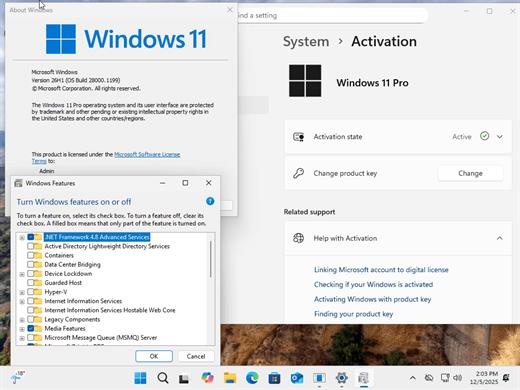
Windows 11 Pro 25H2 Build 26200.8328 TPM Bypassed & Pre-Activated May 2026

Description: On August 29, 2025, Microsoft released the first official preview of Windows 11 version 25H2 (2025 Update) in the Release Preview Channel of the Windows Insider Program. The update is rolling out as an enablement package for devices already running version 24H2.
Windows 11 versions 24H2 and 25H2 use the same underlying system files and architecture. That means there’s no need to reinstall or replace the core operating system to move between them. Instead of delivering a large, full-featured update, the software giant simply “flips the switch” with a small enablement package that activates the 25H2 features already present in 24H2. This makes the update faster, less risky, and easier to roll back.

What’s New


  • Some of the features that you can expect to find on Windows 11 25H2 include
  • Start menu redesign: Wider layout, more pinned apps, a new “All” apps section, and optional removal of “Recommended.”
  • File Explorer dark mode: More dialogs now match the theme, including copy and delete prompts.
  • Notification Center: Now shows full clock (with seconds) on secondary monitors.
  • Android app resume: Continue mobile app activity directly from the Taskbar.
  • Start menu sidebar: Expanded access to messages, calls, and photos from your phone with a new interface.
  • Click to Do: New “Describe Image” action, selection modes (Freeform, Rectangle, Ctrl + Click), and touch gestures.
  • Admin Protection: Prompts for elevation on untrusted apps—adds a visual warning layer.
  • Passkeys with 1Password: Native support for plugin-based passkey managers.
  • Text & image AI activity log: Track recent AI usage from third-party apps.
Release Name: Windows 11 Pro 25H2 Build 26200.8328 TPM Bypassed & Pre-Activated May 2026
Size: 6.7 GB
Links: HOMEPAGE – NFO – Torrent Search

Download: RAPiDGATOR

3 Comments
May 12

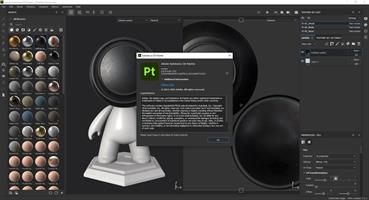
Adobe Substance 3D Painter v12.0.3 [FINAL] (x64) Pre-Cracked

Description: Substance Painter is a brand new 3D Painting app with never before seen features and workflow improvements to make the creation of textures for 3D assets easier than ever. It is acknowledged as the most innovative and user-friendly 3D Painter out there.

Power to the artists
- Substance Painter gives you all the tools you need to texture your 3D assets.

What You See Is What You Get
- The PBR real-time viewport lets you work on asset look development.
- Create in Substance Painter and get real-time feedback in UE4 and Unity thanks to the live link.

Augmented Artistry
- Unleash your creativity with powerful tools and a non-destructive workflow.

Smart Materials
- Tear and wear, scratches and dust instantly appear where they're supposed to.

Smart Masks
- Apply the same mask preset on any type of object and have it adapt automatically.

Integrated 8K Bakers
- Baking is where it all starts. Bake high quality maps in an instant directly within Substance Painter.

Bring VFX to the Top
- Support for Linux, 8K export, color management, UDIM management and Scripting API make integrating Substance Painter into VFX workflows easier than ever.

Open to the world
- Get 1:1 engine exports and share directly to portfolio sites with dedicated formats.

System Requirements:
Minimum:
- OS: Windows 10 64-bit Version 1909
- RAM: 16 GB
- VRAM 4 GB

Release Name: Adobe Substance 3D Painter v12.0.3 [FINAL] (x64) Pre-Cracked
Size: 3.2 GB
Links: HOMEPAGE – NFO – Torrent Search

Download: RAPiDGATOR

0 Comments
May 12

Adobe Substance 3D Modeler v1.22.7 [FINAL] (x64) Pre-Cracked

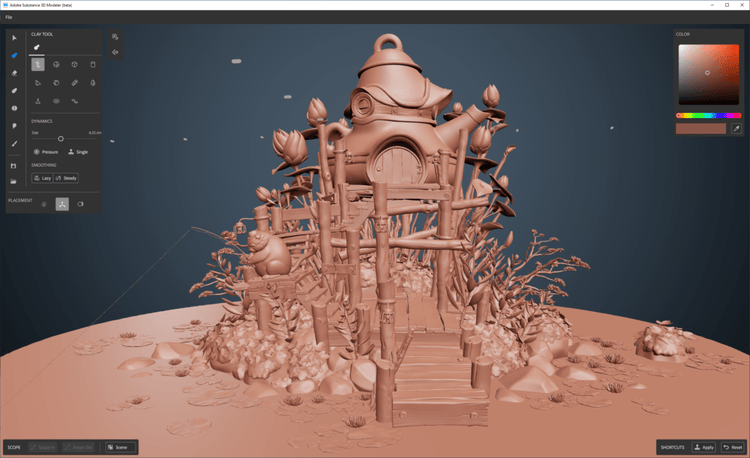
Description: 3D Modeler is a 3D modeling and sculpting application that helps you create across both desktop and VR.Modeler aims to make working in 3D as intuitive as working with clay in real life. To help achieve this, with Modeler you don't have to worry about tweaking vertexes or managing UVs, instead you can focus on the creative process.

Modeler is a 3D modeling and sculpting application that helps you create across both desktop and VR.
Modeler aims to make working in 3D as intuitive as working with clay in real life. To help achieve this, with Modeler you don't have to worry about tweaking vertexes or managing UVs, instead you can focus on the creative process.

Liberate 3D modeling from technical constraints.
With an intuitive design, Modeler frees you from the technical constraints of traditional 3D modeling. Focus purely on the creative process and create simple 3D models or complex, fully conceived 3D scenes.

From concepting in 3D to sculpting an entire scene.
Modeler is a flexible tool for creating concept art, sketching and prototyping, blocking out game levels, crafting detailed characters or props, or sculpting an entire scene. All in one app.

Switch seamlessly between desktop and VR.
The powerful tools in Modeler work seamlessly across both desktop and VR. Create with the hardware that empowers you best at each step of your creative workflow.

The features in Substance 3D Modeler let you interact naturally with your art.

Multisurface support
Modeler allows you to switch at any time between VR and desktop, depending on the needs of your project, the task at hand, or your own preferred style of working.

Symmetry and repetition tools
Harness powerful symmetry and repetition capabilities to quickly assemble complex structures and craft with incredible detail.

Hard-surface sculpting
Create clear and decisive forms with a range of parametric primitive shapes, and easily add and cut them into more complex models.

System requirements
Operating System: Windows 10, 11 (64bit)
CPU: Intel i5 or AMD Ryzen 5
Memory: 8GB RAM
Graphics: GTX 1060 or AMD RX580 (4GB VRAM)

Supported VR headsets and controllers

Meta Rift S HMD
-Discrete, compatible DisplayPort output
-Compatible miniDisplayPort video output (miniDisplayPort to DisplayPort adapter included with Rift S)
-1x USB 3.0 Port

Meta Rift HMD
-Discrete, compatible HDMI 1.3 video output
-2x USB 3.0 ports, plus 1x USB 2.0 port

Release Name: Adobe Substance 3D Modeler v1.22.7 [FINAL] (x64) Pre-Cracked
Size: 1.1 GB
Links: HOMEPAGE – NFO – Torrent Search

Download: RAPiDGATOR

0 Comments
May 12

Adobe Substance 3D Designer v16.0.1 [FINAL] (x64) + Fix

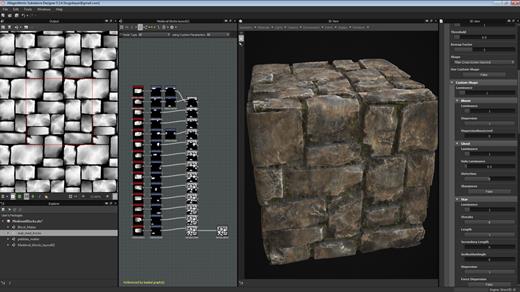
Description: 3D Assets Creation. Limitless. Create, iterate. Substance Designer is the Ultimate 3D Material Authoring and Scan Processing Tool. It has become the standard in the entertainment industry for PBR material authoring.

Discover the power of procedural creation.
With Substance 3D Designer, create seamless materials and patterns, image filters, environment lights, or even 3D models. Each asset can output infinite variations.

The industry standard for material authoring.
Substance 3D Designer is used across many industries and is at the center of most video game and visual effects material pipelines. Substance parametric materials are supported in most 3D creation tools and will integrate seamlessly into any workflow. Send your materials directly to Substance 3D Painter and Stager.

The industry standard for material authoring.
Substance 3D Designer is used across many industries and is at the center of most video game and visual effects material pipelines. Substance parametric materials are supported in most 3D creation tools and will integrate seamlessly into any workflow. Send your materials directly to Substance 3D Painter and Stager.

Nondestructive, nonlinear.
The node-based workflow allows you to use a wide range of approaches. Any step of the process can always be modified later. Try everything, adjust anytime.

Endless possibilities, infinite combinations.
Designer comes with a rich node library to create your assets from scratch. Build upon and learn from thousands of materials from Substance 3D Assets and Substance 3D Community Assets.

Go beyond materials.
Generate dynamic 3D models, or combine existing elements like curves and kitbash models. Create parametric environment lights to use in any app supported by Substance 3D.

Integrates into any workflow.
Designer comes with an extensive scripting API so you can tailor the app to your needs. Build and share powerful plugins with the integrated Python scripting interface. Create tools and utility graphs to supercharge your pipeline.

An ever-growing library of content
Access hundreds of nodes and filters. Create any surface with unique and randomizable noises and patterns.

HDR lighting creation
Create parametric lighting stages using procedural lights or 360° photos.

Color management
Take advantage of Pantone and OpenColorIO support.

MDL support
Create MDL materials with the dedicated shader graph.

Send-to
Send materials and filters to other Substance 3D applications, allowing you to iterate in context with Designer.

Parametric modeling (beta)
This graph lets you generate customizable and dynamic 3D models.

Release Name: Adobe Substance 3D Designer v16.0.1 [FINAL] (x64) + Fix
Size: 760 MB
Links: HOMEPAGE – NFO – Torrent Search

Download: RAPiDGATOR

0 Comments
May 12

Adobe Bridge 2026 v16.0.3 [FINAL] (x64) Pre-Cracked

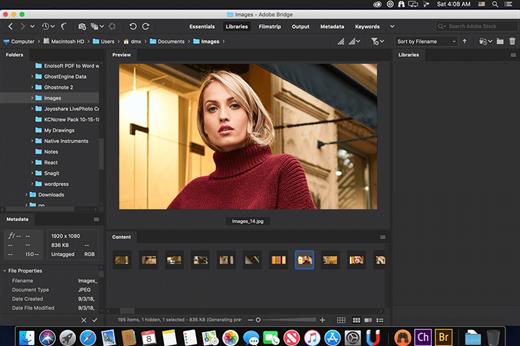
Description: Bridge gives you centralized access to all the files and assets you need for your creative projects. Organize personal and team assets, batch edit with ease, add watermarks, set centralized color preferences, and even upload your photos to Adobe Stock. Bridge simplifies your workflow and keeps you organized and now with CC Libraries.

Features
- Bulk import, export and preview CC Libraries assets
- Edit photo capture time
- Export/ Import network cache
- Native PDF Output Module
- Easy upload of images to Adobe Stock so you can get royalties for your work
- Support for Retina and HiDPI displays with the ability to scale
- Automated cache management
- Publishing to Adobe Portfolio to build your personalized website
- Quick organization and stacking of panoramic and HDR images
- On-demand thumbnail and metadata generation
- Option to import photos and videos from your mobile device or digital camera on macOS
- Support for CEP HTML5
- Flexible batch processing
- Drag-and-drop file flexibility
- Centralized color settings

Consistent user experience
Adobe Bridge now has an enhanced user interface to provide you a similar experience like other Creative Cloud applications. You can also change the default user interface appearance, text size, and scaling by setting the User Interface preferences in the Edit > Preferences > Interface dialog.

Enhanced Creative Cloud Libraries
The Libraries workspace in Bridge now displays a high-quality preview of library items. You can select multiple items to see their previews together.

Centralized cache management
You can now share a cache with other Bridge users and let them use the shared cache instead of creating a cache. Any Adobe Bridge user can export a cache to a shared folder, and other users can import a copy of the shared cache to their local systems. Given that the systems are in synchronization, managing the cache at a centralized location lets you reuse the exported cache, without the need to rebuild the cache on different user machines. You can create and manage the shared cache by using the Manage Cache dialog (Tools > Manage Cache), which has now been enhanced to provide options for building, importing, and purging cache. In addition, the cache preferences have been enhanced (Edit > Preferences > Cache and Edit > Preferences > Cache Management).

Edit capture time
Adobe Bridge now lets you change the capture time of the JPEG and RAW image files, just like the way it is done in Adobe Lightroom. This feature is helpful if you travel to a different time zone and do not change the date or time setting of your camera before you start photographing. With this feature, you can edit the capture time after capturing the image.

Support for XD file formats
Bridge now supports preview, thumbnail generation, metadata tagging, and keyword generation for Adobe XD files.

Media cache preferences
Bridge now processes and maintains a cache of all audio and video playback files. This capability improves the performance of playback files because the files are available for ready access whenever you want to view them later. It is recommended that you regularly clean the old and unused media cache files to optimize the performance. The preferences for media cache can be set by choosing Edit > Preferences > Media Cache.

Cut, copy, or move files and folders across Bridge and File Explorer or Finder

Bridge now lets you perform the following operations
- Cut, copy, or move files and folders from File Explorer (Windows) or Finder (macOS) and paste them in Bridge
- Cut, copy, or move files and folders from the Bridge workspace and paste them in File Explorer (Windows) or Finder (macOS)

Release Name: Adobe Bridge 2026 v16.0.3 [FINAL] (x64) Pre-Cracked
Size: 2.7 GB
Links: HOMEPAGE – NFO – Torrent Search

Download: RAPiDGATOR

0 Comments
May 12

Directory Opus 13.23

Description: Are you frustrated by the limitations of Windows Explorer? Directory Opus is a complete replacement for Explorer, with far more functionality than any other file manager available today.

You're in control.
Not just a simple file manager; Directory Opus lets you make your computer yours.
With a flexible user interface and unbelievable configurability, you can tailor Opus to streamline your workflow.
Dual panes, dual trees, multiple tabs.
Filter, sort, group your folders. Label and rate your files.
Queued file copies. Powerful batch renaming. Full archive support.
Find your files. Locate duplicates. Synchronize backups.
Assign tags and descriptions. Convert images. Edit metadata.
Fully multi-threaded, native 64 bit high performance code.
Whatever you want to do - Opus can probably do it. And if it's not built-in, you can take advantage of the unrivalled configurability to extend Opus using external tools.

What makes Opus unique?

Built for speed
Opus is written in native C++ multi-threaded code; compiled for the latest 64 bit CPUs, with high performance our number one design principle.

Fully configurable
Change the colors. Change the fonts. Change the toolbars and menus. Set up hotkeys. Opus adapts to how you want to use it.

Makes file management a breeze
Powerful searching, sorting, grouping, labelling and tagging features let you take control of your files like never before.

Endlessly extensible
Work with third-party tools as easily as with the built-in features. A full scripting interface, including scriptable dialogs, means your imagination is really the only limit.

Replace Windows Explorer and don't look back
Our unique Explorer Replacement mode provides a full replacement for Windows Explorer.
Single or dual pane file display and folder trees
Tabbed interface let you keep multiple folders open and switch quickly between them
Integrated viewer, metadata editor and utility panel
Built-in tools including synchronize and duplicate file finder
Leverage indexed search engines like Windows Search and Everything

High performance file management features
Copy, move, rename, duplicate, archive, view, backup and delete your files with ease
Queue multiple file copies for improved performance
Batch renaming including easy-to-use keyboard macros
Support for FTP and archive formats like Zip, 7Zip and RAR
Quickly filter, sort, group and search your folders
Color-code your files, assign status icons, star ratings, tags and descriptions
View images, documents and more. Image marking lets you sort your photos quickly and easily
Calculate folder sizes and print or export folder listings

Unrivalled configurability
Why let the programmers decide for you? You can tailor Opus to look how you want it to look, and to work how you want it to work.
Choose from light mode, dark mode, or design your own theme
Over 600 configurable colors and fonts
All toolbars and menus can be edited, plus you can add your own
Floating toolbars can act as program launchers
Configure your own hotkeys that work everywhere or just in Opus
Full scripting interface lets you design your own dialogs and add your own commands

Release Name: Directory Opus 13.23
Size: 28.2 MB
Links: HOMEPAGE – NFO – Torrent Search

Download: RAPiDGATOR

4 Comments
May 12

CoolUtils Total Image Converter 8.2.0.300

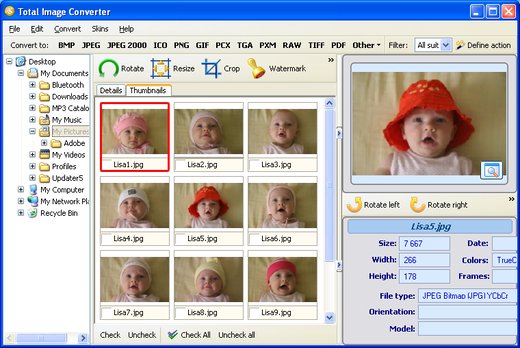
Description: Total Image Converter converts images to other formats, crops, resizes and rotates them. Convert large TIFFs into small JPEGs, make photos suitable for the web or recover old photos in unsupported formats - Total Image Converter will do everything you need.

Supports TIFF, JPEG, RAW, PNG, BMP, PSD, TGA, and many other image formats;
Works incredibly fast with new multi-threading feature;
Converts CMYK to RGB;
Handy resize and crop options to make your photos smaller;
Watermarking: add your comment, logo or date.

Unique options of Total Image Converter
/image converterTotal Image Converter supports TIFF, JPEG, JPEG2000, RAW, PNG, BMP, ICO, PSD, TGA, PCX, PCD and many other rare image file types files complete list).
rotate imageAlong with conversions you can rotate your images! All is done in batch so you save a lot of your valuable time.
resize cadWith Total Image Converter it's very easy to resize your photos or images.
colorWith Total Image Converter you can specify the color space for your output images.
combine foldersWhat to combine images within folders? No problem! Our powerful batch image converter can do that too.
frame jpegTotal Image Converter will also add a frame to your images in batch.
interfaceConvert TIFF, JPEG, PSD and many other files in seconds via our clear wizard-mode interface (thumbnails or file lists with details).
/image formatsThe widest list of output file types: PDF, TIFF, BMP, PNG, JPEG, JPEG2000, ICO, GIF, PCX, TGA, PXM, PS, PCL! Besides, it supports many rare formats like PALM, PICT, XPM, FIX, etc.
html converterTotal Image Converter supports almost all RAW camera photos (CRW, CR2, NEF, PEF, RAF, X3F, RAW, BAY, ORF, NRW, SRF, MRW).
previewThe built-in Preview panel helps you to view each file full-sized and learn the indo about it.
/image watermarkAdd text watermarks to the header or the footer of the output file to prevent unauthorized use.
dxf to pdfWhen you convert images to PDF you can set user permissions, password-protect your files or sign them with your digital signature.

Release Name: CoolUtils Total Image Converter 8.2.0.300
Size: 107 MB
Links: HOMEPAGE – NFO – Torrent Search

Download: RAPiDGATOR

4 Comments
May 12

Yuhan Blu-ray DVD Creator 4.8.3

Description: Yuhan Blu-ray Creator could burn standard Blu-rays from videos in 200+ formats like AVI, MP4, MKV, MOV, FLV, WMV, etc. You could freely convert and burn MP4 to Blu-ray, MKV to Blu-ray, MOV to Blu-ray, etc. Meanwhile, Yuhan Blu-ray Creator is also a photo to Blu-ray burner software tool that could burn Blu-ray from photos in JPG, BMP, PNG, TIFF, GIF and WEBP, including iPhone HEIC photos.

It could automatically generate photos into photo slideshow and then let you burn generated photo slideshow to Blu-ray easily.

Burn 1080P FHD or 720P HD Blu-ray Disc, ISO and/or Folder
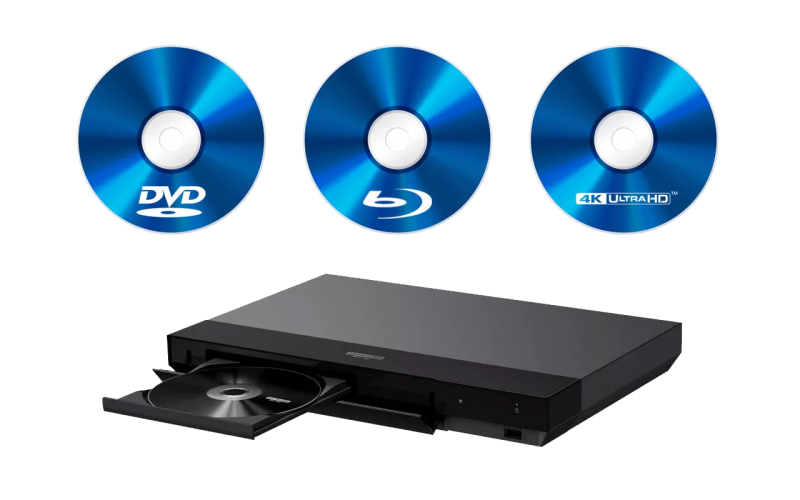
With Yuhan Blu-ray Creator, you could convert and burn photos/videos to Blu-ray disc, folder, and/or ISO image file in either 1080P Full-HD or 720P HD. You could burn BD100, BD66, BD50 or BD25 content according to the disc you have or want. The created Blu-ray disc could be played back on any standalone Blu-ray players you have in hand.

Retain Blu-ray PCM, TrueHD(Dolby Atmos), DTS HD Master Audio
If your video contains high-quality audio such as Blu-ray PCM, TrueHD(Dolby Atmos), or DTS HD Master, Yuhan Blu-ray Creator can retain them through Audio Copy or Passthrough mode. There will be no audio quality loss in burning video to Blu-ray. You could get amazing 1080P or 720P HD movie watching experience on your standalone Blu-ray player or computers with original audio effect.

Burn Blu-ray from Video at Any Frame Rate from 23.976FPS to 59.94FPS
Powered by advanced frame rate conversion technology, Yuhan Blu-ray Creator could burn videos of any frame rate from 23.976fps, 24fps, 25fps, 29.97fps, 50fps to 59.94fps to Blu-ray content without frame rate drop. It could even help you convert 50fps videos to 23.976fps Blu-ray video with original frame rate perfectly preserved.

Retain Multiple Subtitles and Audio Tracks
As long as source video files contain multiple subtitles and audio tracks, Yuhan Blu-ray Creator could let you freely select audio tracks and subtitles from source videos, and even add external subtitles, to burn video to Blu-ray with multiple audio tracks and subtitles preserved.The multi-audio tracks and multi-subtitles you add will appear on the disc menu, making it more like a commercial disc.

Release Name: Yuhan Blu-ray DVD Creator 4.8.3
Size: 114.5 MB
Links: HOMEPAGE – NFO – Torrent Search

Download: RAPiDGATOR

4 Comments
May 12

KS DB Merge Tools for SQLite 1.25.2

Description: KS DB Merge Tools for SQLite is an easy to use diff & merge tool for SQLite database files. It has native two-panel UI that is commonly used in industry-leading text-diff tools. This tool allows users to compare database object definitions and data, generate and execute SQL scripts to synchronize these changes.

Release Name: KS DB Merge Tools for SQLite 1.25.2
Size: 22.5 MB
Links: HOMEPAGE – NFO – Torrent Search

Download: RAPiDGATOR

5 Comments
May 12

Hard Disk Sentinel Pro 6.40.1 Beta

Description: Hard Disk Sentinel Professional (HDSentinel) is a hard disk monitoring software with highest possible support of HDD/SSD/SSHD (hybrid) drives. Its goal is to find, test, diagnose and repair hard disk drive problems, report and display SSD and HDD health, performance degradations and failures.
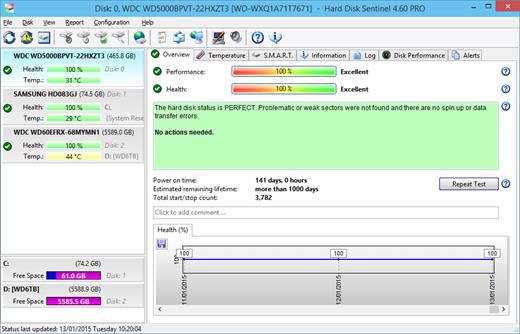
Hard Disk Sentinel gives complete textual description, tips and displays/reports the most comprehensive information about the hard disks and solid state disks inside the computer or in external enclosures (USB / e-SATA). Many different alerts and report options are available to ensure maximum safety of your valuable data.

The software monitors hard disk drive / HDD status, including health, temperature and all S.M.A.R.T. (Self-Monitoring, Analysis and Reporting Technology, built in most hard disks, solid state disks and hybrid drives (SSHD) today) values for each disks. Also it measures the disk transfer speed in real time which can be used as a benchmark or to detect possible hard disk failures, performance degradations,

HDSentinel is the perfect data protection solution: it can be effectively used to prevent HDD failure and SSD / HDD data loss because it has the most sensitive hard disk health rating system which is extremely sensitive to hard disk problems. This way even a small HDD problem can't be missed. The Professional version has scheduled and automatic (on-problem) hard disk backup options to prevent data loss caused by not only failure but by malware or accidental delete also.

Features of Hard Disk Sentinel Professional

Easy to use interface
All information are displayed in the main window of the application. Quick controls allow easy navigation to access all hard disks, partitions and different information. Intuitive user interface elements display information by using green/yellow/red color to indicate the level of problem. Detailed text description and context sensitive help guides the user thru the features and options.

1. Install > 2. Configure > 3. Stay protected
Just install, configure alerts and backup functions and your system is now safe. You'll be notified about the problems - but if everything is correct, Hard Disk Sentinel just sits on tray and displays current status. The data is protected 24 hours daily, 7 days a week.

Hard Disk Management
Control Advanced Power Management level and adjust Free Fall Control sensitivity of hard disks to maximise hard disk performance and data safety.

Backup
Wide range of automatic backup methods are available: to backup data to local computer, to a LAN server or to a remote server by transferring files via FTP (or even by e-mail). It is possible to use 3rd party tools to create archives or burn CD/DVD media. Hard Disk Sentinel Professional can manage power status of remote computers in the network, so it is possible to automatically power on and shut down remote computers, for example a backup server.

API Interface For Developers
With the API it is possible to query detected hard disk information from the software. This way 3rd party software can log, display or otherwise process detected hard disk drive information including temperature, health and so.

Remote Monitoring
Hard Disk Sentinel Professional offers extensive remote monitoring capabilities. Hard disk status can be checked remotely by a web browser, even by a mobile phone or a PDA.

Instant S.M.A.R.T. analysing
Hard Disk Sentinel can communicate with all IDE, Serial ATA, NVMe, SCSI, SAS and most USB hard disk drives, SSD and hybrid drives (SSHD) to detect their status and temperature. Hard disk status are displayed immediately as you launch the application, there is no need to analyse hard disks for a long period. It displays the current and maximum temperature for the hard disk. It reads all general and vendor-specific attributes and monitor their values. For advanced users, all raw data are displayed also including power-on time and number of read/write errors. Hard Disk Sentinel interprets the performance and fitness related S.M.A.R.T. values and displays the calculated Performance and Health percentage, total power on time and estimated lifetime remaining.

Hard Disk Hardware and Software Tests
By using Hard Disk Sentinel, it is possible to start hardware hard disk self tests. These tests can be used to effectively find all hard disk problems because built-in hardware methods are used to verify hard disk components (for example heads, servo, internal buffer in the Short self test). The Extended self test also verifies the complete hard disk surface, finds and repairs all weak areas and re-allocates the possible bad sectors. This is not possible with the software-based hard disk surface scan methods (for example, by using scandisk).

Seek Noise Test
Seek Test - to verify hard disk noise, seek time performance and temperature. Longer tests can be used as very deep and intensive stress-tests for the hard disk and verify if additional cooling is required.

Enhanced Hard Disk Tests
Surface Test - to verify hard disk surface with intensive hard disk testing methods to reveal and fix hard disk problems. Surface reinitialisation resets all sectors to factory default states. Different destructive and non-destructive tests are available to re-fresh the condition of any hard disk drives, solid state disks or even your pendrives or memory cards.

Logging
Hard Disk Sentinel logs all degradations in all SMART parameters and issues alerts in such cases to maximise data protection. For example, if a new bad sector is found on your hard disk, you will be notified.

Alerts
Hard Disk Sentinel has wide range of alerts upon different problems. It can send e-mail (with e-mail->SMS gateway it can be SMS warning to your mobile), network message, can play sound alerts and so.It can execute various tasks (automatic panic backup or any configured external applications) in case of a problem.There is an option to send daily emails about current status.

Shutdown
Offers option to shut down the computer on hard disk failure, HDD overheat or health degradation. This option can be used in combination of the alerts to prevent further data loss.

Hard Disk Details
Detects and displays every information about the hard disk, from the revision number and buffer size to all features it has. The maximum available and current transfer modes are also displayed.

HDD status in Windows Explorer
View the current health status and used space in Windows Explorer or in any other application, so you'll always know the amount of used space for each partitions and the hard disk drive condition.

Hard disk health and used space displayed on hard disk icons
Information on demand
Current hard disk temperatures and health are displyed on the system tray and can be displayed in a small status window, the desktop itself or in a sidebar gadget (under Windows Vista or newer operating system). Average and maximum temperatures are logged for all hard disks and these informations are displayed in graphs for statistical purposes.

Hard Disk Performance
Logs how much data were read from or written to the hard disk. Displays current transfer rates for both reading and writing and estimates the maximum available (theoretical) transfer rate for a particular hard disk.

Hard Disk Partitions
Displays partitions for each physical hard disks and type and usage informations about them so you cannot run out of space. Hard Disk Sentinel sends this information automatically in alert/status messages.

Acoustic Management
Offers option to control the acoustic level of IDE/S-ATA hard disk. It is possible to increase performance or make the hard disk drives more silent. Unique feature: control the acoustic level of your external USB hard disk (if your USB enclosure is equipped with one of the proper USB-ATA bridge chips which supports this feature).

Clock Synchronization
It offers option to synchronize the PC clock with an atomic clock via NTP (Network Time Protocol).

Release Name: Hard Disk Sentinel Pro 6.40.1 Beta
Size: 40.9 MB
Links: HOMEPAGE – NFO – Torrent Search

Download: RAPiDGATOR

5 Comments