Please REGISTER or RENEW your account on RAPiDGATOR.net and support us by doing through all RAPiDGATOR working download links on main posts...
May 12

AI Aquarium Screensaver 1.4.1

Description: Relax & Explore: Interactive AI Aquarium Screensaver for Your Screen. AI Aquarium Screensaver is a 3D interactive aquarium screensaver that transports you into a vibrant underwater world. Imagine having an aquarium on your screen that features different styles of fish tank landscape background pictures, ranging from serene stone arch bridges to mystical stone forests.

Our tropical rain forest scenes bring the essence of nature into your digital space, while the rockery stone and Dutch style aquarium designs add a touch of elegance. It offers a diverse selection of environments such as coral water grass and nature style backdrops, as well as end world and cartoon styles for a more whimsical feel. For those who love futuristic aesthetics, the cyber mechanical style background image will captivate your imagination.

AI Aquarium screensaver is designed to feature auto feed options, ensuring that you never miss a moment of your aquatic adventure. With over 150 different types of fish, including goldfish, koi fish, clownfish, manta rays, amago, and even the fascinating angel shark, your virtual aquarium will never be dull. The AI fish bring this experience to life, allowing you to interact directly with these incredible creatur Whether you're looking to relax, inspire creativity, or simply enjoy the beauty of the ocean, AI Aquarium Screensaver is perfect for enhancing any digital environment.

10 Aquarium Background Styles
Stone Arch Bridge, Stone Forest, Tropical Rain Forest, Rockery Stone, Dutch Style Aquarium, Coral Water Grass, Nature Style, End World Style, Cartoon Style, and Cyber Mechanical Style.

150+ Fish Species
A diverse collection of freshwater and saltwater fish including goldfish, koi, clownfish, manta rays, neon tetra, betta fish, arowana, rainbowfish, catfish, sharks, and more.

Interactive Aquarium Experience
Select fish types and quantities, feed and tease fish, and create realistic ripple effects.

Automatic Feeding System
Runs in the background to keep your aquarium active at all times.

Customization Options
Support for custom aquarium background images and background music.

Multi-Monitor Support
Extend the immersive aquarium across multiple displays.

Advanced Lighting Effects
Rainbow Gradient, Pulse Gradient, and White Noise Gradient modes for natural and dynamic underwater lighting.

System Requirements
- OS: Windows 10 version 17763.0 or higher
- Memory: 2 GB (Minimum), 4 GB (Recommended)
- Graphics Processor: OpenGL 3.0 (Minimum), OpenGL 4.0 (Recommended)

Release Name: AI Aquarium Screensaver 1.4.1
Size: 275.3 MB
Links: HOMEPAGE – NFO – Torrent Search

Download: RAPiDGATOR

6 Comments
May 12

AccdbMerge 1.38.2

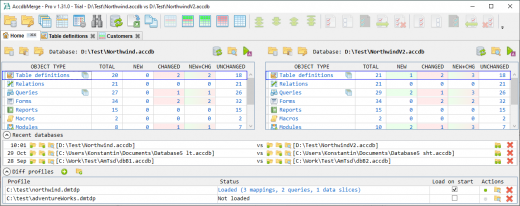
Description: AccdbMerge is a reliable program that enables you to quickly join the information and structured from multiple Microsoft Access database files, in two projects. The application can perform advanced data differencing, in order to avoid duplicate entries. Moreover, the program offers support for batch data differential comparison.

AccdbMerge features a user-friendly interface which offers a comprehensive view of the tables and the contained data. You can easily merge two files or compare numerous tables in Batch Data Diff. This function can provide you with additional information, since you can query data.

Alternatively, you can use the Custom Data Diff, in order to compare tables and queries, after mapping the fields. You need to specify a mapping type key and process at least one field. The software can open password-protected files and compare them in two parallel projects. You may save the settings, in case you often work with the same protected files.

AccdbMerge can process compiled .MDE and .ACCDE files, aside from the basic .MDB, .ACCDB formats. You can select which objects you wish to include in the differencing process, by checking/unchecking the box next to them. Tables, relations, queries, forms, reports, macros, modules and references can easily be compared, from each database. In the case of .MDE and .ACCDE files, however, the software does not support processing modules, forms and reports.

AccdbMerge features an individual function for comparing queries, which can be accessed from the toolbar at the top of the window. You may easily define the query key fields, in order to identify query rows, as well as new or changed records.

AccdbMerge also allows you to compare and merge indexes or relationships from table structure differencing window. Moreover, it offers support for operations performed via command line arguments. You can open AccdbMerge projects in a differencing viewer mode, which allows you to control system clients.

Release Name: AccdbMerge 1.38.2
Size: 24.1 MB
Links: HOMEPAGE – NFO – Torrent Search

Download: RAPiDGATOR

5 Comments
May 12

Chaos Vantage 3.2.1

Description: Explore your most complex 3D production scenes ray traced in real-time. With Chaos Vantage, there are no time-consuming conversions. Simply drag and drop your complete V-Ray scene into Vantage and start exploring. There’s also a direct live link available from 3ds Max, so you can use it just like a viewport.

Chaos Vantage requires an NVIDIA RTX series GPU.

Features

Zero setup
Drag and drop your V-Ray scene into Chaos Vantage and start exploring. Unlike other real-time solutions, there’s no geometry to optimize, UVs to unwrap, or lighting to bake.
a
Go big!

Chaos Vantage is built to handle huge scenes and billions of polygons. It’s the fastest way for you to see your most detailed V-Ray scenes in real-time.

Easy to navigate

Navigating your scene is easy. Use controls similar to your 3D app, or move around just like playing a game. Walk up stairs and avoid walking through walls with automatic collision detection.

100% ray-traced quality
With fully raytraced and real-time rendering, Chaos Vantage uses physically based cameras, lights, materials, and global illumination for the most realistic results.

Simple and fast animation

Perfect for previsualization, you can create, edit, and render animation right from Chaos Vantage. Easily animate between cameras, apply transitions, arrange your sequence in the Animation Editor.

Live link
Get a live raytraced view of your scene with a live link from 3ds Max. Changes you make in your 3ds Max scene will instantly appear in Chaos Vantage.

System Requirements:
OS: Microsoft® Windows® 10 RS5 (version 1809), update from October 2018, build 17763 or later
- DXR compatible GPU: NVIDIA RTX® series GPU with NVIDIA® driver 436.02 or newer; recommended version 457.09 or 452.57
- System memory should exceed GPU memory (minimum 8 GB RAM)

Release Name: Chaos Vantage 3.2.1
Size: 932.8 MB
Links: HOMEPAGE – NFO – Torrent Search

Download: RAPiDGATOR
5 Comments
May 12

Capture One 16.7.8.3529

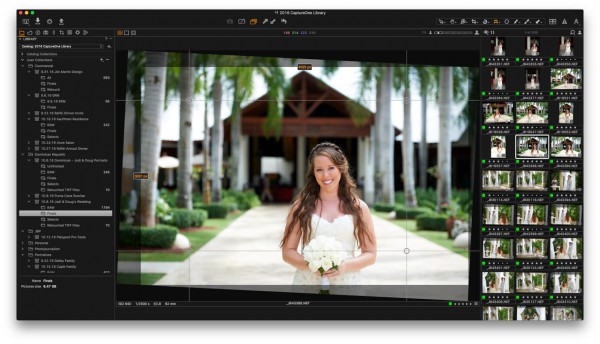
Description: Mind-blowing colors and quality. Get true-to-life colors and superb image quality right from the start of your photo process. Fine-tuned by our in-house experts, our RAW converter is customized for nearly 600 camera profiles and over 700 lenses. With true-to-life color processing, you can spend less time editing and reach your final look even faster.

Shoot tethered. Fast.
Connect your camera and shoot tethered into Capture One. Organize shots, make changes on the spot, auto-apply edits to incoming shots, and get the perfect image every time. See what your camera sees with Live View, and don’t miss out on some of our smart features like ReTether and Save to Card, which will make sure you stay flexible and never lose a shot.

Work together with anyone, anywhere
Collaborating with teams and clients – whether in the same room or on different continents – is made easy with Capture One Live. Share, view, comment, rate, tag, and get feedback. All in one place. No uploading, exporting, or downloading a single photo ever again.

Edit intelligently. Easily.
With assisted editing, you can start and finish your projects with just a few clicks.

With a single click, you can instantly match the style or edits of a reference image. Whether from a previous project, a film still, or a mood board, it automatically transfers the look to your current photo(s), giving you a strong starting point for editing and color grading.

Mask skin, hair, eyes, facial features, subjects, and backgrounds with extreme precision. Save time by creating complex masks quickly for multiple images. You can even combine them with other adjustments and save them as a Style.

You can now set your crop reference to a single image and apply it to a batch of photos or incoming shots. Capture One will detect whether to focus on a face or a subject and automatically make consistent crops for all your shots.

Finish most of your edits in seconds with Smart Adjustments by automatically adjusting Exposure and White Balance. Unlike copy and apply, Smart Adjustments makes our photos consistent, even under different lighting conditions.

Experience the speed as Capture One intelligently zooms and pans to the nearest eye in each shot, allowing you to quickly check for sharpness without manually zooming in.

A quick and easy way to take care of annoying dust spots in multiple photos and dramatically speed up your editing.

Release Name: Capture One 16.7.8.3529
Size: 1.2 GB
Links: HOMEPAGE – NFO – Torrent Search

Download: RAPiDGATOR

5 Comments
May 12

QR-Code Creator 7.6.1.5

Description: Create QR codes in no time on your PC. The best part is that the codes are generated without an internet connection. The software calculates the codes directly on your local computer, so you don't have to worry about your data being read by third parties.

You can easily paste the generated QR codes into almost any application using the clipboard.

The software is constantly being developed and now includes a built-in prompt generator in addition to numerous canvases for visual enhancement.

Release Name: QR-Code Creator 7.6.1.5
Size: 34.3 MB
Links: HOMEPAGE – NFO – Torrent Search

Download: RAPiDGATOR

6 Comments
May 12

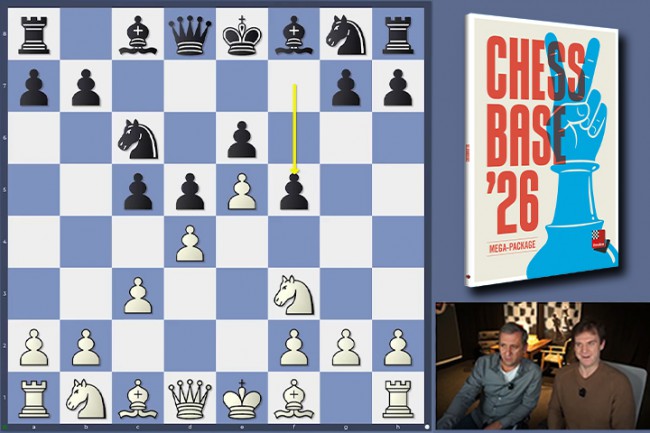
ChessBase 26.7

Description: ChessBase is a personal, stand-alone chess database that has become the standard throughout the world. Everyone uses ChessBase, from the World Champion to the amateur next door. It is the program of choice for anyone who loves the game and wants to know more about it. Start your personal success story with ChessBase and enjoy the game even more.

Whether it is preparation for an individual opponent or tournament, administration and analysis of one's own games, development of training material for self-study or for training groups, or publication of games on the web or in print: ChessBase o.ers an incredible wealth of functions for all areas of study and playing levels. Anyone who is seriously involved in chess, plays tournaments or simply wants to understand chess, needs ChessBase: youth players, amateurs, tournament players, coaches, grandmasters, professional players etc.

New in ChessBase´26

More targeted preparation
Club players need different statistics than top grandmasters. Prepare for your level, not for the World Champion. The ChessBase’26 opening books reflect mainstream theory and often suggest lines that are not easy for the opponent you are preparing for to play.

New tools and improved functions
- Top players immediately recognize the latest trends and the statistics for different move orders. With ChessBase’26, you too can understand the typical variations along with their strategic themes and common plans.
- Train by reviewing selected instructive games.
- Solve the typical tactical motifs – this is revolutionary for opening training and great fun.
- New reference filters
- Instant preparation: simply enter the name.
- Filter out blitz and rapid games with one click.
- New detection of duplicate games.
- Ten times faster and much more precise. Database maintenance has never been so easy.
- Monte-Carlo analysis
- AI description of plans
- Explains a position to you like a good personal trainer.
- (Valuable insights, but be aware that hallucinations are still possible.)
- Real-time ray tracing
- The ray-traced 3D boards have become ultra-fast and reach high resolution within seconds.

Minimum Requirements
Desktop PC or Notebook, 4 Threads, 8 GB RAM, Windows 10 64bit, DirectX 10 graphics card with 1 GB RAM

Recommended Requirements
Intel core i7 or AMD Ryzen Processor with 8 Threads, 16 GB RAM, Windows 10/11 64bit, DirectX 11 graphics card (or compatible) with 1 GB RAM or more, full HD Monitor

Supported Languages
German, English, Spanish, French, Italian

Release Name: ChessBase 26.7
Size: 581.3 MB
Links: HOMEPAGE – NFO – Torrent Search

Download: RAPiDGATOR

7 Comments
May 12

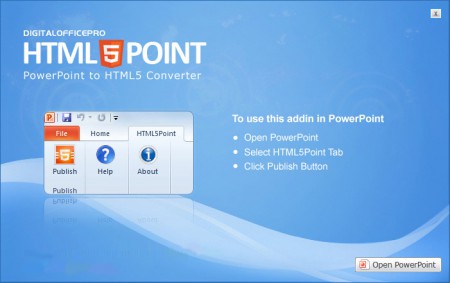
DigitalOfficePro HTML5Point 4.1.74

Description: HTML5Point - is the world's first PowerPoint to HTML5 converter that lets you to convert your PowerPoint presentation into an interactive HTML5 content that can be viewed on iPads, iPhones, other mobile devices and on all modern browsers - all in a Single click!

Convert PPT to HTML5 in a single click
Say goodbye to expensive programmers
Flexible publishing / delivery options

View Converted HTML5 presentations on iPad, iPhone and other devices
Develop interactive presentations for desktops, laptops, Android tablets, iPads & iPhone with a single click. HTML5Point accurately converts your PowerPoint content to HTML5 preserving all the animations, transitions and other special effects associated with the original PowerPoint presentation. Developing an e-Learning package with support on all devices is now very easy with HTML5Point.

HTML5 slideshows support on all modern browsers
Converted HTML5 output works flawlessly on almost all modern browsers without any additional plugins (unlike flash which requires additional plugins) installed on your machine. It is due to this cross platform compatible nature that publishers recommend the new HTML5 format over any other conventional formats.

Animations and Transitions in HTML5
HTML5Point PPT to HTML5 converter completely retains the animations and transition effects of original PowerPoint presentation. The superior plug-in also has the capability to support auto timing feature associated with the presentation.

Compatible with SCORM
With HTML5Point PowerPoint to HTML5 conversion tool you can create SCORM [SCORM 2004 (2nd, 3rd and 4th edition)] compatible presentation that can be uploaded to any SCORM compliant LMS (Learning Management System) on the cloud.

FTP Support
Anyone can easily upload a presentation to the website instantly with just a click. Add your credentials and click the publish button. Simple and fast!

No Functional Limitations in Trial
There are no functional limitations to HTML5Point trial version. You can use your trial for unlimited days to test drive the product to the fullest.

Installed to right within PowerPoint
PPT to HTML5 converter called HTML5Point is downloaded as a PowerPoint add-in. The HTML5Point installer places a tab to your PowerPoint ribbon, and you can access all its functions from this tab. We have updated this plugin with the latest features to get your work done quickly and accurately.

HTML5Point Key Features
powerpoint to html5 features
YouTube & Video Support
Narration & Continuous Audio
Animated Gifs
Hyperlinks
Optimize compression of images
Animations & Transitions
No Additional Plugins
Cross browser compatibility
Consistency
Search Engine friendly
Improved Semantics
Improved Accessibility

Release Name: DigitalOfficePro HTML5Point 4.1.74
Size: 134.6 MB
Links: HOMEPAGE – NFO – Torrent Search

Download: RAPiDGATOR
7 Comments
May 12

Coolutils Total Excel Converter 7.1.0.118

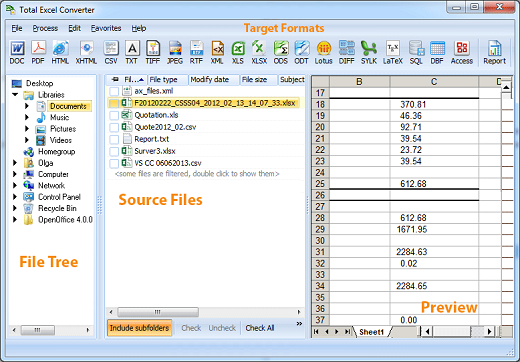
Description: Total Excel Converter is the perfect choice to convert any type of table. Supported input formats include Excel and Excel 2007, XLSM, XLT, XLTM as well as OpenOffice formats ODS, XML, SQL, WK2, WKS, WAB, DBF, TEX, and DIF. The list of target formats is even more extensive: convert your tabled files into DOC, DOCX, PDF, HTML, Access, TXT, ODT, ODS, XML, SQL, CSV, Lotus, DBF, TEX, DIFF, SYLK, and LaTeX. Download excel converter and convert XLS, XLSX, ODS, XML spreadsheets in batch offline.

Total Excel Converter strictly preserves document layout; you'll get an exact copy of the source file but in a new format. In addition, we've included a number of handy options:
With Total Excel Converter, you can convert each sheet into a new file.
Convert Excel to PDF and set user permissions. This will protect your PDF files from being modified or copied.
Total Excel Converter can easily convert OpenOffice ODS files to Microsoft XLS documents; making it so that spread sheets produced by different programs are compatible with your viewer.

Unique options of Total Excel Converter
Total Excel Converter supports almost all Excel extensions: XLS, XLSX, XLSM, XLSB, XLT, XLTM, XLTX, XLK, XLW. When the new Office is released, we will add new file types too.
With our Excel Converter you can convert Excel to PDF and add a digital signature in one go.
Using our Excel conversion tool, you can convert each page of your spreadsheet into a separate file.
Our XSLX converter can copy the original time stamps if you don't want to change the date.
Have an outdated Microsoft Office 2003? Update all your old files to the new format in one go. Use our XLS to XLSX converter offline for batch processing.
Through CoolUtils' Excel converter app, you can also convert Excel 2003 XML Files (rare option!)
Our converter has a built-in renamer to give your files new descriptive names. Include a counter, a date or worksheet name into the file name and your files will be in perfect order.
Convert Excel spread sheets via our most straightforward interface.
The widest list of output file types: DOC, PDF, HTML, MHT, XHTML, CSV, TXT, TIFF, JPEG, SVG, RTF, XML, XLS, XLSX, ODS, ODT, Lotus, DIFF, SYLK, LATEX, SQL, DBF, Access!
Total Excel Converter can combine several Excel spread sheets into one TIFF or PDF file.
Want to quickly find a file? Total Excel Converter helps you to preview any document you select.
Add your logo or any other image to the header or the footer of the output file.
Want more order? Add page counters or a date to every page of the output files. Sequential numbering of several folders is avaialble.
Total Excel Converter from Coolutils will accurately convert XLS files with charts.
When you convert Excel to PDF you can set user permissions, password-protect your files or sign with a digital signature. Get PDF, PDF/A and non-searchable PDFs.
Total Excel Converter can be run via command line (get the ready-to-use command line from GUI).

Release Name: Coolutils Total Excel Converter 7.1.0.118
Size: 121.9 MB
Links: HOMEPAGE – NFO – Torrent Search

Download: RAPiDGATOR

5 Comments
May 12

Imaginando BAM 1.7.0

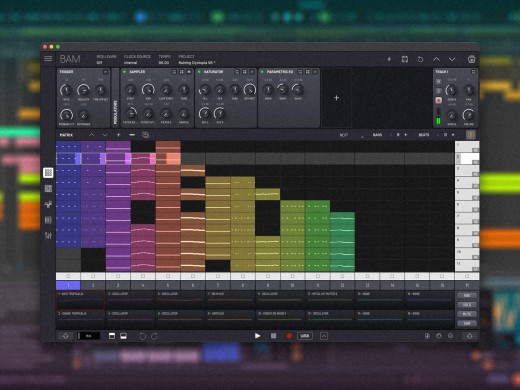
Description: BAM is a complete music production studio. BAM - Beat Maker & Music Maker equips you with all the tools necessary to transform your musical ideas into reality.

Whether you're looking to start as a beat maker or produce full tracks, BAM is tailored for both novices and experts. For those just starting out, BAM offers an intuitive interface that allows you to start creating music and beats within minutes.

BAM features an impressive array of built-in synthesis engines and effects, including an oscillator synthesizer, sampler, drum synthesizer, analog bass synthesizer, and analog emulations of drum components. The suite of effects includes a filter, EQ, delay, chorus, compressor, and saturator, among others.

Additionally, the extensive sample library provides a vast selection of sounds, easily navigable through the integrated sample manager and recorder. With BAM, you have everything at your fingertips to start making beats and music right away!

Features
16 tracks, 2 send channels and a master channel with effects rack
AUv3 instruments, fx and MIDI fx hosting
Comprehensive mixer with volume, mute, solo, pan and arm controls
Integrated synthesizers including an analog modeled Oscillator and classic acid bass generator, a Sampler and a Drum Synth
Integrated effects including an analog modeled Delay and Chorus, multimode Filter, a DJ style 3-band and Parametric EQs, our Burner waveshaper, Compressor, Reverb, Phaser, Bit Reduction, and Stereo Enhancer
Ubiquitous piano roll editor for in-depth composition
Up to 256 steps per clip on an intuitive step sequencer
Lock-style parameter automation on a clip basis
Parameter modulation via LFO and EG modulators on a track basis
Hybrid audio/midi clip matrix with scene launcher and follow actions
Tempo synced time stretch for audio clips
Packed with over 1000 percussive and melodic samples

Release Name: Imaginando BAM 1.7.0
Size: 349.8 MB
Links: HOMEPAGE – NFO – Torrent Search

Download: RAPiDGATOR

6 Comments
May 12

Imaginando VS 2.2.1

Description: Easily create visuals that react to MIDI and audio. Creating audio-reactive visuals has traditionally been a complex and intimidating process, often requiring deep technical knowledge and navigating software designed with steep learning curves. For many musicians and creators, this complexity becomes a barrier to exploring the visual side of performance.

VS - Visual Synthesizer offers a refreshing solution by making the creation of music-driven visuals accessible, intuitive, and creatively inspiring. Its compact yet powerful feature set is purposefully designed with a musician’s mindset, adopting familiar concepts from audio workflows to ease the transition into the visual realm. By streamlining how MIDI and audio triggers are assigned to control visual parameters and movement, VS removes the technical friction, empowering users to focus on creativity and expression rather than setup and configuration.

Features
8 Polyphonic visual layers with blend modes
4 voices per layer
Multiple layer sources: shaders, audio visualizers, image, video, and text
Real-time input sources: camera, Syphon / Spout, and render output feedback
1 background layer with a solid color or image / video
Factory content amounting to 57 shaders, 63 presets and over 100 images and videos
Multiple expansions with new shaders, videos, images and presets in a variety of styles
Built-in shader editor for creating your own materials
4 multi-shape LFOs with sync and MIDI trigger options
2 MIDI-triggered envelope generators
4 audio-triggered modulators with peak and frequency band modes
Modulation Matrix per layer
Built-in video recorder
Preset Playlist with duration and transition time settings
Audio & MIDI player for loading your music
Midi Mapping Manager
Media Manager
Up to 60 FPS, 4k output with horizontal and vertical portrait rendering
Syphon / Spout and NDI output

Release Name: Imaginando VS 2.2.1
Size: 1.2 GB
Links: HOMEPAGE – NFO – Torrent Search

Download: RAPiDGATOR

5 Comments