Please REGISTER or RENEW your account on RAPiDGATOR.net and support us by doing through all RAPiDGATOR working download links on main posts...
May 9

CleverGet 26.0.0

Description: Download Up to 8K Videos, Live Stream and even paid streaming videos in batch or individually from 1000+ websites like YouTube, Facebook, Twitter, Twitch.tv, Max, Netflix, Amazon, Disney+, Hulu, Apple TV+, Paramount+, Discovery+, etc. Record online video at up to 4K resolution and 5X recording speed from various streaming services to MP4/MKV files without ads.
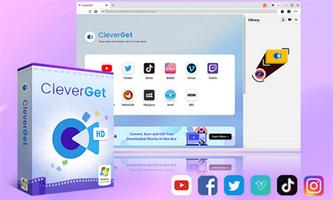
Coverall Online Video Downloader for 1000+ Sites
As all-inclusive online video downloader toolkit pack, CleverGet has multiple modules, including: Video Downloader, Netflix Downloader, Amazon Prime Downloader, HBO Max Downloader, Disney+ Downloader, Apple TV Plus Downloader, Hulu Downloader, Discovery+ Downloader, Twitch Downloader, Video Recorder, etc. With multiple downloader modules, CleverGet could download online videos, one-demand movies and TV shows, and live streams from 1000+ websites like Twitch, YouTube, Vimeo, Twitter, Facebook, TikTok, Netflix, Amazon, Max, Disney+, Hulu, etc. With the internal Streaming Video Recorder module, CleverGet could record and save videos from those video sites that are not downloadable via its downloader modules, as long as the target video could be played back within CleverGet. Besides these existing modules, more online video downloader modules are on the way out.

Lossless 8K Video and 320 kbps Audio Downloading
CleverGet could download 8K videos with 320 kbps audio as long as they are available in source videos. Compared to various online video downloaders and video downloader software tools, CleverGet is almost the sole tool that can download 8K video and audio at 320 kbps without quality loss. This HD video downloader tool helps you easily and freely watch HD videos with your own home theatre system.

Download TV Series Episodes of All/Certain Seasons
With powerful online video parsing function, this online TV show downloader could smartly parse a TV show episode and then detect full season or even all seasons of current TV episode. After parsing a single TV show episode, this online TV series downloader could list all episodes from the same season or even all seasons to you. With this online stream video downloader, you could download current episode, selected episodes from various seasons, entire season or even all seasons in batch.

Download Online Videos to MP4/MKV/WEBM
While most portable media players and devices accept MP4 files, CleverGet won't let you down. Offering different downloading options, CleverGet enables you to download online videos to MP4, MKV, WEBM or other available popular formats for diverse uses. You could even download online videos and save in audio formats. Watching online movies, TV shows and other videos offline on various MP4 compatible devices is a simple run with CleverGet.

Record Streaming Video to MP4/MKV at Up to 4K Resolution and 5X Speed
CleverGet Streaming Video Recorder could record online streaming videos to MP4/MKV files at up to 4K resolution from almost all sites. You could record online on-demand video and live streaming video without quality loss and at up to 5X speed, schedule recording by presetting recording length, skip ads upon preset ad filter for recording, etc. With CleverGet Video Recorder, you could even record DRM protected video for unlimited offline viewing.

Save Online Video with Selected Subtitle and Audio Track
No matter you are using the internal video downloader modules or the streaming video recorder module, CleverGet enables you to download or record online videos with selected subtitle and audio track. The streaming video downloader modules could download multiple subtitles and audio tracks upon your choice, and save subtitles as independent SRT/SUP file as external subtitle or pack into output videos as internal subtitle.

Convenient Built-in Browser
CleverGet is firstly a browser that enables you to open target streaming platform directly, and then search, play back and download online video easily. Theoretically, CleverGet could download online videos, live streams and even paid content during playback. This stream video downloader could analyze target video page and list all available download options to you. You don't need to get the M3U8 links of live streaming videos for downloading, and neither will you be blocked by the video protections for downloading. CleverGet does all these for you.

Release Name: CleverGet 26.0.0
Size: 378.7 MB
Links: HOMEPAGE – NFO – Torrent Search

Download: RAPiDGATOR

7 Comments
May 9

Total Commander 11.57 Final

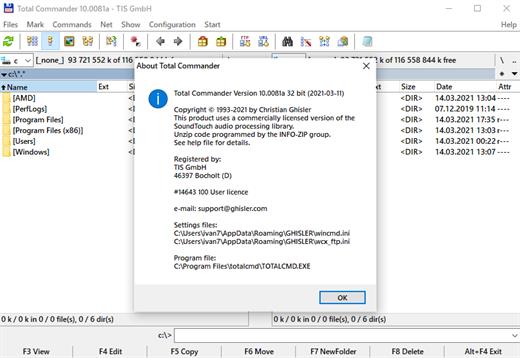
Description: Total Commander (former Wincmd) is a file manager for Windows similar to the Windows Explorer. But Total Commander uses a different approach: it has two fixed windows side by side like a well-known file manager for DOS.

Features
Two file windows side by side
Multiple language and Unicode support
Enhanced search function
Compare files (now with editor) / synchronize directories
Quick View panel with image and video display
ZIP, 7ZIP, ARJ, LZH, RAR, UC2, TAR, GZ, CAB, ACE archive handling + plugins
Built-in FTP client with FTPS (encrypted FTP) and HTTP proxy support
Multi-rename tool
Tabbed interface, regular expressions, history+favorites buttons
Thumbnails view, custom columns
Compare editor, cursor in lister, separate trees, logging, enhanced overwrite dialog etc.
Unicode names almost everywhere, long names (>259 characters), password manager for ftp and plugins, synchronize empty dirs, 64 bit context menu, quick file filter (Ctrl+S)
USB port connection via special direct transfer cable, partial branch view (Ctrl+Shift+B), and many improvements to ftp, synchronizing and other functions
And many more!

Release Name: Total Commander 11.57 Final
Size: 10.7 MB
Links: HOMEPAGE – NFO – Torrent Search

Download: RAPiDGATOR
6 Comments
May 9

Fast Video Cutter Joiner 7.1

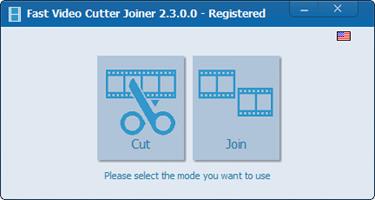
Description: Fast Video Cutter Joiner. This is a fast video-cutting and joining software whit an easy-to use interface. It allows users to trim parts of a video quickly while maintaining the quality of the original video. User can also join multiple video files.

Cut clips
If you want to cut and save specific parts of a video.

Join multiple videos
If you want to join multiple videos or merge more than two video files.

Release Name: Fast Video Cutter Joiner 7.1
Size: 23 MB
Links: HOMEPAGE – NFO – Torrent Search

Download: RAPiDGATOR

6 Comments
May 9

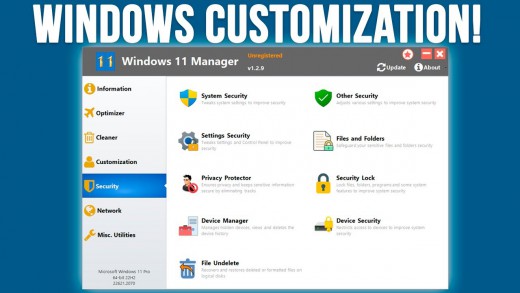
Yamicsoft Windows Manager 2.3.7

Description: The complete solution to optimize, tweak, repair and clean up Windows 10/11. Windows Manager is an all-in-one utility for Microsoft Windows 10/11 specially, it includes over forty different utilities to optimize, tweak, clean up, speed up and repair your Windows 10/11, helps make your system perform faster, eliminate system fault, increase stability and security, personalize your copy of Windows 10/11, and meet all of your expectations.

Information
Creates the system restore point manually; Gets detailed information about your system and hardware, helps you find out the Microsoft product key such as Microsoft Windows and Microsoft Office; Shows and manages all running processes and threads; Repair Center helps to diagnose and fix the various system problems; Cleans up your system just one clicking; Optimization Wizard is useful to the user who is unfamiliar with computers.

Optimizer
Tweaks your system to improve performance and increase speed; Manages and configures the Windows boot menu to your preference; Startup Manager controls all the started programs with Windows start, checks and repairs the advanced startup items to restore the malicious change by viruses; Manages and optimizes system services and drivers to improve performance; Manages and optimizes the scheduled tasks to speed up your system.

Cleaner
Disk Analyzer can analyze and view the disk space usage of all programs, files and folders find out which engross your disk space and shown with a chart; Cleans up WinSxS folder securely to reduce the component store size; Smart Uninstaller can fully delete programs from your system without residual files and Registry entries; Desktop Cleaner can analyze and move unused shortcuts, files and folders on desktop to specified folders; Searches and deletes junk files to save disk space and improve performance; Searches and deletes the duplicated files to save your disk space; Registry Cleaner searches Registry to find out and delete the invalid items; Registry Defrag rebuilds and re-indexes your Registry to reduce registry access time and therefore improve application responsiveness and eliminate mistakes and corruption in Registry.

Customization
Customizes system parameters according to your preferences by tweaking File Explorer, Desktop, Start, Taskbar and Notification area; Adds files, folders and system items to This PC, and Desktop; Pins the files or folders to your Desktop, Taskbar or Start; Creates the quick startup items for jumplist on Taskbar; Manages the context menu when right click the file, folder, etc; Edits the shortcut menu that right-click Start button (Win + X shortcut); Customizes the look of your system; Edits and adds the shortcuts that executed on Run dialog box; Tweaks the Windows Apps and Microsoft Modern UI settings.

Security
Tweaks system, components, UAC, Sign in settings, adjusts various settings and restricts access to drives and programs to improve system security; Safeguard your sensitive files and folders security, encrypt files, move system folders to safe locations; Privacy Protector ensures privacy and keeps sensitive information secure by eliminating tracks; File Undelete recovers and restores deleted or formatted files on logical disks; Locks some system features to improve security.

Network
Optimizes and tweaks your internet connection and network settings; Manages your URLs and IPs; IP Switcher can switch between different network settings easily; Edits the Hosts file to speed up system surfing internet; Wi-Fi Manager can view and manage all your wireless network; Network tools contains some commonly used network utilities; Network Monitor can display traffic data transmitted by the network.

Misc. Utilities
Creates scheduled tasks or the monitorings that trigger tasks; Shows and run the useful collection of utility that built-in your Windows; Splits a file into several smaller files or merges back to the original file; Super Copy is the powerful tool to copy files or backup automatically; Operates your Registry easily using the Registry Tools.

Release Name: Yamicsoft Windows Manager 2.3.7
Size: 36.3 MB
Links: HOMEPAGE – NFO – Torrent Search

Download: RAPiDGATOR
6 Comments
May 6

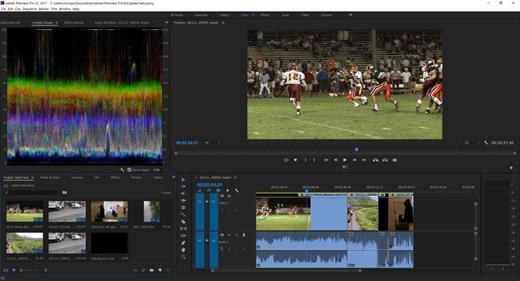
Adobe Premiere Pro 2026 26.2.2

Description: Video editing that’s always a cut above. Premiere Pro is the leading video editing software for film, TV, and the web. Creative tools, integration with other Adobe apps and services, and the power of Adobe Sensei help you craft footage into polished films and videos in one seamless workflow. And Premiere Rush, our new app, is included with your subscription so you can capture footage and start editing on all your devices, anywhere.

Smart tools. Better storytelling.
Premiere Pro is used by Hollywood filmmakers, TV editors, YouTubers, videographers — anyone with a story to tell, including you.

Stay in your creative flow.
Premiere Pro is the industry leader for editing everything from fast-turn TV series to feature films. Integrated, efficient workflows let you polish your work without leaving your timeline. And automated tools powered by Adobe Sensei speed up time-consuming tasks, so you can focus on your story.

Any camera. Any format. Any platform.
Edit footage in any modern format, from 8K to virtual reality. Broad native file support and simple proxy workflows make it easy to work with your media, even on mobile workstations. Delivering content that’s optimized for any screen or platform is faster than ever.

Everything you need. Right where you need it.
Along with tools for color, audio, and graphics, Premiere Pro works seamlessly with other apps and services, including After Effects, Adobe Audition, and Adobe Stock. Open a Motion Graphics template from After Effects or download one from Adobe Stock and customize it — all without leaving the app. And Premiere Pro integrates with hundreds of partner technologies.

Precise and simple color grading
Take the guesswork out of curve adjustments with innovative Lumetri Color tools. Each curve has two axes with paired values, making selective color grading easy and accurate.

Improve audio instantly
New sliders in the Essential Sound panel let you dial down or remove background noise and reverb for incredible results.

Infographics with Motion Graphics templates
Drag and drop spreadsheets into new infographics Motion Graphics templates to quickly generate visualizations of your data. Any updates to your spreadsheets are automatically updated in your infographic.

Release Name: Adobe Premiere Pro 2026 26.2.2
Size: 4.1 GB
Links: HOMEPAGE – NFO – Torrent Search

Download: RAPiDGATOR

3 Comments
May 6

Adobe Media Encoder 2026 26.2.2

Description: Ingest, transcode, create proxies, and output any format you can imagine. This powerful media management tool allows you to work with media in a unified way across applications. Tight integration with Adobe Premiere Pro CC, After Effects CC, and other applications provides a seamless workflow.

Key Features
- Support for 8K H.264 export
- Export XAVC QFHD Long GOP 4:2:2 formats
- Hardware-accelerated HEVC encoding on Windows 10 with 7th Generation (or later) Intel® Core™ processors and Intel Graphics enabled
- Improved RED camera format decoding
- Improved Sony RAW/X-OCN camera format decoding
- Hardware-accelerated H.264 encoding on Windows 10 with 6th Generation (or later) Intel® Core™ processors and Intel Graphics enabled
- Hardware-accelerated H.264 and HEVC encoding on Mac OS 10.13 systems with supported hardware
- Support for importing Canon C200 camera formats
- Support for importing Sony Venice camera formats
- RED camera Image Processing Pipeline[IPP2] support
- Destination Publishing support for new Twitter 280-character limit
- Channel selection when publishing to YouTube and Vimeo
- Playlist selection when publishing to YouTube
- Page selection when publishing to Facebook
- Add custom titles when publishing to YouTube, Facebook, or Vimeo
- Add custom video thumbnails when publishing to YouTube
- Notification for missing items in queue before encoding
- H.264 adaptive bitrate presets automatically choose best output bitrate based on source frame size and frame rate
- Animated GIF export on macOS and Windows
- Time Tuner effect improvements
- Newly optimized list of H.264 presets
- Format support for RF64 WAV Decode/Encode, decode for Sony X-OCN, and QuickTime DNx Smart Rendering
- Warning when importing non-native QuickTime sources
- Timecode modification for 720p 59.94 media
- Destination Publishing to Adobe Stock Contributor
- Adobe Team Projects support
- Support for Color Profiles from After Effects sources
- Automatically relinked assets when importing a sequence
- Option to maintain playback in Premiere Pro while rendering in Media Encoder
- Streamlined bit depth and alpha channel settings (QuickTime only)
- Export support for ambisonic audio (H.264 only)
- Support for Hybrid LOG Gamma (HLG)
- Support for HDR in HEVC (H.265) export Export support for Panasonic AVC-Long GOP Op1b

Release Name: Adobe Media Encoder 2026 26.2.2
Size: 2.7 GB
Links: HOMEPAGE – NFO – Torrent Search

Download: RAPiDGATOR
2 Comments
May 6

AI Ebook to Audio Converter 1.1.29

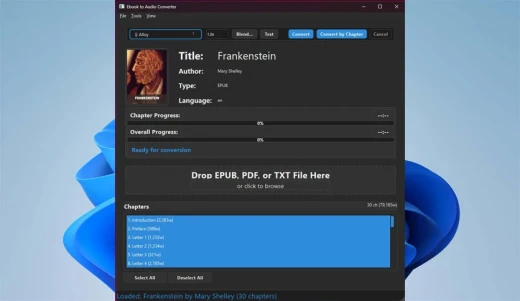
Description: AI Ebook to Audio Converter transforms your ebooks into high-quality audiobooks using advanced AI voice technology. Convert EPUB, PDF, and TXT files into MP3 audiobooks with natural-sounding voices, all while working completely offline with no subscription fees.

Advanced Voice Technology
- High-quality AI voice synthesis with natural-sounding results
- Voice blending system - blend multiple voices together for custom sound
- Save and load voice presets for consistent results
- Test voice samples before conversion

Comprehensive Format Support
- EPUB files (most common ebook format)
- PDF documents
- Plain text (TXT) files

Complete Control Over Conversion
- Convert entire books or only selected chapters
- Adjust reading speed to your preference
- Real-time progress tracking with time estimates
- Create a single audiobook file or separate chapter files

Privacy-Focused Design
- Works 100% offline - no internet connection required
- No data collection or tracking
- All processing happens locally on your device
- No subscription fees or hidden costs

User-Friendly Experience
- Intuitive interface with dark/light theme support
- Drag-and-drop file loading
- Clear progress indicators
- Detailed book information display

Transform your reading experience today - convert your favorite ebooks into audiobooks you can listen to anywhere!

System Requirements
- OS: Windows 10 version 17763.0 or higher (64-bit)
- Memory: 4 GB (Minimum), 8 GB (Recommended)

Microsoft Store - Full Version

Release Name: AI Ebook to Audio Converter 1.1.29
Size: 1.4 GB
Links: HOMEPAGE – NFO – Torrent Search

Download: RAPiDGATOR
5 Comments
May 6

Print Artist Premier 25.1.0.1

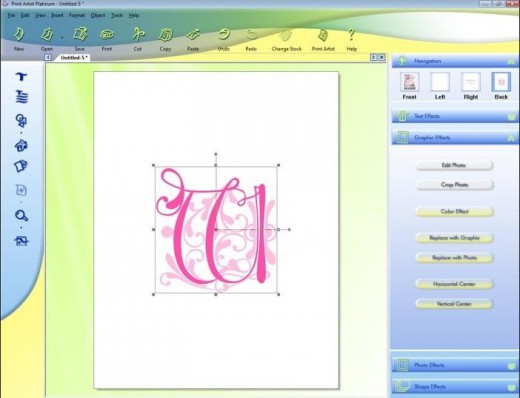
Description: Print Artist® Premier 25 is unlike any print software you’ve ever used – its unparalleled quality combined with unprecedented ease of use lets you produce amazing print projects for your home, school or business. Impress friends, family and clients with the creative edge that only Print Artist Premier can offer – 28,000+ professionally-designed templates, 377,000+ sensational graphics, 1,000+ premium fonts and more!

With its powerful, yet easy-to-use design, text and drawing customization tools, advanced photo editor, special text effects gallery and more, you’ll be creating expert, eye-popping print projects with a professional, custom look that truly raises the bar!

Key Features of Print Artist Premier


  • 28,000+ Professionally-Designed Templates
  • 377,000+ Sensational Graphics
  • 1,000+ Premium Fonts
  • NEW User Interface! Now Even Easier to Use
  • Easily Upload Projects to Facebook & YouTube
  • Photo Card Projects & Photo Clip Art
  • Digital Photo Editor Makes Your Pictures Shine
  • Bonus! Create CD Slideshows You Can Watch on TV
Release Name: Print Artist Premier 25.1.0.1
Size: 880 MB
Links: HOMEPAGE – NFO – Torrent Search

Download: RAPiDGATOR
6 Comments
May 6

Easy Cut Studio 6.020

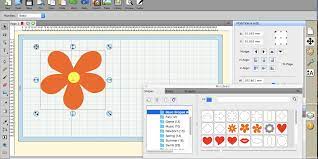
Description: The easiest way to design and cut signs, decals, stickers, car lettering, display graphics, shapes, logos, labels, window film, stencils, and etc. Take your sign-making to a whole new level with Easy Cut Studio.

Introducing Easy Cut Studio 6
The world’s most-loved sign making and vinyl cutting software, developed to perfectly match your vinyl cutter and cutting plotter. Easily create designs and cut in one simple workflow. It gives you the ability to cut any font, SVG, AI, PDF, as well as your own original designs with your vinyl cutting plotter. This awesome vinyl cutter software even supports vectorize your images and built-in shape library includes hundreds of vectorial designs ready for cutting. With the intuitive interface and robust toolset, Now anyone can cut designs like a pro with professional-grade features! Now available in both Windows and macOS.

Powerful Design Tools
Drawing and Designing couldn’t get any easier! This powerful vinyl cutter software comes with a suite of various design and layout tools that you need. Easily draw unique shapes, modify signs, edit vector images, create graphics, customize text with all fonts on your computer plus special effects. Easy Cut Studio 6 will make your design and cut your signs easier than with any other vinyl cutting software in the industry. It is a little design powerhouse for plotting vinyl. Everyone can design like a pro, No skills needed.

Versatile Import/Export options
Import and edit various vector files, including SVG, PDF, AI, EPS, PNG, GSD, FCM, WPC and other major embroidery files as editable objects. Giving you the power to cut any shapes and custom artworks. You can also export your design to SVG, PNG, TIFF, PDF, JPG, BMP, FCM, and G-code.

Image Tracing & Vectorizing
Unmatched image vectorization, Turn images into editable vectors with ease. Simply use the powerful tracing tool to create cuttable outlines from any imported raster graphics (including PNG, JPG, PDF, BMP, GIF, PSD, TIFF, TGA, etc.) or any scanned images. Easily create accurate vector paths ready for cutting or make further editing.

Node Editing
Easy node editing tools give you total control over outlines. Individual lines, curves and nodes can be manipulated to any degree for perfect results. The simplify feature is useful for trying to reduce the number of points/nodes in a shape.

Design and Cut Rhinestone Templates
Easily convert designs into rhinestone templates and make your own custom rhinestone designs with typeable rhinestone ready fonts. and ability to add a spray of rhinestones surrounding a design. With the help of Easy Cut Studio Rhinestone feature, you can now apply rhinestones to practically everything from T-shirts, handbags, jeans, textiles, cell phones and so on.

Weld Text and Shapes Together
Welding is an advanced option allows you to make overlapping text and shapes to become a single shape, by joining shapes together wherever an overlap occurs. There are two ways to combine shapes/letters together: welding and joining.

Working With Layers
Easily create complex designs using multiple layers, grouping to organize the display order of objects. Using Layers can help you more control over how you organize, edit and cut objects with Easy Cut Studio (including ability to cut by layer). You can also assign layers to print only, cut only, score, draw or both print and cut. The Shadow Layer option will create cuttable shadows from any shapes.

Print and Cut (Contour Cutting)
Print and Cut made easy, fast and accurate. Automatic creation of registration marks for print and cut applications. Easily print your design and then cut out around the printed design using your cutting plotter, which is perfect to create decals and stickers. User control over registration size, thickness and offset will help the cutter find the contour cut marks easily.

Full control over your vinyl cutter
Cut vinyl signs with incredible ease. Flexible cut settings that allow you to cut exactly what you want. You can set cut mode, pressure & speed, score force, cut selection only, multi-cut, blade offset, overcut, mirror, Print+Cut and many more professional vinyl cutter controls. Further enhancing the potentiality of vinyl cutter. Get the job done, faster.

Supported Vinyl Cutters and Plotters
Works with a wide range of vinyl cutters/plotters including Graphtec, Vevor, Roland, GCC, Mimaki, Summa, HP Latex, Siser, Mutoh, Secabo, LOKLiK, USCutter, UKCutter, Desay Master, JinKa, KNK, Silhouette, DGI, E-cut, Mycut, Refine, Saga, Teneth, Rabbit, Vicsign, Seiki, Foison, Workhorse, KASA, SkyCut, Creation PCut, Ioline, AnaGraph, ROHS, Yinghe, HobbyCut, GSN, DGI, BDF, ProCut, Vinyl Systems, Jaguar, MUSE, Liyu, PixMax, Redsail, GoldCut, Vinyl Express machines and much more (700+). (No longer work with the Cricut cutting machines).

Release Name: Easy Cut Studio 6.020
Size: 38.4 MB
Links: HOMEPAGE – NFO – Torrent Search

Download: RAPiDGATOR

6 Comments
May 5

Adobe Master Collection 2026 2.0

Description: As I hope you know, the Adobe Master Collection package does not officially exist in nature; Adobe has never released it. But, nevertheless, he is in front of you! Moreover, it is assembled on the basis of a modern installer produced by Adobe, the use of which for this assembly became possible thanks to the joint efforts of your humble servant and the well-known PainteR. We both worked hard to make this package come to life. Adobe Master Collection is a collection of applications from the Creative Cloud line, combined with a multilingual installer with the ability to select the installation path and interface language of the installed programs. In terms of functionality, everything is very similar to the well-proven Adobe Master Collection CS6 in the past. Only, the installer interface has undergone major changes compared to its namesake in the Creative Suite 6 line, the composition of the package has changed somewhat, and the versions of the programs themselves are definitely newer.

Pacakge Content
Adobe Acrobat Pro 64-bit (Russian and English)
Adobe Acrobat Pro 32-bit (Russian and English)
Adobe After Effects 2026 (Russian and English)
Adobe Animate 2024 (Russian and English)
Adobe Audition 2026 (English only)
Adobe Bridge 2026 (Russian and English)
Adobe Character Animator 2026 (Russian and English)
Adobe Dimension (English only)
Adobe Dreamweaver 2021 (Russian and English)
Adobe Fresco (Russian and English)
Adobe Illustrator 2026 (Russian and English)
Adobe InCopy 2026 (Russian and English)
Adobe InDesign 2026 (Russian and English)
Adobe Lightroom Classic (Russian and English)
Adobe Media Encoder 2026 (Russian and English)
Adobe Photoshop 2026 (Russian and English)
Adobe Premiere Pro 2026 (Russian and English)
Adobe Premiere Rush (Russian and English)
Adobe Substance 3D Designer (English only)
Adobe Substance 3D Modeler (English only)
Adobe Substance 3D Painter (English only)
Adobe Substance 3D Sampler (English only)
Adobe Substance 3D Stager (English only)
Adobe XD (Russian and English)

FAQ

Question: I can’t click the “Continue” button because the window contents don’t fit within the window itself, and the button is out of sight. What should I do?
Answer: This happens occasionally on poorly configured operating systems. There’s a TAB key on your keyboard. Use it to navigate to the desired menu item.
Question: The installation was not completed due to an unknown error. What should I do?
Answer: Please review the error code explanation . I also recommend reviewing the installation log. It is located at C:\Program Files (x86)\Common Files\Adobe\Installers\Install.log. You may find more detailed information about the problem and how to resolve it there.
Question: My antivirus detected a Trojan in this release. How so?
Answer: Some antivirus programs may falsely report that this release contains viruses. They typically point to the files crack.exe, Cinema 4D.exe, templib.dll, and xzlib0.dll. However, I can assure you that these are all false positives! To resolve this, simply disable your antivirus during the installation of Acrobat and the first launch of Cinema 4D (if you installed After Effects with it). I’ll explain how to do this using the Windows security mechanism as an example. First, I recommend disabling SmartScreen. And not just during installation, but PERMANENTLY! To do this, launch the Windows Security app and select “App & browser control” -* “Reputation-based protection settings” -* “Check apps and files” -* Disable. *In Windows 10, there’s one less intermediate step. Next, disable the main antivirus module. But this is temporary. In the Windows Security app, select “Virus & threat protection” -* “Manage settings” and move all the switches to the Off position. After the installation is complete, you can return the switches to their original positions. And if your antivirus complains about the last two files in the list, simply add them to the antivirus exclusions.
Question: What do I need to do to access cloud storage and other online services?
Answer: To do this, connect to the Adobe server with your ID by selecting “Help->Sign In” from the program menu and logging in. I strongly recommend closing the window prompting you to launch the trial version by clicking the “X.” This will prevent you from encountering the annoying trial expiration message in the future! Online services will be available after restarting the program.
Question: What’s the status of the medications in the current build?
Answer: The build was patched using the work of uncia & CGP Co. A number of files were patched, which I then integrated into the installer. You don’t need to do anything to patch them! Just in case, the original files are saved with the *.bak extension. If you want to get the original, unpatched product, simply remove this extension from these files and replace the existing patched files with them.
Question: What about disabling spyware modules?
Answer: The following spyware modules are disabled: Log Transport Application (LogTransport2.exe), CRLog Transport Application (CRLogTransport.exe), Adobe Crash Processor (Adobe Crash Processor.exe), Adobe Crash Report Window (AdobeCrashReportWindow.exe), Adobe Crash Report Service (AdobeCrashReport.exe), and Crashpad Handler (crashpad_handler.exe). Just in case, the files that initialize them are saved with the *.bak extension. If you suddenly want to restore their functionality, simply remove this extension from these files. The crack included in the build also removes Adobe Genuine Service if this module was previously installed with other Adobe programs (this module is not installed with this build).
Question: When opening a program, I get the error “Adobe Creative Cloud, needed to resolve the problem, is missing or damaged…”. What should I do?
Answer: You have leftover installations of Adobe Creative Cloud components on your system. These need to be removed. To do this, use the Adobe Creative Cloud Cleaner Tool . Select “All” as the component to remove, then “Adobe Creative Cloud Desktop”. Then, reinstall the offending program. This cleanup and reinstallation will not damage any previously installed programs.
Question: After installing Photoshop, I get the error “SSE 4.2 or later.” What should I do?
Answer: According to Adobe , Photoshop 2021 and later requires a processor with support for SSE 4.2 or later. Unfortunately, if your processor doesn’t support this architecture, this version of Photoshop will not work on your computer.
Question: I can’t download neurofilters in Photoshop. Why?
Answer: If you’re being denied downloading neurofilters, delete the folder C:\Users\<username>\AppData\Roaming\Adobe\UXP\PluginsStorage\PHSP\27\Internal\com.adobe.nfp.gallery\PluginData. See the number 27 in the path? If you have folders 26, 25, and so on in addition to 27, you need to delete them as well! Afterward, restart the program – the filters should start downloading. I recommend downloading all the necessary filters at once, as deleting this folder also deletes all previously downloaded neurofilters.
Question: My Generative AI isn’t working. Is there a way to resolve this?
Answer: Only paid subscribers can use generative tools. Even then, they have a limit on the number of generations. You can also use generative tools during a free 14-day trial period. So, if you really need generative tools, register a new business account (14-day trial vs. 7-day trial for personal accounts) and activate the trial period. Then, log in to the program using the “Help->Sign In” menu. After 14 days, register a new ID. Continue doing this until you’re done. Unfortunately, there are currently no other options. For residents of the Russian Federation, the process is somewhat more complicated. Since Adobe has officially withdrawn from Russia, you’ll need to use a VPN both during registration and while using generative tools. And not just in your browser! You need a VPN that intercepts internet connections and those of other programs on your computer, particularly Adobe applications. Oh, and before registering a new account, don’t forget to log out of your old one, both in your programs and your browser. It’s also a good idea to clear cookies for the Adobe website in your browser. That’s all! Please don’t bother me with any questions about generative options.
Question: When I launch Animate, the start screen is just a black background. What should I do?
Answer: If the start screen isn’t important to you, simply use the program menu to create or open a file. If you want to see the start screen at startup, you need to connect to the Adobe server with your ID by selecting “Help->Sign In” from the program menu and logging in. The start screen will work normally.
Question: Acrobat Pro requires authorization when launching. Is this normal?
Answer: Your Acrobat Pro installation was untreated. This most likely occurred because the program was installed via an update or because the crack was blocked by your antivirus. In this case, you need to run the cracker manually with your antivirus disabled. The cracker paths in the Master Collection distribution are: ..\Adobe 2026\products\APRO_x32\crack.exe for the 32-bit version, ..\Adobe 2026\products\APRO\crack.exe for the 64-bit version. Run the cracker as administrator and wait for the message “Cracking complete. Enjoy!” to appear. After that, you can freely use the cured application.
Question: Can I install both 32-bit and 64-bit Acrobat Pro simultaneously?
Answer: Yes, it’s possible, although I don’t understand why this is necessary…
Question: I can’t connect to the Adobe server with my ID from Acrobat Pro. What should I do?
Answer: Unfortunately, this is a quirk of the program. It’s a bit buggy.
Question: How do I switch between the old and new Acrobat Pro interfaces?
Answer: New -* Old: In the upper left corner of the program, click “Menu” and select “Disable new Acrobat” from the drop-down menu, then restart the program. Old -* New: In the top menu, click “View” and select “Enable new Acrobat” from the drop-down menu, then restart the program.
Question: Why am I blocked from creating new projects in Premiere Rush?
Answer: For the program to function properly, you need to connect to the Adobe server with your ID by selecting “Help->Sign In” from the program menu and logging in.
Question: Why does Fresco require authorization immediately after launch?
Answer: The program doesn’t allow use without authorization. No other option!
Question: After launching Fresco, it closes almost immediately with a notification that I don’t have time to read. What’s wrong?
Answer: The notification most likely states that the program requires a GPU with Direct X that supports Feature Level 12.1. Apparently, your GPU doesn’t support this version. I can’t help with that. Use version 5.5.5 or earlier. Although it lists similar system requirements, the program runs with Feature Level 12.0.
Question: After launching Fresco, a notification appears stating that the program requires Microsoft Edge WebView2 Runtime. What should I do?
Answer: In the notification window, click “Download.” The official Microsoft Edge WebView2 page will open in your browser. Scroll to the “Download the WebView2 Runtime” section. Under the “Evergreen Bootstrapper” heading, click “Download,” accept the license agreement, and download the Microsoft Edge WebView2 Runtime installer. Run the downloaded installer and wait for it to complete. Fresco will then start working.
Question: Even though I select English during installation, Fresco is still in Russian. What should I do?
Answer: This type of installer doesn’t allow the user to select a language for Fresco. The language is selected automatically based on the OS’s preferred language setting. If you want to change your preferred language, go to Settings->Time & Language->Language->Preferred languages ​​and select English above Russian in the list. This will change Fresco’s interface language. However, keep in mind that this is a system setting, not a specific program’s setting. The interface language of some other programs and even some OS interface elements may also change!
Question: Even though I select English during installation, XD is still in Russian? What should I do?
Answer: This type of installer doesn’t allow the user to select a language for XD. The language is selected automatically based on the operating system language. However, you can change the program interface language after the application is installed. To do this, launch the program and open any template. Then, log in by going to “Help->Sign In…” in the program menu. Restart the program, open the template again, then click “Edit->Preferences->Language” in the program menu and set the desired application interface language.
Question: When I try to save a file in InDesign, I see a black window with a waiting icon on top. What’s wrong?
Answer: InDesign has been able to save files to the cloud for some time now. And this saving option is selected by default. But you’re not logged in! This means the cloud is unavailable to you. Hence the unloading window. However, there are two solutions to this problem. First, disconnect from the internet and try saving the file; the window will now fill up, and due to the lack of an internet connection, the option “Save to your device” will appear. Second, log in to the program with your Adobe ID and try saving the file; the window will now load, and you’ll see the option to save the file to the cloud, but in the lower left corner of the window you’ll see an alternative save button, “On your computer.” You only need to do either of these steps once, and the option to save files to your computer will be selected by default.
Question: Illustrator and InDesign are consuming a lot of resources. Is there anything I can do?
Answer: Try killing the CoreSync.exe process in Task Manager. Then rename or delete the file that launches this process. It’s located at: C:\Program Files (x86)\Adobe\Adobe Sync\CoreSync\CoreSync.exe. According to reviews, this significantly reduces the program’s resource consumption. Another option: log in using the Help->Sign In… menu.
Question: When I first launch Premiere Pro, it starts in English, even though I selected a different interface language during installation. Why is that?
Answer: Another bug on the part of Adobe’s incompetent programmers. Apparently, they mixed up the order of the commands responsible for creating configs and reading them. The error is harmless. The second time I launch the program, it will start in the selected interface language.
Question: When I launch Premiere Pro, After Effects, Media Encoder, or Audition, the application closes with error 0xc0000142! The same thing happens with InDesign. What’s wrong?
Answer: Starting with version 24.1, these applications require your processor to support Advanced Vector Extensions 2 (AVX2). If your processor doesn’t support this technology, none of these programs will launch, returning the same error. I recommend rolling back to a version earlier than 24.1. For InDesign, roll back to a version earlier than 20.0.
Question: When trying to use the transcription plugin in Premiere Pro or Media Encoder, the program endlessly downloads language packs. What’s wrong?
Answer: Adobe Speech to Text language packs are not included in this build. They are large, 800 MB each. However, I’ve kept in mind the needs of those who actually use the plugin and created a build specifically for them called Adobe Speech to Text for Premiere Pro (also compatible with Media Encoder), which allows them to install any of the Speech to Text Language Packs. Look for it on trackers!
Question: Can you tell me more about the ability to use Maxon Cinema 4D as a standalone application?
Answer: Maxon Cinema 4D is forced to install as part of the Adobe After Effects 2026 suite. By default, it’s a trial version. But I’ve fixed it for you (using the n1z method). When you first launch the program, you’ll see a License Manager window with an error message. Just close it. The program will automatically launch again. But this time, it’s completely free of greed! Just to clarify, this is the version without RedShift. Also, you should know that the developers have removed the Russian interface from Maxon Cinema 4D starting with the 2024 version. So, don’t blame me for the lack of any of that.
Question: Is there any way to update applications included in the Master Collection?
Answer: I strongly advise against updating the applications themselves or using the Creative Cloud Desktop app, as this will almost certainly result in the installation failing. I recommend using my own builds with updated versions of the programs. The new version can be installed over the old one if both versions are from the same series (for example, both versions have the “2026” badge). If you have the Master Collection and only need to update Photoshop, you can use a separate Photoshop build—everything will update correctly, with all your settings carried over to the new version.

Notes

ATTENTION! The build includes a new, more advanced mechanism for blocking pop-up windows informing about the end of the trial period. A one-time OS reboot may be required to initiate it! I would also like to draw attention to the fact that all the “tails” from the old blocking methods will be cleaned up. This applies to entries in hosts, rules in Windows Firewall and tasks in the Task Scheduler. In this regard, I recommend that you reinstall programs installed from my builds earlier, even if their version has not changed with the release of the Master Collection. This ensures that programs will not be left without protection from ill-fated pop-ups.

Release Name: Adobe Master Collection 2026 2.0
Size: 42 GB
Links: HOMEPAGE – NFO – Torrent Search

Download: RAPiDGATOR
1 Comments