Apr 2

O&O Defrag Professional 31.2.26042
Description: Your PC gets slower and slower over time. Fragmentation occurs on every computer. Files are broken up when saved and stored in individual parts on the hard drive or SSD wherever there is space. Defragmentation reverses this memory chaos. A defragmentation system rearranges the stored files and puts them back together.
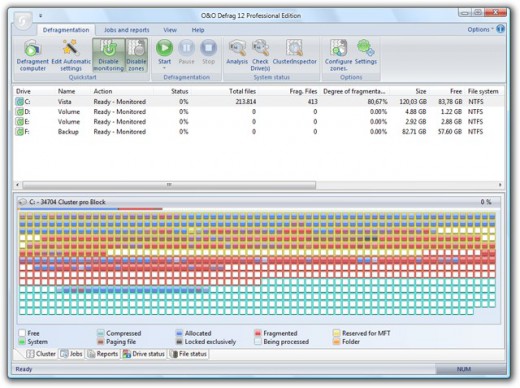
How does O&O Defrag help?
O&O Defrag tidies up this shoebox by combining the snippets of a file and writing them one after the other to the hard drive or SSD. In addition, the files are reorganized so that the access times during loading are minimized. This saves you time and protects your data carriers. Regular use of O&O Defrag noticeably increases the access speed and overall performance of your Windows system. And so that you never have to worry about “file snippets” again, O&O Defrag can also be run completely automatically in the background.

Simply simple
Everyone should have a fast computer. That’s why we’ve made O&O Defrag 31 so simple that anyone can use it. The new modern view does not require complicated settings.

Not a difficult decision as to which is the best defragmentation strategy for your PC. O&O Defrag takes care of everything itself. All you have to do is choose whether you want to start O&O Defrag manually yourself or whether you want it to take care of everything automatically.

O&O VisualDisk
Visualization of write access to SSDs
With O&O VisualDisk, write access to the hard drive as it takes place on flash-based storage media such as SSDs and NVMe drives is clearly displayed. This innovative feature shows how defragmentation can help reduce future write accesses and extend the lifespan of SSDs. The user gets a clear picture of how the hard drive works and how its performance can be optimized through targeted measures. O&O VisualDisk helps you understand how O&O Defrag can get the most out of a hard drive and protect it from unnecessary wear and tear – for a long-lasting and fast PC system.

O&O StartupManager
Remove unnecessary ballast at take-off
The new O&O StartupManager offers a clear overview of all programs, tasks and services that are automatically executed when Windows starts. With detailed information about each program – including how it affects the system’s startup time – it is easy to decide which programs should be enabled or disabled. Unnecessary applications are marked as such and can be deactivated with a mouse click. Defective start entries are also detected and can be deleted. This shortens the startup time of the computer and ensures that it is ready for use faster.

New Boot-Time Optimization
and improved O&O IntensiveOptimize
The new boot time optimization optimizes the system fully automatically even before Windows starts – so even locked system files and other critical files can be reliably accelerated.

With the revised O&O IntensiveOptimize, demanding users can also optimize their system in their own Windows environment – with full access to all user and system files. Thanks to the improvements in version 31, a single mouse click is now enough, even for Bitlocker-encrypted drives.

My individual O&O Defrag
O&O Defrag 31 also gives you the opportunity to choose your own personal defragmentation strategy. In the classic view, you can make all professional settings yourself.

In O&O Defrag 31, you can switch at any time between the classic view with all professional settings and the modern view, which is reduced to the essentials.

System maintenance of your data carriers
O&O Defrag 31 checks your hard drive or SSD for inconsistencies that can lead to problems. It examines the component memory and Windows system files for errors.

O&O Defrag will show you whether and which errors have been found after the check has been completed. With the repair function, most errors can be fixed directly.

Remove ballast and free up space
Over time, more and more ballast accumulates on a PC. Temporary files, internet cache and the like can take on considerable proportions. This can lead to a storage space problem, especially on modern SSDs. But backups also take much longer than necessary.

With the improved O&O DiskCleaner in O&O Defrag, you can put an end to files that are no longer needed.

Remove superfluous programs
Programs that are no longer in use can pose a security risk. Definitely, they are wasting disk space. You probably won’t need a 2011 tax filing program anymore. But do you even know it’s still installed?

O&O Defrag 31 now clearly displays all installed programs. And with one click, you can easily uninstall the ones you no longer need. This saves storage space (important for SSDs) and increases your security.

Automatic defragmentation in the background
The automatic defragmentation optimizes your data carriers in the background without negatively affecting your computer’s performance. O&O Defrag can be set up so that defragmentation starts automatically at a certain level of fragmentation, on certain days of the week, or whenever your screensaver is active.

Native support for the ARM platform
For the first time, O&O Defrag 31 now supports the family of CPUs based on the ARM architecture (Advanced RISC Machine) in addition to the previous Intel and AMD processors. These are currently mainly used in new Windows PCs with AI support and will take a significant market share in the coming period due to their energy efficiency and lower costs.

Release Name: O&O Defrag Professional 31.2.26042
Size: 63 MB
Links: HOMEPAGE – NFO – Torrent Search

Download: RAPiDGATOR

Feel free to post your Old O&O Defrag Professional 31.2.26042 torrent, subtitles, samples, free download, quality, NFO, direct link, free link, uploaded.to, rapidgator, turbobit, openload, mega.co.nz, filefactory, crack, serial, keygen, requirements or whatever-related comments here. Don't be rude (permban), use only English, don't go offtopic and read FAQ before asking a question. Owners of this website aren't responsible for content of comments.

If you are purchasing an account from Rapidgator's Resellers, please be sure to read this guide before purchasing.

  • Single Link Download
  • RLSBB
  • Oryad
  • IamBack
  • audioz𝗱wn
    Apr 2nd, 2026 at 09:54 PM

    O.O.Defrag.Professional.31.2.26042.rar | 63 MB
    https://frdl.io/kogpit26c9mg/O.O.Defrag.Professional.31.2.26042.rar.html

  • audi𝗼zdwn
    Apr 2nd, 2026 at 09:55 PM

    O.O.Defrag.Professional.31.2.26042.rar | 63 MB
    https://usersdrive.com/xt31qor61dbf.html

  • Oryad
    Apr 2nd, 2026 at 09:55 PM

    O O Defrag Professional 31 2 26042
    Size: 63.0 MB

    https://down.mdiaload.com/vhwa1ptl7clb

  • Katzddl.net
    Apr 7th, 2026 at 02:52 PM

    O&O Defrag Professional 31.2.26042 (x64) | Size: 62.98 MB
    Language: English
    Your PC gets slower and slower over time. Fragmentation occurs on every computer. Files are broken up when saved and stored in individual parts on the hard drive or SSD wherever there is space. Defragmentation reverses this memory chaos. A defragmentation system rearranges the stored files and puts them back together.
    How does O&O Defrag help?
    O&O Defrag tidies up this shoebox by combining the snippets of a file and writing them one after the other to the hard drive or SSD. In addition, the files are reorganized so that the access times during loading are minimized. This saves you time and protects your data carriers. Regular use of O&O Defrag noticeably increases the access speed and overall performance of your Windows system. And so that you never have to worry about "file snippets" again, O&O Defrag can also be run completely automatically in the background.
    Simply simple
    Everyone should have a fast computer. That's why we've made O&O Defrag 31 so simple that anyone can use it. The new modern view does not require complicated settings.
    Not a difficult decision as to which is the best defragmentation strategy for your PC. O&O Defrag takes care of everything itself. All you have to do is choose whether you want to start O&O Defrag manually yourself or whether you want it to take care of everything automatically.
    O&O VisualDisk
    Visualization of write access to SSDs
    With O&O VisualDisk, write access to the hard drive as it takes place on flash-based storage media such as SSDs and NVMe drives is clearly displayed. This innovative feature shows how defragmentation can help reduce future write accesses and extend the lifespan of SSDs. The user gets a clear picture of how the hard drive works and how its performance can be optimized through targeted measures. O&O VisualDisk helps you understand how O&O Defrag can get the most out of a hard drive and protect it from unnecessary wear and tear - for a long-lasting and fast PC system.
    O&O StartupManager
    Remove unnecessary ballast at take-off
    The new O&O StartupManager offers a clear overview of all programs, tasks and services that are automatically executed when Windows starts. With detailed information about each program - including how it affects the system's startup time - it is easy to decide which programs should be enabled or disabled. Unnecessary applications are marked as such and can be deactivated with a mouse click. Defective start entries are also detected and can be deleted. This shortens the startup time of the computer and ensures that it is ready for use faster.
    New Boot-Time Optimization
    and improved O&O IntensiveOptimize
    The new boot time optimization optimizes the system fully automatically even before Windows starts - so even locked system files and other critical files can be reliably accelerated.
    With the revised O&O IntensiveOptimize, demanding users can also optimize their system in their own Windows environment - with full access to all user and system files. Thanks to the improvements in version 31, a single mouse click is now enough, even for Bitlocker-encrypted drives.
    My individual O&O Defrag
    O&O Defrag 31 also gives you the opportunity to choose your own personal defragmentation strategy. In the classic view, you can make all professional settings yourself.
    In O&O Defrag 31, you can switch at any time between the classic view with all professional settings and the modern view, which is reduced to the essentials.
    System maintenance of your data carriers
    O&O Defrag 31 checks your hard drive or SSD for inconsistencies that can lead to problems. It examines the component memory and Windows system files for errors.
    O&O Defrag will show you whether and which errors have been found after the check has been completed. With the repair function, most errors can be fixed directly.
    Remove ballast and free up space
    Over time, more and more ballast accumulates on a PC. Temporary files, internet cache and the like can take on considerable proportions. This can lead to a storage space problem, especially on modern SSDs. But backups also take much longer than necessary.
    With the improved O&O DiskCleaner in O&O Defrag, you can put an end to files that are no longer needed.
    Remove superfluous programs
    Programs that are no longer in use can pose a security risk. Definitely, they are wasting disk space. You probably won't need a 2011 tax filing program anymore. But do you even know it's still installed?
    O&O Defrag 31 now clearly displays all installed programs. And with one click, you can easily uninstall the ones you no longer need. This saves storage space (important for SSDs) and increases your security.
    Automatic defragmentation in the background
    The automatic defragmentation optimizes your data carriers in the background without negatively affecting your computer's performance. O&O Defrag can be set up so that defragmentation starts automatically at a certain level of fragmentation, on certain days of the week, or whenever your screensaver is active.
    Native support for the ARM platform
    For the first time, O&O Defrag 31 now supports the family of CPUs based on the ARM architecture (Advanced RISC Machine) in addition to the previous Intel and AMD processors. These are currently mainly used in new Windows PCs with AI support and will take a significant market share in the coming period due to their energy efficiency and lower costs.
    System Requirements: supports 64 bit versions of Windows 11 und Windows 10
    HOMEPAGE: https://www.oo-software.com/
    FREE DOWNLOAD LINKS:
    https://rapidgator.net/file/abe03ff36c9c98c4429b947c31d099b5/OO_Defrag_Professional_31.2.26042_x64.rar
    https://nitroflare.com/view/73700E817D79117/OO_Defrag_Professional_31.2.26042_x64.rar

  • Katzddl.net
    Apr 28th, 2026 at 05:41 PM

    O&O Defrag Professional 31.2.26042 | Size: 63.22 MB
    Language: English
    Up to 100% increased PC speed: There is nothing worse than when you want to do something on your PC and your computer is running slow. A disk defragmenter used regularly can speed up a PC of any age and get it working like new again!
    Don't let a slow computer spoil your work or fun! Let O&O Defrag optimize your hard disks and - New! - SSDs and you can experience speed increases of up to 100%! Regular disk defragmentation optimizes your PC performance!
    When you defragment, the files that Windows splits up when saving documents across the hard disk or SSD are put back in order again so that files can be quickly recognized and found by the SSD or the read and write heads inside your HDD. Speed increases of up to 100% are not uncommon, and your hardware suffers much less wear and tear!
    New: O&O Defrag supports Windows Compact OS: Many new things have been added to the O&O Defrag engine that make using it, especially under Windows 10, even better. That's why version 24 now supports the Windows 10-integrated feature for compressing system files so that more space can be kept free.
    New function "Install & That's All": After installation, no further settings need to be configured. The program selects and implements the defragmentation method best suited to the system.
    If you spend a lot of time on your PC, slow system and program starts or system crashes while playing can be very frustrating. Periodic defragmentation often works wonders in bringing new life to a PC.
    New SOLID method
    By customer request, O&O Software has developed the defragmentation method SOLID in order to offer the user a choice adapted to his or her needs: SOLID/Complete and SOLID/Quick. Both methods sustainably extend the life of the SSD but differ in terms of the duration and protection of the hardware.
    O&O DiskCleaner
    The brand new in-built O&O DiskCleaner searches for and removes temporary and unnecessary files that are taking up memory and increasing fragmentation. O&O DiskCleaner also increases the security of your data, as private content (e.g. Thumbs.db, copies of documents, drafts of emails, Dumps) will no longer be kept as copies in unnecessary system files.
    Benefits of a clearly laid out hard disk
    Whenever it saves data, Windows scatters file fragments all over the hard disk and this slows down access times considerably. Defragmentation reverses this by rearranging data and speeding up access times dramatically. This not only saves the user time, it also reduces wear on hard disks and extends their life expectancy. Defragmentation can even make the difference if you lose important data because chances of full recovery are better on a defragmented disk. Why? After defragmentation, it's easier for data recovery software such as O&O DiskRecovery to restore files when they're not scattered across multiple areas of a hard disk.
    Automatic background defragmentation
    Automatic defragmentation can be configured with just three clicks and optimizes your disks behind the scenes with no negative impact on your computer's performance. You can set O&O Defrag to run defragmentation at a certain level of fragmentation, on particular days of the week, or whenever your screensaver is being used. Defragmentation can be paused and resumed whenever you want because O&O Defrag automatically recognizes where defragmentation was interrupted.
    Recommended use
    We recommend manual defragmentation for PCs that are being used heavily because only a user can decide when the time is right to give up the performance needed for running defragmentation. On computers using video editing or graphics applications, O&O Defrag can be configured to not start automatic optimization while certain programs are running. The default settings in O&O Defrag are more than adequate for ordinary desktop PCs running mainly internet or office applications. O&O Defrag is also perfect for notebooks. Whenever an external power supply is disconnected, O&O Defrag automatically goes into pause mode to save energy
    Product features:
    "Install & That's All": After installation, no further settings need to be configured. The programselects and implements the defragmentation method best suited to the system
    SOLID/Quick: This method, developed specifically for SSDs, performs a superficial optimization of the SSD, such as erasing the free space. This method is gentler and faster.
    SOLID/Complete: This method, developed specifically for SSDs, is a thorough optimization of the SSD.
    ClusterView with SSDs: In order to represent the degree of fragmentation of an SSD, the ClusterView now maps the logical structure of an SSD so that, accordingly, 6 blocks are combined into one.
    Fragment Filter to identify the most fragmented files on a drive
    O&O DiskCleaner
    Time View to see which defragmentation activity results in which successful optimization
    Easy-to-Use: Ideal for Beginners and Professionals
    Even faster system and program starts
    Defragmentation time reduced by up to 40%
    Defragmentation of locked files
    Lifetime Performance Statistics
    Optimizing systems with Thin Provisioning
    OS: Windows 10, Windows 8 and Windows 8.1
    Server Edition requires Windows Server 2019, 2016, 2012 R2, 2012, 2008 R2, 2008
    HOMEPAGE: https://www.oo-software.com/
    FREE DOWNLOAD LINKS:
    https://rapidgator.net/file/801acb6cea570aa316c88c3caa64cdc5/OO_Defrag_Professional_31.2.26042.rar
    https://nitroflare.com/view/4B61CEC05E0267F/OO_Defrag_Professional_31.2.26042.rar
