Please REGISTER or RENEW your account on RAPiDGATOR.net and support us by doing through all RAPiDGATOR working download links on main posts...
June 17

WaveMetrics Igor Pro 10.03.30115

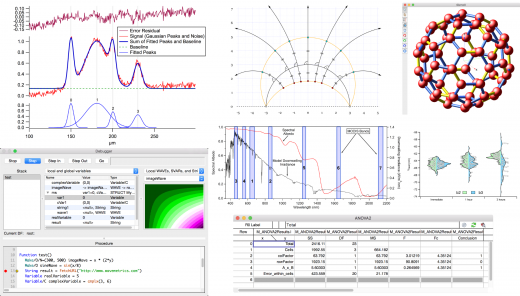
Description: Igor Pro is an interactive software environment for experimentation with scientific and engineering data and for the production of publication-quality graphs and page layouts. Igor has been used by tens of thousands of technical professionals since its introduction in 1989. Here are a few highlights of the newly released Igor Pro 10.

Features:
Igor Pro 10 runs on Windows 10 and later
Produces and exports high-resolution, journal quality scientific graphs in SVG, EPS, PDF, and PNG
Handles large data sets very quickly
Includes a wide range of capabilities for scientific and engineering analysis and simulation
Contains a built-in programming environment that makes it easy to automate applications and extend internal tools
Completely programmable via a built-in programming environment and can be extended by external code (XOPs) written in C
Igor Pro has special support for time-series or other evenly-spaced data
Includes extensive image processing tools for image filtering, manipulation and graphing
Python integration allows you to directly execute Python code and exchange data between Igor and Python
Imports data in many formats and can acquire data from hardware devices
Uses unicode to support foreign languages and mathematical symbols
Active user-to-user support and collaboration forum
Responsive, user-acclaimed technical support
Includes Igor Filter Design Laboratory for interactive design of FIR and IIR digital filters

Release Name: WaveMetrics Igor Pro 10.03.30115
Size: 247.7 MB
Links: HOMEPAGE – NFO – Torrent Search

Download: RAPiDGATOR

6 Comments
June 17

Disk Sorter 18.2.34

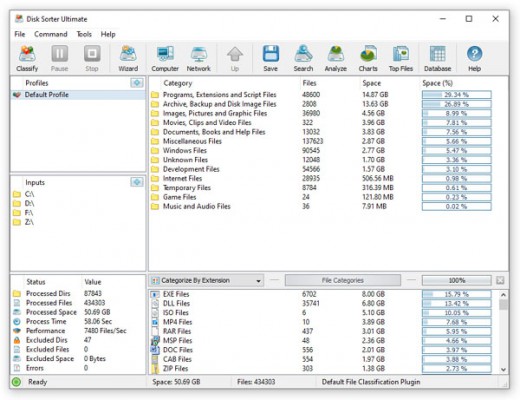
Description: DiskSorter is a file classification solution allowing one to classify files in local disks, network shares, NAS devices and enterprise storage systems. Users are provided with the ability to gain an in-depth visibility into which types of files are using most of the disk space, save reports and perform file management operations on categories of files.

DiskSorter provides a number of built-in file classification plugins capable of recognizing more than 3,000 types of files and allowing one to classify files by the file type, extension, user name, creation, last modification and last access dates, etc. Users are provided with the ability to generate various types of pie charts, categorize and filter file classification results and save file classification reports into a number of standard formats including HTML, PDF, Excel, text, CSV, XML and the DiskSorter native report format.

IT and storage administrators are provided with the ability to submit file classification reports from multiple servers and NAS storage devices to a centralized SQL database and analyze disk space usage history trends for one or more file categories per server and/or per user across the entire enterprise.

Classifying Files in Network Servers and NAS Storage Devices
DiskSorter allows one to scan the network, discover network servers and NAS storage devices, automatically detect all accessible network shares and classify files in hundreds of network servers and NAS storage devices. In addition, the user is provided with the ability to export the list of detected servers and NAS storage devices (including lists of network shares for each server) into HTML, PDF, text and Excel CSV reports.

In order to classify files in one or more servers or NAS storage devices, press the 'Network' button located on the main toolbar and wait while DiskSorter will scan the network and show a list of detected network servers and NAS storage devices. On the network servers and NAS storage devices dialog, select the required servers and press the 'Classify' button.

DiskSorter will show all network shares hosted on the selected servers and NAS storage devices allowing one to classify files and save various types of file classification charts and reports. In addition, DiskSorter provides a large number of advanced file classification options allowing one to tune and customize file classification operations for user specific needs and hardware configurations.

DiskSorter Command Line Utility
In addition to the desktop GUI application, DiskSorter Ultimate and DiskSorter Server provide a command line utility allowing one to perform file classification operations, save various types of file classification reports, export file classification results to an SQL database and control one or more DiskSorter Servers locally or via the network.

DiskSorter Server
Enterprise customers are provided with DiskSorter Server, which runs in the background as a service and allows one to perform multiple, parallel file classification operations, schedule periodic file classification operations and provides advanced file classification capabilities optimized for servers and NAS storage devices.

DiskSorter Server may be controlled using a full-scale client GUI application, which provides all features available in the desktop product version and additional capabilities allowing one to schedule periodic file classification operations and perform multiple-parallel file classification operations on a number of servers and/or NAS storage devices.

In addition to the client GUI application, DiskSorter Enterprise provides a web-based management interface allowing one to control one or more servers using a regular web browser locally or via the network.

Batch File Classification Operations
DiskSorter Server and DiskSorter Enterprise provide the ability to scan the network, detect all network servers and NAS storage devices, execute one or more pre-configured file classification commands on hundreds of network servers and NAS storage devices and generate an individual file classification report for each network server, NAS storage device or network share.

In the simplest case, just press the 'Network' button located on the main toolbar, search all network servers and NAS storage devices on the network, select one or more servers, press the right mouse button and select the 'Batch File Classification' menu item. DiskSorter will show a list of pre-configured file classification commands allowing one to select one or more commands to be executed on all selected network servers and NAS storage devices.

Depending on the selected configuration, DiskSorter will save in the built-in reports database an individual file classification report for each network server, NAS storage device or network share. Once the batch file classification operation is completed, the user will be provided with the ability to open saved file classification reports, review file classification results, generate various types of pie charts and export reports to a number of standard formats including HTML, PDF, Excel, text, CSV and XML.

Release Name: Disk Sorter 18.2.34
Size: 71.5 MB
Links: HOMEPAGE – NFO – Torrent Search

Download: RAPiDGATOR

5 Comments
June 17

ExamDiff 17.0.1.3

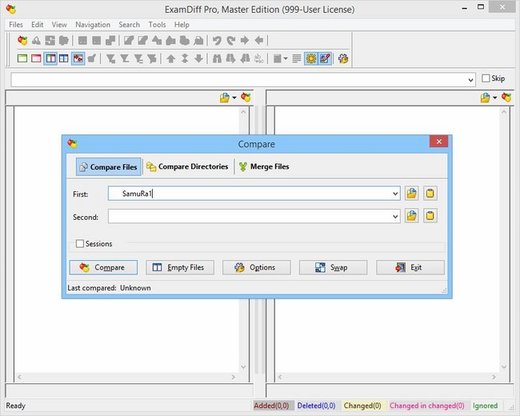
Description: ExamDiff Pro is a powerful yet intuitive and easy to use visual file and directory comparison tool for Windows. It features unique functionality that distinguishes ExamDiff Pro from other comparison programs. If you’ve been frustrated with other comparison utilities, you will find that ExamDiff Pro offers a much more efficient and user-friendly way to compare files and folders.

Features: 


  • Compares text files, binary files, and directories.
  • Performs two-way and three-way diff and merge.
  • Highlights differences down to the level of lines, words or characters.
  • Highlights document syntax.
  • Fuzzy line matching.
  • Ability to recognize moved text blocks.
  • Automated directory synchronization.
  • Line Inspector panel for easy recognition of differences within lines.
  • Can perform full file comparison in a background task in directory comparison.
  • Ability to add manual synchronization points to text file comparison.
  • Compares directly from Windows Explorer.
  • Allows file editing within file comparison panes.
  • Allows copying, renaming, and deleting files or directories.
  • Saves the file differences in a standard UNIX DIFF file or to a dynamic HTML web page.
  • Prints and print previews diff reports.
  • Easy navigation through the differences.
  • Advanced Search features.
  • Drag and drop support.
  • Advanced Ignore options, for ignoring capitalization, white space, programming-language comments, and more.
  • Word wrapping.
  • Plug-in support.
  • Drag and drop support.
  • Can create directory snapshots for later comparison.
  • Includes full Unicode support.
  • Fully customizable.
Release Name: ExamDiff 17.0.1.3
Size: 46.6 MB
Links: HOMEPAGE – NFO – Torrent Search

Download: RAPiDGATOR

6 Comments
June 17

Internet Download Manager 6.43 Build 1

Description: Internet Download Manager has a smart download logic accelerator that features intelligent dynamic file segmentation and safe multipart downloading technology to accelerate your downloads. Unlike other download accelerators and managers that segment files before downloading starts, Internet Download Manager segments downloaded files dynamically during download process.
Features
- All popular browsers and applications are supported!
Internet Download Manager has been tested with the following browsers: Internet Explorer, MSN Explorer, AOL, Netscape Communicator, Netscape 6, Netscape 7, Mozilla, Mozilla Firefox, Mozilla Firebird, Opera, NetCaptor, UltraBrowser, Slim Browser, Avant Browser, MyIE2, Optimal Desktop, Ace Explorer, Advanced Browser, 27 Tools-in-1 Wichio Browser, WindowSurfer, 550 Access Browser, FineBrowser Freeware, Kopassa Browser, Fast Browser Pro, Enigma Browser, GoSuRF, K-Meleon, Smart Explorer, The Off By One Web Browser, Smartalec Voyager, CrystalPort AppCapture, The Family Browser, XANA Web Browser, Bluto, AutoSurf, 32bit Web Browser, BrowseMan, WrestlingBrowser, Eminem Browser, UltraBrowser, Cygsoft LDAP Browser, and Net M@nager. Internet Download Manager supports all versions of popular browsers, and can be integrated into any 3rd party Internet applications.

- Easy downloading with one click.
When you click on a download link in a browser, IDM will take over the download and accelerate it. IDM supports HTTP, FTP, HTTPS and MMS protocols.

- Download Speed Acceleration.
Internet Download Manager can accelerate downloads by up to 5 times due to its intelligent dynamic file segmentation technology. Unlike other download managers and accelerators Internet Download Manager segments downloaded files dynamically during download process and reuses available connections without additional connect and login stages to achieve best acceleration performance.

- Download Resume.
Internet Download Manager will resume unfinished download from the place where they left off.

- YouTube grabber.
Internet Download Manager can grab FLV videos from popular sites like YouTube, MySpaceTV, and Google Video.

- Simple installation wizard.
Quick and easy installation program will make necessary settings for you, and check your connection at the end to ensure trouble free installation of Internet Download Manager

- Drag and Drop.
You may simply drag and drop links to IDM, and drag and drop downloaded files out of Internet Download Manager.

- Automatic Antivirus checking.
Antivirus checking makes your downloads free from viruses and trojans.

- Advanced Browser Integration.
When enabled, the feature can be used to catch any download from any application. None of download managers have this feature.

- Built-in Scheduler.
Internet Download Manager can connect to the Internet at a set time, download the files you want, disconnect, or shut down your computer when it's done.

- IDM includes web site spider and grabber.
IDM downloads all required files that are specified with filters from web sites, for example all pictures from a web site, or subsets of web sites, or complete web sites for offline browsing. It's possible to schedule multiple grabber projects to run them once at a specified time, stop them at a specified time, or run periodically to synchronize changes.

- IDM supports many types of proxy servers.
For example, IDM works with Microsoft ISA, and FTP proxy servers.

- IDM supports main authentication protocols
Basic, Negotiate, NTLM, and Keberos. Thus IDM can access many Internet and proxy servers using login name and password.

- Download All feature.
IDM can add all downloads linked to the current page. It's easy to download multiple files with this feature.

- Customizable Interface.
You may choose the order, and what buttons and columns appear on the main IDM window.

- Download Categories.
Internet Download Manager can be used to organize downloads automatically using defined download categories.

- Quick Update Feature.
Quick update may check for new versions of IDM and update IDM once per week.

- Download limits.
Progressive downloading with quotas feature. The feature is useful for connections that use some kind of fair access policy (or FAP) like Direcway, Direct PC, Hughes, etc.

- IDM is multilingual.
IDM is translated to Albanian, Arabic, Azerbaijan, Bosnian, Bulgarian, Chinese, Croatian, Czech, Danish, Dutch, Farsi, French, German, Greek, Hebrew, Hungarian, Italian, Japanese, Korean, Lithuanian, Macedonian, Norwegian, Polish, Portuguese, Romanian, Russian, Serbian, Slovak, Slovenian, Spanish, Thai, Turkish, and Uzbek languages.

Release Name: Internet Download Manager 6.43 Build 1
Size: 23.9 MB
Links: HOMEPAGE – NFO – Torrent Search

Download: RAPiDGATOR

7 Comments
June 17

Files Inspector Pro 4.55

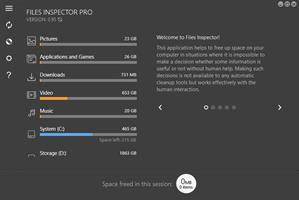
Description: Files Inspector is a software that allows you to analyze the data on the hard drive and delete the file obsolete, since it frees up space and improve performance of the system. Despite the fact that the hard drives are becoming cheaper and more voluminous, you have a place to store a large number of files are not really necessary in most cases, due to the repetition and simple data is outdated. If not maintained properly, you can fill the space trash and clean up will eventually become a process tedious, stage lights, this will allow you to quickly turn everything.

After installation, one interface, modern style, greet you. You should remember that the tool starts automatically scan your disk, this process may take a little time depending on the size of the hard disk or SSD. While waiting for the completion of this process, you can find the tips about the functionality of the application, especially if you haven't used such programs before, but I think that this is not necessary, everyone can find out.

This development will allow you to perform a quick analysis of the documents, images, multimedia and other data and display clearly the space is occupied. Unfortunately, nothing will be displayed in the form of diagrams, anyway, data collection is quite intuitive and you can easily get an overview about the files occupy much space most.

After you decide what data will be deleted from the disk, Files Inspector allows you to delete it directly from the app, for this you just need to pick them up. This does not only apply to files and folders, but also for the apps you no longer use. According to the developer, the application provides clear, safe and just in case you change your mind, you can find deleted data in the trash.

The features and functions of the Files Inspector Pro

1. A quick analysis of file system
Provides results immediately after launch. Allows you to evaluate any data on the disk.

2. A quick analysis of file system
The analysis check the data on the disk and display the results according to the diagram convenient, to help clarify the element would occupy much disk space on your PC.

3. Advanced features for users who have
experienced users are experience can be flexible and study whole information about their means and delete unnecessary data.

Ability to:
A quick analysis of the file the user
Check quickly analyze the folder, documents, photos, videos, music, and other files and display the space occupied on the disk.

Machine analysis advanced
For advanced users, Files Inspector have the parser raise allows you to evaluate data in all the files and folder on the storage media out there.

Delete unnecessary data
After you find the file or folder is not needed in the list the analysis of The test file, you can delete them without using Explorer or other tools to work with file system.

Delete files and folders not needed
While researching the content of the disk, you can delete files and folders not needed in a few clicks to freeing up space on the media in his computer.

Remove the unnecessary apps remove the app
not necessary is one of the important steps to free up disk space. The application can be removed directly through the Files Inspector.

Safety
Files Inspector for permission to delete the files and folders. To prevent the wrong actions, all deleted items are placed in the trash, from which they can be restored immediately.

Release Name: Files Inspector Pro 4.55
Size: 49.5 MB
Links: HOMEPAGE – NFO – Torrent Search

Download: RAPiDGATOR

5 Comments
June 17

O&O SafeErase Professional 21.3.26141

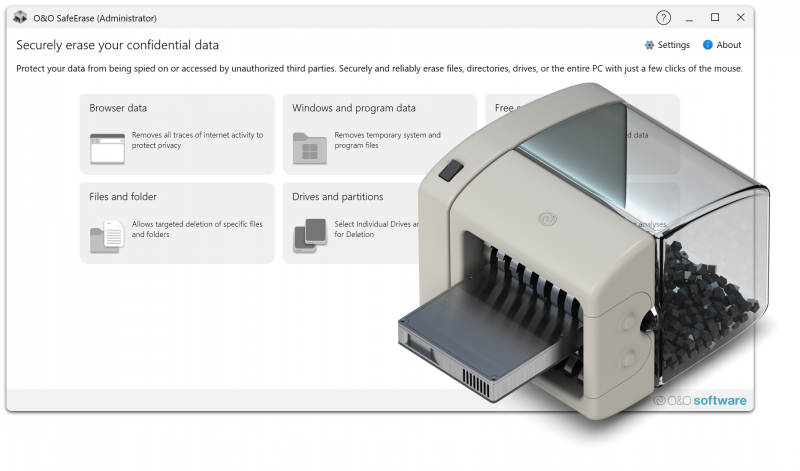
Description: The complete solution for your data protection! Deleting files, directories, drives or the entire PC – no problem with O&O SafeErase! Your internet traces can also be deleted quickly and securely at the touch of a button. At some point, every user of a Windows PC comes to the point where a hard drive or SSD needs to be deleted or certain documents need to be securely destroyed.

If the computer is sold or given away, personal photos or business data can easily fall into the wrong hands. Because deleting it under Windows does not mean that the data is permanently removed. O&O SafeErase allows you to securely delete and overwrite your data using recognized deletion procedures so that restoration is no longer possible.

Avoid the risks
Data misuse can have serious consequences, from identity theft to financial loss. Simply “deleting” files is not enough as they can often be recovered.
O&O SafeErase ensures that deleted data is irretrievably removed using advanced deletion algorithms that meet the strictest security standards.

Unique Fortress Mode
With the Fortress Mode from O&O SafeErase 20, you can now destroy your sensitive data even more efficiently and securely. To do this, your PC is placed in a locked mode in which no other application can access your data. This not only makes the deletion process faster, but also safer, as background processes cannot influence the deletion process or even write new sensitive data during the process.

Surf the Internet without a trace
As you surf the Internet, your browser usually silently stores data about your history and actions. This data can provide information about websites visited and even access data. O&O SafeErase supports current browsers and allows you to safely delete their data and therefore your traces.

Delete the entire PC
Wiping the entire computer allows you to securely delete all of your data before selling, giving away, or disposing of the computer. All data, settings, applications and even the operating system are securely deleted so that recovery is not possible. O&O SafeErase does not require any additional hardware and is ready to use straight away.

Six deletion methods for maximum security
O&O SafeErase offers you the choice between six different deletion methods. These differ in their speed and thoroughness. In addition to standardized deletion procedures from the U.S. Departments of Defense (DoD) and the Federal Office for Information Security (BSI), you can also choose a complex mathematical method (Gutmann method) that meets the highest security requirements. This means that O&O SafeErase even exceeds the current requirements of the BSI and DoD.

Product details
- Secure deletion of data, memory cards and data carriers (hard drives and SSDs)
- Protect your privacy by securely deleting internet traces
- Fortress mode for secure and isolated deletion of sensitive data
- Erase entire PC with TotalErase – without additional hardware
- Security check for automatic detection of insecurely deleted data
- Six extinguishing methods according to international industry standards
- Advanced erasure method for SSDs (Solid State Disks) with SolidErase
- Creation of reports as proof of deletion
- Seamless integration into Windows Explorer (InstantErase)
- Support for Microsoft Edge, Google Chrome and Mozilla Firefox as well as Internet Explorer

Release Name: O&O SafeErase Professional 21.3.26141
Size: 68 MB
Links: HOMEPAGE – NFO – Torrent Search

Download: RAPiDGATOR

5 Comments
June 17

YT Downloader 10.6

Description: YT Downloader (ex YTD Youtube Downloader) is a simple and easy-to-use video download application. It helps you to download and convert videos from YouTube and hundreds of other video sites. YT Downloader increases your download speeds by up to 500%.

Features
YT Downloader is the easiest and the fastest way to download and convert videos from YouTube and other video sites.

Download videos from YouTube and hundreds of video sites
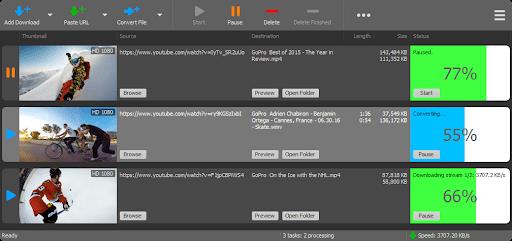
YT Downloader can download videos from YouTube, Facebook, Dailymotion, Vimeo, Metacafe, and hundreds of other video sites. After downloading your video files, you'll be able to watch them smoothly using any media player, even if you don't have internet access.

Accelerate your downloads
YT Downloader features an advanced download acceleration engine that lets you download videos 500% faster than normal speed.

Download 4K, 2K, HD 1080p and 720p videos from YouTube
You can also download 3D videos from YouTube if they are available.

YouTube to MP3
YT Downloader allows you to download only audio stream from YouTube, and save it as MP3. You don't need to download the entire video file. The audio stream is small, you can download it within seconds.

Download whole playlist from YouTube
Just enter a YouTube playlist ID, YT Downloader will download all or selected videos in the playlist from YouTube for you.

Support drag-and-drop
You can directly drag and drop video link from your browser to the drop box or program window to start a download. You don't even need to copy and paste video URL.

Download multiple videos at a time
YT Downloader supports simultaneous downloads. It allows you to download more than one video at same time and safe time.

Pause and resume downloads
You can pause, resume, or cancel your downloads if you need more connection to perform other important tasks.

Preview videos while downloading
While downloading, you can click the Preview button to play incomplete video and make sure the content you are downloading is really the content of your choice.

Video and audio converter
YT Downloader is also a powerful video/audio converter. It can convert local video/audio files to any format you wish so that they are playable everywhere.

Video to MP3
YT Downloader allows you to extract audio streams from videos and save them as mp3, wav, wma, ac3, ringtone, or other audio format.

Support all popular video and audio formats
YT Downloader allows you to save downloaded videos in any format for any device, so you can watch them smoothly on your PC, iPhone, iPad, Android phone, and other device.

Ready-made presets
YT Downloader provides ready-made presets for all video and audio formats. You can also custom output video/audio format settings.

iTunes compatible
Optionally, YT Downloader can add downloaded video/music to your iTunes library automatically, so you can easily synchronize your videos and music to your iPhone, iPad, iPod.

Media Player
YT Downloader includes a simple and easy-to-use media player. If your Windows Media Player cannot play your video/audio files, you may try our Media Player.

Release Name: YT Downloader 10.6
Size: 164.2 MB
Links: HOMEPAGE – NFO – Torrent Search

Download: RAPiDGATOR
4 Comments
June 17

Pixologic Zbrush 2026.2.1

Description: The latest updates to ZBrush for iPad and the desktop version enhance workflows for artists, whether they are starting a project from the comfort of their couch or adding final touches to a sculpt on their desktop: The Anchor Brush in ZBrush for Desktop receives a new Bend mode, allowing users to bend models with two anchor points and give a different deformation to the model than the rotate mode.

Features: Thanks to an improved integration of Redshift, users enjoy even better rendering of their sculpts and the addition of AOVs provides greater control in compositing. Various speed enhancements will boost workflows with much faster feedback when adjusting lighting or material attributes of a model. With the addition of Redshift Denoiser, you can get to a final render much faster without the need to raise the quality slider. Additionally, GoZ has been updated to simplify the process of sending sculpts from ZBrush for Desktop to the current versions of 3Ds Max and Maya, as well as exchanging files from ZBrush for iPad with Cinema 4D. This makes it easy to pose and animate your model, add simulations and particle effects or take full advantage of Redshift in Cinema 4D. Additionally, we’re introducing Pro Projects inside of ZBrush and ZBrush for iPad, featuring a set of holiday cookies.

Born in Clay
ZBrush sets the industry standard for digital sculpting and painting. Its features enable you to use customizable brushes to shape, texture and paint virtual clay in a real-time environment that provides instant feedback. When you use ZBrush you'll be empowered by the same tools employed by film studios, game developers, toy/collectible makers, jewelry designers, automotive/aviation designers, illustrators, advertisers, scientists and other artists the world over. In fact, we have even received an Academy Award for the technology that powers ZBrush. In short, ZBrush is an art tool created by artists, for artists. It allows you to create models and illustrations limited only by your imagination, at a speed that allows you to stand out in today's fast paced industry.

Digital Sculpting
Get empowered by the world’s leading digital sculpting solution. The powerful systems inside of ZBrush are designed to eliminate the constraints of traditional modeling and allow you to create freely, just as you would with clay. When you’re ready to move your 3D sculpt into a pipeline for animation, rendering or 3D printing, the tools to do so are at hand.

Painting & Texturing
Because ZBrush works with tens of millions of polygons in real-time, you can paint directly on the surface of the model without first assigning a texture map or UV’s. This offers significant advantages compared to a standard workflow. The resolution of the texture map does not need to be decided in advance. You have the freedom to visualize, explore and create textures in 3D, and in real time.

Ready, Set, Render
Whether you are using ZBrush by itself as an illustration tool or as part of a production pipeline for animation, you will at some point want to show your work to others. ZBrush makes this possible using Redshift, as well as a powerful rendering system called BPR (Best Preview Render).

Tools Pipeline
The intuitive approach of ZBrush doesn’t end with sculpting and painting. Interoperability is at your fingertips, with support for key file formats and real time integration with a number of popular software packages.

ZBrushCore
ZBrushCore 2021.6.7 helps you develop your sculpting skills by providing new ways to interact with your digital clay and share your creations with the world.

ZBrushCoreMini
Enjoy a true ZBrush experience as you take your first steps into the exciting world of digital sculpting with ZBrushCoreMini… completely free!

Release Name: Pixologic Zbrush 2026.2.1
Size: 2.5 GB
Links: HOMEPAGE – NFO – Torrent Search

Download: RAPiDGATOR

3 Comments
June 17

CoolUtils Total Image Converter 8.5.0.316

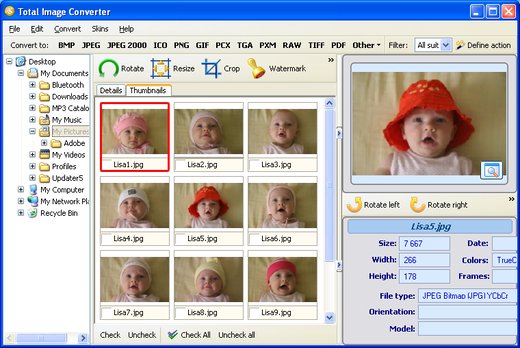
Description: Total Image Converter converts images to other formats, crops, resizes and rotates them. Convert large TIFFs into small JPEGs, make photos suitable for the web or recover old photos in unsupported formats - Total Image Converter will do everything you need.

Supports TIFF, JPEG, RAW, PNG, BMP, PSD, TGA, and many other image formats;
Works incredibly fast with new multi-threading feature;
Converts CMYK to RGB;
Handy resize and crop options to make your photos smaller;
Watermarking: add your comment, logo or date.

Unique options of Total Image Converter
/image converterTotal Image Converter supports TIFF, JPEG, JPEG2000, RAW, PNG, BMP, ICO, PSD, TGA, PCX, PCD and many other rare image file types files complete list).
rotate imageAlong with conversions you can rotate your images! All is done in batch so you save a lot of your valuable time.
resize cadWith Total Image Converter it's very easy to resize your photos or images.
colorWith Total Image Converter you can specify the color space for your output images.
combine foldersWhat to combine images within folders? No problem! Our powerful batch image converter can do that too.
frame jpegTotal Image Converter will also add a frame to your images in batch.
interfaceConvert TIFF, JPEG, PSD and many other files in seconds via our clear wizard-mode interface (thumbnails or file lists with details).
/image formatsThe widest list of output file types: PDF, TIFF, BMP, PNG, JPEG, JPEG2000, ICO, GIF, PCX, TGA, PXM, PS, PCL! Besides, it supports many rare formats like PALM, PICT, XPM, FIX, etc.
html converterTotal Image Converter supports almost all RAW camera photos (CRW, CR2, NEF, PEF, RAF, X3F, RAW, BAY, ORF, NRW, SRF, MRW).
previewThe built-in Preview panel helps you to view each file full-sized and learn the indo about it.
/image watermarkAdd text watermarks to the header or the footer of the output file to prevent unauthorized use.
dxf to pdfWhen you convert images to PDF you can set user permissions, password-protect your files or sign them with your digital signature.

Release Name: CoolUtils Total Image Converter 8.5.0.316
Size: 234.1 MB
Links: HOMEPAGE – NFO – Torrent Search

Download: RAPiDGATOR
4 Comments