Please REGISTER or RENEW your account on RAPiDGATOR.net and support us by doing through all RAPiDGATOR working download links on main posts...
June 20

Permute 4.0.4

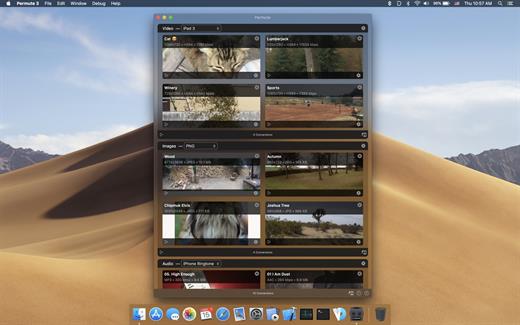
Permute offers easy-to-use drag-and-drop video conversion.
Features:


  • Easy to Use – built from the ground up, Permute is a perfect example of what a Mac app should be. With a gorgeous interface and drag & drop simplicity no need for complicated options.
  • Insanely Fast – Permute was engineered to be incredibly fast. Let us take care of the hard stuff. Just select the video format you want and it’ll be done faster than you can say “hardware acceleration” – MP4 and HEVC presets now take advantage of your machine’s hardware acceleration capabitlities, speeding up HEVC conversions more than 3 times over previous versions of Permute!
  • PDF Support – Permute 3 now includes support for stitching multiple images into a single PDF.
  • Everything Included – It doesn’t matter if you’re converting home movies or processing images. Permute can do it all. We support nearly every format and have plenty of device presets to choose from.
  • Looks Amazing – Whether you use dark mode or not, Permute will look amazing. Taking advantage of the modern technologies, Permute will even change its icon in dark mode.
  • Keep the Schedule – Video re-encoding is quite demanding on computer resources. This is why you can now schedule Permute to convert videos e.g. at night when you’re not using your computer.
  • And so much more! – There are so many other great features in Permute – adjust volume of an audio file or an audio track in a video. Batch-resize, rotate and flip images and videos. And more!
What’s New

Version 4.0.4:


  • Release notes were unavailable when this listing was updated.
Compatibility

macOS 10.12.0 or later


Release Name: Permute 4.0.4
Size: 51.1 MB
Links: HOMEPAGE – NFO – Torrent Search

Download: RAPiDGATOR

5 Comments
June 20

CleanMyMac 5.5.4 (50504.0.2605291449)

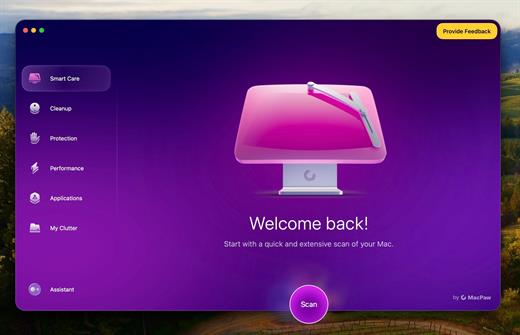
CleanMyMac is all-in-one package to awesomize your Mac. It cleans megatons of junk and makes your computer run faster. Just like it did on day one.

CleanMyMac makes space for the things you love. Sporting a range of ingenious new features, CleanMyMac lets you safely and intelligently scan and clean your entire system, delete large, unused files, reduce the size of your iPhoto library, uninstall unneeded apps or fix the ones that started to work improperly, manage all your extensions from one place and do much more – all from one newly designed and beautifully simple interface.

Note:

wait a second to let it activate itself

What’s New

Version 5.5.4:


  • Release notes were unavailable when this listing was updated.
Compatibility

macOS 14.0 or later


Release Name: CleanMyMac 5.5.4 (50504.0.2605291449)
Size: 156.7 MB
Links: HOMEPAGE – NFO – Torrent Search

Download: RAPiDGATOR
6 Comments
June 20

Hand Mirror 4.0.4

Hand Mirror is a super simple app that lives in your Menu Bar (little cozy top right corner of your Mac) and gives you a one-click access camera check!

‣ Need to jump on a video call? Quick camera check.
‣ Need to quickly check your surroundings? Quick camera check.
‣ Need a view of your camera for when you’re streaming or recording your screen? Quick camera check and drag the window around.
‣ Need to check your face because you’re gorgeous? Quick camera check.

Want more? Good thing for Hand Mirror Plus:
It’s a one-time purchase that will unlock all past, present, and future features added to the app, like:
‣ Snaps: Save the moment with a cute Polaroid-style picture, complete with a marker for drawing over it.
‣ Mic Check: You already know you look good, but can people hear you? Check your microphone levels directly from Hand Mirror
‣ Reactions Playground: Custom triggers for all of the new macOS Sonoma Reactions for some fun screenshots
‣ Smart Window: Fully customizable, resizable, positioned window
‣ Window Masks: Zoom, crop, tweak border radius, make your camera view just like you like it
‣ Custom position: Want to trigger the window right below your camera, pick where the window appears
‣ Notch Trigger: If you’re on a compatible device, you can click right on the camera housing area to trigger Hand Mirror
‣ Custom App Icons and Menu Bar Icons: Make the Menu Bar icon match your camera and or your taste

What’s New

Version 4.0.4:


  • Fixed an issue where the Smart Window could appear on the wrong display after restarting the app
  • Fixed an issue where the Snaps setting would turn itself back on after restarting the app
  • Fixed an issue where the annotation tools and color picker could be hidden or appear empty when taking a snap
  • Stability and performance improvements
Compatibility

macOS 14.4 or later.


Release Name: Hand Mirror 4.0.4
Size: 28.3 MB
Links: HOMEPAGE – NFO – Torrent Search

Download: RAPiDGATOR

5 Comments
June 20

Manet Music 1.0.12

Experience seamless music streaming from Jellyfin for free with Manet, your go-to music app for iOS.

Offline Playback


  • Download your favorite music for offline listening, perfect for when you’re on the go or conserving data.

Siri Support


  • Command your music effortlessly using Siri. Simply ask Siri to play artists, playlists, albums, or tracks.

CarPlay Integration


  • Safely control playback while driving with our intuitive CarPlay interface, keeping your focus on the road.

Native iOS Experience


  • Built with native iOS technologies, Manet seamlessly integrates with your device for optimal performance.

Sleek Design


  • Purpose-built for iOS, Manet blends seamlessly with the platform’s aesthetics, offering a familiar and intuitive user experience.

Shortcuts Integration


  • Easily start playback as part of larger automations using Shortcuts.
What’s New

Version 1.0.12:


  • Release notes were unavailable when this listing was updated.
Compatibility

macOS 14.0 or later.


Release Name: Manet Music 1.0.12
Size: 12 MB
Links: HOMEPAGE – NFO – Torrent Search

Download: RAPiDGATOR

5 Comments
June 20

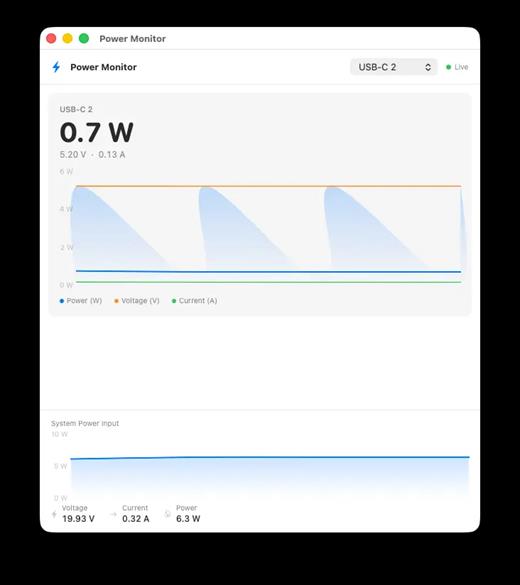
WhatCable Pro 1.1.0

WhatCable Pro is a deep USB-C diagnostics tool designed specifically for Apple Silicon Macs running macOS 14+. While the free version identifies basic cable capabilities, the Pro tier offers advanced, real-time troubleshooting directly from IOKit data—requiring no extra software or root access.

Key Features


  • Negotiation Diagnostics: Easily spot bottlenecks by comparing what your Mac port, cable, and connected device support side-by-side.
  • Live Power Metering: Displays real-time wattage, voltage, and amperage per port, updating every 2 seconds.
  • Hardware & Port Health: Tracks lifetime port errors, resets, and monitors liquid detection (LDCM) sensors.
  • Advanced Insights: Offers Power Delivery (PD) contract inspection, cable resistance estimation, and DisplayPort Alt Mode lane mapping.
  • Developer Friendly: Includes a CLI monitor mode (whatcable –monitor) and desktop widgets for quick tracking.
What’s New

Version 1.1.0:


  • Release notes were unavailable when this listing was updated.
Compatibility

macOS 14.0 or later


Release Name: WhatCable Pro 1.1.0
Size: 12.5 MB
Links: HOMEPAGE – NFO – Torrent Search

Download: RAPiDGATOR

5 Comments
June 20

Unite Pro 1.5

Unite for macOS lets you turn any website into a fully native Mac app with deep customization, fast performance, and macOS integration. Instead of opening sites in a browser with many tabs, Unite creates standalone apps that live in your Dock, support native window controls, and behave like real macOS software.

With Unite you can create an app in seconds by entering a URL, choosing an icon, and tailoring appearance and behavior to your preferences. Each app runs in its own isolated, lightweight WebKit‑based environment that feels more integrated and efficient than browser web apps or Electron alternatives. 

Unite apps offer extensive customization. You can hide or show title bars, adjust colors to match site branding, control window appearance, manage multiple tabs with advanced options like pinning and locking, and choose how links open within or outside the app. Notifications and macOS Focus Modes work per app, helping reduce distractions. 

Unite also includes flexible app modes, such as standard Mac windows, sidebar views, floating windows, compact views, and menu bar utilities. A built‑in ad blocker and customizable keyboard shortcuts streamline everyday use and navigation. 

What’s New

Version 1.5:


  • Release notes were unavailable when this listing was updated.
Compatibility

macOS 15 or later


Release Name: Unite Pro 1.5
Size: 29.1 MB
Links: HOMEPAGE – NFO – Torrent Search

Download: RAPiDGATOR

5 Comments
June 20

Bad Boys Houston Auditions S02 1080p ZEUS WEB-DL H264-FFG

Series Executive Producer Natalie Nunn, along with original Bad Boy Jonathan Wright and Hip-Hop Superstar Blueface, help to choose the cast for the next season of Zeus Network’s original hit series “Bad Boys”.

Links: HOMEPAGEiMDB

Bad.Boys.Houston.Auditions.S02.720p.WEB.H264-JFF
MKV | AAC | 2EP [2 GB]
NFO - SubtitlesTorrentNiTROFLARERAPiDGATOR
Single File RAR: RAPiDGATOR Backup

Bad.Boys.Houston.Auditions.S02.1080p.ZEUS.WEB-DL.AAC2.0.H.264-FFG
MKV | AAC | 2EP [3.8 GB]
NFOSubtitlesTorrentNiTROFLARERAPiDGATOR
Single File RAR: RAPiDGATOR Backup

Bad.Boys.Houston.Auditions.S02.WEB.H264-RBB [P2P]
MP4 | AAC | 2EP [790.3 MB]
NFOSubtitlesTorrentNiTROFLARERAPiDGATOR
Single File RAR: RAPiDGATOR Backup

2 Comments
June 20

Hype 4 Pro 4.1.21

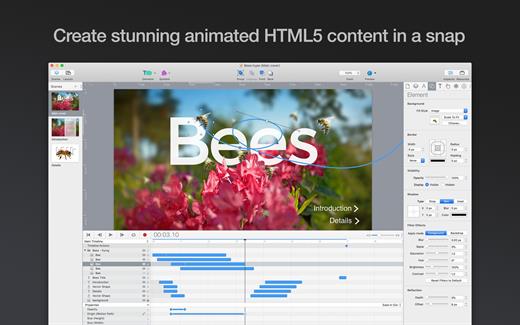
Create stunning animated and interactive web content with Hype. Hype’s HTML5 output works on all modern browsers and mobile devices like iPhones and iPads. No coding required.

Hype’s free download includes 14-day fully functional trial and document viewer mode. In-App Purchases are available for Hype Standard and Professional editions, with discounts for previous owners.

Hype is an award-winning tool used by leading designers. Create animations which add a “wow” factor to web pages, infographics, presentations, digital magazines, ads, iBooks, educational content, app prototypes, portfolios, animated GIFs, videos, entire websites, and much more. From prototype to production, anyone can create rich interactive media with Hype.

Quickly Animate:


  • Easy to use keyframe-based animation system
  • Record mode watches your every move, automatically creating keyframes as needed
  • Create natural motion curves with bézier paths
  • Morph between vector shapes with no effort (even with different number of path points)
  • Make scenes for organization and flow
  • Use the power of multiple simultaneous timelines to run animations

Add Interactivity:


  • Action handlers kick off and control timelines, transition between scenes, or run custom JavaScript
  • Visually build action handlers to respond to taps, clicks, and animation events

Create Stunning Content:


  • WebKit-based WYSYWIG “what you see is what you get” scene editing
  • Intelligent guidelines, arrangement, and sizing tools
  • Easily integrate video and audio for stunning multimedia documents
  • Cutting-edge effects: blur, image filters, backdrop filters, scale, skew, reflection, and 3D transforms
  • Add Google Fonts or use your own web fonts
  • Setup accessibility alt text, roles, and tab index
  • Retina image support

Perfect for Mobile:


  • Hype’s HTML5 output works great on mobile devices
  • A flexible layout system resizes your content to fit any screen
  • Easily add swipe, touch, and page turn actions
  • Bind drag events to timeline positions for rich interactivity
  • Preview your projects on iPhones and iPads with the free Hype Reflect companion iOS app
  • Hype Reflect’s Mirror Mode shows edits live as you make them

Extend with Code:


  • Edit the Inner HTML of any element
  • Integrated JavaScript editor for writing functions triggered by user actions
  • API to control scenes, timelines, and more

Export to HTML:


  • Outputs state-of-the-art HTML5, CSS3 styles, and JavaScript
  • Content works across all browsers from IE 6 up to the latest Chrome
  • Self-contained directory holds all resources and code for your document
  • Integrate into existing pages by copying and pasting 3 lines of HTML

Great for Ads:


  • A minimal document is only 24 KB (self-hosted, compressed) or only 1.5 KB overhead when using the official CDN
  • Export Script plugins extend Hype to support common ad systems
  • Advanced Export fine-tunes deliverables

Hype also Exports:


  • iBooks Author widgets
  • Videos
  • Animated GIFs and PNGs

Because We Love the Mac:


  • Written in Cocoa exclusively as an macOS app (supports 10.10 through 10.14)
  • Adopts new macOS features and is gorgeous in Light and Dark modes

The Hype Professional In-App Purchase and adds powerful features to Hype 4:


  • Responsive Layouts
  • Symbols for creating reusable elements
  • Persistent Symbols for master content
  • Sprite Sheet/Image Sequence Import
  • Waypoints
  • Physics
  • Editable Timing Functions
  • Customizable Interface
  • Grid System
  • Advanced Export
  • CDN for JS Runtime
  • Ad System Plugins
  • Fallback Images
  • External Editors
  • Behaviors
  • Templates
  • HTML Data Attributes
  • OAM Export
  • APNG Export
  • Video Bitrate/Codec Options
  • And More!
What’s New

Version 4.1.21:


  • Bug Fixes
Compatibility

macOS 10.10 or later
Apple Silicon or Intel Core processor


Release Name: Hype 4 Pro 4.1.21
Size: 19.2 MB
Links: HOMEPAGE – NFO – Torrent Search

Download: RAPiDGATOR
5 Comments
June 20

Metadatics 1.7.1

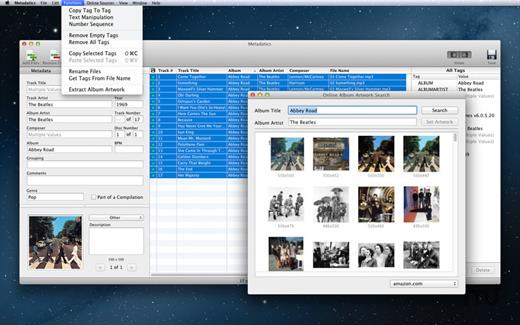
Metadatics is a powerful and advanced audio metadata editor. It supports batch editing of most common audio file types including MP3, M4A, AIFF, WAV, FLAC, APE, OGG, WMA, and more. Lookup metadata from online sources, rename files based on metadata, or manipulate metadata using one of the many built in functions. Metadatics provides all you need to edit metadata with ease and flexibility.

Features


  • Batch Editing – Edit multiple files at once quickly and easily.
  • Functions – Metadatics has a number of built in function to quickly manipulate data. Replace text, remove characters from the beginning or end of a tag, generate number sequences, copy from tag-to-tag, and much more!
  • Online Sources – Search for album artwork and tags from sources including Amazon and MusicBrainz.
  • Album Artwork – Metadatics supports reading and writing multiple images per file. Artwork can be extracted from files and saved as a separate image file. You can also search for artwork from online sources including Amazon.
  • File Rename – Generate directory structures and rename files based on metadata.
  • Support For Many Metadata Formats – Metadatics supports reading and writing ID3v1, ID3v2, MP4, Vorbis, APE, and ASF tags all from a variety of audio file types.
What’s New

Version 1.7.1:


  • Release notes were unavailable when this listing was updated.
Compatibility

macOS 10.13.0 or later

Apple Silicon or Intel Core processor


Release Name: Metadatics 1.7.1
Size: 18.7 MB
Links: HOMEPAGE – NFO – Torrent Search

Download: RAPiDGATOR

5 Comments
June 20

iA Writer 8.0.1

iA Writer (was iA Writer Pro) is a professional writing suite that gives you full control over your notes, drafts and edits.


  • Workflow: Note – Write – Edit – Read. Each stage has a task-specific typeface and color.
  • Syntax Control scans the syntax of English, French, German, Italian, and Spanish text and highlights your adjectives, nouns, verbs, adverbs, prepositions or conjunctions.
  • Precision Writing Tools:

    • Auto Markdown formats text on-screen — your hands stay on the keyboard
    • Syntax Control introduces syntactic markup for natural language text. It covers English, French, German, Italian, and Spanish. Patent pending.
    • Convert Markdown to Microsoft Word 2007 .docx, and back again
Features

  • Workflow states
  • Custom typefaces, carefully set for optimal readability
  • In-app preview
  • Reading time, plus sentence, word, and character count
  • Real-time iCloud sync
  • Ready for Retina displays
  • Full-screen
What’s New

Version 8.0.1:


  • Release notes were unavailable when this listing was updated.
Compatibility

macOS 10.15 or later


Release Name: iA Writer 8.0.1
Size: 26.3 MB
Links: HOMEPAGE – NFO – Torrent Search

Download: RAPiDGATOR
5 Comments