

Sononym 1.6.4

Description: Sononym introduces an innovative approach to sample browsing, using machine learning and audio feature extraction to make personal sample collections searchable and discoverable. Sononym’s key innovation is “Similarity Search,” a special search mode that accepts any sound as input and finds matching sounds in your sample collection. Using this approach, you can even connect a synthesizer, guitar, or microphone to find samples, recording new sounds on the fly. In addition, the software offers many other features you’d expect from a sample browser, such as fully searchable and sortable file/result views and a modern, streamlined user interface.
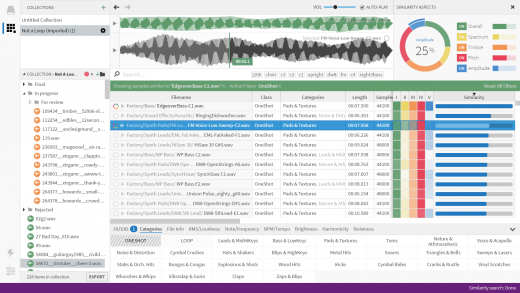
Sononym Features
• Works with your files: recordings, sound collections, any sources.
• Cross-platform: Sononym is available for Windows, Linux, and OS X.
• Deep audio analysis: Extract pitch, tempo, brightness, and more.
• Self-organizing content: Automatically groups samples into relevant categories, such as loops and one-shots, kicks or snares.
• Similarity search: A powerful way to discover variations of any sound.
• Real-time recording: Quickly find samples based on any input you make.
• Integrated bookmarks and export: Don’t lose the flow while browsing.
• Random browsing: Avoid listening to the same few samples over and over.
Installation
- Uninstall the previous version.
- Install ‘Setup Sononym v1.6.4.exe’.
- Copy the contents of the ‘!patch’ folder to the installation directory, for example, “%ProgramFiles%\Sononym”.
- Click ‘Enter License’ and register using any random name and serial number. For example:
Name: bot
Email: [email protected]
Code: 1111111111 1111111111 1111111111
1111111111 1111111111 1111111111
- Future updates should work. If not, revert to the original version.
Release Name: Sononym 1.6.4
Size: 110 MB
Links: HOMEPAGE – NFO – Torrent Search
Download: RAPiDGATOR



