Please REGISTER or RENEW your account on RAPiDGATOR.net and support us by doing through all RAPiDGATOR working download links on main posts...
July 23

Abelssoft StartupStar 2026 v18.2.74679

Description: The rocket engine for the PC: stops useless autostarts with a mouse click. Removes unnecessary system slowdowns with just one click. Blocks and warns against unwanted autostart entries. Ensures a fast PC start-up like on the first day.
Overview of all functions
Complete control over the autostarts
You decide which autostart entries should be deactivated and which not.

Easy 1-click operation
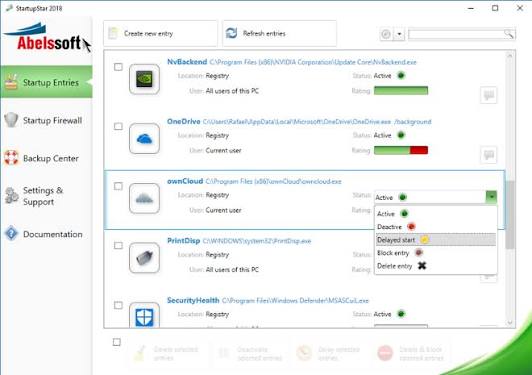
Simply deactivate, activate, block or delay the start-up entries with a mouse click.

Overview of all startup entries
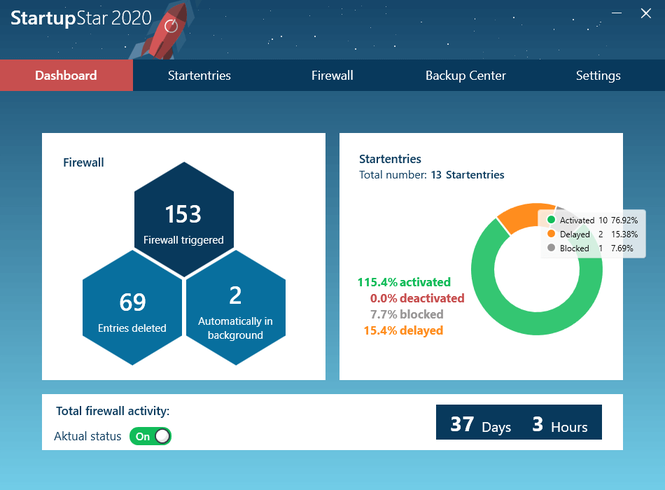
Startup Star shows you all Autostart entries, which can be filtered according to their current status.

Autostart firewall
The firewall warns you of autostarts that have been installed without your permission and blocks them.

How many hidden programs & processes slow down your PC startup?
The dashboard shows you how many start-up entries are deactivated, activated, blocked or delayed and prevent a fast PC start.

Even after the shortest time of PC use, the startup speed decreases drastically
Can you still remember when your PC was new and started up within just a few seconds? Unfortunately, this memory often fades very quickly, because with each PC use, the start-up speed decreases drastically. This is usually due to too many autostarts, many of which even nest themselves unasked into the startup entries. Startup Star loosens these system brakes and turns a lame PC back into a high-speed racing car.

With Startup Star you have full control over the start-up entries
With Startup Star you can decide for yourself which programs should be started when the computer is booted and which are not needed. You can choose whether some autostart entries should not be activated at all or whether it is sufficient that they start with a delay. Thanks to Startup Star you get control over the autostarts simply by mouse click and shorten the PC start-up time significantly.

No chance for unsolicited start-up entries thanks to the start-up firewall
Many programs nest themselves in your autostart entries without being asked and cause a massive loss of speed when starting your PC. The Autostart Firewall gets to the bottom of these slowdowns. It immediately blocks the Autostart entries and shows you in the Startup Star dashboard how many it has found. Startup Star removes system brakes, gives you full control over the Autostart entries and ignites the rocket boost - so booting up your PC feels like starting it for the first time!

Release Name: Abelssoft StartupStar 2026 v18.2.74679
Size: 6.1 MB
Links: HOMEPAGE – NFO – Torrent Search

Download: RAPiDGATOR
4 Comments
Aug 9

Abelssoft StartupStar 2020 v12.09.45 Multilingual-P2P

Description: Abelssoft StartupStar – program for easy management autoloading. After installing the program (it will be in Russian) in its main window, you will see all the programs that start together with the system. And conveniently can (if necessary) to remove these entries, remove and block by adding in the future, disable them, or set up a delayed start, ie not immediately after the download, and, for example, after a certain period vremeni.Poslednee quite convenient: you get quickly to run the operating system and at the same time, your necessary programs after a restart, for example.

Take control of your applications
Did you know that an average PC has more than 20 different applications that are launched automatically when you start your PC? A lot of those startup entires are unnecessary and they usually slow down your PCs starting time.

Keep full control
You can see quick and efficient overview of all startup entries in the main screen and you can enable, disable, or delete them. With the built-in search function you can easily find applications.

Autostart firewall
StartupStar protects you against applications that want to add themselves into the startup of your PC. This new feature will alert you whenever a programm tries to add a new entry into your PC startup. This firewall mode of StartupStar helps you to keep your PC start clean and fast.

High security through backups
If you accidentally delete an entry, you can easily restore it using the backup – StartupStar logs every change.

Delay entries
StartupStar allows you to delay the start of applications. This reduces the number of simultaneous program starts during boot time and speeds up your boot experience.

Help creating new entries
With StartupStar you can instantly create new startup entries if you want. You can decide where when those startup entries will be launched. You have even the possibility to start programs with administrator rights without UAC (User Access Control).

Windows task scheduler included
StartupStar handles the entries in the Windows task scheduler that has been integrated into Windows (Windows Vista).

Ready for Windows 10
This application has been already optimized for Windows 10. This means for you: You don’t have to care which Windows operating system you have installed, you can buy this application today and even when you are switching to Windows 10 you can continue using this application without problems.

Release Name: Abelssoft StartupStar 2020 v12.09.45 Multilingual-P2P
Size: 3.62 MB
Links: HOMEPAGE – NFO – Torrent Search

Download: UPLOADGiG – NiTROFLARE – RAPiDGATOR

9 Comments
Apr 17

Abelssoft StartupStar 2020 v12.07.37 Multilingual-P2P

Description: Abelssoft StartupStar – program for easy management autoloading. After installing the program (it will be in Russian) in its main window, you will see all the programs that start together with the system. And conveniently can (if necessary) to remove these entries, remove and block by adding in the future, disable them, or set up a delayed start, ie not immediately after the download, and, for example, after a certain period vremeni.Poslednee quite convenient: you get quickly to run the operating system and at the same time, your necessary programs after a restart, for example.

Take control of your applications
Did you know that an average PC has more than 20 different applications that are launched automatically when you start your PC? A lot of those startup entires are unnecessary and they usually slow down your PCs starting time.

Keep full control
You can see quick and efficient overview of all startup entries in the main screen and you can enable, disable, or delete them. With the built-in search function you can easily find applications.

Autostart firewall
StartupStar protects you against applications that want to add themselves into the startup of your PC. This new feature will alert you whenever a programm tries to add a new entry into your PC startup. This firewall mode of StartupStar helps you to keep your PC start clean and fast.

High security through backups
If you accidentally delete an entry, you can easily restore it using the backup – StartupStar logs every change.

Delay entries
StartupStar allows you to delay the start of applications. This reduces the number of simultaneous program starts during boot time and speeds up your boot experience.

Help creating new entries
With StartupStar you can instantly create new startup entries if you want. You can decide where when those startup entries will be launched. You have even the possibility to start programs with administrator rights without UAC (User Access Control).

Windows task scheduler included
StartupStar handles the entries in the Windows task scheduler that has been integrated into Windows (Windows Vista).

Ready for Windows 10
This application has been already optimized for Windows 10. This means for you: You don’t have to care which Windows operating system you have installed, you can buy this application today and even when you are switching to Windows 10 you can continue using this application without problems.

Release Name: Abelssoft StartupStar 2020 v12.07.37 Multilingual-P2P
Size: 5.99 MB
Links: HOMEPAGE – NFO – Torrent Search

Download: UPLOADGiG – NiTROFLARE – RAPiDGATOR

12 Comments
Mar 14

Abelssoft StartupStar 2020 v12.05.30 Multilingual-P2P

Description: Abelssoft StartupStar – program for easy management autoloading. After installing the program (it will be in Russian) in its main window, you will see all the programs that start together with the system. And conveniently can (if necessary) to remove these entries, remove and block by adding in the future, disable them, or set up a delayed start, ie not immediately after the download, and, for example, after a certain period vremeni.Poslednee quite convenient: you get quickly to run the operating system and at the same time, your necessary programs after a restart, for example.

Take control of your applications
Did you know that an average PC has more than 20 different applications that are launched automatically when you start your PC? A lot of those startup entires are unnecessary and they usually slow down your PCs starting time.

Keep full control
You can see quick and efficient overview of all startup entries in the main screen and you can enable, disable, or delete them. With the built-in search function you can easily find applications.

Autostart firewall
StartupStar protects you against applications that want to add themselves into the startup of your PC. This new feature will alert you whenever a programm tries to add a new entry into your PC startup. This firewall mode of StartupStar helps you to keep your PC start clean and fast.

High security through backups
If you accidentally delete an entry, you can easily restore it using the backup – StartupStar logs every change.

Delay entries
StartupStar allows you to delay the start of applications. This reduces the number of simultaneous program starts during boot time and speeds up your boot experience.

Help creating new entries
With StartupStar you can instantly create new startup entries if you want. You can decide where when those startup entries will be launched. You have even the possibility to start programs with administrator rights without UAC (User Access Control).

Windows task scheduler included
StartupStar handles the entries in the Windows task scheduler that has been integrated into Windows (Windows Vista).

Ready for Windows 10
This application has been already optimized for Windows 10. This means for you: You don’t have to care which Windows operating system you have installed, you can buy this application today and even when you are switching to Windows 10 you can continue using this application without problems.

Release Name: Abelssoft StartupStar 2020 v12.05.30 Multilingual-P2P
Size: 3.6 Mb
Links: HOMEPAGE – NFO – Torrent Search

Download: UPLOADGiGNiTROFLARERAPiDGATOR

9 Comments