Please REGISTER or RENEW your account on RAPiDGATOR.net and support us by doing through all RAPiDGATOR working download links on main posts...
Apr 16

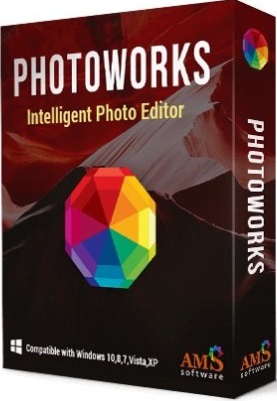
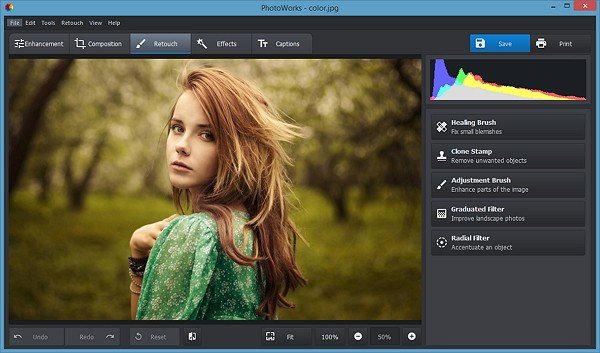
AMS Software PhotoWorks 22.0
Description: Not quite happy with your photos? Tricky weather and lighting conditions or a stranger in the background have ruined a priceless shot? Vacation pictures don't look as vibrant as you hoped they would? With PhotoWorks in hand, you'll get the tools that let you save a spoiled shot or turn an average picture into a photography masterpiece.
This seemingly simple photo editing software has the latest image processing technology under the hood - for you, this means perfect pictures with a couple of mouse clicks! Try content-aware auto correction to fix the lighting, boost dull colors, add contrast and vibrancy. To fix the most common issues, edit multiple photos at once!

Retouch portraits with pro-level tools
Need to touch up a portrait or make a shiny avatar? The intelligent photo retouching tools inside PhotoWorks will hide any imperfections and add a glam finish to your picture. Get rid of pimples, freckles, and spots; smooth out wrinkles and create an even skin tone - all of that with a few mouse clicks, no brushes involved! Whiten your teeth for a luminous smile and fix red eyes in photos. Feel like experimenting with your looks? Try changing the eye color - just one mouse click, and your gray eyes will turn green! Make sure to try the built-in photo filters, too - that’s the easiest way to turn an ordinary shot into a studio-quality picture.

Create striking landscapes in a few clicks
Some of your valuable vacation photos were taken in gloomy weather? You can't go back to that place, but you can always add some sunshine with PhotoWorks! Discover the powerful graduated filter and one-click sky replacement tool - they will work wonders for your landscapes, turning the gray sky blue and breathing life into a dull photo. Straighten your picture if it suffers from tilted or crooked lines. Erase unwanted objects such as power lines, road signs, or passersby. Do some magic with 200+ artistic effects - there's an array of presets like sun rays, morning mist, winter frost, summer glow, etc., ready to give your pics a rad new look.

Experiment with colors like a true artist
Have immense fun playing with hues and tones right on your laptop! One quick movement, and your red dress turns pink or orange; another one - and day becomes dusk. Play with the color hue, saturation, and luminance to change the atmosphere of the shot. Make your photos pop with pro-grade color correction tools, such as Curves, 3D LUTs, Tone Mapping, and Lab Colors. PhotoWorks uses intelligent technology that lets you work with each color on the photo one by one, without you having to do any manual selection - it’s likely the best solution for non-professionals who still want stunning results.

Change your digital look with a single slider drag
Want to look like a movie star but you're unsatisfied with the length of your nose or the shape of your mouth? Now it's possible to improve your facial features without plastic surgery. Get started with this intelligent photo editing software and you will see yourself from a new perspective! Meet the Face Sculpt tool that can do wonders to your portrait shots. This feature lets you make your face leaner, get plumper lips, fix your turned-up nose and accentuate eyes for a more glamorous look.

Play with dozens of one-click effects
Looking for instant photo effects? We've got you covered! PhotoWorks comes with a huge variety of artistic filters - color toning, details enhancement, HDR, vignetting, retro, black & white photo, color splash, seasonal effects, and a lot more. Download the program and play with all of these effects for free! A single click will create a certain mood, add some drama or a romantic vintage flair to your shot. Even if you are completely new to post-processing, PhotoWorks will give your images a polished look in mere seconds.

Captions & Watermarks
Add stylish captions, or watermark images to protect your work. Rotate text or make it semi-transparent if necessary.

Perspective Correction
Level out a wonky horizon, eliminate the "falling building" effect, correct lens distortions in a few clicks.

Magical Brushes
Use an array of brushes to work with any object on the photo - for example, fix small blemishes or accentuate a detail.

Convenient Crop
Improve the photo composition with crop presets - the Rule of Thirds, the Golden Ratio and other grids are there to help.

Instant Enhancement
Apply auto correction to fix the exposure and improve the color balance, add contrast and enhance the sky.

Batch Processing
Edit multiple photos at once: enhance image quality with live preview, add text or watermarks, resize and export with a click.

Release Name: AMS Software PhotoWorks 22.0
Size: 444.9 MB
Links: HOMEPAGE – NFO – Torrent Search

Download: RAPiDGATOR

5 Comments
July 12

AMS Software PhotoWorks 18.0 Multilingual

Description: Not quite happy with your photos? Tricky weather and lighting conditions or a stranger in the background have ruined a priceless shot? Vacation pictures don't look as vibrant as you hoped they would? With PhotoWorks in hand, you'll get the tools that let you save a spoiled shot or turn an average picture into a photography masterpiece. This seemingly simple photo editing program has the latest image processing technology under the hood - for you, this means perfect pictures with a couple of mouse clicks!

Do Wonders with Portrait Magic:
High-level photo retouching is no longer exhausting or time-consuming. With the smart portrait editor, you can get fabulous headshots in a few clicks! There're lots of ready-made presets to smoothen skin, remove glare, conceal blemishes, add tan, apply glossy lipstick or bring out eyes. Your pics will be like shiny images from popular magazines.

Change Any Background:
A drab background would undermine even a professional photo. The best way to restore its visual impact is to replace a ruined back scene with something more eye-catching. In PhotoWorks, it’s extremely easy to add background to photo and swap skies, transfer your digital self to another location or get rid of undesired objects in mere 5 minutes!

Remove Unwanted Details:
Captured a spectacular scene, but people in the background spoil it? Make these unwanted guests go away with an array of magical brushes. Remove a person from a photo, delete power lines, erase shadows and other objects without any photo-editing skills. Shoot even in crowded tourist places and don’t be afraid of slow and clumsy post-production.

Apply Stylish Effects:
Change the look of your photos with a built-in collection of artistic filters - make photos look vintage, turn them black & white, apply HDR, color splash and other effects. To achieve a truly stunning result, play with light and tone settings, recreate your favorite movie and make your pictures look as if they were taken on a classic photographic film.

Add New Captions:
Turn your polished images into a personalized postcard or invitation in no time at all. Simply add caption to photo! You can either insert a plain description or spice things up with custom colors, fonts and captions integrated into different positions on the picture. This feature is also perfect for signing your creations with an author’s watermark.

System Requirements:
-OS: Windows 10, 8, 7, Vista, XP
-CPU: 1 GHz or faster (Intel, AMD)
-RAM: min. 256 MB
-Hard drive space: 500 MB or more

Release Name: AMS Software PhotoWorks 18.0 Multilingual
Size: 383.9 MB
Links: HOMEPAGE – NFO – Torrent Search

Download: FiKPERNiTROFLARERAPiDGATOR

13 Comments
May 10

AMS Software PhotoWorks 16.5 Multilingual

Description: Not quite happy with your photos? Tricky weather and lighting conditions or a stranger in the background have ruined a priceless shot? Vacation pictures don't look as vibrant as you hoped they would? With PhotoWorks in hand, you'll get the tools that let you save a spoiled shot or turn an average picture into a photography masterpiece. This seemingly simple photo editing program has the latest image processing technology under the hood - for you, this means perfect pictures with a couple of mouse clicks!

Do Wonders with Portrait Magic:
High-level photo retouching is no longer exhausting or time-consuming. With the smart portrait editor, you can get fabulous headshots in a few clicks! There're lots of ready-made presets to smoothen skin, remove glare, conceal blemishes, add tan, apply glossy lipstick or bring out eyes. Your pics will be like shiny images from popular magazines.

Change Any Background:
A drab background would undermine even a professional photo. The best way to restore its visual impact is to replace a ruined back scene with something more eye-catching. In PhotoWorks, it’s extremely easy to add background to photo and swap skies, transfer your digital self to another location or get rid of undesired objects in mere 5 minutes!

Remove Unwanted Details:
Captured a spectacular scene, but people in the background spoil it? Make these unwanted guests go away with an array of magical brushes. Remove a person from a photo, delete power lines, erase shadows and other objects without any photo-editing skills. Shoot even in crowded tourist places and don’t be afraid of slow and clumsy post-production.

Apply Stylish Effects:
Change the look of your photos with a built-in collection of artistic filters - make photos look vintage, turn them black & white, apply HDR, color splash and other effects. To achieve a truly stunning result, play with light and tone settings, recreate your favorite movie and make your pictures look as if they were taken on a classic photographic film.

Add New Captions:
Turn your polished images into a personalized postcard or invitation in no time at all. Simply add caption to photo! You can either insert a plain description or spice things up with custom colors, fonts and captions integrated into different positions on the picture. This feature is also perfect for signing your creations with an author’s watermark.

System Requirements:
-OS: Windows 10, 8, 7, Vista, XP
-CPU: 1 GHz or faster (Intel, AMD)
-RAM: min. 256 MB
-Hard drive space: 500 MB or more

Release Name: AMS Software PhotoWorks 16.5 Multilingual
Size: 337.8 MB
Links: HOMEPAGE – NFO – Torrent Search

Download: FiKPERUPLOADGiGNiTROFLARERAPiDGATOR

6 Comments
May 5

AMS Software PhotoWorks 10.0 Multilingual-P2P

Description: Not quite happy with your photos? Tricky weather and lighting conditions or a stranger in the background have ruined a priceless shot? Vacation pictures don’t look as vibrant as you hoped they would? With PhotoWorks in hand, you’ll get the tools that let you save a spoiled shot or turn an average picture into a photography masterpiece. This seemingly simple photo editing software for PC has the latest image processing technology under the hood – for you, this means perfect pictures with a couple of mouse clicks!

Feature :
Retouch portrait photos with pro-level tools
Need to touch up a portrait or make a shiny avatar? The intelligent photo retouching tools inside PhotoWorks will hide any imperfections and add a glam finish to your picture. Get rid of pimples, freckles, and spots; smooth out wrinkles and create an even skin tone – all of that with a few mouse clicks, no brushes involved! Whiten your teeth for a luminous smile and fix red eyes in photos. Feel like experimenting with your looks? Try changing the eye color – just one mouse click, and your grey eyes will turn green! Make sure to try the built-in photo filters, too – that’s the easiest way to turn an ordinary shot into a studio-quality picture.

Create striking landscapes in a few clicks
Some of your valuable vacation photos were taken in gloomy weather? You can’t go back to that place, but you can add some sunshine with an easy image editor for computer! Discover the power of the graduated filter – this tool can work wonders for your landscapes, turning the grey sky blue and breathing life into a dull photo. Straighten your picture if it suffers from tilted or crooked lines. Erase unwanted objects such as power lines, road signs, or passersby. Do some magic with artistic effects – there’s an array of presets like morning mist, winter frost, summer glow etc., ready to give your pics a rad new look.

Experiment with colors like a true artist
Have immense fun playing with hues and tones right on your laptop! One quick movement, and your red dress turns pink or orange; another one – and day becomes dusk. Play with the color hue, saturation and luminance to change the atmosphere of the shot. PhotoWorks uses intelligent technology that lets you work with each color on the photo one by one, without you having to do any manual selection – it’s likely the best solution for non-professionals who still want stunning results.

Release Names: AMS Software PhotoWorks 10.0 Multilingual-P2P
Size: 208.03 MB
Links: HOMEPAGE – NFO – Torrent Search

Download: UPLOADGiG – NiTROFLARE – RAPiDGATOR

30 Comments
Jan 28

AMS Software PhotoWorks 9.15 Multilingual-P2P

Description: Not quite happy with your photos? Tricky weather and lighting conditions or a stranger in the background have ruined a priceless shot? Vacation pictures don’t look as vibrant as you hoped they would? With PhotoWorks in hand, you’ll get the tools that let you save a spoiled shot or turn an average picture into a photography masterpiece. This seemingly simple photo editing software for PC has the latest image processing technology under the hood – for you, this means perfect pictures with a couple of mouse clicks!

Feature :
Retouch portrait photos with pro-level tools
Need to touch up a portrait or make a shiny avatar? The intelligent photo retouching tools inside PhotoWorks will hide any imperfections and add a glam finish to your picture. Get rid of pimples, freckles, and spots; smooth out wrinkles and create an even skin tone – all of that with a few mouse clicks, no brushes involved! Whiten your teeth for a luminous smile and fix red eyes in photos. Feel like experimenting with your looks? Try changing the eye color – just one mouse click, and your grey eyes will turn green! Make sure to try the built-in photo filters, too – that’s the easiest way to turn an ordinary shot into a studio-quality picture.

Create striking landscapes in a few clicks
Some of your valuable vacation photos were taken in gloomy weather? You can’t go back to that place, but you can add some sunshine with an easy image editor for computer! Discover the power of the graduated filter – this tool can work wonders for your landscapes, turning the grey sky blue and breathing life into a dull photo. Straighten your picture if it suffers from tilted or crooked lines. Erase unwanted objects such as power lines, road signs, or passersby. Do some magic with artistic effects – there’s an array of presets like morning mist, winter frost, summer glow etc., ready to give your pics a rad new look.

Experiment with colors like a true artist
Have immense fun playing with hues and tones right on your laptop! One quick movement, and your red dress turns pink or orange; another one – and day becomes dusk. Play with the color hue, saturation and luminance to change the atmosphere of the shot. PhotoWorks uses intelligent technology that lets you work with each color on the photo one by one, without you having to do any manual selection – it’s likely the best solution for non-professionals who still want stunning results.

Release Names: AMS Software PhotoWorks 9.15 Multilingual-P2P
Size: 208 MB
Links: HOMEPAGE – NFO – Torrent Search

Download: UPLOADGiG – NiTROFLARE – RAPiDGATOR

8 Comments
June 17

AMS Software PhotoWorks 8.15 Multilingual-P2P

Description: Not quite happy with your photos? Tricky weather and lighting conditions or a stranger in the background have ruined a priceless shot? Vacation pictures don’t look as vibrant as you hoped they would? With PhotoWorks in hand, you’ll get the tools that let you save a spoiled shot or turn an average picture into a photography masterpiece. This seemingly simple photo editing software for PC has the latest image processing technology under the hood – for you, this means perfect pictures with a couple of mouse clicks!

Feature :
Retouch portrait photos with pro-level tools
Need to touch up a portrait or make a shiny avatar? The intelligent photo retouching tools inside PhotoWorks will hide any imperfections and add a glam finish to your picture. Get rid of pimples, freckles, and spots; smooth out wrinkles and create an even skin tone – all of that with a few mouse clicks, no brushes involved! Whiten your teeth for a luminous smile and fix red eyes in photos. Feel like experimenting with your looks? Try changing the eye color – just one mouse click, and your grey eyes will turn green! Make sure to try the built-in photo filters, too – that’s the easiest way to turn an ordinary shot into a studio-quality picture.

Create striking landscapes in a few clicks
Some of your valuable vacation photos were taken in gloomy weather? You can’t go back to that place, but you can add some sunshine with an easy image editor for computer! Discover the power of the graduated filter – this tool can work wonders for your landscapes, turning the grey sky blue and breathing life into a dull photo. Straighten your picture if it suffers from tilted or crooked lines. Erase unwanted objects such as power lines, road signs, or passersby. Do some magic with artistic effects – there’s an array of presets like morning mist, winter frost, summer glow etc., ready to give your pics a rad new look.

Experiment with colors like a true artist
Have immense fun playing with hues and tones right on your laptop! One quick movement, and your red dress turns pink or orange; another one – and day becomes dusk. Play with the color hue, saturation and luminance to change the atmosphere of the shot. PhotoWorks uses intelligent technology that lets you work with each color on the photo one by one, without you having to do any manual selection – it’s likely the best solution for non-professionals who still want stunning results.

Release Names: AMS Software PhotoWorks 8.15 Multilingual-P2P
Size: 193.60 MB
Links: HOMEPAGE – NFO – Torrent Search

Download: UPLOADGiGNiTROFLARERAPiDGATOR

7 Comments