Please REGISTER or RENEW your account on RAPiDGATOR.net and support us by doing through all RAPiDGATOR working download links on main posts...
Apr 12

Compressor 5.2

Compressor is now part of Apple Creator Studio, an amazing collection of Apple’s most powerful creative apps designed to help you bring your ideas to life. The suite includes Final Cut Pro, Logic Pro, Pixelmator Pro, Motion, Compressor, and MainStage — plus premium content and intelligence features in Keynote, Pages, Numbers, and Freeform*, all in one simple plan.
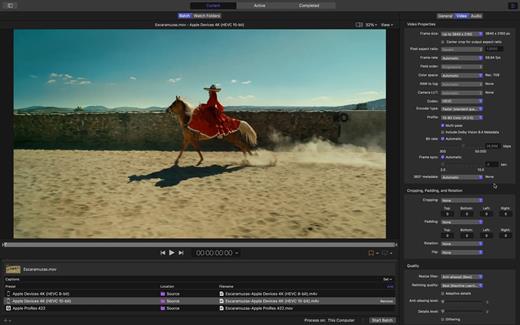
New Feature


  • Create files for an Apple Immersive Video package for playback, and HTTP live streaming on Apple Vision Pro
Overview

Compressor integrates tightly with Final Cut Pro and Motion to add power and flexibility to your video conversions. Quickly customize output settings, enhance images, and package your movie for sale on the iTunes Store.

Advanced Encoding for Final Cut Pro


  • Customize encoding settings for use in Final Cut Pro and Motion
  • Set up batch processes to streamline the encoding of large numbers of files
  • Create self-contained Droplets to encode on the desktop with drag-and-drop ease
  • Automatically encode videos that are added to selected folders in the file system
  • Encode stereoscopic spatial video and deliver directly to Apple Vision Pro
  • Unrivaled performance with optimizations for the latest generation of Apple silicon
iTunes Store Package Creation

  • Import and organize your movie, trailer, closed captions, audio descriptions, and subtitles into an iTunes Store-compliant package for submission to an Apple-certified iTunes delivery partner
  • Audition video with any audio, caption, or subtitle to verify sync
  • Built-in error detection helps you identify issues with your iTunes Store Package
  • Deliver HDR video as P3 D65 PQ, Rec. 2020 HLG, and Rec. 2020 PQ for HDR10
  • Support in the iTunes Store Package to link a Dolby Vision graded video file to a Dolby Vision XML
Support for Industry Standards

  • Encode to a broad range of industry standard formats including HEVC, MV-HEVC, H.264, MXF, and ProRes
  • Import Targa, DPX, TIFF, PSD, PNG, or OpenEXR image sequences and encode them using any setting
  • Create, view, adjust, and deliver closed captions in CEA-608, SRT, and iTT formats
Pristine Format Conversions

  • Convert any file between formats — such as SD to HD, or progressive to interlaced video
  • Import and manipulate wide color video, then deliver in standard Rec. 601 and Rec. 709 color spaces or in wide Rec. 2020 color space
  • Deliver High Dynamic Range (HDR) video with controls for color space conversions and HDR metadata
  • Deliver HDR video as P3 D65 PQ, Rec. 2020 HLG, and Rec. 2020 PQ
  • Add effects to your content like custom LUTs, a timecode overlay, and watermarks
  • Speed up video, slow it down, or adjust the frame rate to make the duration match a runtime
  • Convert log-encoded video to SDR and HDR color spaces using built-in camera LUTs for Panasonic, Sony, Canon, Blackmagic, Nikon and ARRI or add a custom camera LUT
  • Convert ProRes RAW and ProRes RAW HQ media to other professional file formats
System Requirements: macOS 15.6 or later, 8 GB of memory, 1.2 GB of available disk space. Apple Immersive Video processing requires macOS 15.0 or later, 32 GB memory (64 GB recommended). Storage read speed of 2000 MB/s or faster is recommended. Some features require a Mac with Apple silicon.

  • Premium content and features in Freeform are not currently available and are expected to be included in the Apple Creator Studio subscription later this year.
What’s New

Version 5.2:


  • Release notes were unavailable when this listing was updated.
Compatibility

macOS 15.6 or later.


Release Name: Compressor 5.2
Size: 112 MB
Links: HOMEPAGE – NFO – Torrent Search

Download: RAPiDGATOR

8 Comments
Feb 13

Compressor 5.0 fix

Compressor is now part of Apple Creator Studio, an amazing collection of Apple’s most powerful creative apps designed to help you bring your ideas to life. The suite includes Final Cut Pro, Logic Pro, Pixelmator Pro, Motion, Compressor, and MainStage — plus premium content and intelligence features in Keynote, Pages, Numbers, and Freeform*, all in one simple plan.

New Feature


  • Create files for an Apple Immersive Video package for playback, and HTTP live streaming on Apple Vision Pro
Overview

Compressor integrates tightly with Final Cut Pro and Motion to add power and flexibility to your video conversions. Quickly customize output settings, enhance images, and package your movie for sale on the iTunes Store.

Advanced Encoding for Final Cut Pro


  • Customize encoding settings for use in Final Cut Pro and Motion
  • Set up batch processes to streamline the encoding of large numbers of files
  • Create self-contained Droplets to encode on the desktop with drag-and-drop ease
  • Automatically encode videos that are added to selected folders in the file system
  • Encode stereoscopic spatial video and deliver directly to Apple Vision Pro
  • Unrivaled performance with optimizations for the latest generation of Apple silicon
iTunes Store Package Creation

  • Import and organize your movie, trailer, closed captions, audio descriptions, and subtitles into an iTunes Store-compliant package for submission to an Apple-certified iTunes delivery partner
  • Audition video with any audio, caption, or subtitle to verify sync
  • Built-in error detection helps you identify issues with your iTunes Store Package
  • Deliver HDR video as P3 D65 PQ, Rec. 2020 HLG, and Rec. 2020 PQ for HDR10
  • Support in the iTunes Store Package to link a Dolby Vision graded video file to a Dolby Vision XML
Support for Industry Standards

  • Encode to a broad range of industry standard formats including HEVC, MV-HEVC, H.264, MXF, and ProRes
  • Import Targa, DPX, TIFF, PSD, PNG, or OpenEXR image sequences and encode them using any setting
  • Create, view, adjust, and deliver closed captions in CEA-608, SRT, and iTT formats
Pristine Format Conversions

  • Convert any file between formats — such as SD to HD, or progressive to interlaced video
  • Import and manipulate wide color video, then deliver in standard Rec. 601 and Rec. 709 color spaces or in wide Rec. 2020 color space
  • Deliver High Dynamic Range (HDR) video with controls for color space conversions and HDR metadata
  • Deliver HDR video as P3 D65 PQ, Rec. 2020 HLG, and Rec. 2020 PQ
  • Add effects to your content like custom LUTs, a timecode overlay, and watermarks
  • Speed up video, slow it down, or adjust the frame rate to make the duration match a runtime
  • Convert log-encoded video to SDR and HDR color spaces using built-in camera LUTs for Panasonic, Sony, Canon, Blackmagic, Nikon and ARRI or add a custom camera LUT
  • Convert ProRes RAW and ProRes RAW HQ media to other professional file formats
System Requirements: macOS 15.6 or later, 8 GB of memory, 1.2 GB of available disk space. Apple Immersive Video processing requires macOS 15.0 or later, 32 GB memory (64 GB recommended). Storage read speed of 2000 MB/s or faster is recommended. Some features require a Mac with Apple silicon.

  • Premium content and features in Freeform are not currently available and are expected to be included in the Apple Creator Studio subscription later this year.
What’s New

Version 5.0:


  • Release notes were unavailable when this listing was updated.
Compatibility

macOS 15.6 or later.


Release Name: Compressor 5.0 fix
Size: 114 MB
Links: HOMEPAGE – NFO – Torrent Search

Download: RAPiDGATOR
11 Comments
Sept 22

Compressor 4.11.0

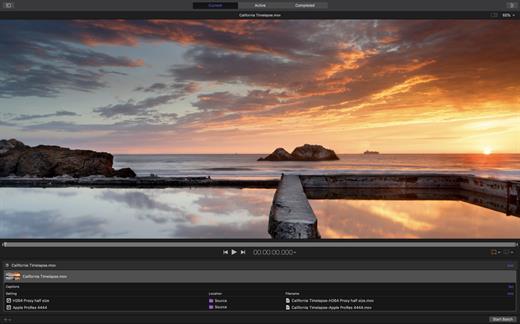
Compressor adds power and flexibility to Final Cut Pro X export. Customize output settings, work faster with distributed encoding, and tap into a comprehensive set of delivery features.

Powerful Encoding for Final Cut Pro


  • Use Compressor to customize encoding settings available in Final Cut Pro.
  • Choose from a wide array of codecs, sizes, frame rates, and other parameters.
  • Save your custom settings in Compressor; they automatically appear in Final Cut Pro.
  • Share settings with other editors, even if Compressor isn’t installed on their workstations.
Time-Saving Encoding Workflow

  • Experiment freely with encoding options, using real-time feedback in the Preview window.
  • Find exactly the setting you need in just a few clicks in the updated settings library.
  • Set up batch processes to streamline the encoding of large numbers of files.
  • Build batch templates to combine encoding with tasks such as moving or copying files.
  • Create self-contained Droplets to encode on the desktop with drag-and-drop ease.
Industry-Standard Encoding Support

  • Use one-step settings for Apple devices and websites such as Vimeo, YouTube, and Facebook.
  • Work with a choice of themed menus to encode and burn a DVD or Blu-ray disc.
  • Add chapter markers for discs or podcasts distributed on iPad, iPhone, iPod, or Apple TV.
  • Encode to a broad range of industry-standard formats, such as MPEG-2, H.264, and ProRes.
  • Generate files for HTTP live streaming in a single step.
  • Import Targa, DPX, TIFF, PSD, or PNG image sequences and encode them to any setting.
  • Tap into advanced encoding features for adding closed captioning, metadata, and more.
Pristine Format Conversions

  • Convert any file from its source format to another format, such as NTSC to PAL or SD to HD.
  • Clean up and customize your content using image filters, a timecode overlay, and watermarks.
  • Speed up video, slow it down, or adjust the frame rate to make the duration match a runtime.
Distributed Encoding

  • Save time by distributing encoding work among multiple cores and workstations.
  • Install Compressor on any Mac to activate it as a cluster node for distributed encoding.
  • Speed up encoding in Final Cut Pro by choosing a Compressor cluster for output processing.
  • Activate QuickCluster for dynamic configuration of nodes based on available resources.
What’s New

Version 4.11.0:


  • Take advantage of the flexibility and dynamic range of log-encoded video shot on iPhone 15 Pro.
  • Fixes an issue where the source/output comparison viewer would not reflect the camera log selection.
  • Addresses an issue where Reveal in Finder was not available for clips with modified audio settings.
  • Fixes an issue where luminance levels could be incorrect when Job inspector color space and Output color space were set to Rec. 709.
Compatibility

macOS 14.6 or later
Apple Silicon or Intel Core processor


Release Name: Compressor 4.11.0
Size: 106.5 MB
Links: HOMEPAGE – NFO – Torrent Search

Download: RAPiDGATOR
7 Comments
Dec 1

Compressor 4.7.0

Compressor adds power and flexibility to Final Cut Pro X export. Customize output settings, work faster with distributed encoding, and tap into a comprehensive set of delivery features.

Powerful Encoding for Final Cut Pro


  • Use Compressor to customize encoding settings available in Final Cut Pro.
  • Choose from a wide array of codecs, sizes, frame rates, and other parameters.
  • Save your custom settings in Compressor; they automatically appear in Final Cut Pro.
  • Share settings with other editors, even if Compressor isn’t installed on their workstations.
Time-Saving Encoding Workflow

  • Experiment freely with encoding options, using real-time feedback in the Preview window.
  • Find exactly the setting you need in just a few clicks in the updated settings library.
  • Set up batch processes to streamline the encoding of large numbers of files.
  • Build batch templates to combine encoding with tasks such as moving or copying files.
  • Create self-contained Droplets to encode on the desktop with drag-and-drop ease.
Industry-Standard Encoding Support

  • Use one-step settings for Apple devices and websites such as Vimeo, YouTube, and Facebook.
  • Work with a choice of themed menus to encode and burn a DVD or Blu-ray disc.
  • Add chapter markers for discs or podcasts distributed on iPad, iPhone, iPod, or Apple TV.
  • Encode to a broad range of industry-standard formats, such as MPEG-2, H.264, and ProRes.
  • Generate files for HTTP live streaming in a single step.
  • Import Targa, DPX, TIFF, PSD, or PNG image sequences and encode them to any setting.
  • Tap into advanced encoding features for adding closed captioning, metadata, and more.
Pristine Format Conversions

  • Convert any file from its source format to another format, such as NTSC to PAL or SD to HD.
  • Clean up and customize your content using image filters, a timecode overlay, and watermarks.
  • Speed up video, slow it down, or adjust the frame rate to make the duration match a runtime.
Distributed Encoding

  • Save time by distributing encoding work among multiple cores and workstations.
  • Install Compressor on any Mac to activate it as a cluster node for distributed encoding.
  • Speed up encoding in Final Cut Pro by choosing a Compressor cluster for output processing.
  • Activate QuickCluster for dynamic configuration of nodes based on available resources.
What’s New

Version 4.7.0:


  • Take advantage of the flexibility and dynamic range of log-encoded video shot on iPhone 15 Pro.
  • Fixes an issue where the source/output comparison viewer would not reflect the camera log selection.
  • Addresses an issue where Reveal in Finder was not available for clips with modified audio settings.
  • Fixes an issue where luminance levels could be incorrect when Job inspector color space and Output color space were set to Rec. 709.
Compatibility

macOS 13.5 or later
Apple Silicon or Intel Core processor


Release Name: Compressor 4.7.0
Size: 355.5 MB
Links: HOMEPAGE – NFO – Torrent Search

Download: FiKPERUPLOADGiGNiTROFLARERAPiDGATOR

8 Comments
Sept 20

Compressor 4.6.6

Compressor adds power and flexibility to Final Cut Pro X export. Customize output settings, work faster with distributed encoding, and tap into a comprehensive set of delivery features.

Powerful Encoding for Final Cut Pro


  • Use Compressor to customize encoding settings available in Final Cut Pro.
  • Choose from a wide array of codecs, sizes, frame rates, and other parameters.
  • Save your custom settings in Compressor; they automatically appear in Final Cut Pro.
  • Share settings with other editors, even if Compressor isn’t installed on their workstations.
Time-Saving Encoding Workflow

  • Experiment freely with encoding options, using real-time feedback in the Preview window.
  • Find exactly the setting you need in just a few clicks in the updated settings library.
  • Set up batch processes to streamline the encoding of large numbers of files.
  • Build batch templates to combine encoding with tasks such as moving or copying files.
  • Create self-contained Droplets to encode on the desktop with drag-and-drop ease.
Industry-Standard Encoding Support

  • Use one-step settings for Apple devices and websites such as Vimeo, YouTube, and Facebook.
  • Work with a choice of themed menus to encode and burn a DVD or Blu-ray disc.
  • Add chapter markers for discs or podcasts distributed on iPad, iPhone, iPod, or Apple TV.
  • Encode to a broad range of industry-standard formats, such as MPEG-2, H.264, and ProRes.
  • Generate files for HTTP live streaming in a single step.
  • Import Targa, DPX, TIFF, PSD, or PNG image sequences and encode them to any setting.
  • Tap into advanced encoding features for adding closed captioning, metadata, and more.
Pristine Format Conversions

  • Convert any file from its source format to another format, such as NTSC to PAL or SD to HD.
  • Clean up and customize your content using image filters, a timecode overlay, and watermarks.
  • Speed up video, slow it down, or adjust the frame rate to make the duration match a runtime.
Distributed Encoding

  • Save time by distributing encoding work among multiple cores and workstations.
  • Install Compressor on any Mac to activate it as a cluster node for distributed encoding.
  • Speed up encoding in Final Cut Pro by choosing a Compressor cluster for output processing.
  • Activate QuickCluster for dynamic configuration of nodes based on available resources.
What’s New

Version 4.6.6:


  • Take advantage of the flexibility and dynamic range of log-encoded video shot on iPhone 15 Pro.
  • Fixes an issue where the source/output comparison viewer would not reflect the camera log selection.
  • Addresses an issue where Reveal in Finder was not available for clips with modified audio settings.
  • Fixes an issue where luminance levels could be incorrect when Job inspector color space and Output color space were set to Rec. 709.
Compatibility

macOS 12.6 or later.
Apple Silicon or Intel Core processor


Release Name: Compressor 4.6.6
Size: 344.5 MB
Links: HOMEPAGE – NFO – Torrent Search

Download: FiKPERUPLOADGiGNiTROFLARERAPiDGATOR

6 Comments
July 20

Compressor 4.6.5

Compressor adds power and flexibility to Final Cut Pro X export. Customize output settings, work faster with distributed encoding, and tap into a comprehensive set of delivery features.

Powerful Encoding for Final Cut Pro


  • Use Compressor to customize encoding settings available in Final Cut Pro.
  • Choose from a wide array of codecs, sizes, frame rates, and other parameters.
  • Save your custom settings in Compressor; they automatically appear in Final Cut Pro.
  • Share settings with other editors, even if Compressor isn’t installed on their workstations.
Time-Saving Encoding Workflow

  • Experiment freely with encoding options, using real-time feedback in the Preview window.
  • Find exactly the setting you need in just a few clicks in the updated settings library.
  • Set up batch processes to streamline the encoding of large numbers of files.
  • Build batch templates to combine encoding with tasks such as moving or copying files.
  • Create self-contained Droplets to encode on the desktop with drag-and-drop ease.
Industry-Standard Encoding Support

  • Use one-step settings for Apple devices and websites such as Vimeo, YouTube, and Facebook.
  • Work with a choice of themed menus to encode and burn a DVD or Blu-ray disc.
  • Add chapter markers for discs or podcasts distributed on iPad, iPhone, iPod, or Apple TV.
  • Encode to a broad range of industry-standard formats, such as MPEG-2, H.264, and ProRes.
  • Generate files for HTTP live streaming in a single step.
  • Import Targa, DPX, TIFF, PSD, or PNG image sequences and encode them to any setting.
  • Tap into advanced encoding features for adding closed captioning, metadata, and more.
Pristine Format Conversions

  • Convert any file from its source format to another format, such as NTSC to PAL or SD to HD.
  • Clean up and customize your content using image filters, a timecode overlay, and watermarks.
  • Speed up video, slow it down, or adjust the frame rate to make the duration match a runtime.
Distributed Encoding

  • Save time by distributing encoding work among multiple cores and workstations.
  • Install Compressor on any Mac to activate it as a cluster node for distributed encoding.
  • Speed up encoding in Final Cut Pro by choosing a Compressor cluster for output processing.
  • Activate QuickCluster for dynamic configuration of nodes based on available resources.
What’s New

Version 4.6.5:


  • Changed the Settings and Locations sidebar to now be resizable when the Inspector is open.
  • Improves reliability when processing 4:2:2-based H.264 media on Mac computers with Apple silicon.
  • Addresses an issue where the color space of a Photo-JPEG source was incorrect when Color space was set to Automatic.
  • Fixes an issue where an exported IMF supplemental package was one frame shorter than the original package.
Compatibility

macOS 12.6 or later.
Apple Silicon or Intel Core processor


Release Name: Compressor 4.6.5
Size: 341.5 MB
Links: HOMEPAGE – NFO – Torrent Search

Download: FiKPERUPLOADGiGNiTROFLARERAPiDGATOR

4 Comments