
Please REGISTER or RENEW your account on RAPiDGATOR.net and support us by doing through all RAPiDGATOR working download links on main posts...
May 29

CyberLink AudioDirector Ultra 2026 v16.5.6525

Description: Cutting-edge audio editing software that simplifies editing and fixing audio tracks. Edit, Mix, Record, and Restore Audio. Restore and fine-tune speech in your video and audio projects. Create podcasts & voiceovers with unmatched clarity even in loud or noisy environments.

AI Speech Enhancement
Remove or enhance speech in your recordings with world-class AI algorithms.

Crystal Clear Speech
Restore and fine-tune speech in your video and audio projects. Create podcasts & voiceovers with unmatched clarity even in loud or noisy environments.

Clean Up Audio
Get rid of noise, hiss, hum, or distortion with precision restoration tools.

Voice Profiler & EQ Match
Create templates from your audio files to replicate on other tracks.

AI Wind Removal
Remove distracting and destructive background noise when shooting outdoors.

Vocal Balance
Detect and adjust the volume of vocals in audio tracks.

AI De-Reverb
Gain complete control of reverb and echo in your recordings.

System Requirements
- Microsoft Windows 11, 10, 8/8.1, 7 (64-bit OS only)
- Microsoft Windows 10 or above is required to use AI features
- Intel Core™ i-series and above
- Haswell (4th generation) processor: Core i7-4770 (only Core and Xeon branded), and above required for AI features
- AMD Phenom® II and above
- AMD A8-7670K and above, AMD Ryzen 3 1200 and above required for AI features
- 128 MB VGA VRAM or higher
- AI Features: 2 GB VGA VRAM or higher
- 4 GB memory required (8 GB or above recommended)
- 1 GB space required
- Windows compatible sound card is required
- 1024 x 768, 16-bit color or above

Supported Languages
- English
- French
- German
- Italian
- Spanish (European)
- Chinese Simplified
- Chinese Traditional
- Japanese
- Korean

Release Name: CyberLink AudioDirector Ultra 2026 v16.5.6525
Size: 139.8 MB
Links: HOMEPAGE – NFO – Torrent Search

Download: RAPiDGATOR

6 Comments
Apr 9

CyberLink AudioDirector Ultra 2026 v16.3.6331.1

Description: Cutting-edge audio editing software that simplifies editing and fixing audio tracks. Edit, Mix, Record, and Restore Audio. Restore and fine-tune speech in your video and audio projects. Create podcasts & voiceovers with unmatched clarity even in loud or noisy environments.

AI Speech Enhancement
Remove or enhance speech in your recordings with world-class AI algorithms.

Crystal Clear Speech
Restore and fine-tune speech in your video and audio projects. Create podcasts & voiceovers with unmatched clarity even in loud or noisy environments.

Clean Up Audio
Get rid of noise, hiss, hum, or distortion with precision restoration tools.

Voice Profiler & EQ Match
Create templates from your audio files to replicate on other tracks.

AI Wind Removal
Remove distracting and destructive background noise when shooting outdoors.

Vocal Balance
Detect and adjust the volume of vocals in audio tracks.

AI De-Reverb
Gain complete control of reverb and echo in your recordings.

System Requirements
- Microsoft Windows 11, 10, 8/8.1, 7 (64-bit OS only)
- Microsoft Windows 10 or above is required to use AI features
- Intel Core™ i-series and above
- Haswell (4th generation) processor: Core i7-4770 (only Core and Xeon branded), and above required for AI features
- AMD Phenom® II and above
- AMD A8-7670K and above, AMD Ryzen 3 1200 and above required for AI features
- 128 MB VGA VRAM or higher
- AI Features: 2 GB VGA VRAM or higher
- 4 GB memory required (8 GB or above recommended)
- 1 GB space required
- Windows compatible sound card is required
- 1024 x 768, 16-bit color or above

Supported Languages
- English
- French
- German
- Italian
- Spanish (European)
- Chinese Simplified
- Chinese Traditional
- Japanese
- Korean

Release Name: CyberLink AudioDirector Ultra 2026 v16.3.6331.1
Size: 138.6 MB
Links: HOMEPAGE – NFO – Torrent Search

Download: RAPiDGATOR

11 Comments
Mar 31

CyberLink AudioDirector Ultra 2026 v16.3.6323

Description: Cutting-edge audio editing software that simplifies editing and fixing audio tracks. Edit, Mix, Record, and Restore Audio. Restore and fine-tune speech in your video and audio projects. Create podcasts & voiceovers with unmatched clarity even in loud or noisy environments.

AI Speech Enhancement
Remove or enhance speech in your recordings with world-class AI algorithms.

Crystal Clear Speech
Restore and fine-tune speech in your video and audio projects. Create podcasts & voiceovers with unmatched clarity even in loud or noisy environments.

Clean Up Audio
Get rid of noise, hiss, hum, or distortion with precision restoration tools.

Voice Profiler & EQ Match
Create templates from your audio files to replicate on other tracks.

AI Wind Removal
Remove distracting and destructive background noise when shooting outdoors.

Vocal Balance
Detect and adjust the volume of vocals in audio tracks.

AI De-Reverb
Gain complete control of reverb and echo in your recordings.

System Requirements
- Microsoft Windows 11, 10, 8/8.1, 7 (64-bit OS only)
- Microsoft Windows 10 or above is required to use AI features
- Intel Core™ i-series and above
- Haswell (4th generation) processor: Core i7-4770 (only Core and Xeon branded), and above required for AI features
- AMD Phenom® II and above
- AMD A8-7670K and above, AMD Ryzen 3 1200 and above required for AI features
- 128 MB VGA VRAM or higher
- AI Features: 2 GB VGA VRAM or higher
- 4 GB memory required (8 GB or above recommended)
- 1 GB space required
- Windows compatible sound card is required
- 1024 x 768, 16-bit color or above

Supported Languages
- English
- French
- German
- Italian
- Spanish (European)
- Chinese Simplified
- Chinese Traditional
- Japanese
- Korean

Release Name: CyberLink AudioDirector Ultra 2026 v16.3.6323
Size: 138.6 MB
Links: HOMEPAGE – NFO – Torrent Search

Download: RAPiDGATOR

10 Comments
Jan 29

CyberLink AudioDirector Ultra 2026 v16.1.6122

Description: Cutting-edge audio editing software that simplifies editing and fixing audio tracks. Edit, Mix, Record, and Restore Audio. Restore and fine-tune speech in your video and audio projects. Create podcasts & voiceovers with unmatched clarity even in loud or noisy environments.

AI Speech Enhancement
Remove or enhance speech in your recordings with world-class AI algorithms.

Crystal Clear Speech
Restore and fine-tune speech in your video and audio projects. Create podcasts & voiceovers with unmatched clarity even in loud or noisy environments.

Clean Up Audio
Get rid of noise, hiss, hum, or distortion with precision restoration tools.

Voice Profiler & EQ Match
Create templates from your audio files to replicate on other tracks.

AI Wind Removal
Remove distracting and destructive background noise when shooting outdoors.

Vocal Balance
Detect and adjust the volume of vocals in audio tracks.

AI De-Reverb
Gain complete control of reverb and echo in your recordings.

System Requirements
- Microsoft Windows 11, 10, 8/8.1, 7 (64-bit OS only)
- Microsoft Windows 10 or above is required to use AI features
- Intel Core™ i-series and above
- Haswell (4th generation) processor: Core i7-4770 (only Core and Xeon branded), and above required for AI features
- AMD Phenom® II and above
- AMD A8-7670K and above, AMD Ryzen 3 1200 and above required for AI features
- 128 MB VGA VRAM or higher
- AI Features: 2 GB VGA VRAM or higher
- 4 GB memory required (8 GB or above recommended)
- 1 GB space required
- Windows compatible sound card is required
- 1024 x 768, 16-bit color or above

Supported Languages
- English
- French
- German
- Italian
- Spanish (European)
- Chinese Simplified
- Chinese Traditional
- Japanese
- Korean

Release Name: CyberLink AudioDirector Ultra 2026 v16.1.6122
Size: 138.3 MB
Links: HOMEPAGE – NFO – Torrent Search

Download: RAPiDGATOR

12 Comments
Dec 31

CyberLink AudioDirector Ultra 2026 v16.0.6024.12

Description: Cutting-edge audio editing software that simplifies editing and fixing audio tracks. Edit, Mix, Record, and Restore Audio. Restore and fine-tune speech in your video and audio projects. Create podcasts & voiceovers with unmatched clarity even in loud or noisy environments.

AI Speech Enhancement
Remove or enhance speech in your recordings with world-class AI algorithms.

Crystal Clear Speech
Restore and fine-tune speech in your video and audio projects. Create podcasts & voiceovers with unmatched clarity even in loud or noisy environments.

Clean Up Audio
Get rid of noise, hiss, hum, or distortion with precision restoration tools.

Voice Profiler & EQ Match
Create templates from your audio files to replicate on other tracks.

AI Wind Removal
Remove distracting and destructive background noise when shooting outdoors.

Vocal Balance
Detect and adjust the volume of vocals in audio tracks.

AI De-Reverb
Gain complete control of reverb and echo in your recordings.

System Requirements
- Microsoft Windows 11, 10, 8/8.1, 7 (64-bit OS only)
- Microsoft Windows 10 or above is required to use AI features
- Intel Core™ i-series and above
- Haswell (4th generation) processor: Core i7-4770 (only Core and Xeon branded), and above required for AI features
- AMD Phenom® II and above
- AMD A8-7670K and above, AMD Ryzen 3 1200 and above required for AI features
- 128 MB VGA VRAM or higher
- AI Features: 2 GB VGA VRAM or higher
- 4 GB memory required (8 GB or above recommended)
- 1 GB space required
- Windows compatible sound card is required
- 1024 x 768, 16-bit color or above

Supported Languages
- English
- French
- German
- Italian
- Spanish (European)
- Chinese Simplified
- Chinese Traditional
- Japanese
- Korean

Release Name: CyberLink AudioDirector Ultra 2026 v16.0.6024.12
Size: 137.8 MB
Links: HOMEPAGE – NFO – Torrent Search

Download: RAPiDGATOR

12 Comments
Sept 18

CyberLink AudioDirector Ultra 2026 v16.0.5703

Description: Cutting-edge audio editing software that simplifies editing and fixing audio tracks. Edit, Mix, Record, and Restore Audio. Restore and fine-tune speech in your video and audio projects. Create podcasts & voiceovers with unmatched clarity even in loud or noisy environments.

AI Speech Enhancement
Remove or enhance speech in your recordings with world-class AI algorithms.

Crystal Clear Speech
Restore and fine-tune speech in your video and audio projects. Create podcasts & voiceovers with unmatched clarity even in loud or noisy environments.

Clean Up Audio
Get rid of noise, hiss, hum, or distortion with precision restoration tools.

Voice Profiler & EQ Match
Create templates from your audio files to replicate on other tracks.

AI Wind Removal
Remove distracting and destructive background noise when shooting outdoors.

Vocal Balance
Detect and adjust the volume of vocals in audio tracks.

AI De-Reverb
Gain complete control of reverb and echo in your recordings.

System Requirements
- Microsoft Windows 11, 10, 8/8.1, 7 (64-bit OS only)
- Microsoft Windows 10 or above is required to use AI features
- Intel Core™ i-series and above
- Haswell (4th generation) processor: Core i7-4770 (only Core and Xeon branded), and above required for AI features
- AMD Phenom® II and above
- AMD A8-7670K and above, AMD Ryzen 3 1200 and above required for AI features
- 128 MB VGA VRAM or higher
- AI Features: 2 GB VGA VRAM or higher
- 4 GB memory required (8 GB or above recommended)
- 1 GB space required
- Windows compatible sound card is required
- 1024 x 768, 16-bit color or above

Supported Languages
- English
- French
- German
- Italian
- Spanish (European)
- Chinese Simplified
- Chinese Traditional
- Japanese
- Korean

Release Name: CyberLink AudioDirector Ultra 2026 v16.0.5703
Size: 137.7 MB
Links: HOMEPAGE – NFO – Torrent Search

Download: RAPiDGATOR

6 Comments
Apr 29

CyberLink AudioDirector Ultra 2024 v14.4.4024.0 (x64) Multilingual

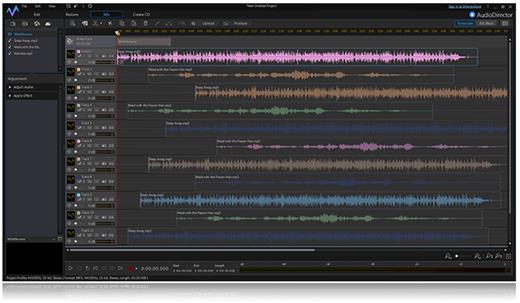
Description: Audio is half of the movie experience, and improving the audio in video projects dramatically enhances the final result. AudioDirector contains cutting-edge tools that make editing and fixing audio tracks fast and simple. With end-to-end audio features and seamless integration with PowerDirector, AudioDirector is a must-have application for extreme video makers.
Round-trip Editing (UNIQUE!)
AudioDirector works flawlessly with PowerDirector, providing effortless round-trip editing. With round-trip editing there is no need to export your modified sound tracks and then re-import them your into your video project.

Precision Audio-Visual Syncing
Visual editing tool lets you accurately synchronize voice-overs or audio effects to specific video frames, while automated dialogue replacement helps you to seamlessly align post-recorded audio to your video.

Track Alternatives in Mixer Room (NEW!)
Sample different effects and recordings on a single track with Track Alternatives. Add multiple tracks to the same timeline, meaning you can preview different styles without having to individually mute and unmute them.

Faster Loading & Conversion
AudioDirector lets you get to work quicker with less resource instensive loading and importing. Once you're done, outputting your work to whatever format you choose is a breeze, even if you have to convert the original file to a new format.

Batch Processing (NEW!)
Apply your favorite effects to multiple audio files simultaneously saving hours of tedious editing time and repetition.

360º Video Support
AudioDirector lets you import 360º videos for audio editing. With round-trip editing, you can send your finished work back to PowerDirector to apply some final touches and produce your masterpiece!

Spatial Audio Panner (NEW!)
Create an ambisonic, 360º audio soundtrack for a truly immersive viewing experience. AudioDirector lets you import 360º videos for audio editing, making it perfect for editors on the cutting edge of video creation.

Ambience Creator
Instantly generate ambient noise for soundless clips so that they blend seamlessly with neighboring footage.

Surround Sound Panner
Create sophisticated surround sound projects using dynamic panning technology.

Auto-Fit Background Music
Automatically adjust backing music tracks to fit the length of your video.

Pitch Bender
Set keyframe points and accurately transform the pitch of audio tracks to give your recordings the exact effect you're after.

Stereo Expander
Use new Stereo Expander to virtually give tracks a wider stereo presence and sound fuller.

Restoration Adjustment Tools
• Plosive Removal - Remove distracting breathy sounds in speech
• Noise Reduction - Clears unwanted static and background noise
• Declip - Removes distortion caused by clipping
• Declick - Clears track of clicks, pops and crackles
• Hiss Removal - Eliminates hissing sounds from audio tracks
• Hum Removal - Gets rid of low frequency audio artifacts

Multi-channel Device Recording
Record from multiple audio channels at the same time directly into AudioDirector. You don't need to spend time syncing channels, so you can start editing right away.

Group Track Selection for Adjustments
Speed up the editing process by selecting and applying audio adjustments to multiple tracks with just a click.

System Requirements:
- Microsoft Windows 11, 10, 8/8.1, 7 (64-bit OS only)
- Multi-core Intel processor with 64-bit support
- 128 MB VGA VRAM or higher
- 4 GB memory required (8 GB or above recommended)
- 1 GB hard disk space GB required
- Windows compatible sound card is required

Language Support:
- English
- French
- German
- Italian
- Spanish (European)
- Chinese Simplified
- Chinese Traditional
- Japanese
- Korean

Release Name: CyberLink AudioDirector Ultra 2024 v14.4.4024.0 (x64) Multilingual
Size: 145.6 MB
Links: HOMEPAGE – NFO – Torrent Search

Download: FiKPERNiTROFLARERAPiDGATOR

12 Comments
Dec 29

CyberLink AudioDirector Ultra 2024 v14.0.3622.12

Description: Audio is half of the movie experience, and improving the audio in video projects dramatically enhances the final result. AudioDirector contains cutting-edge tools that make editing and fixing audio tracks fast and simple. With end-to-end audio features and seamless integration with PowerDirector, AudioDirector is a must-have application for extreme video makers.

Round-trip Editing (UNIQUE!)
AudioDirector works flawlessly with PowerDirector, providing effortless round-trip editing. With round-trip editing there is no need to export your modified sound tracks and then re-import them your into your video project.

Precision Audio-Visual Syncing
Visual editing tool lets you accurately synchronize voice-overs or audio effects to specific video frames, while automated dialogue replacement helps you to seamlessly align post-recorded audio to your video.

Track Alternatives in Mixer Room (NEW!)
Sample different effects and recordings on a single track with Track Alternatives. Add multiple tracks to the same timeline, meaning you can preview different styles without having to individually mute and unmute them.

Faster Loading & Conversion
AudioDirector lets you get to work quicker with less resource instensive loading and importing. Once you're done, outputting your work to whatever format you choose is a breeze, even if you have to convert the original file to a new format.

Batch Processing (NEW!)
Apply your favorite effects to multiple audio files simultaneously saving hours of tedious editing time and repetition.

360º Video Support
AudioDirector lets you import 360º videos for audio editing. With round-trip editing, you can send your finished work back to PowerDirector to apply some final touches and produce your masterpiece!

Spatial Audio Panner (NEW!)
Create an ambisonic, 360º audio soundtrack for a truly immersive viewing experience. AudioDirector lets you import 360º videos for audio editing, making it perfect for editors on the cutting edge of video creation.

Ambience Creator
Instantly generate ambient noise for soundless clips so that they blend seamlessly with neighboring footage.

Surround Sound Panner
Create sophisticated surround sound projects using dynamic panning technology.

Auto-Fit Background Music
Automatically adjust backing music tracks to fit the length of your video.

Pitch Bender
Set keyframe points and accurately transform the pitch of audio tracks to give your recordings the exact effect you're after.

Stereo Expander
Use new Stereo Expander to virtually give tracks a wider stereo presence and sound fuller.

Restoration Adjustment Tools
• Plosive Removal - Remove distracting breathy sounds in speech
• Noise Reduction - Clears unwanted static and background noise
• Declip - Removes distortion caused by clipping
• Declick - Clears track of clicks, pops and crackles
• Hiss Removal - Eliminates hissing sounds from audio tracks
• Hum Removal - Gets rid of low frequency audio artifacts

Multi-channel Device Recording
Record from multiple audio channels at the same time directly into AudioDirector. You don't need to spend time syncing channels, so you can start editing right away.

Group Track Selection for Adjustments
Speed up the editing process by selecting and applying audio adjustments to multiple tracks with just a click.

System Requirements:
- Microsoft Windows 11, 10, 8/8.1, 7 (64-bit OS only)
- Multi-core Intel processor with 64-bit support
- 128 MB VGA VRAM or higher
- 4 GB memory required (8 GB or above recommended)
- 1 GB hard disk space GB required
- Windows compatible sound card is required

Language Support:
- English
- French
- German
- Italian
- Spanish (European)
- Chinese Simplified
- Chinese Traditional
- Japanese
- Korean

Release Name: CyberLink AudioDirector Ultra 2024 v14.0.3622.12
Size: 143 MB
Links: HOMEPAGE – NFO – Torrent Search

Download: FiKPERUPLOADGiGNiTROFLARERAPiDGATOR

8 Comments
Nov 9

CyberLink AudioDirector Ultra 2024 v14.0.3503.11 (x64) Multilingual

Description: Audio is half of the movie experience, and improving the audio in video projects dramatically enhances the final result. AudioDirector contains cutting-edge tools that make editing and fixing audio tracks fast and simple. With end-to-end audio features and seamless integration with PowerDirector, AudioDirector is a must-have application for extreme video makers.

Round-trip Editing (UNIQUE!)
AudioDirector works flawlessly with PowerDirector, providing effortless round-trip editing. With round-trip editing there is no need to export your modified sound tracks and then re-import them your into your video project.

Precision Audio-Visual Syncing
Visual editing tool lets you accurately synchronize voice-overs or audio effects to specific video frames, while automated dialogue replacement helps you to seamlessly align post-recorded audio to your video.

Track Alternatives in Mixer Room (NEW!)
Sample different effects and recordings on a single track with Track Alternatives. Add multiple tracks to the same timeline, meaning you can preview different styles without having to individually mute and unmute them.

Faster Loading & Conversion
AudioDirector lets you get to work quicker with less resource instensive loading and importing. Once you're done, outputting your work to whatever format you choose is a breeze, even if you have to convert the original file to a new format.

Batch Processing (NEW!)
Apply your favorite effects to multiple audio files simultaneously saving hours of tedious editing time and repetition.

360º Video Support
AudioDirector lets you import 360º videos for audio editing. With round-trip editing, you can send your finished work back to PowerDirector to apply some final touches and produce your masterpiece!

Spatial Audio Panner (NEW!)
Create an ambisonic, 360º audio soundtrack for a truly immersive viewing experience. AudioDirector lets you import 360º videos for audio editing, making it perfect for editors on the cutting edge of video creation.

Ambience Creator
Instantly generate ambient noise for soundless clips so that they blend seamlessly with neighboring footage.

Surround Sound Panner
Create sophisticated surround sound projects using dynamic panning technology.

Auto-Fit Background Music
Automatically adjust backing music tracks to fit the length of your video.

Pitch Bender
Set keyframe points and accurately transform the pitch of audio tracks to give your recordings the exact effect you're after.

Stereo Expander
Use new Stereo Expander to virtually give tracks a wider stereo presence and sound fuller.

Restoration Adjustment Tools
• Plosive Removal - Remove distracting breathy sounds in speech
• Noise Reduction - Clears unwanted static and background noise
• Declip - Removes distortion caused by clipping
• Declick - Clears track of clicks, pops and crackles
• Hiss Removal - Eliminates hissing sounds from audio tracks
• Hum Removal - Gets rid of low frequency audio artifacts

Multi-channel Device Recording
Record from multiple audio channels at the same time directly into AudioDirector. You don't need to spend time syncing channels, so you can start editing right away.

Group Track Selection for Adjustments
Speed up the editing process by selecting and applying audio adjustments to multiple tracks with just a click.

System Requirements:
- Microsoft Windows 11, 10, 8/8.1, 7 (64-bit OS only)
- Multi-core Intel processor with 64-bit support
- 128 MB VGA VRAM or higher
- 4 GB memory required (8 GB or above recommended)
- 1 GB hard disk space GB required
- Windows compatible sound card is required

Language Support:
- English
- French
- German
- Italian
- Spanish (European)
- Chinese Simplified
- Chinese Traditional
- Japanese
- Korean

Release Name: CyberLink AudioDirector Ultra 2024 v14.0.3503.11 (x64) Multilingual
Size: 143.2 MB
Links: HOMEPAGE – NFO – Torrent Search

Download: FiKPERUPLOADGiGNiTROFLARERAPiDGATOR

3 Comments
Sept 14

CyberLink AudioDirector Ultra 2024 v14.0.3304.0 (x64) Multilingual

Description: Audio is half of the movie experience, and improving the audio in video projects dramatically enhances the final result. AudioDirector contains cutting-edge tools that make editing and fixing audio tracks fast and simple. With end-to-end audio features and seamless integration with PowerDirector, AudioDirector is a must-have application for extreme video makers.

Round-trip Editing (UNIQUE!)
AudioDirector works flawlessly with PowerDirector, providing effortless round-trip editing. With round-trip editing there is no need to export your modified sound tracks and then re-import them your into your video project.

Precision Audio-Visual Syncing
Visual editing tool lets you accurately synchronize voice-overs or audio effects to specific video frames, while automated dialogue replacement helps you to seamlessly align post-recorded audio to your video.

Track Alternatives in Mixer Room (NEW!)
Sample different effects and recordings on a single track with Track Alternatives. Add multiple tracks to the same timeline, meaning you can preview different styles without having to individually mute and unmute them.

Faster Loading & Conversion
AudioDirector lets you get to work quicker with less resource instensive loading and importing. Once you're done, outputting your work to whatever format you choose is a breeze, even if you have to convert the original file to a new format.

Batch Processing (NEW!)
Apply your favorite effects to multiple audio files simultaneously saving hours of tedious editing time and repetition.

360º Video Support
AudioDirector lets you import 360º videos for audio editing. With round-trip editing, you can send your finished work back to PowerDirector to apply some final touches and produce your masterpiece!

Spatial Audio Panner (NEW!)
Create an ambisonic, 360º audio soundtrack for a truly immersive viewing experience. AudioDirector lets you import 360º videos for audio editing, making it perfect for editors on the cutting edge of video creation.

Ambience Creator
Instantly generate ambient noise for soundless clips so that they blend seamlessly with neighboring footage.

Surround Sound Panner
Create sophisticated surround sound projects using dynamic panning technology.

Auto-Fit Background Music
Automatically adjust backing music tracks to fit the length of your video.

Pitch Bender
Set keyframe points and accurately transform the pitch of audio tracks to give your recordings the exact effect you're after.

Stereo Expander
Use new Stereo Expander to virtually give tracks a wider stereo presence and sound fuller.

Restoration Adjustment Tools
• Plosive Removal - Remove distracting breathy sounds in speech
• Noise Reduction - Clears unwanted static and background noise
• Declip - Removes distortion caused by clipping
• Declick - Clears track of clicks, pops and crackles
• Hiss Removal - Eliminates hissing sounds from audio tracks
• Hum Removal - Gets rid of low frequency audio artifacts

Multi-channel Device Recording
Record from multiple audio channels at the same time directly into AudioDirector. You don't need to spend time syncing channels, so you can start editing right away.

Group Track Selection for Adjustments
Speed up the editing process by selecting and applying audio adjustments to multiple tracks with just a click.

System Requirements:
- Microsoft Windows 11, 10, 8/8.1, 7 (64-bit OS only)
- Multi-core Intel processor with 64-bit support
- 128 MB VGA VRAM or higher
- 4 GB memory required (8 GB or above recommended)
- 1 GB hard disk space GB required
- Windows compatible sound card is required

Language Support:
- English
- French
- German
- Italian
- Spanish (European)
- Chinese Simplified
- Chinese Traditional
- Japanese
- Korean

Release Name: CyberLink AudioDirector Ultra 2024 v14.0.3304.0 (x64) Multilingual
Size: 138.7 MB
Links: HOMEPAGE – NFO – Torrent Search

Download: FiKPERUPLOADGiGNiTROFLARERAPiDGATOR

6 Comments