Please REGISTER or RENEW your account on RAPiDGATOR.net and support us by doing through all RAPiDGATOR working download links on main posts...
July 2

FonePaw iPhone Data Recovery 7.1.0

FonePaw iPhone Data Recovery is made for those unexpected incidents which can result in data loss on an iPhone, such as iPhone damaged/lost/stolen, reset, accident deletion, virus attack, jailbreak or even error operation. The lost data can be recovered using several free or paid, but how to choose the best iPhone Data Recovery software for your Mac? Here is a review of FonePaw iPhone Data Recovery. Read and know the features and how to recover deleted files from iPhone using FonePaw program. FonePaw iPhone Data Recovery
Features


  • Directly recover deleted files from iPhone without backup No backup is needed. Just connect your iPhone to the Mac and run this program, you can get back all your deleted, lost data.
  • Recover data from iTunes backup & iCloud backup This practical program can also extract data from unreadable iTunes backup files, which is very helpful when iPhone is stolen/lost.
  • Selectively recovery This tool enables you to preview before recovery and selectively retrieve data, rather than the whole from iTunes backup.
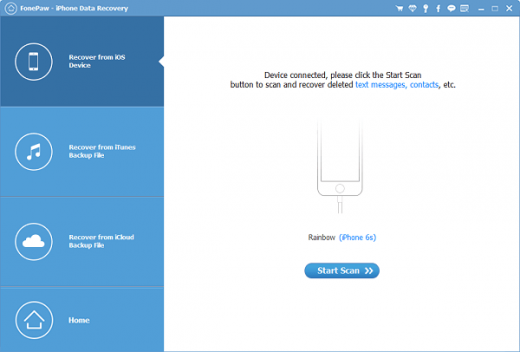
  • Outstanding user experience After launching the program, you can see a well-designed and easy-to-navigate interface. And you can recover what you want with super fast data scan and recovery speed.
  • FonePaw iPhone Data Recovery Usage Connect iPhone to the Mac and Launch FonePaw iPhone Data Recovery Hit “Start Scan” Preview the scan result Click “Recover” and you can recover the files in different formats depending on your selection
What’s New

Version 7.1.0:


  • Release notes were unavailable when this listing was updated.
Compatibility

OS X 10.7 or later

Release Name: FonePaw iPhone Data Recovery 7.1.0
Size: 53.4 MB
Links: HOMEPAGE – NFO – Torrent Search

Download: UPLOADGiGNiTROFLARERAPiDGATOR

5 Comments
Jan 21

FonePaw iPhone Data Recovery v6.1.0 Multilingual-P2P

Description: Accidentally delete important iPhone files? Jailbreak failure of iOS devices? Hardware or system Malfunction? iPhone Data Recovery is specially designed to help you recover deleted photos, videos, messages, contacts, call history, notes, etc. from iPhone directly or extract backup files from iTunes & iCloud to restore deleted files, so that you can save them on your computer or Mac with one easy click.

3 Options Enable You To Recover Lost Data
Don’t be afraid to lose data, iPhone Data Recovery helps you get them back. This mobile expert offers 3 recovery modes to recover deleted files from iPhone, iPad and iPod touch.

Recover from iDevice Directly
Just plug iPhone/iPad/iPod touch into computer/Mac and launch this terrific software, you can directly recover contacts, photos, messages and more from your iOS device, even if your device is damaged or dropped into water.

Recover from iTunes Backup
Every time you connect your iDevice to computer, iTunes will automatically create a backup for your device. Whenever you want to restore data from iTunes, you can count on iPhone Data Recovery, which can recover all types data from iTunes backup files in a few clicks.

Recover from iCloud Backup
Since iCloud will back up photos, contacts, messages, etc. when your device is connected to Wi-Fi, you can also extract iCloud backup files to recover what you want. You just need to sign in iCloud with Apple ID and password in this software, and iPhone Data Recovery will do the rest for you.

Release Name: fonepaw-iphone-data-recovery-v6-1-0-multilingual-p2p-portable
Size: 53 MB

Links: HOMEPAGE – NFO – Torrent Search  

Download: UPLOADGiGNiTROFLARERAPiDGATOR

8 Comments