Please REGISTER or RENEW your account on RAPiDGATOR.net and support us by doing through all RAPiDGATOR working download links on main posts...
Apr 9

FonePaw Screen Recorder 8.8.0

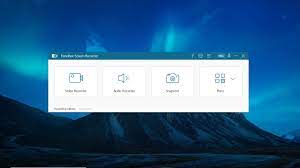
Description: Record Anything on Your Screen. Record screen video with no watermark. Record computer system sound. Record your voice. Record your webcam. No lags (lightweight screen recorder). HD quality (1080p & 60fps). Easy to use (intuitive UI).
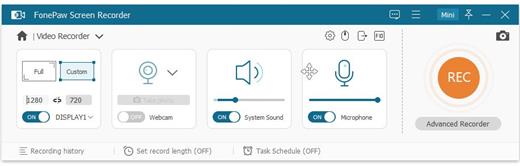
Record HD Video on Your Screen
Use Video Recorder to record video on your computer screen in up to 1080p with full voice and webcam. The recording area can be the entire screen, a specific window, or a customized region. During recording, you can use annotations and mouse effects for emphasis. No watermark added.

Record Audio from Computer
Audio Recorder link enables you to easily record computer system sound and microphone separately or simultaneously. Even Mac users can easily record internal audio. There's also noise cancellation and microphone enhancement feature to help you record your voice clearly.

Capture Gameplay on PC
Want to record your gameplay without distractions? FonePaw's Game Recorder link can help by detecting and locking the gameplay window for recording. All non-gameplay screen activity will not be captured. Even better, the gameplay video can be recorded at up to 1080p and 60 fps without any lag.

Record High-Quality Webcam Video
FonePaw is also a professional webcam capture programlink to record your face. Not only can you capture your screen with webcam overlay, but you can also capture facecam video only. Either the built-in or external webcam is supported, and you can freely adjust more settings such as the resolution, shape, and position of the camera.

Mirror and Record Your Phone Screen
Want to mirror and record the activity on your phone to a larger screen? FonePaw's Phone Recorder will do the trick! Easily project your iOS/Android screen to a computer wirelessly or with a USB cable and record the phone screen, system audio and microphone sound at the same time.

Record Video of A Specific Application
When you want to record only a fixed window, FonePaw's Window Recorder is just what you need. Utilizing this feature, you can lock and record a specific window and exclude what is happening in other windows, so your recording is completely free from distractions.

Release Name: FonePaw Screen Recorder 8.8.0
Size: 108.3 MB
Links: HOMEPAGE – NFO – Torrent Search

Download: RAPiDGATOR

8 Comments
Feb 8

FonePaw Screen Recorder 6.2 (x64) Multilingual

FonePaw Screen Recorder Crack Download is a professional video screen recording software application that will capture the screen of a Windows computer in a few steps. You can create your own video (with or without audio) for a specific area/webcam.

With FonePaw Screen Recorder Registration Code, you can create unique videos by drawing or adding text, arrows to records or screenshots. You can Record screen and audio together from both systems and Microphones. For Mac, system sound is not supported now. It is possible to record your webcam video only or along with screen activity. With one click to capture your desktop or get a snapshot from the recording video.

With FonePaw Screen Recorder Full Version, you can select the entire computer screen or part of it to begin your capturing. The recorded videos can be saved in different video formats in output settings. MP4 is recommended. The output video and audio quality can be set as High, Medium and Low. You can also set up hotkeys for certain operation so you can take quick action when recording.

FonePaw Screen Recorder Registration Key Features:


  • Capture the screen of a Windows computer in a few steps.
  • Make the cursor stand out and show the mouse clicks to customize your recordings.
  • You can quickly check the recorded history (videos and screenshots) and you can share or delete in one click.
  • Easy and fast installation process.
  • Easily set the recording length for the video as you like (only on the Windows version).
  • Export recording as a GIF image and set up its frame rate (only on Windows version).
  • You can create your own video (with or without audio) for a specific area/webcam.
  • You can create unique videos by drawing or adding text, arrows to records, or screenshots.
  • Can select the entire computer screen or part of it to begin your capturing.
  • And much more
Release Name: FonePaw Screen Recorder 6.2 (x64) Multilingual
Size: 85.6 MB
Links: HOMEPAGE – NFO – Torrent Search

Download: UPLOADGiGNiTROFLARERAPiDGATOR

6 Comments
Nov 11

FonePaw Screen Recorder 5.9

FonePaw Screen Recorder Crack Download is a professional video screen recording software application that will capture the screen of a Windows computer in a few steps. You can create your own video (with or without audio) for a specific area/webcam. You May Also Like AutoScreenRecorder Pro With Crack

With FonePaw Screen Recorder Registration Code, you can create unique videos by drawing or adding text, arrows to records or screenshots. You can Record screen and audio together from both systems and Microphones. For Mac, system sound is not supported now. It is possible to record your webcam video only or along with screen activity. With one click to capture your desktop or get a snapshot from the recording video.

You May Also Download Macro Recorder Enterprise Crack [Latest]

With FonePaw Screen Recorder Full Version, you can select the entire computer screen or part of it to begin your capturing. The recorded videos can be saved in different video formats in output settings. MP4 is recommended. The output video and audio quality can be set as High, Medium and Low. You can also set up hotkeys for certain operation so you can take quick action when recording.

FonePaw Screen Recorder Registration Key Features:


  • Capture the screen of a Windows computer in a few steps.
  • Make the cursor stand out and show the mouse clicks to customize your recordings.
  • You can quickly check the recorded history (videos and screenshots) and you can share or delete in one click.
  • Easy and fast installation process.
  • Easily set the recording length for the video as you like (only on the Windows version).
  • Export recording as a GIF image and set up its frame rate (only on Windows version).
  • You can create your own video (with or without audio) for a specific area/webcam.
  • You can create unique videos by drawing or adding text, arrows to records, or screenshots.
  • Can select the entire computer screen or part of it to begin your capturing.
  • And much more
Release Name: FonePaw Screen Recorder 5.9
Size: 168.4 MB
Links: HOMEPAGE – NFO – Torrent Search

Download: UPLOADGiGNiTROFLARERAPiDGATOR

4 Comments
Sept 18

FonePaw Screen Recorder 5.8

FonePaw Screen Recorder Crack Download is a professional video screen recording software application that will capture the screen of a Windows computer in a few steps. You can create your own video (with or without audio) for a specific area/webcam. You May Also Like AutoScreenRecorder Pro With Crack

With FonePaw Screen Recorder Registration Code, you can create unique videos by drawing or adding text, arrows to records or screenshots. You can Record screen and audio together from both systems and Microphones. For Mac, system sound is not supported now. It is possible to record your webcam video only or along with screen activity. With one click to capture your desktop or get a snapshot from the recording video.

With FonePaw Screen Recorder Full Version, you can select the entire computer screen or part of it to begin your capturing. The recorded videos can be saved in different video formats in output settings. MP4 is recommended. The output video and audio quality can be set as High, Medium and Low. You can also set up hotkeys for certain operation so you can take quick action when recording.

FonePaw Screen Recorder Registration Key Features:


  • Capture the screen of a Windows computer in a few steps.
  • Make the cursor stand out and show the mouse clicks to customize your recordings.
  • You can quickly check the recorded history (videos and screenshots) and you can share or delete in one click.
  • Easy and fast installation process.
  • Easily set the recording length for the video as you like (only on the Windows version).
  • Export recording as a GIF image and set up its frame rate (only on Windows version).
  • You can create your own video (with or without audio) for a specific area/webcam.
  • You can create unique videos by drawing or adding text, arrows to records, or screenshots.
  • Can select the entire computer screen or part of it to begin your capturing.
  • And much more
Release Name: FonePaw Screen Recorder 5.8
Size: 53.2 MB
Links: HOMEPAGE – NFO – Torrent Search

Download: UPLOADGiGNiTROFLARERAPiDGATOR

5 Comments