Please REGISTER or RENEW your account on RAPiDGATOR.net and support us by doing through all RAPiDGATOR working download links on main posts...
Feb 7

JetBrains DataSpell 2025.3.2

Description: JetBrains DataSpell is an IDE for Data Science. DataSpell is designed specifically for those involved in exploratory data analysis and prototyping machine learning models. This is an ergonomic development environment that combines the interactive capabilities of Jupyter notebooks and the smart PyCharm editor for working with Python and R.


JetBrains DataSpell Features


  • Python → DataSpell will help you work with both Jupyter notebooks and Python scripts, analyze your code for errors, suggest quick fixes, and allow you to navigate your code with ease
  • Markdown → DataSpell supports editing and displaying Markdown markup – both in notebook cells and in individual files. LaTex support is also coming soon
  • Interactive results → DataSpell fully supports both static and JavaScript results used in the Plotly, Bokeh, Altair, ipywidgets, etc. libraries. DataFrame objects can be worked with using interactive tables
  • Conda → Built-in support for Conda will simplify the management of environments and dependencies, allowing you to create and reuse them/
  • Debugger → Debugging capabilities are supported for both Jupyter notebooks and Python scripts. These include breakpoints, stepping through code, and viewing and manipulating the state of variables.
  • SQL → Connect your database and get the ability to analyze tables, apply refactorings, import/export data, etc.
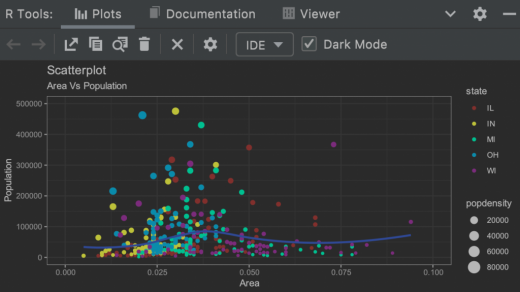
  • R → IDE includes basic R support: a debugger, a tool for viewing datasets and visualizations, a dependency manager, a smart code editor, etc.
  • Plugins → There are many plugins at your disposal – for emulating Vim, working with Docker, additional VCS, customizing appearance, etc.
Notes

• Activation occurs automatically during installation, do not forget to check the corresponding checkbox.
• If you previously used another activator in your system, to avoid activation problems, remove the old activator and all traces of it in the system before installation.
• IDE installation must be performed as a user with administrator rights

System Requirements

Operating system: Windows 10, 11 (only x64)
RAM: 8 GB total system memory
Minimum:
Disk space: 3.5 GB plus 1 GB for caches
Monitor resolution: 1024×768
Recommended:
Disk space: SSD drive with at least 5 GB of free space
Monitor resolution: 1920×1080

Release Name: JetBrains DataSpell 2025.3.2
Size: 2.14 GB
Links: HOMEPAGE – NFO – Torrent Search

Download: RAPiDGATOR

6 Comments
May 25

JetBrains DataSpell v2022.1.1 (x64) + Fix

Description: Rising up to the standards set by its developer, JetBrains DataSpell provides an integrated development environment that can cater to the needs and requirements of professional data scientists. This new IDE brings to the table functionality that is meant to streamline exploratory data analysis and machine learning. The JetBrains team prides itself in creating an ergonomic environment where users can take advantage of the smart coding tools in PyCharm and the interactive Jupyter notebooks.


Features :


  • Compatible with Python and other languages
    JetBrains DataSpell relies on the Python interpreter, while providing support for Conda, Markdown and the R language. It features debugging tools, a dataset and virtualization explorer, a package manager and reliable coding assistance.
  • As you might expect from a JetBrains products, the IDE features an elegant look, with a generous editing area. Whether you work with Python scripts or access Jupyter notebooks, you will enjoy a development environment with line numbering, code completion, smart suggestions and syntax highlighting.
  • Working with Python scripts in JetBrains DataSpell allows you to access all the Python scientific libraries. Python scripts can be split into code cells and run separately like in Jupyter, while the built-in Python console displays the output in real-time.
  • Support for local and remote Jupyter notebooks
    One of its most noticeable features is the Jupyter integration. You can initiate connections to local Jupyter notebooks or remote ones, to JupyterLab and JupyterHub.
  • DataSpell allows you to work with both the command mode and the editor mode. It comes with support for all the standard Jupyter shortcuts and generates interactive outputs, while the IDE allows code completion and quick error checking to ease your work.
  • Version control, a terminal and database tools
    Aside from the particularities above, JetBrains DataSpell comes with features that are usually available in major IDEs, such as version control, a built-in terminal and database tools.
    Version control allows you to manage your Git projects, commits and changes like a professional. The terminal facilitates working with the command console, while the database tools help you access and query databases from the IDE.
  • An IDE dedicated more to data science and less to development
    JetBrains DataSpell was designed to be an IDE oriented towards working with data, while PyCharm is also geared towards development, while also providing data science functionality. In other words, JetBrains DataSpell is suitable for professional data scientists more than developers.

How To Install?


  • Install JetBrains from given setup.
  • For windows : Copy folder ja-netfilter to Drive C:
  • Auto configure vmoptions (Copy form Neo):
    macOS or Linux: execute “scripts/install.sh”
    Windows: double click to execute “scripts\install-current-user.vbs”     or   – Manually Edit:
    Go to install directory product JetBrains ( Example : C:\Program Files\JetBrains\PhpStorm 2022.1.1\bin ) find *.exe.vmoptions ( Example : phpstorm64.exe.vmoptions ) open with Notepad++ add end line & Save:windows:
    -javaagent:C:\ja-netfilter\ja-netfilter.jar=jetbrainsmac:
    -javaagent:/Users/neo/ja-netfilter/ja-netfilter.jar=jetbrainslinux:
    -javaagent:/home/neo/ja-netfilter/ja-netfilter.jar=jetbrains
  • Open JetBrains and use license server https://jetbra.in and Active
  • Boom! Now you can use the program without any interruptions.
  • That’s it, Enjoy now
Release Name: JetBrains DataSpell v2022.1.1 (x64) + Fix
Size: 510 MB
Links: HOMEPAGE – NFO – Torrent Search

Download: UPLOADGiG – NiTROFLARE – RAPiDGATOR

6 Comments