Please REGISTER or RENEW your account on RAPiDGATOR.net and support us by doing through all RAPiDGATOR working download links on main posts...
Jan 30

JixiPix Artista Impresso Pro 1.8.29

Standalone Product that transform photos into paintings then combines paint effects with layers and brushes for gorgeous print-worthy artwork. Also includes plugin for Photoshop, Elements, Lightroom and PaintShop Pro.
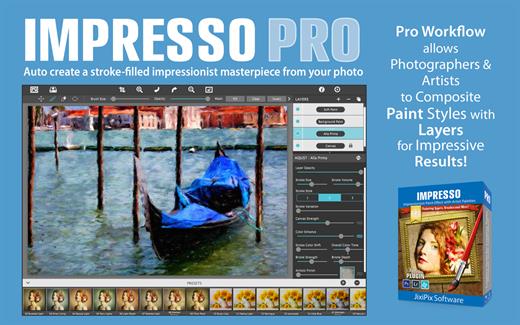
For professionals who like creative control we give you Smart Layers and brushes for blending multiple paint styles, a library of Edges that blend beautifully with canvas, a Background Paint effect to create distances, a Soft Paint effect for enhancing foreground subjects, an Aged Paint effect for adding craquelure to paintings, and an ultra-impressionism effect called Tache to cover paintings with broken brush strokes. Impresso Pro has everything an Artist or Photographer will need to create gallery-style paintings with enough detail even for the largest print.

Features

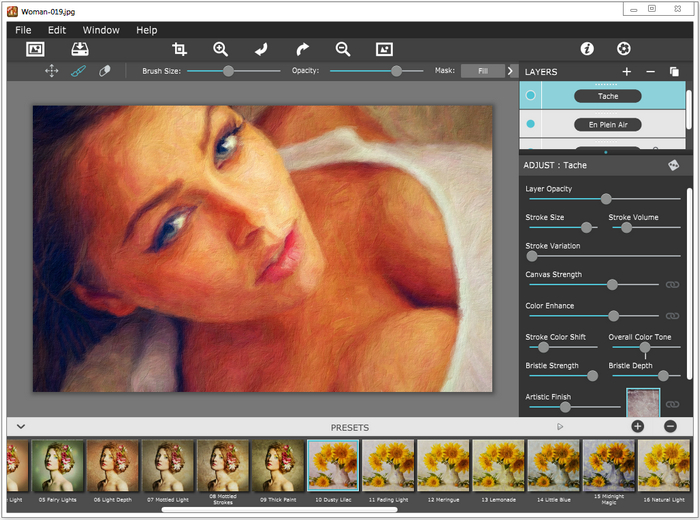
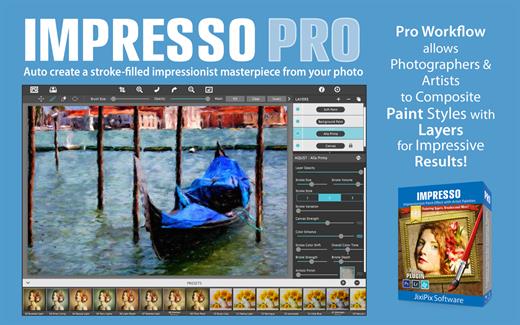
A pro workflow adds impressionism styles per layer. With Layers, users can blend styles using brushes to paint on or off areas in the painting! Also, included is the powerful Ellipse Detail tool to add finely painted details to faces, flowers or to create focal points in landscapes. Once completed , resize then hit the ‘Apply’ button to render small brushstrokes inside the Ellipse. With layers photographers and artists now have the power to composite multiple impressionism styles for impressive results.

IMPRESSIONISM STYLES


  • Alla Prima (‘wet-on-wet’ or ‘all-at-once’)—is great for portraits! This beautiful paint style starts by filling the painting with an abundance of brushstrokes. A library of artistic finishes compliments this style by adding light, color and movement with controls over strength.
  • En Plein Air (in open air) is perfect for landscapes. This stroke-filled effect consists of eight artists’ palettes created by famous impressionists. Use them as they are or edit the paint colors to make your own palette. The Save Preset feature keeps the palette and all the layers intact for future projects.
  • Tache (‘spot’ or ‘blot’) applies broken brushstrokes throughout the image. This technique of laying thick patches, flecks and dabs of color is great for making paint look as if it stands out from the surface. Apply a light spackling of strokes or fill the painting with dabs of color—the choice is up to you!
  • Canvas layer is added to each painting created. By creating a canvas layer, it can now be turned on or off for viewing strokes created on previous layers. As with traditional methods, the canvas is an integral part of the painting, so we have locked the layer to keep it from being accidentally deleted.
INCLUDES

  • Three stroke styles: #1 is a series of straighter strokes, #2 combines the first style with curved ones, and #3 is an abstract set. Then the Tache effect has its own custom set of brushes designed for depth.
  • Three Impressionism styles: Alla Prima, En Plein Air and Tache (pronounced tash)
  • Pro Layers with built-in Impressionism styles for multi-layer types and options to duplicate, reorder, and delete them
  • Control over detail ellipse tool, stroke size, stroke volume, bristle strength & depth, artistic finishes and the painted edge
  • Save Preset to save customized paint palettes and keep all strokes & layers intact for future projects
  • Smart brushes to remove or add impressionism effect—the brushes are smart because they remove the effect by stroke
  • Mask with fill, invert and clear to support brushes and layers
  • Canvas and linen texture
  • 8 Impressionist palette styles
  • One-touch paint styles
  • 70 Artistic finishes
  • One-of-a-kind ellipse detail tool renders small brush strokes inside the placed area
  • Plugin for Photoshop CS3+, Lightroom and Elements for Mac and Windows
What’s New

Version 1.8.29:


  • Release notes were unavailable when this listing was updated.
Compatibility

macOS 10.9 or later


Release Name: JixiPix Artista Impresso Pro 1.8.29
Size: 120.3 MB
Links: HOMEPAGE – NFO – Torrent Search

Download: RAPiDGATOR
12 Comments
Jan 28

JixiPix Artista Impresso Pro 1.8.29

Description: For professionals who like creative control we give you Smart Layers and brushes for blending multiple paint styles, a library of Edges that blend beautifully with canvas, a Background Paint effect to create distances, a Soft Paint effect for enhancing foreground subjects, an Aged Paint effect for adding craquelure to paintings, and an ultra-impressionism effect called Tache to cover paintings with broken brush strokes. Impresso Pro has everything an Artist or Photographer will need to create gallery-style paintings with enough detail even for the largest print.

The 19th century brush-wielding Impressionist artists were crazy about flowers and gardens, and it was good. With flowing brush strokes and thickly painted texture, Van Gogh made his sunflowers immortal; with harmonious movement of color, contrast, and form, Monet made his lily pond a celebrity. It took their genius, lifetimes of practice, and navigating the riot of their senses, but these extraordinary artists took what they saw and felt in the petals and leaves and transferred their impressions onto canvasses full of beauty, mood, and meaning.

Lucky you, 21st century software wielding seer and lover of beauty—you have Impresso Pro. With the same enduring attention to detail, light, color, and texure, Impresso transforms your photos into multi-textured, stroke-filled Impressionist masterpieces. And keen eyes will love how Impresso maintains the balance of your piece! The result—captivating, print-worthy paintings brimming with passion, life, and beauty.

Paint Layers Make It Impressive
Paint Layers (also known as Paint Styles) is what makes Impresso Pro impressive. When a photo is placed in Impresso Pro it automatically transforms the photo into the first paint style called Alla Prima, then places it above a Canvas Layer. This is done to give the user a head start and allows them to jump right in and evolve the painting with settings that give full control. The Paint Layers are impressive because each active layer reveals all the paint settings associated with it. This keeps settings organized and adjustments easy when going from paint style-to-paint style (or layer-to-layer). The Paint Layers are also impressive because you can add paint styles or remove them using this smart layering system. This allows users to create unique one-of-a-kind paintings with a variety of blended paint layers.

Impresso Pro Paint Styles

Alla Prima is great for portraits! This beautiful paint style starts by filling the painting with an abundance of brushstrokes. A featured library of Artistic Finishes compliment this style by adding mottled light, color and movement to the painting.

En Plein Air is perfect for landscapes. This stroke-filled effect consists of seven artists’ palettes created by famous impressionists. Use them as they are or edit the colors and save them with all the layers and settings intact for future projects.

Tache applies broken brushstrokes throughout the painting. This technique of laying thick strokes of color is great for making the paint look as if it stands out from the surface. Apply a light spackling of strokes or fill the painting with dabs of color.

Soft Paint (when brushed) is great for foreground objects! Using it brings out realistic detail to forground subjects by creating a hard edge for contrast from other edges around it.

Background Paint (when brushed) is great for creating an out-of-focus effect. Use it to knock down detail in the background scene, then use Soft Paint on the focal to create a natural depth-of-field.

Aged Paint is stunning and adds a vintage weathered look to the painting! An auto-crack feature creates craquelure in a linear or angled fashion with control over crack size, angle and spacing.

Signature personalizes the painting using two signature styles: The first uses a type face from the fonts installed on your computer, and the other allows you to paint on your signature freehand. Both styles can be fine-tuned using stroke size and volume sliders.

Canvas is the base of your painting. On this layer use settings to change the texture from canvas to linen or change canvas color. Here you can also add a painted edge choosing from 18 hand painted ones with options to adjust edge size and shape.

Includes
NEW 11 brush styles offer a variety of ways to create expressive paintings, along with an easy-to-use brush library to see the brush styles before applying.
NEW 3 Bristle Styles: Textured, Thick and Smooth wield brushwork into paintings while retaining high quality strokes.
NEW Conform Strokes slider to bring out detail naturally when using large or abstract brush styles
NEW Edge Styles found on the Canvas Layer allow you to choose a painted edge or load in a custom one
3 Impressionism styles with control over stroke size, stroke volume, bristle strength and depth
Soft Paint layer for adding realism to foreground subjects
Background Paint layer for creating distances
Aged Paint layer for cracked surface paint
Smart layers for blending Impressionism styles with options to reorder, duplicate and delete. This powerful feature allows you to blend multiple paint styles together for strokes that stand out. * To add an Impressionism Style, use the plus sign (+) at the top of the layers palette.
Ellipse Detail Tool adds even more detail when placed on the painting
Smart links to globally unify color finishes and canvas strength across all layers
Presets for saving custom paint palettes and to keep layers and settings intact for future projects
Smart Brushes to remove or add impressionism effect
Mask option to invert, clear or fill in brushed areas
70 Artistic Finishes to add mottled light and color to the painting
18 Painted Edges with control over stroke size and edge blending
Canvas background layer reacts to paint like a real canvas would, showing more texture in thinner paint and less in thicker
Save Layer Preset allows signatures to be saved without the paint layers for future signings. You know it’s been saved right when the layer icon appears on the corner of the preset thumbnail.

Release Name: JixiPix Artista Impresso Pro 1.8.29
Size: 134.1 MB
Links: HOMEPAGE – NFO – Torrent Search

Download: RAPiDGATOR
9 Comments
Dec 17

JixiPix Artista Impresso Pro 1.8.18

Standalone Product that transform photos into paintings then combines paint effects with layers and brushes for gorgeous print-worthy artwork. Also includes plugin for Photoshop, Elements, Lightroom and PaintShop Pro.

For professionals who like creative control we give you Smart Layers and brushes for blending multiple paint styles, a library of Edges that blend beautifully with canvas, a Background Paint effect to create distances, a Soft Paint effect for enhancing foreground subjects, an Aged Paint effect for adding craquelure to paintings, and an ultra-impressionism effect called Tache to cover paintings with broken brush strokes. Impresso Pro has everything an Artist or Photographer will need to create gallery-style paintings with enough detail even for the largest print.

Features

A pro workflow adds impressionism styles per layer. With Layers, users can blend styles using brushes to paint on or off areas in the painting! Also, included is the powerful Ellipse Detail tool to add finely painted details to faces, flowers or to create focal points in landscapes. Once completed , resize then hit the ‘Apply’ button to render small brushstrokes inside the Ellipse. With layers photographers and artists now have the power to composite multiple impressionism styles for impressive results.

IMPRESSIONISM STYLES


  • Alla Prima (‘wet-on-wet’ or ‘all-at-once’)—is great for portraits! This beautiful paint style starts by filling the painting with an abundance of brushstrokes. A library of artistic finishes compliments this style by adding light, color and movement with controls over strength.
  • En Plein Air (in open air) is perfect for landscapes. This stroke-filled effect consists of eight artists’ palettes created by famous impressionists. Use them as they are or edit the paint colors to make your own palette. The Save Preset feature keeps the palette and all the layers intact for future projects.
  • Tache (‘spot’ or ‘blot’) applies broken brushstrokes throughout the image. This technique of laying thick patches, flecks and dabs of color is great for making paint look as if it stands out from the surface. Apply a light spackling of strokes or fill the painting with dabs of color—the choice is up to you!
  • Canvas layer is added to each painting created. By creating a canvas layer, it can now be turned on or off for viewing strokes created on previous layers. As with traditional methods, the canvas is an integral part of the painting, so we have locked the layer to keep it from being accidentally deleted.
INCLUDES

  • Three stroke styles: #1 is a series of straighter strokes, #2 combines the first style with curved ones, and #3 is an abstract set. Then the Tache effect has its own custom set of brushes designed for depth.
  • Three Impressionism styles: Alla Prima, En Plein Air and Tache (pronounced tash)
  • Pro Layers with built-in Impressionism styles for multi-layer types and options to duplicate, reorder, and delete them
  • Control over detail ellipse tool, stroke size, stroke volume, bristle strength & depth, artistic finishes and the painted edge
  • Save Preset to save customized paint palettes and keep all strokes & layers intact for future projects
  • Smart brushes to remove or add impressionism effect—the brushes are smart because they remove the effect by stroke
  • Mask with fill, invert and clear to support brushes and layers
  • Canvas and linen texture
  • 8 Impressionist palette styles
  • One-touch paint styles
  • 70 Artistic finishes
  • One-of-a-kind ellipse detail tool renders small brush strokes inside the placed area
  • Plugin for Photoshop CS3+, Lightroom and Elements for Mac and Windows
What’s New

Version 1.8.18:


  • Release notes were unavailable when this listing was updated.
Compatibility

OS X 10.7 or later, 64-bit processor


Release Name: JixiPix Artista Impresso Pro 1.8.18
Size: 123.2 MB
Links: HOMEPAGE – NFO – Torrent Search

Download: UPLOADGiGNiTROFLARERAPiDGATOR

4 Comments
Nov 29

JixiPix Artista Impresso Pro 1.8.17

Standalone Product that transform photos into paintings then combines paint effects with layers and brushes for gorgeous print-worthy artwork. Also includes plugin for Photoshop, Elements, Lightroom and PaintShop Pro.

For professionals who like creative control we give you Smart Layers and brushes for blending multiple paint styles, a library of Edges that blend beautifully with canvas, a Background Paint effect to create distances, a Soft Paint effect for enhancing foreground subjects, an Aged Paint effect for adding craquelure to paintings, and an ultra-impressionism effect called Tache to cover paintings with broken brush strokes. Impresso Pro has everything an Artist or Photographer will need to create gallery-style paintings with enough detail even for the largest print.

Features

A pro workflow adds impressionism styles per layer. With Layers, users can blend styles using brushes to paint on or off areas in the painting! Also, included is the powerful Ellipse Detail tool to add finely painted details to faces, flowers or to create focal points in landscapes. Once completed , resize then hit the ‘Apply’ button to render small brushstrokes inside the Ellipse. With layers photographers and artists now have the power to composite multiple impressionism styles for impressive results.

IMPRESSIONISM STYLES


  • Alla Prima (‘wet-on-wet’ or ‘all-at-once’)—is great for portraits! This beautiful paint style starts by filling the painting with an abundance of brushstrokes. A library of artistic finishes compliments this style by adding light, color and movement with controls over strength.
  • En Plein Air (in open air) is perfect for landscapes. This stroke-filled effect consists of eight artists’ palettes created by famous impressionists. Use them as they are or edit the paint colors to make your own palette. The Save Preset feature keeps the palette and all the layers intact for future projects.
  • Tache (‘spot’ or ‘blot’) applies broken brushstrokes throughout the image. This technique of laying thick patches, flecks and dabs of color is great for making paint look as if it stands out from the surface. Apply a light spackling of strokes or fill the painting with dabs of color—the choice is up to you!
  • Canvas layer is added to each painting created. By creating a canvas layer, it can now be turned on or off for viewing strokes created on previous layers. As with traditional methods, the canvas is an integral part of the painting, so we have locked the layer to keep it from being accidentally deleted.
INCLUDES

  • Three stroke styles: #1 is a series of straighter strokes, #2 combines the first style with curved ones, and #3 is an abstract set. Then the Tache effect has its own custom set of brushes designed for depth.
  • Three Impressionism styles: Alla Prima, En Plein Air and Tache (pronounced tash)
  • Pro Layers with built-in Impressionism styles for multi-layer types and options to duplicate, reorder, and delete them
  • Control over detail ellipse tool, stroke size, stroke volume, bristle strength & depth, artistic finishes and the painted edge
  • Save Preset to save customized paint palettes and keep all strokes & layers intact for future projects
  • Smart brushes to remove or add impressionism effect—the brushes are smart because they remove the effect by stroke
  • Mask with fill, invert and clear to support brushes and layers
  • Canvas and linen texture
  • 8 Impressionist palette styles
  • One-touch paint styles
  • 70 Artistic finishes
  • One-of-a-kind ellipse detail tool renders small brush strokes inside the placed area
  • Plugin for Photoshop CS3+, Lightroom and Elements for Mac and Windows
What’s New

Version 1.8.17:


  • Release notes were unavailable when this listing was updated.
Compatibility

OS X 10.7 or later, 64-bit processor


Release Name: JixiPix Artista Impresso Pro 1.8.17
Size: 123.2 MB
Links: HOMEPAGE – NFO – Torrent Search

Download: UPLOADGiGNiTROFLARERAPiDGATOR

6 Comments
June 4

JixiPix Artista Impresso Pro v1.8.12-P2P

Description: For professionals who like creative control we give them Layers for blending multiple paint styles and brushes to paint on and off the impressionism strokes. We have also included an ultra-impressionism effect called ‘Tache’ to cover the painting with broken brush strokes or dabs of color that literally stand out, apply them sparsely or cover the entire painting, the choice is yours.

A pro workflow adds impressionism styles per layer. With Layers, users can blend styles using brushes to paint on or off areas in the painting! Also, included is the powerful Ellipse Detail tool to add finely painted details to faces, flowers or to create focal points in landscapes. Once completed , resize then hit the ‘Apply’ button to render small brushstrokes inside the Ellipse. With layers photographers and artists now have the power to composite multiple impressionism styles for impressive results.

Release Name: JixiPix Artista Impresso Pro v1.8.12-P2P
Size: 149.8 MB
Links: HOMEPAGE – NFO – Torrent Search

Download: UPLOADGiGNiTROFLARERAPiDGATOR

11 Comments