Please REGISTER or RENEW your account on RAPiDGATOR.net and support us by doing through all RAPiDGATOR working download links on main posts...
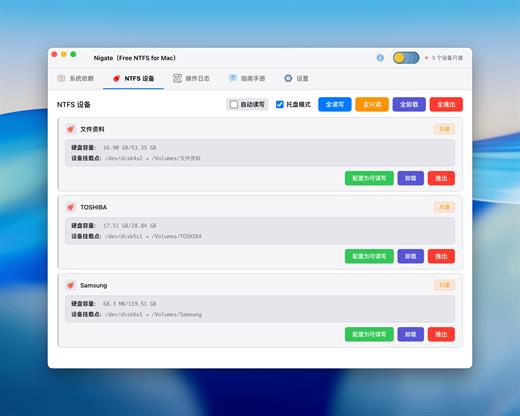
This is the Electron GUI version of Nigate, which provides a modern and intuitive interface for NTFS device management while retaining the original geek terminal version.
Features
- ? Modern Interface – Dark theme with clean and beautiful design
- ? Real-time Monitoring – Automatically detects NTFS device connections
- ✅ Dependency Check – Automatically checks and installs required system dependencies
- ? One-Click Mount – Easily mount read-only NTFS devices in read-write mode
- ? Status Display – Clearly displays device status and operation logs
- ?️ Secure & Reliable – Uses Electron security best practices
First Time Use
- Check System Dependencies
- After opening the application, click the “Check Dependencies” button
- The system will automatically check required dependencies (Swift, Homebrew, MacFUSE, ntfs-3g)
- If any dependencies are missing, click “Install Missing Dependencies” to install them
- Mount NTFS Devices
- Insert an NTFS-formatted removable storage device
- The application will automatically detect the device (refreshes every 5 seconds)
- For read-only devices, click the “Mount as Read-Write” button
- Enter administrator password to complete mounting
What’s New Version 1.3.1:
- Release notes were unavailable when this listing was updated.
Compatibility macOS 14.0 or later
Apple Silicon
Release Name: Nigate 1.3.1 – Free NTFS for Mac
Size: 96.5 MB
Links: HOMEPAGE – NFO – Torrent Search
Download: RAPiDGATOR
This is the Electron GUI version of Nigate, which provides a modern and intuitive interface for NTFS device management while retaining the original geek terminal version.
Features
- ? Modern Interface – Dark theme with clean and beautiful design
- ? Real-time Monitoring – Automatically detects NTFS device connections
- ✅ Dependency Check – Automatically checks and installs required system dependencies
- ? One-Click Mount – Easily mount read-only NTFS devices in read-write mode
- ? Status Display – Clearly displays device status and operation logs
- ?️ Secure & Reliable – Uses Electron security best practices
First Time Use
- Check System Dependencies
- After opening the application, click the “Check Dependencies” button
- The system will automatically check required dependencies (Swift, Homebrew, MacFUSE, ntfs-3g)
- If any dependencies are missing, click “Install Missing Dependencies” to install them
- Mount NTFS Devices
- Insert an NTFS-formatted removable storage device
- The application will automatically detect the device (refreshes every 5 seconds)
- For read-only devices, click the “Mount as Read-Write” button
- Enter administrator password to complete mounting
What’s New Version 1.3.1:
- Release notes were unavailable when this listing was updated.
Compatibility macOS 14.0 or later
Apple Silicon
Release Name: Nigate 1.3.1 – Free NTFS for Mac
Size: 96.5 MB
Links: HOMEPAGE – NFO – Torrent Search
Download: RAPiDGATOR


