
Please REGISTER or RENEW your account on RAPiDGATOR.net and support us by doing through all RAPiDGATOR working download links on main posts...
Dec 3

Recordia 2.6.1

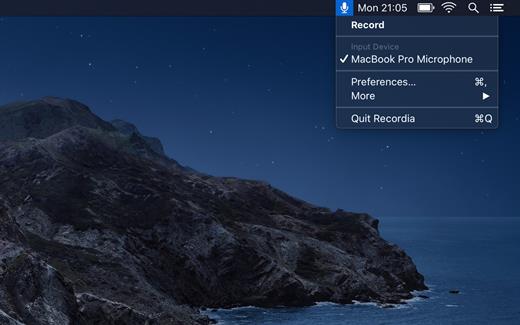
Recordia lets you record audio directly from the menu bar or with a global keyboard shortcut.

This can be useful for recording voice memos, song ideas, meetings, lectures, interviews, phone calls, voice-overs, and more.
Features


  • Record compressed or lossless audio.
  • Customizable keyboard shortcuts to start/stop and pause/resume recording.
  • Change input device.
  • Unlimited recording duration.
  • Set default output directory.
  • Optionally show the recording in Finder when done.
  • Easily copy and share the previous recording.
  • Launch at login preference.
  • Record system audio (See FAQ below).
  • Choose between multiple menu bar icons.
Technical details: It records at 48 kHz to either M4A (AAC, 256 kbps, compressed) or WAV (PCM, 16-bit, uncompressed). The recording is stereo if the input device supports it, otherwise mono.

What’s New

Version 2.6.1:


  • Release notes were unavailable when this listing was updated.
Compatibility

macOS 10.15 or later


Release Name: Recordia 2.6.1
Size: 8 MB
Links: HOMEPAGE – NFO – Torrent Search

Download: UPLOADGiGNiTROFLARERAPiDGATOR

5 Comments
Nov 29

Recordia 2.6.0

Recordia lets you record audio directly from the menu bar or with a global keyboard shortcut.

This can be useful for recording voice memos, song ideas, meetings, lectures, interviews, phone calls, voice-overs, and more.

Features


  • Record compressed or lossless audio.
  • Customizable keyboard shortcuts to start/stop and pause/resume recording.
  • Change input device.
  • Unlimited recording duration.
  • Set default output directory.
  • Optionally show the recording in Finder when done.
  • Easily copy and share the previous recording.
  • Launch at login preference.
  • Record system audio (See FAQ below).
  • Choose between multiple menu bar icons.
Technical details: It records at 48 kHz to either M4A (AAC, 256 kbps, compressed) or WAV (PCM, 16-bit, uncompressed). The recording is stereo if the input device supports it, otherwise mono.

What’s New

Version 2.6.0:


  • Release notes were unavailable when this listing was updated.
Compatibility

macOS 10.15 or later


Release Name: Recordia 2.6.0
Size: 7.9 MB
Links: HOMEPAGE – NFO – Torrent Search

Download: UPLOADGiGNiTROFLARERAPiDGATOR

5 Comments
July 10

Recordia 2.5.0

Recordia lets you record audio directly from the menu bar or with a global keyboard shortcut.

This can be useful for recording voice memos, song ideas, meetings, lectures, interviews, phone calls, voice-overs, and more.

Features


  • Record compressed or lossless audio.
  • Customizable keyboard shortcuts to start/stop and pause/resume recording.
  • Change input device.
  • Unlimited recording duration.
  • Set default output directory.
  • Optionally show the recording in Finder when done.
  • Easily copy and share the previous recording.
  • Launch at login preference.
  • Record system audio (See FAQ below).
  • Choose between multiple menu bar icons.
Technical details: It records at 48 kHz to either M4A (AAC, 256 kbps, compressed) or WAV (PCM, 16-bit, uncompressed). The recording is stereo if the input device supports it, otherwise mono.

What’s New

Version 2.5.0:


  • Added gentle sound effects when starting, pausing, and stopping recording. You must have "Play user interface sound effects" enabled in "System Preferences › Sound".
Compatibility

macOS 10.15 or later

Release Name: Recordia 2.5.0
Size: 7.2 MB
Links: HOMEPAGE – NFO – Torrent Search

Download: UPLOADGiGNiTROFLARERAPiDGATOR

4 Comments