
Please REGISTER or RENEW your account on RAPiDGATOR.net and support us by doing through all RAPiDGATOR working download links on main posts...
May 11

VX Search 18.1.16

Description: VX Search is an automated, rule-based file search solution allowing one to search files by the file type, category, file name, size, location, extension, regular expressions, text and binary patterns, creation, modification and last access dates, EXIF tags, etc. Users are provided with the ability to categorize and filter results, copy, move or delete files, save reports and export results to an SQL database.
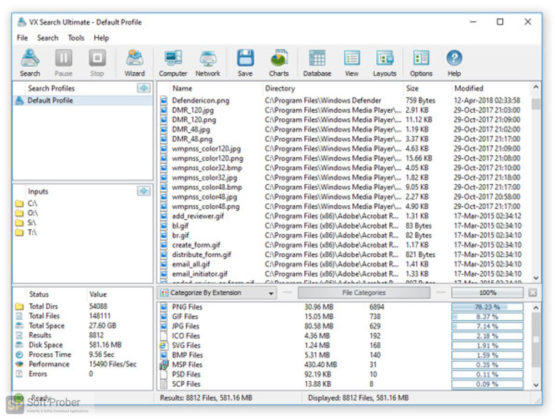
VX Search is an automated, rule-based file search solution allowing one to search files by the file type, category, extension, file name, file size, location, creation, modification and last access dates, regular expressions, user name, file attributes, binary and text patterns, JPEG EXIF tags, etc.

The user is provided with the ability to categorize and filter file search results, perform file management operations, generate various types of pie and bars charts, save reports to a number of standard formats such as HTML, PDF, Excel, text, CSV, XML and export search results to an SQL database.

IT administrators are provided with advanced file search capabilities including the ability to search files in multiple servers and/or NAS storage devices simultaneously, periodic file search operations, automatic report generation, conditional file search actions allowing one to send E-Mail notifications and/or execute custom commands when a file search operation finds a user-specified number of files.

Searching Files in Network Servers and NAS Storage Devices
VX Search allows one to scan the network, discover network servers and NAS storage devices, automatically detect all accessible network shares and search files in hundreds of network servers and NAS storage devices. In addition, the user is provided with the ability to export the list of detected servers and NAS storage devices (including lists of network shares for each server) into HTML, PDF, Excel, text, XML and CSV reports.

In order to search files in one or more servers or NAS storage devices, press the 'Network' button located on the main toolbar and wait while VX Search will scan the network and show a list of detected network servers and NAS storage devices. On the network servers and NAS storage devices dialog, select the required servers and press the 'Search' button.

VX Search will show all network shares hosted on the selected servers and NAS storage devices allowing one to search files and save various types of file search reports and charts. In addition, VX Search provides a large number of advanced file search options allowing one to tune and customize file search operations for user specific needs and hardware configurations.

VX Search Command Line Utility
In addition to the VX Search GUI application, the user is provided with a command line utility, which can be used to execute pre-configured file search operations and integrated into user-custom shell scripts and batch files. The VX Search command line utility may be used to execute file search operations locally or control file search operations in one or more VX Search Servers via the network.

VX Search Server
IT and storage administrators are provided with the server product version, which runs in the background as a service and provides the ability to perform fully-automated, periodic file search operations, generate various types of file search reports, analyze file search results and execute conditional actions based on user-defined rules and policies.

VX Search Server may be controlled using a full-scale client GUI application and the command line utility, which provides the ability to perform file search operations, review results and save reports locally and through the network. Finally, enterprise customers are provided with VX Search Enterprise - a server-based product version allowing one to perform search operations, review results and save reports using a regular web browser locally or through the network.

Batch File Search Operations
VX Search Server and VX Search Enterprise provide the ability to scan the network, detect all network servers and NAS storage devices, execute one or more pre-configured file search commands on hundreds of network servers and NAS storage devices and generate an individual file search report for each network server, NAS storage device or network share.

Depending on the selected configuration, VX Search Server will save in the built-in reports database an individual file search report for each network server, NAS storage device or network share. Once the batch file search operation is completed, the user will be provided with the ability to open saved file search reports, review file search results, generate various types of pie charts and export reports to a number of standard formats including HTML, PDF, text, Excel CSV and XML

Release Name: VX Search 18.1.16
Size: 84.5 MB
Links: HOMEPAGE – NFO – Torrent Search

Download: RAPiDGATOR

5 Comments
Apr 11

VX Search 18.0.12

Description: VX Search is an automated, rule-based file search solution allowing one to search files by the file type, category, file name, size, location, extension, regular expressions, text and binary patterns, creation, modification and last access dates, EXIF tags, etc. Users are provided with the ability to categorize and filter results, copy, move or delete files, save reports and export results to an SQL database.

VX Search is an automated, rule-based file search solution allowing one to search files by the file type, category, extension, file name, file size, location, creation, modification and last access dates, regular expressions, user name, file attributes, binary and text patterns, JPEG EXIF tags, etc.

The user is provided with the ability to categorize and filter file search results, perform file management operations, generate various types of pie and bars charts, save reports to a number of standard formats such as HTML, PDF, Excel, text, CSV, XML and export search results to an SQL database.

IT administrators are provided with advanced file search capabilities including the ability to search files in multiple servers and/or NAS storage devices simultaneously, periodic file search operations, automatic report generation, conditional file search actions allowing one to send E-Mail notifications and/or execute custom commands when a file search operation finds a user-specified number of files.

Searching Files in Network Servers and NAS Storage Devices
VX Search allows one to scan the network, discover network servers and NAS storage devices, automatically detect all accessible network shares and search files in hundreds of network servers and NAS storage devices. In addition, the user is provided with the ability to export the list of detected servers and NAS storage devices (including lists of network shares for each server) into HTML, PDF, Excel, text, XML and CSV reports.

In order to search files in one or more servers or NAS storage devices, press the 'Network' button located on the main toolbar and wait while VX Search will scan the network and show a list of detected network servers and NAS storage devices. On the network servers and NAS storage devices dialog, select the required servers and press the 'Search' button.

VX Search will show all network shares hosted on the selected servers and NAS storage devices allowing one to search files and save various types of file search reports and charts. In addition, VX Search provides a large number of advanced file search options allowing one to tune and customize file search operations for user specific needs and hardware configurations.

VX Search Command Line Utility
In addition to the VX Search GUI application, the user is provided with a command line utility, which can be used to execute pre-configured file search operations and integrated into user-custom shell scripts and batch files. The VX Search command line utility may be used to execute file search operations locally or control file search operations in one or more VX Search Servers via the network.

VX Search Server
IT and storage administrators are provided with the server product version, which runs in the background as a service and provides the ability to perform fully-automated, periodic file search operations, generate various types of file search reports, analyze file search results and execute conditional actions based on user-defined rules and policies.

VX Search Server may be controlled using a full-scale client GUI application and the command line utility, which provides the ability to perform file search operations, review results and save reports locally and through the network. Finally, enterprise customers are provided with VX Search Enterprise - a server-based product version allowing one to perform search operations, review results and save reports using a regular web browser locally or through the network.

Batch File Search Operations
VX Search Server and VX Search Enterprise provide the ability to scan the network, detect all network servers and NAS storage devices, execute one or more pre-configured file search commands on hundreds of network servers and NAS storage devices and generate an individual file search report for each network server, NAS storage device or network share.

Depending on the selected configuration, VX Search Server will save in the built-in reports database an individual file search report for each network server, NAS storage device or network share. Once the batch file search operation is completed, the user will be provided with the ability to open saved file search reports, review file search results, generate various types of pie charts and export reports to a number of standard formats including HTML, PDF, text, Excel CSV and XML

Release Name: VX Search 18.0.12
Size: 84.5 MB
Links: HOMEPAGE – NFO – Torrent Search

Download: RAPiDGATOR

6 Comments
Mar 11

VX Search 17.9.14

Description: VX Search is an automated, rule-based file search solution allowing one to search files by the file type, category, file name, size, location, extension, regular expressions, text and binary patterns, creation, modification and last access dates, EXIF tags, etc. Users are provided with the ability to categorize and filter results, copy, move or delete files, save reports and export results to an SQL database.

VX Search is an automated, rule-based file search solution allowing one to search files by the file type, category, extension, file name, file size, location, creation, modification and last access dates, regular expressions, user name, file attributes, binary and text patterns, JPEG EXIF tags, etc.

The user is provided with the ability to categorize and filter file search results, perform file management operations, generate various types of pie and bars charts, save reports to a number of standard formats such as HTML, PDF, Excel, text, CSV, XML and export search results to an SQL database.

IT administrators are provided with advanced file search capabilities including the ability to search files in multiple servers and/or NAS storage devices simultaneously, periodic file search operations, automatic report generation, conditional file search actions allowing one to send E-Mail notifications and/or execute custom commands when a file search operation finds a user-specified number of files.

Searching Files in Network Servers and NAS Storage Devices
VX Search allows one to scan the network, discover network servers and NAS storage devices, automatically detect all accessible network shares and search files in hundreds of network servers and NAS storage devices. In addition, the user is provided with the ability to export the list of detected servers and NAS storage devices (including lists of network shares for each server) into HTML, PDF, Excel, text, XML and CSV reports.

In order to search files in one or more servers or NAS storage devices, press the 'Network' button located on the main toolbar and wait while VX Search will scan the network and show a list of detected network servers and NAS storage devices. On the network servers and NAS storage devices dialog, select the required servers and press the 'Search' button.

VX Search will show all network shares hosted on the selected servers and NAS storage devices allowing one to search files and save various types of file search reports and charts. In addition, VX Search provides a large number of advanced file search options allowing one to tune and customize file search operations for user specific needs and hardware configurations.

VX Search Command Line Utility
In addition to the VX Search GUI application, the user is provided with a command line utility, which can be used to execute pre-configured file search operations and integrated into user-custom shell scripts and batch files. The VX Search command line utility may be used to execute file search operations locally or control file search operations in one or more VX Search Servers via the network.

VX Search Server
IT and storage administrators are provided with the server product version, which runs in the background as a service and provides the ability to perform fully-automated, periodic file search operations, generate various types of file search reports, analyze file search results and execute conditional actions based on user-defined rules and policies.

VX Search Server may be controlled using a full-scale client GUI application and the command line utility, which provides the ability to perform file search operations, review results and save reports locally and through the network. Finally, enterprise customers are provided with VX Search Enterprise - a server-based product version allowing one to perform search operations, review results and save reports using a regular web browser locally or through the network.

Batch File Search Operations
VX Search Server and VX Search Enterprise provide the ability to scan the network, detect all network servers and NAS storage devices, execute one or more pre-configured file search commands on hundreds of network servers and NAS storage devices and generate an individual file search report for each network server, NAS storage device or network share.

Depending on the selected configuration, VX Search Server will save in the built-in reports database an individual file search report for each network server, NAS storage device or network share. Once the batch file search operation is completed, the user will be provided with the ability to open saved file search reports, review file search results, generate various types of pie charts and export reports to a number of standard formats including HTML, PDF, text, Excel CSV and XML

Release Name: VX Search 17.9.14
Size: 83.8 MB
Links: HOMEPAGE – NFO – Torrent Search

Download: RAPiDGATOR

9 Comments
Feb 10

VX Search 17.8.12

Description: VX Search is an automated, rule-based file search solution allowing one to search files by the file type, category, file name, size, location, extension, regular expressions, text and binary patterns, creation, modification and last access dates, EXIF tags, etc. Users are provided with the ability to categorize and filter results, copy, move or delete files, save reports and export results to an SQL database.

VX Search is an automated, rule-based file search solution allowing one to search files by the file type, category, extension, file name, file size, location, creation, modification and last access dates, regular expressions, user name, file attributes, binary and text patterns, JPEG EXIF tags, etc.

The user is provided with the ability to categorize and filter file search results, perform file management operations, generate various types of pie and bars charts, save reports to a number of standard formats such as HTML, PDF, Excel, text, CSV, XML and export search results to an SQL database.

IT administrators are provided with advanced file search capabilities including the ability to search files in multiple servers and/or NAS storage devices simultaneously, periodic file search operations, automatic report generation, conditional file search actions allowing one to send E-Mail notifications and/or execute custom commands when a file search operation finds a user-specified number of files.

Searching Files in Network Servers and NAS Storage Devices
VX Search allows one to scan the network, discover network servers and NAS storage devices, automatically detect all accessible network shares and search files in hundreds of network servers and NAS storage devices. In addition, the user is provided with the ability to export the list of detected servers and NAS storage devices (including lists of network shares for each server) into HTML, PDF, Excel, text, XML and CSV reports.

In order to search files in one or more servers or NAS storage devices, press the 'Network' button located on the main toolbar and wait while VX Search will scan the network and show a list of detected network servers and NAS storage devices. On the network servers and NAS storage devices dialog, select the required servers and press the 'Search' button.

VX Search will show all network shares hosted on the selected servers and NAS storage devices allowing one to search files and save various types of file search reports and charts. In addition, VX Search provides a large number of advanced file search options allowing one to tune and customize file search operations for user specific needs and hardware configurations.

VX Search Command Line Utility
In addition to the VX Search GUI application, the user is provided with a command line utility, which can be used to execute pre-configured file search operations and integrated into user-custom shell scripts and batch files. The VX Search command line utility may be used to execute file search operations locally or control file search operations in one or more VX Search Servers via the network.

VX Search Server
IT and storage administrators are provided with the server product version, which runs in the background as a service and provides the ability to perform fully-automated, periodic file search operations, generate various types of file search reports, analyze file search results and execute conditional actions based on user-defined rules and policies.

VX Search Server may be controlled using a full-scale client GUI application and the command line utility, which provides the ability to perform file search operations, review results and save reports locally and through the network. Finally, enterprise customers are provided with VX Search Enterprise - a server-based product version allowing one to perform search operations, review results and save reports using a regular web browser locally or through the network.

Batch File Search Operations
VX Search Server and VX Search Enterprise provide the ability to scan the network, detect all network servers and NAS storage devices, execute one or more pre-configured file search commands on hundreds of network servers and NAS storage devices and generate an individual file search report for each network server, NAS storage device or network share.

Depending on the selected configuration, VX Search Server will save in the built-in reports database an individual file search report for each network server, NAS storage device or network share. Once the batch file search operation is completed, the user will be provided with the ability to open saved file search reports, review file search results, generate various types of pie charts and export reports to a number of standard formats including HTML, PDF, text, Excel CSV and XML

Release Name: VX Search 17.8.12
Size: 83.7 MB
Links: HOMEPAGE – NFO – Torrent Search

Download: RAPiDGATOR

10 Comments
Dec 23

VX Search 17.6.18

Description: VX Search is an automated, rule-based file search solution allowing one to search files by the file type, category, file name, size, location, extension, regular expressions, text and binary patterns, creation, modification and last access dates, EXIF tags, etc. Users are provided with the ability to categorize and filter results, copy, move or delete files, save reports and export results to an SQL database.

VX Search is an automated, rule-based file search solution allowing one to search files by the file type, category, extension, file name, file size, location, creation, modification and last access dates, regular expressions, user name, file attributes, binary and text patterns, JPEG EXIF tags, etc.

The user is provided with the ability to categorize and filter file search results, perform file management operations, generate various types of pie and bars charts, save reports to a number of standard formats such as HTML, PDF, Excel, text, CSV, XML and export search results to an SQL database.

IT administrators are provided with advanced file search capabilities including the ability to search files in multiple servers and/or NAS storage devices simultaneously, periodic file search operations, automatic report generation, conditional file search actions allowing one to send E-Mail notifications and/or execute custom commands when a file search operation finds a user-specified number of files.

Searching Files in Network Servers and NAS Storage Devices
VX Search allows one to scan the network, discover network servers and NAS storage devices, automatically detect all accessible network shares and search files in hundreds of network servers and NAS storage devices. In addition, the user is provided with the ability to export the list of detected servers and NAS storage devices (including lists of network shares for each server) into HTML, PDF, Excel, text, XML and CSV reports.

In order to search files in one or more servers or NAS storage devices, press the 'Network' button located on the main toolbar and wait while VX Search will scan the network and show a list of detected network servers and NAS storage devices. On the network servers and NAS storage devices dialog, select the required servers and press the 'Search' button.

VX Search will show all network shares hosted on the selected servers and NAS storage devices allowing one to search files and save various types of file search reports and charts. In addition, VX Search provides a large number of advanced file search options allowing one to tune and customize file search operations for user specific needs and hardware configurations.

VX Search Command Line Utility
In addition to the VX Search GUI application, the user is provided with a command line utility, which can be used to execute pre-configured file search operations and integrated into user-custom shell scripts and batch files. The VX Search command line utility may be used to execute file search operations locally or control file search operations in one or more VX Search Servers via the network.

VX Search Server
IT and storage administrators are provided with the server product version, which runs in the background as a service and provides the ability to perform fully-automated, periodic file search operations, generate various types of file search reports, analyze file search results and execute conditional actions based on user-defined rules and policies.

VX Search Server may be controlled using a full-scale client GUI application and the command line utility, which provides the ability to perform file search operations, review results and save reports locally and through the network. Finally, enterprise customers are provided with VX Search Enterprise - a server-based product version allowing one to perform search operations, review results and save reports using a regular web browser locally or through the network.

Batch File Search Operations
VX Search Server and VX Search Enterprise provide the ability to scan the network, detect all network servers and NAS storage devices, execute one or more pre-configured file search commands on hundreds of network servers and NAS storage devices and generate an individual file search report for each network server, NAS storage device or network share.

Depending on the selected configuration, VX Search Server will save in the built-in reports database an individual file search report for each network server, NAS storage device or network share. Once the batch file search operation is completed, the user will be provided with the ability to open saved file search reports, review file search results, generate various types of pie charts and export reports to a number of standard formats including HTML, PDF, text, Excel CSV and XML.

Release Name: VX Search 17.6.18
Size: 83.7 MB
Links: HOMEPAGE – NFO – Torrent Search

Download: RAPiDGATOR

10 Comments
Oct 24

VX Search 17.4.16

VX Search is an automated, rule-based file search solution allowing one to search files by the file type, category, file name, size, location, extension, regular expressions, text and binary patterns, creation, modification and last access dates, EXIF tags, etc. Users are provided with the ability to categorize and filter results, copy, move or delete files, save reports and export results to an SQL database.

VX Search is an automated, rule-based file search solution capable of searching files by the file type, category, extension, file name, regular expressions, location, size, creation, modification and last access dates, user, file attributes, JPEG EXIF tags, etc. In addition, the user is provided with the ability to categorize and filter file search results, copy, move or delete search results, generate various types of pie and bars charts and save reports to a number of standard formats such as HTML, text, Excel CSV and XML.

Power computer users and IT administrators are provided with advanced search capabilities such as the ability to search files in multiple servers and/or NAS storage devices simultaneously, automatic report generation, SQL database integration and conditional notifications allowing one to send E-Mail notifications when a search operation finds a user-specified number of files.

Frequently used file search operations may be pre-configured, saved as user-defined search profiles and performed fully automatically using the VX Search GUI application or direct desktop shortcuts allowing one to execute search commands in a single mouse click. Finally, VX Search Ultimate provides a command line utility capable of executing user-defined search commands periodically using the Windows built-in task scheduler and enabling periodic generation of search reports and automatic E-Mail notifications.

Release Name: VX Search 17.4.16
Size: 82.9 MB
Links: HOMEPAGE – NFO – Torrent Search

Download: RAPiDGATOR

8 Comments
Sept 29

VX Search 17.3.12

VX Search is an automated, rule-based file search solution allowing one to search files by the file type, category, file name, size, location, extension, regular expressions, text and binary patterns, creation, modification and last access dates, EXIF tags, etc. Users are provided with the ability to categorize and filter results, copy, move or delete files, save reports and export results to an SQL database.

VX Search is an automated, rule-based file search solution capable of searching files by the file type, category, extension, file name, regular expressions, location, size, creation, modification and last access dates, user, file attributes, JPEG EXIF tags, etc. In addition, the user is provided with the ability to categorize and filter file search results, copy, move or delete search results, generate various types of pie and bars charts and save reports to a number of standard formats such as HTML, text, Excel CSV and XML.

Power computer users and IT administrators are provided with advanced search capabilities such as the ability to search files in multiple servers and/or NAS storage devices simultaneously, automatic report generation, SQL database integration and conditional notifications allowing one to send E-Mail notifications when a search operation finds a user-specified number of files.

Frequently used file search operations may be pre-configured, saved as user-defined search profiles and performed fully automatically using the VX Search GUI application or direct desktop shortcuts allowing one to execute search commands in a single mouse click. Finally, VX Search Ultimate provides a command line utility capable of executing user-defined search commands periodically using the Windows built-in task scheduler and enabling periodic generation of search reports and automatic E-Mail notifications.

Release Name: VX Search 17.3.12
Size: 82.8 MB
Links: HOMEPAGE – NFO – Torrent Search

Download: RAPiDGATOR

8 Comments
May 28

VX Search 16.0.32

VX Search is an automated, rule-based file search solution allowing one to search files by the file type, category, file name, size, location, extension, regular expressions, text and binary patterns, creation, modification and last access dates, EXIF tags, etc. Users are provided with the ability to categorize and filter results, copy, move or delete files, save reports and export results to an SQL database.

VX Search is an automated, rule-based file search solution capable of searching files by the file type, category, extension, file name, regular expressions, location, size, creation, modification and last access dates, user, file attributes, JPEG EXIF tags, etc. In addition, the user is provided with the ability to categorize and filter file search results, copy, move or delete search results, generate various types of pie and bars charts and save reports to a number of standard formats such as HTML, text, Excel CSV and XML.

Power computer users and IT administrators are provided with advanced search capabilities such as the ability to search files in multiple servers and/or NAS storage devices simultaneously, automatic report generation, SQL database integration and conditional notifications allowing one to send E-Mail notifications when a search operation finds a user-specified number of files.

Frequently used file search operations may be pre-configured, saved as user-defined search profiles and performed fully automatically using the VX Search GUI application or direct desktop shortcuts allowing one to execute search commands in a single mouse click. Finally, VX Search Ultimate provides a command line utility capable of executing user-defined search commands periodically using the Windows built-in task scheduler and enabling periodic generation of search reports and automatic E-Mail notifications.

Release Name: VX Search 16.0.32
Size: 40.3 MB
Links: HOMEPAGE – NFO – Torrent Search

Download: FiKPERNiTROFLARERAPiDGATOR

3 Comments
Feb 27

VX Search 15.9.14

VX Search is an automated, rule-based file search solution allowing one to search files by the file type, category, file name, size, location, extension, regular expressions, text and binary patterns, creation, modification and last access dates, EXIF tags, etc. Users are provided with the ability to categorize and filter results, copy, move or delete files, save reports and export results to an SQL database.

VX Search is an automated, rule-based file search solution capable of searching files by the file type, category, extension, file name, regular expressions, location, size, creation, modification and last access dates, user, file attributes, JPEG EXIF tags, etc. In addition, the user is provided with the ability to categorize and filter file search results, copy, move or delete search results, generate various types of pie and bars charts and save reports to a number of standard formats such as HTML, text, Excel CSV and XML.

Power computer users and IT administrators are provided with advanced search capabilities such as the ability to search files in multiple servers and/or NAS storage devices simultaneously, automatic report generation, SQL database integration and conditional notifications allowing one to send E-Mail notifications when a search operation finds a user-specified number of files.

Frequently used file search operations may be pre-configured, saved as user-defined search profiles and performed fully automatically using the VX Search GUI application or direct desktop shortcuts allowing one to execute search commands in a single mouse click. Finally, VX Search Ultimate provides a command line utility capable of executing user-defined search commands periodically using the Windows built-in task scheduler and enabling periodic generation of search reports and automatic E-Mail notifications.

Release Name: VX Search 15.9.14
Size: 40.1 MB
Links: HOMEPAGE – NFO – Torrent Search

Download: FiKPERNiTROFLARERAPiDGATOR

5 Comments
Jan 25

VX Search 15.8.16

VX Search is an automated, rule-based file search solution allowing one to search files by the file type, category, file name, size, location, extension, regular expressions, text and binary patterns, creation, modification and last access dates, EXIF tags, etc. Users are provided with the ability to categorize and filter results, copy, move or delete files, save reports and export results to an SQL database.

VX Search is an automated, rule-based file search solution capable of searching files by the file type, category, extension, file name, regular expressions, location, size, creation, modification and last access dates, user, file attributes, JPEG EXIF tags, etc. In addition, the user is provided with the ability to categorize and filter file search results, copy, move or delete search results, generate various types of pie and bars charts and save reports to a number of standard formats such as HTML, text, Excel CSV and XML.

Power computer users and IT administrators are provided with advanced search capabilities such as the ability to search files in multiple servers and/or NAS storage devices simultaneously, automatic report generation, SQL database integration and conditional notifications allowing one to send E-Mail notifications when a search operation finds a user-specified number of files.

Frequently used file search operations may be pre-configured, saved as user-defined search profiles and performed fully automatically using the VX Search GUI application or direct desktop shortcuts allowing one to execute search commands in a single mouse click. Finally, VX Search Ultimate provides a command line utility capable of executing user-defined search commands periodically using the Windows built-in task scheduler and enabling periodic generation of search reports and automatic E-Mail notifications.

Release Name: VX Search 15.8.16
Size: 40.1 MB
Links: HOMEPAGE – NFO – Torrent Search

Download: FiKPERNiTROFLARERAPiDGATOR

7 Comments