Please REGISTER or RENEW your account on RAPiDGATOR.net and support us by doing through all RAPiDGATOR working download links on main posts...
July 21

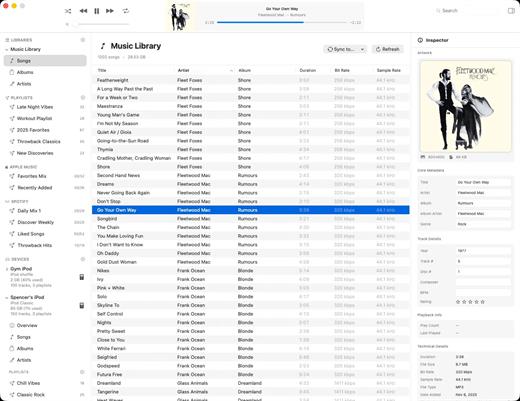
PodCenter 1.2.3

PodCenter is a native Mac app designed to help you manage, organize, and sync your music library to your iPod or other portable music players—without needing iTunes.
Key Features


  • No iTunes Needed: Syncs your music library directly on modern macOS with full control.
  • Automatic Format Conversion: Automatically converts unsupported file formats (like FLAC and OGG) into compatible audio files while transferring.
  • Metadata & Artwork Editor: Fix song titles, artist names, album details, and artwork individually or in bulk.
  • Playlist Management: Easily build and manage custom playlists that sync reliably every time.
  • Full Sync Transparency: Preview exactly which songs will be transferred, converted, or skipped before you start syncing.
What’s New

Version 1.2.3:


  • Release notes were unavailable when this listing was updated.
Compatibility

macOS 15 Sequoia or later


Release Name: PodCenter 1.2.3
Size: 52.7 MB
Links: HOMEPAGE – NFO – Torrent Search

Download: RAPiDGATOR

4 Comments
July 21

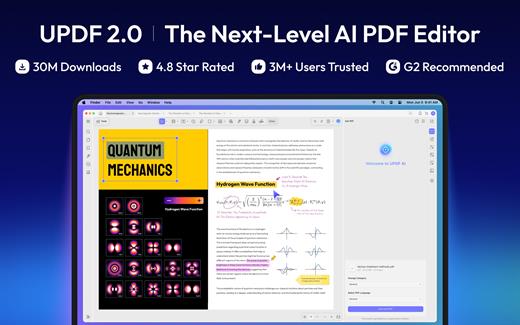
UPDF 2.5.5

UPDF is an all-in-one AI-integrated PDF editor software that you can use to AI chat with PDF, edit, annotate, convert PDFs, and more. One UPDF license allows you to use it across all platforms, including macOS/iOS/iPadOS (universal purchase).

FEATURES

AI Assistant


  • Powered by GPT-5 and Full DeepSeek (R1).
  • AI chat with your PDF to summarize, translate full PDFs without losing format, and get answers related to the PDFs.
  • Convert PDFs to mind maps.
  • Chat with images and ask any questions about the images.
  • Ask any prompts and get answers from AI.
Edit PDFs

  • Edit text in PDF to change the properties of the text, such as the color, font, size, etc.
  • Edit images in PDF to change the size, crop, rotate, extract, replace, delete, etc.
  • Add or remove links to the web or a page.
Annotate PDFs

  • Highlight, underline, strikethrough, or squiggly the text in PDFs.
  • Add sticky notes, text boxes, text comments, text callouts, or shapes to PDFs.
  • Free-hand drawing within a PDF.
  • Add stamps, stickers, and signatures to PDFs.
  • Measure PDF.
UPDF Cloud

  • Sync files across different devices and platforms.
OCR (This feature is NOT AVAILABLE on the Mac App Store. To use OCR, you can download from https://updf.com.)

  • Convert scanned PDFs or images into searchable and editable PDFs or vice versa.
  • Can recognize text in 38 languages.
Convert PDFs

  • Convert PDFs to: DOCX, XLSX, and PPTX.
  • Convert PDFs to image: PNG, JPEG, BMP, TIFF, and GIF.
  • Convert PDFs to TXT, RTF, CSV, HTML, and XML.
Organize PDF Pages

  • Insert, replace, extract, split, rotate, remove, and reorder the pages in PDFs
  • Crop or extend page margins.
  • Split a long single page into multiple pages.
Protect PDFs

  • Add an open or permission password to protect PDFs from opening, copying, editing, and printing.
Prepare Form

  • Create fillable PDF forms by adding interactive form fields.
  • Fill PDF forms and add an e-signature.
  • Add digital signatures to prove the sender’s identity.
Batch Process PDFs

  • Support batch process to convert, merge, OCR, compress, print, create, insert, and encrypt PDFS
  • Support batch process to add or remove backgrounds, watermarks, header & footer, and Bates numbering in multiple PDFs
  • Batch Remove text markup, measurements, stamps, form fields, and signatures.
Read and Print PDFs

  • View PDF single page or two-page view/scrolling.
  • Text-to-speech.
  • Search and find text.
  • Slideshow PDF.
  • Support light and dark mode.
  • Add and manage bookmarks.
  • Print PDFs.
Create PDFs

  • Create a blank PDF with different backgrounds or from Word/Excel/PPT/image/CAJ/Paperwork/selection capture/window capture/screen capture/clipboard/scanner.
MORE

  • Share PDF via link, QR code, or email.
  • Compare PDFs.
  • Redact sensitive information in PDF.
  • Add, edit, or remove watermarks from PDFs.
  • Edit the background for PDFs.
  • Edit the header and footer from PDFs.
  • Save as PDF/A.
  • Flatten PDFs.

Note: AI features won’t work

What’s New

Version 2.5.5:


  • Release notes were unavailable when this listing was updated.
Compatibility

macOS 11.0 or later.


Release Name: UPDF 2.5.5
Size: 129.2 MB
Links: HOMEPAGE – NFO – Torrent Search

Download: RAPiDGATOR
6 Comments
July 21

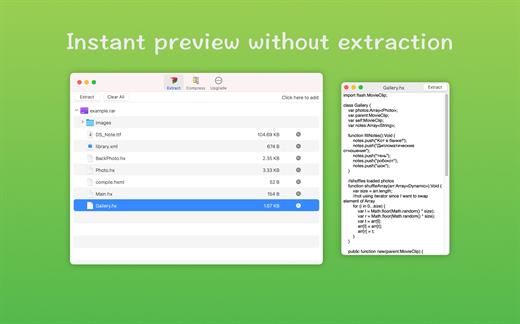
RAR Extractor – Unzip 16.1

Zip,rar,7z,tar files opener. RAR Extractor can extract compressed files in all most formats(over 50 formats).

「Support RAR, ZIP, 7z, pak, pkg, apk, tbz, sti, tar, xar, lha, lzh, hqx, bin, bz2, bzip2, bz, xz, iso, cid, nrg, mdf, taz,l zma, xip, ace, arj, lbr, lqr, cab, rpm, cpt, sea, exe, msi, cpio, lzx, jar, swf, pdf, nsa, dcs, spk… 」
「Compress files to password-protected ZIP & 7Z archives 」
「Quicklook files in archive before extraction」


「Features」


  • Extract extract compressed files in all most formats(over 50 formats).
  • Unzip, unrar encrypted archives.
  • Easy view an archive’s file list.
  • Quicklook files in archive without extracting.
  • Unarchive & unrar the selected individual file or folder in the archive.
  • Double click to display or extract directly after setting this APP as default archiver.
  • Drag archives to the dock icon to extract or display directly.
  • Batch decompress many archives
  • Create password-protected ZIP & 7Z archives.
  • AES256 encryption algorithm to create ZIP & 7Z archives.
What’s New

Version 16.1:


  • Release notes were unavailable when this listing was updated.
Compatibility

macOS 10.13 or later


Release Name: RAR Extractor – Unzip 16.1
Size: 21.5 MB
Links: HOMEPAGE – NFO – Torrent Search

Download: RAPiDGATOR

4 Comments
July 21

OCRKit Pro 26.5

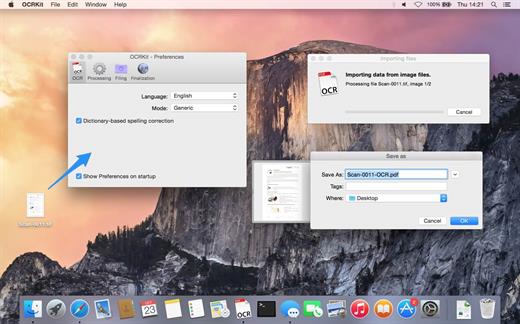
OCRKit uses OCR (optical character recognition) technology to recognize the text in the graphic, which is particularly useful for PDFs received via e-mail, created by DTP, office applications, or with a scanner or copier. Create searchable PDFs, RTF, HTML, or Unicode plain text simply by dragging a document on the OCRKit application or Dock icon.

OCR Engine


  • Text recognition accuracy
  • Instant content search ability
  • PDF compression
  • High-speed conversion
  • Stability and performance

The OCR engine recognizes the following languages: Bulgarian, Croatian, Czech, Danish, Dutch, English, Estonian, Finnish, French, German, Hungarian, Italian, Latvian, Lithuanian, Polish, Portuguese, Rumanian, Russian, Serbian, Slovenian, Spanish, Swedish, Turkish, Ukrainian, and Norwegian.

Pro Features

  • Automatic Language Detection – You often find yourself switching OCR settings between documents in another languages? OCRKit Pro comes with an new “Automatic” languages choice. It transparently detects the langauge and switches to the apropriate alphabet and dictionary for each page of the document independently.
  • Higher Multi-Threading Performance – OCRKit Pro further optimizes the use of the many cores available today. Allowing the Pro version to archive even higher performance compared to the already blazing fast standard version of OCRKit.
  • Imprinter – The Imprinter allows OCRKit Pro to print text onto the page’s image. For example the scanned date, or watermarks such as “APPROVED”, “VOID”, “PRELIMINARY”, “CONFIDENTIAL” or anything else you may need.
What’s New

Version 26.5:


  • Release notes were unavailable when this listing was updated.
Compatibility

macOS 10.9 or later


Release Name: OCRKit Pro 26.5
Size: 19.6 MB
Links: HOMEPAGE – NFO – Torrent Search

Download: RAPiDGATOR
4 Comments
July 21

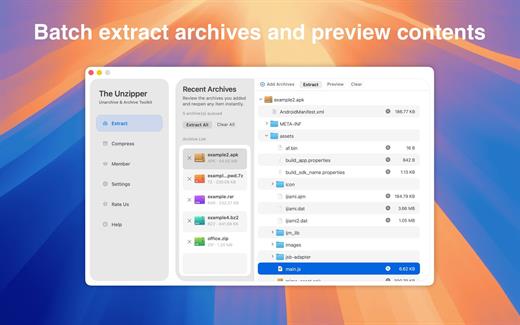
The Unzipper – Extract RAR ZIP 9.7

Zip,rar,7z,tar files opener. RAR Extractor can extract compressed files in all most formats(over 50 formats).

A powerful compression and extraction tool compatible with almost all archive formats:.rar, .zip, .zipx,
7z, pkg, .bz, exe, .gzip, tgz, .sit, .tboz, .tar, xar, jar, .swf, -pdf,.gz, xip, .dms, pak, .apk, .iso and more.n

–Main Features-


  • Built-in archive preview function
  • Extract selected files directly from archives
  • Fast archive decompression
  • Support extracting password-protected archives
  • Create encrypted compressed files
  • Double-click to extract archives
  • Drag and drop for quick extraction
What’s New

Version 9.7:


  • Release notes were unavailable when this listing was updated.
Compatibility

macOS 11.5 or later


Release Name: The Unzipper – Extract RAR ZIP 9.7
Size: 16.9 MB
Links: HOMEPAGE – NFO – Torrent Search

Download: RAPiDGATOR
4 Comments
July 21

Numi 3.34

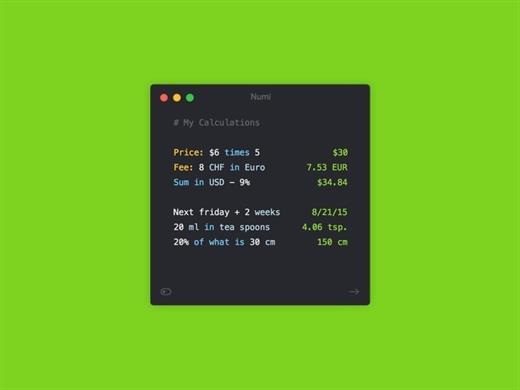
Numi is a calculator that magically combines calculations with text, and allows you to freely share your computations.


  • Numi combines text editor and calculator
  • Support plain English. For example, ‘5 cm plus 1 meter’
  • Unit converter: Numi supports currency, length, area, volume, time, temperature, and data size. It automatically convert units if it’s needed.
  • Configurable hotkey
  • Menubar and Dock modes
What’s New

Version 3.34:


  • Release notes were unavailable when this listing was updated.
Compatibility

macOS 10.13 or later


Release Name: Numi 3.34
Size: 16.3 MB
Links: HOMEPAGE – NFO – Torrent Search

Download: RAPiDGATOR
4 Comments
July 21

Typora 1.14.6

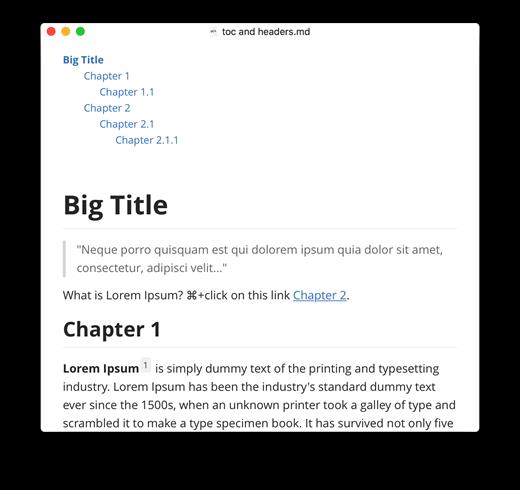
Typora gives you a seamless experience as both a reader and a writer. It removes the preview window, mode switcher, syntax symbols of markdown source code, and all other unnecessary distractions, replacing them with a real-time preview to help you concentrate on the content itself.

Features:


  • Markdown support including tables, code fences with syntax highlight, LaTeX, table of contents
  • Cross-platform
  • The real-time preview and WYSIWYG features
  • Beautiful interface and custom CSS theme support
  • Easy export
What’s New

Version 1.14.6:


  • Release notes were unavailable when this listing was updated.
Compatibility

macOS 10.13.0 or later, 64-bit processor


Release Name: Typora 1.14.6
Size: 19.1 MB
Links: HOMEPAGE – NFO – Torrent Search

Download: RAPiDGATOR

5 Comments
July 21

Nova 14.0

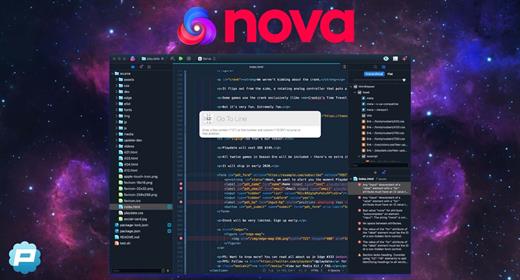
Nova is hyper-fast and flexible code editor with all the features you want: smart autocomplete, multiple cursors, a Minimap, editor overscroll, tag pairs and brackets, and way, way more.

Features:


  • The Editor. It all starts with our first-class text-editor. It’s new, hyper-fast, and flexible, with all the features you want: smart autocomplete, multiple cursors, a Minimap, editor overscroll, tag pairs and brackets, and way, way more.
  • It’s beautiful. And clean. And fun. You can make Nova look exactly the way you want, while still feeling Mac-like. Bright, dark, cyberpunk, it’s all you. Plus, themes are CSS-like and easy to write. Nova can even automatically change your theme when your Mac switches from light to dark mode.
  • Nova doesn’t just help you code. It helps your code run. You can easily create build and run tasks for your projects. We didn’t have them in Coda, but boy do we have them now. They’re custom scripts that can be triggered at any time by toolbar buttons or keyboard shortcuts.
  • Now, this is important. Editing text is just part of what Nova does. We’ve bundled in extremely useful tools to help you get your work done quickly and efficiently. They’re all fast and native too, of course.
  • Nova has a robust extensions API. A Nova extension can do lots of things, like add support for new languages, extend the sidebar, draw beautiful new themes and syntax colors, validate different code, and much more.
  • People have strong editor opinions. And we’re here to help. Nova has a whole host of settings. We have easily customizable key bindings. We have custom, quickly-switchable workspace layouts. And we have loads of editor tweaks, from matching brackets to overscroll.
What’s New

Version 14.0:


  • Release notes were unavailable when this listing was updated.
Compatibility

macOS 11.6 or later


Release Name: Nova 14.0
Size: 68.8 MB
Links: HOMEPAGE – NFO – Torrent Search

Download: RAPiDGATOR
5 Comments
July 21

Looq 1.6.2

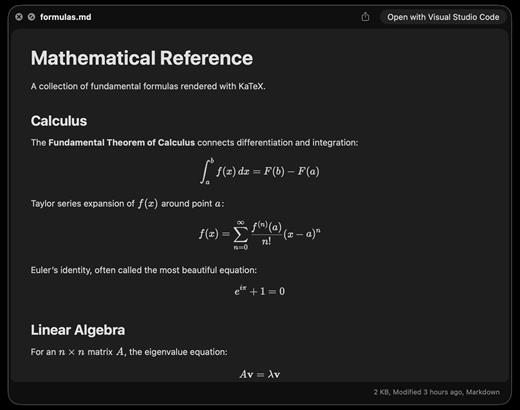
A better look at your files. Preview Markdown with KaTeX and Mermaid, highlight 190+ languages, view CSV and SQLite tables, browse archives and folders. All from Quick Look.
macOS 14 (Sonoma) or later

Markdown
Full GFM rendering with rich formatting support.


  • Live rendering on file save
  • KaTeX math (inline and block)
  • BeautifulMermaid diagrams
  • Syntax-highlighted code blocks
  • GitHub Alerts and emoji shortcodes
  • Auto table of contents sidebar
  • Remote image caching
  • Scroll position memory

Source Code
Syntax highlighting for 190+ languages.


  • Progressive rendering
  • Auto-format JSON, CSS, XML, SVG, plist
  • Configurable line numbers
  • Custom fonts, size, and weight
  • Tab width and word wrap
  • Independent light and dark themes
  • Shebang detection

Data Files
Native table views for structured data.


  • Resizable CSV and TSV columns
  • Alternating row colors
  • SQLite multi-table preview
  • Column type and constraint tooltips
  • Color-coded diff/patch
  • Multi-file tab switching
  • Large file truncation

Archives and Folders
Browse compressed files and directories.


  • ZIP and TAR directory tree
  • Pure Swift binary parsing
  • File size, date, and type columns
  • Sortable column headers
  • Folder preview with Spotlight metadata
  • Configurable display columns
  • Finder tag support
What’s New

Version 1.6.2:


  • Release notes were unavailable when this listing was updated.
Compatibility

macOS 14 (Sonoma) or later


Release Name: Looq 1.6.2
Size: 17.4 MB
Links: HOMEPAGE – NFO – Torrent Search

Download: RAPiDGATOR

6 Comments
July 21

OCRKit Enterprise 26.5

OCRKit uses OCR (optical character recognition) technology to recognize the text in the graphic, which is particularly useful for PDFs received via e-mail, created by DTP, office applications, or with a scanner or copier. Create searchable PDFs, RTF, HTML, or Unicode plain text simply by dragging a document on the OCRKit application or Dock icon.

OCR Engine


  • Text recognition accuracy
  • Instant content search ability
  • PDF compression
  • High-speed conversion
  • Stability and performance

The OCR engine recognizes the following languages: Bulgarian, Croatian, Czech, Danish, Dutch, English, Estonian, Finnish, French, German, Hungarian, Italian, Latvian, Lithuanian, Polish, Portuguese, Rumanian, Russian, Serbian, Slovenian, Spanish, Swedish, Turkish, Ukrainian, and Norwegian.

Pro Features

  • Automatic Language Detection – You often find yourself switching OCR settings between documents in another languages? OCRKit Pro comes with an new “Automatic” languages choice. It transparently detects the langauge and switches to the apropriate alphabet and dictionary for each page of the document independently.
  • Higher Multi-Threading Performance – OCRKit Pro further optimizes the use of the many cores available today. Allowing the Pro version to archive even higher performance compared to the already blazing fast standard version of OCRKit.
  • Imprinter – The Imprinter allows OCRKit Pro to print text onto the page’s image. For example the scanned date, or watermarks such as “APPROVED”, “VOID”, “PRELIMINARY”, “CONFIDENTIAL” or anything else you may need.
What’s New

Version 26.5:


  • Release notes were unavailable when this listing was updated.
Compatibility

macOS 10.13 or later


Release Name: OCRKit Enterprise 26.5
Size: 19.6 MB
Links: HOMEPAGE – NFO – Torrent Search

Download: RAPiDGATOR
5 Comments