Please REGISTER or RENEW your account on RAPiDGATOR.net and support us by doing through all RAPiDGATOR working download links on main posts...

PCalc 4 is a brand new version of my veteran calculator application.
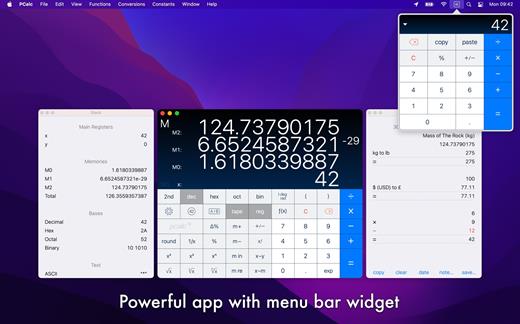
It is a fully featured scientific calculator for macOS with support for hexadecimal, octal and binary calculations, as well as an optional RPN mode, parentheses, programmable functions, and an extensive set of unit conversions.
Features include:
- Switchable button layouts – choose from many different horizontal and vertical layouts to suit your needs. Includes all the layouts from the iPhone and iPad, as well as Mac-specific ones.
- A powerful Notification Center widget, for quick access to PCalc.
- Calculator themes – pick your look, all the way from minimalist to striking.
- An RPN mode with one button access to the stack, and optional multiple-line display.
- Editable user conversions, functions, and constants which are synced automatically across multiple devices.
- Hexadecimal, octal and binary modes, complete with a variety of bitwise operators.
- A simulated paper tape to keep track of your calculations with a “ticker tape” mode under the main display.
- Smart searching of conversions, functions, and constants. Just search for “$ to £” for example.
- Stylish, consistent user interface.
- Support for Retina displays.
- Full AppleScript support.
- Multiple undo and redo.
- Modern 64-bit application.
- Handoff of in-progress calculations between PCalc on iOS, macOS, and watchOS.
- Support for the Touch Bar on the MacBook Pro.
- Support for macOS 10.15 Catalina, including Dark Mode.
What’s New Version 4.11.3:
- Improved support for macOS 26.
- Fixed a problem with stray button clicks with the "Maximize in foreground" option switched on.
- Fixed a problem with the conversion sheet appearing in the wrong place.
- Fixed a problem with the buttons in the tape window.
Compatibility macOS 11.0 or later.
Release Name: PCalc 4.11.3
Size: 12.9 MB
Links: HOMEPAGE – NFO – Torrent Search
Download: RAPiDGATOR
Pcalc

If prompted:”The application “CleanMyMac” can’t be opened.”
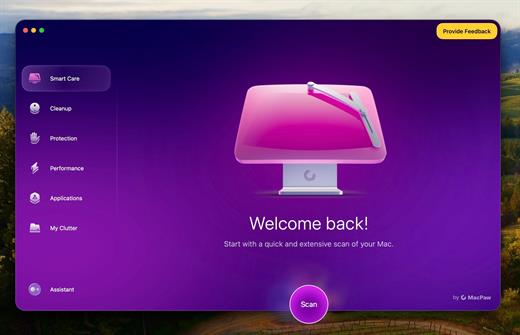
What’s New
Version 5.4.0:
- Release notes were unavailable when this listing was updated.
Compatibility macOS 14.0 or later
Release Name: CleanMyMac 5.4.0
Size: 151.7 MB
Links: HOMEPAGE – NFO – Torrent Search
Download: RAPiDGATOR
Cleanmymac
My Metronome is the perfect practice tool for every person who is fond of music. It was created by professional musicians and it lets you feel a real metronome as close as it could ever be.
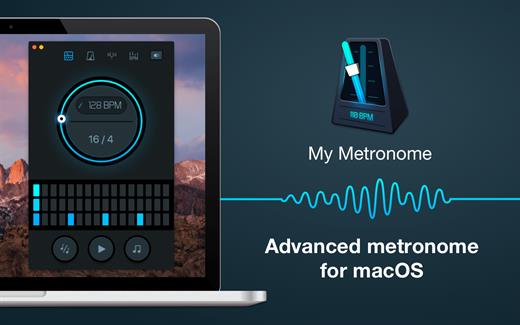
PRECISE INSTRUMENT FOR MUSICIANS
- Very steady tempo: ranges from 10 to 500 BPM (beats per minute)
- Flexible time signatures settings
- BPM detector: analyze a melody you want to sing, and it will show you the tempo you need to set
PLEASANT BONUSES
- Classic and advanced modes
- Guitar tuner: tune your guitar right then and there
- Truly intuitive interface
Use My Metronome app during your music sessions and you will never miss a single note!
What’s New
Version 1.4.8:
- Release notes were unavailable when this listing was updated.
Compatibility macOS 10.10 or later
Release Name: My Metronome 1.4.8
Size: 103.6 MB
Links: HOMEPAGE – NFO – Torrent Search
Download: RAPiDGATOR
My Metronome

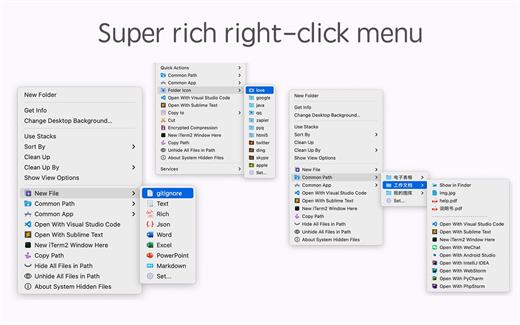
*** Main Features ***
– All menus support custom sorting.
– Quickly create all kinds of commonly used files, and supports custom creation of various file types you want.
– Quickly open your terminal, iTerm2, and go to the directory you want.
– Quickly open VSCode, Sublime Text and Emacs, and customize the various apps you want to open.
– Quickly copy the current path power.
– Complete files deletion is supported.
– Supports files moving, copying and cutting.
– Supports files encrypted compression.
– Quickly open your favorite directory.
– Quickly get file MD5,SHA1,SHA256 and other information.
– Supports hiding and displaying of specified files.
– Supports modify folder icon.
What’s New
Version 4.1.4:
- Release notes were unavailable when this listing was updated.
Compatibility macOS 10.11 or later
Release Name: MouseBoost Pro 4.1.4
Size: 17.7 MB
Links: HOMEPAGE – NFO – Torrent Search
Download: RAPiDGATOR
Mouseboost Pro

Farrago provides the best way to quickly play sound bites, audio effects, and music clips on your Mac. Podcasters can use Farrago to include musical accompaniment and sound effects during recording sessions, while theater techs can run the audio for live shows. Whether it’s providing quick access to a large library of sounds or running through a defined list of audio, Farrago is ready to assist!
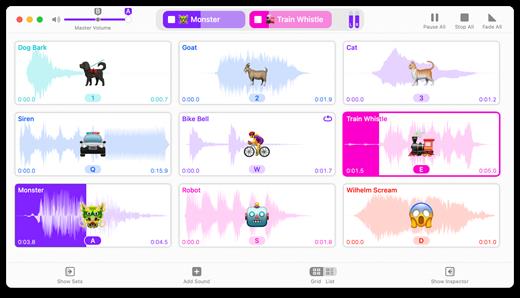
- Powerful Tile Interface: Farrago’s tile grid lets you lay out your audio exactly how you want it. Put your sounds at your fingertips and work the way you want.
- Customize With the Inspector: Use the inspector to tailor each sound’s settings to your needs. Set the tile name and color, tweak in/out points, alter fade settings and more.
- Organize With Sets: Create distinct groups of audio based on mood, show, or any other critera you like. Using sets makes managing audio a breeze.
- Sound Sets: Farrago’s default sound set is useful, but you can create your own sets based on show, mood, or anything else you like.
- A Thoughtful Interface: Farrago’s tile-based layout provides an easily understood way to play your audio via the keyboard or mouse.
- Global Access via Hotkeys: With Farrago’s user-definable Global Hotkey, you can pull the app forward, then use the in-app shortcuts to instantly trigger your desired audio.
What’s New Version 2.1.5:
- Release notes were unavailable when this listing was updated.
Compatibility macOS 10.14 or later
Release Name: Farrago 2.1.5
Size: 46.5 MB
Links: HOMEPAGE – NFO – Torrent Search
Download: RAPiDGATOR
Farrago

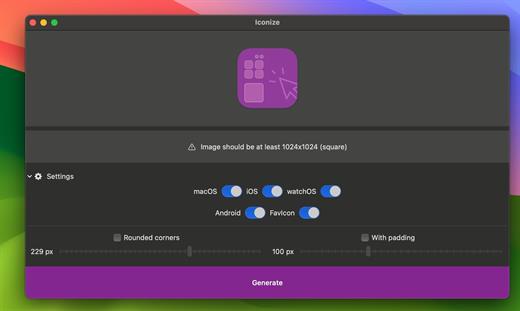
All your app icons. With one click. Customizeable icons? Mac? iOS? Android? Perhaps, a “favicon” for your website? Iconize has got you covered.
Easy-to-use
Just drag’n’drop your icon image and Iconize will take care of the rest. You may use any image format your Mac recognizes!
Configurable
Your icon is not yet “ready” and decided you want to add rounded corners and/or padding to conform to the guidelines? Awesome!
Fast
All the speed of the Mac at your fingertips. The whole process will be complete before you even begin to notice!
What’s New
Version 1.8.7:
- Release notes were unavailable when this listing was updated.
Compatibility macOS 11.0 or later.
Apple Silicon or Intel Core processor
Release Name: Iconize 1.8.7
Size: 4.9 MB
Links: HOMEPAGE – NFO – Torrent Search
Download: RAPiDGATOR
Iconize

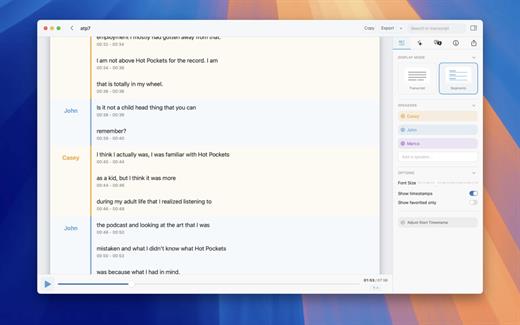
Whisper Transcription converts audio files into text using the Whisper machine learning model for speech recognition and transcription — making it easy to transcribe meetings, lectures, and other recordings.
Key Features
- Easy Transcription: Drag and drop audio files for instant conversion.
- On-Device Processing: 100% local transcription—no data leaves your machine.
- Fast & Accurate: Get text multiple times faster than real-time with Metal & GPU acceleration (depending on the system).
- Search & Edit: Highlight, edit, and delete transcript sections.
- Audio Playback: Sync playback with the transcript for easy review.
- Multi-Language Support: Transcribes in 100+ languages (fastest in English).
- Subtitle Export: Save transcripts as .srt & .vtt files.
- Batch Processing & System Audio Capture: Transcribe multiple files simultaneously and capture system audio (Zoom calls, podcasts, etc.).
- Flexible Output: Export transcripts to Word, PDF, HTML, and subtitles.
- Speaker Separation: Detect and split transcripts by speaker.
- Reader Mode: Focused reading experience.
- Advanced Model Support: Choose from various models for different accuracy and speed levels.
- Supported Formats: Works with mp3, wav, m4a, mp4, mov, ogg, opus and more.
- Pro Unlock: Upgrade for industry-leading transcription quality with Medium & Large models, batch processing, system audio recording, podcast transcription, and more.
What’s New Version 13.16:
- Release notes were unavailable when this listing was updated.
Compatibility macOS 14.0 or later.
Release Name: Whisper Transcription 13.16 fix
Size: 45.1 MB
Links: HOMEPAGE – NFO – Torrent Search
Download: RAPiDGATOR
Whisper Transcription

X DJing is a DJ software that lets you easily mix music, set loops, and hot cues and play with audio effects.
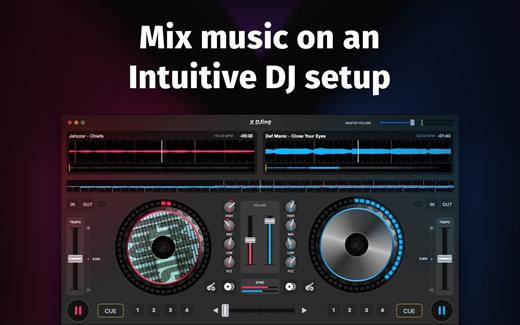
POWERFUL TOOL FOR YOUR FIRST PERFORMANCE
Created according to all latest industry standards. No matter if you’re a beginner DJ or an experienced artist, you will find everything to create a professional mix.
ADVANCED DJ TOOLS
- 8 powerful audio effects
- Automatic beatmatching and synching
- 4 hot cue points
- 3-band equalizer
- Parallel waveforms
AUDIO RECORDER Record your DJ set and save it to your hard drive.
Start your DJ career with X DJing!
What’s New
Version 2.3.1:
- Release notes were unavailable when this listing was updated.
Compatibility macOS 10.12 or later
Release Name: X Djing – Music Mix Maker 2.3.1
Size: 59.1 MB
Links: HOMEPAGE – NFO – Torrent Search
Download: RAPiDGATOR
X Djing Music Mix Maker

Carbon Copy Cloner backups are better than ordinary backups. Suppose the unthinkable happens while you’re under deadline to finish a project: your Mac is unresponsive and all you hear is an ominous, repetitive clicking noise coming from its hard drive. With ordinary backups, you’d spend your day rushing out to a store to buy a new hard drive and then sit in front of your computer reinstalling the operating system and restoring data.
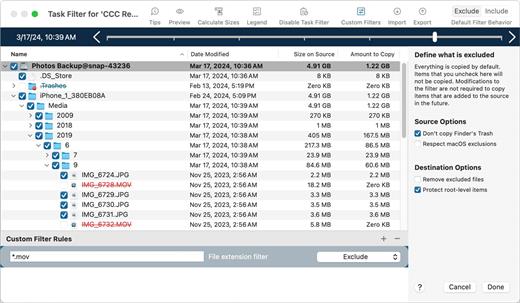
With Carbon Copy Cloner, your data and the operating system’s data are all preserved on a bootable volume, ready for production at a moment’s notice. When disaster strikes, simply boot from your backup and get back to using your Mac. At your convenience, replace the failed hard drive and then let CCC restore the OS, your data and your settings directly from the backup in one easy step.
What’s New Version 7.1.5:
- Release notes were unavailable when this listing was updated.
Compatibility macOS 11.0 or later
Release Name: Carbon Copy Cloner 7.1.5
Size: 31.2 MB
Links: HOMEPAGE – NFO – Torrent Search
Download: RAPiDGATOR
Carbon Copy Cloner
Make professional music with Loop Mash Up. This app is a powerful sampler with plenty of loops and presets.
All samples were created by professional musicians and DJs. Enjoy creating powerful beats by simply tapping the pads and get the instant result!
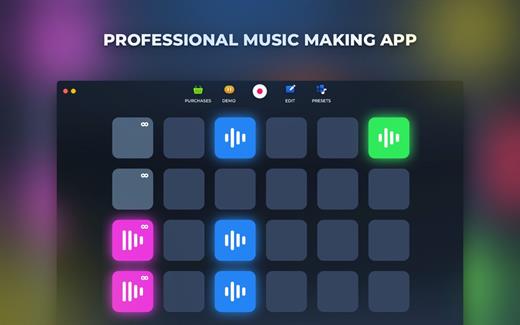
VARIOUS ELECTRONIC MUSIC STYLES
- Choose between 6 most popular genres of electronic music
VARIOUS SAMPLES & LOOPS
- Dozens of sounds for each music style
ADJUSTABLE BEAT PAD & HOTKEYS
- Adjust samples and loops layout and assign hot keys
RECORD YOUR TRACKS LIVE
- Create and save your songs on your device
Become the best electronic music producer with Loop Mash Up!
What’s New
Version 1.2.15:
- Release notes were unavailable when this listing was updated.
Compatibility macOS 10.12 or later.
Release Name: Loop Mash Up Pro 1.2.15
Size: 443.7 MB
Links: HOMEPAGE – NFO – Torrent Search
Download: RAPiDGATOR
Loop Mash Up Pro


