Please REGISTER or RENEW your account on RAPiDGATOR.net and support us by doing through all RAPiDGATOR working download links on main posts...
Mar 16

Cookie 8.4.6

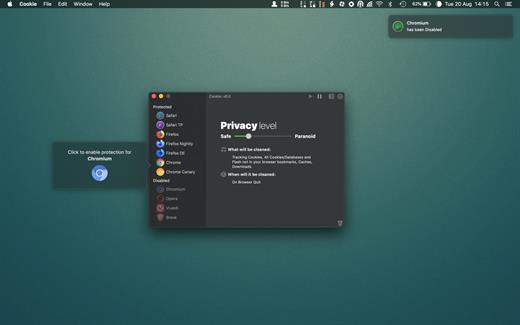
Cookie prevents third parties from hijacking your browsing experience. The sites you visit store “cookies” in your browser without your knowledge or consent. Some are helpful, but others are frustrating and invasive. Cookie can help.
Features:


  • Consolidate all your browser privacy settings
  • Simplified View that takes care of all the technical details for you
  • Advanced View which puts you in total control of all your privacy settings
  • Combined cookie view displaying all cookie/flash/localStorage data in one easy to manage view
  • Cookie’s can be favorited on a per domain, or per cookie basis. You decide
  • Individual Browser settings. It is possible to configure different automatic removal options for each browser. In the case of Chrome/Chromium/Canary/Brave you can even configure settings per user!
  • A number of removal schedules are possible: When quitting Cookie, when a Browser is Quit, on computer login, On computer waking from sleep, on a customizable time schedule, or entirely manually
  • Hotkey support, so you can remove all unwanted data quickly and easily
  • Customizable tracking cookie definitions
  • Whitelist individual tracking cookies
  • Clean, modern and Intuitive User Interface
  • Helpful setup window
  • Browser extension protection
  • Full Screen support
  • iCloud support
  • Dark/Regular theme
What’s New

Version 8.4.6:


  • Release notes were unavailable when this listing was updated.
Compatibility

macOS 10.14 or later, 64-bit processor


Release Name: Cookie 8.4.6
Size: 8.1 MB
Links: HOMEPAGE – NFO – Torrent Search

Download: RAPiDGATOR

5 Comments
Mar 16

iCompta Pro 6.2.2

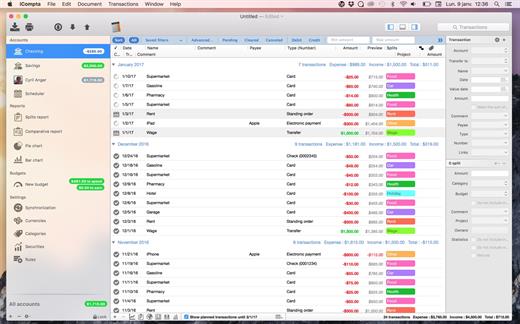
iCompta is a simple and powerful personal finance management application. iCompta is designed to be as easy to use as possible while maintaining an array of features to help you track your money down and start saving!

Features


  • Multiple currencies: Each account can have its own currency and you can organize transactions by category.
  • Compatibility: iCompta lets you reconcile transactions which are on your bank reports by downloading your transactions from your bank site either with the embedded Web browser or via OFX direct connect for supported financial institutions. Factory settings are even available for most financial institutions to let you setup your account quickly.
  • Budgets: You can set budgets for your accounts to track your income and expenses on a periodic basis.
  • IOU’s: iCompta lets you deal with the common problem of who owes what to who when you buy things with people.
  • Synchronization: Sync your iPhone with a wireless network via Bonjour.
  • Analysis and Statistics: You can sort and filter transactions to make statistics on your incomes and expenses. You can show a graph of the balance evolution of an account and even have a forecast for the next months.
  • Rules: You can create rules to modify your transactions automatically in order to be more productive.
  • Import / Export: iCompta can import / export the following formats: CSV, QIF, OFX
  • Transfers: Make funds transfers between multiple accounts
  • Security: iCompta documents can be password encrypted
What’s New

Version 6.2.2:


  • Release notes were unavailable when this listing was updated.
Compatibility

macOS 10.9 or later.


Release Name: iCompta Pro 6.2.2
Size: 26.5 MB
Links: HOMEPAGE – NFO – Torrent Search

Download: RAPiDGATOR
6 Comments
Mar 16

Rectangle Pro 3.73

Additional Efficiency and Speed
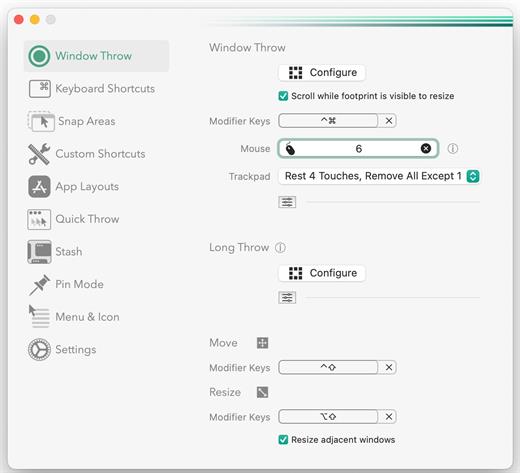
• Each window action can be configured with a quick, simple cursor movement and modifier key combination
• Just press and release modifier keys while you move your cursor over the window you want to snap

What’s New

Version 3.73:


  • Release notes were unavailable when this listing was updated.
Compatibility

macOS 10.12 or later
Apple Silicon or Intel Core processor


Release Name: Rectangle Pro 3.73
Size: 8.2 MB
Links: HOMEPAGE – NFO – Torrent Search

Download: RAPiDGATOR

7 Comments
Mar 16

Multitrack Editor 1.0.11

Features
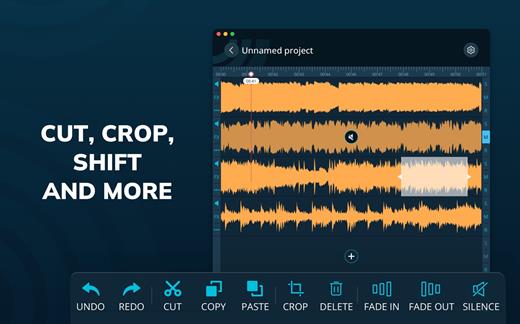
– Multitrack editing
– Various audio file formats
– File sharing

Change the duration, crop and cut the selected areas with only a few taps. Save your files or entire projects on your device. Even if you don’t save, the app will back up any unsaved progress (can be activated/deactivated in the settings).

What’s New

Version 1.0.11:


  • Release notes were unavailable when this listing was updated.
Compatibility

macOS 10.15 or later


Release Name: Multitrack Editor 1.0.11
Size: 30.7 MB
Links: HOMEPAGE – NFO – Torrent Search

Download: RAPiDGATOR
6 Comments
Mar 16

Monologue 1.0.66

Monologue is an app that automatically converts your speech into text. It helps you write faster by simply speaking into a microphone, saving you time compared to typing manually.

The program understands over 100 languages ​​and adapts to your speaking style and vocabulary so that your text sounds natural and matches what you mean.

Monologue works as a standalone application, allowing you to dictate text in any program without any unnecessary complications.

It can automatically format text and make it neater, eliminating unnecessary repetitions and errors.

This is useful if you want to quickly translate spoken language into written text—for example, for notes, letters, messages, or preparing documents.

What’s New

Version 1.0.66:


  • Release notes were unavailable when this listing was updated.
Compatibility

macOS 14 and later


Release Name: Monologue 1.0.66
Size: 58.9 MB
Links: HOMEPAGE – NFO – Torrent Search

Download: RAPiDGATOR

5 Comments
Mar 16

LuLu 4.2.1

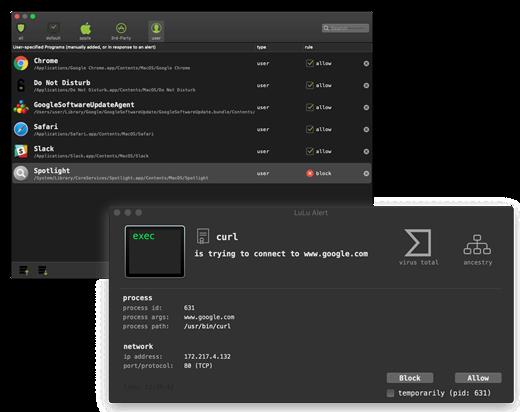
LuLu is the free, shared-source macOS firewall that aims to block unknown outgoing connections, unless explicitly approved by the user.

What’s to like about LuLu? Lots!

100% free

As in no ads, no time trials, no missing features. Because why not!?
And no, it doesn’t track, monitor, or spy on you – as that’d just be pure evil!

shared source

The full source code for LuLu is available on GitHub. Such transparency allows anybody to audit its code, or understand exactly what is going on.

protects

LuLu aims to alert you whenever an unauthorized network connection is attempted. As such, it can generically detect malware, or be used to block legitimate applications that may be transmitting private data to remote servers.

simple

“Do one thing, do it well!” LuLu is designed as simply as possible. Sure this means complex features may not be available, but it also means it’s easier to use and has a smaller attack surface!

enterprise friendly

Want to know what network events are being detected? Or rules your users have added? LuLu provides simple mechanisms to subscribe to such events, and stores data such as rules in an open, easily digestible manner.

Network Monitoring

By design, LuLu only monitors for outgoing network connections. Apple’s built in firewall does a great job blocking unauthorized incoming connections.

Rules

Currently, LuLu only supports rules at the ‘process level’, meaning a process (or application) is either allowed to connect to the network or not. As is the case with other firewalls, this also means that if a legitimate (allowed) process is abused by malicious code to perform network actions, this will be allowed.

Single User

For now, LuLu can only be installed for a single user. Future versions will likely allow it to be installed by multiple users on the same system.

Self-Defense

Legitimate attackers/security professionals know that any security tool can be trivially bypassed if specifically targeted – even if the tool employs advanced self-defense mechanisms. Such self-defense mechanisms are often complex to implement and in the end, almost always futile. As such, by design LuLu (currently) implements few self-defense mechanisms. For example, an attacker could enumerate all running processes to find the LuLu component responsible for displaying alerts and terminate it (via a sigkill).

What’s New

Version 4.2.1:


  • Fixed UI issues that could prevent profile creation
  • LuLu can now be installed within subfolders of /Applications
  • For bundled helper apps without an icon, the parent's icon is now shown
  • Rules can now be created with 0.0.0.0/ (IPv4) and ::/0 (IPv6)
  • LuLu_4.2.0.dmg: 92516F945F681B37600D2649E5296BC48E2BABB8ADF3B8CC6274E95B382C87FA
Compatibility

macOS 10.15 or later


Release Name: LuLu 4.2.1
Size: 6.9 MB
Links: HOMEPAGE – NFO – Torrent Search

Download: RAPiDGATOR
6 Comments
Mar 16

Specimen 1.0.5

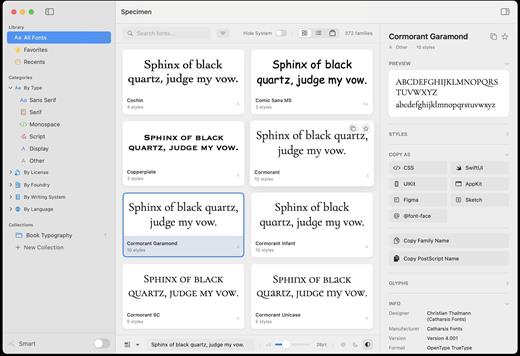
Specimen is a beautifully designed font manager for macOS that helps designers, developers, and typography enthusiasts easily browse, organize, and compare fonts. Built as a modern alternative to Apple’s Font Book, it provides powerful tools in a clean and intuitive interface, making font management faster and more enjoyable. 

With Specimen, users can quickly explore their entire font library through multiple preview modes, including grid, list, and carousel layouts. Customizable preview text, adjustable font sizes, and light or dark backgrounds allow you to see exactly how a typeface will look in real design scenarios. 

The app includes advanced organization tools that make managing large font collections simple. You can filter fonts by type, language support, writing system, foundry, or license type, and create both manual and smart collections for efficient categorization. Specimen also automatically groups related font families together, helping you keep your library clean and structured. 

Specimen also provides professional tools for typography workflows. You can compare up to four fonts side-by-side, inspect glyph sets, and preview variable font axes in real time. Designers can even generate professional PDF type specimens with waterfall previews, character sets, and metadata for presentations or reference. 

To help users discover new typography, Specimen integrates directly with collections such as Google Fonts and Fontshare, allowing you to browse and install thousands of high-quality fonts without leaving the app. Built-in diagnostics can also scan your font library for duplicates, corrupted files, or missing glyphs to ensure everything runs smoothly. 

Designed for modern macOS systems, Specimen combines performance, elegant design, and powerful font tools into a single application—making it the perfect solution for anyone who works with typography.

What’s New

Version 1.0.5:


  • Release notes were unavailable when this listing was updated.
Compatibility

macOS 13.5 or later


Release Name: Specimen 1.0.5
Size: 4.7 MB
Links: HOMEPAGE – NFO – Torrent Search

Download: RAPiDGATOR

6 Comments
Mar 16

calibre 9.5.0

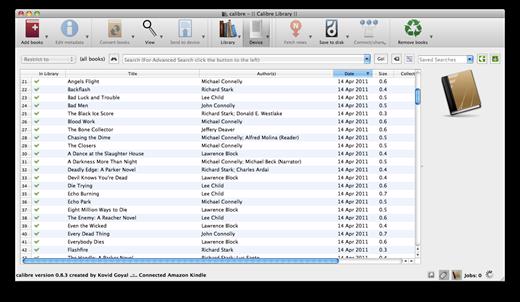
Calibre is a complete e-book library manager. Organize your collection, convert your books to multiple formats, and sync with all of your devices. Let Calibre be your multi-tasking digital librarian.

Manage, convert, sync, and more


  • Library management. Calibre keeps things orderly by creating single entries for books that contains multiple formats. Add tags and comments for better searchability.
  • Format conversion. Calibre’s robust conversion options support
What’s New

Version 9.5.0:


  • Release notes were unavailable when this listing was updated.
Compatibility

macOS 10.14 or later


Release Name: calibre 9.5.0
Size: 324.1 MB
Links: HOMEPAGE – NFO – Torrent Search

Download: RAPiDGATOR

6 Comments
Mar 16

Textilicious 1.2.2

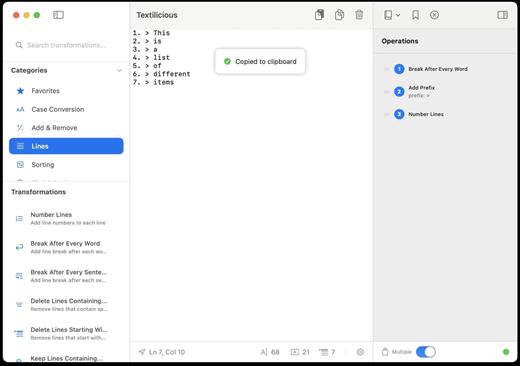
Textilicious is a powerful text processing and transformation tool designed for macOS users who need to manipulate, clean, and analyze text quickly and efficiently. Whether you’re working with code, data files, or documents, Textilicious provides an intuitive environment to apply complex text operations with just a few clicks. 

With more than 50 built-in transformations, the app allows users to perform tasks such as case conversion, sorting, filtering, encoding, and other advanced text manipulations. Multiple operations can be stacked and executed in sequence, enabling powerful workflows for batch processing and repetitive tasks. 

One of Textilicious’ key features is its recipe system, which lets users save sequences of transformations and reuse them whenever needed. This makes it easy to automate frequently used text-processing workflows and significantly improve productivity. 

The app also includes smart analysis tools that provide useful insights such as character frequency, readability scores, statistics, and estimated reading time—allowing users to analyze text without modifying it. Real-time preview ensures you instantly see the results of every operation, while the full undo/redo history allows you to experiment safely with different transformations. 

Designed with simplicity and performance in mind, Textilicious features a built-in editor capable of handling large text files while maintaining a smooth workflow. Users can easily import text, apply transformations, and export the final results or save workflows for later reuse.

What’s New

Version 1.2.2:


  • Release notes were unavailable when this listing was updated.
Compatibility

macOS 13.5 or later


Release Name: Textilicious 1.2.2
Size: 4 MB
Links: HOMEPAGE – NFO – Torrent Search

Download: RAPiDGATOR

6 Comments
Mar 15

PullTube 1.8.6.26

Sharing videos via online hosting services, such as YouTube or Vimeo is a common practice, yet streaming the content might not work as expected if you have a slow internet connection.

PullTube offers you the possibility to download videos from both sources (YouTube and Vimeo), while other platforms might be added at a later time. The app can handle playlists, allows you to select the output quality, and can even extract only the audio.

Video downloader that can import links with drag and drop and can detect playlists

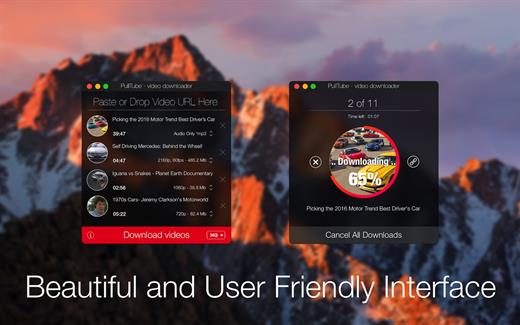
The PullTube user interface is represented by a small window where you get to quickly paste the video URL. Note that you can also add a video by dropping the link on top of the PullTube window.

Worth mentioning is that, if PullTube detects that the video is part of a playlist, will offer to download the entire collection: will fetch the data for each entry and handle the downloads consecutively.

Download videos hosted on YouTube or Vimeo to different output sizes and formats

PullTube will start fetching the video data right away so you can see the video name, duration, and a small thumbnail. When configuring a download, you get to select the output quality (highest, 4K, HD or regular with different resolutions) or choose to export only the audio to an M4A or MP3 file.

Via the PullTube Settings panel, you can change the default download location and the default MP3 bitrate (320Kbps, 256Kbps, 128Kbps, 64Kbps). You can also add the quality info to the video’s name and choose to quit the app when all downloads are completed.

Get offline access to videos hosted online in just a few steps

PullTube proposes a streamlined workflow for quickly downloading videos from YouTube or Vimeo, provides control over the output quality, and enables you to extract the audio to MP3 or M4A files.

However, during our tests, we have noticed that PullTube has trouble completing the download when handling videos that are longer that 2 minutes. The process stops without any explanation, and you can eventually complete the task, but you need to add the link to download tool multiple times.

What’s New

Version 1.8.6.26:


  • Release notes were unavailable when this listing was updated.
Compatibility

macOS 10.12 or later


Release Name: PullTube 1.8.6.26
Size: 232.1 MB
Links: HOMEPAGE – NFO – Torrent Search

Download: RAPiDGATOR
9 Comments