Please REGISTER or RENEW your account on RAPiDGATOR.net and support us by doing through all RAPiDGATOR working download links on main posts...
Mar 9

Proxyman 6.6.0

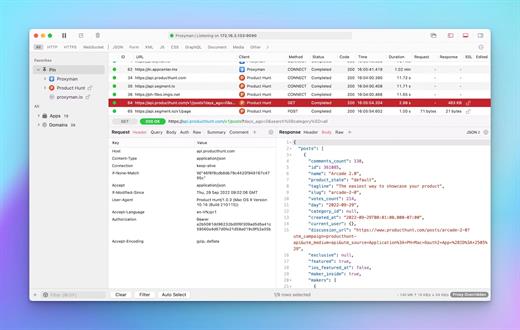
Proxyman is a high-performance macOS app, which enables developers to view HTTP/HTTPS requests from apps and domains.

Features


  • ? Native macOS app. Written by Swift, Objective-C. Powered by Apple SwiftNIO for the high-performance network application.
  • ? Fully support Apple Chip (e.g M1, M2, M1 Pro/Max).
  • ? Built for macOS Monterey & Ventura.
  • ✅ Hassle-free Intercept HTTP/HTTPS requests/response and WebSocket from Web Browsers, iOS, and Android devices.
  • ✅ Modern and intuitive UI
  • ? Multiple filters
  • Comprehensive Guideline to set up with iOS simulator and iOS and Android devices.
  • Basic debugging tools: Compose, Repeat, Wildcard/Regex Filter, Multiple Filters, Customize Columns, Toolbar…
  • Advanced Tools: Breakpoint, Map Local, Map Remote, Backlist, External Proxying, No Caching, Protobuf, Clear Cache, Custom Certificates, Scripting, Network Conditions, Reverse Proxy, Diff, Access Control etc
  • Automatic Setup for Backend Development: Auto capture HTTP(s) traffic from NodeJS, Ruby and Python.
  • macOS 10.15+
What’s New

Version 6.6.0:


  • Release notes were unavailable when this listing was updated.
Compatibility

macOS 10.15 or later


Release Name: Proxyman 6.6.0
Size: 33.9 MB
Links: HOMEPAGE – NFO – Torrent Search

Download: RAPiDGATOR

6 Comments
Mar 9

Dato 5.7.1

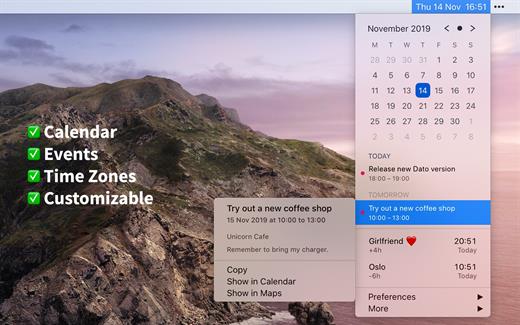
Dato is a replacement for the system menu bar clock.

By default, it looks exactly the same, but when you click it, you get a small calendar, calendar events for the next week, the current time in various time zones (even with custom names), week number, and more. You can customize what to show in the menu and the menu bar.

Dato supports all the locales and languages that macOS supports for dates, times, and the calendar, but the menus are English-only.

Features


  • Calendar, optionally with week numbers. Your upcoming events for the next week at a glance (customizable).Time zones, optionally with custom names.Search time zones by city (15K cities included).Customizable.Double-click a day in the calendar to open that day in the default calendar app.
  • (Supports: Calendar, Fantastical 2, BusyCal).Fully offline with no network entitlements, for your privacy benefit.Supports calendar events with HTML formatted notes.Lots of keyboard shortcuts for power users.”Join Zoom Meeting” button on Zoom meeting calendar invites.
What’s New

Version 5.7.1:


  • Release notes were unavailable when this listing was updated.
Compatibility

macOS 10.14.4 or later, 64-bit processor


Release Name: Dato 5.7.1
Size: 19.5 MB
Links: HOMEPAGE – NFO – Torrent Search

Download: RAPiDGATOR

5 Comments
Mar 9

NetWorker Pro 11.0.6

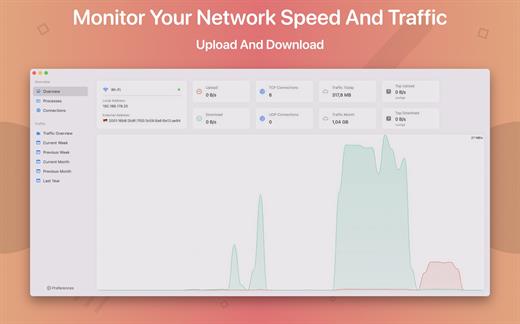
NetWorker is a lightweight and easy-to-use tool that shows either the current download and upload speed or the session traffic of your network adapter. The information is shown in a small view in your menu bar.

Features


  • You can switch between three modes: speed, traffic, or speed/traffic
  • You can choose the network adapter to observe, so both wired and wireless adapters are supported
  • Adjustable refresh interval
  • Support for auto-start
What’s New

Version 11.0.6:


  • Release notes were unavailable when this listing was updated.
Compatibility

macOS 11.0 or later


Release Name: NetWorker Pro 11.0.6
Size: 7.7 MB
Links: HOMEPAGE – NFO – Torrent Search

Download: RAPiDGATOR

6 Comments
Mar 9

Fork 2.64

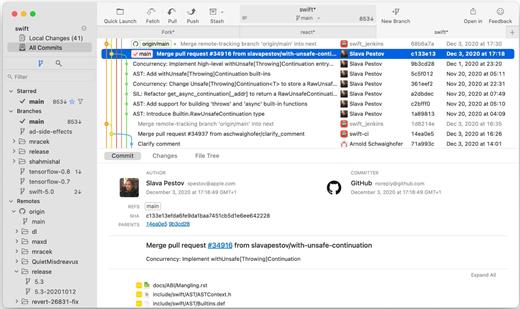
More features: Browse the repository file tree at any commit | Intuitive merge conflict resolving | See your stashes right in the commit list

What’s New

Version 2.64:


  • Release notes were unavailable when this listing was updated.
Compatibility

macOS 10.13 or later


Release Name: Fork 2.64
Size: 44.4 MB
Links: HOMEPAGE – NFO – Torrent Search

Download: RAPiDGATOR

7 Comments
Mar 9

Aspect Ratio Pro 3.5

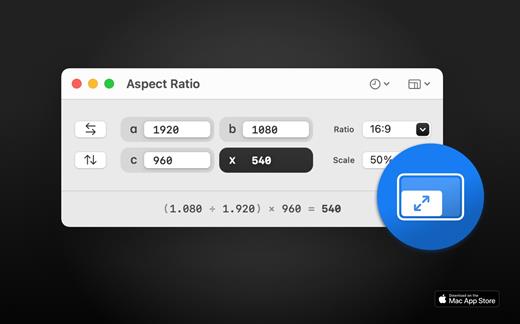
Aspect Ratio X is a rule-of-three calculator.

Features:

• Calculate aspect ratios (rule of three)
• Swap values horizontally and vertically
• Select scales and ratios
• Browse common resolutions
• Browse recent ratios
• Formula preview
• Uses imperial or metric system automatically based on your system settings
• Multi-window support
• Optimized for macOS 11+
• Optimized for Mac with M1 (Apple Silicon)

What’s New

Version 3.5:


  • Release notes were unavailable when this listing was updated.
Compatibility

macOS 11.0 or later


Release Name: Aspect Ratio Pro 3.5
Size: 15.1 MB
Links: HOMEPAGE – NFO – Torrent Search

Download: RAPiDGATOR

5 Comments
Mar 8

Topaz Gigapixel 1.1.2

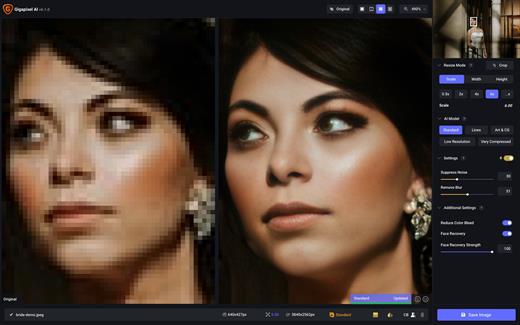
Topaz Gigapixel knocks traditional upscaling tools off their pedestals.

Enlarging your image without losing detail has always been impossible… until now. Upscale your photos by up to 600% while perfectly preserving image quality.

Breathtakingly sharp prints. High-resolution cropping in post-production. iPhone photos that look like they came out of a DSLR.

No matter why you’re enlarging your photos, you always want the best possible quality for your results. Gigapixel AI is currently the only photo enlargement product available that can actually add detail back to your upscaled photo.

What’s New

Version 1.1.2:


  • Release notes were unavailable when this listing was updated.
Compatibility

macOS 12 Monterrey,ARM only.


Release Name: Topaz Gigapixel 1.1.2
Size: 371.7 MB
Links: HOMEPAGE – NFO – Torrent Search

Download: RAPiDGATOR

7 Comments
Mar 8

Topaz Photo 1.3.1

AI-powered photo editing tool that improves photos pixel by pixel.
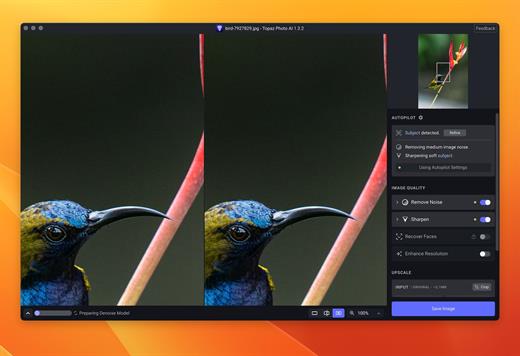
What is Topaz Photo AI? It is a new-generation photo editing tool that uses AI technology to perfect and denoise pictures pixel by pixel. Topaz Photo AI simplifies the editing process for photographers and designers. Its groundbreaking suite offers multiple tools to satisfy both amateurs and confident pros.

Topaz Photo AI allows editors to denoise, sharpen, upscale, preserve text, recover faces, remove objects, correct lighting, and balance color. Professional photo editors will be amazed at how much power Topaz Photo AI gives, and beginners will appreciate how easy and intuitive this tool is.

Topaz Photo AI helps you Sharpen, remove noise, and increase the resolution of your photos with tomorrow’s technology.

Maximize the potential of your photos.

Magically enhance image quality and resolution based on a deep understanding of the contents of your photo.

Enhance Quality

Maximize the visual quality of your images with best-in-the-world noise and blur reduction. Particularly useful in difficult settings with fast-moving subjects, low light, or atypical environments.

Crisp, clear, and noise-free.

It’s a magical feeling to see noise evaporate while sharp detail remains. Topaz Photo AI understands the contents of your image and accurately determines the difference between image detail and noise.

Tack-sharp subjects.

Unlike traditional sharpening, Topaz Photo AI’s Sharpen module naturally reverses root causes of blurriness (camera shake, motion blur, missed focus) to create more natural results. In the absence of blur, sharpness remains – crisp, clear detail that’s free of edge haloes or other artifacts.

Increase Resolution

Join hundreds of thousands of photographers and designers who use Topaz technology to generate real image detail for better printing, cropping, restoration, and more.

Magically add real detail.

Topaz Photo AI “remembers” real detail from millions of similar images, then fills in missing pixels based on that understanding. (It’s like how you can picture a friend’s face without being physically in front of them.) Add real image resolution to your photos for tighter crops or better prints.

Recover faces naturally.

Introduced in 2023, the breakthrough Face Recovery AI offers remarkable detail enhancement for low-resolution or blurry faces.

Intelligently improve lighting.

It’s a magical feeling to see noise evaporate while sharp detail remains. Topaz Photo AI understands the contents of your image and accurately determines the difference between image detail and noise.

Improve efficiency with Autopilot

Specify adjustments based on detected image attributes like subject, faces, noise, and blur levels. Autopilot allows you to mold Photo AI to your workflow and unique photographic style.

Easy workflow

Topaz Photo AI works directly on your Mac or PC. Use the standalone to batch process thousands of images in sequence, or use it as a Photoshop plugin for tight workflow integration. We’ve also partnered with major hardware manufacturers like Nvidia, AMD, and Intel to make Photo AI run as fast as possible for your computer.

What’s New

Version 1.3.1:


  • Release notes were unavailable when this listing was updated.
Compatibility

macOS 10.12 or later


Release Name: Topaz Photo 1.3.1
Size: 1.6 GB
Links: HOMEPAGE – NFO – Torrent Search

Download: RAPiDGATOR

7 Comments
Mar 7

eMail Address Extractor 6.1.3

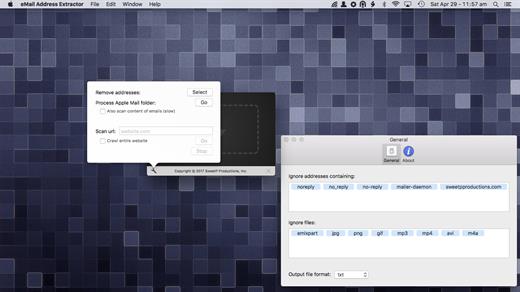
eMail Address Extractor allows you to extract valid email addresses from virtually any kind of text file. No configuration required, it just works!

Easily extract addresses from websites, your entire Apple Mail database, selected Mail.app folders, iWork projects (Pages, Keynote, Numbers), Microsoft Office (docx, xlsx). You can even scans within zip archives! so there’s no need to extract your archived databases and documents.

eMail Address Extractor is great for:


  • creating personal and business mailing lists
  • processing SQLite databases
  • scanning multiple documents at one time
  • removing duplicate adresses from mailing lists
  • merging lists
  • getting contact details from websites
Files can be processed:

  • via the menubar
  • drag and drop
Configuration to streamline your workflow:

  • less false positives
  • add flies types to an ignore list (speed up your workflow by not needing to manually sort through valid file types)
  • ignore email addresses containing strings (mailer-daemon, noreply addresses for example)
  • option to also scan the contents of emails (not just the headers)
  • output results to CSV or TXT file
  • notifications when tasks have been completed
What’s New

Version 6.1.3:


  • updated social media links
Compatibility

macOS 11.0 or later


Release Name: eMail Address Extractor 6.1.3
Size: 6.3 MB
Links: HOMEPAGE – NFO – Torrent Search

Download: RAPiDGATOR

7 Comments
Mar 7

Wondershare PDFelement Pro 12.1.10 (OCR)

Wondershare PDFelement is a self-explanatory OS X application that makes it easier for your to preview, edit, join, split and convert PDF documents using a Mac.

The Wondershare PDFelement also features a simple, clean and intuitive interface that provide instantaneous access to all the tools and features you might need to complete your daily tasks.

Powerful and user-friendly PDF editor for everyday use

Moreover, with Wondershare PDFelement’s help, you can effortlessly edit PDF documents created using text files, web pages or scanned documents.

Consequently, you can add, remove or edit text, move and rearrange pages, insert or remove images and more.

Wondershare PDFelement’s top toolbar helps you hide, show and customize the sidebar in order to display the items and information you are interested in. In addition, you can browse through the loaded document, zoom in or out, print it or email it with just a couple of mouse clicks.

Advanced OCR capabilities make text editing a breeze

Furthermore, you can choose between the “Hand”, “Select” and “Edit” tool, use the advanced OCR feature and convert your source file into plain text or RTF document, ePUB, HTML, as well as file formats compatible with Microsoft Word, Excel, and PowerPoint.

The context menu also helps you switch between the “Move”, “Select” and “Touchup” tool, change the display mode and open the Inspector window to view detailed information about the loaded document.

As an added bonus, by accessing the Document menu, you have the option to add, update or remove an watermark, extract, insert and delete pages, split, merge or convert your document and crop or rotate a page with ease.

Full-featured tool designed to help you stamp, watermark, encrypt and decrypt PDF documents on a Mac

The complete list of all available editing tools, bookmark features, annotation tools and stamp options can be found under the Tools menu.

From here you can easily insert text boxes, add sticky notes, highlight, strike-through and underline text, insert various shapes and use the handy pencil or erase.

On the whole, Wondershare PDFelement comes with the right set of features to help you edit and annotate PDF documents using a Mac, as well as effortlessly add password protect and convert them other formats for easier sharing with your friends and colleagues.

What’s New

Version 12.1.10:


  • Release notes were unavailable when this listing was updated.
Compatibility

macOS 11.0 or later
Apple Silicon or Intel Core processor


Release Name: Wondershare PDFelement Pro 12.1.10 (OCR)
Size: 827.9 MB
Links: HOMEPAGE – NFO – Torrent Search

Download: RAPiDGATOR

12 Comments
Mar 7

FoneLab for Android 5.0.62

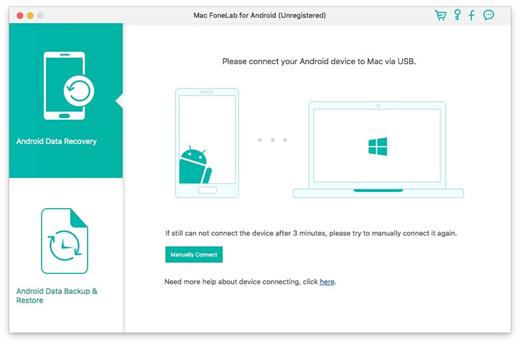
FoneLab for Android allows you recover deleted files on Android device from Many Common Scenarios

There would be lots of unexpected events which will cause Android data loss, such as losing data after factory restore, OS update or rooting, device stuck or not responding, device locked, forgotten password, ROM flashing, etc. However, with the assistant of this professional Android data recovery software, your lost or deleted SMS, contacts, photos, videos, etc. can be recoverable in an easy and safe way.

You can easily recover the deleted contacts with full information like contacts name, phone number, Email, job title, address, and more which you fill on your phone. And the exported contacts will be saved as VCF, CSV or HTML for your use.Recover call history

Lost important call log before saving the contact? Then this Android data recovery software will do you a great favor to restore the lost phone number, name, data, duration time, etc. You can view the retrieved call history in HTML and attached images with your browser.Recover text messages

Accidental deletion on your text messages worries you? Then recovering the deleted text messages with this Android data recovery tool. It can undelete the deleted SMS with one click and download them to CSV, HTML and attached images.

What’s New

Version 5.0.62:


  • Release notes were unavailable when this listing was updated.
Compatibility

macOS 10.10 or later


Release Name: FoneLab for Android 5.0.62
Size: 57.5 MB
Links: HOMEPAGE – NFO – Torrent Search

Download: RAPiDGATOR
8 Comments