Please REGISTER or RENEW your account on RAPiDGATOR.net and support us by doing through all RAPiDGATOR working download links on main posts...
Mar 7

Aiseesoft FoneLab 10.6.28

If you are just careless to drop your iPhone into water, how to recover lost photos/videos and other files from your iPhone? The Mac iPhone Data Recovery Software can help you! What’s more, whether your iOS device is locked because of the lost or forgotten password, or it gets smashed, damaged, or even broken, all the data are not lost!
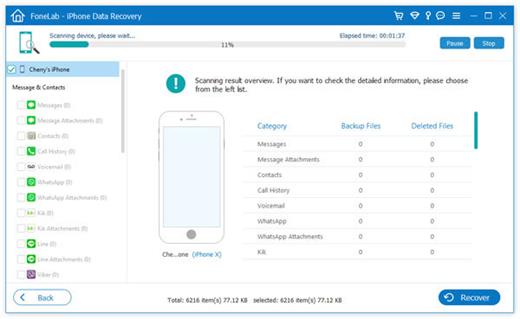
As long as your iPhone/iPad/iPod has ever been successfully connected to iTunes on your MacBook, it’s possible to get back the lost data from the broken devices directly without backup.

If you have backups in iTunes or iCloud, you can also recover lost data from iTunes or iCloud backup. To help you rescue the data on your iPhone, iPad or iPod touch that may suffer from situations mentioned above, this iPhone Data Recovery will provide the best way to recover lost/deleted contacts, photos, text messages, WhatsApp, iMessages, videos, music, call history, notes, etc. from your broken devices.

What’s New

Version 10.6.28:


  • Release notes were unavailable when this listing was updated.
Compatibility

macOS 10.10 or later


Release Name: Aiseesoft FoneLab 10.6.28
Size: 77.4 MB
Links: HOMEPAGE – NFO – Torrent Search

Download: RAPiDGATOR
11 Comments
Mar 7

Photomator 3.4.13

Photomator is a powerful yet easy-to-use photo editor with over 5,000 five-star ratings.

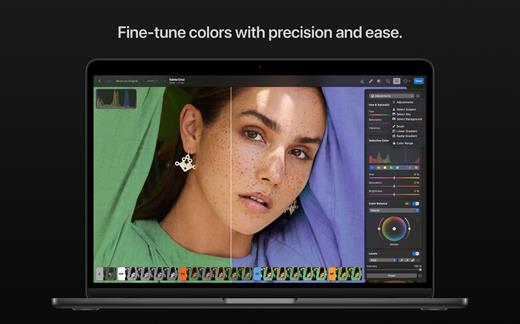
Photomator is a photo editing powerhouse, offering incredible tools for enhancing, retouching, and managing your photos. It includes an extensive collection of cutting-edge color adjustments, automatic selections powered by AI, powerful batch editing features, Clone and Repair tools for removing unwanted objects, and much more. Simply put, it has everything you need to make every shot your best.

The ultimate photo editing experience


  • Adjust colors and lighting using a collection of powerful, nondestructive color adjustments
  • Automatically make precise subject, sky, and background selections in photos using AI
  • Add gradient masks, make color range selections, or simply paint over the areas you want to adjust using a brush
  • Seamlessly clone or remove unwanted objects using state-of-the-art retouching tools
  • Easily copy and paste edits between photos or batch edit entire photoshoots at a time
  • Crop, straighten, and change the perspective of photos with a powerful and easy-to-use Crop tool
  • Quickly change the look of photos using an extensive collection of presets, designed for landscape, black and white, and other photography styles
Tools powered by AI

  • Automatically enhance shots using a machine learning algorithm trained on 20 million pro photos, or fine-tune individual adjustments, like White Balance, Selective Color, or Color Balance with a single click
  • Magically increase the resolution of photos while keeping them detailed and sharp
  • Remove camera noise and image compression artifacts with the Core ML-powered Denoise feature
  • Instantly improve the quality of photos by removing color banding and increasing color depth with AI-powered Smart Deband feature
  • Copy the look of any photo to another using the incredible color-matching feature
  • Intelligently crop photos using machine learning-powered auto-cropping
State-of-the-art color adjustments

  • Enjoy powerful tools for effortlessly adjusting the temperature, tint, exposure, contrast, brightness, hue, saturation, and vibrance in your photos
  • Recover incredible amounts of detail in the highlights and shadows of photos
  • Magically enhance fine details and structure in photos using powerful Clarity and Texture adjustments, or adjust textures in the highlights, midtones, and shadows separately
  • Selectively edit individual color ranges with Selective Color, or improve the balance of colors in the shadows, midtones, and highlights with Color Balance
  • Adjust lighting and colors with full precision using Levels and Curves adjustments
  • Mix the balance of the red, green, and blue color channels to create intense color effects in your images
  • Replace any color with any other using the Replace Color adjustment
  • Create beautiful black and whites even from your color photos
  • Use a range of additional adjustments, like Sharpen, Fade, Grain, Color Monochrome, Sepia, and Invert to make your photos stand out
  • Instantly change the look of photos with LUTs or export custom LUTs to use in other apps
RAW editing made simple

  • Open and edit over 650 RAW image formats, including Apple ProRAW and compressed Fujifilm RAWs
  • Edit RAW photos as easily as photos in other formats using all the nondestructive tools, including Repair and Clone tools
  • Easily batch-edit RAW photos together with photos in other formats
Compatibility

  • Automatically sync every change back to your Photos library
  • With the support for iCloud Drive, enjoy seamless edit syncing across Mac, iPhone, and iPad
Photomator is built from the ground up for Mac and integrates seamlessly with macOS Ventura. It uses powerful Apple technologies like Meta

What’s New

Version 3.4.13:


  • Release notes were unavailable when this listing was updated.
Compatibility

macOS 13.0 or later


Release Name: Photomator 3.4.13
Size: 625 MB
Links: HOMEPAGE – NFO – Torrent Search

Download: RAPiDGATOR
9 Comments
Mar 7

Aiseesoft FoneTrans 9.3.16

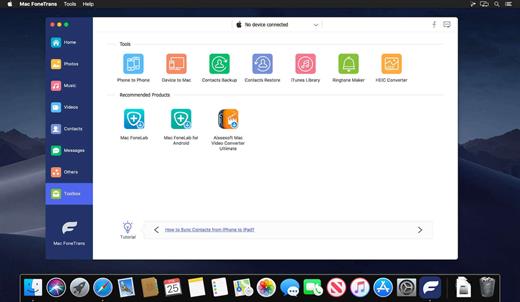
This Mac iOS transfer and management software can transfer contacts/photos/songs/videos and more between Mac and iOS devices. It enables you to edit Playlist/Podcasts… effectively. Your digital life can be managed easier.

This iOS transfer software can help to transfer media files (music, videos, audio books, voice memos and ringtones) between Mac and iOS device. And when it copy media files from Mac to iOS device, it will automatically convert the file format that is not supported by your iPod/iPad, to MP4/MOV/MP3/WAV/AIFF, etc.

You can use this iOS transfer tool to sync contacts to your Macbook by saving as a format of CSV files(Hotmail/AOL) and vCard files(Yahoo/Gmail). And you can easily add/edit your contact lists before you restore your contacts to new iPhone. De-duplicate function makes it simple to delete duplicated contacts when you transfer contacts to new iPhone.

It’s quite a useful function to preserve the valuable messages for everyone. Mac FoneTrans can transfer your SMS text messages and MMS from iPhone to Mac as CSV, HTML and TXT files. You can view all your messages from the displayed list before you choose the important ones to keep.

Maybe you’ve spent so much time in organizing the playlists, so when you transfer songs to your iOS device (iPhone/iPad/iPod) or iTunes, you always want to get the same playlists. Mac iOS Transfer makes it possible to sync the playlists to your device. In addition, it is convenient to manage your iPhone playlist by adding or deleting in one click.

This iOS files transfer can provide you a better experience to check the PDF files or read a favorite ePub novel on the go at any time. With its help, you can transfer ePub/PDF files to iPad/iPhone/iPod from Mac quickly. Also, it affords an effective way to export important PDF files or ePub files to your Mac or iTunes Library for reserving.

Mac FoneTrans enables you to transfer all types of pictures from your iPhone/iPad/iPod to Mac with ease. Any frequently-used image format is supported, such as JPG, PNG, BMP, GIF and so on. Moreover, you can rely on it to transfer photos between different iOS device in one click. Even you have the need to copy photos from Camera Roll and Photo Library, you can easily do that.

What’s New

Version 9.3.16:


  • Release notes were unavailable when this listing was updated.
Compatibility

macOS 10.10 or later


Release Name: Aiseesoft FoneTrans 9.3.16
Size: 82.8 MB
Links: HOMEPAGE – NFO – Torrent Search

Download: RAPiDGATOR

8 Comments
Mar 7

Adobe Photoshop 2026 v27.4.0

Adobe Photoshop 2026, the industry standard for digital image processing and editing, delivers a comprehensive package of professional retouching tools, and is packed with powerful editing features designed to inspire.

Combine, retouch, and remix your pics. Add new color to your old black-and-whites. Make unwanted stuff disappear. Or turn a boring background into an exotic paradise. With Photoshop, everyone can.

Make creativity your business.

Chinzalée Sonami is a ceramic artist who sells her colorful pottery at her studio, through an online shop, and at small outlets around the country. She designs posters, flyers, brochures, ads, and more with Photoshop to promote her business.

Retouch and remix your pics.

Forrest Aguar and Michelle Norris, the duo behind Tropico Photo studio, use Photoshop techniques, inventive color combinations, and dimensions to bring their bright version of paradise to any location.

Your go-to for Instagram-gorgeous graphics.

Nice Day Chinese Takeout uses Photoshop to create mouthwatering social posts and scroll-stopping graphics for their popular New York takeout restaurant.

Build a following and a brand.

Meg Lewis designs virtual backgrounds and graphics with Photoshop to showcase her colorful style on social and build her personal brand.

Discover your own artistic style.

Designer and illustrator Aries Moross draws and paints with Photoshop brushes to transform letters into personal artistic expressions.

What’s New

Version 27.4.0:


  • Release notes were unavailable when this listing was updated.
Compatibility

macOS 11 or later
Apple Silicon or Intel Core processor


Release Name: Adobe Photoshop 2026 v27.4.0
Size: 7.9 GB
Links: HOMEPAGE – NFO – Torrent Search

Download: RAPiDGATOR
4 Comments
Mar 7

EdgeView 5.7.7

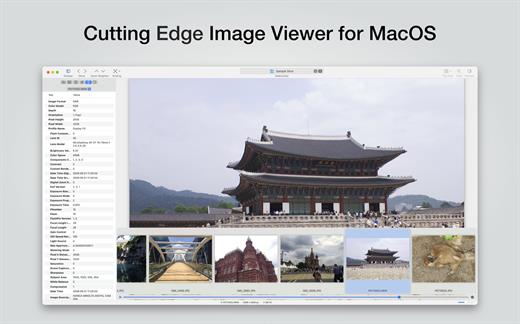
EdgeView 5 is fast image viewer has elegant user interface. EdgeView 5 is developed and designed for modern MacOS. It can open various image files such as JPEG, PNG, TIFF, BMP, and RAW file of DSLR, EPS and PDF, AI(Adobe Illustrator). Can open image files in archive directly without extraction.

User can open files, rename files, delete files from EdgeView’s file browser. Also can access to SMB/AFP/FTP network volume.

User can navigate images quickly by using keyboard shorcut, mouse wheel, trackpad gesture. EdgeVew show EXIF information, play animation GIF/PNG/WebP smoothly. Save last status to history, and restore when reopen file.

EdgeView 5 will be the best choice when viewing and managing image files.

What’s New

Version 5.7.7:


  • Release notes were unavailable when this listing was updated.
Compatibility

macOS 11.1 or later
Apple Silicon or Intel Core processor


Release Name: EdgeView 5.7.7
Size: 142.2 MB
Links: HOMEPAGE – NFO – Torrent Search

Download: RAPiDGATOR

7 Comments
Mar 6

R-Studio 7.5.191689

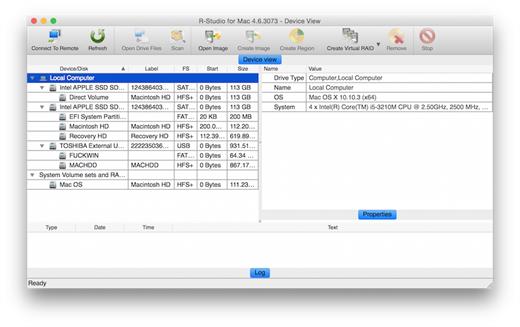
R-Studio for Mac is specially designed for the Mac OS environment, including the Apple M1/M2 chip. It recovers files from APFS/HFS+/HFS (Macintosh), FAT/NTFS/ReFS (Windows), UFS1/UFS2 (FreeBSD/OpenBSD/NetBSD/Solaris) and XFS/Ext2/Ext3/Ext4 FS (Linux) partitions. In addition, raw file recovery (scan for known file types) can be used for heavily damaged or unknown file systems. R-Studio for Mac also recovers data on disks, even if their partitions are formatted, damaged or deleted. Flexible parameter settings give you absolute control over data recovery.

FEATURES


  • Direct access to the system disk even when Apple’s System Integration Protection is enabled.
  • R-Studio for Mac recovers files:

    • Removed by virus attack or power failure;
    • After the partition with the files was reformatted, even for different file system;
    • Deleted from computer;
    • When the partition structure on a hard disk was changed or damaged. In this case, R-Studio for Mac can scan the hard disk trying to find previously existing partitions and recover files from found partitions.
    • From hard disk with bad sectors. R-Studio for Mac can first copy the entire disk or its part into an image file and then process the image file. This is especially useful when new bad sectors are constantly appearing on the hard disk, and remaining information must be immediately saved.
    • Recovers files on damaged or deleted partitions.
    • Hardware RAID, volume set, and stripe set support.
    • Mass file recovery support.
  • Support for:

    • APM, Basic and GPT support. R-Studio for Mac supports all three partition schemes used to define the low-level organization of data on disks formatted for use with Macintosh computers.
    • Apple software RAIDs, CoreStorage, File Vault, and Fusion Drive (APFS/HFS+);
    • Windows Storage Spaces (created by Windows 8/8.1 and 10/Threshold 2/Anniversary/Fall Creators updates);
    • Dynamic disk support including unsyncronized Windows software RAIDs.
    • Linux Logical Volume Manager (LVM/LVM2) and mdadm RAIDs.
    • Intel Software RAIDs.
    R-Studio for Mac can automatically recognize and assemble the components of these disk managers even if their databases are slightly damaged. Their components with severe corrupted databases can be added manually.
  • Support for specific file system features:
  • Recovers data forks, resource forks, finder information, extended file attributes and UNIX file system permissions. Support for HFS+ compressed files.
  • Advanced APFS recovery: support for encryption.
  • Processing of the HFS+ journal to increase a number of successfully found files.
  • Recovers compressed, encrypted files and alternative data streams from NTFS partitions.
  • Recognizes localized names.
  • Recovery of names and paths for files deleted to Recycle Bin and Trash.
  • In-depth file analysis:

    • Advanced file search and mask options.
    • Estimation of file recovery probability.
    • Detailed file information. Comprehensive file information in the Technician version: specific file system info, overlapping files, disk regions, etc.
    • File recovery lists for mass file recovery. File recovery lists with comprehensive file information in the Technician version.
  • Scan process visualization. While scanning an object, R-Studio Mac graphically shows items that have been found, including files of known types, APFS/HFS/HFS+ volume headers, APFS nodes, HFS/HFS+ BTree+ nodes, FAT and NTFS MFT records, boot records, etc.
  • Host OS: macOS 13 Ventura, macOS 12 Monterey, macOS 11 Big Sur, macOS 10.15 Catalina, macOS 10.14 Mojave, macOS 10.13 High Sierra, macOS 10.12 Sierra, OS X 10.11 El Capitan, OS X 10.10 Yosemite, OS X 10.9 Mavericks, OS X Mountain Lion 10.8, OS X Lion 10.7, OS X Snow Leopard 10.6, OS X 10.5 Leopard and OS X Server 10.5 Leopard running on a computer with Apple M1/M2 chip, Intel, PowerPC G5 or PowerPC G4 processors.
What’s New

Version 7.5.191689:


  • Release notes were unavailable when this listing was updated.
Compatibility

macOS 11 or later
Apple Silicon or Intel Core processor


Release Name: R-Studio 7.5.191689
Size: 134.9 MB
Links: HOMEPAGE – NFO – Torrent Search

Download: RAPiDGATOR

9 Comments
Mar 6

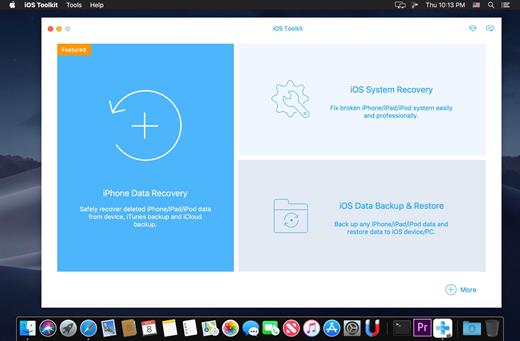
Apeaksoft iPhone Data Recovery 1.2.66

Apeaksoft iPhone Data Recovery can recover lost/deleted Messages, Contacts, Call History, Calendar, Notes, WhatsApp data, Photos, etc. from iPhone/iPad/iPod and from iTunes backup files. It supports all portable iOS devices, including iPhone XS/XS Max/XR/X, iPad Pro, iPad mini 4, iPod touch, etc. And it allows you to preview your lost data before recovery

Key Functions:


  • Recover lost or deleted data directly from iPhone/iPad/iPod iOS Toolkit can recover your lost/deleted data before your device data is overwritten. Recoverable data includes Contacts, Messages, Call history, Calendar, Notes, Reminder, Safari bookmark, Camera Roll, Photo Library, Photo Stream, Message attachments, Voice memos. As for iPhone XS/XS Max/XR/X/SE/6s/6s Plus/6/6 Plus/iPhone 5s/iPhone 5c/iPhone 5/iPhone 4S, iPad 4/2/Air, iPad Air 1/2 and iPod touch 5, it can recover deleted Contacts, Messages, Call history, Calendar, Notes, Reminder and Safari bookmark.
  • Restore data from iTunes backup files and Preview files before recovery. No matter what type your device is, this iOS Toolkit can recover lost/deleted data as long as your device has been backed up with iTunes. So if your data was deleted incautiously or intentionally, you can get them back.
  • iOS System Recovery function. iOS System Recovery function can help you fix your iOS system back to normal in various issues including stuck in recovery mode, DFU mode, white Apple logo, black screen, looping on start, etc. without losing your iPhone/iPad/iPod data.
  • iOS Data Backup & Restore function. iOS Data Backup & Restore function can help you backup your iOS data to computer in one click and can preview and restore backup to any iOS device without any data loss.
What’s New

Version 1.2.66:


  • Release notes were unavailable when this listing was updated.
Compatibility

macOS 10.9 or later


Release Name: Apeaksoft iPhone Data Recovery 1.2.66
Size: 74.9 MB
Links: HOMEPAGE – NFO – Torrent Search

Download: RAPiDGATOR
8 Comments
Mar 6

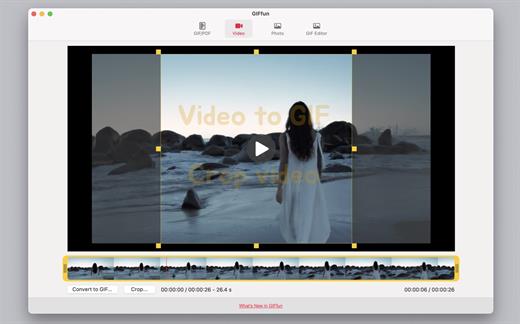
GIFfun – Video,Photos to GIF 10.8.22

GIFfun is a GIF maker that allows you to create animated GIFs from your life photos and videos. It’s the best GIF editor to animate your photos/videos in a few seconds.

Main Features
1. GIF to Video
Convert gif to video.

2. Video to GIF
Convert video to gif.

3. Photos to GIF
Convert multiple pictures to gif.

4. Photos to Video
Convert multiple pictures to video.

5. GIF to JPGs
Export every frame of gif to jpgs.

6. Resize GIF
Change gif dimensions.

7. PDF to GIF
Convert pdf to gif.

8. PDF to JPGs
Export every page of pdf to jpgs.

9. Crop Video
Crop video to short video.

You need to upgrade to the professional version to unlock the following features.
* Crop Video *
* Video to GIF *
* GIF to Video *
* Pictures to Video *

What’s New

Version 10.8.22:


  • Release notes were unavailable when this listing was updated.
Compatibility

macOS 10.10 or later


Release Name: GIFfun – Video,Photos to GIF 10.8.22
Size: 9.4 MB
Links: HOMEPAGE – NFO – Torrent Search

Download: RAPiDGATOR
9 Comments
Mar 6

4K YouTube to MP3 Pro 26.0.6

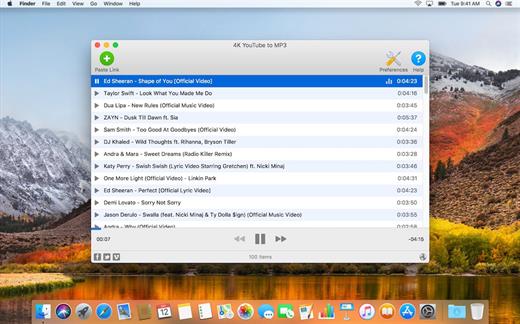
4K YouTube to MP3 was specifically created to extract audio from YouTube, Vimeo or Facebook and save it in MP3, M4A, OGG. No annoying and complicated settings to deal with, just a clean, friendly and functional interface. Downloading is simple and straightforward: just copy the link from your browser and click ‘Paste Url’. Done!

Features


  • Extract audio from YouTube videos and save it in MP3, M4A or OGG in high quality.
  • Download full YouTube playlists or channels and generate m3u files.
  • Transfer downloaded tracks automatically into iTunes and upload them on your iPhone or iPod.
  • Listen music via native built-in music player.
  • Download and extract audio tracks from SoundCloud, Vimeo, Flickr and DailyMotion videos.
  • Download audio books from YouTube.
  • Extract audio tracks even from embedded in HTML page videos.
  • Use 4K YouTube to MP3 on your PC, Mac or Linux, doesn’t matter what OS you prefer.
What’s New

Version 26.0.6:


  • Release notes were unavailable when this listing was updated.
Compatibility

macOS 10.10 or later


Release Name: 4K YouTube to MP3 Pro 26.0.6
Size: 406.4 MB
Links: HOMEPAGE – NFO – Torrent Search

Download: RAPiDGATOR

7 Comments
Mar 6

4K Video Downloader Plus Pro 26.0.6

Easy Downloads Management


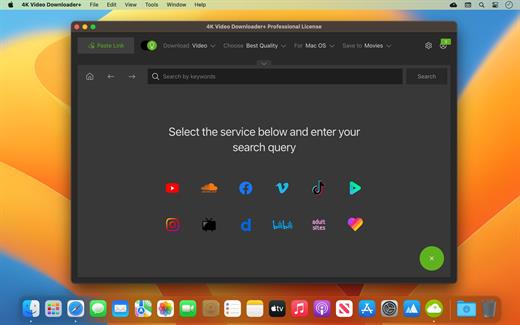
  • Sort and filter downloads by type, name and date. Import and export all files as a single JSON file. Easily track and control the progress of both individual downloads and entire groups of downloading files.

What’s New

Version 26.0.6:


  • Release notes were unavailable when this listing was updated.
Compatibility

macOS 10.13 or later


Release Name: 4K Video Downloader Plus Pro 26.0.6
Size: 435.6 MB
Links: HOMEPAGE – NFO – Torrent Search

Download: RAPiDGATOR
7 Comments