Please REGISTER or RENEW your account on RAPiDGATOR.net and support us by doing through all RAPiDGATOR working download links on main posts...
May 30

Cookie 8.4.10

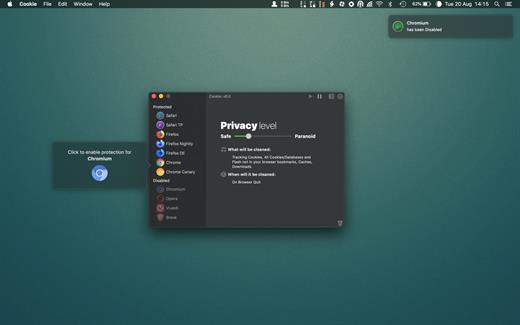
Cookie prevents third parties from hijacking your browsing experience. The sites you visit store “cookies” in your browser without your knowledge or consent. Some are helpful, but others are frustrating and invasive. Cookie can help.
Features:


  • Consolidate all your browser privacy settings
  • Simplified View that takes care of all the technical details for you
  • Advanced View which puts you in total control of all your privacy settings
  • Combined cookie view displaying all cookie/flash/localStorage data in one easy to manage view
  • Cookie’s can be favorited on a per domain, or per cookie basis. You decide
  • Individual Browser settings. It is possible to configure different automatic removal options for each browser. In the case of Chrome/Chromium/Canary/Brave you can even configure settings per user!
  • A number of removal schedules are possible: When quitting Cookie, when a Browser is Quit, on computer login, On computer waking from sleep, on a customizable time schedule, or entirely manually
  • Hotkey support, so you can remove all unwanted data quickly and easily
  • Customizable tracking cookie definitions
  • Whitelist individual tracking cookies
  • Clean, modern and Intuitive User Interface
  • Helpful setup window
  • Browser extension protection
  • Full Screen support
  • iCloud support
  • Dark/Regular theme
What’s New

Version 8.4.10:


  • Release notes were unavailable when this listing was updated.
Compatibility

macOS 10.14 or later, 64-bit processor


Release Name: Cookie 8.4.10
Size: 9.8 MB
Links: HOMEPAGE – NFO – Torrent Search

Download: RAPiDGATOR

6 Comments
May 30

Sticky 2.4

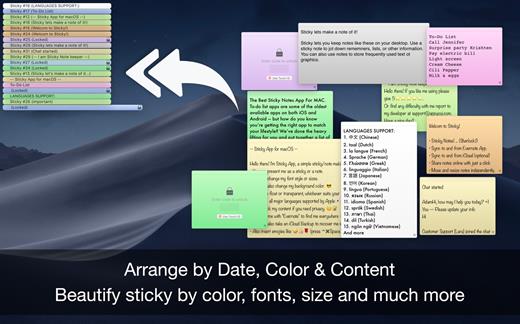
The Sticky Notes app uses your Evernote & iCloud space and to sync notes between Evernote account. It cannot access your private files only those created by itself. Import & Export notes online with one click, with easy & customizable sticky notes in different colors, feel free to move and resize your notes independently.

Supports multiple languages with text to speech recognition and can lock individual sticky notes with touch ID unlock. Sticky Notes use Official Evernote API to sync the sticky notes from and to Evernote account.

■ Sticky notes as always you wanted to be.
■ Sync with Evernote & iCloud across the devices
■ Auto Arrange on desktop.

≈ Welcome to Sticky Notes! ≈

A word about permissions: The Sticky Notes app uses your Evernote and iCloud space to sync notes between Evernote accounts. It cannot access your private files only those created by itself.

Features:

◉ Sticky Notes! (..Sherlock!)
◉ Syncs with Evernote®.
◉ Optional, custom synchronisation via iCloud
◉ Import and export notes online with one click.
◉ Feel free to move and resize your notes independently.
◉ Pin note / Always on top
◉ Choose the colour of your note.
◉ Set the best font for you.
◉ Leisten Text to Speech recognition.
◉ Close the note if you don’t need it at the moment and simply click Sticky Notes icon to open it again and more.

What’s New

Version 2.4:


  • Release notes were unavailable when this listing was updated.
Compatibility

macOS 10.12 or later
Apple Silicon or Intel Core processor


Release Name: Sticky 2.4
Size: 6.9 MB
Links: HOMEPAGE – NFO – Torrent Search

Download: RAPiDGATOR
5 Comments
May 30

WhatCable Pro 0.14.5

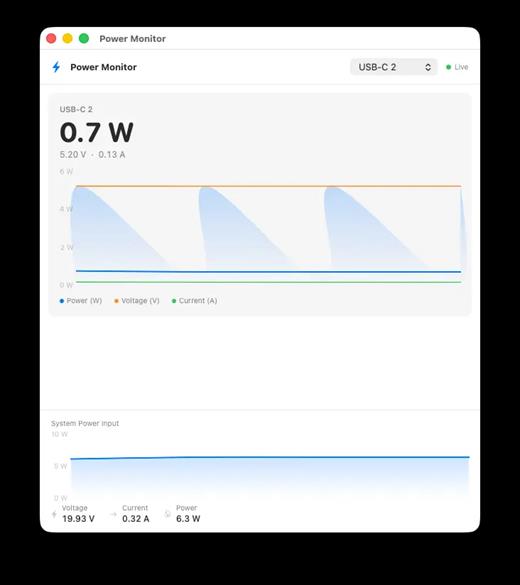
WhatCable Pro is a deep USB-C diagnostics tool designed specifically for Apple Silicon Macs running macOS 14+. While the free version identifies basic cable capabilities, the Pro tier offers advanced, real-time troubleshooting directly from IOKit data—requiring no extra software or root access.

Key Features


  • Negotiation Diagnostics: Easily spot bottlenecks by comparing what your Mac port, cable, and connected device support side-by-side.
  • Live Power Metering: Displays real-time wattage, voltage, and amperage per port, updating every 2 seconds.
  • Hardware & Port Health: Tracks lifetime port errors, resets, and monitors liquid detection (LDCM) sensors.
  • Advanced Insights: Offers Power Delivery (PD) contract inspection, cable resistance estimation, and DisplayPort Alt Mode lane mapping.
  • Developer Friendly: Includes a CLI monitor mode (whatcable –monitor) and desktop widgets for quick tracking.
What’s New

Version 0.14.5:


  • Release notes were unavailable when this listing was updated.
Compatibility

macOS 14.0 or later


Release Name: WhatCable Pro 0.14.5
Size: 7.9 MB
Links: HOMEPAGE – NFO – Torrent Search

Download: RAPiDGATOR

6 Comments
May 30

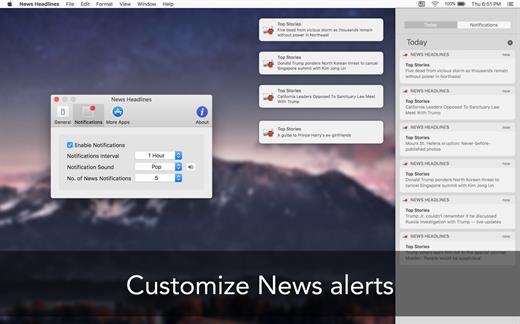
News Headlines: App for Google 4.4

News Headlines keeps you up to date on the latest breaking news from all over the world, right from your menu bar. It gives you a quick glance of news with just one click.

Features


  • Get notified on the latest news without opening the app
  • Choose from different categories of news you want to read
  • Set an auto-refresh interval to refresh the news
  • Support for Retina displays and Dark theme in OS X 10.10 Yosemite
What’s New

Version 4.4:


  • Release notes were unavailable when this listing was updated.
Compatibility

macOS 10.10 or later


Release Name: News Headlines: App for Google 4.4
Size: 10.1 MB
Links: HOMEPAGE – NFO – Torrent Search

Download: RAPiDGATOR
6 Comments
May 29

WhatCable Pro 0.13.4

WhatCable Pro is a deep USB-C diagnostics tool designed specifically for Apple Silicon Macs running macOS 14+. While the free version identifies basic cable capabilities, the Pro tier offers advanced, real-time troubleshooting directly from IOKit data—requiring no extra software or root access.

Key Features


  • Negotiation Diagnostics: Easily spot bottlenecks by comparing what your Mac port, cable, and connected device support side-by-side.
  • Live Power Metering: Displays real-time wattage, voltage, and amperage per port, updating every 2 seconds.
  • Hardware & Port Health: Tracks lifetime port errors, resets, and monitors liquid detection (LDCM) sensors.
  • Advanced Insights: Offers Power Delivery (PD) contract inspection, cable resistance estimation, and DisplayPort Alt Mode lane mapping.
  • Developer Friendly: Includes a CLI monitor mode (whatcable –monitor) and desktop widgets for quick tracking.
What’s New

Version 0.13.4:


  • Release notes were unavailable when this listing was updated.
Compatibility

macOS 14.0 or later


Release Name: WhatCable Pro 0.13.4
Size: 7.7 MB
Links: HOMEPAGE – NFO – Torrent Search

Download: RAPiDGATOR

4 Comments
May 29

Paste 6.5.2

Paste is a new way to copy and paste. It keeps everything you’ve ever copied, and lets you use your clipboard history anytime you need it across all your devices. It recognizes and stores text, images, links, files, and any other type of content, and generates informative previews for easy browsing.

Paste works in the background and tightly integrates into your system and your workflow. An intuitive user interface and improved user experience allows you to focus on your core tasks and not on the application itself.

Features

  • Extends your clipboard history capacity up to unlimited
  • Pinboards and favorite snippets
  • iCloud sync across all your devices running Paste
  • History management, rules and exceptions
  • Intelligent search with flexible filters
  • Select and paste multiple items simultaneously
  • Drag-and-drop multiple items to any application
  • Paste plain or rich text
  • Send clipboard history to other devices via AirDrop or share with your friends

Note:

iCloud not available, It might ask for subscription on the first launch, just ignore and close the window.

xattr -cr /Applications/Paste.app

What’s New

Version 6.5.2:


  • Release notes were unavailable when this listing was updated.
Compatibility

macOS 13.0 or later.


Release Name: Paste 6.5.2
Size: 21.2 MB
Links: HOMEPAGE – NFO – Torrent Search

Download: RAPiDGATOR
4 Comments
May 29

Cookie 8.4.9

Cookie prevents third parties from hijacking your browsing experience. The sites you visit store “cookies” in your browser without your knowledge or consent. Some are helpful, but others are frustrating and invasive. Cookie can help.

Features:


  • Consolidate all your browser privacy settings
  • Simplified View that takes care of all the technical details for you
  • Advanced View which puts you in total control of all your privacy settings
  • Combined cookie view displaying all cookie/flash/localStorage data in one easy to manage view
  • Cookie’s can be favorited on a per domain, or per cookie basis. You decide
  • Individual Browser settings. It is possible to configure different automatic removal options for each browser. In the case of Chrome/Chromium/Canary/Brave you can even configure settings per user!
  • A number of removal schedules are possible: When quitting Cookie, when a Browser is Quit, on computer login, On computer waking from sleep, on a customizable time schedule, or entirely manually
  • Hotkey support, so you can remove all unwanted data quickly and easily
  • Customizable tracking cookie definitions
  • Whitelist individual tracking cookies
  • Clean, modern and Intuitive User Interface
  • Helpful setup window
  • Browser extension protection
  • Full Screen support
  • iCloud support
  • Dark/Regular theme
What’s New

Version 8.4.9:


  • Release notes were unavailable when this listing was updated.
Compatibility

macOS 10.14 or later, 64-bit processor


Release Name: Cookie 8.4.9
Size: 9.8 MB
Links: HOMEPAGE – NFO – Torrent Search

Download: RAPiDGATOR

4 Comments
May 29

Snagit 2026.2.0

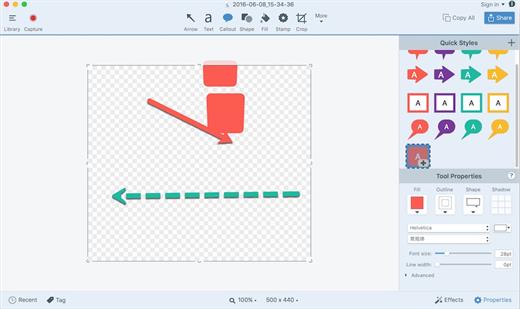
Snagit lets you create an image of what you see on your computer monitor.

Features

Flexible options that let you capture only what you want.

Annotation varieties like arrows, speech bubbles, and more make it easy to customize your capture.

Versatility in what you do with your capture. Send it to your favorite app, share it online, or save it for later.

What’s New

Version 2026.2.0:


  • Release notes were unavailable when this listing was updated.
Compatibility

macOS 10.14 or later
Apple Silicon or Intel Core processor


Release Name: Snagit 2026.2.0
Size: 196.2 MB
Links: HOMEPAGE – NFO – Torrent Search

Download: RAPiDGATOR

5 Comments
May 29

MouseBoost Pro 5.0.2

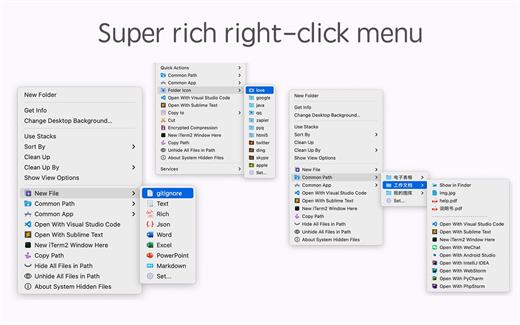
MouseBoost Pro integrates more than 30 kinds of small tools, and the operation way is very simple, as long as you click the right mouse button, you can activate all kinds of functions you want, so that your work efficiency is greatly improved.

You can create any file type you want, open any APP you want, self-sorting, fully customized!

*** Main Features ***
– All menus support custom sorting.
– Quickly create all kinds of commonly used files, and supports custom creation of various file types you want.
– Quickly open your terminal, iTerm2, and go to the directory you want.
– Quickly open VSCode, Sublime Text and Emacs, and customize the various apps you want to open.
– Quickly copy the current path power.
– Complete files deletion is supported.
– Supports files moving, copying and cutting.
– Supports files encrypted compression.
– Quickly open your favorite directory.
– Quickly get file MD5,SHA1,SHA256 and other information.
– Supports hiding and displaying of specified files.
– Supports modify folder icon.

What’s New

Version 5.0.2:


  • Release notes were unavailable when this listing was updated.
Compatibility

macOS 10.11 or later


Release Name: MouseBoost Pro 5.0.2
Size: 20.9 MB
Links: HOMEPAGE – NFO – Torrent Search

Download: RAPiDGATOR

4 Comments
May 29

AltTab Pro 11.1.0

AltTab Pro brings the powerful, intuitive window-switching functionality of Windows to the Mac ecosystem, complete with an elegant look and highly customizable upgrades.

While the core app remains a free and open-source tool providing lightning-fast window switching with high-quality thumbnails, the Pro version elevates the experience for power users with four major upgrades:


  • App Icons & Window Titles Styles: Switch seamlessly between three appearance modes—live window thumbnails, a clean dock-like icon view, or a compact text-only list.
  • Instant Search: Find any window immediately just by typing its title or application name.
  • Auto-Sizing Switcher: Thumbnails automatically scale based on your workspace clutter—expanding when you have fewer windows and shrinking to fit when you have many.
  • Multiple Shortcuts: Configure up to 9 independent keyboard shortcuts, each with custom keys and specific window filters.
What’s New

Version 11.1.0:


  • Release notes were unavailable when this listing was updated.
Compatibility

macOS 13.0 or later


Release Name: AltTab Pro 11.1.0
Size: 9.5 MB
Links: HOMEPAGE – NFO – Torrent Search

Download: RAPiDGATOR
3 Comments