Please REGISTER or RENEW your account on RAPiDGATOR.net and support us by doing through all RAPiDGATOR working download links on main posts...
May 30

Moom 4.5

Moom allows you to move and zoom windows – using either the mouse or the keyboard – to predefined locations and sizes, or to full screen mode.
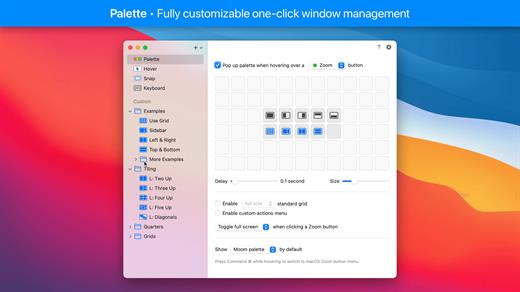
When used via the mouse, all you need to do is hover over a green resize button, and Moom’s interface appears. When used via the keyboard, press your defined shortcut, and the Moom keyboard bezel appears; you can then move windows using the arrow keys and modifier keys.

Moom can be run as a traditional application, a menu bar application, or a completely faceless background application.

What’s New

Version 4.5:


  • Adjusted the settings window and its various controls to macOS 26's new look. This required a lot of small changes that all apply conditionally, depending on which macOS version Moom is running on. (At the risk of editorializing a little: Regardless of how much anyone likes said new look, we think there's value in native apps at least making an honest attempt at being consistent with the system and its bundled apps.)
  • Improved window highlighting on macOS 26. The highlight now matches the highlighted window's radius (which can vary depending on factors such as whether the window has a toolbar), at least for apps that interpret macOS 26's fondness of concentric circles correctly.
  • Fixed a rare issue where tiny windows made Moom crash. (Hat tip to Andreas S.)
  • Improved the settings window's accessibility support.
  • Moom's app icon now supports macOS 26's light, dark, and clear/tinted app icon looks.
  • Adapted to a change in Google Chrome, which affected window matching for layouts.
  • Worked around Cluely's invisible overlay window.(Hat tip to pkubigjoe on Discord.
  • Worked around an issue where weird things happened on macOS 26 when launching Moom by opening a *.moom file.
Compatibility

macOS 10.13 or later
Apple Silicon or Intel Core processor


Release Name: Moom 4.5
Size: 12.5 MB
Links: HOMEPAGE – NFO – Torrent Search

Download: RAPiDGATOR

5 Comments
May 30

Keka 1.6.5

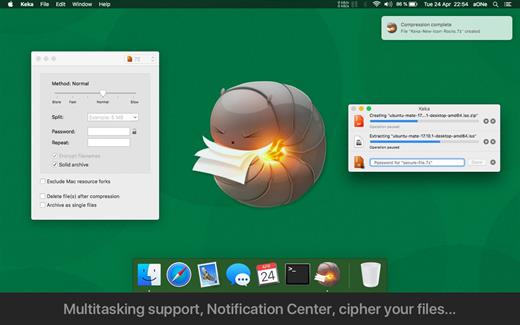
Keka is a file archiver for OS X. It is available for free, but donations are requested to further the project. Similar to making a donation, you can also purchase Keka on the Mac App Store for $1.99 USD.

Supported compression formats:


  • 7z
  • Zip
  • Tar
  • Gzip
  • Bzip2

Supported extraction formats:


  • RAR
  • 7z
  • Lzma
  • Zip
  • Tar
  • Gzip
  • Bzip2
  • ISO
  • EXE
  • CAB,
  • PAX
  • ACE
What’s New

Version 1.6.5:


  • Fixed possible crash when setting as the default uncompressor for macOS 26.4+
Compatibility

macOS 10.10 or later.
Apple Silicon or Intel Core processor


Release Name: Keka 1.6.5
Size: 35.7 MB
Links: HOMEPAGE – NFO – Torrent Search

Download: RAPiDGATOR
6 Comments
May 30

Camtasia 2026.1.2

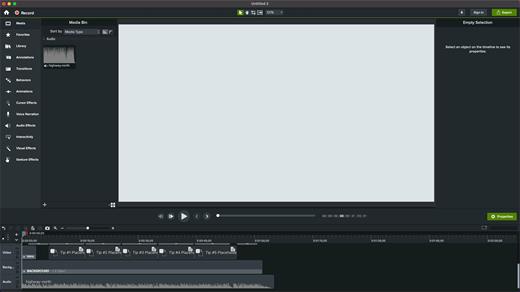
Camtasia for remarkable screencasts made easy. Create eye-catching training, presentation, and demo videos…the easy way. Camtasia screen-recording software is streamlined, intuitive, and makes you look like a pro.

Easily record onscreen activity, Keynote slides, camera video, microphone, or system audio – all with sparkling clarity. Record in front of a live audience or at your desk. Edit to perfection. Turn it into a stunning, HD-quality video at the perfect size to share on popular video sites, Apple devices, your website, blog, or anywhere you like. Make them wonder how you did it.

What’s New

Version 2026.1.2:


  • Release notes were unavailable when this listing was updated.
Compatibility

macOS 13.0 or later
Apple Silicon or Intel Core processor


Release Name: Camtasia 2026.1.2
Size: 413.9 MB
Links: HOMEPAGE – NFO – Torrent Search

Download: RAPiDGATOR

7 Comments
May 30

Shottr 1.9.1

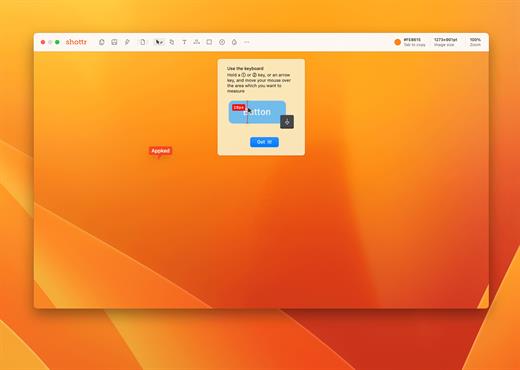
Shottr is a small, fast screenshot app that helps designers and UI developers to explore their pixels.

Scrolling Screenshots on Mac

Take a screenshot of a long web page or capture conversation in a chat. Shottr is probably the only free Scrolling Screenshot app for Mac.

Pixelate or remove objects

Hide parts of your screen behind pixelated curtain, or remove sensitive information as if it was never there.

Markup screenshots

Add text annotations to your screenshots, draw lines, arrows, and simple shapes.

Use it as a Screen Ruler

Press ↑ or ↓ key and move your mouse to measure vertical size, ← or → for horizontal size. Click to imprint the measurement on the screenshot.

Unclutter your desktop

Select a dedicated folder to save screenshots on ⌘ S. Great for purchase receipts, reminders, archive items, random images, etc.

Zoom in on your pixels

Think of Shottr as your digital magnifying glass. If you need to have a closer look at something, take a screenshot and zoom in.

Text recognition (OCR)

Came by a text that won’t select? Press a hotkey and select an area – Shottr will parse the text and copy it to the clipboard.

Proven performance

Shottr is a tiny (1.2mb) native app optimized for M1. It takes only 17ms to grab a screenshot, and ~165ms to show it to you. You can take a screenshot, press Cmd+S and save it before the default macOS preview box would even show up.

Color picker

Take a screenshot, zoom in, move your mouse over the pixel and press the TAB key to copy color under the cursor.

Note:  restart if it’s not activated on the first launch

What’s New

Version 1.9.1:


  • Release notes were unavailable when this listing was updated.
Compatibility

macOS 10.15 or later
Apple Silicon or Intel Core processor


Release Name: Shottr 1.9.1
Size: 2.4 MB
Links: HOMEPAGE – NFO – Torrent Search

Download: RAPiDGATOR
7 Comments
May 30

getIRC – Best IRC Client 1.7

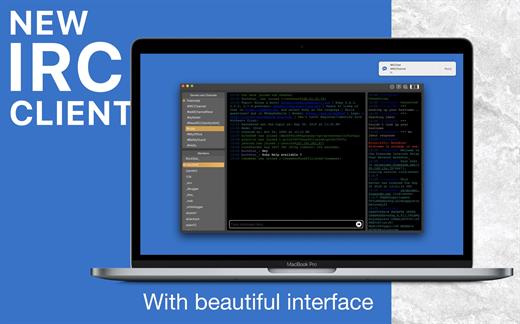
Internet Relay Chat (IRC) chatrooms on macOS:


  • Featured IRC Client
  • Powerful
  • Beautiful interface

IRC provides a way of communicating in real-time with people from all over the world. It consists of various separate networks (or “nets”) of IRC servers, machines that allow users to connect to IRC.

Features:

  • One window for multiple servers
  • Modern and beautiful user interface
  • Multi-channel search and selection
  • Auto-Completion for nicknames, commands, and channels
  • Rich keyboard shortcuts for your comfortable operations
  • Powerful yet simple IRC Client ever for the power user.
  • The Custom server adding/removing option
  • Dark/light mode support
  • Text resize.
  • And much more.
What’s New

Version 1.7:


  • Release notes were unavailable when this listing was updated.
Compatibility

macOS v10.10 or later
Apple Silicon or Intel Core processor


Release Name: getIRC – Best IRC Client 1.7
Size: 11.7 MB
Links: HOMEPAGE – NFO – Torrent Search

Download: RAPiDGATOR

6 Comments
May 30

TransData – Internet Data Speed 3.4

TransData is the perfect solution to control and supervise your network usage.

≈ Features: ≈

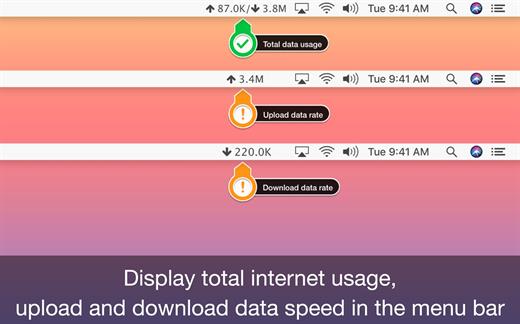
◉ Shows network data transfer rate in Kbps/Mbps with up/down speed on your menu bar.
◉ Display the total data used by Mac from the start of the session.
◉ Monitor and reset Internet data usage.
◉ Displays connected WiFi network in the menu.
◉ A Beautiful widget or graph that shows upload & download internet speed per second.
◉ Display refresh rate can be set in preferences.
◉ Internet data can be displayed in two formats either KB/s(Bytes) or kb/s(bits).
◉ Dark/Light mode for all macOS versions.

TransData works with MacBook Air(M1), MacBook Pro(M1), iMac, MacBook, MacPro, Mac Mini.

≈ Basics: ≈

◎ Up/Down Speed: Upload/Download internet transfer rate per second (Kbps/Mbps)
◎ Up/Down Data: Total Upload & Download internet date used over a period of time.
◎ Micro View: Floating widget on the desktop with Up/Down internet data transfer rate.
◎ Macro View: Graph which shows internet data transfer rate in detail.

≈ Menubar Preferences: ≈

◎ Total Internet data used: Display total of data sent and received.
◎ Upload speed: Display only upload internet speed.
◎ Download Speed: Display only download internet speed.
◎ Up & Down Speed: Show both upload and download speed.
◎ Active Speed: Shows upload or download, whichever is highest.

What’s New

Version 3.4:


  • Release notes were unavailable when this listing was updated.
Compatibility

macOS 10.10 or later


Release Name: TransData – Internet Data Speed 3.4
Size: 6.1 MB
Links: HOMEPAGE – NFO – Torrent Search

Download: RAPiDGATOR
6 Comments
May 30

BrewStation 2.0.4

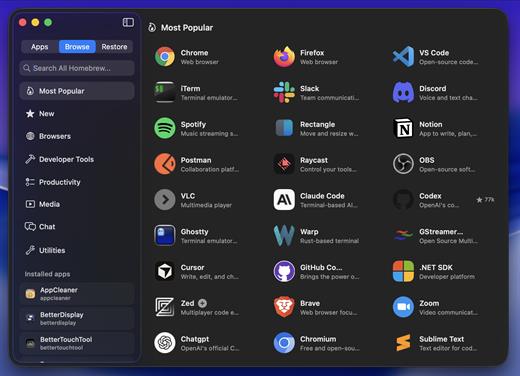
Skip the terminal and get all the benefits of using Homebrew with full app and formulae management with a simple to use GUI application. Manage and view all your Homebrew apps in one place. Search all of Homebrew directly in the app. Homebrewing made simple!

Uscases:

Can be used as a Homebrew viewer and manager.
Can be used as a App restore tool that backs up and saves app states (full snapshot) to be viewed and managed with the built-in snapshot library.
Can be used as a New Mac setup tool, save app snapshots from one Mac and install and restore them (Fully!) with one click on another Mac.

Homebrew:

brew tap hreinssondev/brewstation

brew install –cask hreinssondev/brewstation/brewstation

What’s New

Version 2.0.4:


  • Release notes were unavailable when this listing was updated.
Compatibility

macOS 13 or later


Release Name: BrewStation 2.0.4
Size: 8.4 MB
Links: HOMEPAGE – NFO – Torrent Search

Download: RAPiDGATOR

7 Comments
May 30

WiFi Signal Strength Explorer 2.8

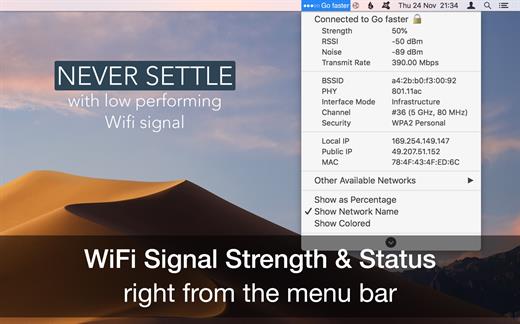
WiFi Wireless Signal Strength Explorer (was WiFi Signal Strength Status) allows you to see wireless signal strength right on the menu bar. See the status of your wifi signal strength right from the menu bar. This utility adds network name, signal strength with “neat icon”, “percentage” on the menu bar. It also which lets you know the strength of the signal and other stats like your IP address, mac address, other available networks, open or secured, channels, BSSID, RSSI, noise, transmit rate, PHY, interface mode, security type, etc. So, never settle for low performing wireless signals with Wi-Fi status app.

Features


  • See the strength, IP address, and speed of the connected network via wireless signal
  • Get the public and local IP address of your computer
  • Connected wireless network name(optional)
  • Get strength of other available networks
  • Join any available network with higher signal strength
  • Get complete details of other detected network with channel detials
  • Retina display-enabled values
  • Copy IP / MAC address from the menu
  • Set refresh rate of signal strength value
  • Transmit rate of connected Wi-Fi network
  • See your local and public IP addresses
What’s New

Version 2.8:


  • Release notes were unavailable when this listing was updated.
Compatibility

macOS 10.10 or later


Release Name: WiFi Signal Strength Explorer 2.8
Size: 6.5 MB
Links: HOMEPAGE – NFO – Torrent Search

Download: RAPiDGATOR
6 Comments
May 30

Radiccio 1.4.1

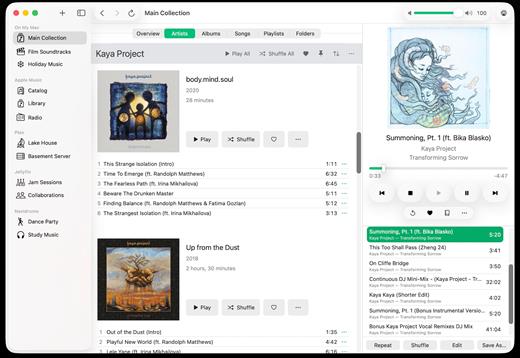
Radiccio is a beautifully crafted Mac music player that unifies your entire library in one place. Play local files, Apple Music, Navidrome, Plex, Jellyfin, and more, with thoughtful features like pinned albums, favorites, auto-skip, and a personal Journal for logging your feelings about songs over time.

What’s New

Version 1.4.1:


  • Release notes were unavailable when this listing was updated.
Compatibility

macOS 15.0 or later.


Release Name: Radiccio 1.4.1
Size: 19 MB
Links: HOMEPAGE – NFO – Torrent Search

Download: RAPiDGATOR

5 Comments
May 30

EzyCal: Time & Date 2.5

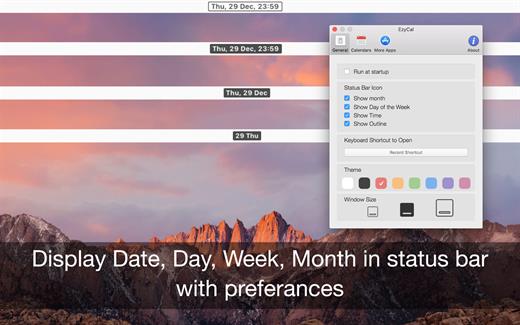
EzyCal is the status bar calendar for the new year 2017, you should have it to be productive then previous to achieve bigger goals. It is a system of organising days for social, religious, commercial or administrative purposes. It is gregorian calendar with natural language event and reminder creation, beautiful calendar views, and reminders app you’ll ever use.

Features


  • Add events, reminders, todo list
  • Count down to keep you on track
  • Sync with system calendar events
  • Different colours themes
  • Different sizes for various screen sizes
  • Customise keyboard shortcuts as needed
  • Sync with all available calendars on your pc
  • Get list of events in single display for next 7 days
  • Simple User interface to interact with calendar
What’s New

Version 2.5:


  • Release notes were unavailable when this listing was updated.
Compatibility

macOS 10.10 or later


Release Name: EzyCal: Time & Date 2.5
Size: 6.8 MB
Links: HOMEPAGE – NFO – Torrent Search

Download: RAPiDGATOR
5 Comments